Didi Chuxing
In China, you don't hail a cab —you tap a screen. Whether it's a 6 AM airport run in Shanghai, a late-night exit from a Chengdu night market, or a cross-town commute in peak-hour Beijing, the answer is always the same app. Knowing how to use Didi in China is as essential as having a passport. Didi Chuxing (滴滴出行) is the platform that took over after Uber exited the mainland in 2016. It's China's dominant ride-hailing platform: operating across 400+ cities, serving over 600 million registered users, and covering everything from budget express rides to luxury airport transfers — all with a full English interface, foreign card support, and real-time driver chat translation built in. For international travelers in 2026, it's not just convenient; in most Chinese cities, it is simply the fastest, safest, and most reliable way to move.
How to Download and Set Up Didi
Setting up Didi takes about 10 minutes and is entirely doable before you board your flight — no Chinese phone number, no local SIM, no Chinese bank account required. Follow these three steps and you'll be ready to ride from the moment you land in 2026.
Step 1: Download the Correct Didi App
-
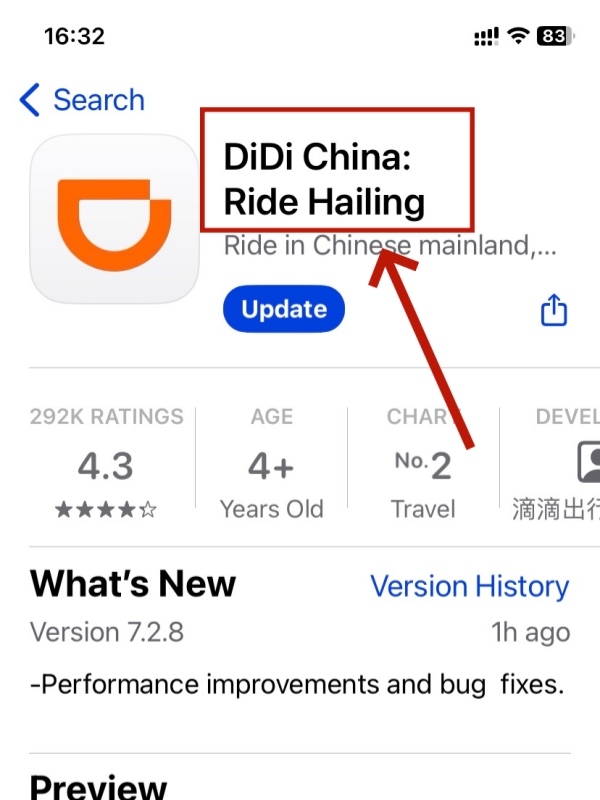

- Choose DiDi: Ride Hailing in China
-
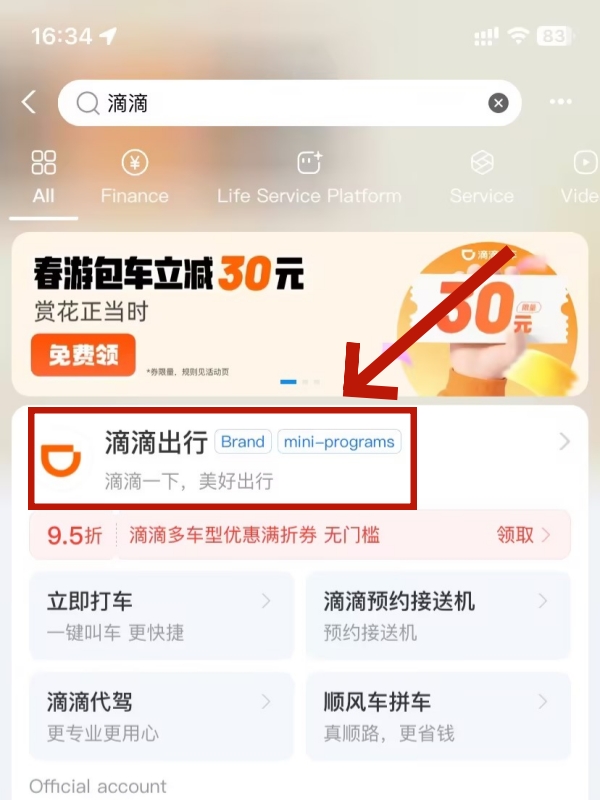
- Didi mini program in Alipay
⚠️ Important: There are two different Didi apps in the store. Search for "DiDi: Ride Hailing in China" — this is the mainland China version. Do NOT download "DiDi Rider," which operates outside China and will show zero available drivers once you're in Beijing or Shanghai.
On iOS, the app is available worldwide via the App Store. On Android outside China, use Google Play. If you're already in China on an Android device without Google Play access, download the APK directly from DiDi's official website (didiglobal.com) or ask your hotel front desk to help.
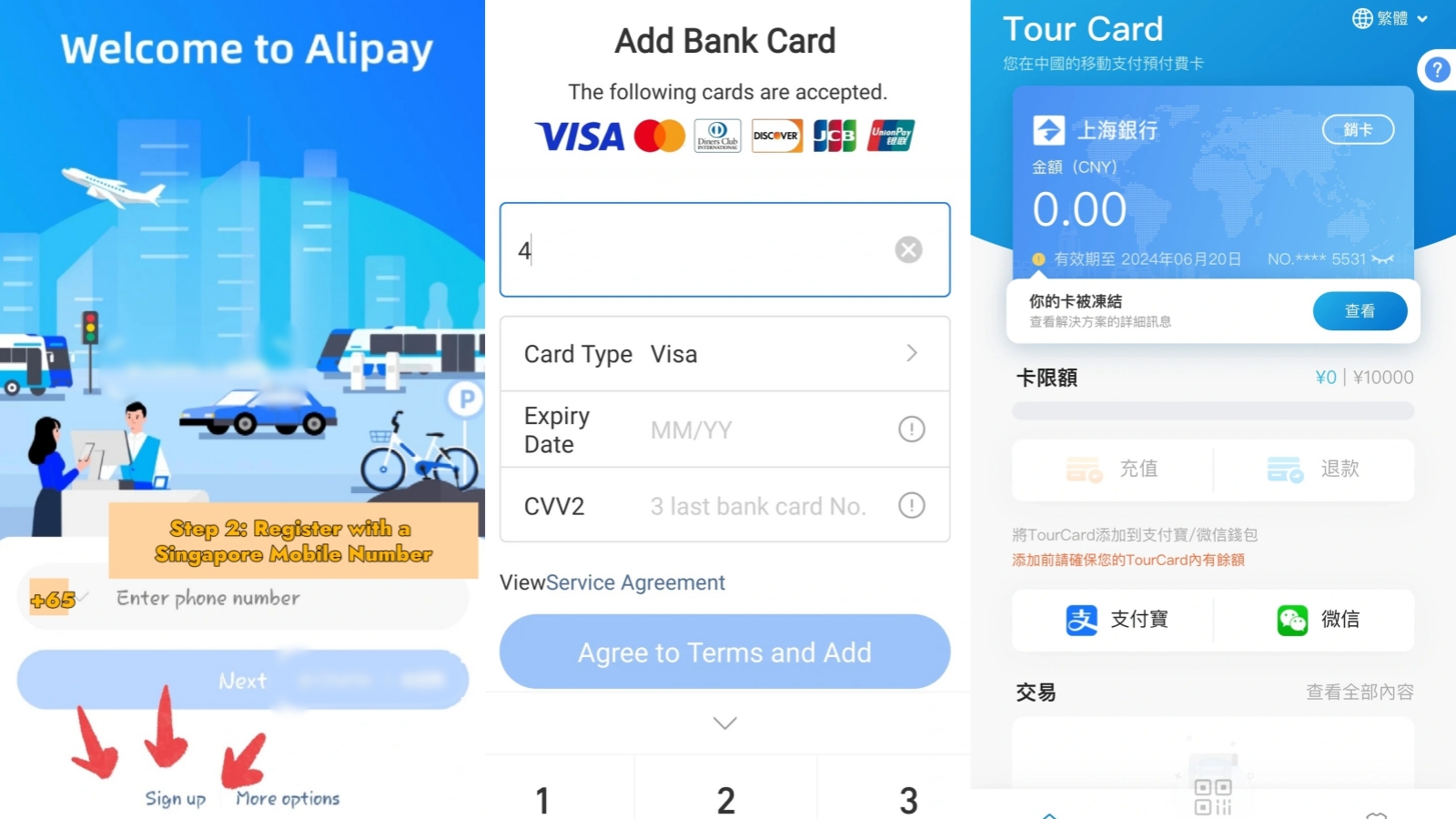
Alternatively, if you'd rather not download another app, the Didi WeChat Mini Program and Didi Alipay Mini Program offer the same booking experience inside apps you may already have — a solid backup that requires no extra storage.
📲 WeChat Mini Programs for Foreigners in China
Prefer not to download Didi separately? The Didi Mini Program inside WeChat gives you the same ride-booking experience without a separate app. Here's how Mini Programs work for foreign travelers.
Step 2: Register Without a Chinese Phone Number
-
![Open the app and tap [Account]](https://img.travelofchina.com/2026/03/16/08/1773651195_mh1fbjey.jpg)
![Open the app and tap [Account]](data:image/svg+xml,%3Csvg%20xmlns=%22http://www.w3.org/2000/svg%22%20viewBox=%220%200%20828%201792%22%3E%3C/svg%3E)
- Open the app and tap [Account]
-
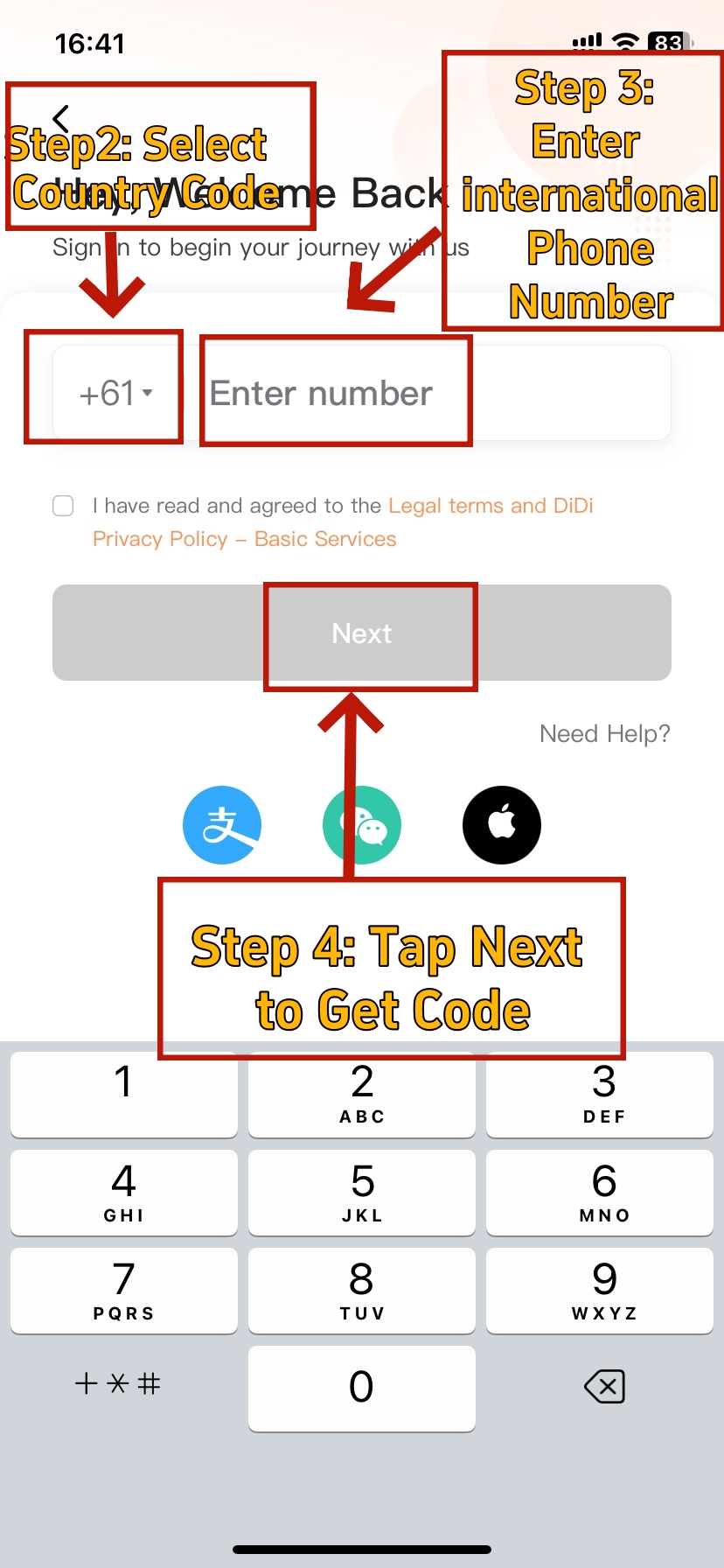
- Sign Up and Get Code
-
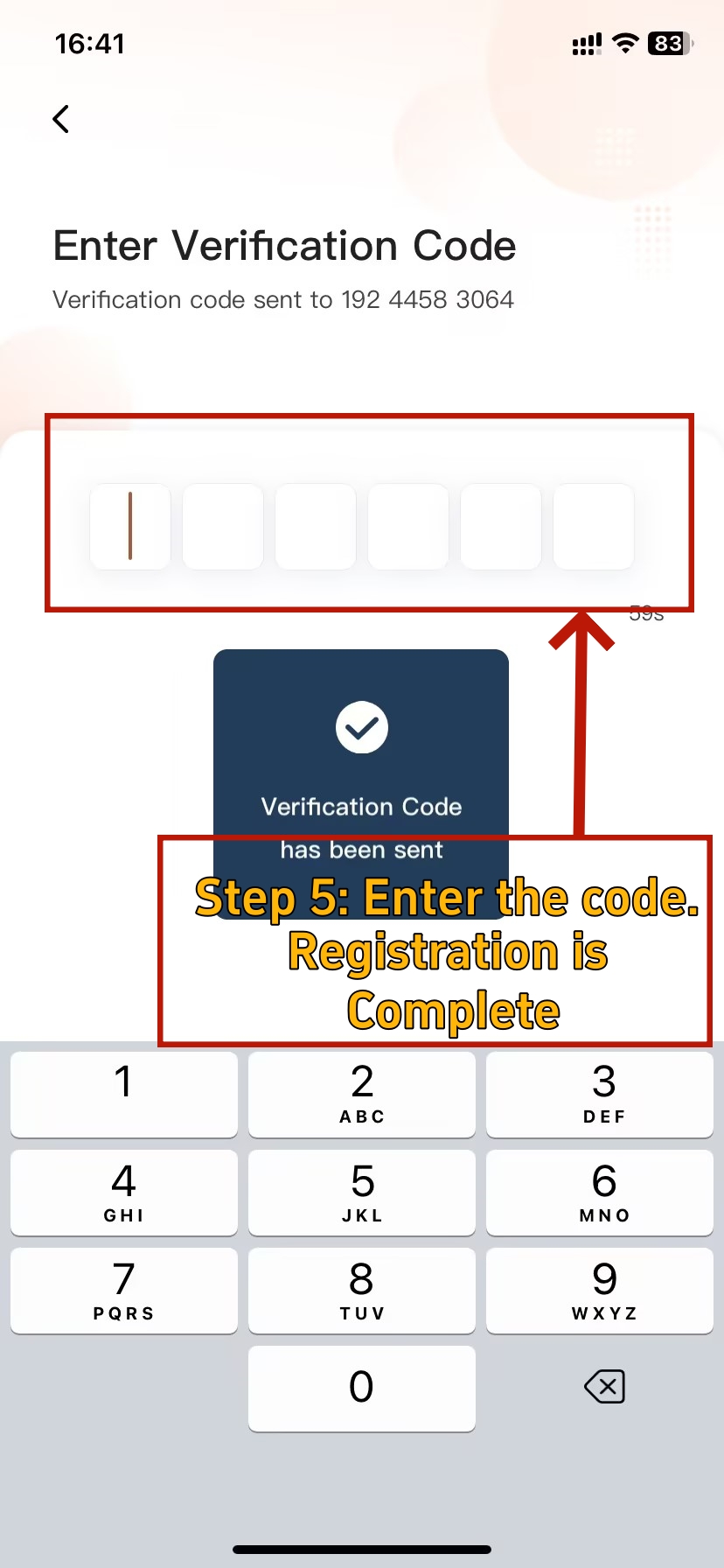
- Finish the Registration
This is the step most guides get wrong: you do NOT need a Chinese (+86) mobile number to register and use Didi. Any international mobile number that can receive SMS verification codes works — US, UK, European, Australian, or most Southeast Asian numbers included.
Registration process:
- Open the app and tap [Account] in the bottom-right corner to reach the login screen.
- Tap "Sign Up," select your country code from the dropdown, and enter your international phone number.
- Tap "Get Code" — a 4 or 6-digit SMS verification code will be sent to your number. Make sure international roaming is enabled or you have a data connection.
- Enter the code. Registration is complete, and your account is immediately active.
💡 Tip: If the SMS code doesn't arrive (common when roaming inside China), try switching to Wi-Fi calling, or log in via the WeChat Mini Program instead — it authenticates directly through your WeChat account and skips the SMS step entirely.
Once inside the app, go to Settings → Language and switch the interface to English. All core functions — booking, tracking, and driver chat — are fully available in English.
📱 Best SIM Card Options for China Travel (2026)
A working mobile connection is essential for receiving Didi's SMS verification code and staying connected on the road. This guide compares the best SIM and eSIM options for foreign travelers in China.
Step 3: Bind Your Payment Method
![Tap [Account]](https://img.travelofchina.com/2026/03/16/09/1773653546_ojp5cm6f.jpg)
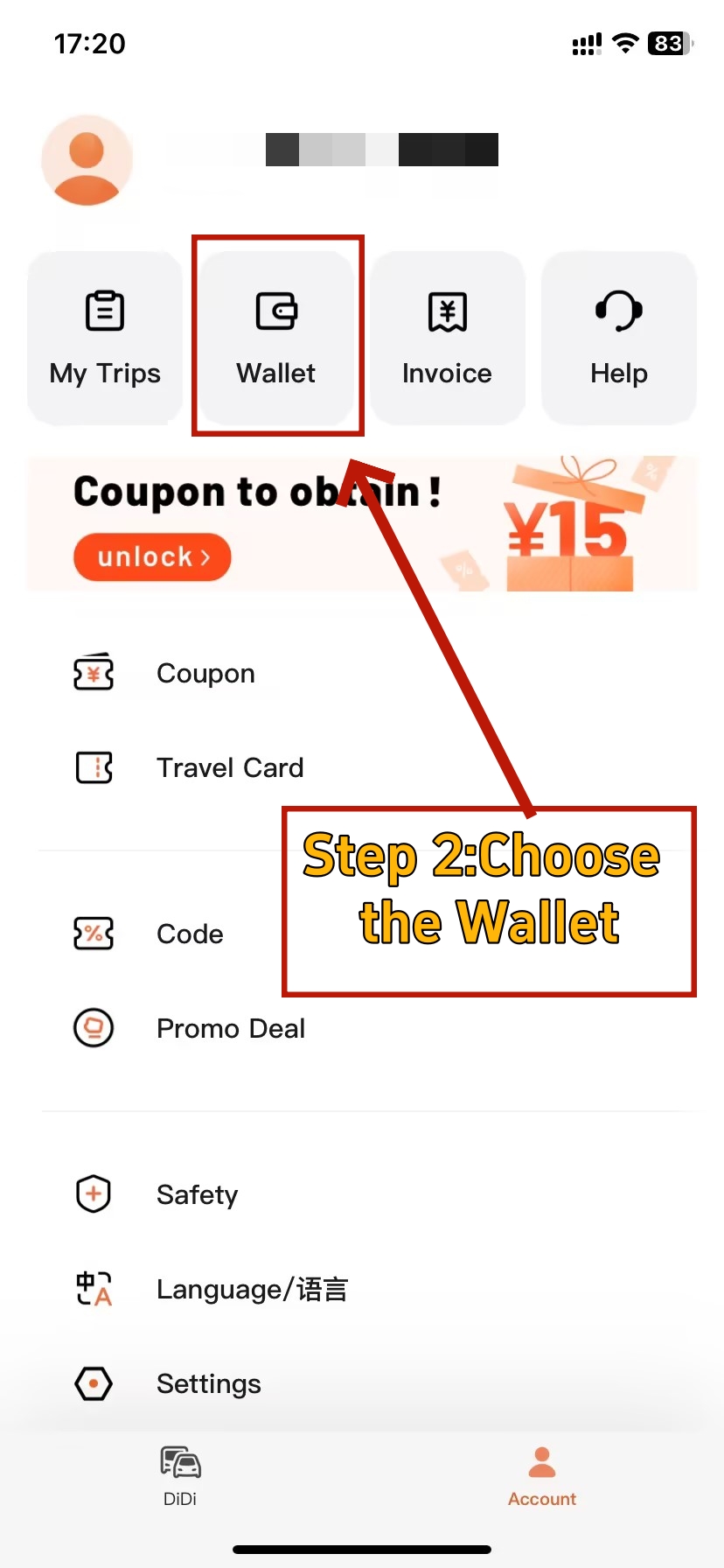
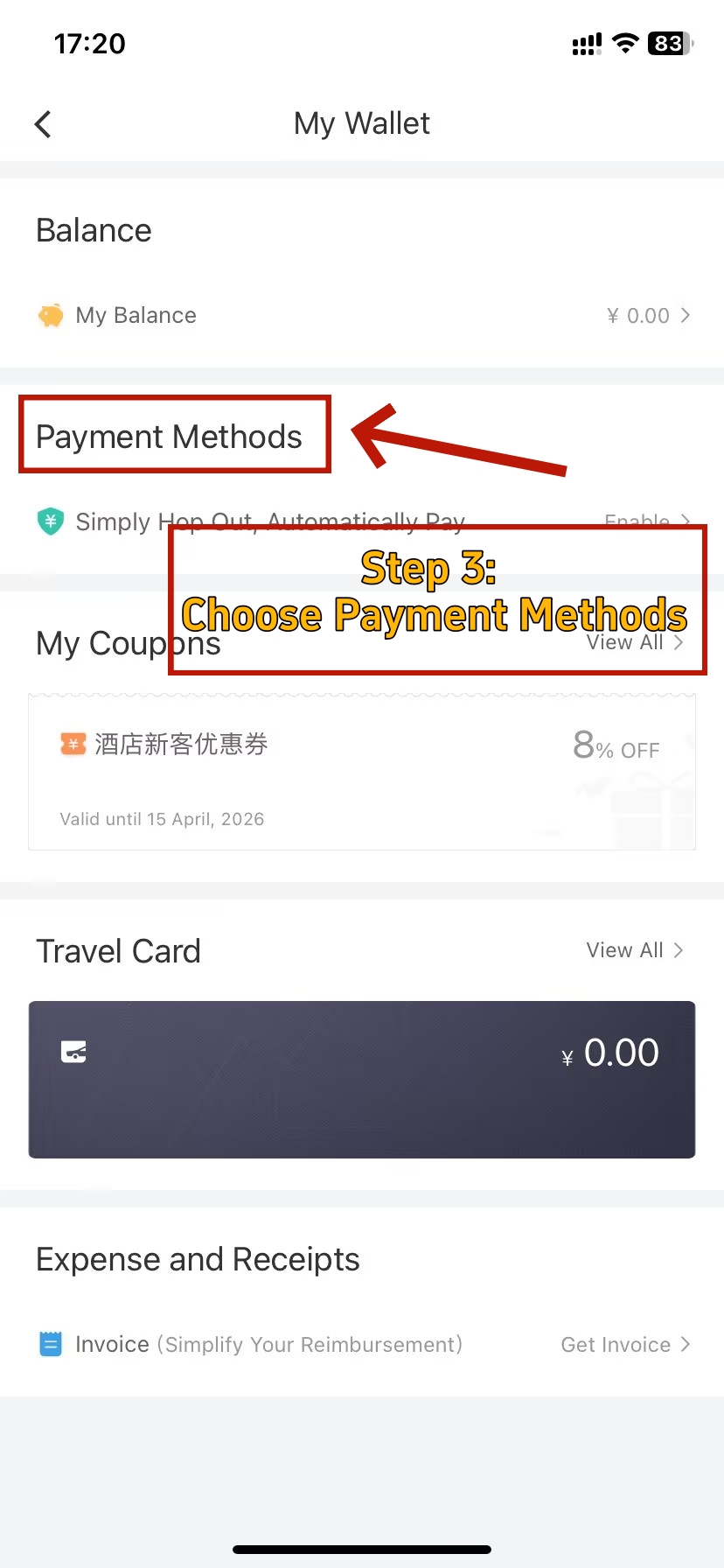
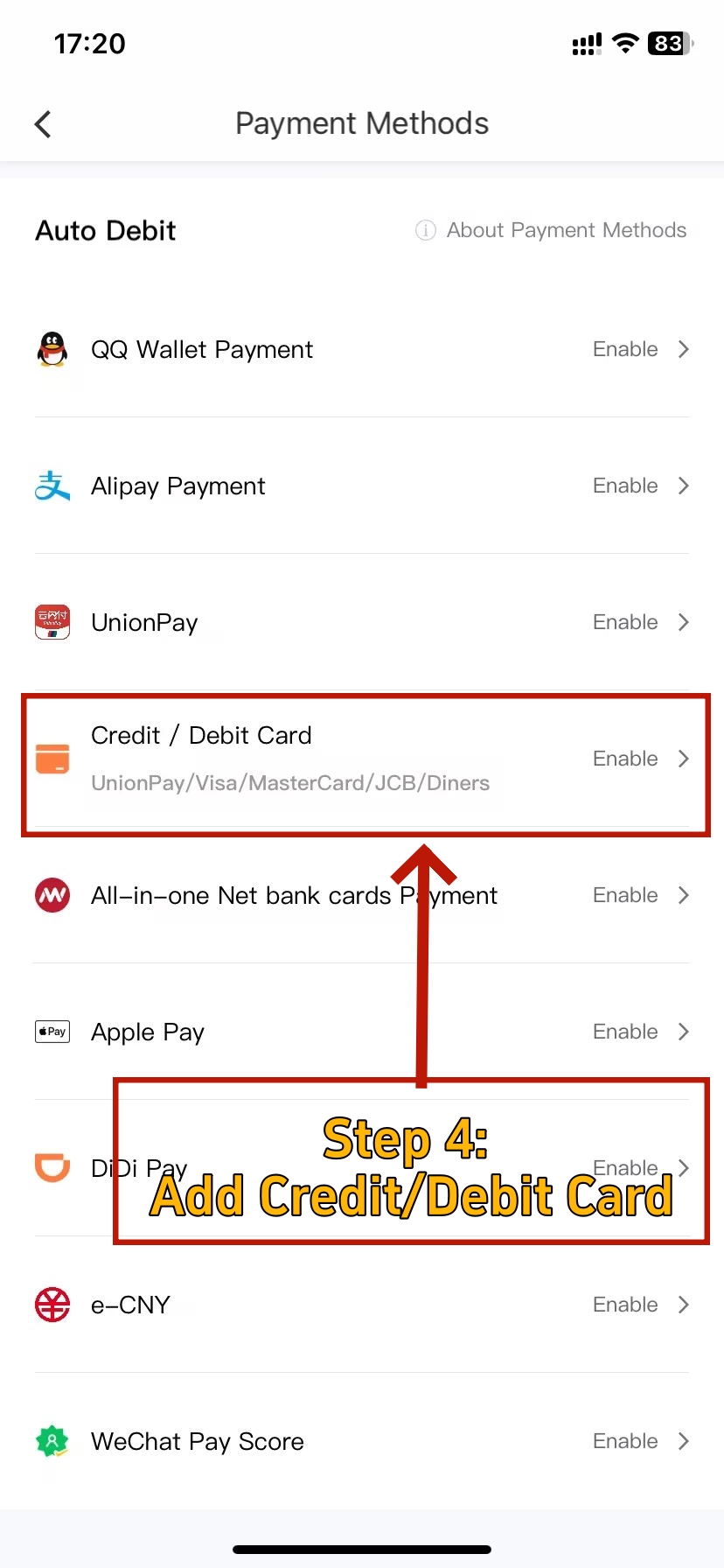
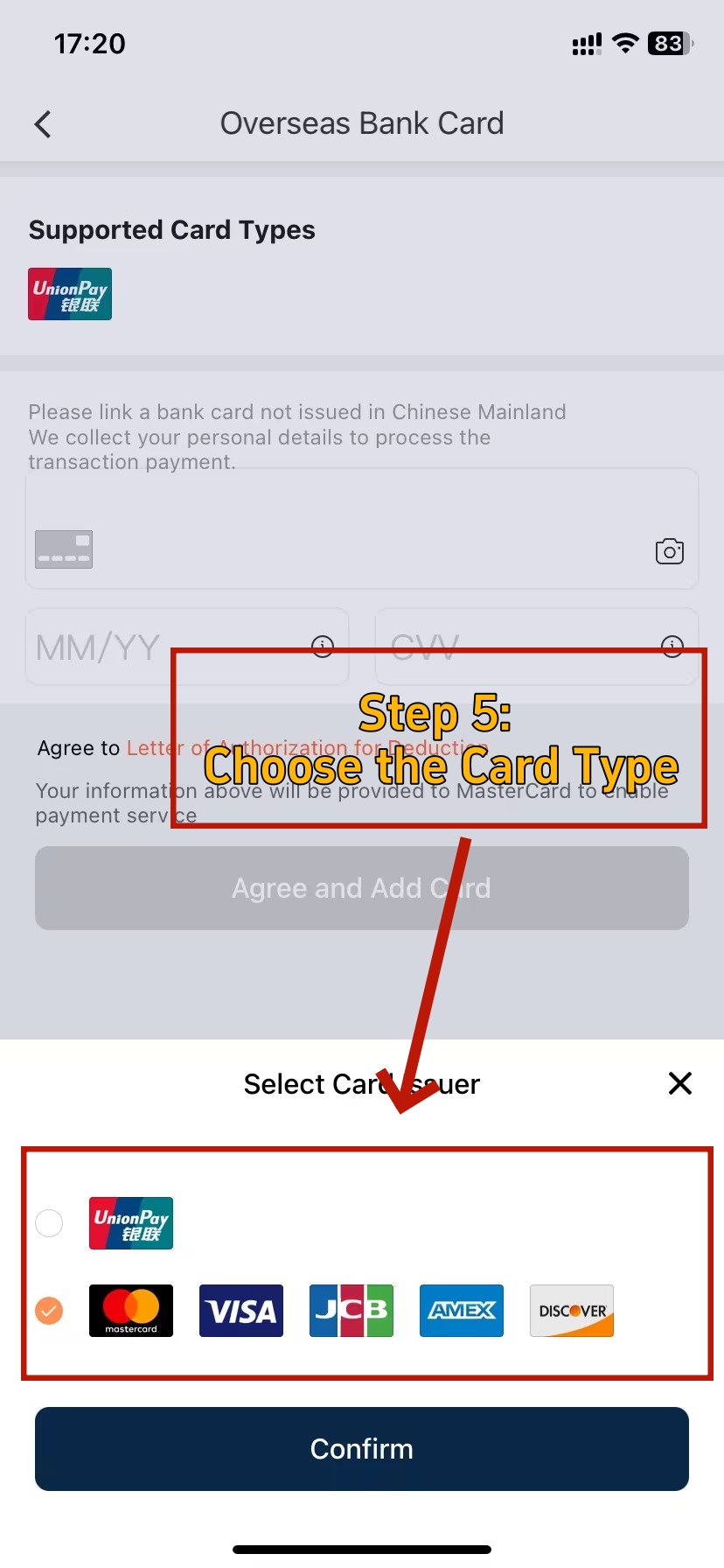
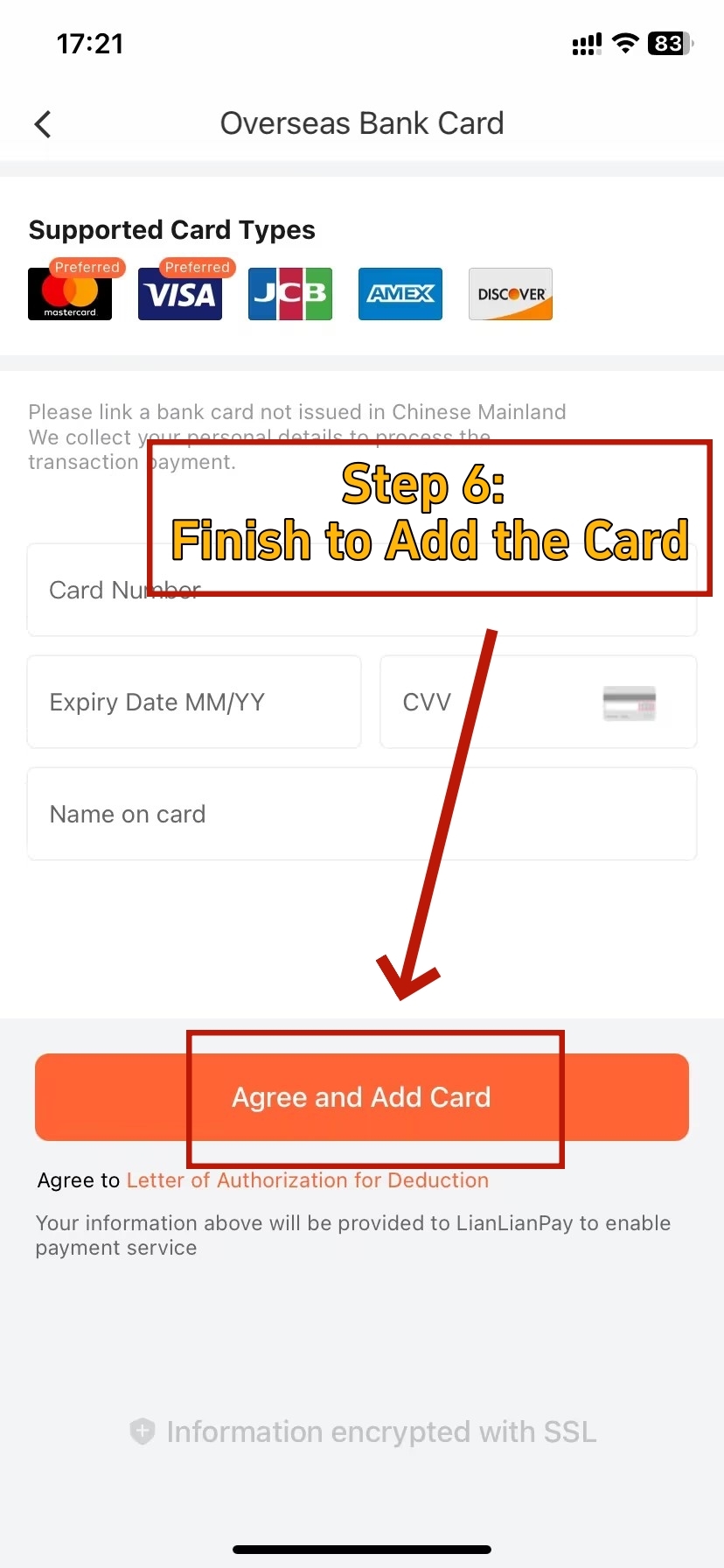
Didi in mainland China runs almost entirely cashless — only traditional taxis currently accept cash, and even then it's unreliable. Setting up payment before your first ride is essential.
To add a method: tap [Account] → [Wallet] → [Payment Methods] → [Add Payment Method].
Option A — Direct Card (Visa / Mastercard / JCB / Diners Club):
- Tap "Add Credit/Debit Card" in Wallet.
- Enter your card number, expiry date, CVV, and billing name exactly as printed on your card.
- Your bank may send a one-time verification code — keep your phone ready.
- Once saved, set this card as your default payment method.
💡 Tip: Before your trip, notify your bank that you'll be making international transactions in China. Many banks auto-block overseas charges as suspected fraud. A quick call or in-app notification prevents your card from being declined on your very first ride.
Option B — The Bridge Method (Recommended for Reliability):
If your card is repeatedly declined in Didi — a common issue with some US and European cards — use what experienced travelers call the "Bridge Method": link your international Visa or Mastercard to Alipay or WeChat Pay first, then select that digital wallet as your Didi payment source. The success rate is significantly higher because both wallets are fully integrated with Didi's payment infrastructure.
- Link your foreign card to Alipay or WeChat Pay (see guide below)
- In Didi: Wallet → Add Payment Method → select Alipay or WeChat Pay
- All ride charges route through the wallet, which pulls from your card
Option C — Alipay Tour Pass (best backup):
Alipay's dedicated prepaid card for foreign visitors lets you top up in foreign currency and spend in RMB. Accepted in Didi and across most of China with no card-decline issues.
For maximum convenience, enable password-free automatic payment: fares are deducted automatically when your trip ends, capped at ¥500 per transaction — just step out and walk away.
💳 Alipay for Foreigners in China: Step-by-Step Setup Guide
No Chinese bank account needed. This guide walks through linking your international Visa or Mastercard to Alipay — the most reliable payment path for Didi rides in 2026.
🏎️ Take the Wheel Yourself: Tired of deciphering app maps or waiting for a taxi stuck three kilometers away? Stop relying on the algorithm and put the "right of way" back in your own hands. Whether you need a temporary permit for a road trip or a long-term solution, check our guide on How to Get a Driver’s License in China (2026) to master the road on your own terms.
How to Book Your First Didi Ride
-
- Enter the Destination
-
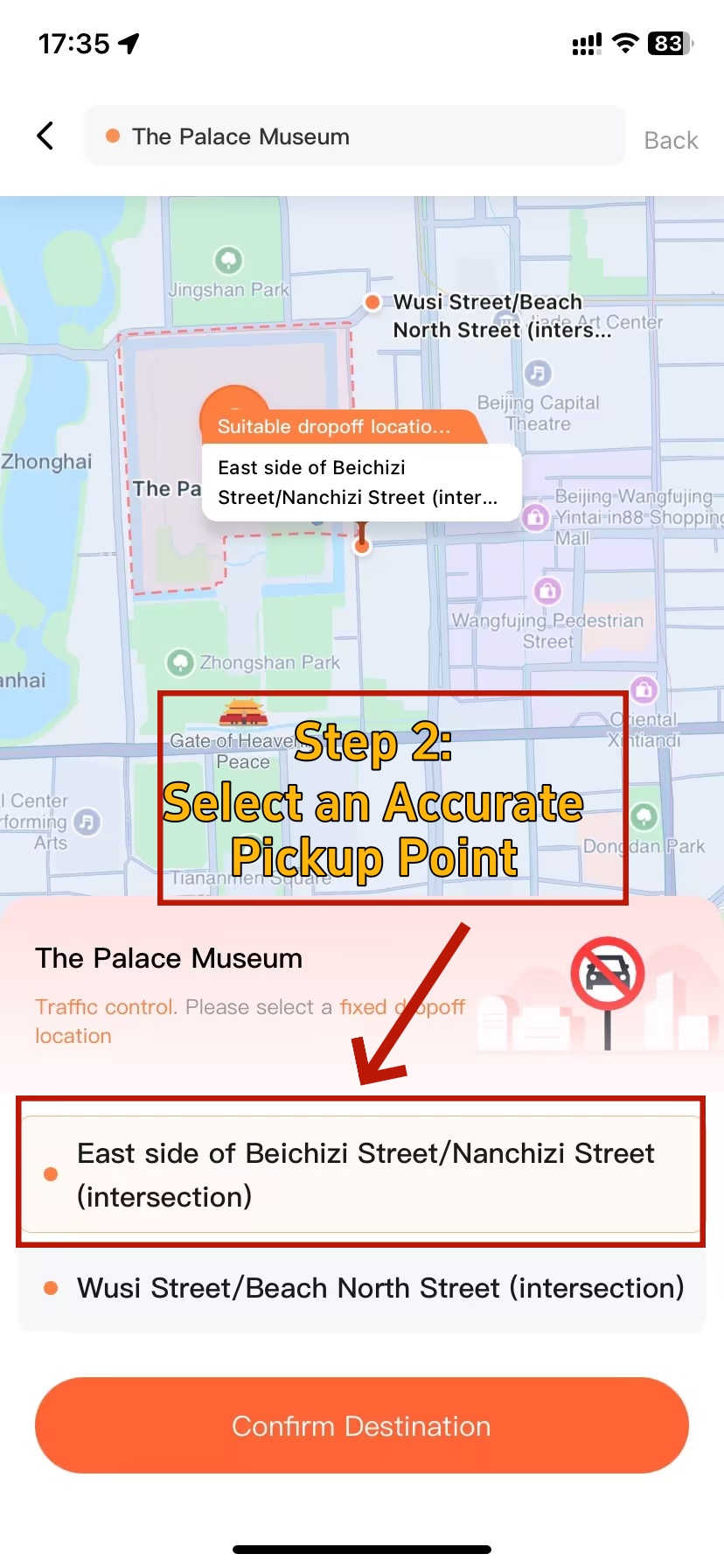
- Confirm Destination
-
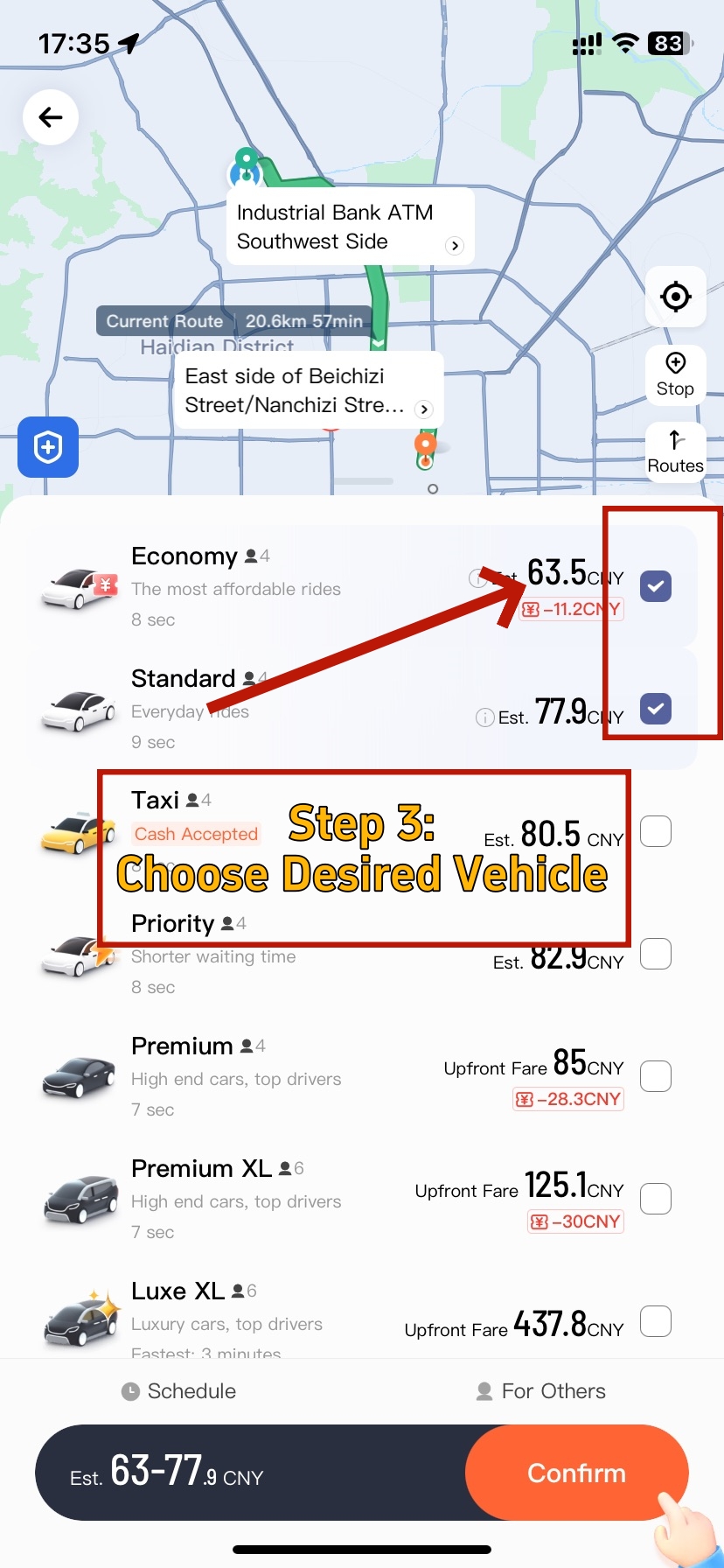
- Select Preferred Car Type
-
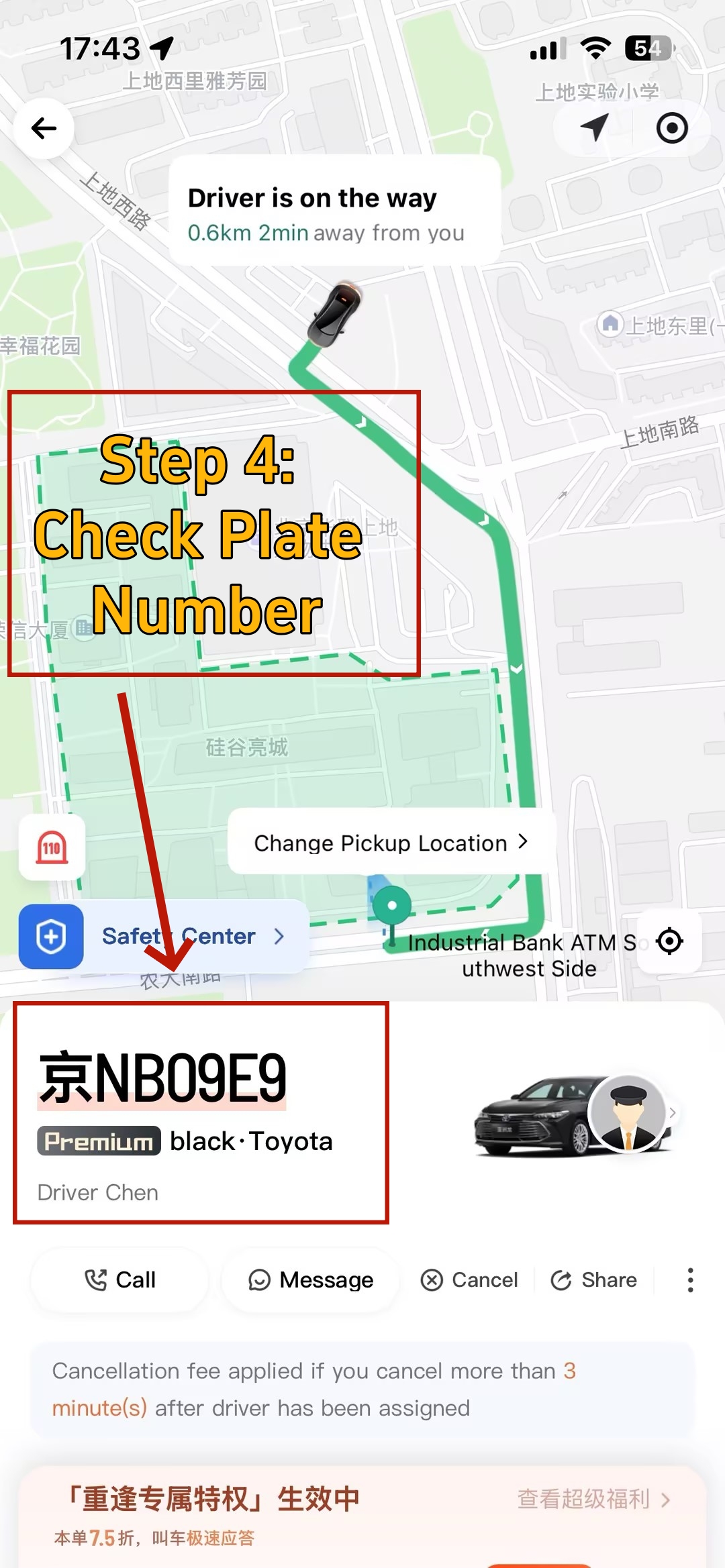

- Confirm Plate
Entering Your Destination
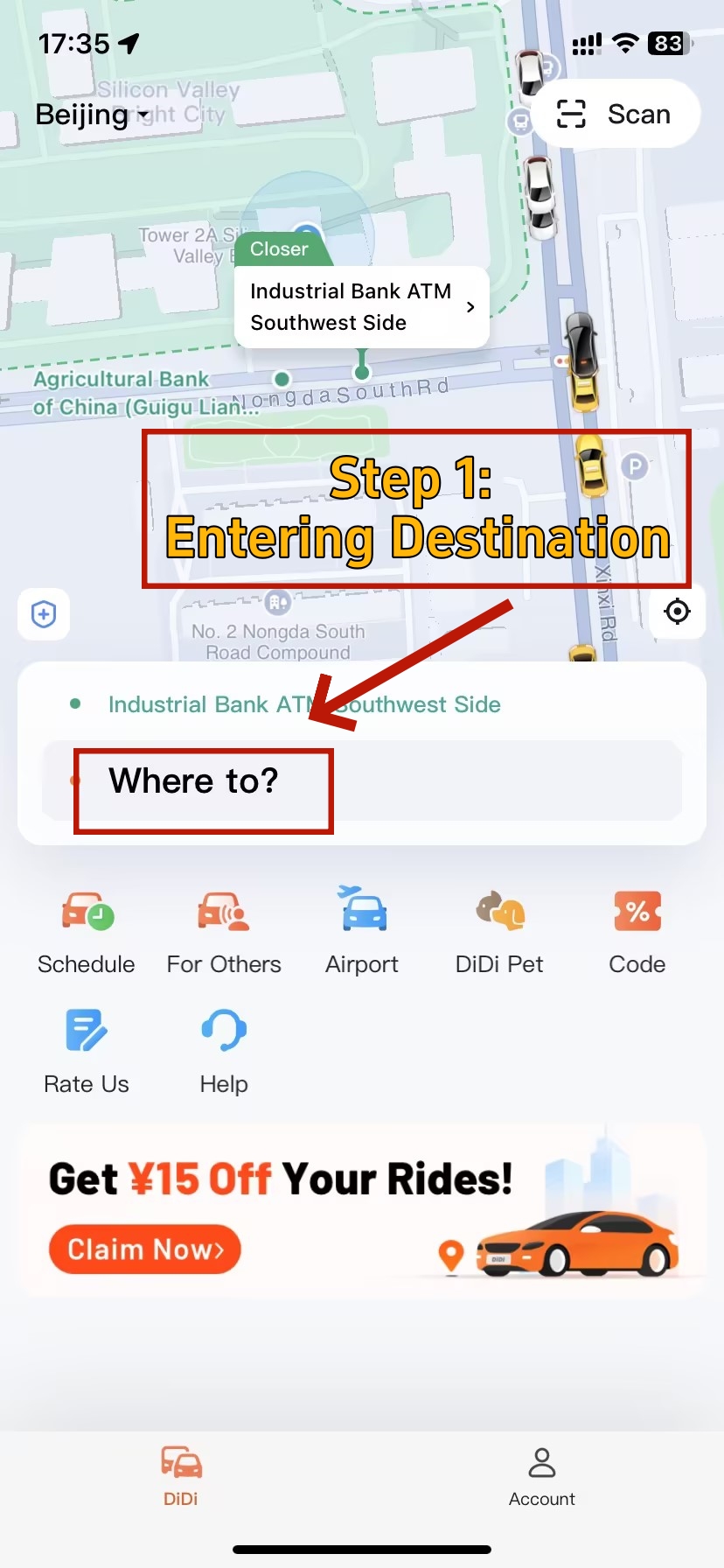
After logging in, the map screen loads with your current location auto-detected (grant location access when prompted). Tap the search bar and type your destination — both English and Chinese addresses work. Landmark names, hotel names, and metro station names in English are all recognized.
💡 Tip: For best accuracy, find the destination in Google Maps or Baidu Maps first, copy the Chinese name, and paste it into Didi. Compare the dropped pin with your map to confirm it's the right entrance — especially important at large hotels, malls, or station complexes with multiple exits.
Your current location auto-fills as the pickup point. You can also drag the map pin to a more convenient nearby spot — useful at busy transit hubs where a side entrance is easier for drivers to reach without circling.
🗺️ Transportation in China: Complete Guide for Foreign Travelers
Didi handles the short hops, but knowing how it fits into China's broader transport network — high-speed rail, metro, buses — helps you plan smarter routes and choose the right option for every leg of your trip.
Choosing Your Vehicle Type
Once a destination is entered, Didi displays all available vehicle types with live estimated fares and wait times. Here's what each option means in practice:
| Vehicle Type | Best For | Est. Price (3–5 km) | Notes |
|---|---|---|---|
| Express 快车 | Daily use, budget travel | ¥20–35 | Most common; fastest to match |
| Premier 专车 | Business trips, airport runs | ¥40–60 | Newer cars, higher-rated drivers |
| Luxe 豪华车 | Special occasions, VIP transfers | ¥100+ | Luxury vehicles — Mercedes, BMW |
| Express Pool 拼车 | Budget solo travelers | ¥12–25 | 30–50% cheaper; shared ride |
| Taxi 出租车 | Cash payers, no account | Meter-based, from ¥13 | Only type accepting cash |
For most everyday travel, Express (快车) is the default — fastest availability, widest coverage, fairest pricing. Airport runs with luggage warrant Premier or Luxe for extra space and reliability. Express Pool works well for solo travelers on a budget who aren't in a rush.
💡 Tip: Before confirming, tap the Safety button on the ride selection screen to enable real-time trip sharing, add emergency contacts, and activate the one-tap SOS button — all before the car even arrives.
Confirming and Meeting Your Driver
- Tap "Confirm" to start matching. In major cities, this takes 1–3 minutes. During peak hours (7–9 AM and 5–7 PM), book 5–10 minutes ahead.
- Once matched, the app shows the driver's name, photo, vehicle model, color, and license plate. Move to a safe, visible waiting spot.
- When the car arrives, verify the license plate against the app before getting in — a standard Didi safety practice.
- The driver will ask for the last 4 digits of your phone number to confirm the pickup. Keep a screenshot of these digits on hand — it sidesteps any language barrier instantly.
- Use the in-app chat for real-time communication. All messages are auto-translated in both directions — no Mandarin needed.
Completing Your Ride and Payment
When you arrive, simply step out. With password-free auto-payment enabled, the fare deducts immediately — no unlocking your phone, no tapping anything. If you chose manual payment, Didi will prompt you to settle the outstanding amount the next time you open the app.
After each trip you'll receive a rating prompt. A 5-star review is the best way to acknowledge a smooth ride — and drivers with consistently high ratings are faster to match on future bookings. Tipping is not part of Chinese ride-hailing culture and there is no in-app tipping option.
🚇 Taxi vs Didi vs Metro: Which Should You Take in China?
Didi is often the best call — but not always. This comparison breaks down when a street taxi, the metro, or Didi makes more sense depending on your destination, time of day, and luggage situation.
Using Didi at Airports in China (Pickup & Transfer Guide 2026)
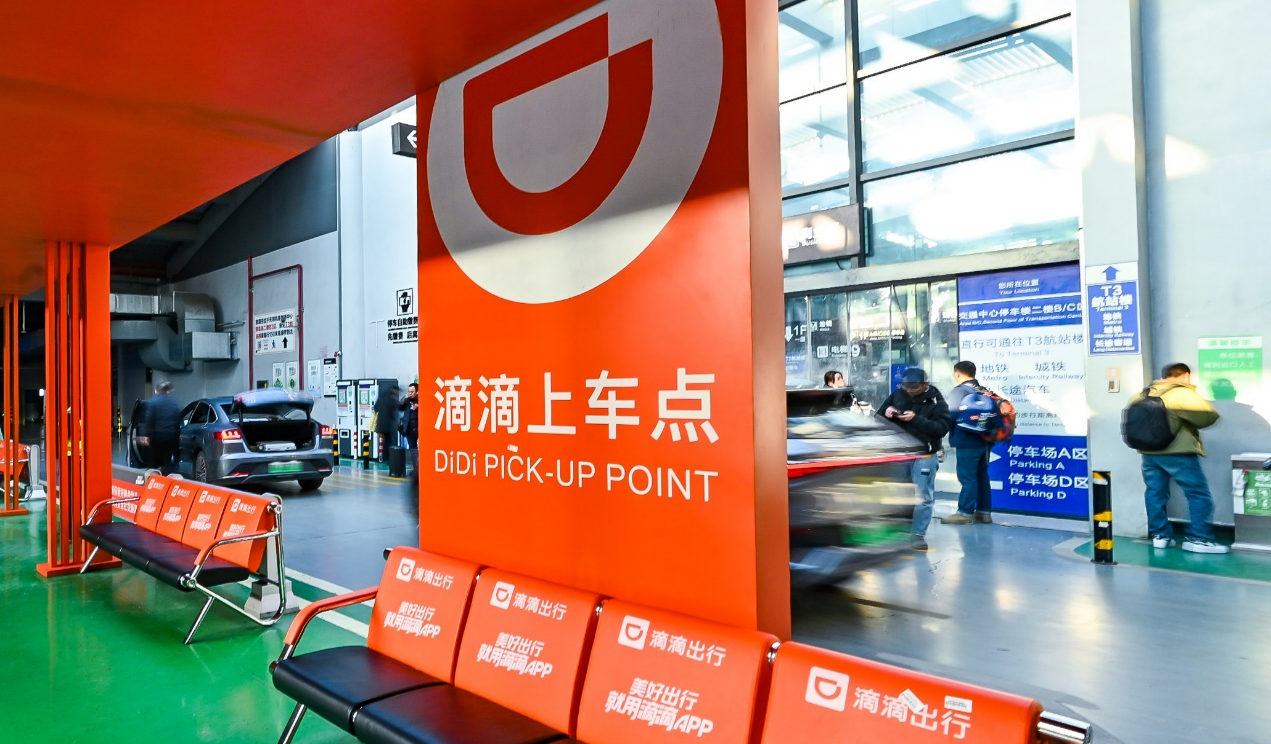
Didi Pickup Waiting Area
Airports in China are large and sprawling, making it easy to confuse Didi pickup zones and lose your way. To avoid this, remember two key things: select the correct pickup point when booking your ride, and navigate to the exact designated pickup area.
How to Select the Correct Pickup Spot on Didi
-
- Didi Pickup Process at PVG T2
-
- Didi Pickup Process at PVG T2
-
- Didi Pickup Process at PVG T2
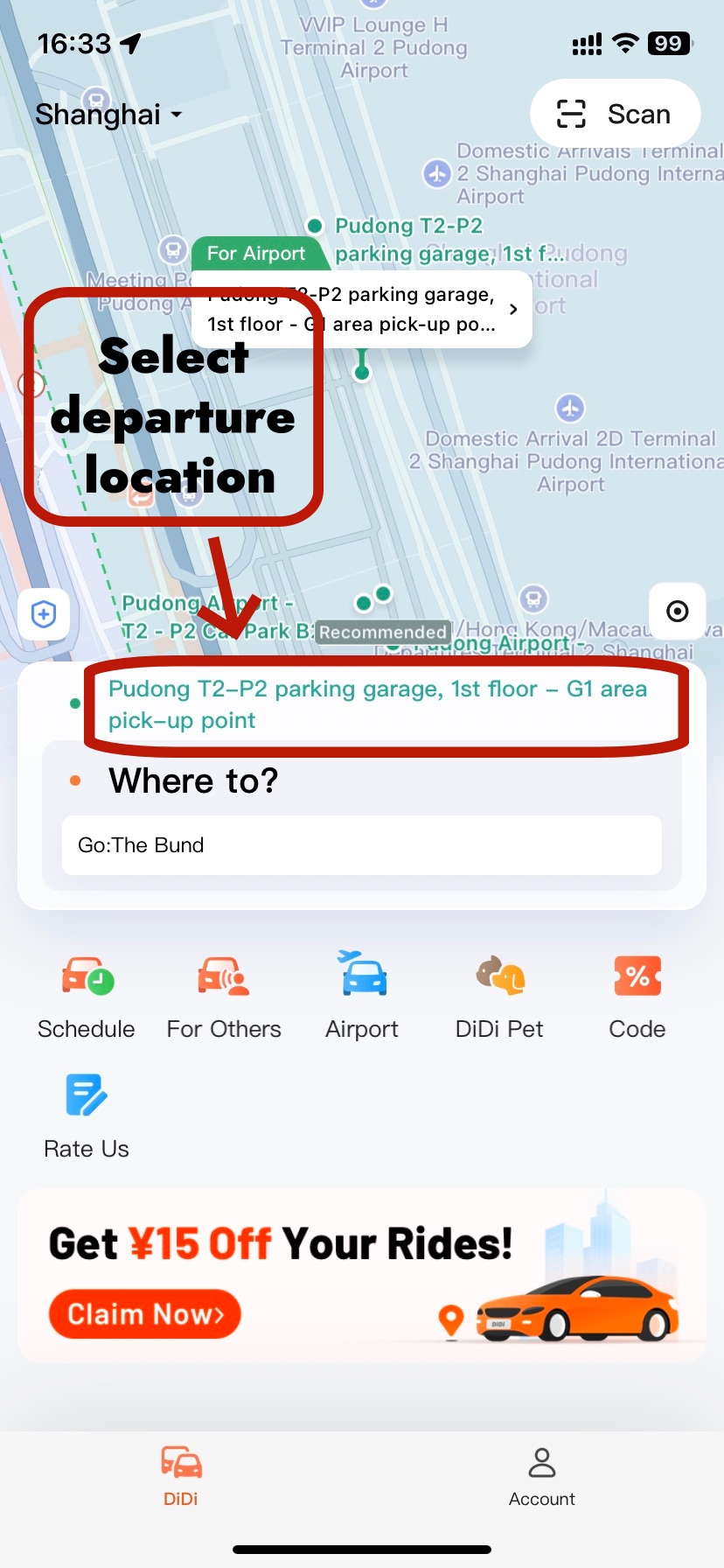
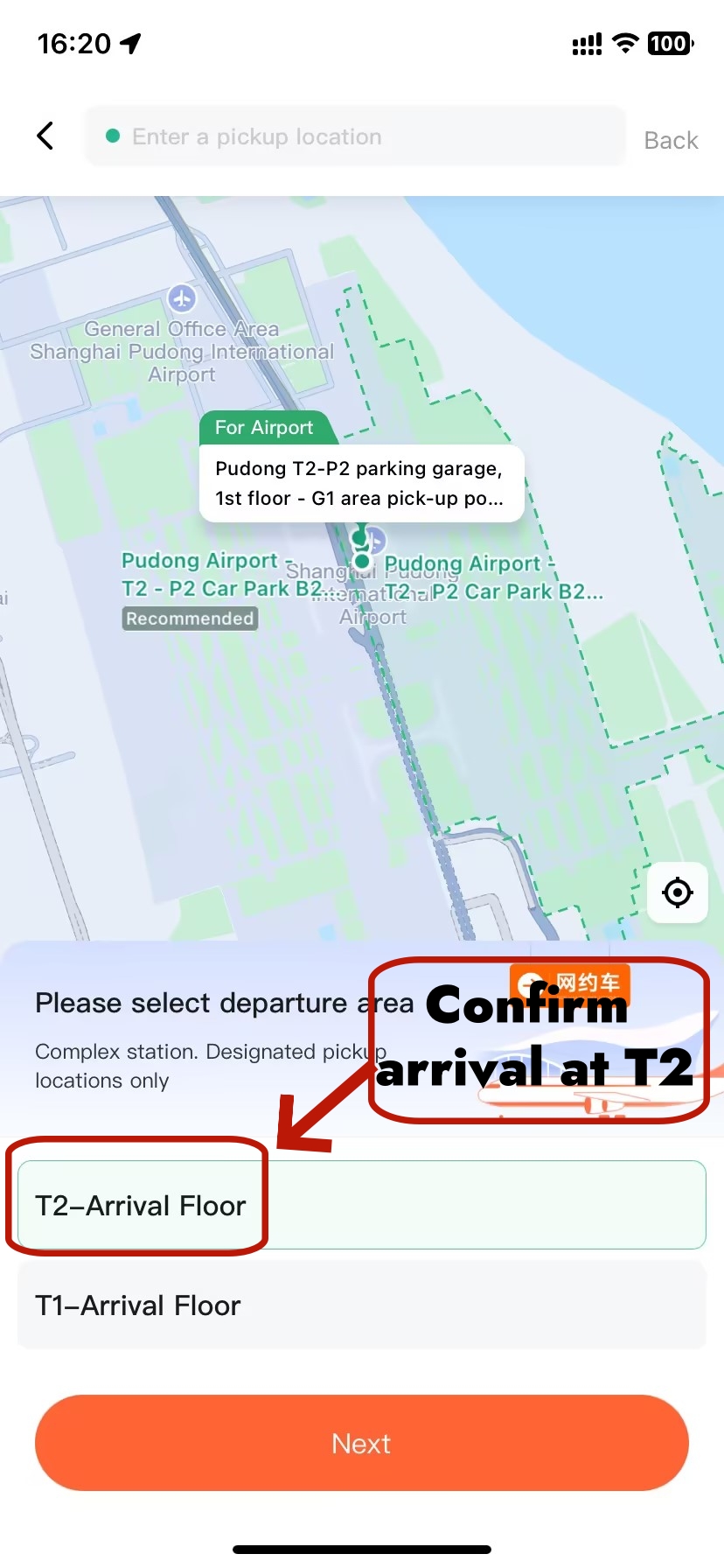
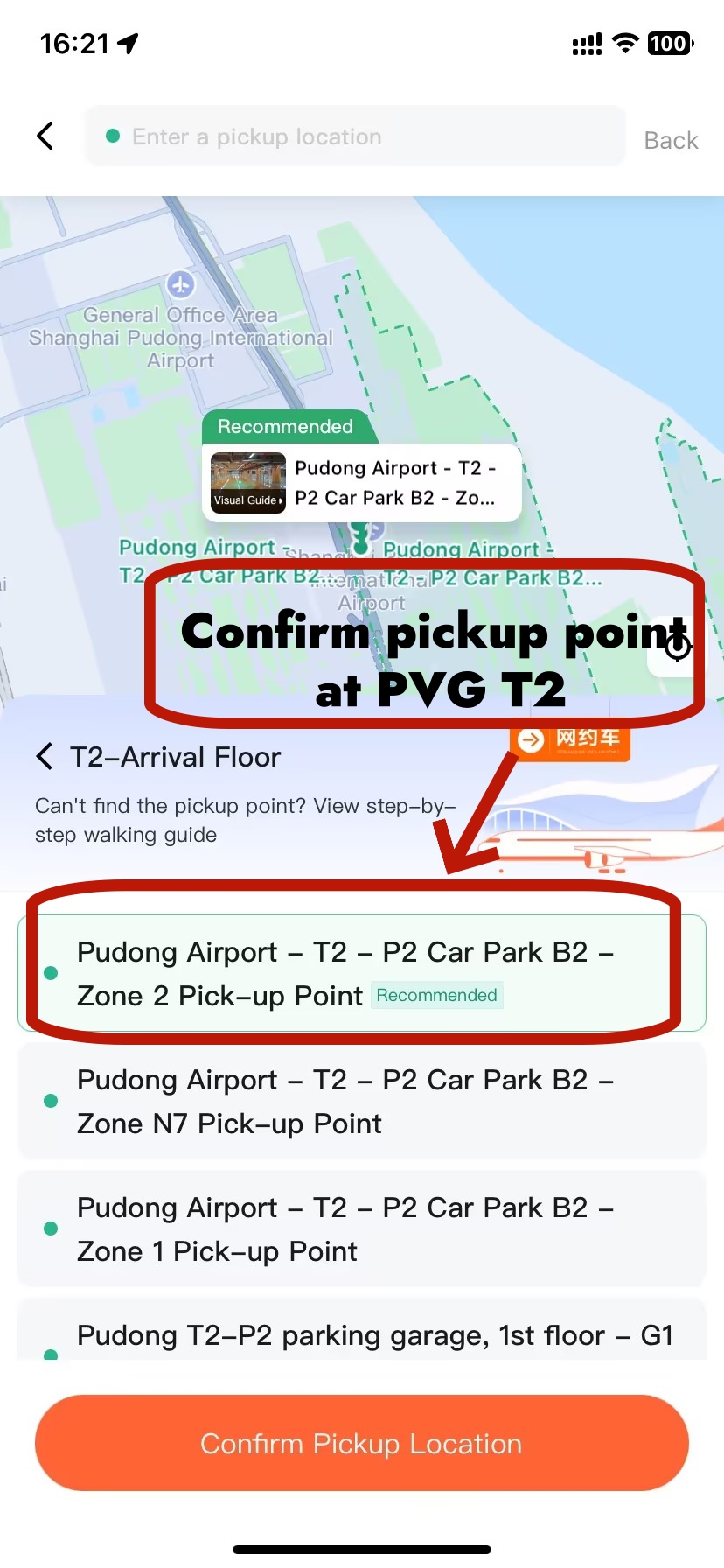
When booking a ride from a Chinese airport, you must select the correct, designated pickup point in the Didi app — drivers cannot meet you at random curbside spots. Here’s how to do it step-by-step:
- Open the Didi app and tap the pickup location field.
- Select your arrival terminal from the list, such as “T2–Arrival Floor.”
- Choose the recommended official pickup zone from the options (e.g., “Terminal 2 – P2 Car Park B2 – Zone 2 Pick-up Point”). These are the only legally permitted areas for drivers to meet you.
- You can send the booking right away, or wait until you’ve cleared customs and collected your luggage before confirming the driver is en route.
💡 Tip — Book while you walk, not while you wait: At most airports the pickup zone is a 3–8 minute walk from the arrivals exit. Start the booking process as soon as you exit customs and collect your luggage — by the time you reach the zone, your driver will already be close or waiting.
How to Reach the Correct Pickup Spot on Didi
-
- Didi Pickup Point Navigation Map
-
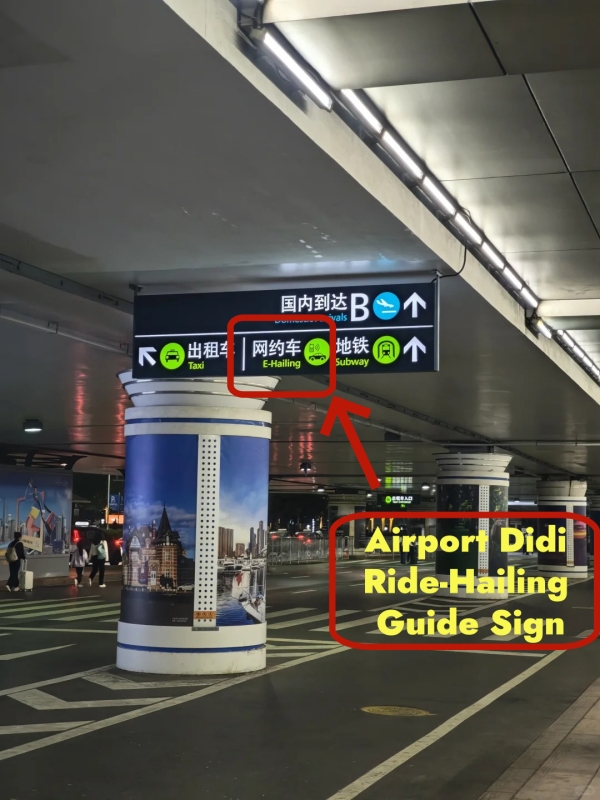
- Airport Didi Ride-Hailing Guide Sign
-
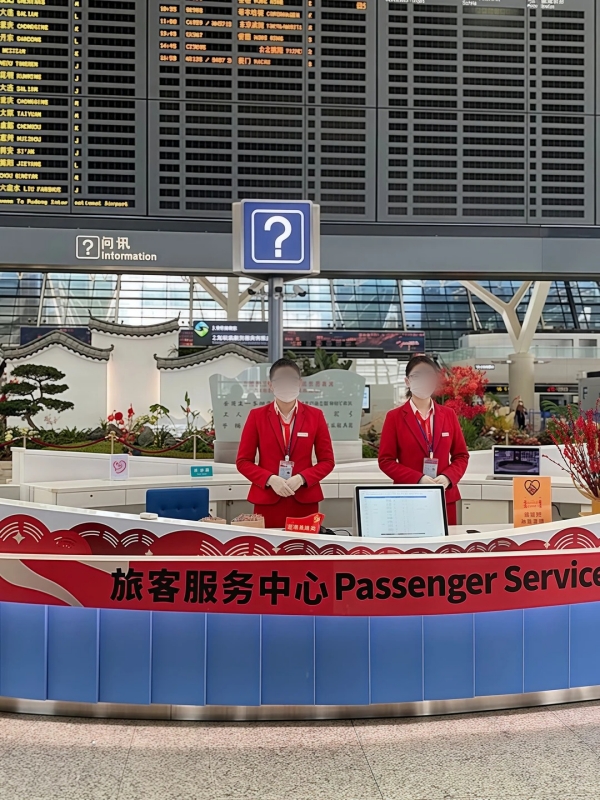
- Airport Service Center
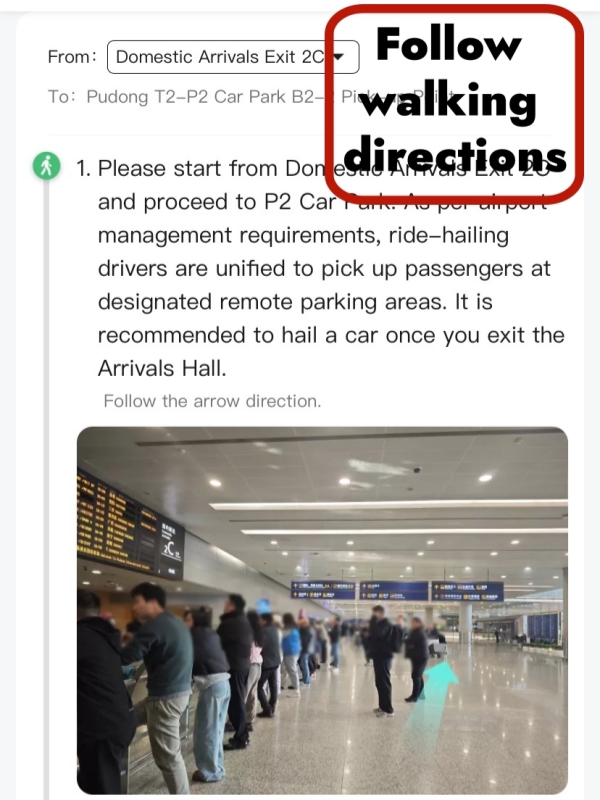
There are three ways to find your way to the pickup zone once you are through arrivals.
- Method 1 — Follow the Didi App Map
- After setting your pickup location, tap Navigate to Pickup Point to launch in-app walking directions, then follow the blue route line to the designated parking garage.
- Once you reach the pickup level, find your numbered waiting bay, note the number, and share it with your driver in the in-app chat (e.g., “I’m at Bay 3, B1 floor, P2 car park”).
- Method 2 — Follow Airport Signage
- After clearing customs and collecting your bags, exit through the marked arrivals gate (look for “C 出口” signs), then follow the 网约车 / Ride-Hailing signs along the covered walkway.
- Take the elevator or escalator down to the designated pickup floor, then locate your numbered waiting bay. Share the bay number with your driver in the in-app chat.
- Method 3 — Ask Airport Staff for Help
- Stop at any Information Desk (marked with the blue “问询 / Information” sign) in the arrivals hall, show your Didi pickup screen, and ask for directions to the ride-hailing zone.
- Airport staff and volunteers are familiar with the pickup area and will guide you. Once you arrive at the bay, share the number with your driver.
🛬 How to Get to Didi Pickup Spot at PVG T2
-
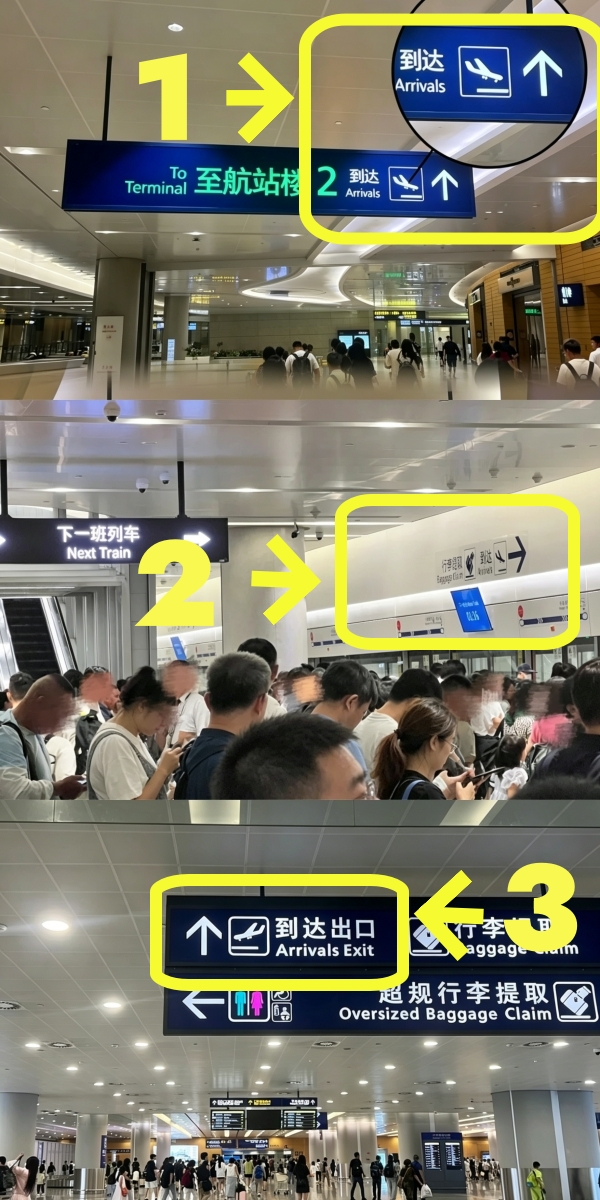

- Didi Pickup Process at PVG
-
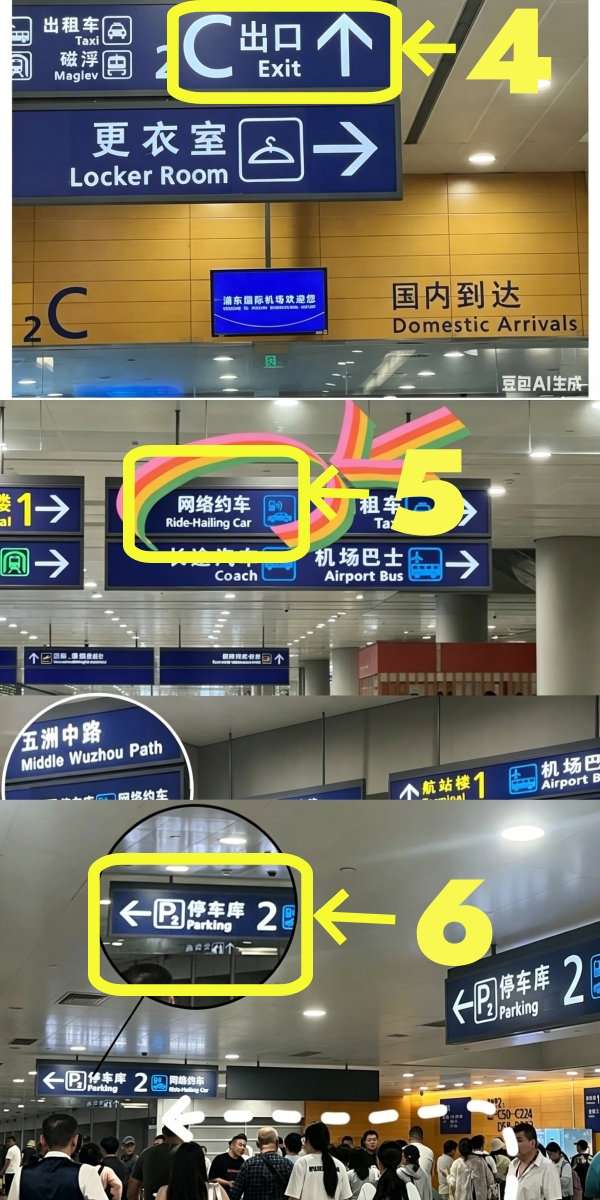
- Didi Pickup Process at PVG
-
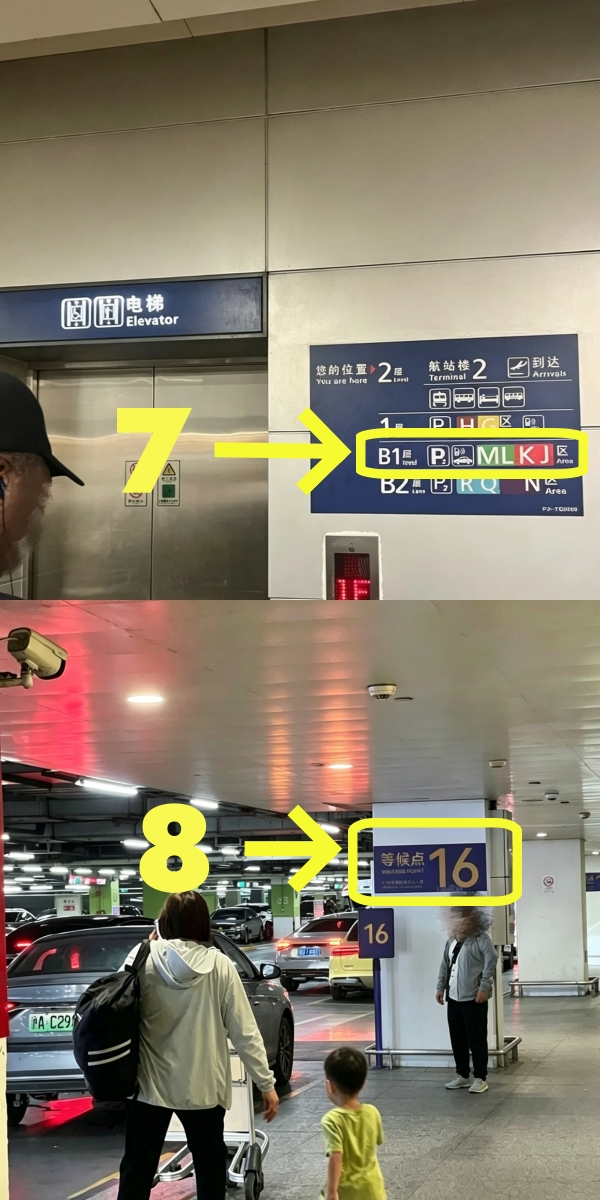
- Didi Pickup Process at PVG
Pudong is China's busiest international gateway. Terminal 2 handles the majority of long-haul international arrivals. The pickup zone is underground in the P2 car park — slightly further than it looks on a map, so allow an extra 5 minutes if you are carrying heavy luggage.
📍 Didi App Location to Set: T2 — P2 Parking — B1 Floor
Search "PVG Terminal 2" in the pickup field and select Pick-up Zone B1 (P2 Car Park). The app will confirm this automatically if location is enabled.
Step-by-step walkthrough:
- Exit the aircraft and follow 到达 (Arrivals) signs toward baggage claim. You will board a short airside shuttle bus — it's free and runs every few minutes. Join the flow of passengers; you can't miss it.
- Collect your luggage at the baggage carousel, then clear customs and immigration.
- Exit through Gate C2 (look for the "C出口" sign on the arrivals floor). Once outside, turn left — you will immediately see signs pointing toward the P2 Car Park 🅿️.
- Follow the 网约车 signs continuously. They lead you along a covered pedestrian walkway past "五洲中路" — when you see that road sign, turn left.
- Take the elevator or escalator down to B1. There is a standard elevator (left side) and an escalator (right side). If you have oversized luggage or a pushchair, use the elevator — it is wide enough for large trolleys.
- On B1, locate your numbered waiting bay. The bays are clearly marked. Pick one, note the bay number, and include it in the in-app chat when your driver asks for your location (e.g. "I'm at bay 3, B1 floor, P2 car park").
- Now open Didi and book — or, if you started booking while walking, simply confirm your driver is en route.
💡 Parking fee note: The P2 car park charges ¥0 for the first 20 minutes, then ¥10/hour. Under normal circumstances your driver arrives and leaves within the free window — no parking surcharge will be added to your fare.
Arriving at Terminal 1 (T1)? The process is identical — follow 网约车 signs from the T1 arrivals hall to the T1 car park, then go to B1. Set your Didi pickup to T1 — Pick-up Zone 3.
🛬 How to Get to Didi Pickup Spot at SHA T1
-
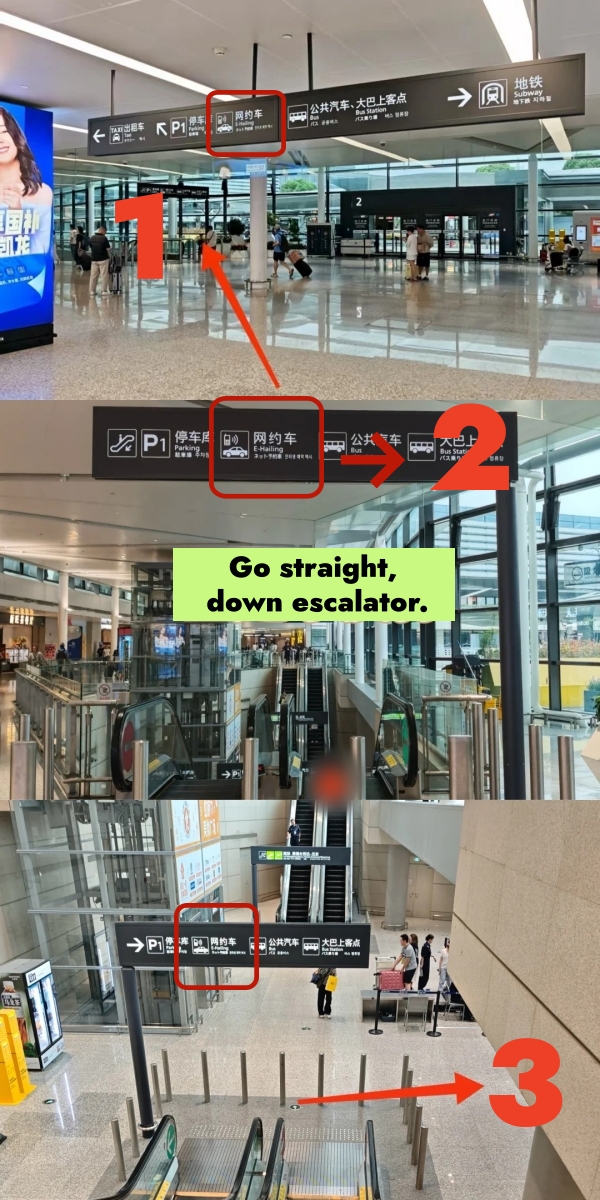
- Didi Pickup Process at SHA
-
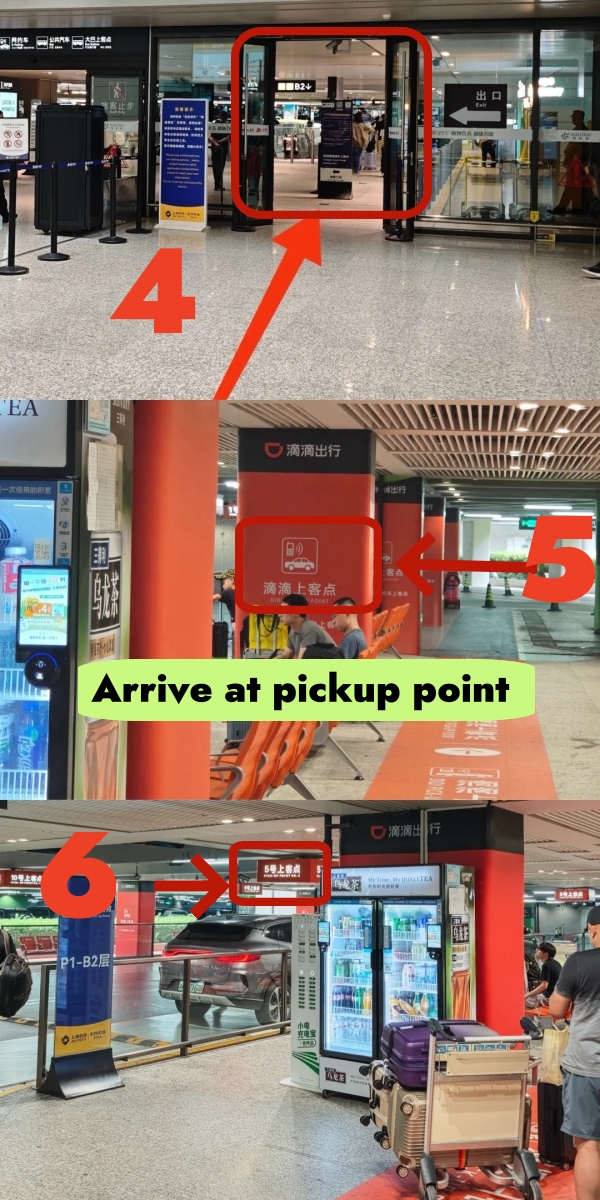
- Didi Pickup Process at SHA
Hongqiao T1 is a compact terminal — the pickup zone is a short, straightforward walk and one of the quickest of any major Chinese airport. Total time from customs exit to being in the car: typically under 10 minutes.
📍 Didi App Location to Set: 虹桥T1 — B2层 P1停车库 — 扶梯处
In English: "Hongqiao T1 — P1 Car Park B2 Floor — Escalator Area." Select this in the pickup dropdown or type it in the search field.
Step-by-step walkthrough:
- Exit arrivals — don't hesitate. Take the elevator straight down to B1 (both a standard lift and a wide freight elevator are available for heavy luggage).
- On B1, look for the P1 Car Park sign. Walk in a straight line toward it — it's a single direct corridor, no turns required.
- Take the escalator down one more level to B2. The ride-hailing waiting area is at the base of the escalator.
- Book your Didi now if you haven't already. Set pickup to the escalator area on B2, P1 Car Park.
💡 Peak-hour tip: If you are arriving during a rush period, book the moment you collect your luggage — not after you reach B2. Hongqiao is busy and drivers fill the zone quickly. Arriving at B2 with a driver already matched means zero wait time.
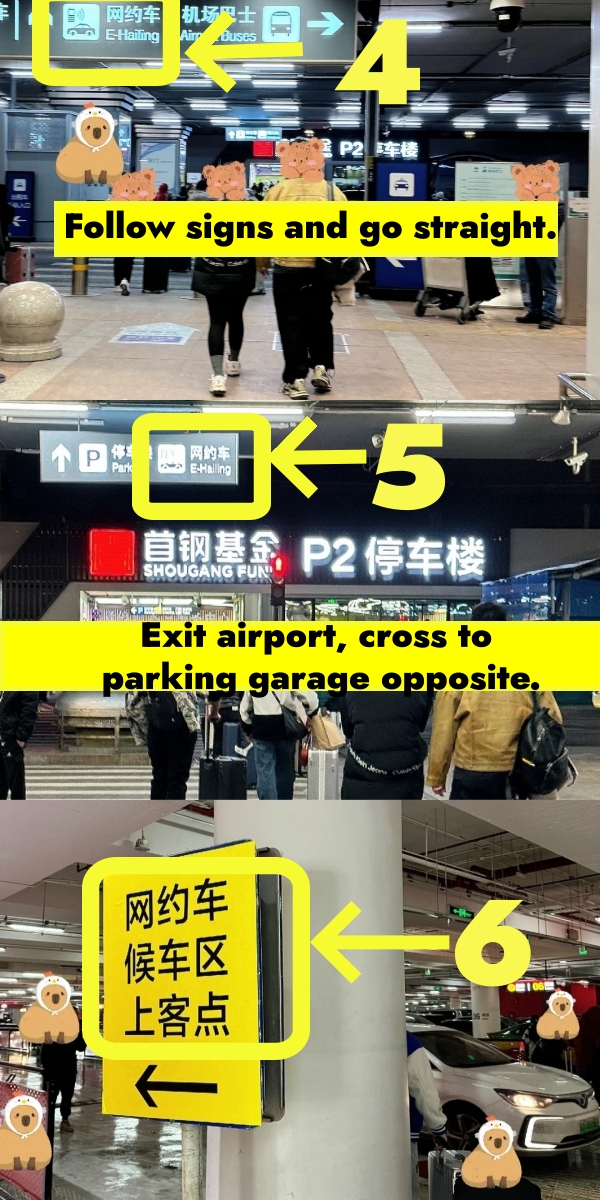
🛬 How to Get to Didi Pickup Spot at PEK T2
-
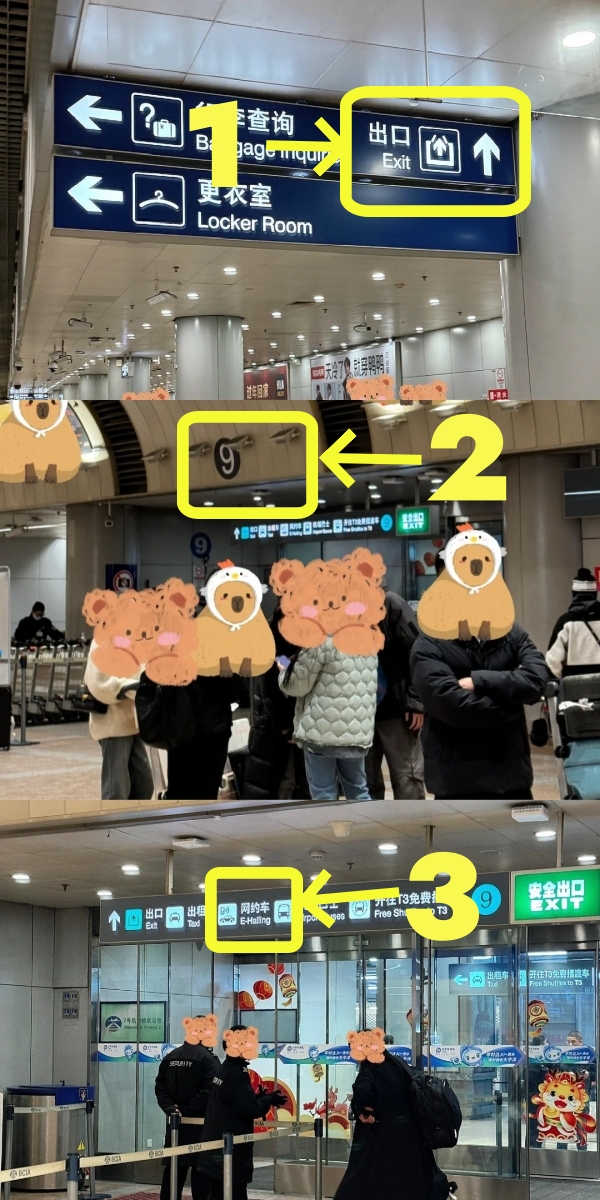
- Didi Pickup Process at PEK
-
- Didi Pickup Process at PEK
📍 Didi App Location to Set: PEK T2 — P2 Car Park — Level 1 South Side
The app will show this as "首都机场T2 — P2停车楼1层南侧滴滴候车区." Your phone's GPS will auto-populate this once you are near the zone.
Step-by-step walkthrough:
- Clear customs and collect luggage, then exit the arrivals hall.
- Exit through Gate 9 (look for "9号门" on the exit signs above you).
- Walk straight ahead and cross the road to reach the P2 Car Park building directly in front of you.
- Enter the P2 building and find the pickup area on Level 1, South Side — follow the 网约车 signs inside the car park. The waiting bays are clearly marked.
- Open Didi and confirm your booking once you are standing in the zone.
🛬 How to Get to Didi Pickup Spot at PEK T3
T3 at Beijing Capital is one of the world's largest single airport terminals and can feel overwhelming on first arrival. The building spans three sub-zones (T3C, T3D, T3E). Most international long-haul flights arrive at T3E.
📍 Didi App Location to Set: PEK T3 — T3 Car Park — B2 Floor
Search "首都机场T3" in the pickup field. The app maps the B2 ride-hailing zone automatically.
Step-by-step walkthrough (arriving at T3E International):
- Clear immigration on Level 3F of T3E, collect your luggage, and exit customs.
- Descend to Level 2F using the escalators or lifts near the arrivals exit.
- Walk across the connecting corridor from T3E toward T3C — the corridor is signposted and takes approximately 5 minutes on foot.
- Exit the terminal building at T3C and follow the 网约车 signs toward the T3 Car Park.
- Go down to Level B2 of the car park — this is the designated ride-hailing pickup floor.
- Book your Didi once you are on B2. Set your pickup to the zone number displayed on the signage nearest to you.
⚠️ T3 first-timer alert: The walk from T3E arrivals to the T3C car park exit takes 10–15 minutes with luggage — longer than at most Chinese airports. Don't let the distance worry you; the route is fully signposted. Start the Didi booking as you exit customs so the driver is close to arriving by the time you reach B2.
🛬 How to Get to Didi Pickup Spot at PKX
-
- Didi Pickup Process at PKX
-
- Didi Pickup Process at PKX
-
- Didi Pickup Process at PKX
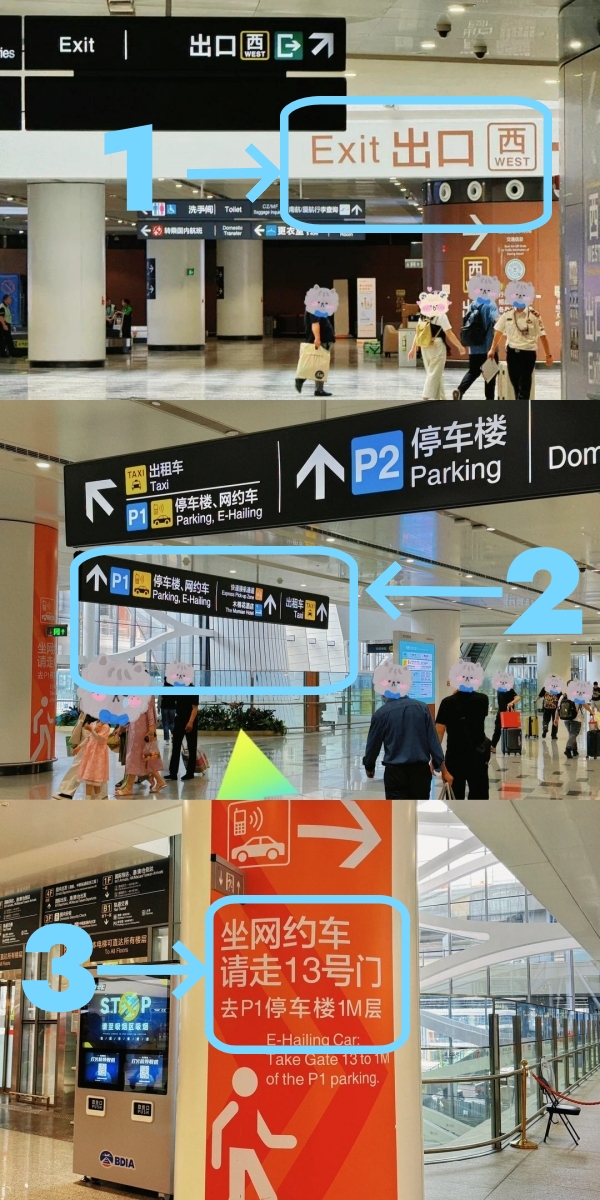
Daxing is Beijing's newer airport, opened in 2019, and its pickup process is significantly simpler than Capital Airport T3. The terminal layout is intuitive and the ride-hailing zone is well-marked.
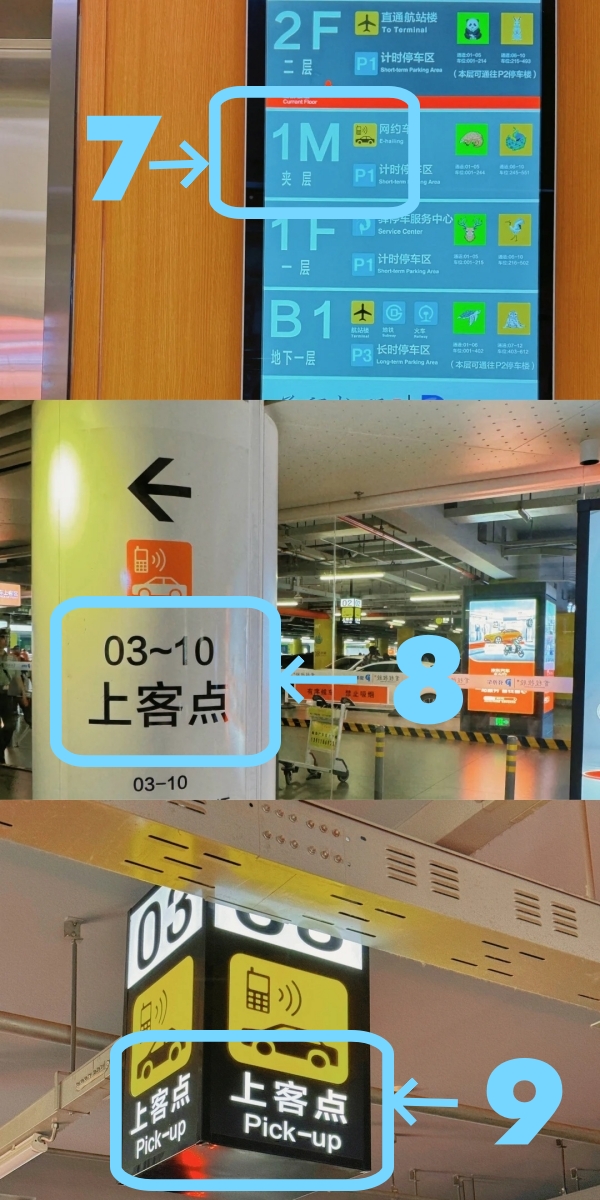
📍 Didi App Location to Set: PKX — P1 Car Park — 1M Mezzanine, Bays 01–03
In the app, search "大兴机场" and select the P1 parking mezzanine zone. Your GPS will confirm this once you are on-site.
Step-by-step walkthrough:
- Clear customs and exit arrivals. Head to the West Exit (西出口) — the route below follows the West Exit; the East Exit leads to a different set of parking bays, so confirm which baggage carousel you collected from and use the nearer exit.
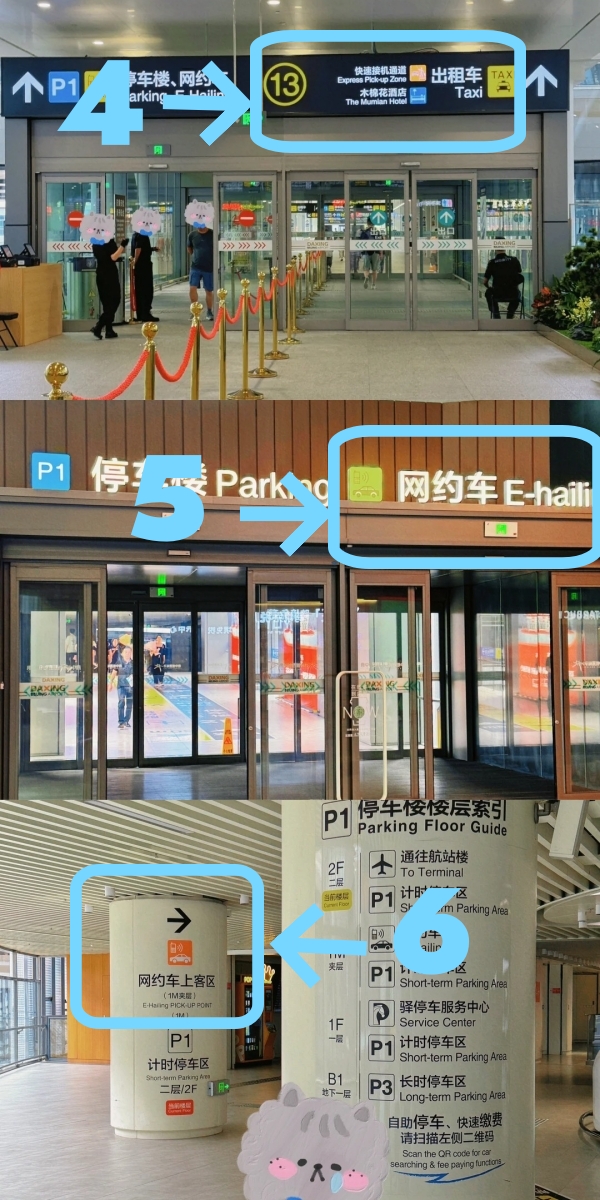
- Exit through Gate 13 (look for "13号门" on the exit signage).
- Walk through the covered pedestrian corridor to P1 Car Park Level 2.
- Take the elevator down to the 1M Mezzanine level. This is a dedicated half-floor between Level 1 and Level 2 specifically for ride-hailing — it won't appear in a normal floor directory, so look for the 网约车 button or sign inside the lift.
- Head to Bays 01, 02, or 03 and confirm your bay number with your driver via in-app chat.
- Book your Didi now if you haven't already — or confirm the driver's ETA if you started booking on the way.
Airport Pickup Quick Reference — 2026
| Airport | Terminal | Exit Gate / Direction | Pickup Floor & Zone | Didi App Search Term | Est. Fare to City Centre |
|---|---|---|---|---|---|
| Shanghai Pudong (PVG) | T2 | Gate C2 → left → P2 Car Park | B1, P2 Car Park | T2 — P2停车楼 B1 | ¥180–230 (Express) |
| Shanghai Pudong (PVG) | T1 | Arrivals exit → P1 Car Park | B1, Pick-up Zone 3 | T1 — Pick-up Zone 3 | ¥170–220 (Express) |
| Shanghai Hongqiao (SHA) | T1 | Arrivals → elevator to B1 → straight to P1 | B2, P1 Car Park — Escalator Area | 虹桥T1-B2层P1停车库 | ¥60–90 (Express) |
| Beijing Capital (PEK) | T2 | Gate 9 → cross road → P2 Car Park | Level 1, South Side — P2 | 首都机场T2 P2停车楼1层南侧 | ¥100–150 (Express) |
| Beijing Capital (PEK) | T3 | T3E 3F → 2F → T3C exit → T3 Car Park | B2, T3 Car Park | 首都机场T3 — B2停车场 | ¥100–150 (Express) |
| Beijing Daxing (PKX) | Main Terminal | West Exit → Gate 13 → P1 corridor | 1M Mezzanine, P1 Car Park, Bays 01–03 | 大兴机场 P1停车楼1M夹层 | ¥80–130 (Express) |
Fares are estimates for a standard Express ride and vary with traffic and time of day. Check the live quote in-app before confirming. For city-specific pricing rules, go to Account → Settings → User Guide inside Didi.
Taking a Didi TO the Airport
-

- PVG T2 Departure Gate
-
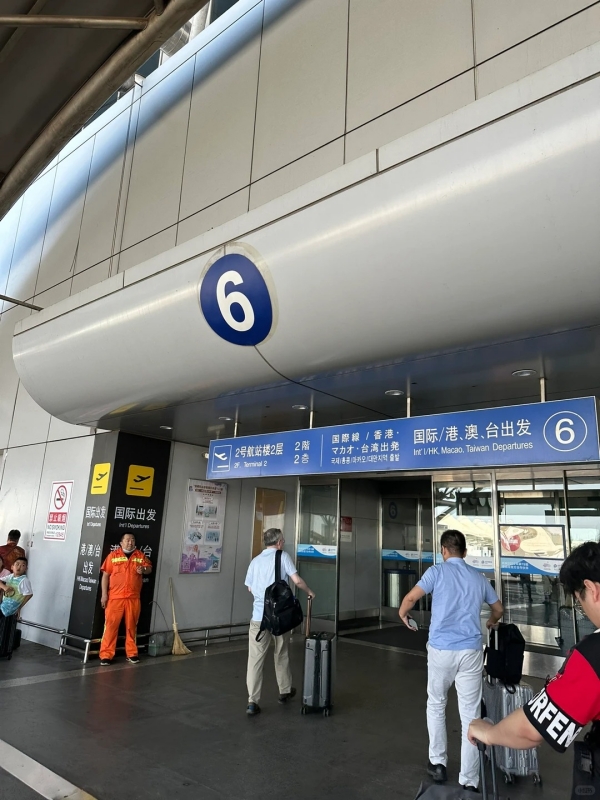
- PEK T2 Departures Gate
Booking a Didi to the airport is simpler than the reverse — no designated pickup zones to find, no underground car parks to navigate. Your driver drops you directly at the departures kerb. The process is the same regardless of which airport you are departing from.
- Open Didi and enter your airport terminal as the destination — for example, "浦东机场T2," "虹桥T1," "首都机场T2," or "大兴机场." The app will suggest the correct departures drop-off point automatically.
- Book before you leave your accommodation. At peak hours, match with a driver while you are still inside — by the time you reach the kerb with your luggage, the car will already be close or waiting.
- Your driver drops you at the departures level. No car park or pickup zone is required on the departure side; the driver pulls up directly to the terminal entrance.
- Enter the terminal and follow 出发 (Departures) signs to your airline's check-in counter.
💡 Tips: If you have large or multiple suitcases, book a Premier or Luxe vehicle for a guaranteed larger boot. Airport drop-offs at all four airports are typically free of parking surcharges — drivers complete the drop-off well within the free waiting window.
Complete Didi Airport Transfer Instructions
-
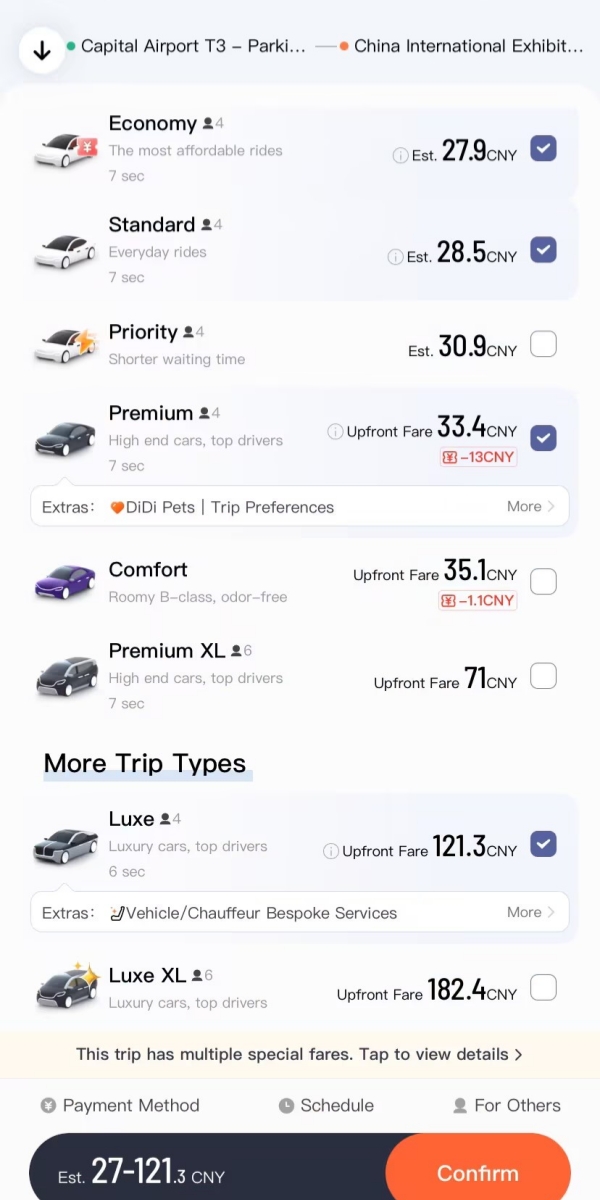
- Didi Car Types for Airport Transfers
-
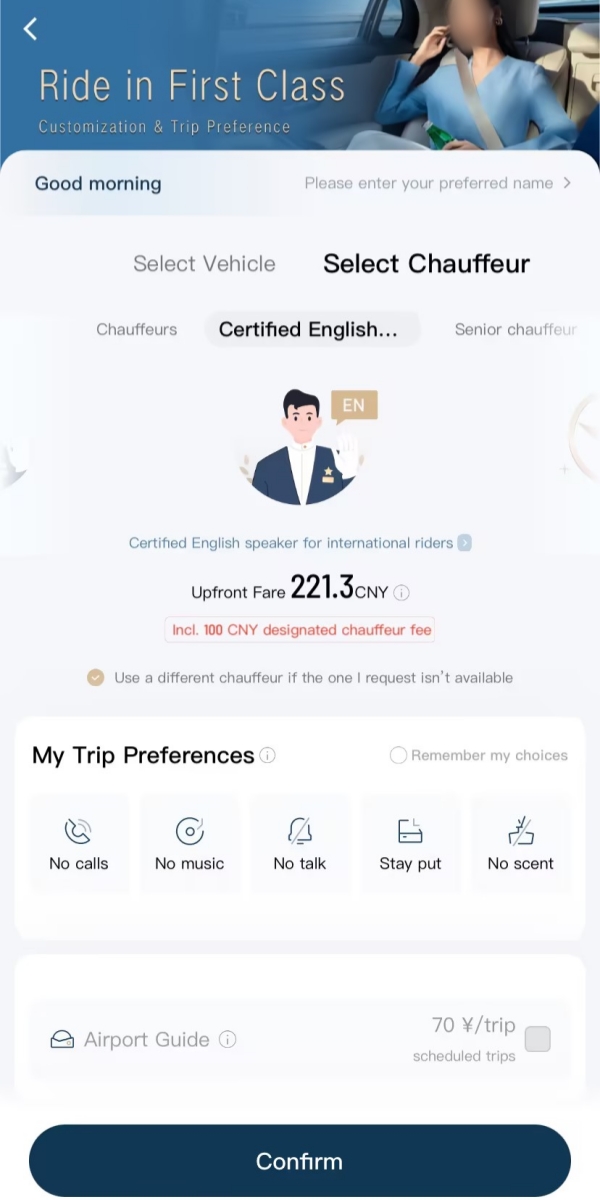
- Didi Airport Transfer Service Selection Screen
-
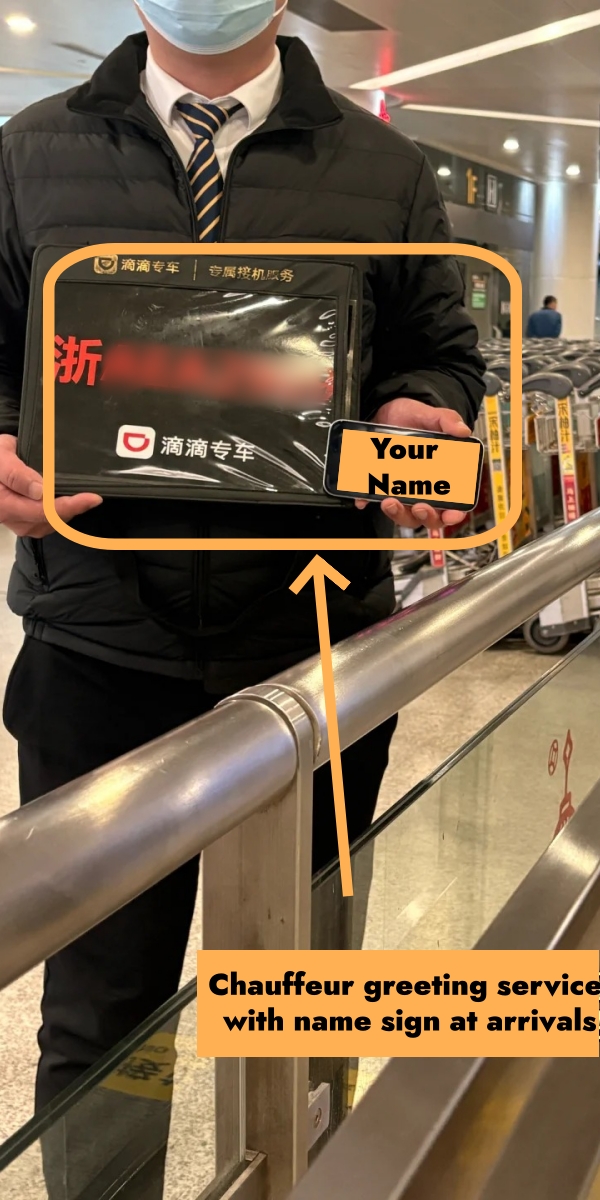
- Didi Arrival Gate Meet-and-Greet Service
One important booking rule applies to both directions: airport drop-off and airport pickup are two entirely separate orders in Didi — you cannot reverse or reuse the same booking. On the pickup side, most vehicle classes expect you to make your own way to the designated ride-hailing zone, though upgrading to Premier (专车) or Luxe (豪华车) unlocks an optional meet-and-greet add-on where your driver waits at the arrivals exit with a name board and handles your luggage — a meaningful convenience if you are new to Chinese airports or travelling with elderly relatives.
Vehicle Tier Classifications and Features
| Vehicle Type | Key Features | Best For |
|---|---|---|
| Express / Budget Express (快车 / 特惠快车) | Cheapest option; self-navigate to pickup zone | Budget travellers with light luggage |
| Premier (专车) | B-class sedan; optional Airport Assistant meet-and-greet; water & tissues included | Business travellers or families wanting a hands-off arrival |
| Luxe (豪华车) | Mercedes / BMW; door service & luggage help; premium refreshments | VIP guests or high-service-expectation travellers |
| Business MPV / 6-Seater (六座商务专车) | Seats up to 6; large boot for multiple cases | Groups, large families, or heavy luggage |
Didi vs. Metro vs. Taxi vs. Shuttle
Didi is not the only way to get to and from the airport — metro lines, taxis, and airport coaches all serve the same routes, each with a different trade-off between price, speed, and effort. The table below summarises where each option excels and where it falls short.
| Option | Pros | Cons | Cost |
|---|---|---|---|
| Didi / Ride-hailing | Door-to-door; flexible timing; multiple tiers; optional meet-and-greet | Pricier; subject to traffic & surge pricing | Express: ¥80–230 Premier / Luxe higher |
| Metro / Airport Express | Fixed travel time; cheapest per person; no booking needed | Luggage handling difficult; crowded at rush hour; no overnight service | ¥7–55 / person Maglev (PVG) ¥50–55 |
| Taxi | Available at kerb immediately; no app needed | Less transparent fares; inconsistent driver quality | ¥100–280 Toll & fuel surcharges may apply |
| Airport Shuttle Bus | Cheapest overall; good for fixed-route destinations | Fixed stops; affected by traffic; walk to boarding point | ¥20–36 / person Limited routes only |
✈️ Beijing Airport Transfer Guide 2026
Navigating PEK or PKX for the first time? This guide covers all transfer options — Didi, taxi, metro, and shuttle — with exact pickup zone locations, terminal maps, and fare estimates for every route into the city.
✈️ Shanghai Pudong Airport Guide 2026
Landing at PVG? This guide shows the exact walking route to the Didi pickup zone at both T1 and T2, what to expect on the way to the city, and how much the ride should cost at different times of day.
Common Issues and How to Fix Them
Payment Card Declined
This is the most common problem foreign travelers face. The most reliable fix is the Bridge Method from Step 3 — link your card to Alipay or WeChat Pay and use that wallet as your Didi payment source instead of direct card input. If that's not yet set up, try these steps first:
- Contact your bank to authorize international online transactions in China
- Try a different card — Mastercard often works where Visa is declined, and vice versa
- Switch to Alipay Tour Pass — a prepaid balance designed specifically for foreign visitors
- Avoid prepaid travel cards: these fail frequently on Chinese platforms in 2026
💰 Alipay Tour Card: The Foreign Traveler's Key to Cashless China
When your card gets declined in Didi, the Alipay Tour Card is the cleanest backup — top it up in foreign currency and pay anywhere in China without card-rejection issues.
🛬 Arriving in China by Air? Before setting up ride-hailing pick-ups at major arrival halls, learn about facility layouts, transport connections, and navigation for top domestic and international hubs in our breakdown of China Airports.
SMS Verification Code Not Arriving
This happens most often when roaming in China or using a data-only eSIM. Fixes to try in order: enable international roaming on your home SIM, switch to a different Wi-Fi network, or register via the WeChat Mini Program version of Didi — authentication goes through WeChat directly, bypassing SMS entirely.
Driver Can't Find You
Use the in-app chat — messages are auto-translated instantly in both directions. Send a screenshot of your surroundings or type your location in English. If you're somewhere unfamiliar, ask a nearby local to help write your location in Chinese; showing the driver "我在这里" (wǒ zài zhèlǐ — I'm here) in chat usually solves it in seconds.
💬 How to Use WeChat QR Code in China: Step-by-Step Guide
WeChat is China's primary communication tool — and knowing how to use it for sending locations, scanning QR codes, and messaging will make your entire trip, including Didi rides, dramatically smoother.
Ride Cancelled by Driver
This occasionally happens at airports or during peak hours. Simply rebook — a new driver is usually matched within minutes. If cancellations repeat, try shifting your pickup pin slightly or switching to Premier, which tends to attract more committed drivers.
Trip Dispute or Overcharge
Go to Account → Help → Contact Customer Service. English-language support is available 24/7 in 2026. For fare disputes, Didi typically responds within 24 hours. For urgent issues, call 400-000-0999 (China mainland, toll-free). Lost something in the car? Use Account → Help → Lost Item and message the driver — offering a ¥20–50 recovery reward speeds things up considerably.
🚖 Didi vs Uber in China: Which App Actually Wins?
Since Uber left mainland China, Didi has been the only real option for ride-hailing. Here's a full breakdown of how the two compare — and why the answer in China is always Didi.
Extra Tips to Make Your Ride Stress-Free
- Book 5–10 minutes early during rush hours (7–9 AM and 5–7 PM) to avoid surge pricing and longer wait times.
- Screenshot your phone's last 4 digits before every trip — drivers ask for this on virtually every ride in China.
- Paste destination names in Chinese for better pin accuracy: copy from Google Maps or your hotel's business card, paste directly into Didi.
- Use real-time trip sharing to send your live location to someone at home: tap the Shield icon on the trip screen → Share Ride.
- For solo female travelers, Premier and Luxe provide higher-rated drivers and newer vehicles. Didi's full-trip audio monitoring, driver ID verification, and one-tap SOS button (directly connected to 110 police) are active on all ride types in 2026.
- Travel off-peak — 10 AM to 4 PM and after 8 PM — to avoid surge pricing and get matched faster.
- If the Didi app glitches, open the Didi Mini Program inside WeChat or Alipay as a fallback — same booking flow, no re-login needed.
🚕 Beyond ride-hailing: Mastering Didi makes short city trips a breeze, but building a complete transit system that includes 350km/h bullet trains, metro networks, and offline emergency backups is the true essence of the one-stop China Travel Survival Guide.
Frequently Asked Questions (FAQs)
Q: Can I use Didi without a Chinese phone number?
Yes. One of the most common questions about how to use Didi in China as a foreigner is whether a local number is required — the answer is no. Any international mobile number that receives SMS works for registration. Select your country code at sign-up and enter your foreign number. If SMS is unreliable, log in via the Didi WeChat Mini Program using your WeChat account — no phone number verification needed.
Q: Is Didi safe for foreigners, including solo female travelers?
Yes — and for anyone learning how to use Didi in China for the first time, the safety features are worth knowing upfront. In 2026, platform compliance (drivers meeting licensing and safety requirements) exceeds 85%. Every trip includes real-time GPS tracking, driver ID verification, in-car audio recording, and a one-tap SOS button connected directly to local police (110). You can share your live ride with contacts at any point during the journey. For solo travelers, Premier and Luxe provide a further layer of screening.
Q: What payment methods work for foreigners on Didi in 2026?
Understanding payment is central to how to use Didi in China without friction. Didi directly accepts Visa, Mastercard, JCB, and Diners Club cards, plus Alipay, WeChat Pay, and Apple Pay. If your card is declined, use the Bridge Method (route your card through Alipay or WeChat Pay first) or load an Alipay Tour Pass as a prepaid backup.
Q: How do I use Didi at the airport?
Airport pickups are a scenario where knowing how to use Didi in China correctly makes a real difference. Follow 网约车 (ride-hailing) signs after clearing customs to the designated pickup zone. Once there, open Didi, confirm the zone number shown on nearby signage as your pickup point, enter your destination, and book. Never book while still inside the terminal — drivers cannot legally stop outside the designated zone.
Q: Does Didi work outside major cities?
Yes, and this is good news for travelers going beyond the standard tourist circuit. Knowing how to use Didi in China isn't just useful in Beijing or Shanghai — the platform operates in 400+ cities, covering nearly every destination foreign travelers visit. In very small towns and rural areas, wait times may extend or Express may be unavailable; in those situations, the Taxi option (cash accepted) is the fallback.
Q: What is the Didi WeChat Mini Program and should I use it?
The Didi WeChat Mini Program is a full version of Didi embedded inside WeChat — no separate download required. It's ideal if the main app won't install, or if SMS verification fails during registration. The interface is identical to the standalone app; the only limitation is that payment is restricted to WeChat Pay. Access it via WeChat → Discover → Mini Programs → search "滴滴出行."
Q: Is tipping expected on Didi?
No. Tipping is not part of Chinese ride-hailing culture and there is no in-app tipping feature. A 5-star rating is the standard acknowledgement for a good ride.
Q: Can I schedule a Didi ride in advance?
Yes. Tap the clock icon on the booking screen to set a future pickup time — useful for early airport departures or guaranteed transfers. Scheduled rides in 2026 occasionally carry a slightly higher base fare than on-demand bookings.