How to Use Dianping App:Comprehensive Listings, Trustworthy Reviews, Intelligent Planning
If Yelp, OpenTable, and Groupon merged together and then trained it on the dining habits of more than 200 million locals, you’d get something like Dianping (大众点评). Launched in Shanghai in 2003 and currently operated by Meituan (美团), China’s largest restaurant-and-lifestyle discovery platform, think of it as your one-stop shop for eating, booking, and saving money in every city in the country. The service lets users browse real-diner-written, photo-laden reviews, check live prices from restaurant’s menus, book a table in seconds, join a virtual queue as you walk to the restaurant, score a group-deal coupon (30-50% off), or order food to your hotel room. It covers restaurants, hotels, attractions, spas, cinemas, and more. In total, there are more than 3.6 billion authentic reviews on 6 million-plus merchants nationwide.
Google Maps barely works in mainland China. TripAdvisor covers only the tourist-facing facade. Dianping is where more than 200 million locals are really deciding where to eat — which makes it the single most useful app you can have on your phone when you travel to China. This step-by-step guide takes you through the whole flow: downloading it before you leave, setting up your account, navigating the interface in English, finding and evaluating restaurants based on their ratings, booking tables, buying coupons, paying, and ordering. Work through it once and you’ll be eating better, spending less, and skipping every tourist trap. 🍜
How to Get & Setup Dinaping App
Complete all of these steps before you leave home. App store access can be restricted once you cross into mainland China, and SMS verification is more reliable on a foreign network.
Downloading the App Before Departure
Search for "大众点评" or "Dianping" in your app store. Confirm the developer is listed as Meituan (美团) before you install. The app size runs between approximately 78 MB and 277 MB depending on your device.
- iOS users: if the app doesn't appear in your regional store, temporarily switch your App Store account region to China Mainland, download, then switch back. The app continues working normally after you revert.
- Android users: Google Play is the cleanest and safest source. Huawei AppGallery and Xiaomi's app store are reliable backups. Avoid third-party APK sites entirely — versions there are outdated and carry genuine security risks.
📱 WeChat Mini-Program — Zero-Download Alternative
-
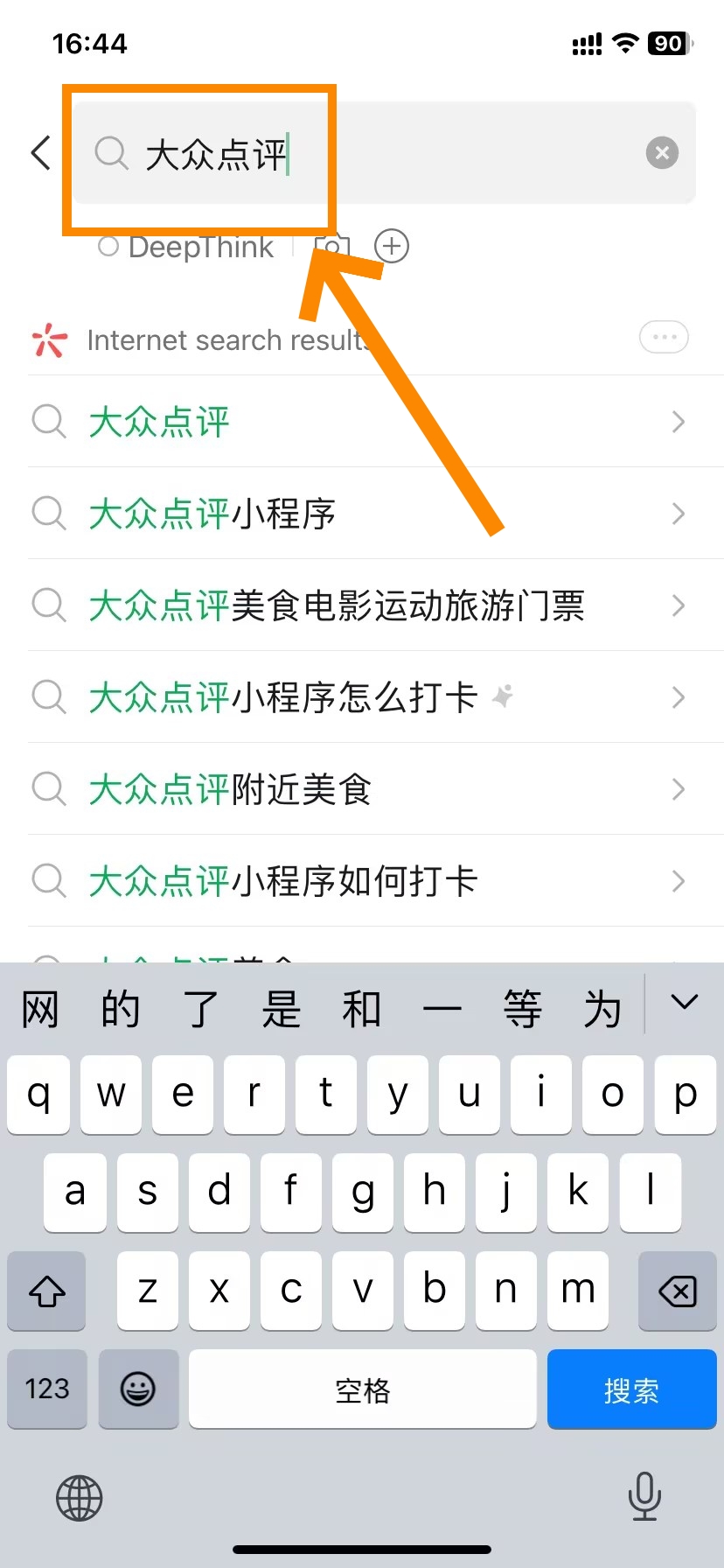

- Dianping WeChat Mini-Program Access(Step 1)
-
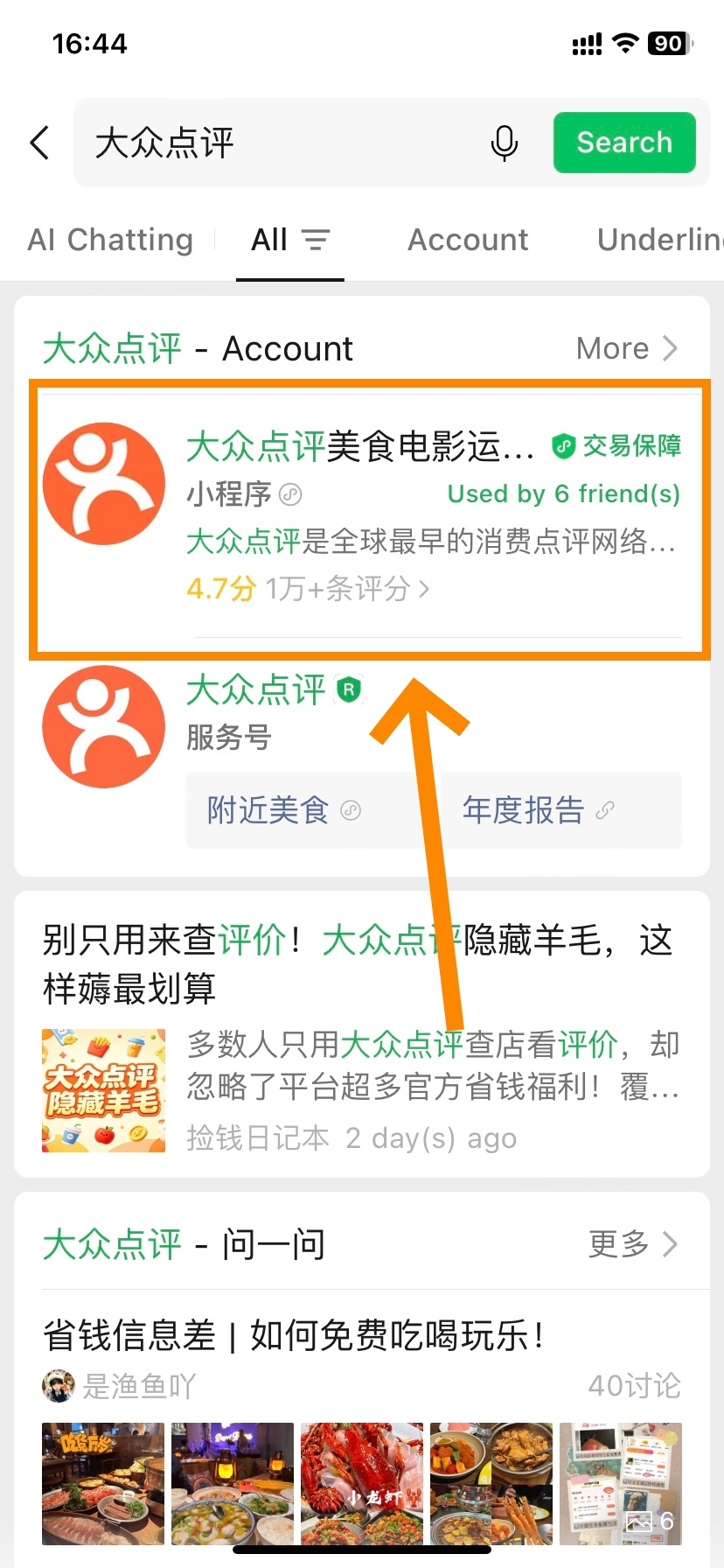
- Dianping WeChat Mini-Program Access(Step 2)
-
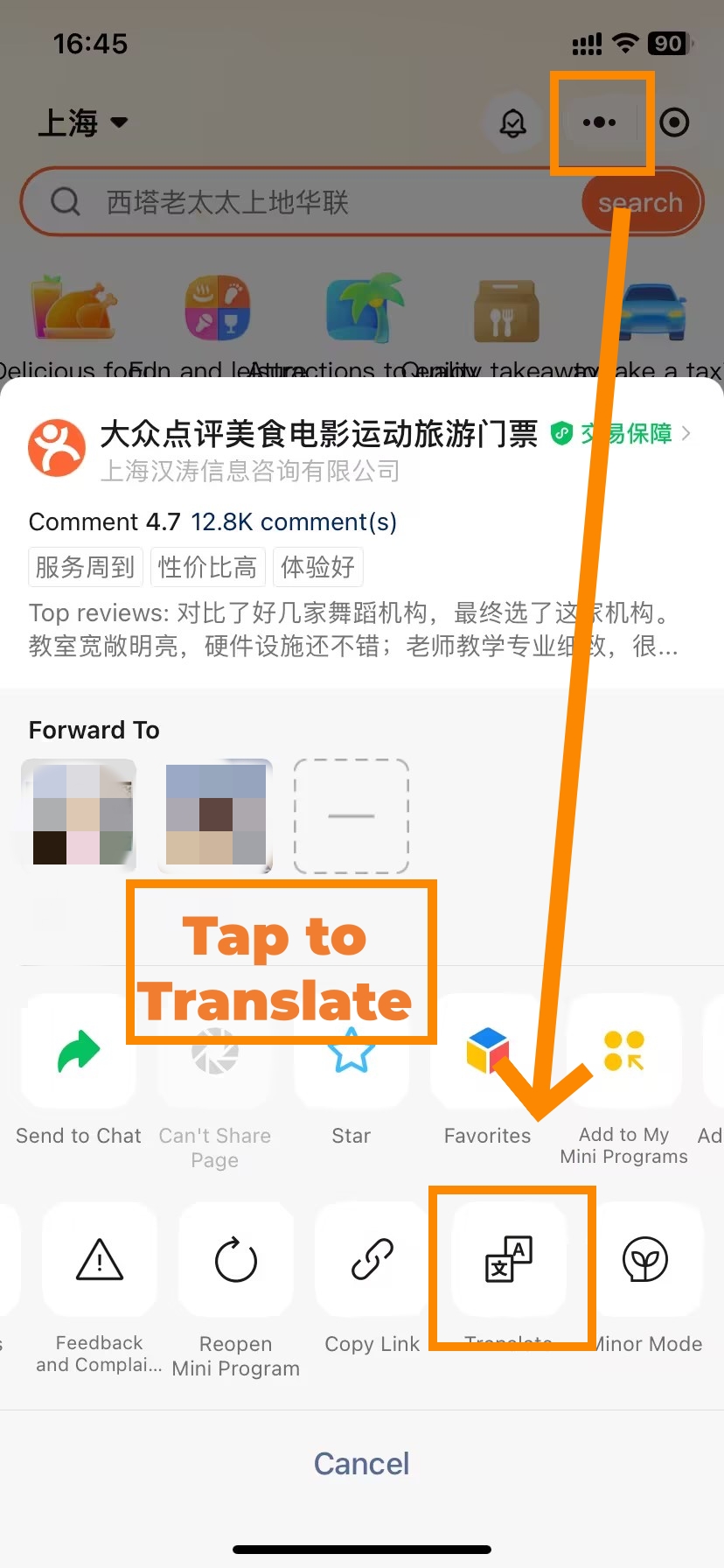
- Dianping WeChat Mini-Program Access(Step 3)
-
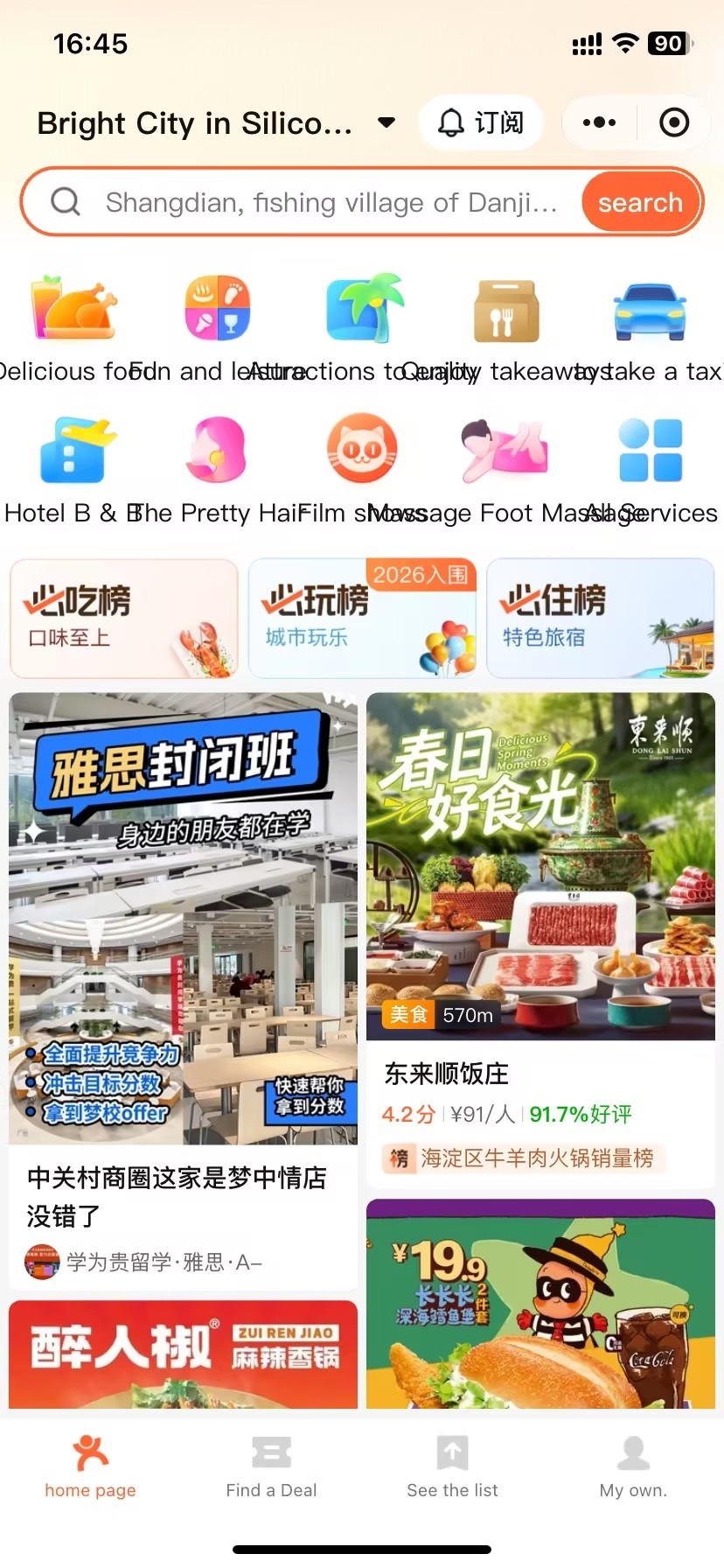
- Dianping WeChat Mini-Program Access(Step 4)
Already have WeChat? You can skip the download entirely:
- Open WeChat → tap the search bar at the top
- Type "大众点评" (Dianping)
- In results, tap the Mini Program tab — not the Official Account
- Tap to open and authorise — you're in immediately
The mini-program shares the same restaurant database as the app. Its main advantage: WeChat's built-in one-tap full-page translation. Its limitation: some group-deal coupons are priced slightly higher or are App-exclusive. Best used for short visits or as a quick entry point before installing the full app.
Essential Permissions Required on First Launch
When you open Dianping for the first time, it will ask for several permissions. Getting these right from the start unlocks the features you'll use most.
| Permission | Why It Matters | Recommendation |
|---|---|---|
| Location | Powers the Nearby search — your most-used daily feature | Allow — Always |
| Camera | Required to scan coupon QR codes at restaurants; also enables photo search | Allow |
| Notifications | Delivers queue call alerts and booking confirmations in real time | Allow (turn off later if needed) |
| Contacts | Used only for social friend-finding — not needed for dining | Safe to decline |
The location permission is the one you cannot skip. Deny it and the Nearby tab — your most practical daily tool in China — goes blank. Set it to Always and Dianping becomes a live food-radar the moment you step off the metro.
📱 WeChat Mini-Program: inherits WeChat's existing location access automatically — no separate prompt needed.
Registering With a Foreign Phone Number
-
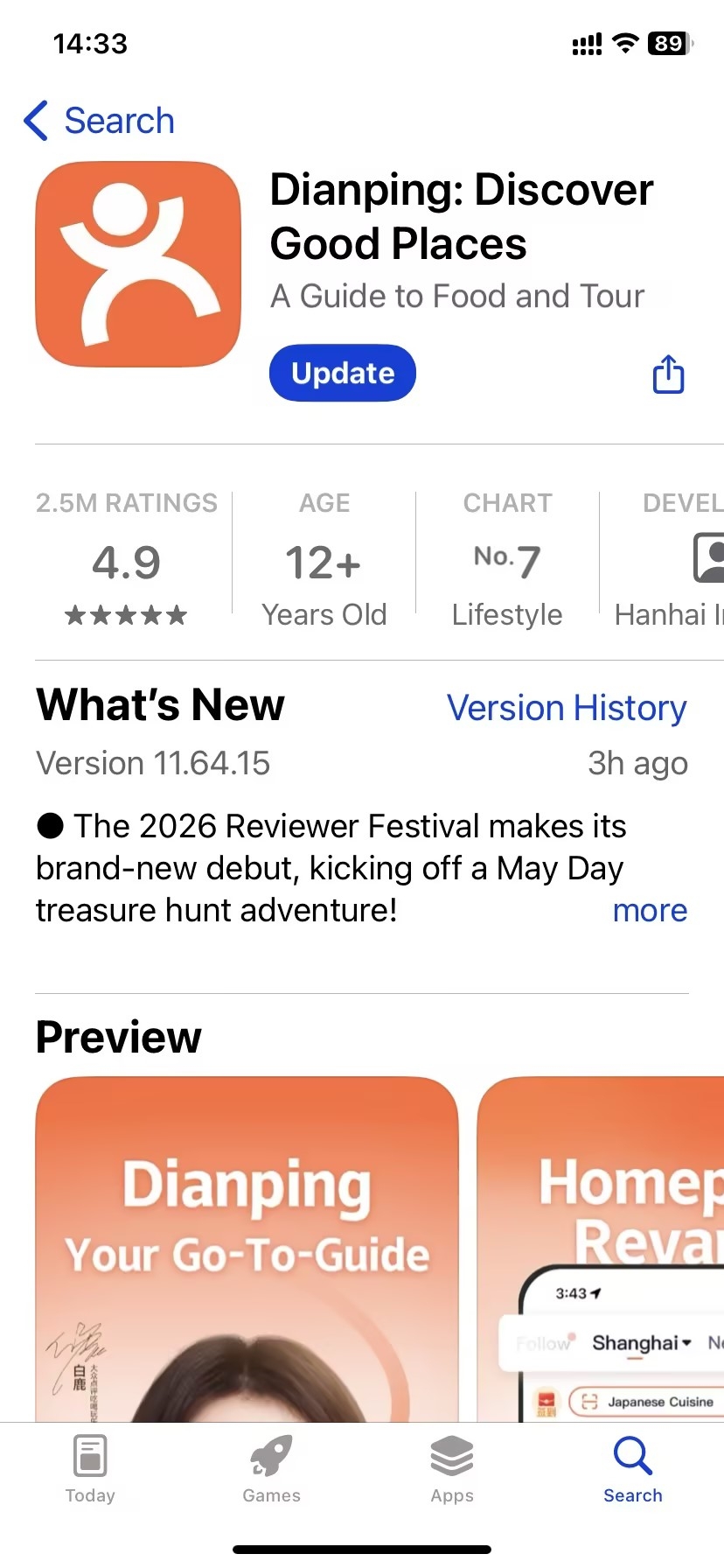
- Dianping App Download & Installation Process(Step 1)
-
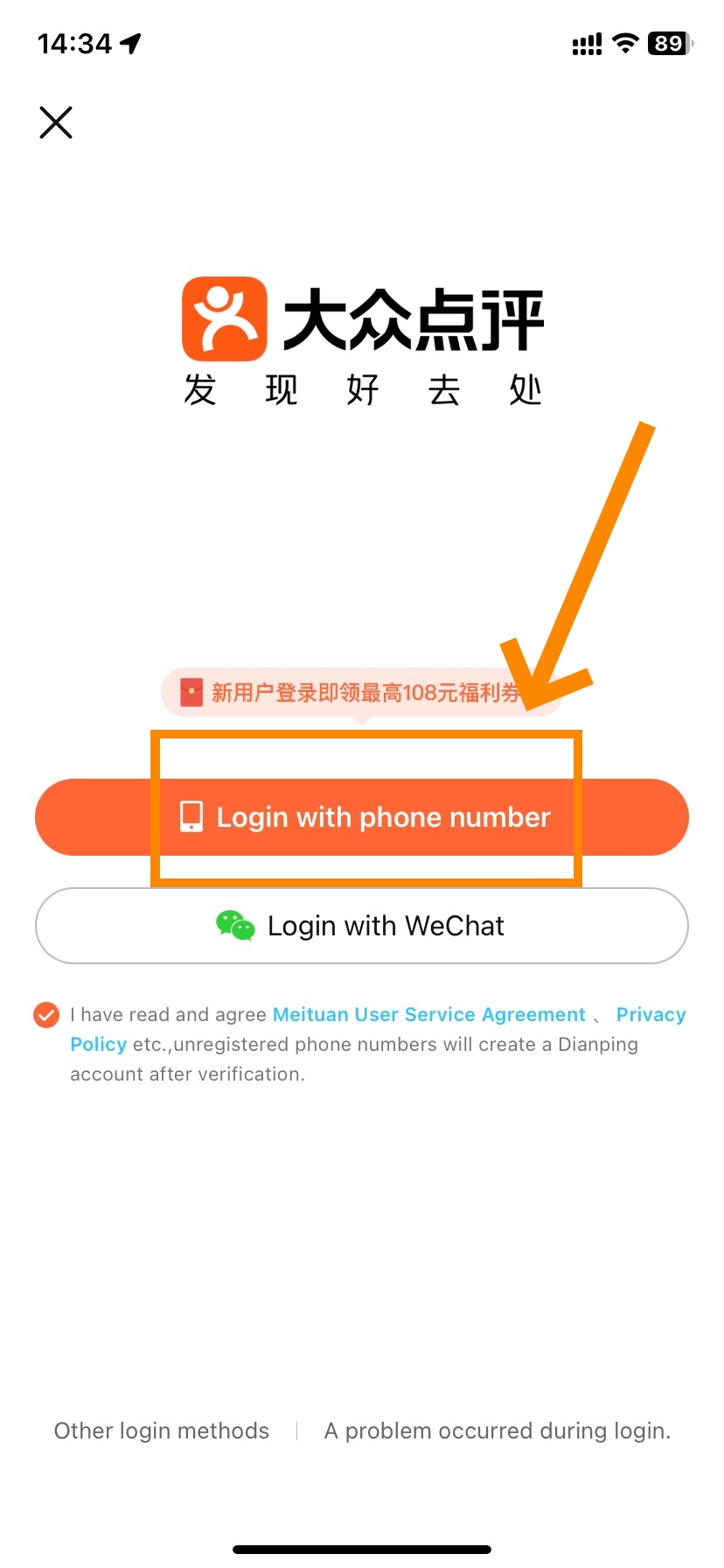
- Dianping App Download & Installation Process(Step 2)
-
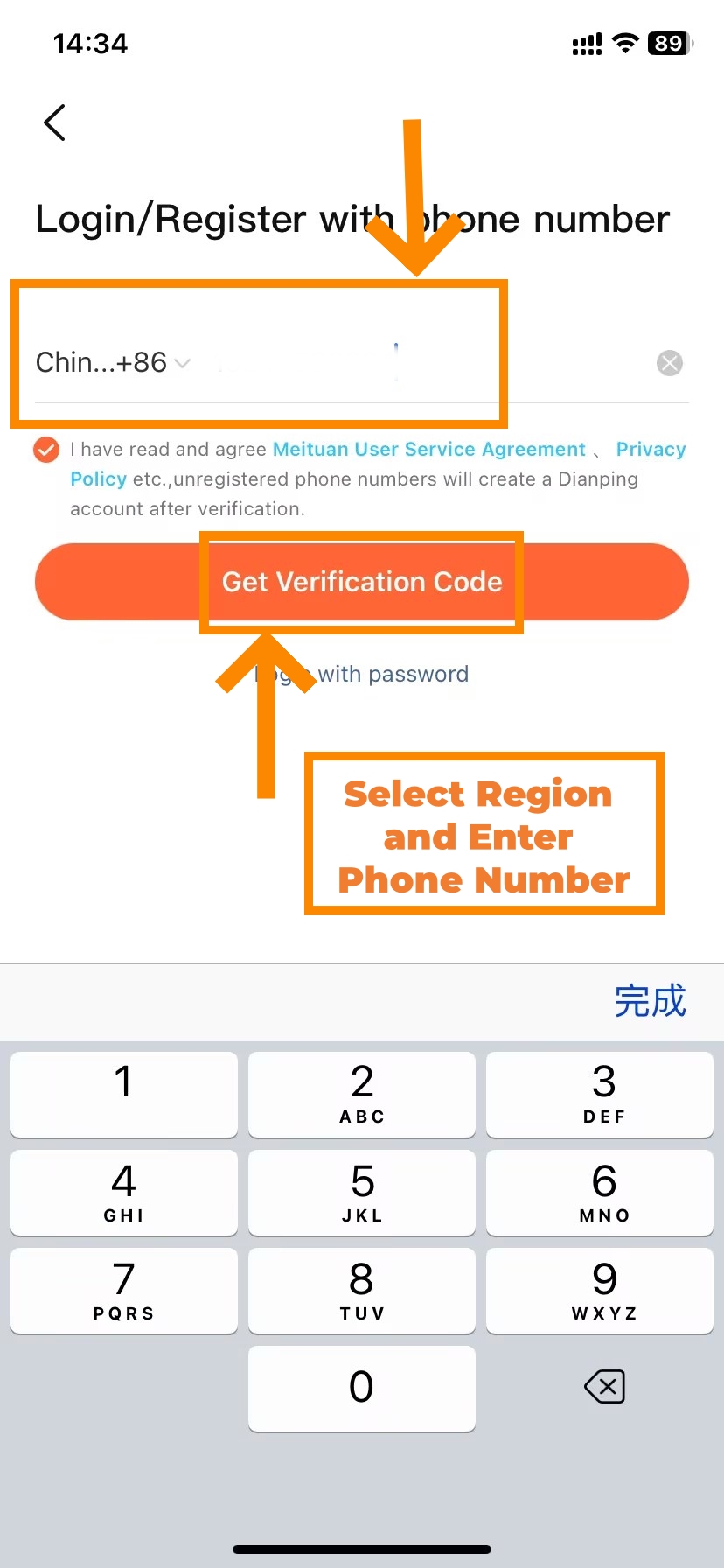
- Dianping App Download & Installation Process(Step 3)
-
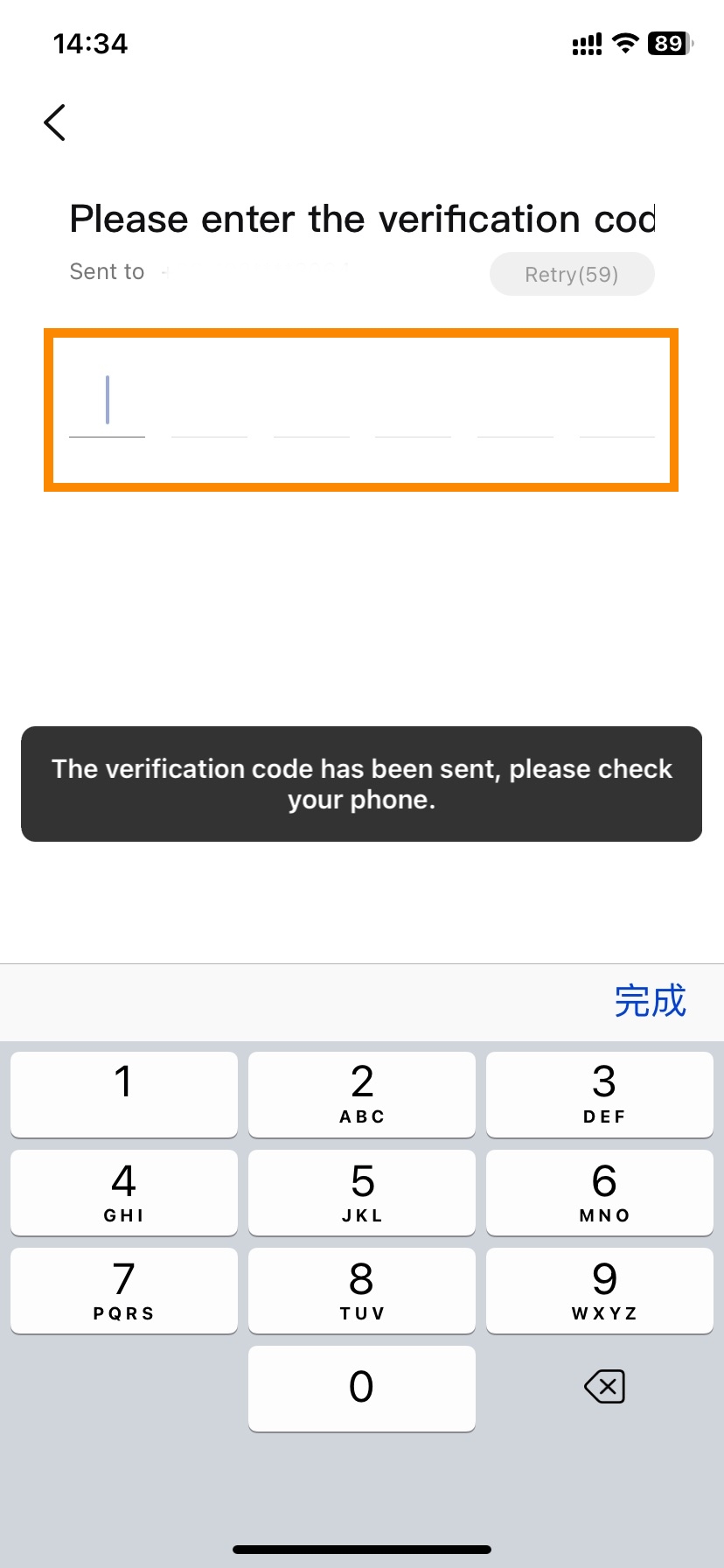
- Dianping App Download & Installation Process(Step 4)
Dianping supports registration with foreign phone numbers, but it can be hit and miss depending on the country and carrier. If your phone number isn’t accepted, WeChat login is by far the fastest, most reliable option, and takes literally ten seconds — automatically giving you access to WeChat Pay too.
- Method 1: Foreign phone number — Tap 我的 (My) at the bottom-right corner. Hit the login banner at the top. Tap the flag icon to the left of the number field and scroll to your country. Enter your number without any + or 00 prefix. Wait up to two minutes for the SMS. Enter the six-digit code. Your nickname can be in English.
- Method 2: WeChat login — recommended for most foreign travelers — Tap 微信登录 (WeChat Login) on the login screen. Authorise in WeChat. Account created instantly, no verification code needed. WeChat Pay links automatically, which means coupon purchases work right away.
⚠️ Privacy note for WeChat login: Dianping may import your WeChat friend list and show their activity on your home screen by default. To disable: My → Settings (top-right menu) → Privacy → Disable all third-party social connections.
Method 3: Browse without an account — Close the login prompt. You can read ratings and menus as a guest. Booking, coupons, and delivery all require a logged-in account.
Troubleshooting Common Login Failures
| Problem | Most Likely Cause | Fix |
|---|---|---|
| SMS code never arrives | Carrier blocks international SMS | Wait full 60 seconds, toggle Wi-Fi vs mobile data, try again. If still nothing: switch to WeChat login. |
| Number already registered | Number used previously by someone else | Tap Forgot Password → reset via SMS. Or create a fresh account via WeChat login. |
| Register button does nothing | App version is outdated | Update via App Store / Google Play, then retry. |
| No working phone number | Carrier incompatibility | WeChat login bypasses SMS entirely — use that. |
| Hotel front desk workaround | Emergency fallback only | Enter the hotel front desk phone number; note in comments that staff should relay any messages. |
Switching Dianping App to English
-
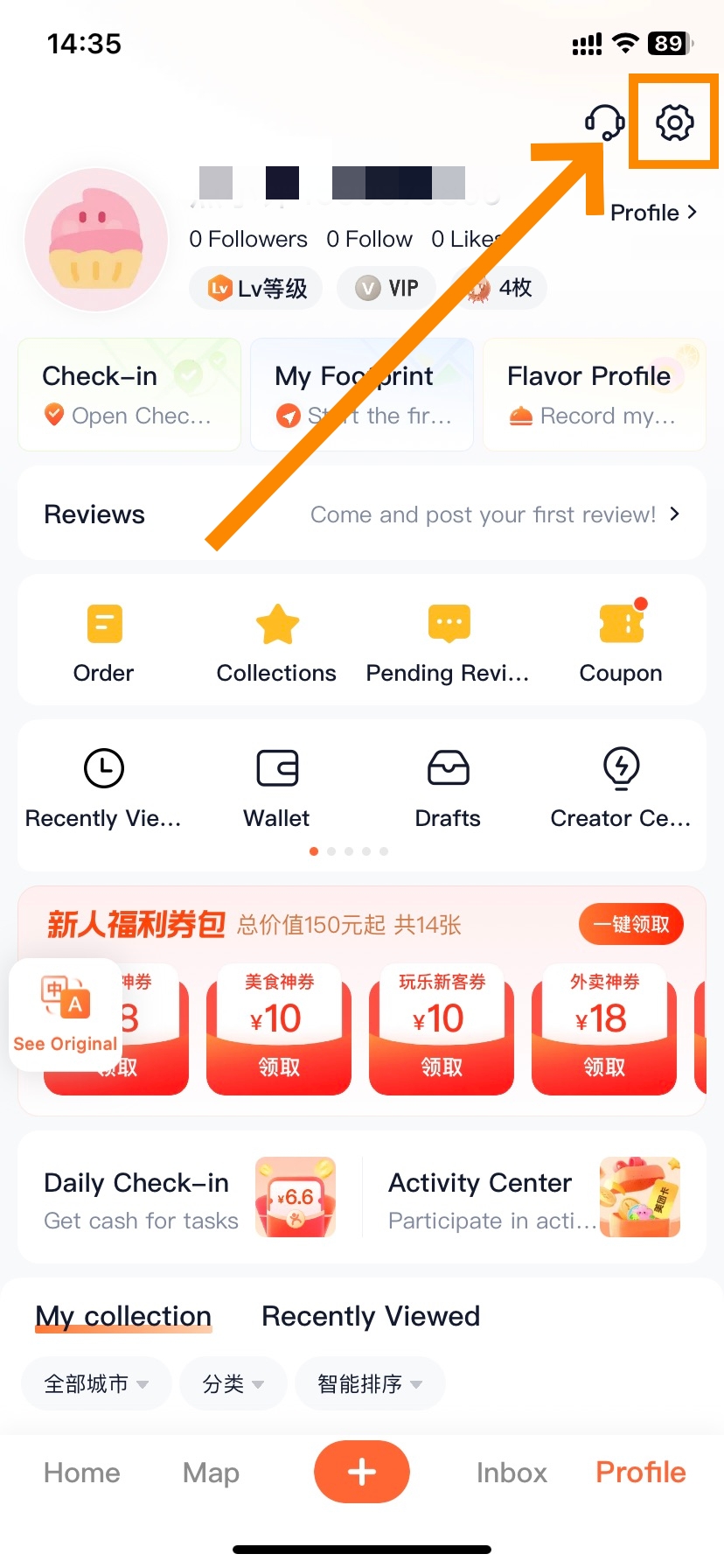
- Dianping Language Setup(Step 1)
-
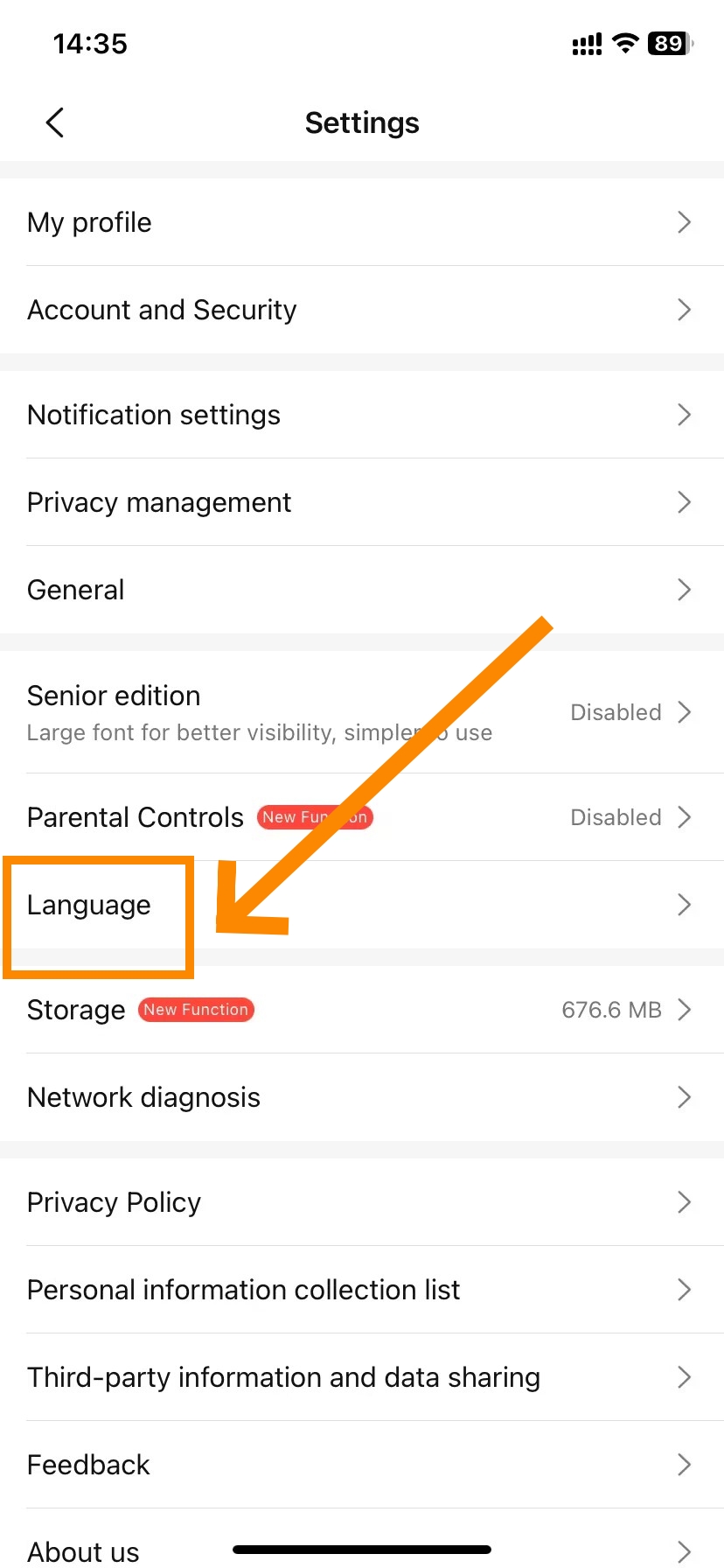
- Dianping Language Setup(Step 2)
-
- Dianping Language Setup(Step 3)
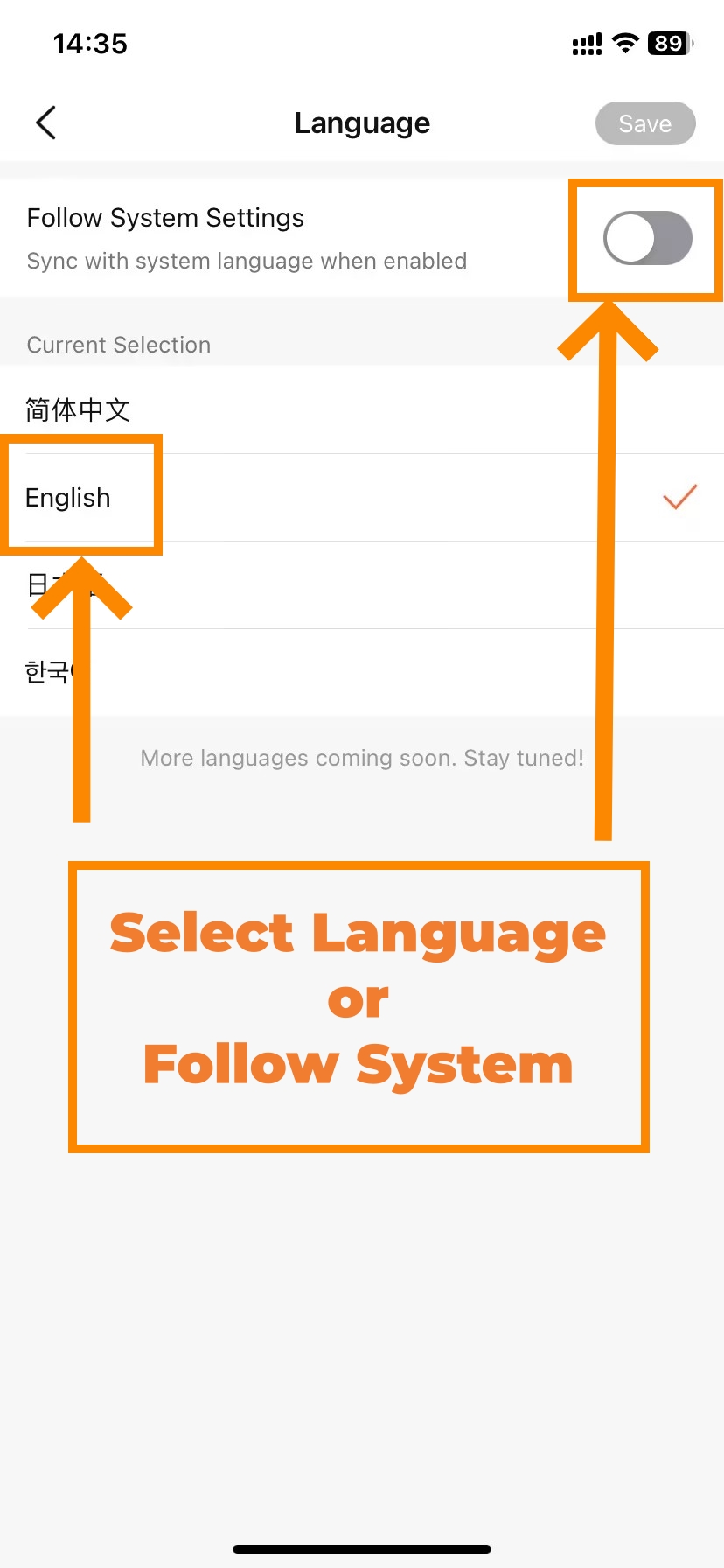
Dianping officially supports English (launched early 2025). One 30-second setting change makes the entire navigation interface display in English.
- Tap 我的 (My) — bottom-right corner
- Tap the three-line icon at the top-right of the My page
- Tap 设置 (Settings)
- Tap 语言 (Language)
- Select English → Save
- The app restarts automatically in English
If you're staring at a fully Chinese interface and can't find Settings, look for the two characters 设置 — tap them and you're in.
📱 WeChat Mini-Program translation: inside the mini-program tap ··· (top-right) → Translate. WeChat overlays the entire page in English instantly. Repeat each time you open it — one tap.
Even with English enabled, some user-generated content (reviews, restaurant names) stays in Chinese. For those moments: long-press any text on iPhone → Translate, or use Google Translate's camera to scan the screen. Android users can use Circle to Search.
-
- Dianping Home Page
-
- Dianping Map Page
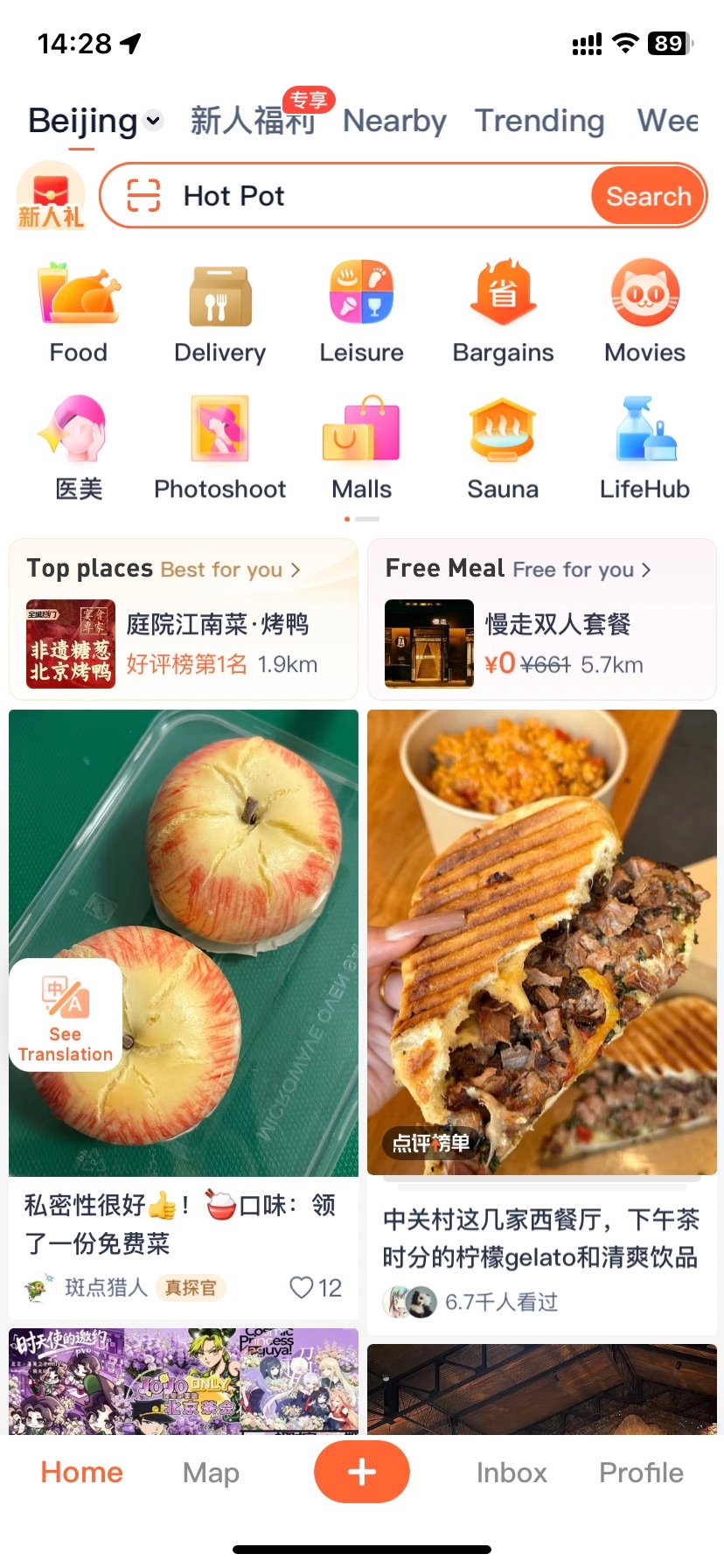
Before diving into specific actions, a quick tour of Dianping's layout saves a lot of confusion. The app is organised around a bottom navigation bar with five elements and a content-rich homepage.
Bottom Menu: Understanding Every Navigation Tab
| Tab | Chinese | What's Here |
|---|---|---|
| Home | 首页 | Search bar, category icons, Must-Eat List entries, personalised restaurant feed |
| Map | 逛逛 / 发现 | Review notes, food videos, trending content — more social, less transactional |
| + (Publish) | 发布 | Write a review, post a note, check in at a restaurant — for content creation |
| Inbox | 消息 / 收件箱 | Booking confirmations, queue alerts, system notifications, social interactions |
| Profile | 我的 | Orders, coupons/wallet, collections, settings, payment setup |
As a traveler you'll spend nearly all your time between Home (finding restaurants) and My (managing coupons and bookings). The + tab and Explore tab are primarily for users who want to write reviews or browse social content.
Exploring the Home Page Layout
The homepage is your main operating base. Top to bottom:
- City selector (top-left) — tap to switch to another city before you search. Dianping automatically detects your location, but you can pre-browse any destination.
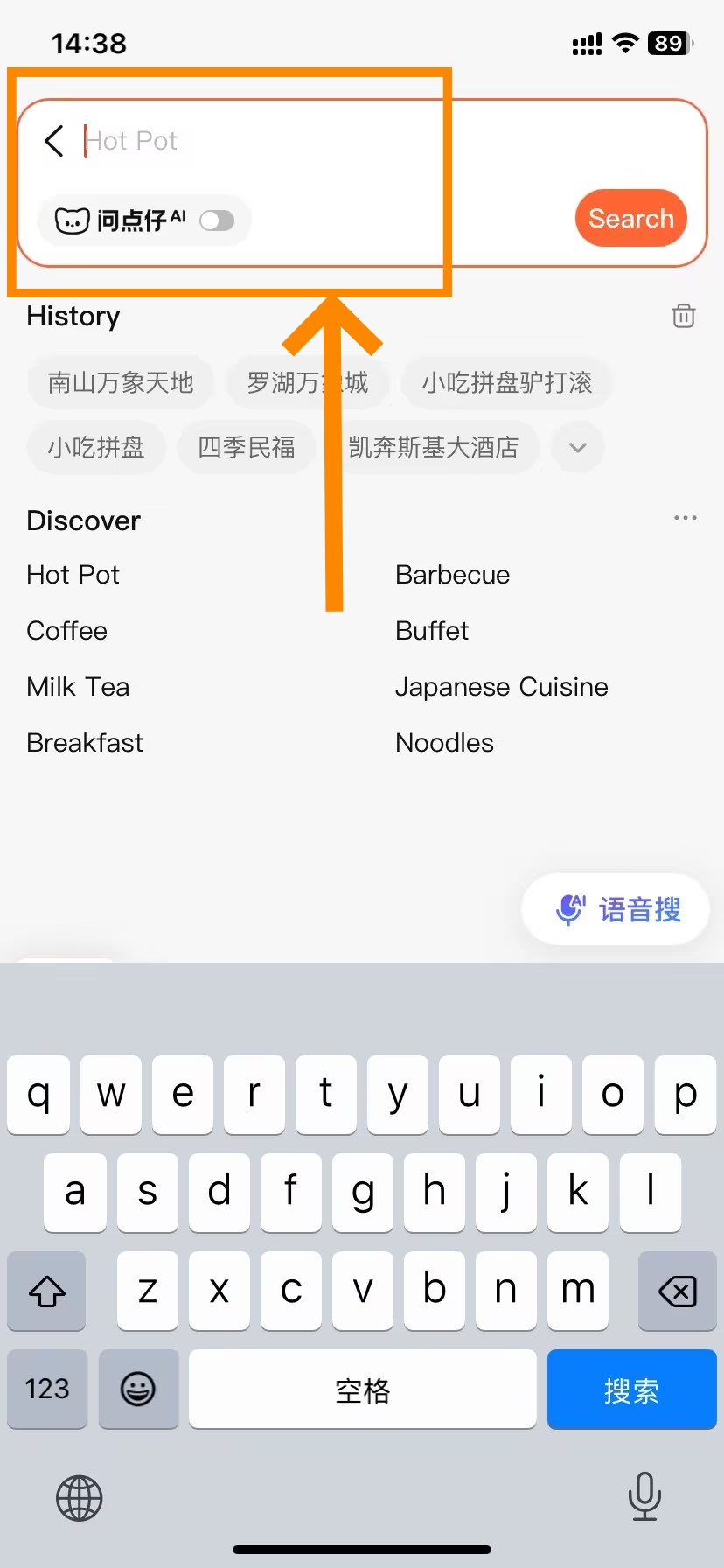
- Search bar — accepts English keywords ("hot pot", "halal", "noodles"), Chinese characters, or voice input. The AI assistant 点仔 (Diǎn Zǎi) is embedded here from 2025 — tap it to get AI-curated restaurant picks.
- Category icon grid — shortcuts to Food (美食), Delivery (外卖), Hotels (酒店), Attractions (景点), Leisure (休闲), Movies (电影), Beauty (丽人), and more. Tap Food as your starting point for restaurant discovery.
- Smart recommendations — algorithm-curated restaurant cards based on your location and interests. Each card shows rating, price range, distance, and any active deals.
- Content feed — user-posted photos and review highlights. Swipe down to browse; tap any card to open the full restaurant page.
Map View for Finding Nearby Places
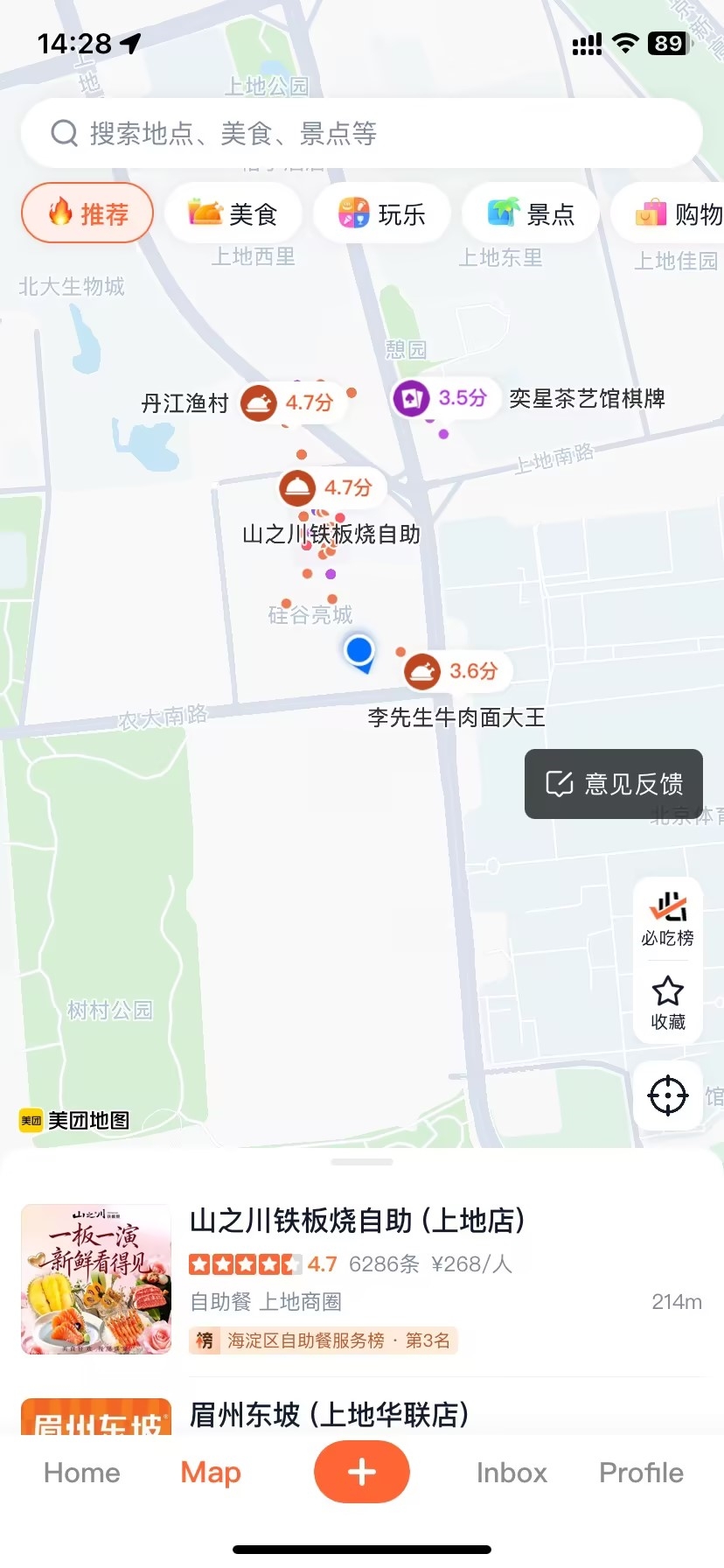
Tap the Map icon to see restaurants around you plotted with pins: the more stars a restaurant has, the larger the pin. The right-side toolbar lets you toggle to Must-Eat List (必吃榜) restaurants only — an easy way to rank the most trusted places in town. Tap a pin to open the restaurant page.
This view is particularly useful when you're walking around and want to see what's within a short distance, rather than searching by name or category.
How to Find Best Restaurants
Mastering Search Filters and Keywords
-
- Dianping Restaurant Search and Filtering(Step 1)
-
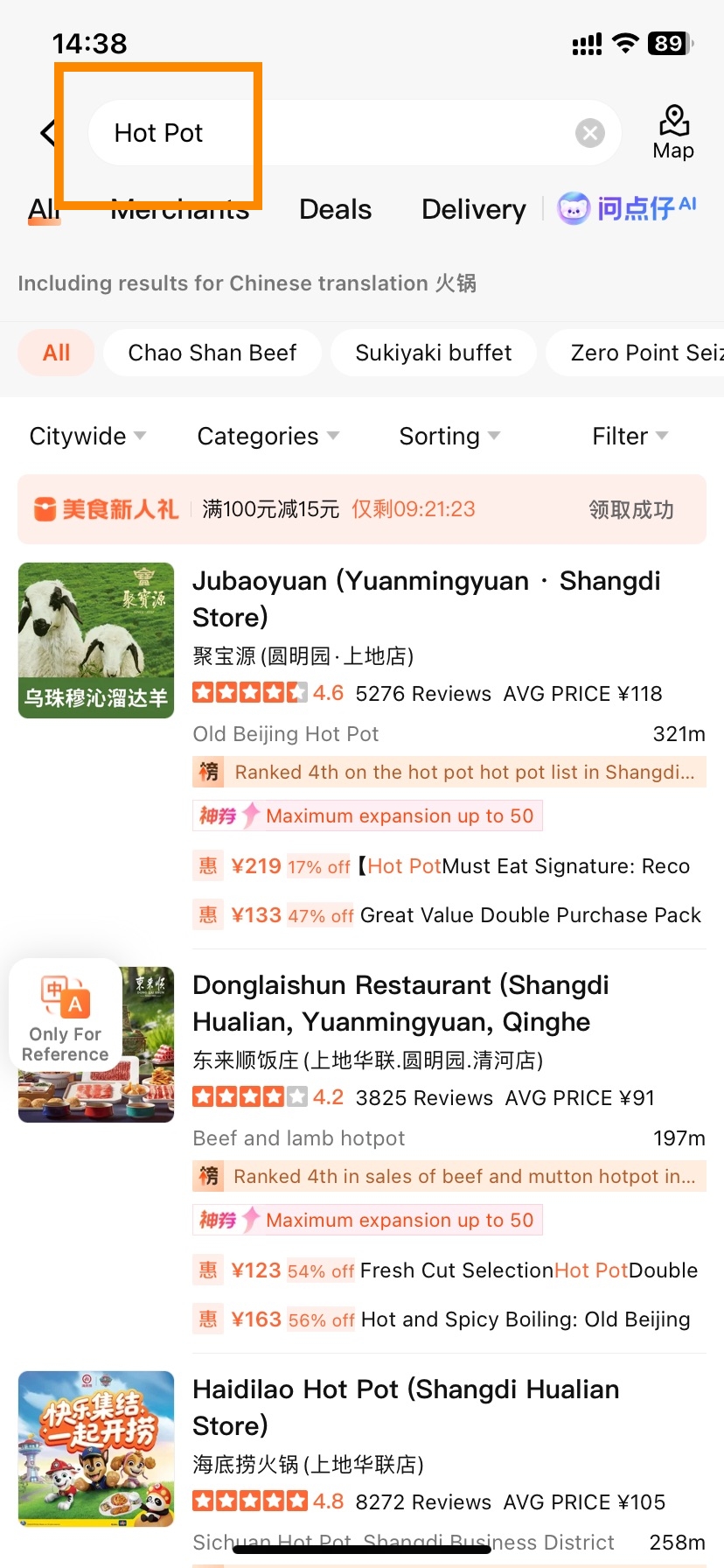
- Dianping Restaurant Search and Filtering(Step 2)
- Nearby (附近) — the fastest daily method. Open the app, tap the search bar or the Nearby shortcut. Dianping lists the highest-rated restaurants within one kilometre, sorted by score. Filter to 4.5+ with 500+ reviews. Pick the one with the most appetising photos. No further research needed.
- Keyword search. Type directly in the search bar. English works well for broad categories: "hot pot", "noodles", "BBQ", "halal", "Xinjiang cuisine". The app matches them to the right Chinese merchant categories automatically.
- Must-Eat List (必吃榜). Type 必吃榜 in the search bar. This is Dianping's official annual ranking of consistently excellent restaurants — 3,091 restaurants across 144 cities in the 2025 list, with an English version available. When you don't want to research, this list decides for you.
- Category icons on the homepage. Tap Food (美食) to browse restaurants, or Delivery (外卖) to order to your hotel. Sub-categories like hot pot, barbecue, Japanese, and Cantonese appear as filter chips once you're inside Food.
Tactics for Refining Search Results
- Rating: set to 4.5+ as your default. The local floor is 4.2 — below that, residents simply don't visit.
- Price: ¥ (under ¥50/person) · ¥¥ (¥50–100) · ¥¥¥ (¥100+)
- Distance: 500m / 1km / 3km — depending on how far you want to walk
- Has group deal (有团购): shows only restaurants with active discount coupons — tick this to instantly shortlist places where you can save 30–50%
- Cuisine type: tap the category chips to filter by hot pot, noodles, Sichuan, Cantonese, and so on
Key Data Points on Restaurant Pages
Every restaurant page follows the same layout. Once you know it, you can get the information you need in under 30 seconds:
| Section | What to Look For |
|---|---|
| Rating + review count (top) | 4.5+ = excellent; 4.2–4.4 = acceptable; below 4.0 = skip |
| Per-person price 人均 (top) | A rough estimate — actual bill can vary ±20% |
| Sub-scores: Taste / Environment / Service | 4.6 taste + 3.8 service = great food, patience required |
| Menu tab 菜单 | Full digital menu with photos and prices — screenshot this before you enter |
| Group Deals tab 团购 | Active coupons and set meals — buy here before you walk in |
| Book Table 订座 | Real-time reservation entry |
| Queue 排队取号 | Virtual queue for restaurants that don't take bookings |
| Reviews tab 点评 | User reviews — filter to "photos only" (只看有图) for fastest assessment |
| Address 地址 (bottom) | Long-press to copy → paste into DiDi for navigation |
| Opening hours (bottom) | Many restaurants close 14:00–17:00 — check before heading out |
Evaluating Reviews Without Reading Chinese
-
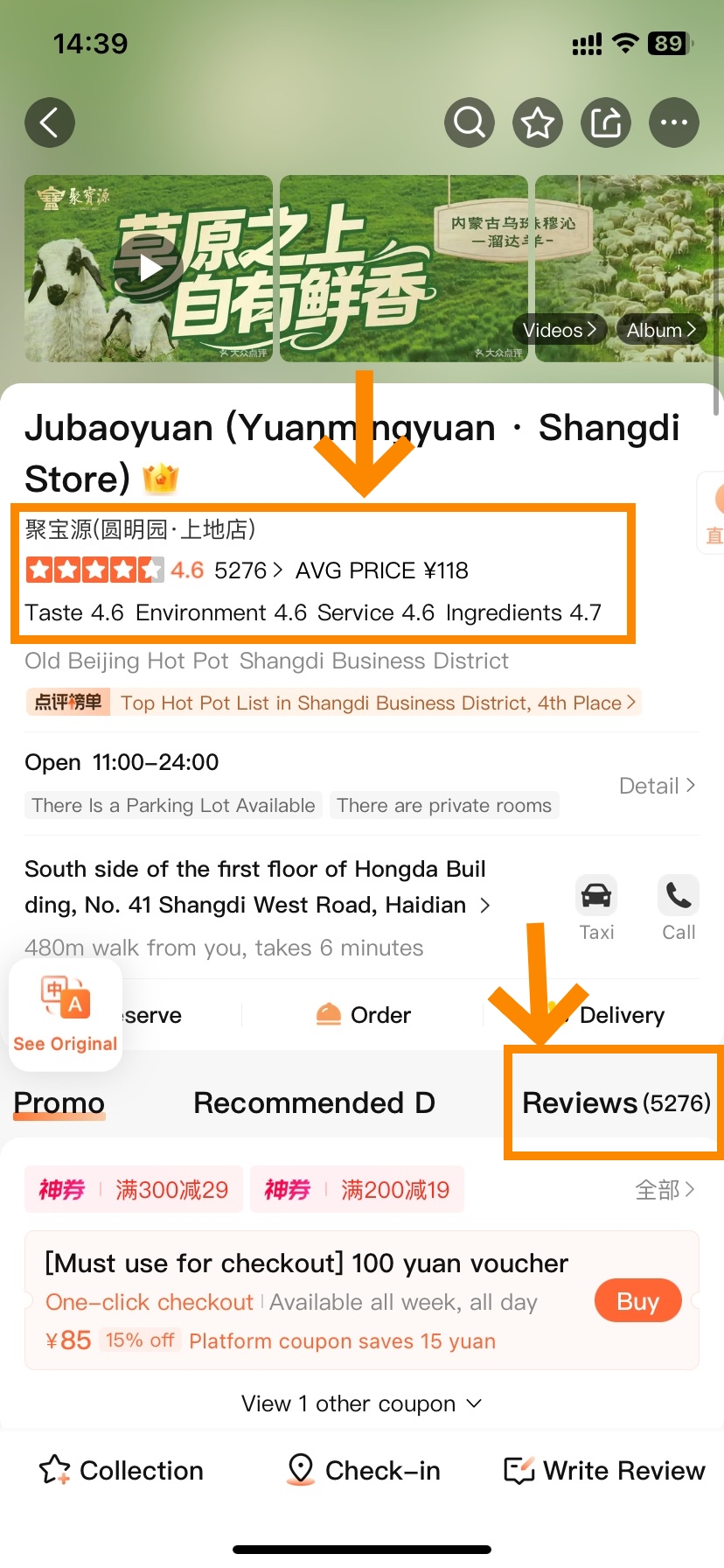
- Dianping Restaurant Evaluation
-
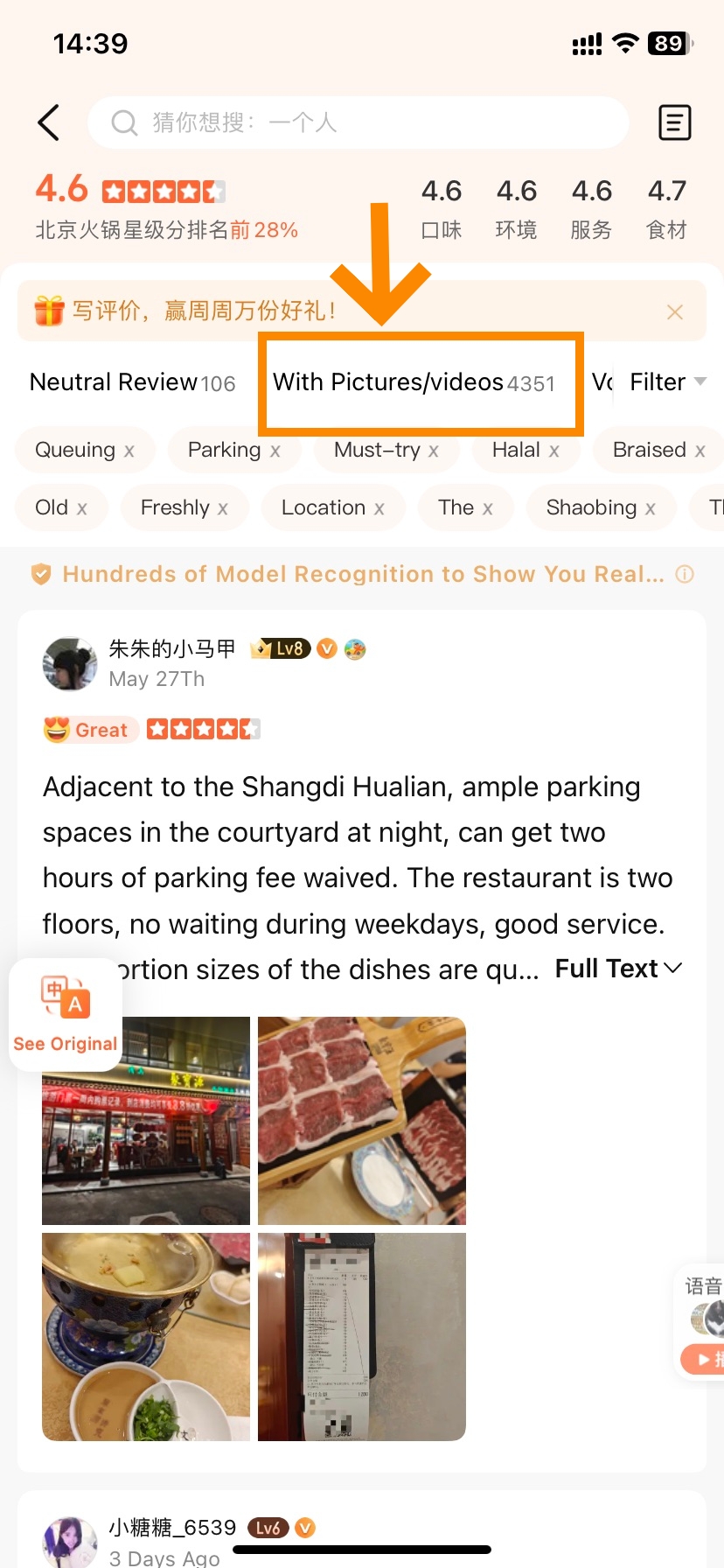
- Dianping Restaurant Evaluation
Photos carry most of the signal. Filter reviews to 只看有图 (photos only), scroll through twenty images, and you already know more than any text tells you: real portion sizes, actual presentation, how busy the dining room gets.
For text-based clues, scan for these keywords:
| Chinese | Meaning | Signal |
|---|---|---|
| 性价比高 | Great value for money | ✅ Strong positive |
| 食材新鲜 | Fresh ingredients | ✅ Positive |
| 再来 / 会再来 | Will come back | ✅ Positive |
| 坑 | Scam / rip-off | 🚨 Leave immediately |
| 名不副实 | Doesn't match its reputation | 🚨 Warning |
| 贵 | Overpriced | ⚠️ Caution |
| 等位久 | Long queue wait | ⚠️ Logistical note only |
| 服务差 | Poor service | ⚠️ Negative |
Dianping's March 2026 Evaluation Transparency Report introduced AI-assisted review screening. Reviews in the 最新 (Most Recent) tab have been through this filter and are the most reliable starting point. Always read the last 30 days of feedback before committing.
How to Reserve Dining Seats
The Step-by-Step Table Booking Process
-
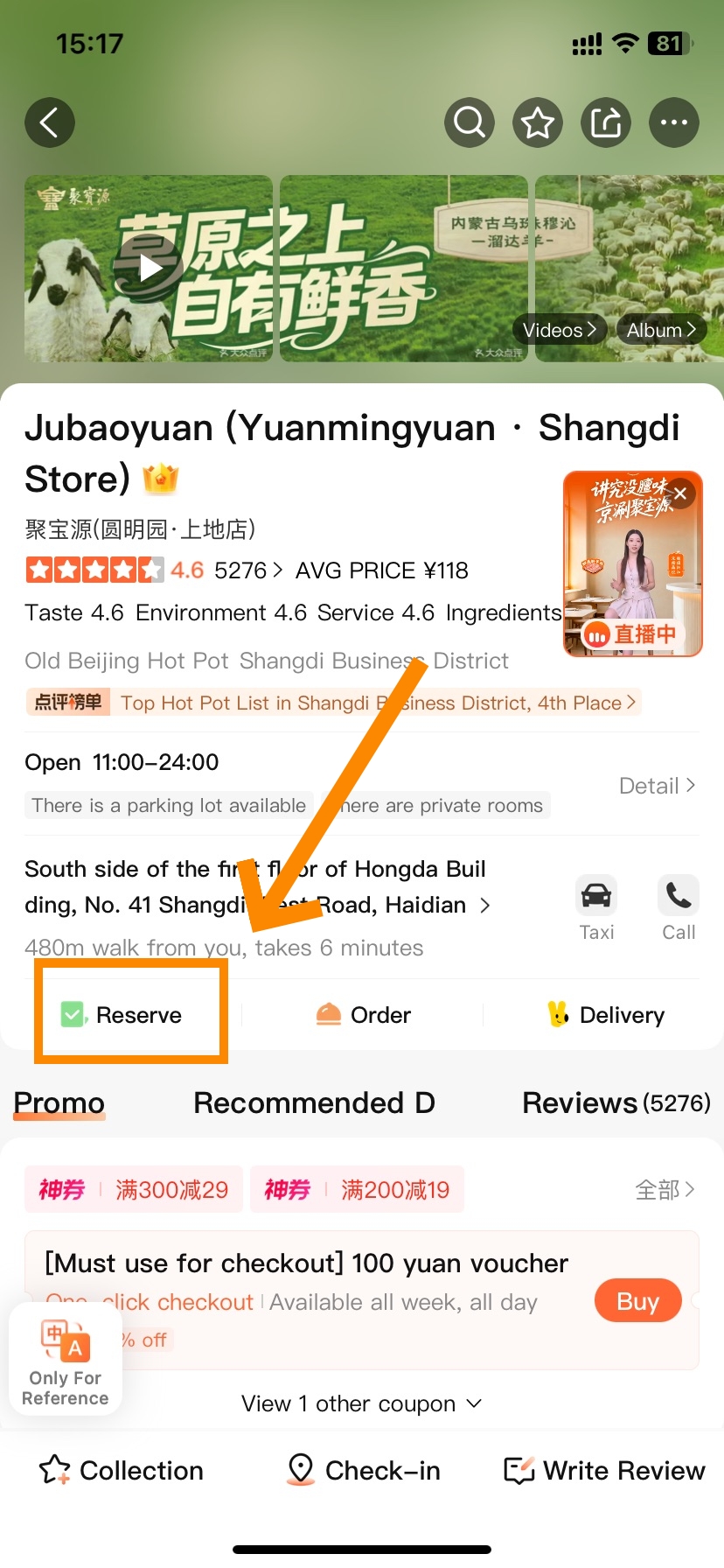
- Dianping Table Reservation(Step 1)
-
- Dianping Table Reservation(Stpe 2)
-
- Dianping Table Reservation(Step 3)
-
- Dianping Table Reservation(Step 4)
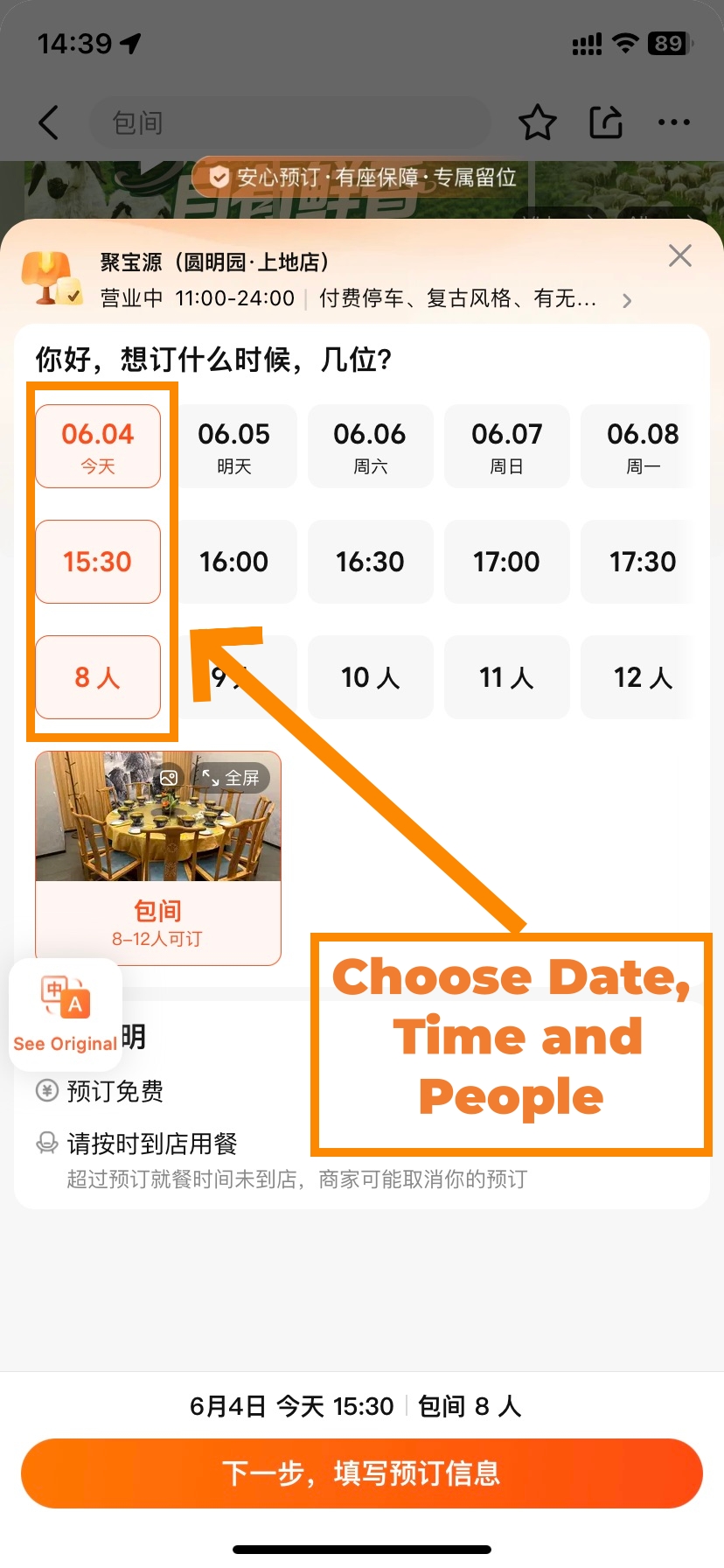
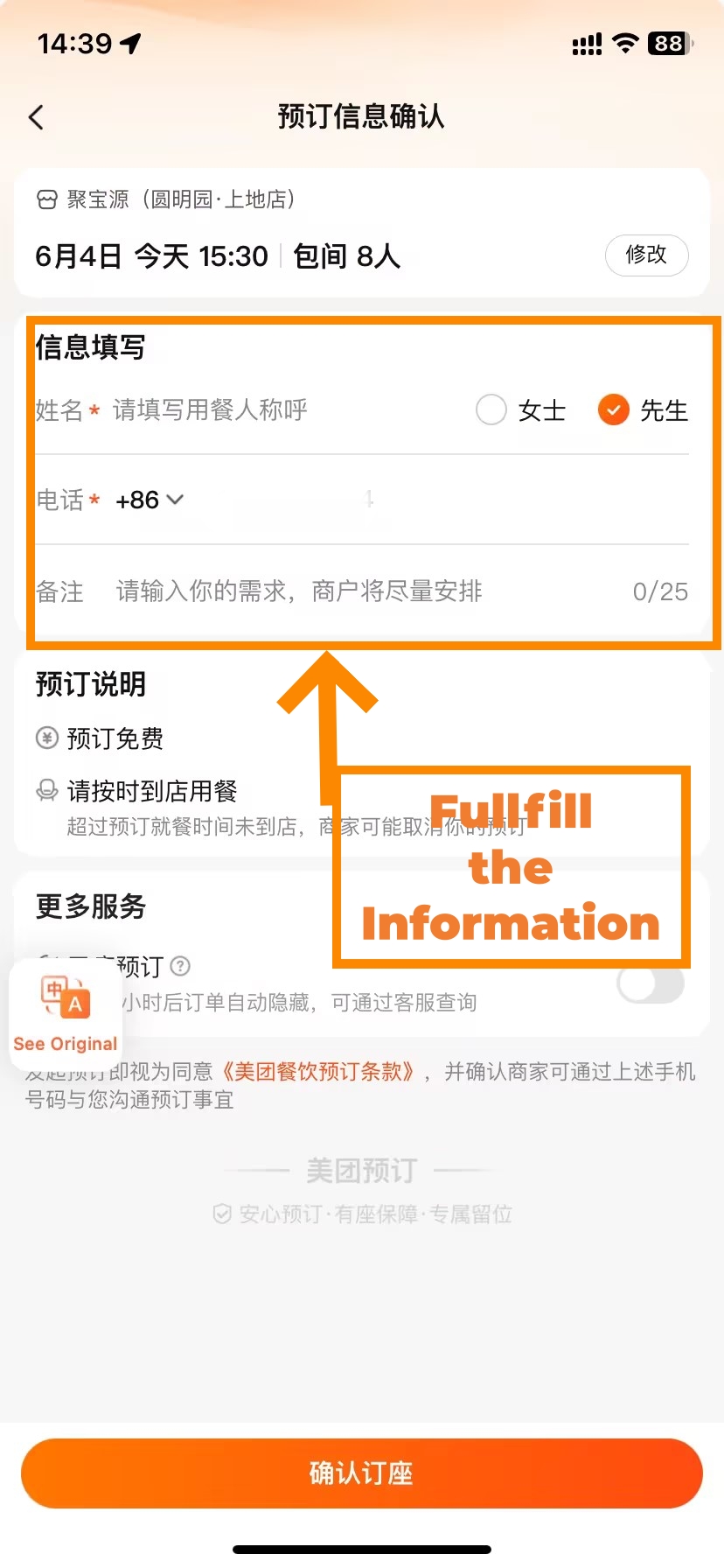
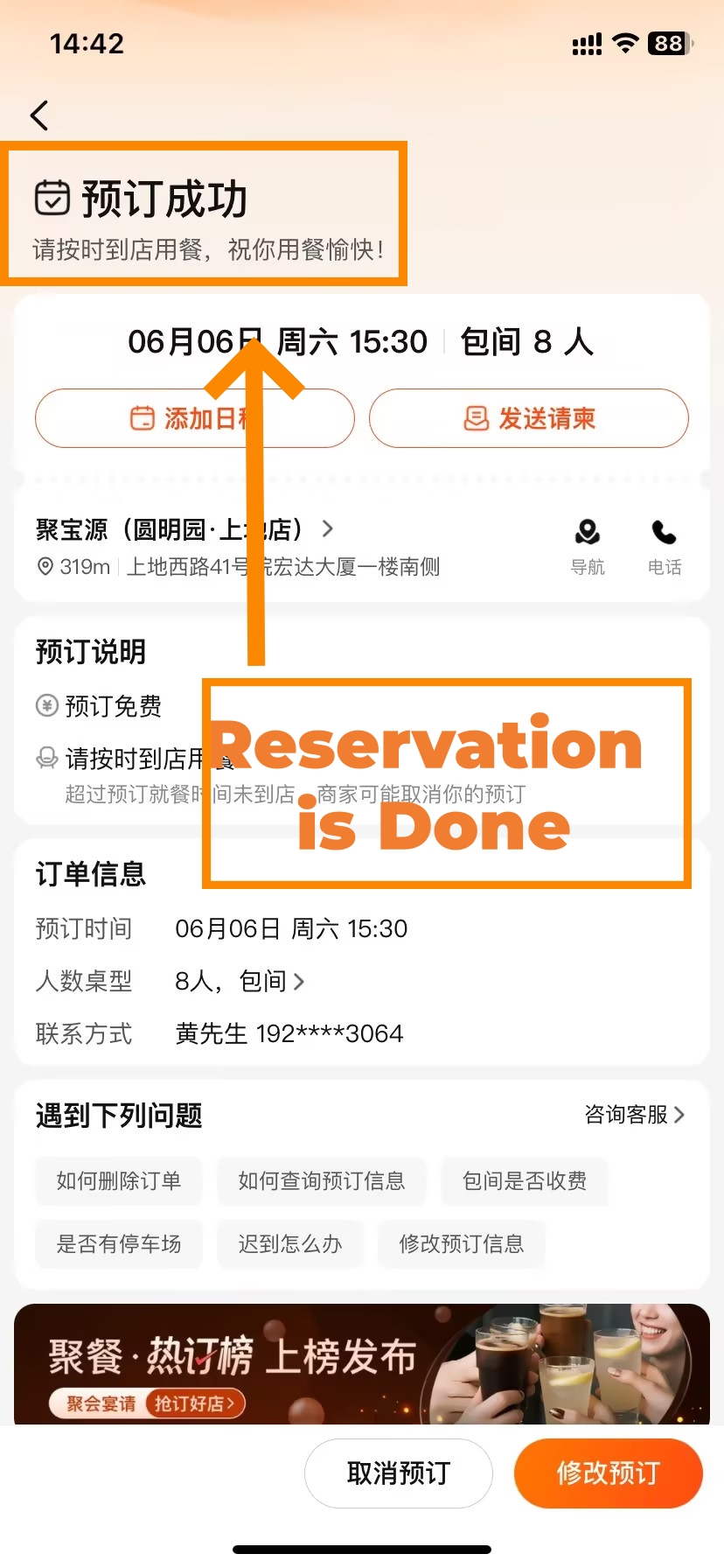
95% of restaurants rated 4.0 or above accept Dianping reservations. The full booking flow takes about 90 seconds and requires no Chinese at any point.
- Open the restaurant page → tap 订座 (Book a table) below the menu/reviews/deals tabs
- Select a date — the calendar shows today plus the next 7 days
- Select your party size
- Choose a time slot — displayed in 30-minute intervals
- Key step — Notes field: type in English: "Foreign guest. Name: [Your Name]. English OK? [dietary notes if any]"
- Tap Confirm Booking (确认预订) — usually no deposit required
- You'll receive a Dianping notification. The SMS is in Chinese — the vibration confirms success.
- At the restaurant: show the 订座成功 (Booking Confirmed) screen to the host
📱 WeChat Mini-Program: the booking flow is identical. The notes field has a stricter character limit — keep it to: Name + "foreign guest" + one dietary note.
For high-demand periods — Chinese New Year, National Day Golden Week — some restaurants activate a deposit-lock system (定金锁位). Paying ¥50–200 holds your table. If the restaurant cancels, they owe you double the deposit back.
Joining Digital Waiting Lists
Some of the most popular restaurants don't take reservations. They run a virtual queue instead. You'll see 排队取号 or 在线取号 instead of a booking button.
- Tap 排队取号 → select party size
- Enter a phone number to receive your queue notification
- Receive your queue number and estimated wait time (e.g. "30 tables ahead, approx. 60 minutes")
- Leave the area and explore nearby — check the app for live progress
- When your turn approaches, Dianping notifies you. Arrive within 10 minutes.
⚠️ 2025 update — some chain restaurants now require verification of a Chinese phone number's last four digits, or even physical SIM confirmation, to combat ticket scalping.
If you hit this wall:
- Ask your hotel front desk to queue using their phone — just show them the restaurant page
- Visit off-peak: 14:00–16:00 for lunch, before 17:30 for dinner — queue pressure drops sharply
- At the door: "No Chinese number — can I join the physical queue?" Most restaurants will accommodate
What to Do When Reservations Aren't Possible
- Ask your hotel front desk to call ahead. Show them the restaurant page — the phone number is at the bottom. Most front desks handle this in under a minute.
- Visit off-peak. Lunch 14:00–16:00 or dinner before 17:30 gives you the best walk-in chances at almost any restaurant in China.
- Show up and show your name. Say "Dianping, my name is [X]" and show the restaurant page. The host can add you manually.
How to Save Money with Coupons
Dianping's group-deal and coupon system is the most effective way to save money eating in China. Understand the two types before you buy.
Understanding Different Deal Types
| Type | Chinese Name | How It Works | Best For | Watch Out For |
|---|---|---|---|---|
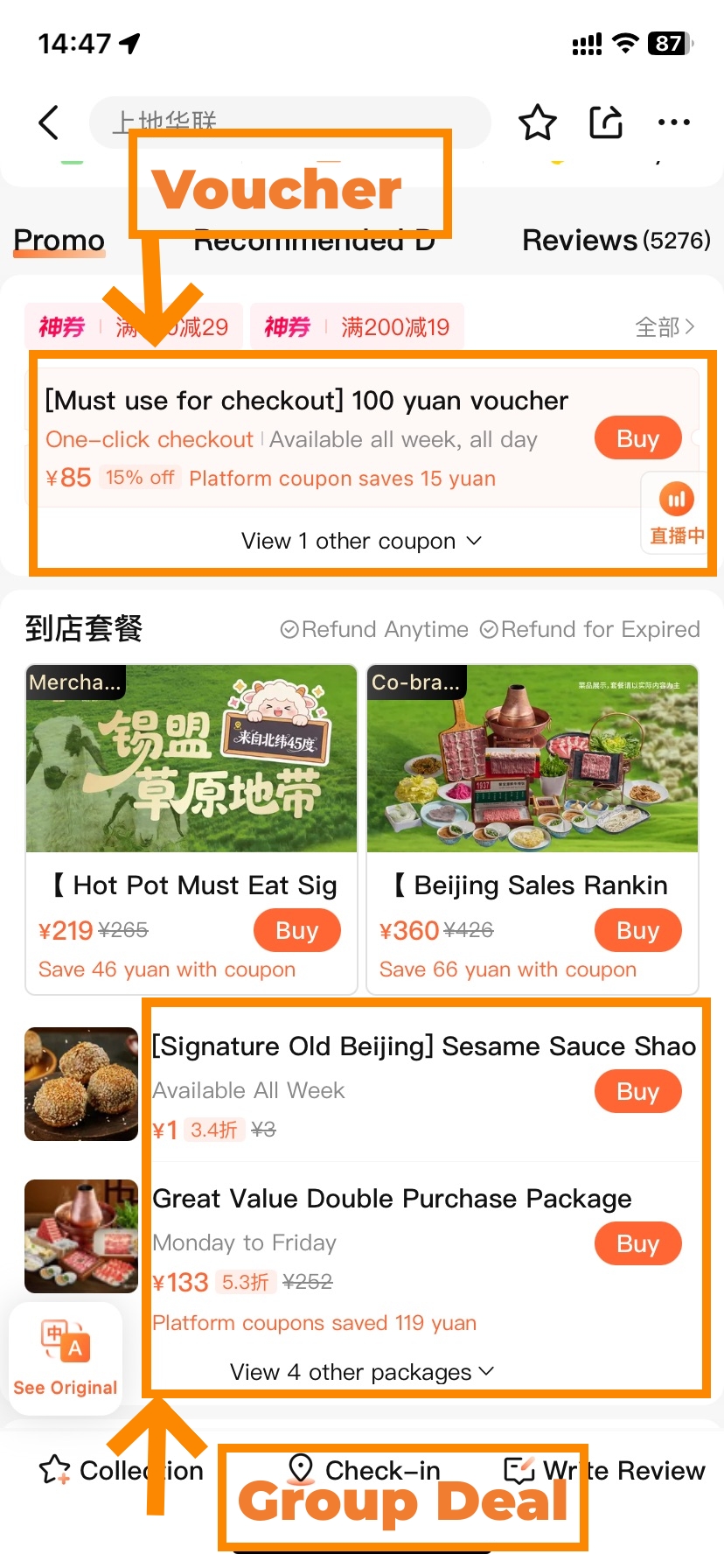
| Cash Voucher | 代金券 (Dàijīnquàn) | Pay ¥X to get ¥Y credit (e.g. ¥85 buys ¥100 of credit) | Groups — when you know you'll hit the minimum spend | Minimum spend threshold; expiry date (usually 7–30 days); often cannot be used in private rooms |
| Set Meal | 套餐 (Tàocān) | Fixed dish combination at a flat price — 15–30% below menu | Couples or small groups — no guessing about portions | Dishes are fixed; you cannot substitute items |
The set meal (套餐) is safer for first-timers — you know exactly what's coming and what it costs. The cash voucher (代金券) delivers better value for larger groups when you're confident you'll clear the minimum. Before buying a voucher, always tap "Purchase Notes" (购买须知) to check the rules — especially the private-room exclusion.
The Voucher Purchasing Process
-
- Dianping Deal Purchase(Step 1)
-
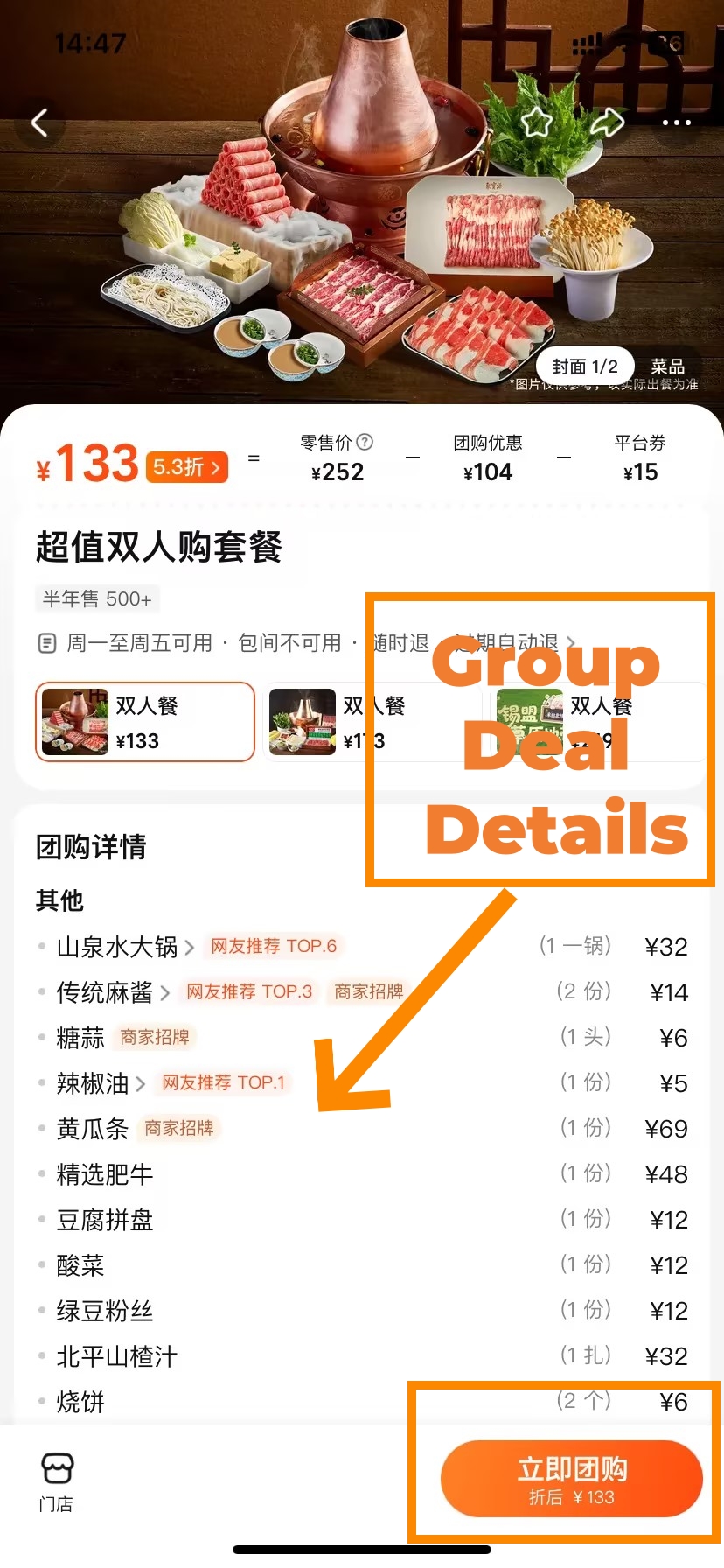
- Dianping Deal Purchase(Step 2)
-
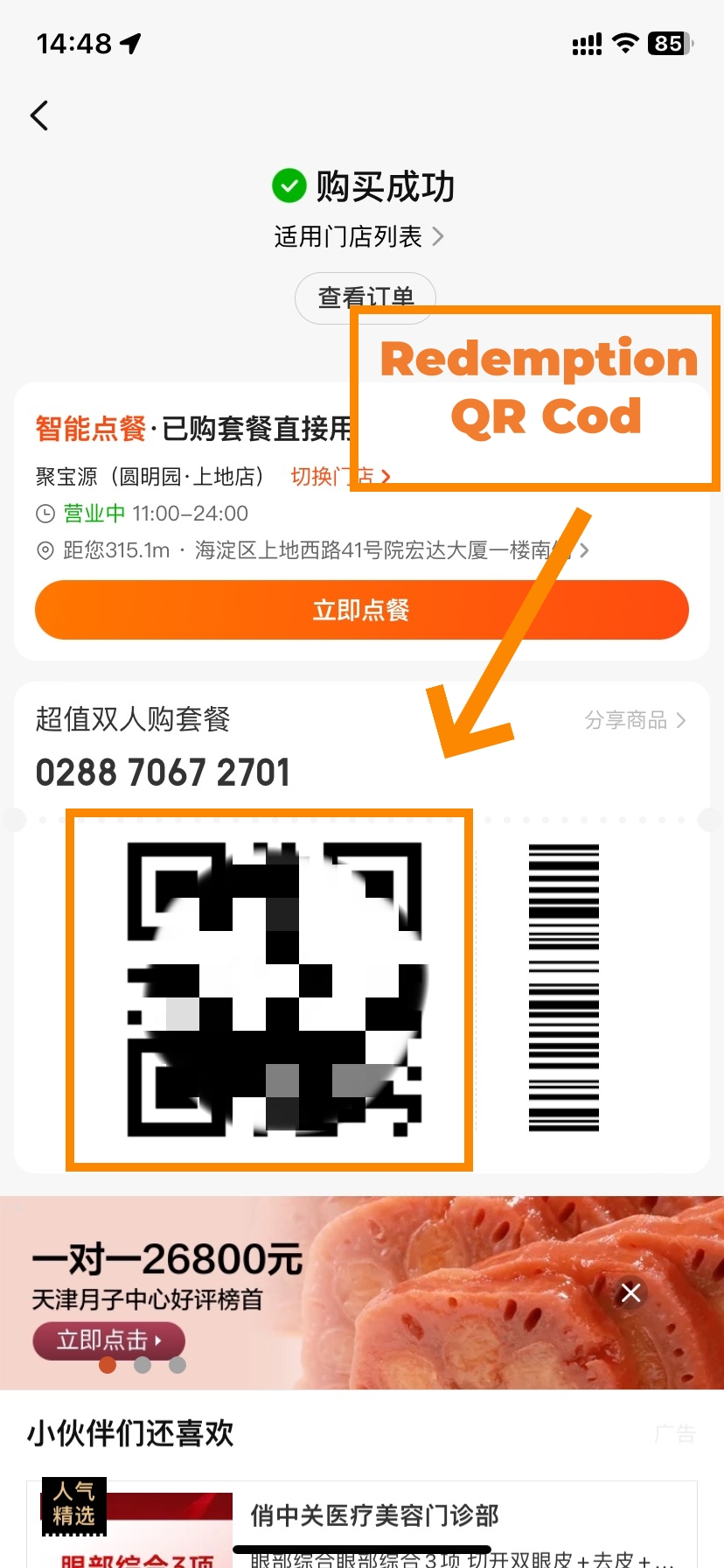
- Group Deal Details(Step 3)
Buy your coupon before you walk into the restaurant. You can do it standing outside. Then the moment you sit down — before you open the menu — show the server the QR code. Restaurants cannot apply it retroactively once the bill is printed.
- On the restaurant page, tap the 团购 (Group Deals) tab
- Browse available set meals and cash vouchers — each shows deal price, original price, validity, and minimum spend
- Tap your chosen deal → tap 立即购买 (Buy Now)
- Select Alipay or WeChat Pay
- After payment, the coupon saves to My → Card Pack (卡包)
- At the restaurant, before ordering: say "I have a Dianping coupon" + open the coupon QR code from Card Pack
- The server scans it — discount applies automatically to your bill
Avoiding Common Coupon Mistakes
- Showing it after the bill is printed: coupons cannot be applied retroactively. Show the QR code before you order — always.
- Expired voucher: some expire within 7 days of purchase. Check the validity period on the listing before buying.
- Missing the minimum spend: cash vouchers require a minimum order (e.g. "¥100 voucher valid on orders of ¥150+"). The listing states this clearly.
- Stacking deals: most Dianping coupons cannot be combined with other promotions. Ask the server before they close the bill if you're unsure.
- Private room exclusion: many cash vouchers explicitly cannot be used for private-room dining. If you've booked a private room, buy a set meal instead, or check the terms first.
Handling Special Dietary Needs
The notes field in the booking flow is your silent translator. Write anything in English — the restaurant sees a Chinese translation:
- Birthday: "Birthday celebration for [name] — decoration welcome if possible"
- Dietary: "No pork / Halal required / Vegetarian / Shellfish allergy"
- Language: "Foreign guests — English-speaking staff preferred if available"
- Seating: "Window seat preferred / Private room for [X] people"
🎟️ Government dining vouchers (消费券) — a hidden saving many foreign visitors miss: Several Chinese cities — including Shanghai, Harbin, Changsha, and Wuhan — run government-subsidised dining vouchers through Dianping. Foreign visitors are eligible. The discount can reach 50%.
How to find them: search [city name] + 消费券 in the Dianping search bar (e.g. 上海消费券). If a campaign is active, you can stack a government subsidy on top of a regular Dianping coupon.
How to Order Food Delivery
In September 2025, Dianping relaunched its quality delivery service with AI-assisted curation that favours high-rated dine-in restaurants. The food is certainly better than the average delivery from most of the mainstream platforms. For rainy days, or late nights, or just the days when you'd rather not do the exploring yourself.
For a broader look at food delivery options in China, our food delivery apps in China guide covers the full landscape.
Placing a Delivery Order
-
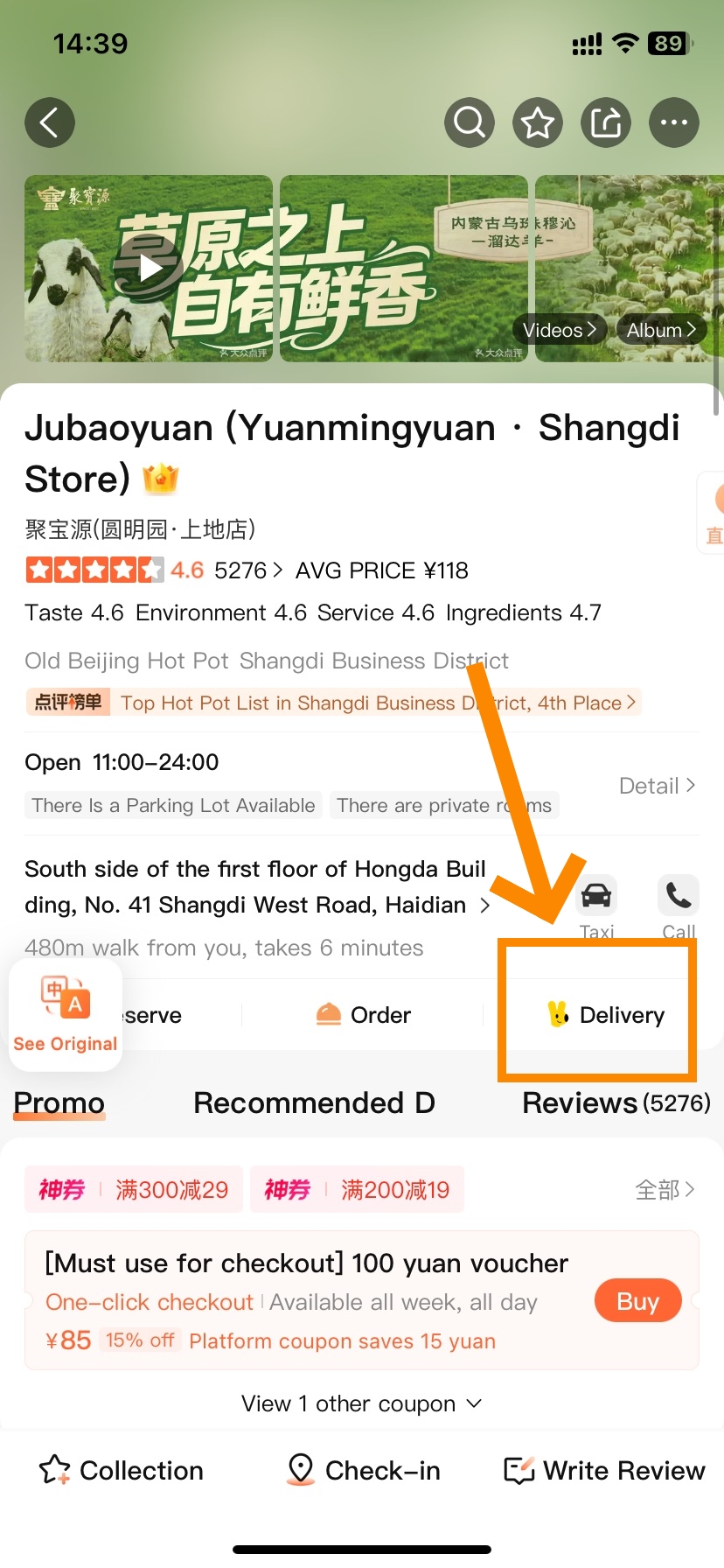
- Dianping Delivery Ordering(Step 1)
-
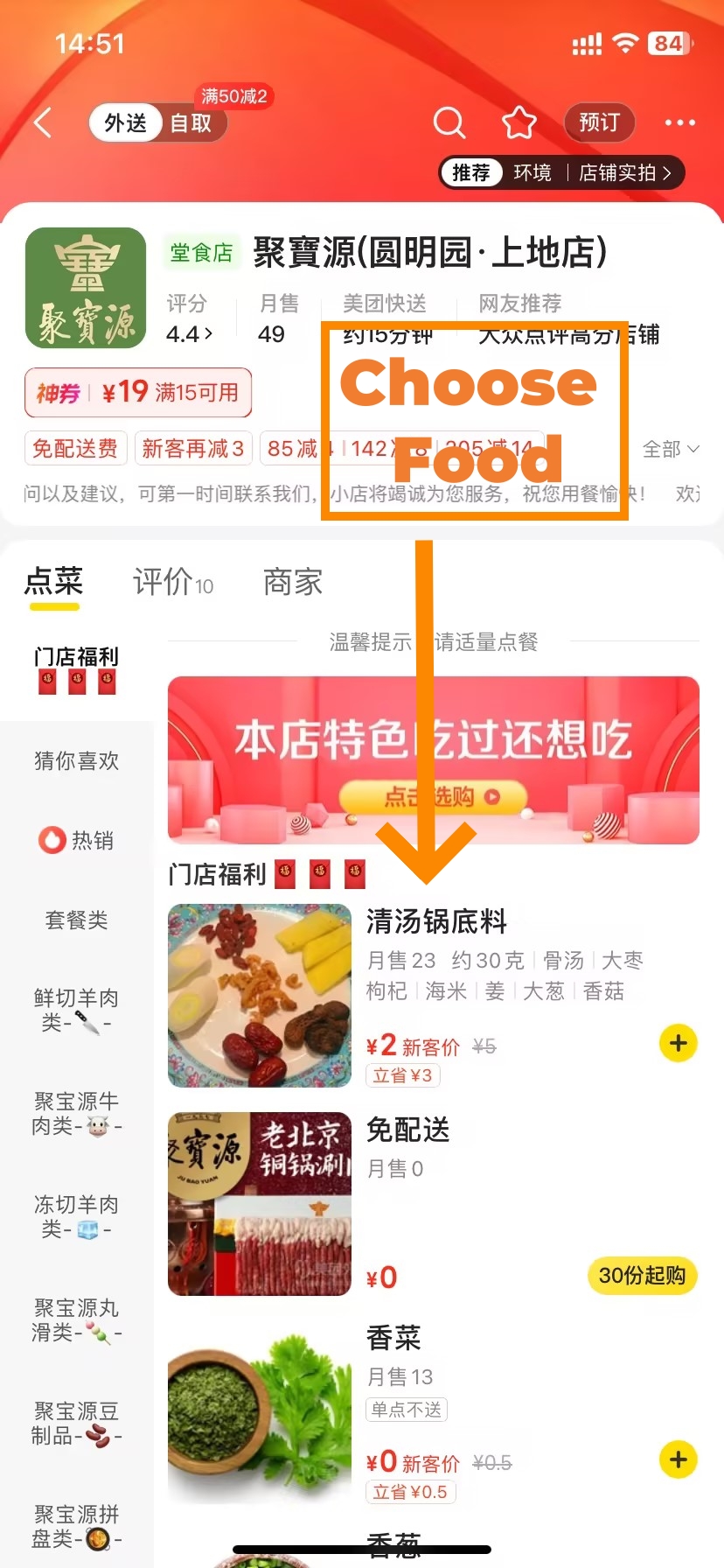
- Dianping Delivery Ordering(Step 2)
-
- Dianping Delivery Ordering(Step 3)
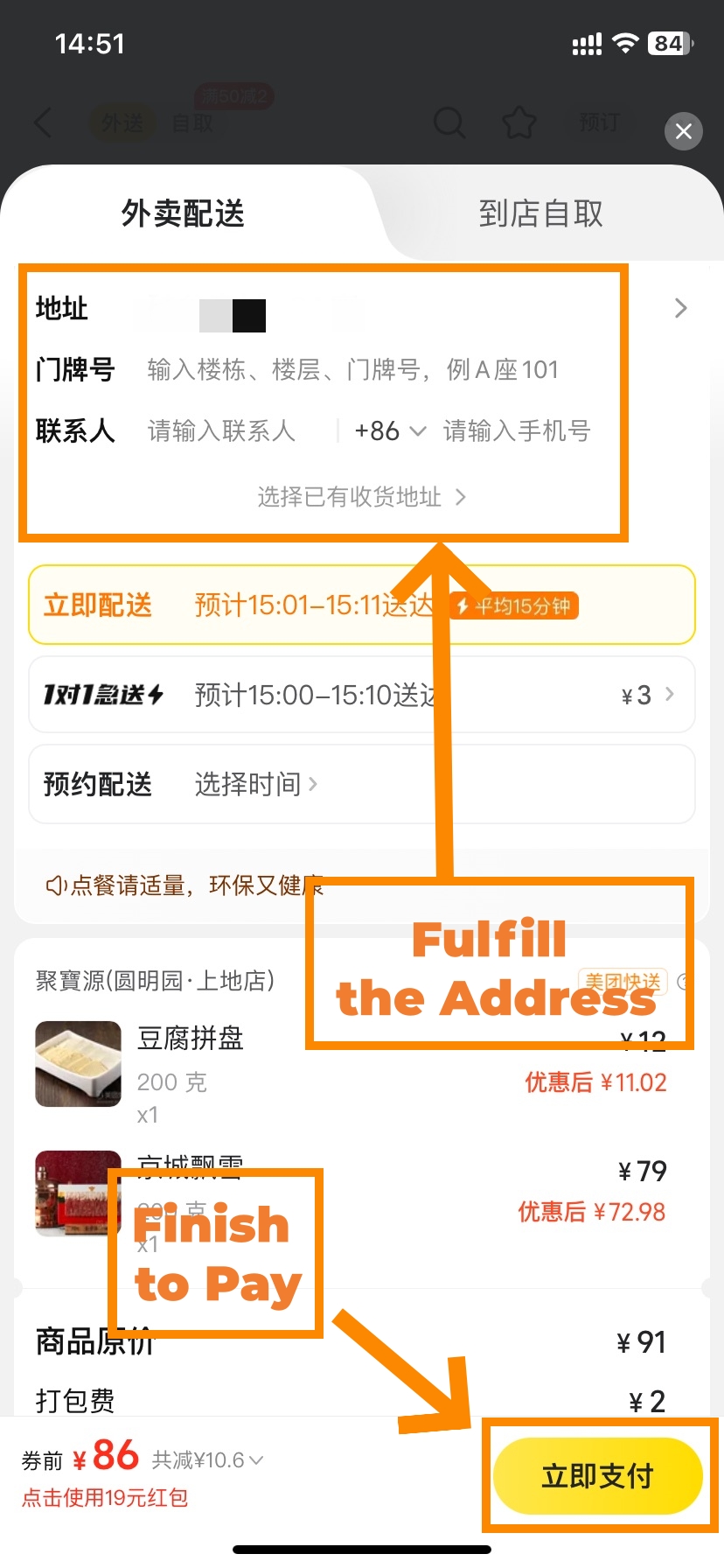
- Find a restaurant → tap the 外卖 (Delivery) option on the restaurant page. Or tap Delivery in the homepage category grid to browse all available restaurants
- Browse the delivery menu and add items to your cart
- Enter your delivery address — your hotel's English name plus room number works fine
- In the delivery notes write: "Please leave at hotel reception if no answer. No Chinese phone number."
- If the system requires a Chinese phone number, enter the hotel front desk number and note the room number in comments
- Pay via Alipay or WeChat Pay → track delivery in real time
Delivery Logistics for International Travelers
- Dietary notes: write "no pork / halal / vegetarian" in English in the delivery notes — the rider sees a Chinese translation
- No local phone: always enter the hotel front desk number as the contact; note in comments that the rider should contact the front desk
- Notification language: delivery push alerts arrive in Chinese — the vibration pattern is enough to know your order is moving
- Rainy days / late nights: Dianping's curated delivery pool includes restaurants open after midnight in major cities — useful when dine-in options are limited
📱 WeChat Mini-Program delivery: the delivery tab is available in the mini-program. If a restaurant shows no delivery option there, check the same listing in the standalone app — some restaurants enable delivery only through the full app.
Scam and Tourist Trap Avoidance
The Importance of the 4.2 Rating Threshold
Chinese locals use 4.2 as their personal floor. They have thousands of options and no patience for mediocre food. A restaurant sitting below 4.2 means the people who actually live in that city chose somewhere else. Follow their lead.
- 4.7–5.0: Rare and genuine. Expect queues. Book in advance.
- 4.5–4.6: Locally regarded as excellent. The range to target.
- 4.2–4.4: Acceptable backup option.
- 4.0–4.1: Check the most recent reviews carefully before committing.
- Below 4.0: Move on — there is always a better option nearby.
Spotting Warning Signs of Fake Reviews
Dianping's AI review screening — introduced in its March 2026 Transparency Report — catches a large volume of fake content. Restaurants caught incentivising reviews dropped 42% after enforcement. Still, knowing the signs helps.
- Burst posting: a flood of reviews appearing in the same two-week window is a classic paid-review pattern
- Identical phrasing: multiple accounts using near-identical sentences points to templated fake content
- Zero photos: real diners photograph their food. A restaurant with 500 reviews and 20 photos has a problem
- Score cliff: high overall rating but the 最新 (most recent) tab shows a sharp quality decline — the early burst was manufactured
- Single-restaurant accounts: reviewer profiles with only one review, no other activity, and no profile photo
Fastest verification: tap 最新 (Most Recent) on the reviews tab and read the last 30 days of feedback. These reviews pass through Dianping's current AI filter. They're the most reliable signal of what the restaurant is like right now.
Bypassing Inflated Tourist Pricing
- English-only menu with no Chinese equivalent: almost always means prices have been inflated for foreign customers. Any serious restaurant has a Chinese menu — that's who they cook for. Screenshot the Dianping menu tab before you enter.
- Price mismatch: if the physical menu doesn't match the Dianping menu, show your screenshot calmly and say: "Dianping shows ¥XX for this dish." At 4.0+ restaurants this almost always resolves it.
- The "signature dish" upsell: waiter recommends an off-menu "special" at 2–3× the price of anything listed. Open the Dianping menu tab, point at what you want, say "I'd like these, thank you." Don't engage.
- Photo vs. reality gap: filter reviews to 只看有图 (photos only) and sort by 最新 (most recent) before you arrive. If the customer photos show significantly smaller portions than the marketing images, factor that in.
International Bank Card Linkage
Dianping doesn’t accept foreign credit cards directly; payment goes through Alipay or WeChat Pay—they both support international cards using their “international card linkage” (外卡内绑) service. Do this step at home, before you enter China; it’s easier by far if done via a foreign network.
Alipay Integration Steps
Alipay supports Visa, Mastercard, JCB, Diners Club, Discover, and American Express. Once your international card is added to Alipay, linking it to Dianping takes about 30 seconds.
- Add your international card to Alipay first: open Alipay → My → Bank Cards → Add Card → enter your card details and complete verification
- In Dianping: tap My → Wallet → Payment Settings
- Select Alipay → the app jumps to Alipay for a one-tap authorisation
- Return to Dianping — payment is now linked
Setting Up WeChat Pay
The WeChat Pay and Dianping share the same parent company (Meituan), so the link is a single-tap authorisation. WeChat Pay also supports international card linkage for Visa and Mastercard.
- Add your international card to WeChat Pay: WeChat → Me → Pay → Wallet → Bank Cards → Add
- In Dianping: tap My → Wallet → Payment Settings → WeChat Pay
- Tap Authorise in the WeChat popup — done
✅ Apple Pay users: link your Visa card to Apple Pay first, then select Apple Pay at Dianping checkout. Foreign card payment also works directly at restaurant counters via the blue merchant QR code (商户码) — scan it with Alipay or WeChat and pay in your home currency at the live exchange rate.
Resolving Common Payment Errors
| Problem | Fix |
|---|---|
| Card type not supported | Complete Alipay/WeChat international card linkage first, then re-link to Dianping |
| Verification fails mid-payment | Complete 3D Secure check in your bank app, then retry. Or scan the restaurant's blue merchant QR directly in Alipay |
| Mini-program won't accept payment | Some coupons are App-exclusive — switch to the standalone app and purchase from the Group Deals tab |
| Binding fails inside China | Contact Alipay's English customer service or ask your hotel concierge to assist |
Offline Trip Preparation
Saving Spots Before Arrival
Ten minutes of pre-trip preparation removes most in-destination friction. For each city, build a short shortlist and screenshot the key details. Screenshots work without data.
- 2 main picks: local signature cuisine, 4.5+ rating, menu and address screenshotted
- 1 halal or dietary-specific option if needed — see our halal food in China guide for city-by-city recommendations
- 1 breakfast spot open before 09:00
- 1 backup: hotel-adjacent, 4.0+, open until 22:00, delivery-enabled
Screenshot each restaurant's detail page — Chinese address, opening hours, top dish photos. Save them in a dedicated album. This covers you entirely if your data connection fails.
Extracting Chinese Addresses for DiDi and Taxis
Not being able to communicate an address to a driver is one of the most common friction points for foreign visitors. Dianping eliminates it in three taps:
- Restaurant page → scroll to the bottom → find the 地址 (Address) field
- Long-press the address text → "Copy" appears
- Open DiDi → paste into the destination field → confirm the map pin → request your ride
If DiDi can't parse the address, take a screenshot and show the driver. For a full walkthrough of ride-hailing in China, our DiDi guide for foreigners covers everything from registration to handling calls.
The Final Pre-Trip Checklist
| Step | Action | Priority |
|---|---|---|
| 1 | Download Dianping (iOS / Android) — OR open WeChat and find the 大众点评 mini-program | Must-do |
| 2 | Register an account — test SMS delivery. If it fails, use WeChat login | Must-do |
| 3 | Settings → Language → English (30 seconds) | Must-do |
| 4 | Complete international card linkage in Alipay or WeChat Pay (do this at home) | Must-do |
| 5 | Link Alipay or WeChat Pay to Dianping (My → Wallet → Payment Settings) | Must-do |
| 6 | Save 3–5 restaurants per destination city; screenshot addresses, hours, and menus | Strongly recommended |
| 7 | Download Google Translate's Chinese offline language pack | Strongly recommended |
| 8 | Download Amap (高德地图) and pre-load offline maps for each city | Strongly recommended |
| 9 | Install and test a paid VPN at home (needed for Google Translate inside China) | Recommended |
| 10 | WeChat login users: Settings → Privacy → disable third-party social connections | Recommended |
Dianping Beyond Restaurants
Food is Dianping's core. It's not the limit. The same ratings-and-coupons system works across fifteen local service categories — all inside the same app.
| Category | What You Can Do |
|---|---|
| Hotels (酒店/民宿) | Browse verified reviews, compare prices, book directly. The Must-Stay List (必住榜) covers 1,418 hotels in 205 cities, filtered by theme: pet-friendly, adjacent to attractions, family-friendly |
| Attractions & Experiences (景点/玩乐) | The Must-Play List (必玩榜) covers 3,811 activities across 230 cities — escape rooms, camping, live shows, children's attractions, photo spots |
| Cinema (电影演出) | Check showtimes and buy seats. English-subtitled screenings appear in major cities |
| Beauty & Spa (丽人/美容) | Neighbourhood spas and hair salons with coupon deals — typically 25–35% below walk-in price |
| Daily services | Laundry, printing, pharmacy, gym — all searchable, reviewed, and coupon-eligible |
Dianping and Xiaohongshu work well together for trip planning: Xiaohongshu surfaces trending spots and atmosphere; Dianping verifies them with crowd-sourced ratings and lets you book. Our Xiaohongshu guide for travelers explains how to use both in combination.
Chinese Keyword Reference Card
Screenshot this table and save it to your camera roll. Every word here is usable without a data connection.
| Chinese | Pinyin | English | Where You'll Use It |
|---|---|---|---|
| 附近 | Fùjìn | Nearby | Homepage — daily restaurant discovery |
| 搜索 | Sōusuǒ | Search | Top search bar |
| 订座 | Dìngzuò | Book a table | Restaurant page — middle |
| 排队取号 | Páiduì qǔhào | Join virtual queue | Busy restaurant pages |
| 代金券 | Dàijīnquàn | Cash voucher | Group Deals tab |
| 套餐 | Tàocān | Set meal deal | Group Deals tab |
| 外卖 | Wàimài | Delivery | Homepage / restaurant page |
| 我的 | Wǒ de | My / Profile | Bottom nav — far right |
| 评价 | Píngjià | Reviews | Restaurant page — lower section |
| 只看有图 | Zhǐ kàn yǒu tú | Photos only | Reviews filter bar |
| 最新 | Zuìxīn | Most recent | Reviews filter bar |
| 人均 | Rénjūn | Avg. price per person | Restaurant page — top |
| 营业时间 | Yíngyè shíjiān | Opening hours | Restaurant page — bottom |
| 地址 | Dìzhǐ | Address (long-press to copy) | Restaurant page — bottom |
| 菜单 | Càidān | Menu | Restaurant page — tab |
| 必吃榜 | Bì chī bǎng | Must-Eat List | Search bar direct input |
| 消费券 | Xiāofèi quàn | Government subsidy coupon | Search [city] + 消费券 |
| 定金锁位 | Dìngjīn suǒ wèi | Deposit-lock reservation | Holiday special booking |
| 设置 | Shèzhì | Settings | My → top-right menu |
| 语言 | Yǔyán | Language | Inside Settings |
| 清真 | Qīngzhēn | Halal | Search / restaurant label |
| 新疆菜 | Xīnjiāng cài | Xinjiang cuisine (halal default) | Search bar |
| 口味 | Kǒuwèi | Taste / flavour score | Review sub-scores |
| 环境 | Huánjìng | Environment / ambience score | Review sub-scores |
| 服务 | Fúwù | Service score | Review sub-scores |
FAQs: Common Questions Answered
Q: Does the Dianping app work with a foreign phone number?
Yes — the Dianping app accepts most major country codes including US (+1), UK (+44), Australia (+61), Canada, and EU countries. SMS delivery success varies by carrier. If the verification code doesn't arrive after two minutes, switch to WeChat login — it bypasses SMS entirely and takes about ten seconds.
Q: Is there an English version of the Dianping app?
Yes, since early 2025. Activate it in 30 seconds: tap My (我的) → top-right menu icon → Settings → Language → English → Save. The Dianping app restarts in English immediately. WeChat mini-program users tap ··· → Translate for a one-tap full-page translation.
Q: How do I download the Dianping app outside of China?
On iOS: search "Dianping" or "大众点评" in the App Store — it appears in most regional stores. If your region doesn't show it, temporarily switch to China Mainland region, download the Dianping app, then switch back. On Android: Google Play is the cleanest source. Download before you enter China.
Q: How do I use the Dianping app without a Chinese phone number?
Three options. WeChat login is the fastest — one tap, no code required. Foreign phone number registration is the second option. For browsing only (no booking or coupons), close the login screen and use the Dianping app as a guest. Emergency fallback: use your hotel front desk phone number to register, note that staff should relay any messages.
Q: How do I make a reservation on the Dianping app?
Open the restaurant page → tap 订座 (Book a table) → choose date, party size, and time slot → add English notes ("Foreign guest. Name: [X]. English OK?") → confirm. The Dianping app sends the note to the restaurant as a Chinese translation. At the restaurant, show the booking confirmation screen.
Q: How do I find halal restaurants using the Dianping app?
Type 清真 (qīngzhēn, halal) or 新疆菜 (Xīnjiāng cài, Xinjiang cuisine) directly in the Dianping app search bar. Both return halal-appropriate results. Xinjiang restaurants are particularly reliable because they operate in virtually every Chinese city, including smaller ones. For city-by-city recommendations, our halal food in China guide goes deeper.
Q: Is the Dianping app safe to use with a foreign credit card?
The Dianping app doesn't accept international cards directly. The correct path: add your Visa, Mastercard, JCB, Diners Club, Discover, or Amex to Alipay via "international card linkage" (外卡内绑), then connect Alipay to Dianping. Do this before entering China — verification is smoother on a foreign network. Apple Pay with a linked Visa also works.
Q: What's the difference between the Dianping app and Meituan?
Meituan (美团) is the parent company, primarily focused on food delivery. The Dianping app (大众点评) focuses on dine-in discovery — ratings, bookings, and discount coupons. Accounts are shared: coupons purchased in Dianping are visible in Meituan and vice versa. For in-person dining decisions, Dianping is the better tool.
Q: Can I use the Dianping app in smaller cities in China?
Yes. The Dianping app covers thousands of cities including county-level towns. Coverage in smaller cities is thinner, so ratings are based on fewer reviews. When the local listing is sparse, search 新疆菜 (Xinjiang cuisine) — these restaurants exist in virtually every Chinese city, are halal by default, and show up reliably everywhere.
Q: Do I need a VPN to use the Dianping app in China?
No. The Dianping app runs natively on mainland Chinese networks without a VPN. What you need a VPN for is Google Translate — which helps you read parts of the Dianping interface. Install and test a paid VPN (NordVPN, ExpressVPN, or Astrill) before you enter China. Free VPNs are unreliable inside the mainland.