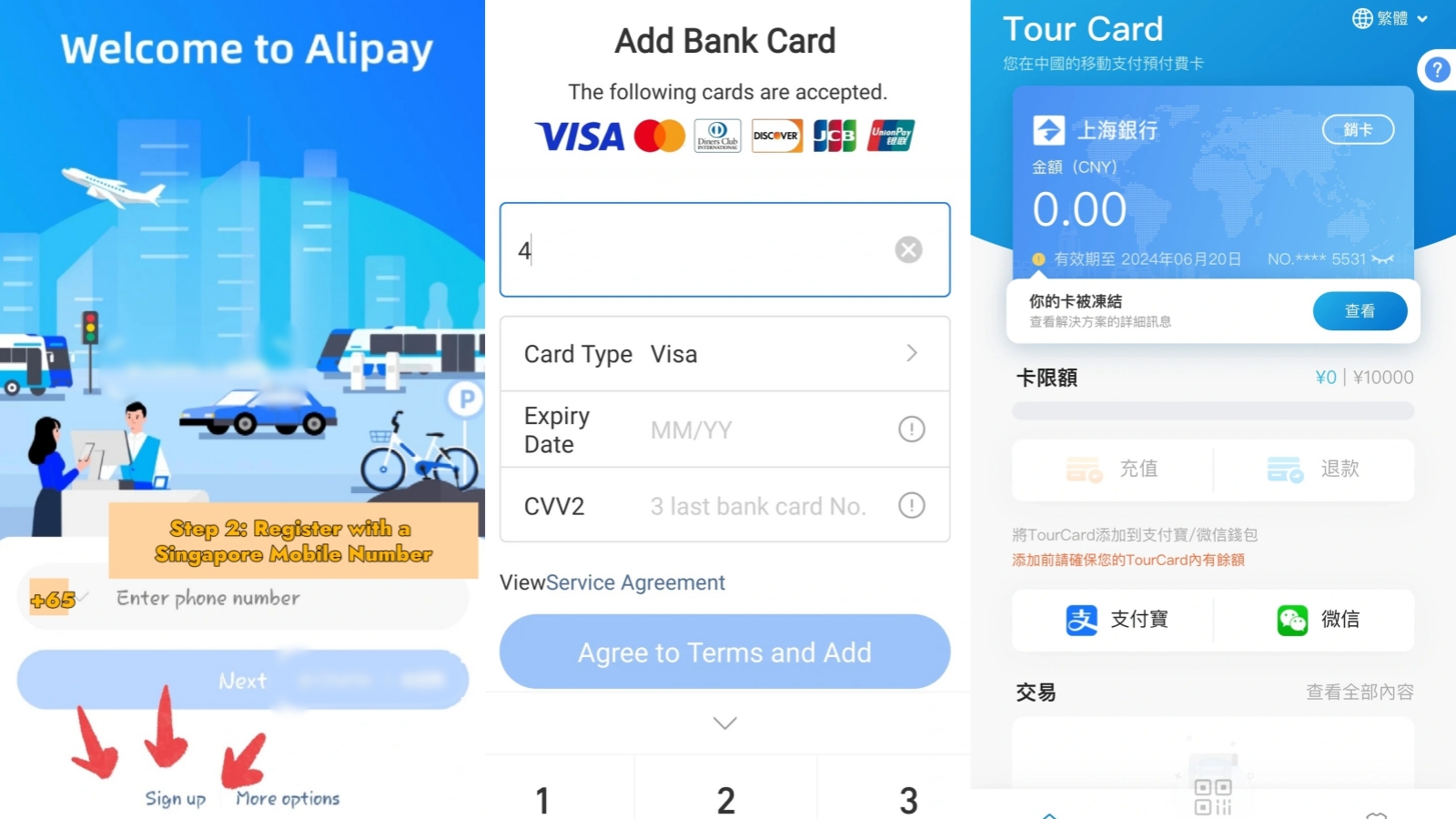
How to Use AMap in China
Search "Amap" in the app store before you fly and you can land on two different names — and which one you install decides whether you can order a car when a driver is already circling. Learning how to use AMap in China comes down to three things: installing the listing that actually belongs to AutoNavi, registering with your own phone number, and matching the pickup point in your order to the floor you are physically standing on. The map half is the easy part. The last two hundred metres, dragging a suitcase through a car park at Beijing Daxing or Shanghai Hongqiao, is where most trips go wrong. This guide covers both halves, with current pickup points for six hubs.
Quick Facts
Confirming You Got the Right App
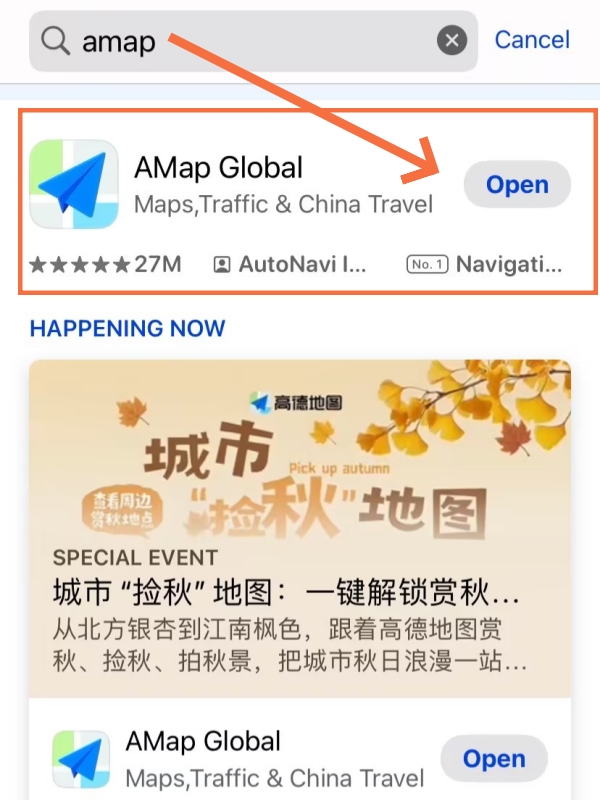
AMap Global App Store Search Result
Two names in the search results usually means one app shown in two languages, not two competing products. Store titles follow your device language, so the same listing can read AMap Global on an English phone and 高德地图 on a Chinese one, and the package behind both is identical.
What settles it is the identity underneath the name. On iOS the listing belongs to AutoNavi Information Technology Co. Ltd. under ID 461703208. On Google Play the package ID is com.autonavi.minimap, published under 高德地图 and developed by 北京高德图强科技有限公司. Copy either identifier into your notes before you install and you can verify the listing later, even if you cannot remember the name.
Two widely repeated claims do not survive contact with the actual store entry. The first is that this is a 63-language build stripped down for overseas users; the language field lists English, Simplified Chinese and Traditional Chinese, which is three, and the same listing carries an Advertising age-rating flag alongside descriptions of everyday life services. The second is that a compliance purge removed countdown timers and lane-level guidance and left ride-hailing hobbled; reporting from July 2026 describes the English build with countdown, navigation and ride-hailing all working. What you are installing is a full navigation app with English support, not a lite version — and getting that wrong is the expensive mistake, because the wrong listing still draws a map while quietly refusing to book you a car.
📱 Essential China Travel Apps: Where AMap sits among the tools most visitors install. Looking for related planning information? Read our China travel apps guide.
How to Set Up AMap Before You Board
-

- How to Set Up AMap(Step 1)
-
- How to Set Up AMap(Step 2)
-
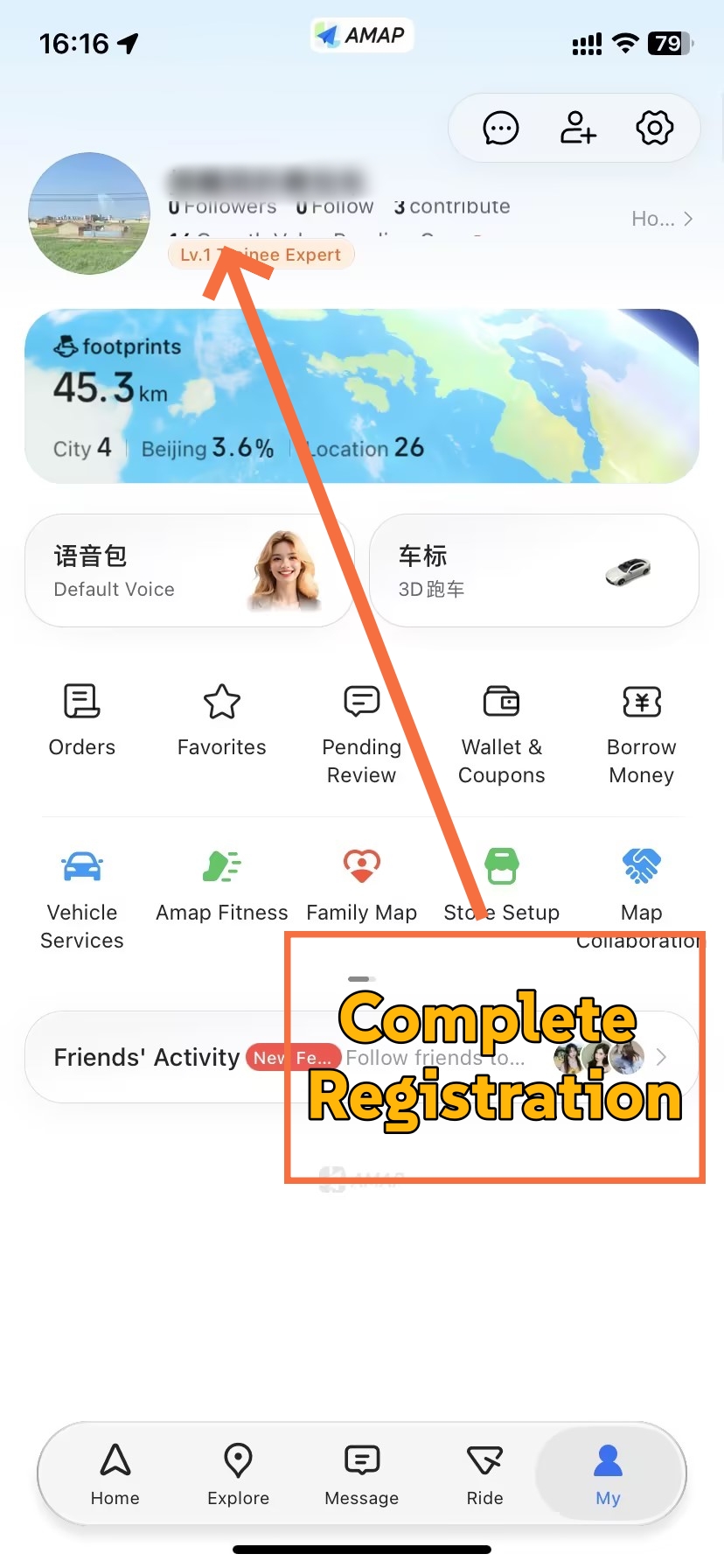
- How to Set Up AMap(Step 3)
Setup takes about ten minutes and you can finish it before you board, and browsing maps needs no account at all. Follow these three steps and you will be ready to navigate, order a car and pay for it the day you land.
Step 1: Download the Correct AMap App
Search AMap in the App Store or Google Play, then check the identity fields before you tap install rather than after.
- iOS: Developer name reads AutoNavi Information Technology Co. Ltd. and the listing ID is 461703208.
- Android: Package ID reads com.autonavi.minimap, published under 高德地图.
- Both: The description should mention one-stop navigation across buses, subways, driving, walking and cycling, plus ride-hailing with price comparison.
⚠️ Important: A different name on your screen is not evidence of a second official product with different features. Titles change with your phone's language; identifiers do not. If a listing you have found carries a developer other than AutoNavi, treat it as a different product entirely and judge it on its own feature list, not as an equivalent AMap.
One practical limit: outside mainland China you can install from Google Play only if your device still has access to it. This guide does not point you at third-party APK mirrors, because the version you get there may lag behind the store release and you have no way to verify what changed.
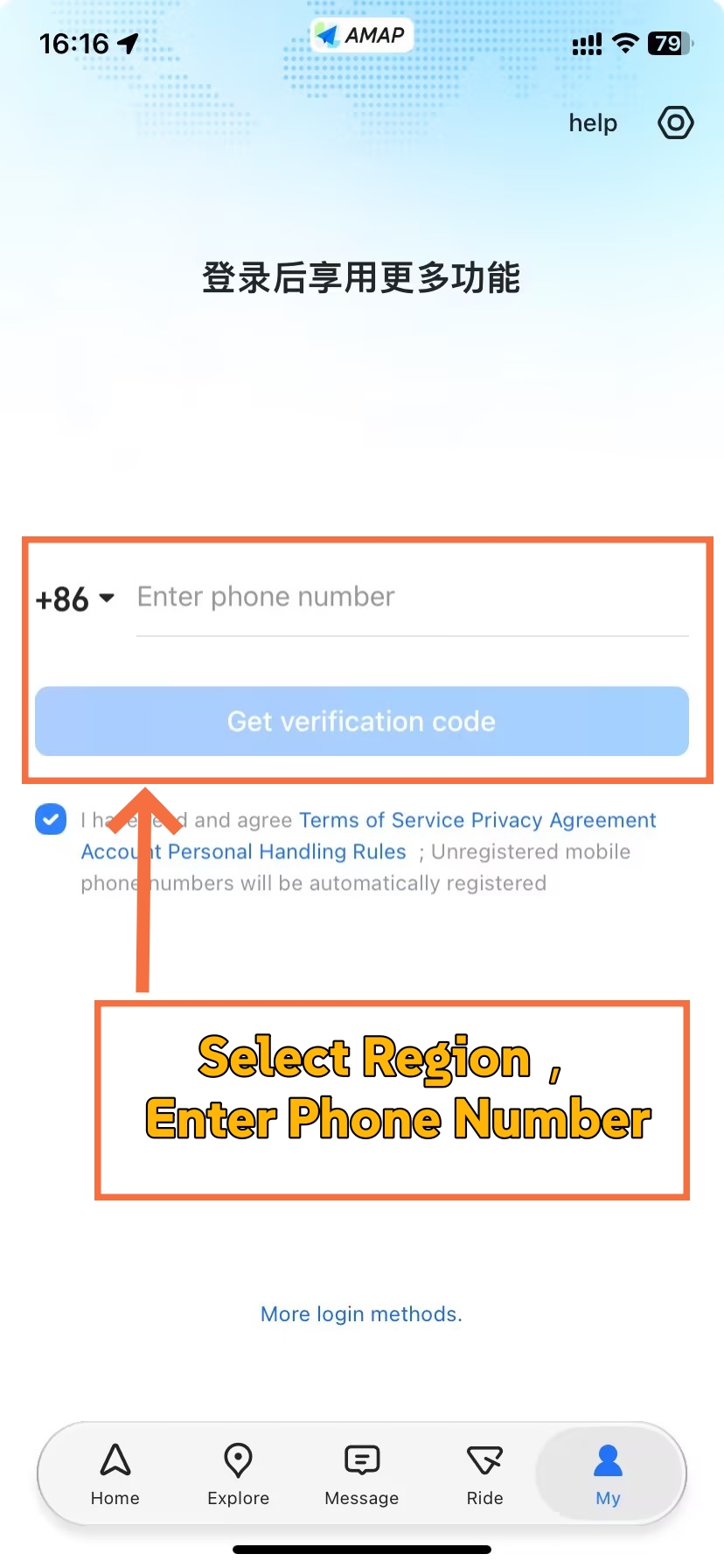
Step 2: Register With Your Own Phone Number
The old assumption — that a Chinese +86 number is compulsory — is out of date. An announcement on 14 July 2026 stated that sign-in for ride-hailing works with mobile numbers from 65 countries and regions.
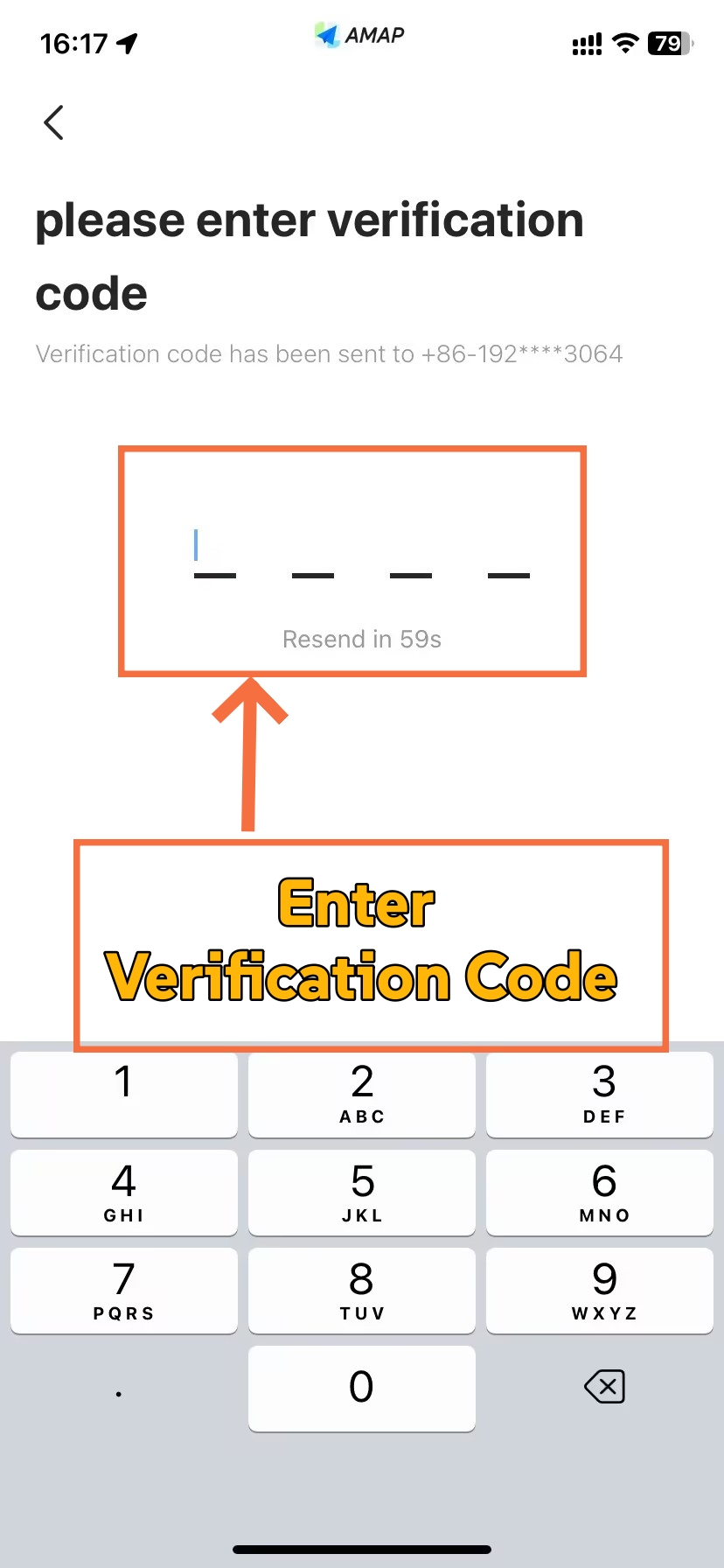
The path runsTap [Account] → [Sign Up] → [Country Code] → [Phone Number] → [Get Code]. Set the code before you type your number; the field defaults to +86, and a foreign number entered against the wrong country code produces an error that looks like a rejection of your number itself. Your core keyword for the rest of the flow is simple: how to use AMap in China without a Chinese number means picking your own code first, then requesting the message.
💡 Tip: If no code arrives on the first attempt, switch network before you try again and confirm the country code once more. Most reported failures cluster around roaming and data-only eSIM connections rather than around any particular national number.
Two things to rule out. There is no published list of the 65 countries and regions, so you cannot pre-check your own; you find out by requesting the code. And while AMap's web account console offers an email or username login field, that belongs to a different product surface and is not evidence that the mobile app accepts an emailed verification code.
If sign-in will not go through, you have not lost the app. Walking, metro, driving and cycling navigation all work independently of your account. Use AMap as a map for the rest of the trip and return to booking when you have a working number.
Step 3: Set Up Your Payment Method
The store listing tells you that one-click payment supports automatic deductions. That is the whole of the official position, and it is narrower than most guides imply: no published compatibility list exists for foreign cards, wallets, vehicle classes or individual orders. A saved card is not a promise that every order will be accepted.
The path runs Open [Account] → [Wallet] → [Payment Methods] → [Add Payment Method], and the useful work happens before you need a ride rather than during one.
- Option A — Link your foreign card to Alipay or WeChat Pay: A 2024 guidance note for foreign business visitors lists Alipay, WeChat and the dedicated Didi app as ways to book ride-hailing independently of AMap. Treat one as your backup channel for new trips. Note that switching channels does not repair a card the platform has already refused, and an order already created must be settled in the channel that created it.
- Option B — Test the card inside AMap before you need it: Run one small real order before you travel. It costs you one short fare and it tells you more than any setup screen will.
- Option C — Keep cash for street taxis: Shanghai's transport authority notes that taxi drivers must carry change for fares. Cash covers a metered street taxi when a ride-hailing order will not go through; it is not a way to settle a ride-hailing fare at the kerb.
💳 Foreign Card Fees on Alipay: Looking for related planning information? Read our guide to international card fees on Alipay.
How to Book Your First AMap Ride
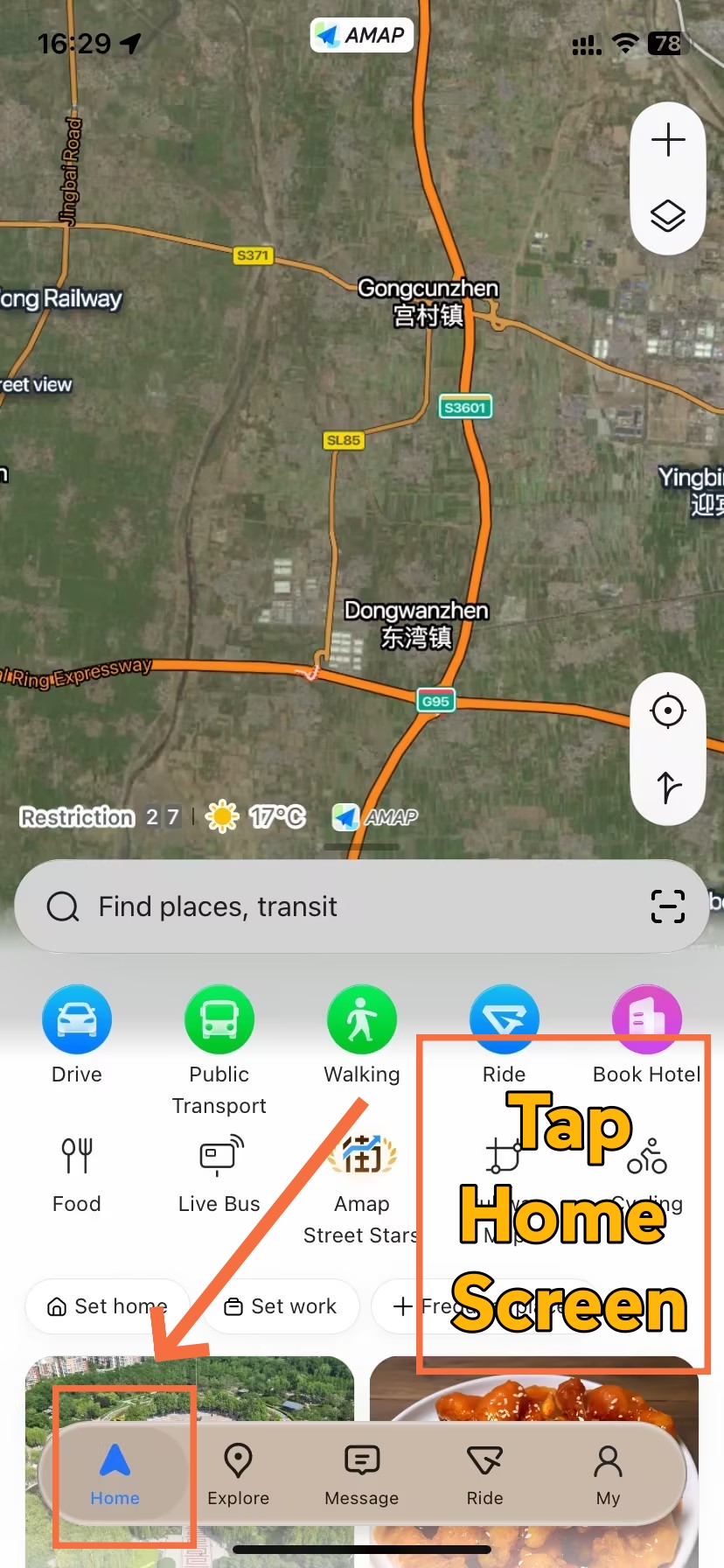
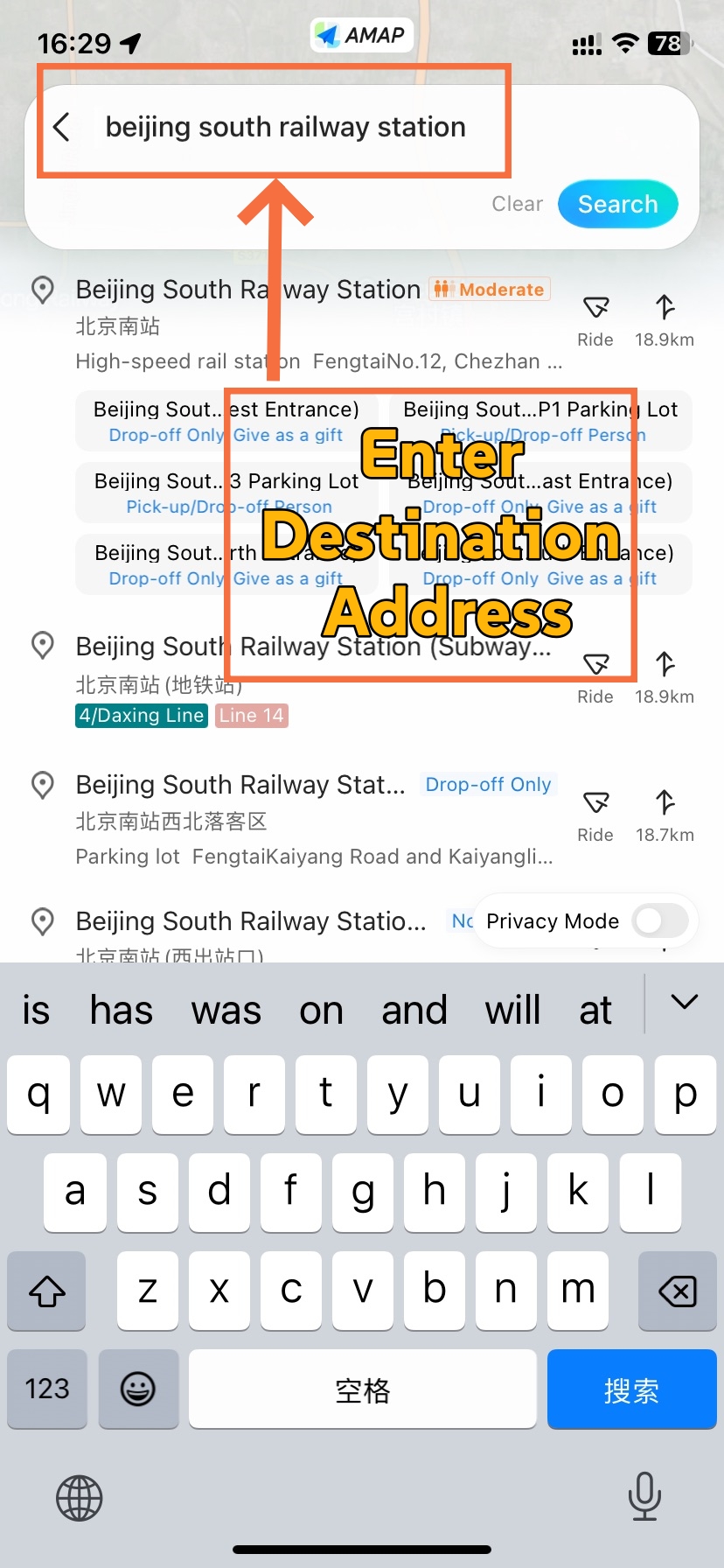
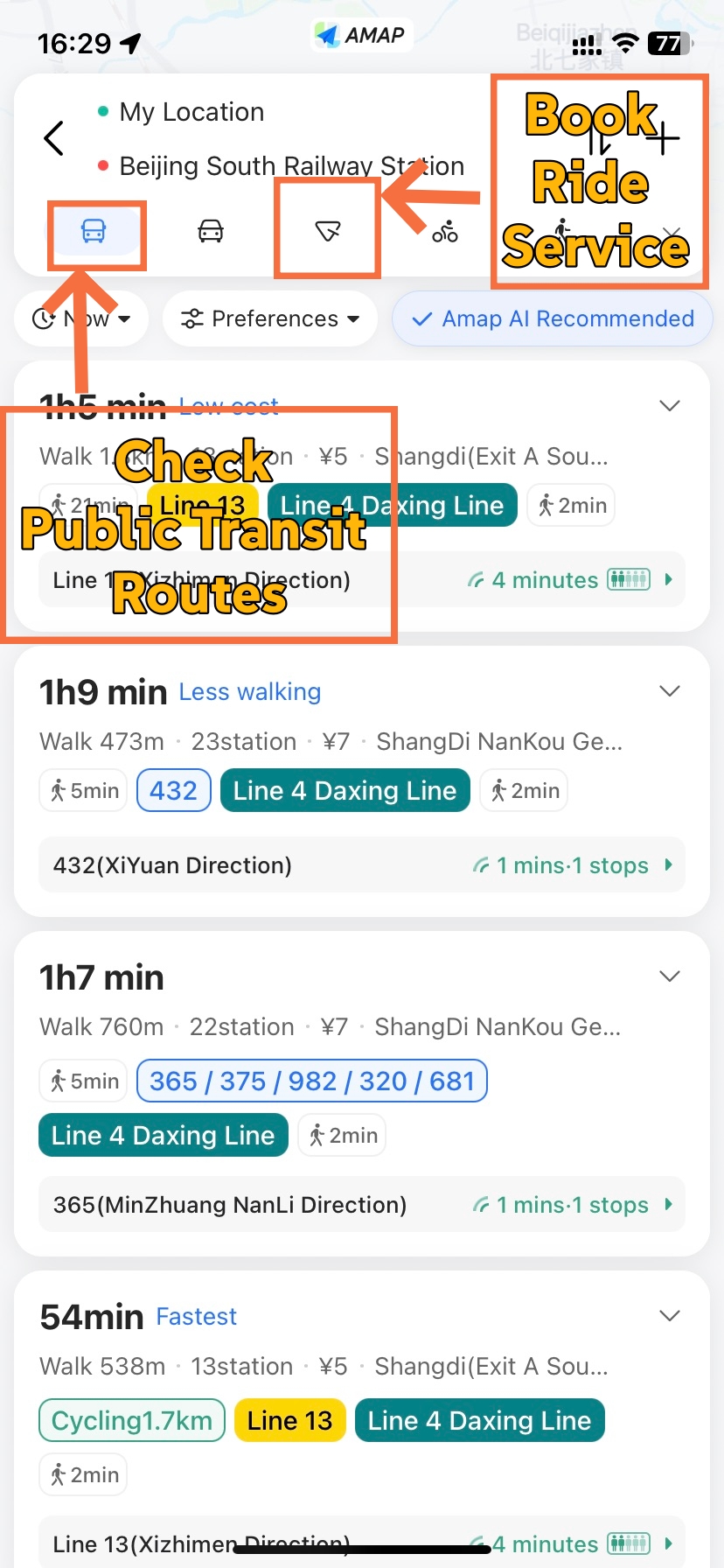
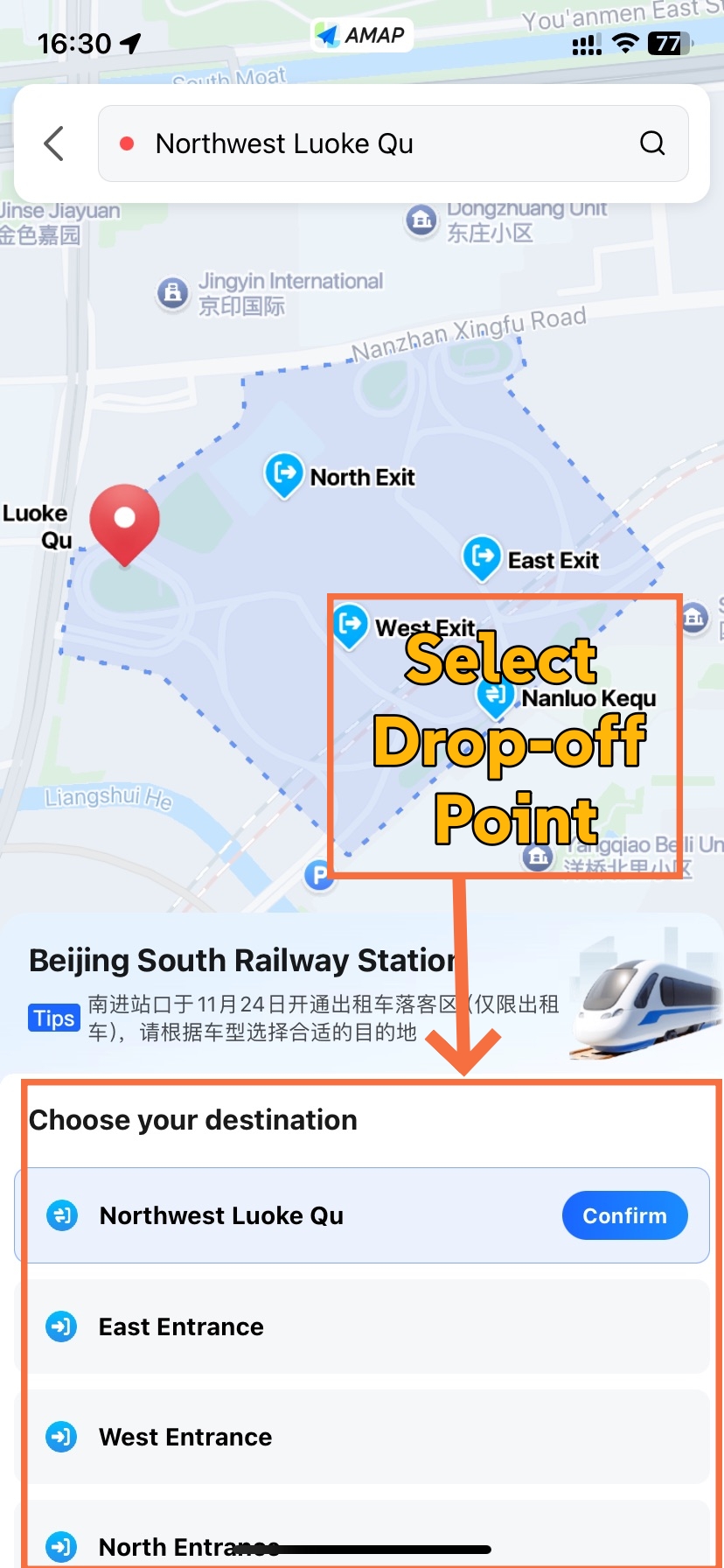
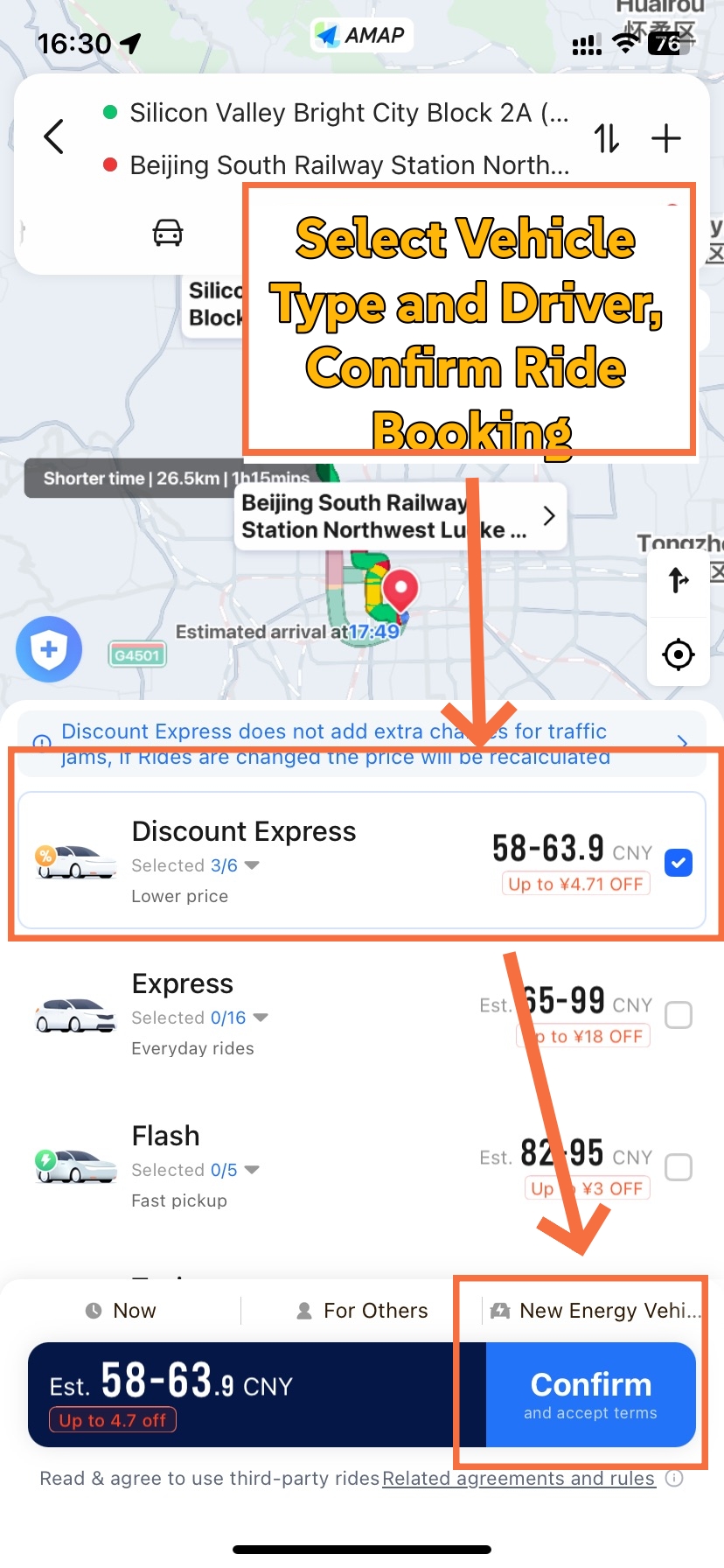
Once the app is set up, an order runs the same way every time: destination, pickup point, fare, confirm. What changes between orders is not the sequence but the care each step needs — searching a name with no English sign, reading a metro plan that ranks options for you, and matching a plate in a car park full of identical sedans.
Entering Your Destination
English destination search is supported: you can type a destination in English and the app will return the pickup point, route and fare. That support is real but not unlimited, which is why a three-stage search saves trouble later.
- English name first: "Forbidden City", "Beijing South Railway Station". Landmarks and station names generally resolve well in English.
- Chinese name second: When English misses, the Chinese name almost always works. This is why saving your hotel's Chinese name before departure pays for itself.
- Nearby business or landmark third: For street-level addresses, searching the surrounding shop, company or attraction lands closer than the door number does.
💡 Tip: Open your hotel in AMap once before you fly and read the Chinese name off the screen. Guessing at a station's English spelling at22:00 with a suitcase is a worse use of time than the ten seconds it takes to save it now.
One terminology point worth getting right: Beijing South Railway Station is written in English, not romanised pinyin. Mixing the two is why some searches that should return the station instead return a residential street of a similar name.
Reading a Metro or Bus Plan
The listing advertises bus and metro navigation alongside real-time public transport information, which makes AMap the most useful tool most visitors will open in China. It is still guidance rather than a promise of what happens on the day.
Two habits keep you out of trouble. First, compare the plans rather than obeying the label — a route recommended for "least walking" is a ranking, and the exit you actually need may sit at the far end of a long concourse. Open the option you intend to take and check the line direction, the interchange station and the exit number before you commit. Second, treat the arrival alerts as a backup, not a substitute: the fixed "two stops to go" behaviour that online guides describe has not been confirmed across versions, so keep your ears open for the station announcements and the name of the station you need to leave at.
On fares, resist the urge to memorise a national range. Metro pricing follows each city's own fare structure and the specific line, and airport express services are priced separately from ordinary lines. What AMap shows is the fare for the route you are looking at, which is the only number that should inform your decision.
🗺️ China's Full Transport Network: Fitting metro, high-speed rail and airport links into one trip? Read our complete guide to getting around China.
Choosing What to Book
Once a destination is in, the app lists the vehicle options available at that moment along with their fares. The listing describes ride-hailing with multi-platform support and price comparison, which means several providers may appear for the same trip — but it does not publish which ones, how many, or what will be available in your city at 23:00 on a public holiday. Comparing four dimensions beats memorising a menu of names that shift from city to city.
- Fare: The number shown is a live quote for your pickup and destination, and it moves with distance, time and demand.
- Estimated wait: Read it as an estimate, not a schedule.
- Pickup point description: The most useful field at an airport or station, because it tells you which zone the driver will come to.
- Vehicle class: Larger classes suit luggage and groups; the list available depends on where you are standing.
There is no price table in this guide, and the absence is deliberate. No verified dataset for AMap vehicle classes and fares exists to build one from, and a table assembled from individual trips would tell you about those trips rather than about tomorrow's fare. Read the quote the app gives you at the moment you book.
One distinction that catches people: ordinary ride-hailing and carpool (顺风车) are different products with different pickup rules. Treat them as separate choices, and do not assume a carpool pickup point applies to a standard ride-hailing order.
Confirming and Meeting Your Driver
The final confirmation step is where the order actually becomes real, and it is also where hurried tapping turns a route query into a paid ride. Knowing how to use AMap in China means understanding that looking at a fare, comparing classes and authorising payment are all reversible, while the confirm action is not.
Before confirming, drag the pickup pin if it sits somewhere a driver cannot safely stop — at a large terminal, a point halfway up a one-way ramp or an interior corridor all produce a driver circling the block. Two habits carry the most weight from this point on.
- Read the order screen before you reach the car: It carries your driver's plate, vehicle model and colour. Note all three.
- Verify all of it at the door: Compare each visible field against the car in front of you before you open it. If the order shows fewer details than you would like, confirm what it does show.
- Ignore the kerb: In a busy pickup zone, other passengers and bystanders will gesture toward cars that are not yours. Your order is the only reference.
- Contact through the app: If something does not match, raise it in the app rather than negotiating in a car park.
💬 What to send your driver: Floor plus zone number ends the guessing faster than a description — for example, "I'm at the B2 level of the P2 car park, zone 3." Describing a pillar does not travel well through translation; a level and a number do.
Booking is the easy half. The walk from the terminal to that car is where luggage, signage and multi-level car parks combine against you, and that is the subject of the next section.
🛍️ Didi for Airport Transfers: AMap finds the pickup floor; a dedicated ride-hailing app handles the booking itself. Looking for related planning information? Read our guide to using Didi in China.
Using AMap at Airports and Big Stations in China (Pickup Guide 2026)
-
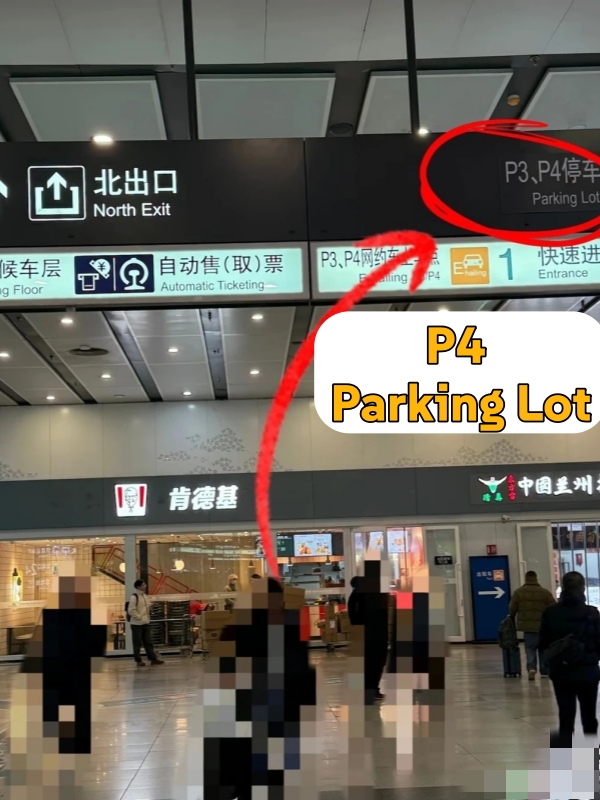

- Pickup Point at Beijing South
-
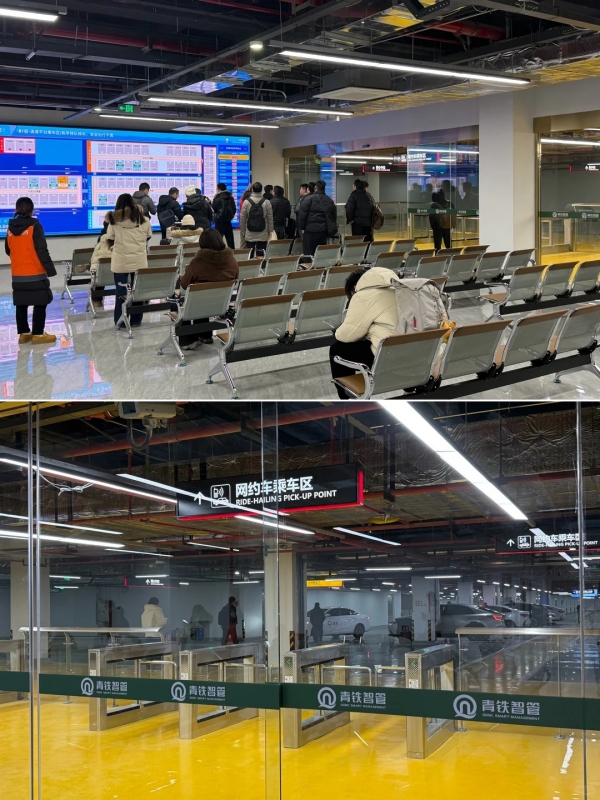
- Pickup Point at Qingdao North
Chinese airports and railway stations are large enough to lose a driver in, and the layout changes underneath you from one year to the next. Two rules prevent nearly all of the trouble: set the pickup point inside your order rather than improvising it on arrival, and then walk to the exact designated area instead of the nearest one that looks like a taxi rank.
Pickup Point Quick Reference — 2026
Pickup points move when terminals are rebuilt. Your order and the signage on the day are more reliable than any guide, including this one.
How to Select the Correct Pickup Spot on AMap
Official pickup areas are not a suggestion. Drivers are directed to designated zones, and a request to be collected from an unplanned kerb tends to produce a car that circles until one of you gives up.
- Open the pickup field: It is not always the same control as the search bar, and at some terminals the app needs your location permission before it will offer zone names.
- Select your terminal or station: Pick the arrival floor you will actually emerge on rather than the terminal as a whole.
- Choose the designated zone: Official points are listed as named levels or areas — a car park level, a transport centre floor, a numbered zone.
- Confirm after clearing customs: You can prepare the trip during your walk, but do not dispatch a driver until you are certain you can reach the pickup area.
Timing deserves honesty. Guides commonly promise that booking a few minutes before arrival means a car is waiting on arrival, and that a driver reaches you within a fixed window. Neither is something the operator commits to, so use the app's live information and your actual progress through immigration and baggage instead of a fixed number.
How to Reach the Correct Pickup Spot on AMap
Three methods work at every hub covered here, and knowing which one fits your situation saves the awkward wandering phase.
- Method 1 — Follow the in-app walking directions: Best when you have light luggage and the building is unfamiliar. The app routes you to the level, and you send your driver the zone number once you arrive.
- Method 2 — Follow the ride-hailing signage: Best with luggage. Ride-hailing signs (网约车) lead you along covered walkways to the correct level and then to numbered waiting bays.
- Method 3 — Ask the information desk: Best when you are unsure which concourse you emerged from. Show the order screen and ask for the ride-hailing zone; staff at large hubs direct this traffic daily.
Several of the hubs below display your plate and bay on a departure screen. Treat that as a cross-check against your order, not as the only source of truth, and do not assume every station has one.
🛬 How to Find Your Pickup Spot at Beijing Daxing (PKX)
📍 AMap Search Term to Set: 大兴机场 网约车 — in English, "Daxing Airport ride-hailing area". Select the zone named in your order, then match the zone number on arrival.
Step-by-step walkthrough:
- Clear immigration and collect your luggage before you book. The pickup area is far enough from arrivals that dispatching a driver early helps nobody.
- Exit at the terminal's Level 2, East Gate 14 (航站楼二层东侧14号门). This entrance leads directly to the new ride-hailing zone.
- Follow the zone signage inside. The relocated area is a dedicated building with platform-by-platform pickup and wayfinding screens.
- Note your zone number and send it to your driver in the app.
💡 Tip: If the signage, your order and your driver do not agree, the airport service hotline is 010-96158. It is faster than circling.
🛬 How to Find Your Pickup Spot at Shanghai Pudong (PVG)
📍 AMap Search Term to Set: 浦东机场 P2 停车场 网约车 — or select the P1 or P2 level your order names, in English "Pudong Airport car park ride-hailing level".
Step-by-step walkthrough:
- Clear immigration, collect luggage, then follow the terminal signage toward the car parks.
- The designated ride-hailing pickup points are the coach level of Parking Lot 1 (P1停车场大巴层) and level B2 of Parking Lot 2 (P2停车场B2层).
- On the correct level, find your numbered zone and check the plate display if the level has one.
- Send your driver the level and zone together rather than describing the nearest landmark.
💡 Tip: If your pin will not lock onto the terminal, stay inside the designated area and contact the platform or airport staff. Setting your pickup to an unknown roadside outside the terminal makes the search harder in both directions, because the driver has to find you and you have to find the driver.
✈️ How to Find Your Pickup Spot at Shanghai Hongqiao (SHA)
📍 AMap Search Term to Set: use the zone named in your order. Official guidance for Shanghai Hongqiao Railway Station (上海虹桥站) lists four ride-hailing pickup points, one of which is the first basement level of Parking Lot 10 (P10停车场B1层).
Step-by-step walkthrough:
- Clear the station concourse and follow the ride-hailing ground markings and distance guidance.
- The waiting areas have seating, ramps, charging points and fans, which matters if your train arrives early.
- Match the zone number in your order against the signage on the level you reach.
- Send the level and zone to your driver before they reach the building.
⚠️ Important: A convenience store kerbside is not a pickup shortcut. Loading zones move, and a driver asked to stop outside the designated area may be refused entry — which leaves you at the store while your order sits somewhere else.
🚄 How to Find Your Pickup Spot at Beijing South Railway Station
📍 AMap Search Term to Set: 北京南站 网约车, then choose the car park shown in your order. Fixing the search on a specific bay or passage is not worth doing.
Step-by-step walkthrough:
- Follow the ride-hailing signs out of the station. The east and west underground car parks take ride-hailing and private cars; the north and south concourses handle taxis.
- Do not join a taxi queue on your way to the car park — it is the single most common wrong turn here.
- All four car parks, P1 through P4, completed rebuilding in July 2026, and the departure screens announce your plate and bay.
- Match the car park, level and bay in your order against the screen and the bay markings.
💡 Tip: Unsure which concourse you came out of? Ask inside the station before you start walking. Being sent back across the building costs more than the question does.
🚄 How to Find Your Pickup Spot at Qingdao North Railway Station
📍 AMap Search Term to Set: 青岛北站 东广场 网约车, then follow whatever level your order specifies.
Step-by-step walkthrough:
- Exit to the east plaza and follow the ride-hailing signs.
- Local service information places Didi-originated rides on level B1 and non-Didi rides on the ground level of the east plaza.
- Check the display for your plate, zone and bay where one is provided.
- If your instructions and the floor do not match, ask station staff rather than waiting on the wrong level.
⚠️ Important: Which platform an AMap-aggregated order belongs to has not been officially confirmed. Your order and on-site staff are the authority here, not the general pattern above.
✈️ How to Find Your Pickup Spot at Hangzhou Xiaoshan (HGH)
📍 AMap Search Term to Set: confirm your terminal first, then select the T3 or T4 arrivals level. Ordinary ride-hailing at Hangzhou Xiaoshan International Airport (杭州萧山国际机场) is collected from level B2 of the transport centre (交通中心B2).
Step-by-step walkthrough:
- Establish which terminal you exited. T3 and T4 are a long way apart, and the wrong one costs you real time.
- From T3 arrivals, leave through Gate 14 and go down to B2.
- From T4, go down from the transport centre on 2F to B2.
- Check your lift hall against your order — the airport's Chinese and English pages list different hall numbers, so verify on site rather than picking a hall from either page.
⚠️ Important: Ordinary ride-hailing and carpool are different products. A carpool pickup arranged at the departures level does not apply to a standard ride-hailing order.
Taking an AMap Ride TO the Airport
The outbound trip is the easy direction. There is no designated pickup zone to find and no multi-level car park to navigate — your driver drops you at the departures kerb, and the process is the same whichever airport you are leaving from.
- Enter the terminal, not the airport: Specifying your terminal produces the correct departures drop-off point instead of a generic airport pin.
- Book before you leave your accommodation: Matching a driver while you are still packing beats matching one at the kerb.
- No pickup zone is required: Unlike the arrival side, the departure side is a straightforward kerbside set-down.
- Keep the three products separate: Ordinary ride-hailing, carpool and street taxis are distinct services on the departure side too.
💡 Tips: With several suitcases, a larger vehicle class is worth choosing for the boot space rather than for speed. And if your flight is early, remember that the departures side has no underground level to navigate — the time you saved walking is time you get back.
Common Issues and How to Fix Them
Four problems account for most of what goes wrong for a first-time visitor, and none of them require reinstalling the app. What they do require is knowing whether you are blocked before a ride exists or after one does, because the fix is different in each case.
Your Verification Code Never Arrives
Keep the on-screen error message before you do anything else — it distinguishes a rejected number from an undelivered one. Then confirm the country code one more time, switch network and try again. Since no country list accompanies the 65-country announcement, you cannot pre-check your own number; the code request is the test.
If messages keep failing, keep using AMap for walking, metro and driving navigation. Those features do not depend on your account, so a stubborn login should not cost you a whole day of routing. Ignore the popular advice to register with an emailed code instead — an email field on AMap's web account console belongs to a different product surface and is not a mobile sign-in route.
Your Card Is Declined at Payment
Before you book, open the payment options on the order screen and see what is actually available for that trip. The store listing's statement about automatic deductions is a description of the feature, not a compatibility promise for your card.
Once an order exists, settle it inside the channel that created it. Switching apps mid-order does not transfer the liability, and the same card that was refused will usually be refused again on a second platform. For the next trip, use an independent channel — Alipay, WeChat or a dedicated ride-hailing app can all be booked separately — and keep a little cash for a metered street taxi, where change is required. Do not assume foreign cards are blocked as a category; no such blanket rule is published.
Your App Language Stays in Chinese
Three different settings are usually being confused here: your phone's per-app language list, a language option inside AMap itself, and the store region your downloads came from. English is supported in the app listing, but the exact menu path is not identical across versions, so look for the language option your build actually offers instead of following a fixed route.
Switching store-region accounts to force an English interface is not a guarantee either — it changes what the store offers, not what the app renders. If part of the interface stays in Chinese, a screenshot translation tool works, but mask your account and payment details before you hand any screen to a translation service.
Your Pin Lands in the Wrong Place
Positioning inside a terminal concourse is genuinely unreliable, and the wrong response is the one that costs the most time: walking out to an unidentified roadside. Stay inside the designated area, contact the platform or ask airport and station staff, and let them point you to the correct level.
Some builds expose an AR or walking-assisted find-car feature. If it appears in your version, it is a useful fallback when a driver cannot see you. It is not something to plan around, because its availability across regions and versions is not something to rely on.
Extra Tips to Make Your AMap Trip Stress-Free
- Run one route before you fly: Navigate from your hotel to the nearest metro station, then save the hotel's Chinese name, Chinese address and front-desk number in plain text. If favourites do not sync to your account, a saved address or a screenshot still works.
- Check three things before you step out: Address saved, route chosen, and — if you are heading somewhere far late at night — your live location shared with someone you trust. Confirm the share actually started, and note that it expires.
- Match the plate, not the description: Nobody in a car park is going to challenge you over who is getting into which car. Verify the plate, model and colour on your order before you open the door.
- A route on the map is not a ticket: Fares, live departures and platform guidance are information. They do not buy a ticket, open a gate, or complete a payment for you.
- Hub layouts move between trips: Daxing's ride-hailing area relocated on 15 September 2026. Last year's pickup point can be today's wrong floor, so trust the order and the on-site signage over an old screenshot.
- Know which product you booked: Ordinary ride-hailing, carpool (顺风车) and street taxis are three different services with three different pickup rules, and mixing them up is how passengers end up on the wrong level.
- Keep a little cash: A metered street taxi may be your fallback when a ride-hailing order will not go through, and drivers must carry change for fares.
- Screens are a cross-check, not a promise: Several major hubs display plate and bay on departure screens. Use them to confirm your order, but do not treat them as your only source or assume every station has one.
Frequently Asked Questions
Q: Do I need a Chinese phone number to use AMap in China?
No. An announcement on 14 July 2026 stated that sign-in for ride-hailing works with mobile numbers from 65 countries and regions, so a Chinese +86 number is not required. No country list was published with it, though, and individual users have reported codes that never arrived while roaming. If sign-in fails, walking, metro and driving navigation still work without an account.
Q: Should I download the "overseas version" or the Chinese one?
Judge by identifiers, not by the name on screen. The iOS listing is AMap Global under AutoNavi Information Technology Co. Ltd., listing ID 461703208; the Android package ID is com.autonavi.minimap. Store titles follow your phone's language, which is why the same app can appear under two names — that does not indicate a second official product with different features.
Q: Can I actually book a ride in English inside AMap?
Yes. The documented flow is to enter your destination in English, review the pickup point, route and fare, then confirm — and the store listing describes multi-platform ride-hailing with price comparison. Button names and their positions change between versions, so follow the labels in your own build rather than a screen-by-screen tutorial from another traveller's phone.
Q: Will my Visa or Mastercard work for AMap rides?
There is no published compatibility list. The store listing states only that one-click payment supports automatic deductions, which describes the feature rather than guaranteeing your card. Check the payment options on the order screen before you book, and run one small real trip before you travel — that costs one short fare and settles the question cheaper than an airport test would.
Q: My number's country isn't listed — will the app still work?
Yes for navigation, and possibly for booking. Since the 65-country announcement came without a country list, you cannot pre-check whether your number is covered; requesting the code is the only test. If sign-in does not go through, AMap remains a working walking, metro and driving navigation tool, which covers most of what a visitor needs day to day.
Q: Does AMap sell me a metro ticket or open my gates?
No. AMap supplies route planning, fares and public transport information, not ticketing. A fare shown on a metro plan is information about the journey, not a purchased ticket, and nothing in the app completes a transit payment for you.
Q: Where exactly is the ride-hailing pickup at Daxing and Pudong?
At Daxing, ride-hailing moved on 15 September 2026 from the former P1 mezzanine bays to the former P2, reached from the terminal's Level 2, East Gate 14, with a service hotline on 010-96158. At Pudong, the designated points are the P1 car park coach level and P2 car park level B2. Both layouts can change, so confirm against your order and on-site signage.
Q: The driver can't find me at the pickup zone. Now what?
Check the order screen first — it carries the plate, model and colour you should be looking for, and matching all three before you get in is the habit that prevents the worst outcome. If contact fails, use the app's own messaging to send your level and zone number rather than a description, and use the departure screen at hubs that have one as a cross-check against your order.