2026 Guide to Registration, Top-Up, and China Payments
Alipay has one billion users globally, so you’d think they’d provide seamless access for Singapore users. However, this app is only for one primary thing: travel to mainland China! China is a cash-free economy today. Shocking, we know. Local vendors reject physical currency and very much reject typical foreign cards. Transit gates and taxis only accept digital currency. You need to get your digital wallet in order before your departure! Read on to learn how to set up alipay in singapore & let’s take the headaches out of living when you land!
✅ Before Departure — Alipay Checklist
Complete every item on this list before boarding the flight. Additionally, screenshot this checklist for quick reference at the airport.
- ☐Downloaded Alipay International Version (blue "A" icon)
- ☐Registered with Singapore mobile number (+65)
- ☐Completed passport identity verification
- ☐Linked a Singapore bank card (Amaze or Wise recommended)
- ☐Notified the bank to enable overseas transactions
- ☐Disabled VPN before all setup and payment steps
- ☐Added a small test top-up to verify the balance works
- ☐Understood transaction limits (CNY 3,000/day for foreign users)
How to Prepare for Alipay Account Registration
Can foreigners use Alipay without a Chinese bank account? The short answer is yes. Foreign passport holders can register and use Alipay through the international version. For instance, no Chinese bank account or phone number is required. Here is what registration needs:
- A valid passport (any nationality)
- A Singapore mobile number (+65)
- A Visa or Mastercard (credit or debit)
Additionally, no Chinese SIM card or residency permit is needed. Foreign users face a daily spending cap of CNY 3,000 and a monthly cap of CNY 50,000. However, these limits cover most China travel needs comfortably.
How to Register Alipay Accounts in Singapore
-

- Register Alipay Accounts in Singapore(Step1)
-

- Register Alipay Accounts in Singapore(Step2)
-
- Register Alipay Accounts in Singapore(Step3)
Registration covers three main steps. Next, work through each one carefully to avoid common errors. Completing the entire process in Singapore ensures a stable network connection throughout.
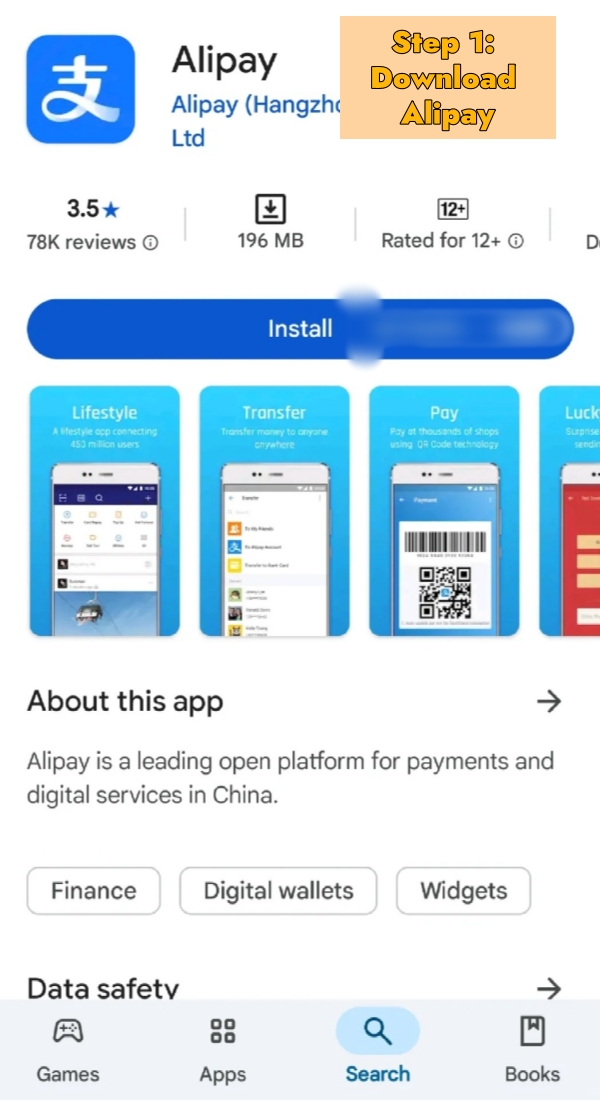
- Step 1: Download Alipay (International Version)
- Open the App Store or Google Play. Search "Alipay."
- Confirm the publisher: Alipay (Hangzhou) Information Technology Co., Ltd.
- iOS users: switch to an international App Store region if the app does not appear in the Singapore store.
- Step 2: Register with a Singapore Mobile Number
- Tap "Sign Up" and select country code +65.
- Enter a mobile number and receive the OTP via SMS.
- Set a login password to complete the registration process.
- Important: Disable VPN before this step. VPN blocks OTP delivery and flags the account as suspicious.
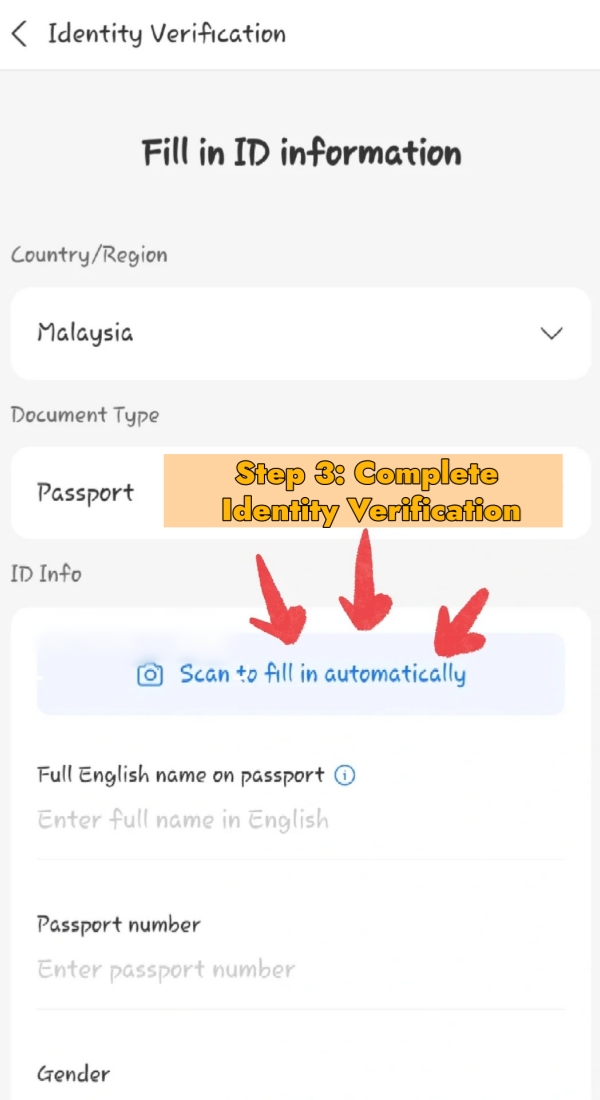
- Step 3: Complete Identity Verification (Passport Upload)
- Go to "My" → "Identity Verification" → select "Non-mainland China ID."
- Upload a clear photo of the passport data page.
- Complete the selfie verification step.
- Approval typically takes 1–3 minutes. However, peak periods can extend this to 24 hours.
- Complete this step in Singapore. Chinese airport Wi-Fi can trigger risk controls and delay verification.
Complete the full registration and identity verification in Singapore. The stable network environment reduces error rates significantly. Additionally, do not attempt the setup at a Chinese airport or hotel lobby for the first time.
How to Connect Singapore Cards to Alipay
-
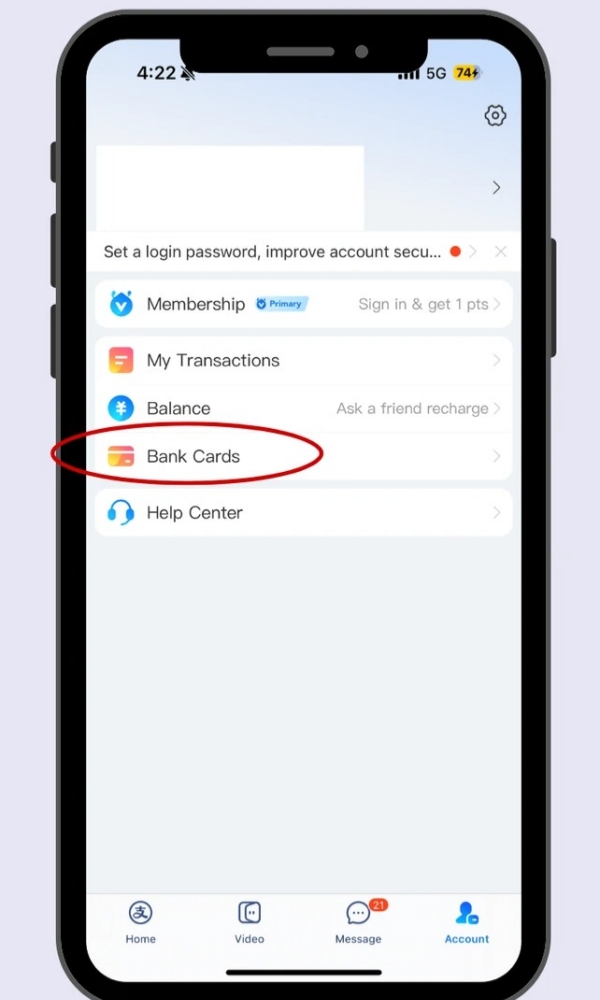

- Connect Singapore Cards to Alipay(Step1)
-
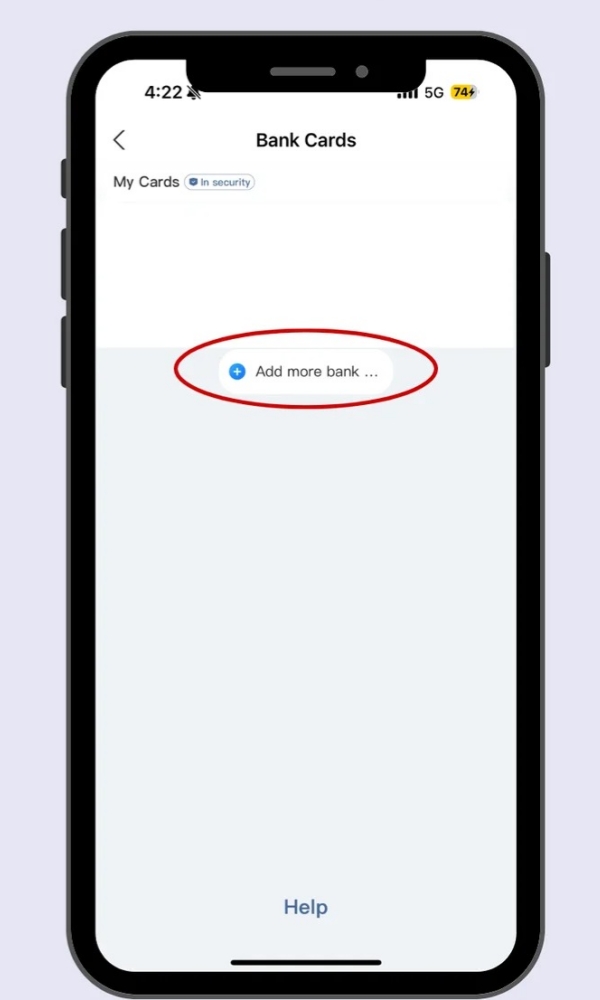
- Connect Singapore Cards to Alipay(Step2)
-
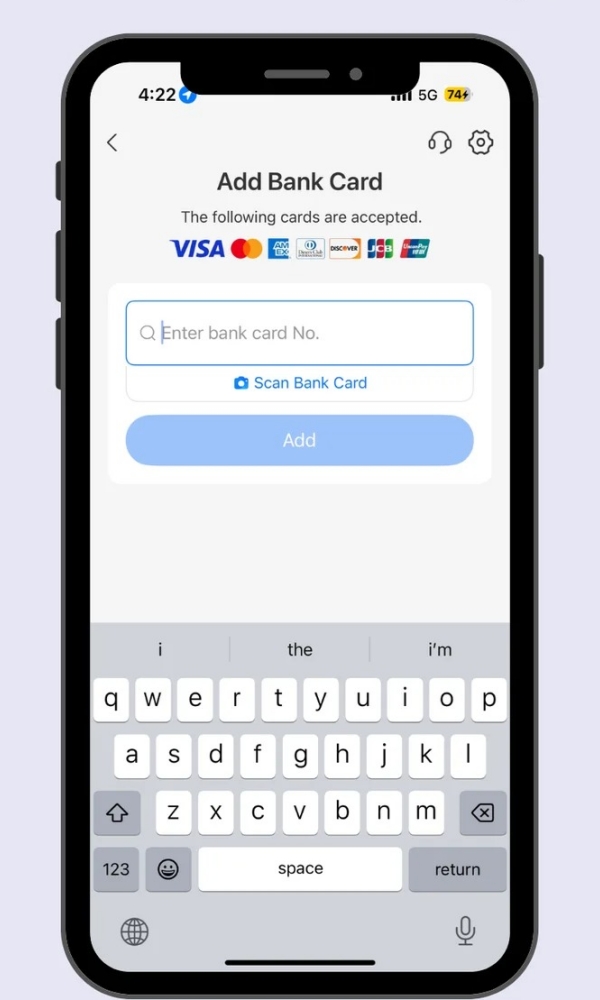
- Connect Singapore Cards to Alipay(Step3)
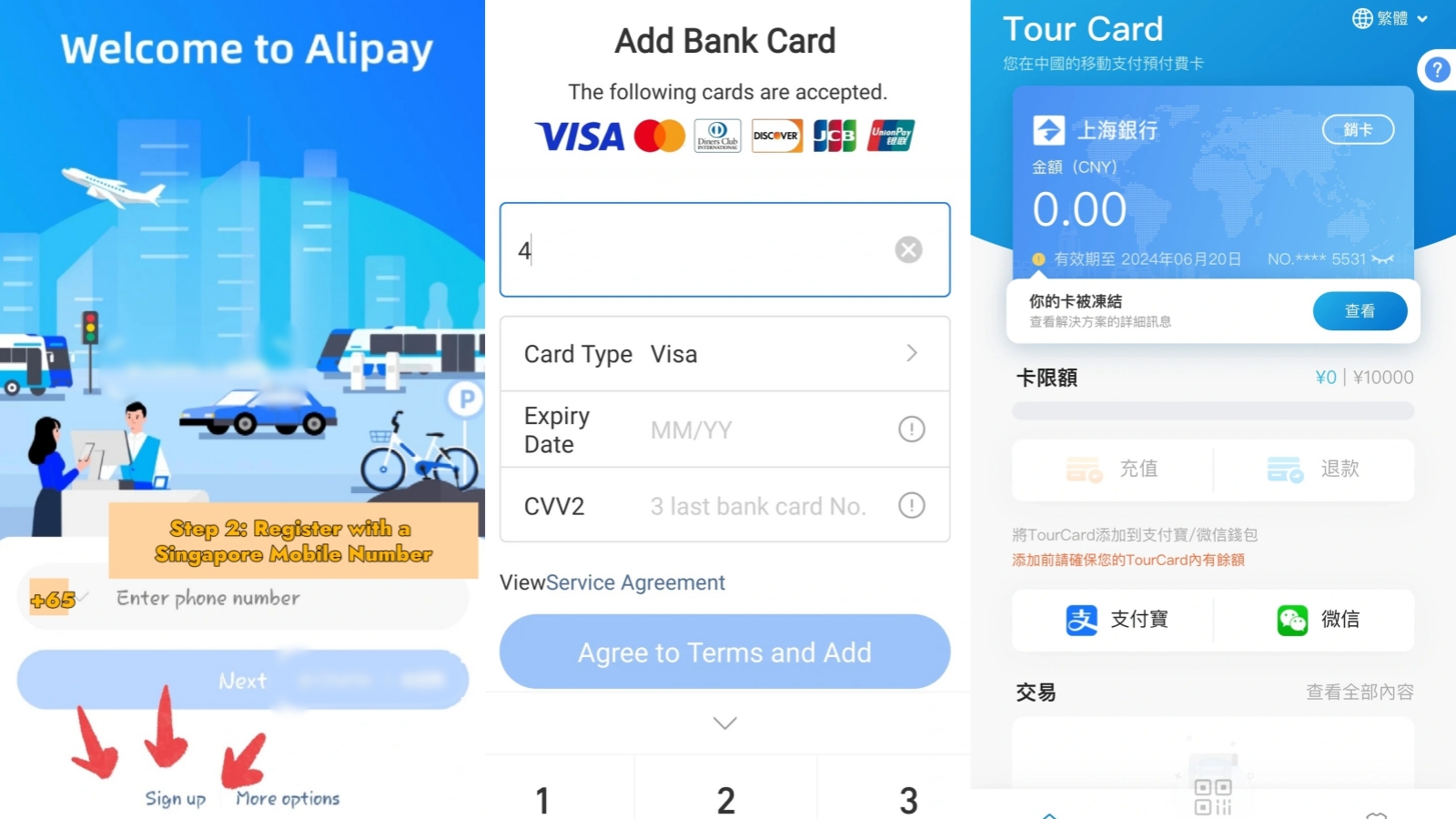
Linking a card for payments and top-ups in China is possible with most Singapore Mastercard and Visa cards on Alipay. American Express, however, does not work at this time.
Step by Step Instructions for Bank Card Linkage
- Step 1: Open Bank Cards Settings
- Open Alipay and tap "My" → "Bank Cards" → "Add Bank Card."
- Step 2: Enter Card Details
- Enter the card number, cardholder name (exactly matching the passport), expiry date, and CVV.
- Step 3: Verify and Activate
- Enter the SMS verification code sent by the bank to finalise the link.
- Notify the bank about planned international usage beforehand to prevent the bank's risk system from blocking the transaction.
Visa and Mastercard are both fully supported. However, American Express is not accepted. Additionally, debit cards work alongside credit cards for this process.
Supported Singapore Bank Cards and Network Types
The following table covers major Singapore cards and their compatibility with Alipay. Additionally, the foreign transaction fee column highlights the true cost of each option.
| Singapore Card | Alipay Support | Foreign Txn Fee | Recommended |
|---|---|---|---|
| DBS Visa / Mastercard | ✅ Yes | 2.5–3% | ⭐⭐⭐ |
| OCBC Mastercard | ✅ Yes | 2.5% | ⭐⭐⭐ |
| UOB Visa / Mastercard | ✅ Yes | 2.8% | ⭐⭐⭐ |
| Amaze Card (Instarem) | ✅ Yes | ~0% | ⭐⭐⭐⭐⭐ |
| Wise Card | ✅ Yes | ~0.5% | ⭐⭐⭐⭐ |
| Amex cards | ❌ Not supported | — | — |
How to Manage Alipay Balances from Singapore
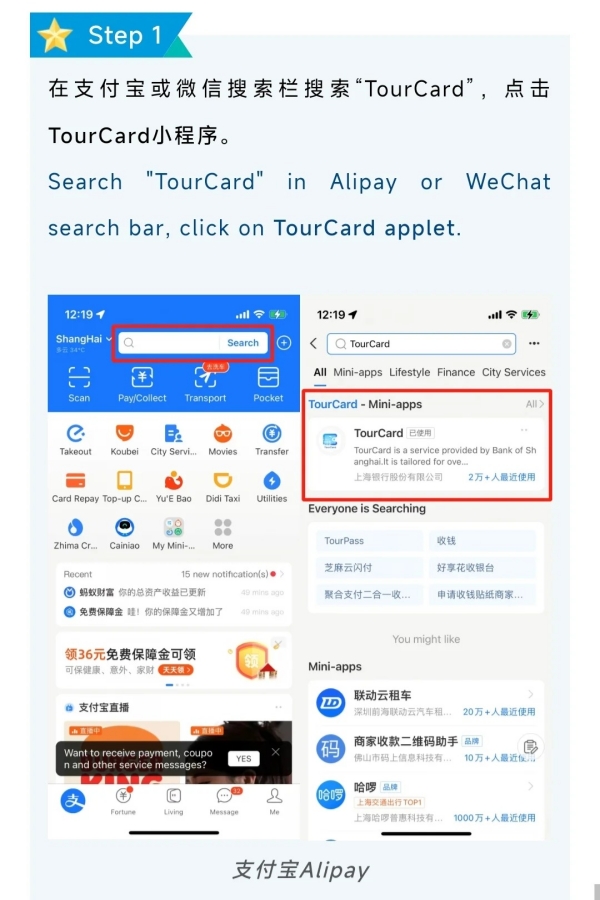
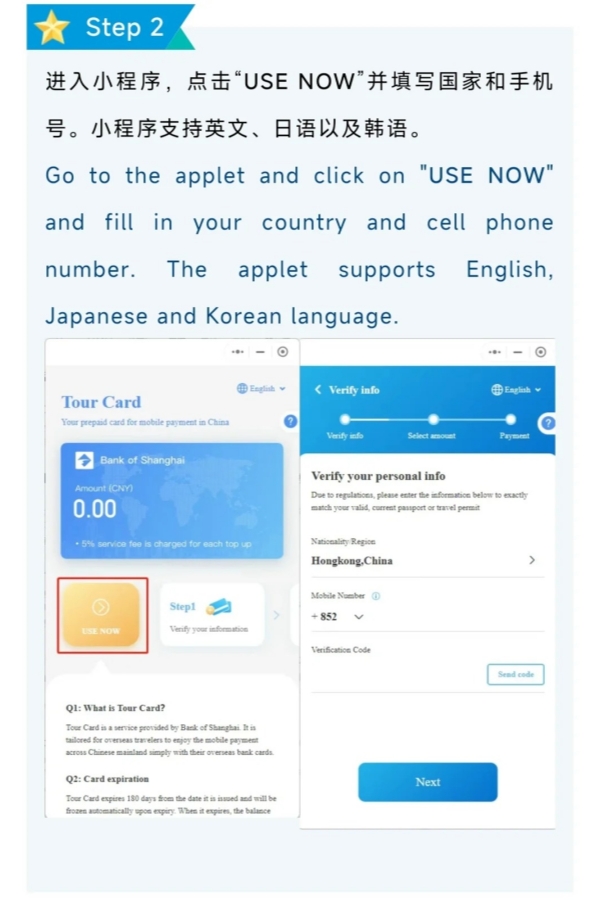
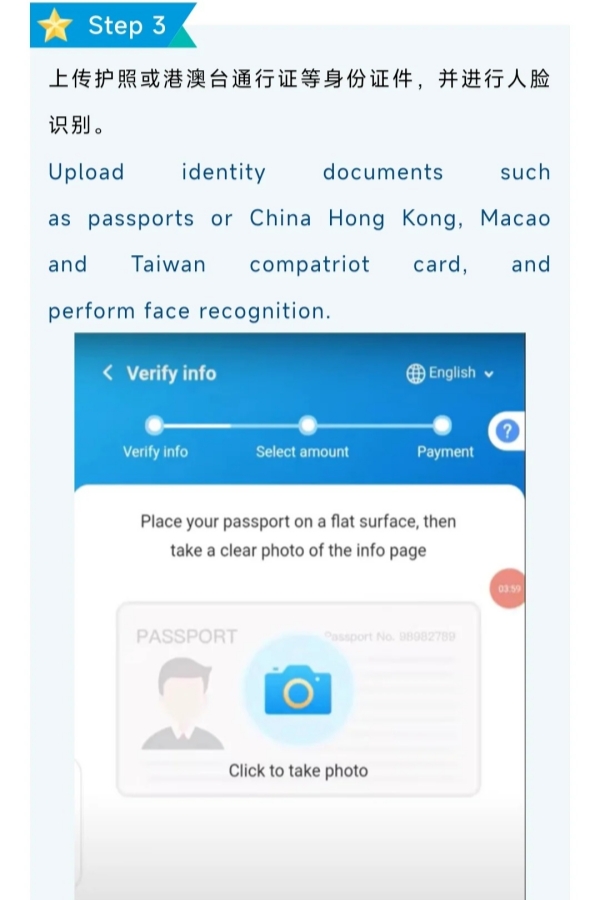
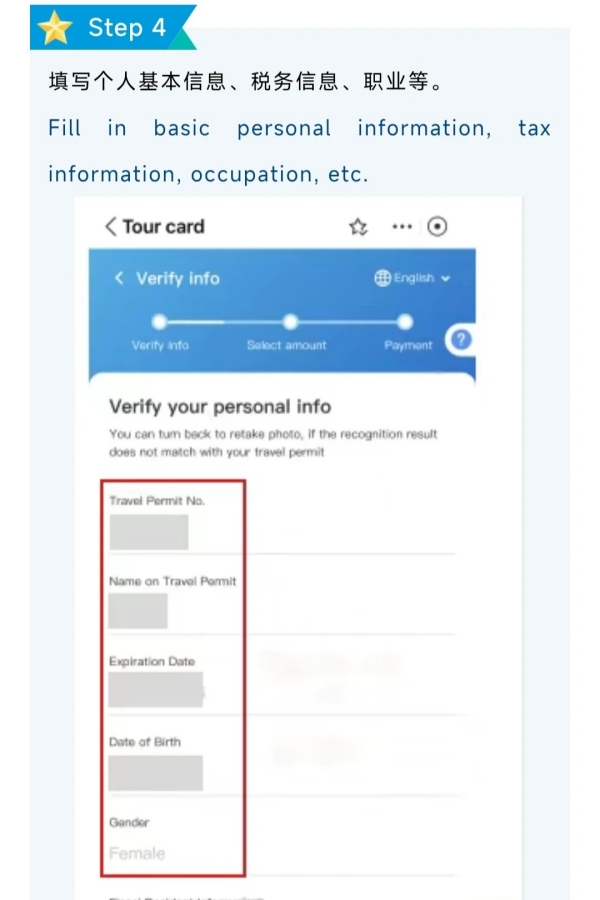
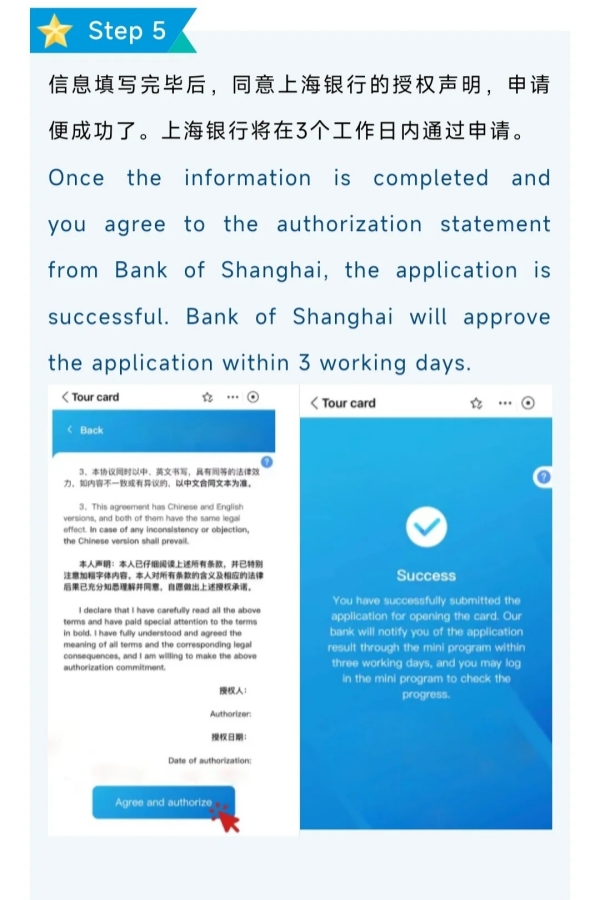
Top-up is the most complex step in the entire Alipay setup process. Therefore, reviewing all available methods helps avoid surprises. The following overview table covers each method's cost and speed at a glance.
| Top-Up Method | Where / How | Fee | Speed | Recommended |
|---|---|---|---|---|
| TourCard (Bank of Shanghai) | Alipay or WeChat mini-program | 5% per top-up | Instant (after 3-day approval) | ⭐⭐⭐ |
| Amaze Card / Wise Card | In-app, anytime | ~0–0.5% | Instant | ⭐⭐⭐⭐⭐ |
| Linked foreign card (Visa/MC) | In-app, anytime | ~3% (varies by card) | Instant | ⭐⭐⭐⭐ (with Amaze/Wise) |
| AXS Machine (Singapore) | AXS kiosks in SG | Low flat fee | Same day | ⭐⭐⭐ |
How to Top Up Alipay Balances from Singapore
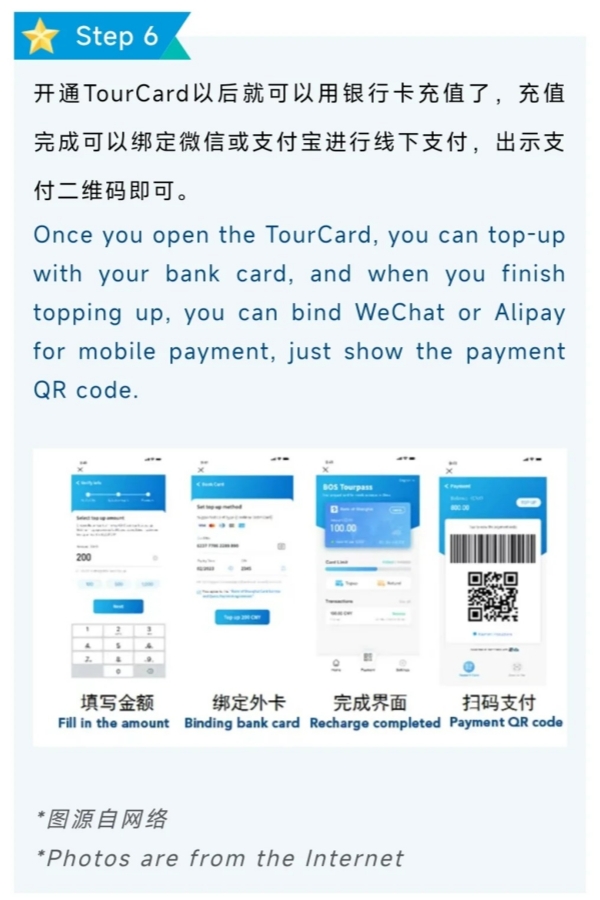
TourCard is a prepaid virtual card issued by Bank of Shanghai for travelling overseas. You can pre-load CNY 20,000 balance (maximum) via Alipay/Login via WeChat Pay mini-program, and then bind the card to make QR code payments in China. 5% service fee charged per top-up. The card is valid for 180 days. Apply at least one week before your journey — Bank of Shanghai takes up to three working days to approve the application.
- Step 1: Open the TourCard Mini-Program
- Search "TourCard" inside Alipay or WeChat and tap the mini-program published by Bank of Shanghai (上海银行股份有限公司). The interface supports English.
- Step 2: Register and Verify Identity
- Tap "USE NOW," select nationality, and enter the SMS verification code sent to your local mobile number.
- Upload a clear photo of the passport data page and complete the face recognition step within the on-screen timer.
- Step 3: Submit Application and Await Approval
- Confirm passport details, select "Non-Chinese fiscal resident" for tax status, then tap "Agree and authorize" to submit.
- Bank of Shanghai notifies the result within three working days via the mini-program.
- Step 4: Top Up and Bind to Alipay
- Once approved, enter the desired CNY amount and link an overseas Visa or Mastercard to complete the top-up (5% fee applies).
- Bind TourCard to Alipay inside the mini-program. Payments deduct from the TourCard balance automatically at the QR code counter.
TourCard's 5% fee is higher than a low-fee card charged directly. It works best as a backup or for travelers who prefer pre-loading a fixed CNY budget before departure.
Alipay Balance Recharges via Amaze or Wise Cards
Amaze Card (by Instarem) and Wise Card are the cheapest and most feasible options to top up Alipay from Singapore. Amaze Card is treated like a local Mastercard by Alipay, no foreign transaction fee meaning you get the very best rates. Wise Card applies near mid-market rates with roughly 0.5% per transaction. Both cards are added directly inside the Alipay app and tops up your balance instantly — no need to go to a kiosk or a separate application.
- Step 1: Get Your Amaze Card or Wise Card
- Download the Instarem app to apply for a free Amaze Card, or download the Wise app to open a Wise account and request a Wise Card. Both are issued as Mastercard.
- For Wise, load SGD into the Wise balance first via PayNow or bank transfer before topping up Alipay.
- Step 2: Link the Card to Alipay
- Open Alipay → "My" → "Bank Cards" → "Add Bank Card."
- Enter the Amaze or Wise card number, cardholder name, expiry date, and CVV, then verify with the SMS OTP.
- Step 3: Top Up Alipay Balance
- Tap "Add Money" on the Alipay homepage (or "My" → "Balance" → "Top Up"), select the linked Amaze or Wise card, and enter the CNY amount.
- Review the exchange rate and confirm payment. Funds appear in the Alipay balance instantly with minimal fees.
Amaze Card stacks rewards with DBS, OCBC, or UOB cards simultaneously. Pair Amaze with a miles-earning card to earn points on every Alipay top-up at effectively 0% foreign transaction fee.
Top-Up Process with Singapore Bank Cards
This is the fastest top-up method available. Next, follow these three steps to add funds from a linked card.
- Step 1: Open Alipay and Access the Top-Up Screen
- Open Alipay and tap "Add Money" on the homepage.
- Alternatively, go to "My" → "Balance" → "Top Up."
- Step 2: Select a Linked Card and Enter the Amount
- Select a linked bank card from the payment method list.
- Enter the top-up amount in CNY.
- The minimum top-up amount is approximately CNY 50 per transaction.
- Step 3: Confirm the Exchange Rate and Complete the Payment
- Review the real-time exchange rate and the final SGD amount before confirming.
- Complete payment verification via PIN, biometric, or OTP.
- If the bank declines the transaction, call to enable international spending permissions first. Then retry.
Alipay Balance Recharges via Local AXS Machines
AXS machines provide a cash-based alternative for topping up Alipay. Therefore, this method suits users who prefer to avoid credit card transactions entirely.
- Step 1: Locate an AXS Machine
- AXS machines are located throughout major malls and MRT stations across Singapore.
- Step 2: Select the Top-Up Option
- At the AXS main menu, select "Top Up" → "Alipay."
- Enter the Alipay account number when prompted.
- Step 3: Make Payment
- Insert cash or swipe a card to complete the top-up.
- The fee is typically a flat SGD 1–2 per transaction.
- Note: minimum and maximum top-up amounts apply and vary by machine location.
Breakdown of the 3% Transaction Fee
- The 3% charge is one of the most frequently asked questions about Alipay. However, this fee does not come from Alipay itself. Understanding the source makes it avoidable.
- The 3% is a foreign transaction fee charged by the card-issuing bank — not by Alipay.
- For example, a CNY 1,000 (~SGD185) spend with a typical credit card would incur around SGD5.55 in fees.
- Using an Amaze Card brings this down to around SGD0.
- In short, there is no top-up surcharge collected by Alipay — all additional fees are from your bank and the Visa/Mastercard network.
🔗 For a complete guide on avoiding international card fees when using Alipay, read How to Avoid International Card Fees on Alipay — a dedicated breakdown of every strategy available.
Current Currency Conversion Rates for Singapore Dollars
Alipay applies the interbank mid-market rate for currency conversion. Therefore, the displayed rate closely tracks live market rates.
- For example, SGD 100 would convert to about CNY 540 (the rates obviously vary daily).
- But paying with a regular credit card essentially penalizes you around 3%.
- Paying with a Wise or Amaze Card keeps your de-facto conversion rate closest to the mid-market rate.
- Before topping up, check the rate that Alipay gives you against Google’s live rate. They should be within 0.5% of each other.
🔗 For a detailed walkthrough of how Alipay calculates the SGD to CNY rate and when it updates, read Alipay Currency Conversion: SGD to CNY Explained.
Optimized Bank Cards for Lower Transaction Costs
Card selection significantly affects the total cost of using Alipay in China. Therefore, choosing the right card before departure saves money throughout the entire trip.
- Amaze Card (Instarem): Alipay recognizes it as a local Mastercard. Therefore, the foreign transaction fee is bypassed entirely. Additionally, it stacks rewards with DBS, OCBC, or UOB cards simultaneously.
- Wise Card: Offers near mid-market exchange rates with approximately 0.5% per transaction. Additionally, there is no minimum top-up amount required.
- Standard credit cards (DBS / OCBC / UOB): These add 2.5%–3% per transaction. They work reliably. However, extended use leads to notably higher total fees compared to Amaze or Wise.
- Avoid linking any 2.5%+ foreign-fee card directly to Alipay for frequent or high-value top-ups.
🔗 For a complete breakdown of every top-up method available while in China, check out How to Top Up Alipay in China — a dedicated guide covering all in-country recharge options in detail.
How to Process Mobile Payments in China
Alipay supports three main payment scenarios in China. Therefore, knowing each workflow in advance prevents confusion at the payment counter or transit gate.
Scan-to-Pay Procedures with QR Codes
Two scanning modes are available. Next, choose based on whether the merchant shows a static QR code or uses a handheld scanner.
- Step 1: Scan the Merchant's QR Code
- Open Alipay and tap the scan icon on the homepage.
- Point the camera at the merchant's QR code to initiate payment.
- Confirm the payment amount and complete the transaction.
- Step 2: Show a Personal Payment QR Code
- Tap "Receive/Pay" on the Alipay homepage.
- Display the personal payment QR code to the merchant's handheld scanner.
- The code refreshes automatically for security purposes.
Additionally, foreign users should keep the following transaction limits in mind:
- Per-transaction cap: CNY 3,000
- Daily cap: CNY 3,000
- Monthly cap: CNY 50,000
Exceeding the limit triggers a system prompt. Therefore, submitting additional verification documents can unlock a higher spending tier.
Public Transport Payments for Metro and Taxis
Alipay covers metro transit and ride-hailing across major Chinese cities. Therefore, a physical transit card is not required for most city journeys.
- Metro transit: Cities including Beijing, Shanghai, and Guangzhou support Alipay QR code entry. Open Alipay, search "Transit Code," grant permissions, and scan at the turnstile.
- Ride-hailing via DiDi: Access DiDi directly as a mini-program inside Alipay. No separate app download is needed. Payment deducts automatically from the Alipay balance or linked card.
- Note: Generate the transit QR code before entering the station. Signal coverage inside metro stations can be unreliable at peak times.
Troubleshooting Solutions for App Payment Failures
The following table covers the most common issues. For instance, VPN interference ranks as the most frequently reported problem across traveler communities.
| Problem | Likely Cause | Fix |
|---|---|---|
| OTP not received during registration | VPN is active | Disable VPN completely, then retry |
| Card keeps getting declined | Bank blocked overseas transactions | Call the bank to enable international usage |
| Identity verification failed | Passport photo unclear or name mismatch | Re-upload with better lighting; name must match the card exactly |
| Payment fails at checkout | Exceeded foreign-user spending limit | Check monthly balance; split the payment or use a different card |
| App shows "service not available in region" | Wrong app version installed | Uninstall and re-download the international version |
FAQs: Common Queries for Alipay Singapore Users
Q: Can foreigners create an Alipay account without a Chinese bank account?
Yes. Foreigners can create an Alipay account using a foreign passport, an overseas mobile number, and a Visa or Mastercard. No Chinese bank account or SIM card is required. The complete process of how to set up Alipay in Singapore relies entirely on locally available documents and cards, making registration straightforward for any foreign user.
Q: Which Singapore bank cards work with Alipay?
DBS, OCBC, and UOB Visa and Mastercard cards all support Alipay. However, Amaze Card and Wise Card are the top recommendations due to near-zero foreign transaction fees. Anyone exploring how to set up Alipay in Singapore should consider Amaze Card or Wise Card to avoid the 3% fee charged by standard bank cards during overseas transactions.
Q: What is the 3% charge on Alipay and can it be avoided?
The 3% charge comes from the card-issuing bank as a foreign transaction fee, not from Alipay. Alipay itself does not add any top-up surcharge. Therefore, those who understand how to set up Alipay in Singapore can avoid this fee entirely by linking an Amaze Card or Wise Card, both of which bypass or significantly minimize overseas transaction charges.
Q: How much can foreigners spend on Alipay per day?
Foreign users face a daily spending cap of CNY 3,000 and a monthly cap of CNY 50,000. These limits apply across all Alipay payment transactions. Therefore, anyone planning an extended China trip while learning how to set up Alipay in Singapore should budget within these caps or submit additional verification documents to apply for a higher spending tier.
Q: Is it safe to link a Singapore credit card to Alipay?
Alipay applies SSL encryption and requires identity verification for all account holders. Additionally, every payment requires a separate PIN or biometric check. Therefore, linking a Singapore credit card is considered secure. However, anyone working through how to set up Alipay in Singapore should download the app exclusively from official app stores to avoid fraudulent versions.
Q: Can Alipay be used in Singapore for local payments?
Alipay+ supports select merchants in Singapore, covering certain retail stores and dining venues. However, local coverage remains limited compared to mainland China. For those who understand how to set up Alipay in Singapore, the primary use case remains China travel payments. Local Singapore usage is growing but has not yet reached the same saturation level as in China.
Q: Does a VPN need to be active to use Alipay in Singapore?
No VPN is needed. In fact, an active VPN actively disrupts the registration and payment process. It blocks OTP delivery and triggers account security flags. Therefore, anyone learning how to set up Alipay in Singapore must disable the VPN before downloading the app, completing registration, and performing all identity verification steps.
Q: What is the difference between Alipay and Alipay International?
The international version is designed specifically for foreign users outside mainland China. It accepts overseas phone numbers and foreign bank cards for registration. The standard version targets Chinese residents with local phone numbers. Therefore, those exploring how to set up Alipay in Singapore must download the international version, available on the App Store and Google Play.
Q: How long does Alipay identity verification take?
Identity verification typically completes within 1 to 3 minutes automatically. However, during peak periods, the process can take up to 24 hours. Therefore, anyone following a guide on how to set up Alipay in Singapore should complete verification well before the departure date. Attempting verification at a Chinese airport increases the risk of connection errors and security flag triggers.
Q: Can Alipay be used to pay for public transport in China?
Yes. Alipay supports metro entry in major Chinese cities, including Beijing, Shanghai, and Guangzhou. The transit QR code is accessible directly inside the app. Therefore, travelers who understand how to set up Alipay in Singapore and activate the transit feature can board metro systems without purchasing physical tickets or prepaid transit cards at station counters.