How to Use Xiaohongshu:Complete Guide 2026
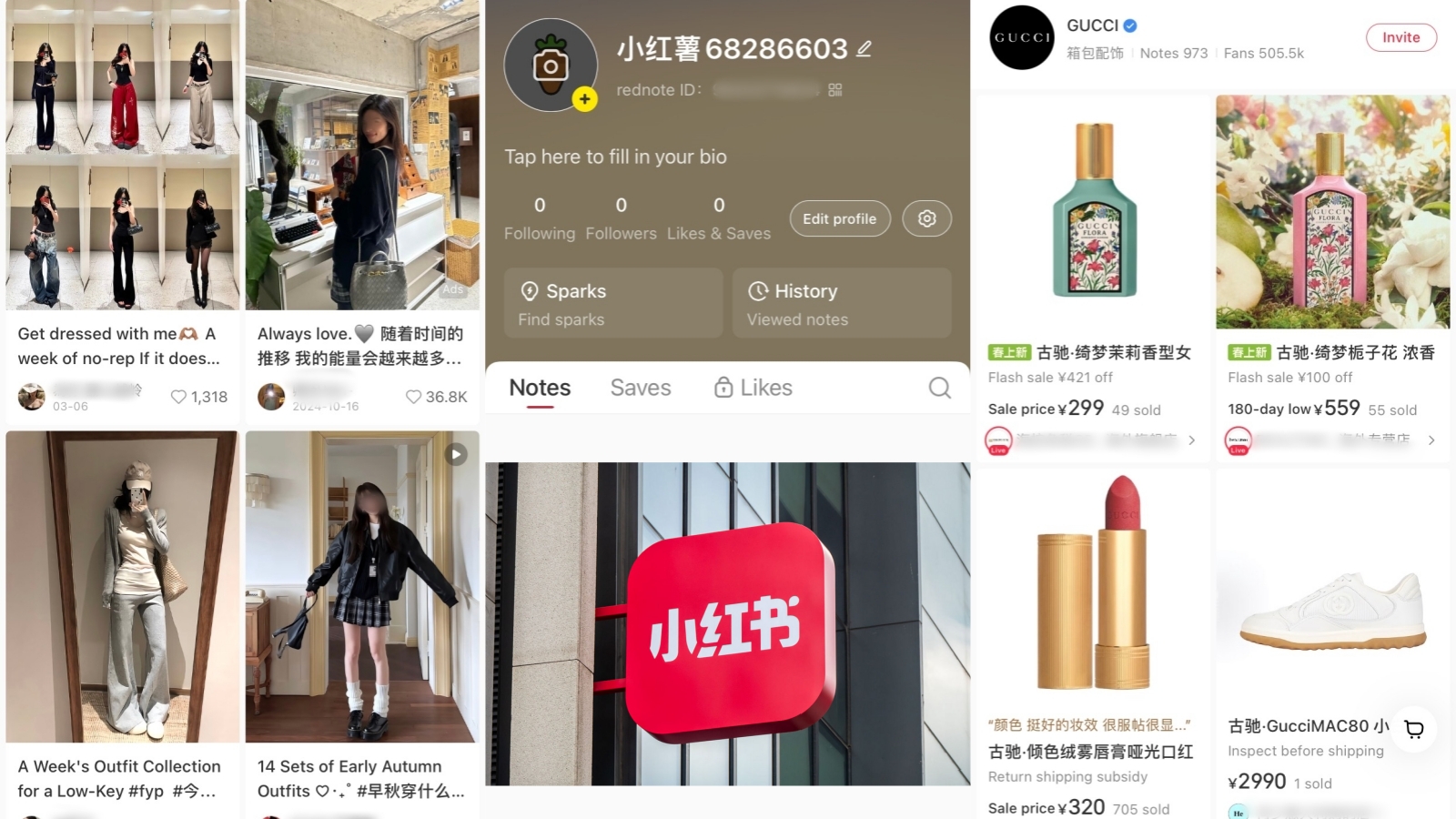
With over 1.3 billion users in search of genuine lifestyle inspiration, there’s no better place than China’s e-commerce and social-media hybrid company Xiaohongshu (小红书), or “Little Red Book.” The app enables users to post photos, videos, and livestreams on the lifestyle-related topics of shopping, product reviews, and recommendations, including beauty, fashion, travel, and fitness. As Chinese social media companies start to move into the West, learning how to use Xiaohongshu could unlock access to some of the most trending products there, among a Chinese- speaking community - as a tool to further reach them. Use Xiaohongshu to find local recommendations when you travel, unique products when you shop or discover new audiences as a creator! To get you started, let’s look at how to use Xiaohongshu (2026) report and more tips and tricks here in this article.
App Setup and Basic Interface
How to Download App and Register
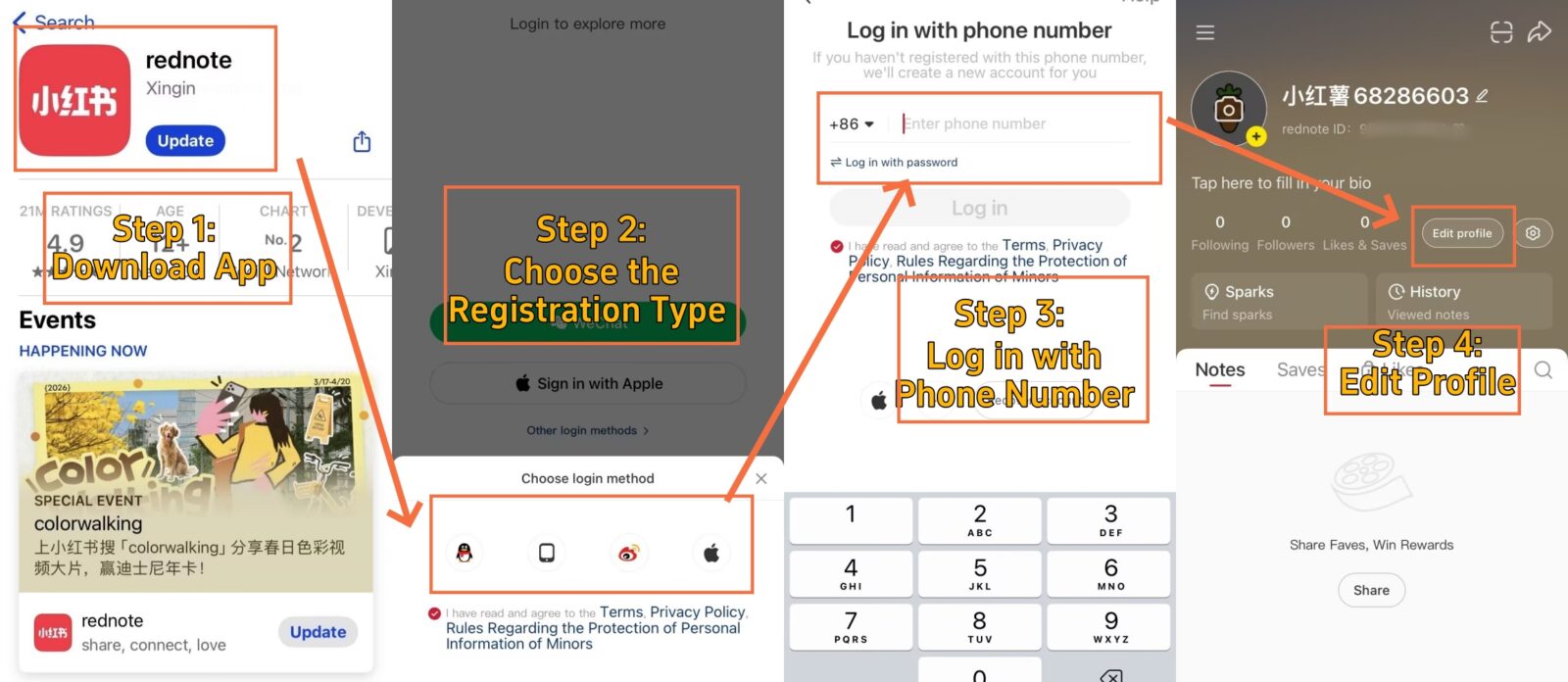
Xiaohongshu Download & Account Setup
Downloading Xiaohongshu is a snap and takes just a few minutes. Head to your device’s App Store (iOS) or Google Play (Android) and search for “Xiaohongshu” or “RED.” The official app will have the iconic red app icon featuring a white notebook.
Verify the developer name shows "行吟信息科技(上海)有限公司" before installing. This ensures you're downloading the authentic app, not a copycat version. Additionally, check that your device has at least 500MB of free storage space.
After installation, you'll choose a registration method. Four options exist: phone number (most reliable), WeChat/QQ (for existing Chinese users), Apple ID (iOS users), or email verification (limited availability, 2026 update).
Google account login is NOT supported. International phone numbers may face verification delays or restrictions. Some countries/regions cannot receive SMS codes. Consider using a Chinese SIM card or existing WeChat account for smoothest registration.
- ●Phone Registration: Enter your number with country code
- ○Wait 30-60 seconds for verification code
- ○Create 6-20 character password
- ●Social Login: One-tap authorization through existing accounts
- ○Auto-imports profile photo and nickname
- ○Still requires phone verification for security
- ●Apple ID: Available for iOS users
- ○Uses device credentials automatically
- ○Secondary phone check may apply
Once you’re signed up, immediately edit your profile: get a catchy username (4-16 characters in length), upload a clear profile picture (preferably 500×500px), and create a short biography (40 Chinese or 80 English characters). Then choose 3–10 tags of interests related to your own, and your content feed will be customized to suit your preferences.
📖For detailed step-by-step registration instructions, including troubleshooting verification code issues, check out this comprehensive Xiaohongshu sign-up guide for foreign travelers.
Home Screen Tabs and Menus
-

- 首页 (Home) in Xiaohongshu
-
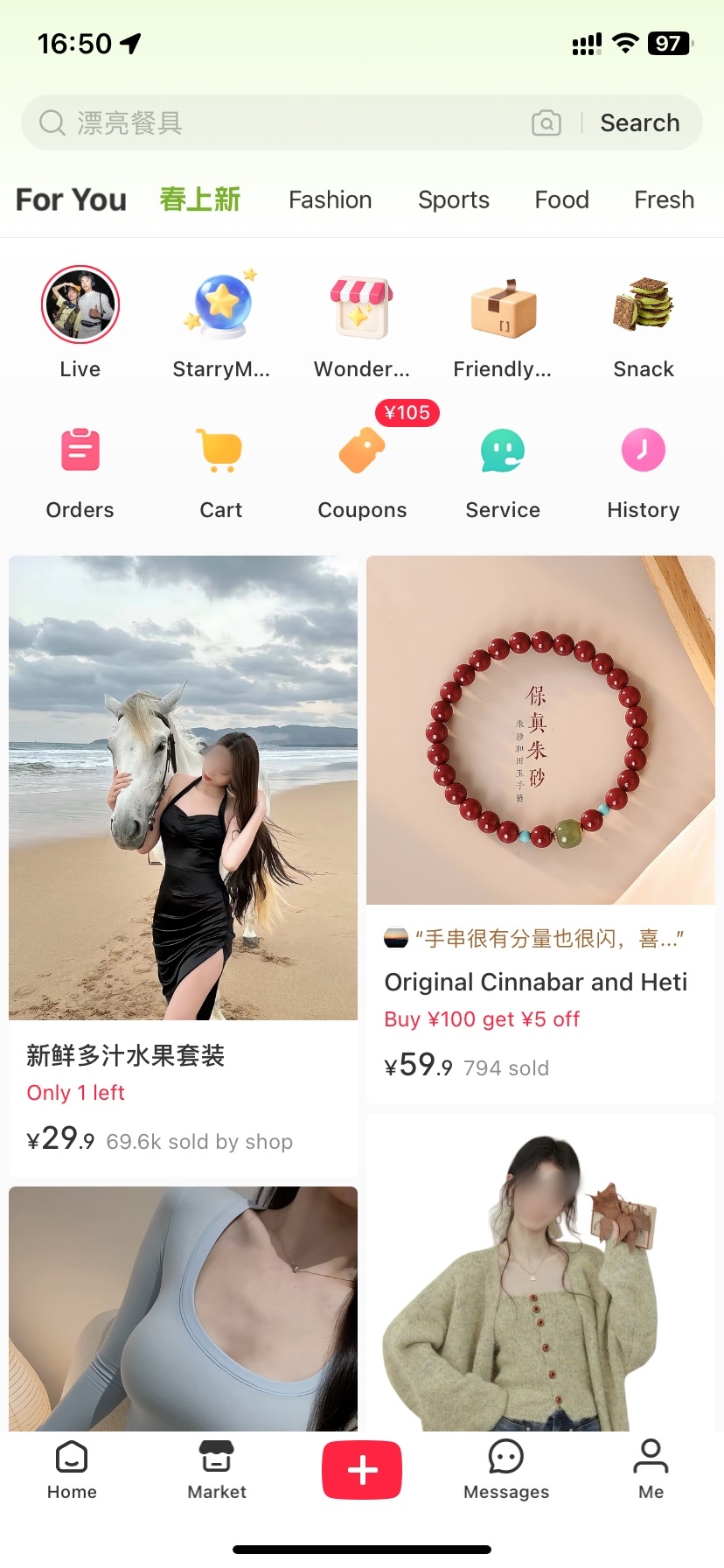
- 市集 (Mall) in Xiaohongshu
-
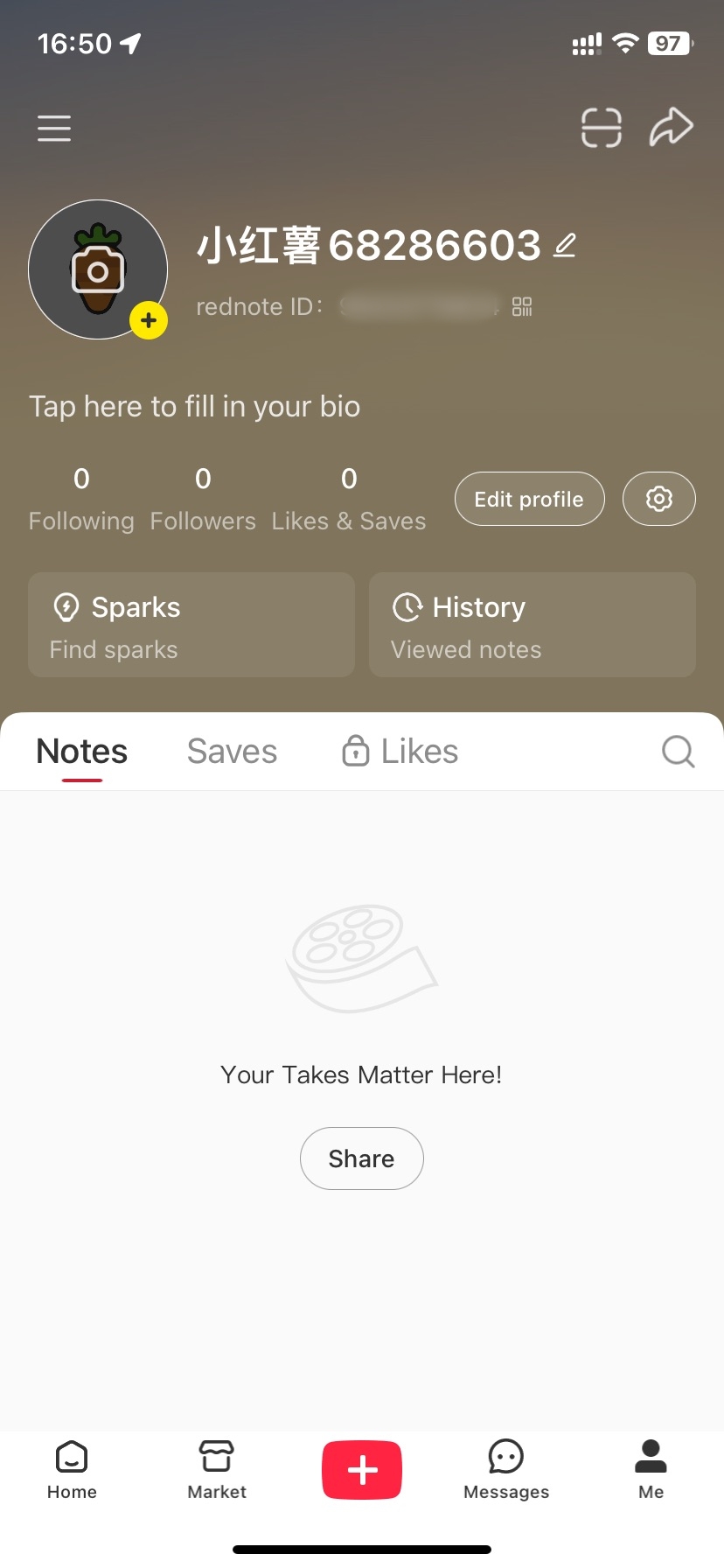
- 我 (Me) in Xiaohongshu
-
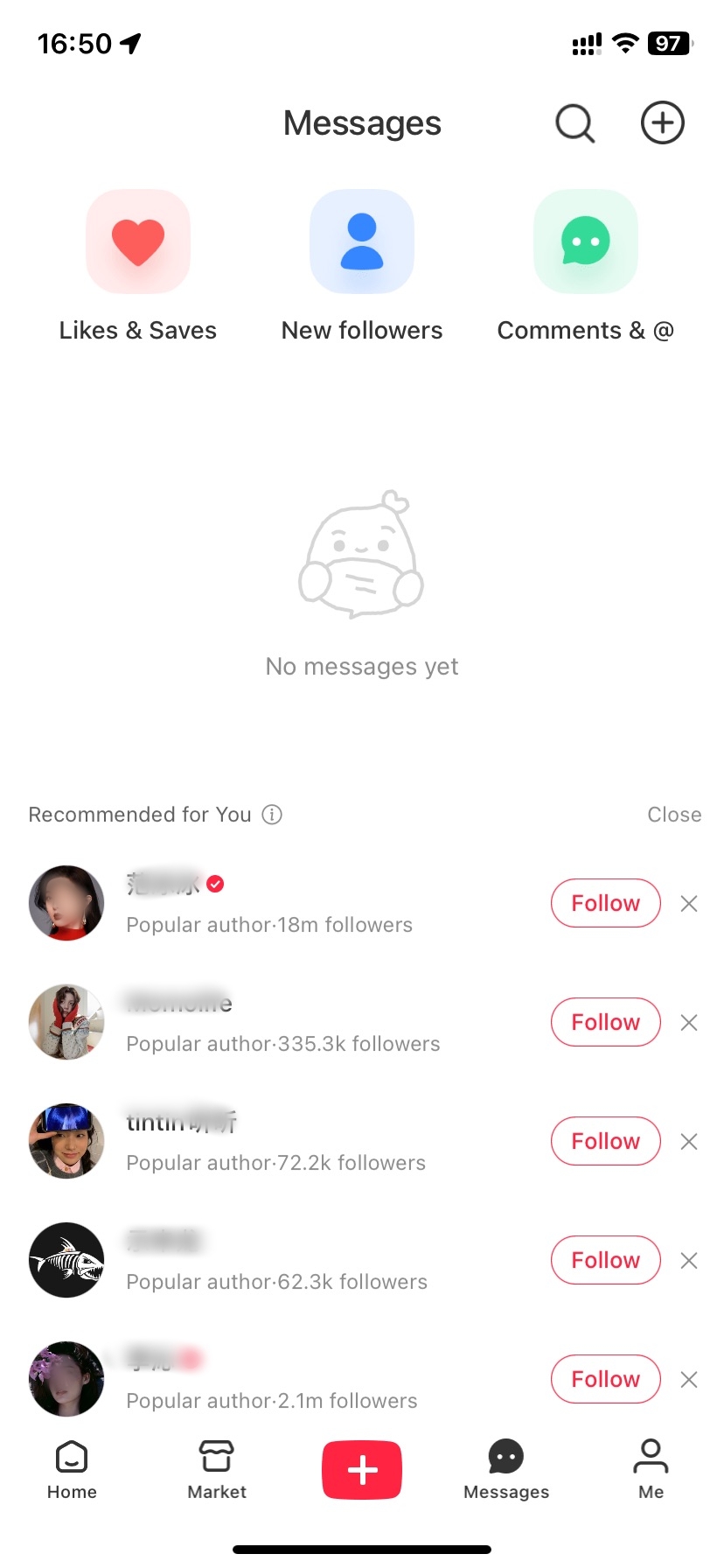
- 消息 (Messages) in Xiaohongshu
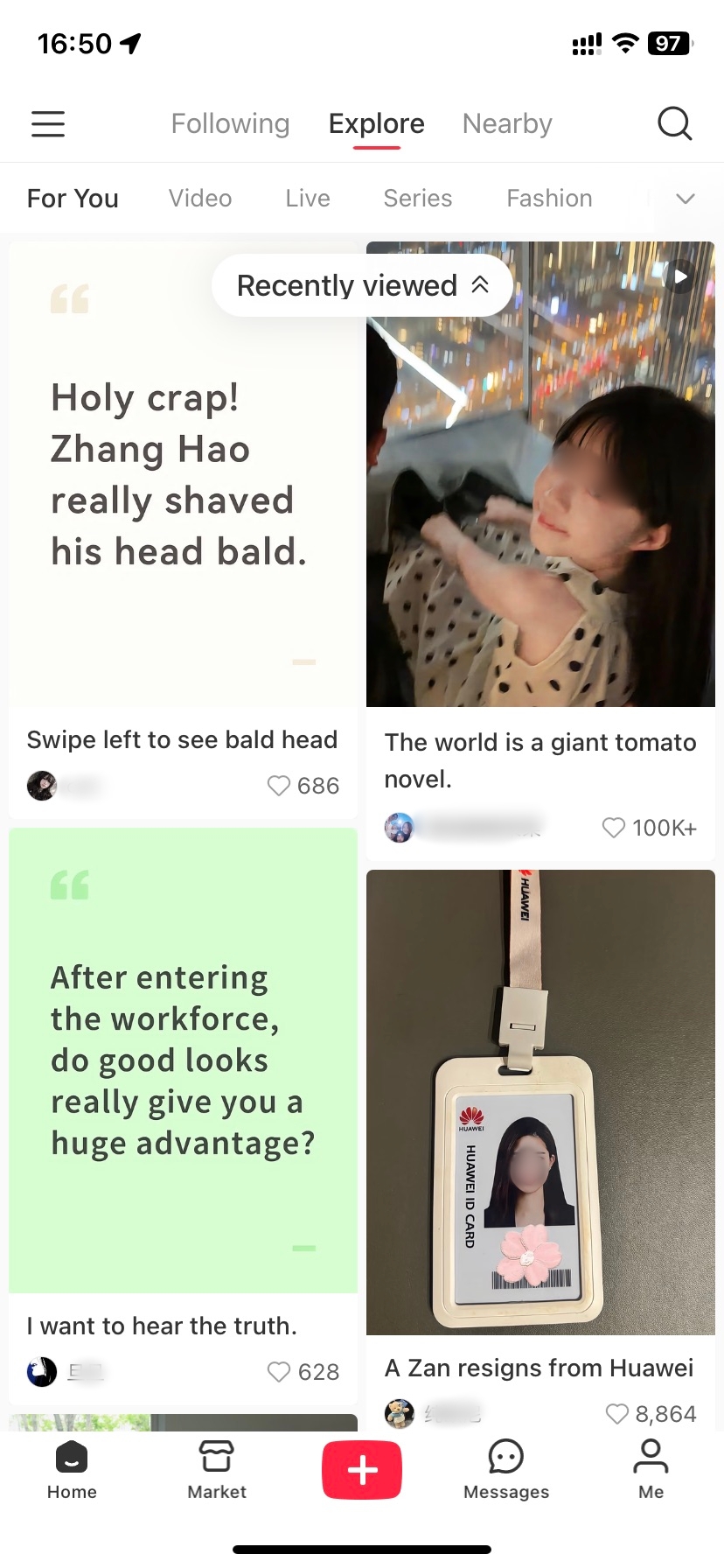
Xiaohongshu's 2026 interface has five bottom navigation entries, with the Home section containing three internal tabs. Understanding this hierarchy helps you navigate efficiently from day one.
Once you tap 首页 (Home), you'll see three tabs at the top:
Enable location permissions to see local recommendations for restaurants, shops, and events. Particularly useful for travelers exploring new cities. Toggle in Settings → Privacy → Location.
Non-Chinese speakers should navigate to Me → Settings (gear icon) → General Settings → Language → English. However, note that only the interface translates—user-generated content remains in Chinese. Therefore, keep Google Translate handy for reading notes and comments.
The algorithm learns your preferences quickly. So if you like, save, or follow that type of content, you’ll be training your feed in a matter of days; you’ll notice “Discover” starts showing you more accurate posts as it learns what you like.
Post Formats and Media Rules
How to Choose Note Formats
-
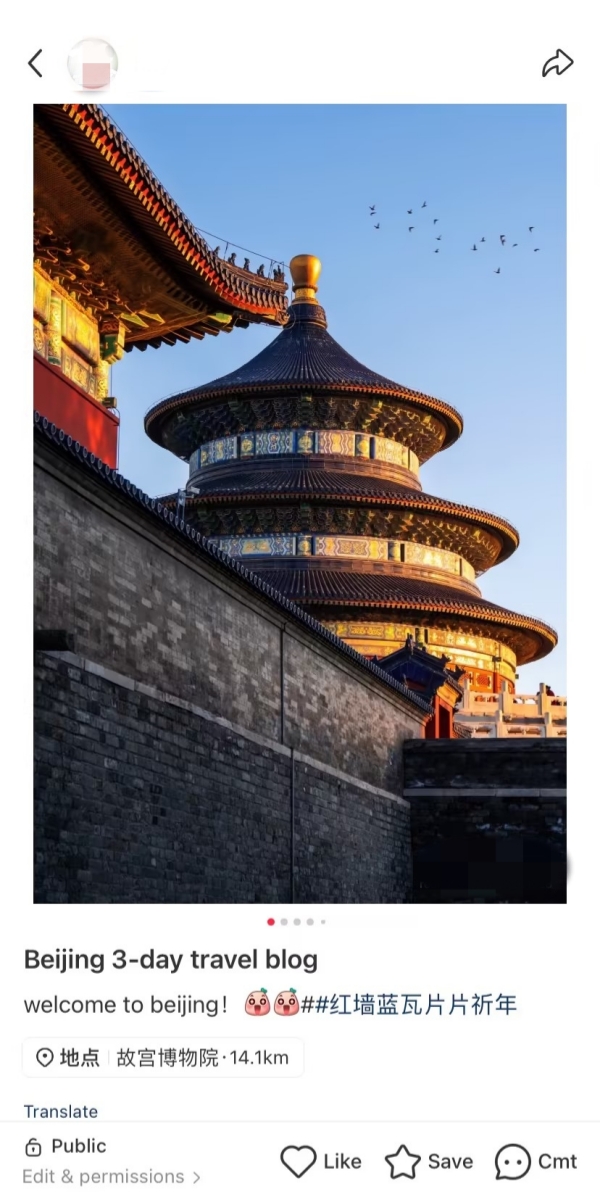

- Xiaohongshu Photo-Text Note
-

- Xiaohongshu Video Note
-
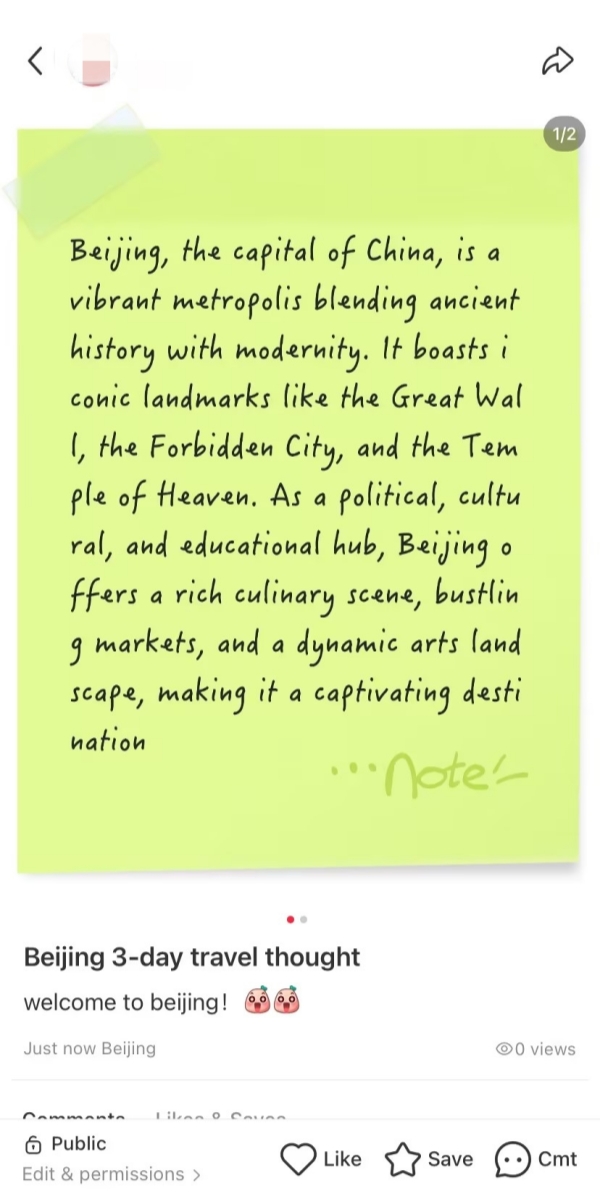
- Xiaohongshu Text-Only Note
Xiaohongshu offers three distinct content formats. Each serves different purposes and audiences.
- ●Photo-Text Notes: Most popular format for lifestyle content
- ○Select 1-9 images from your camera roll
- ○Add descriptive captions
- ○Ideal for outfit posts, reviews, travel guides
- ●Video Notes: Best for tutorials and demonstrations
- ○Upload or record videos up to 30 minutes (2026 update)
- ○Keep under 5 minutes for optimal engagement
- ○Perfect for makeup routines, recipes, unboxings
- ●Text-Only Notes: Quick thoughts and Q&A
- ○Write up to 1,000 characters
- ○Requires cover image selection
- ○Great for tips, recommendations, reflections
Choose photo-text for fashion, beauty, and travel. Similarly, pick video for cooking, skincare routines, or product demos. Meanwhile, text works well for short advice or answering follower questions. The format shapes how users discover and engage with your content.
Both methods begin the same way with a tap of the “+” button at the bottom center, followed by a tap on the choice of format on the popup menu. After that the editing interface opens on a page with tools for the format just selected.
How to Post on Xiaohongshu
-
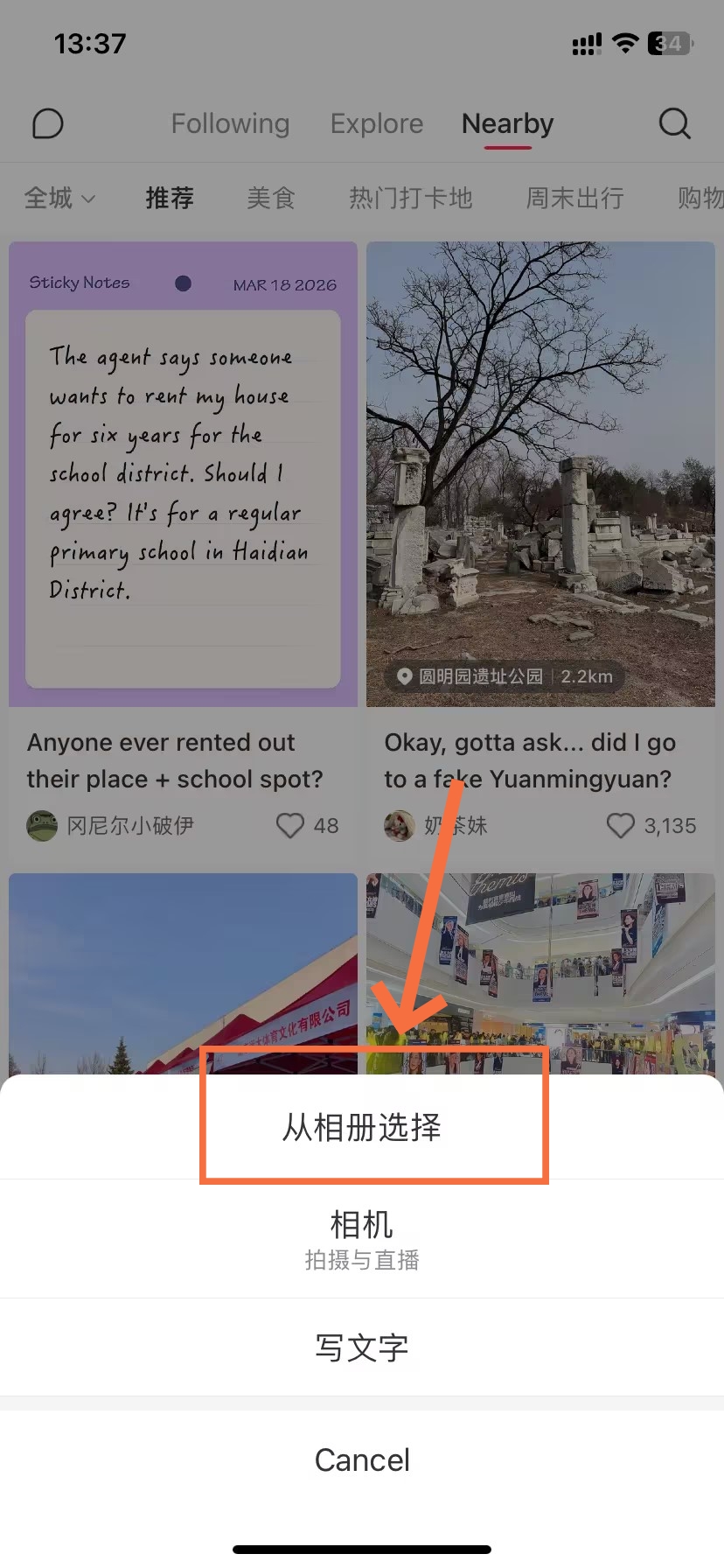
- Select from Album
-
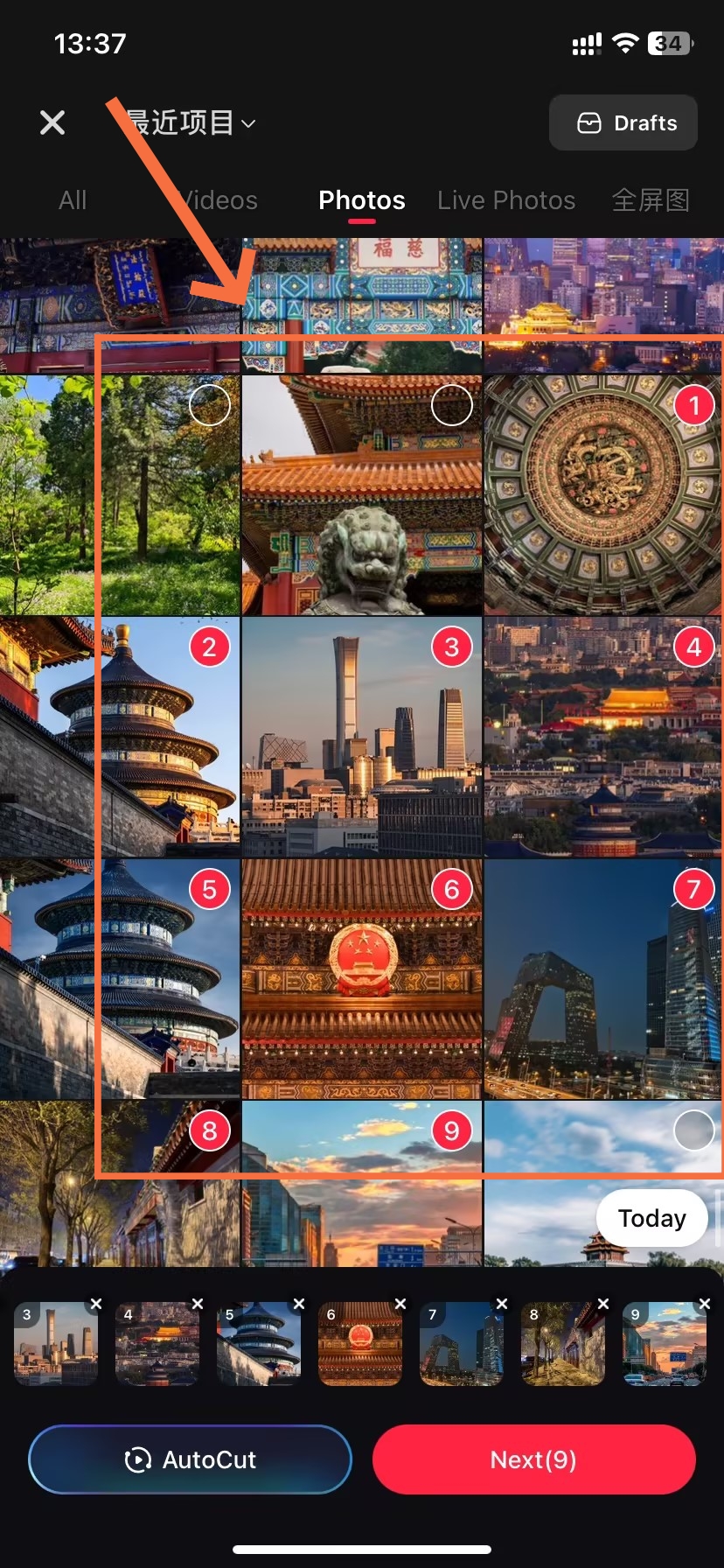
- Select ”Image“
-
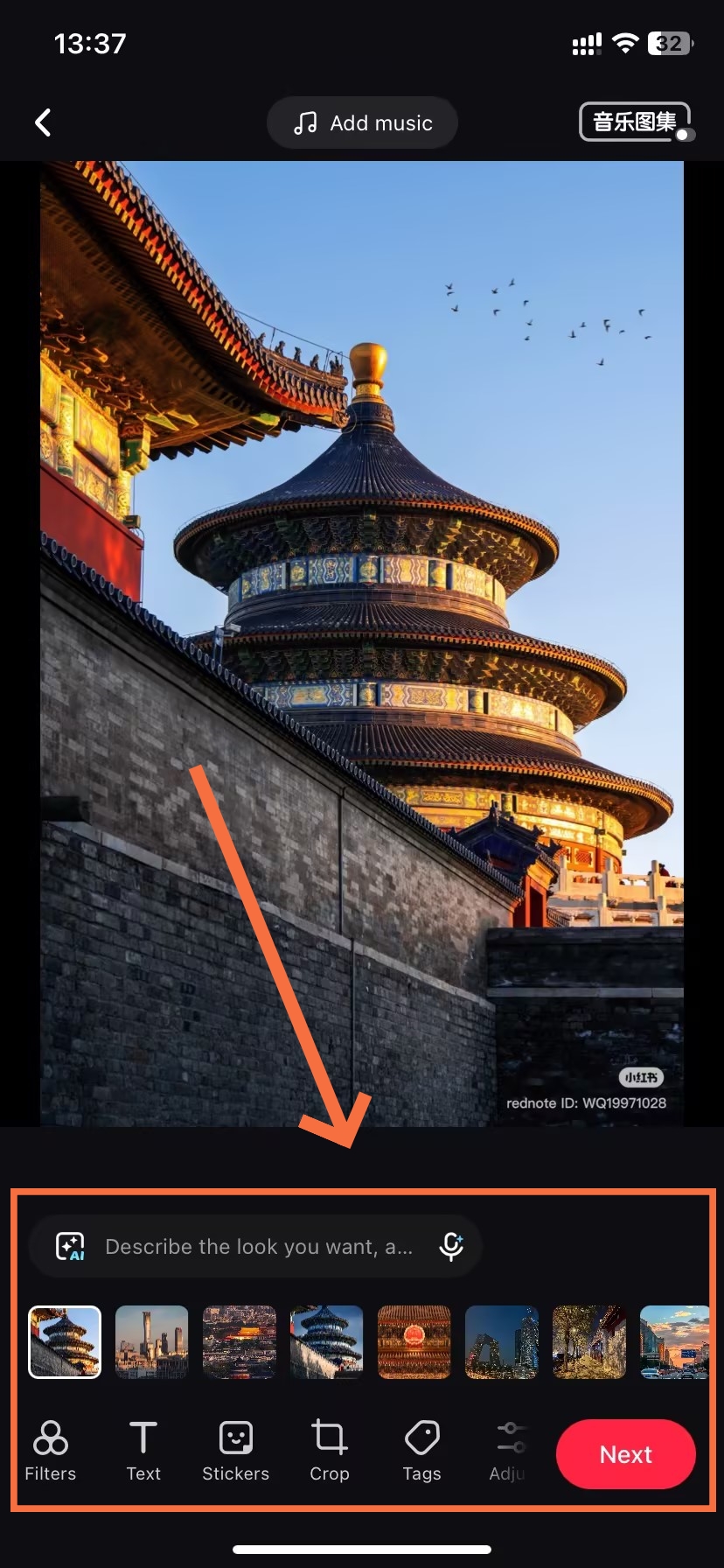
- Edit and Enhance Image
-
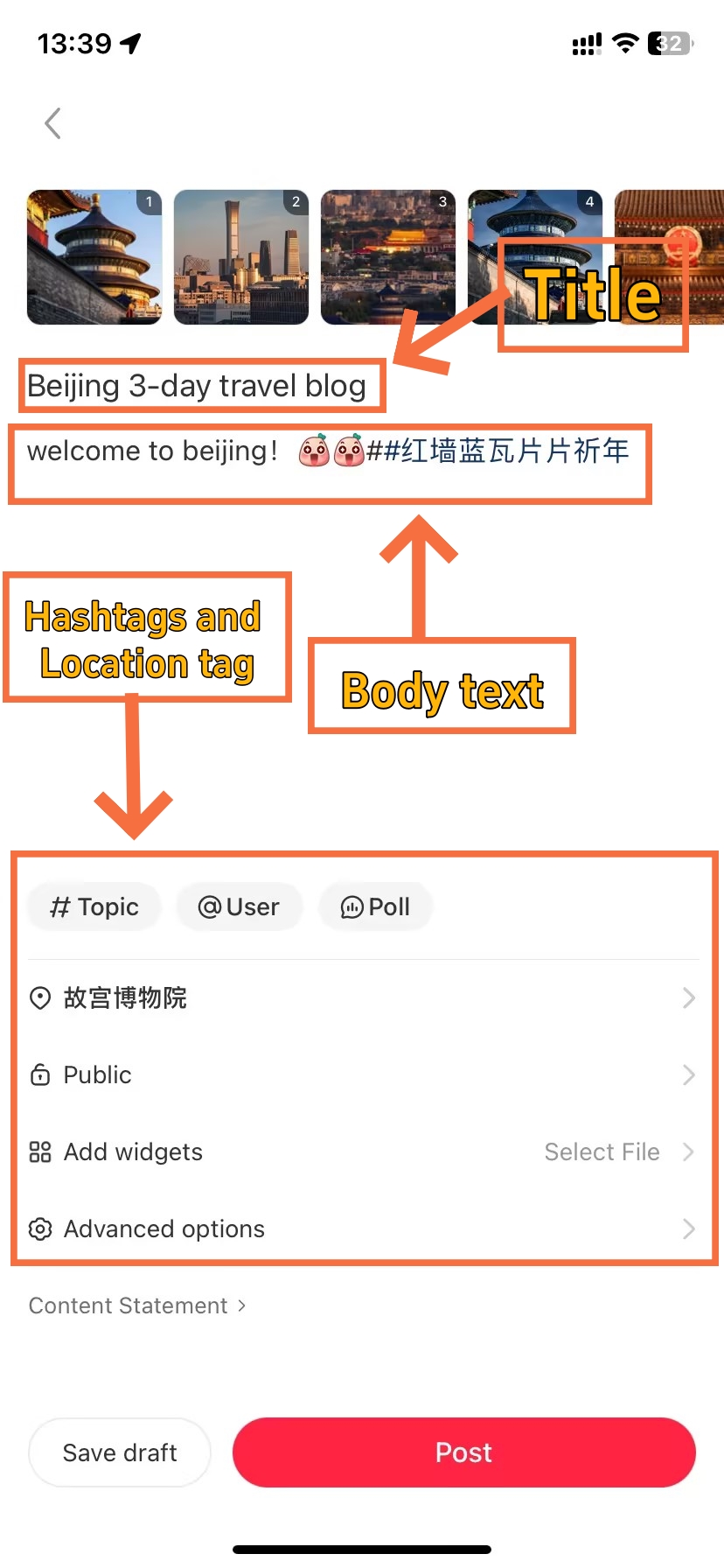
- Filling In the Post Details
-
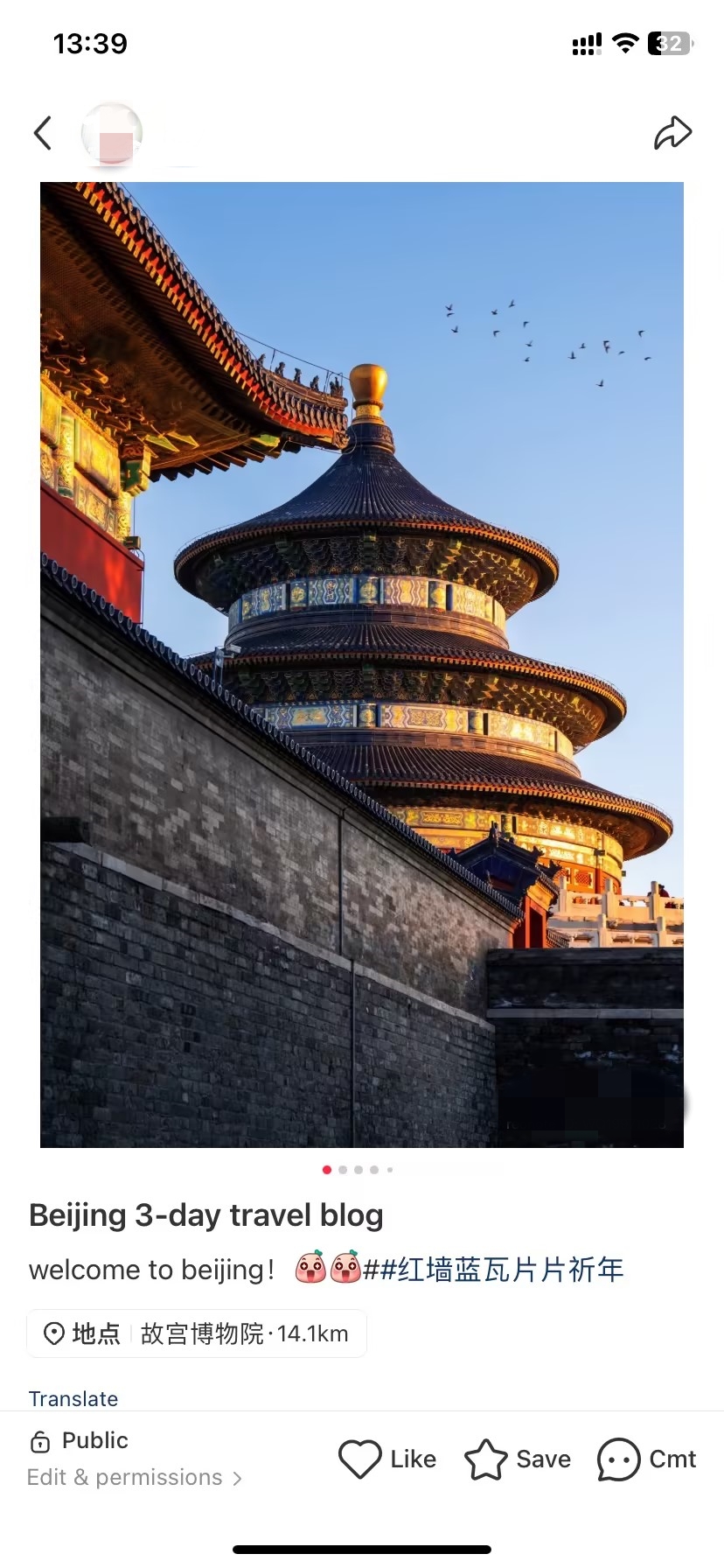
- Finish to Post
Regardless of format, every note follows this universal workflow. Mastering these steps ensures consistent posting success.
- ●Step 1 - Tap Create Button: Press the center "+" icon
- ○Choose between Camera, Album, or Text
- ●Step 2 - Select Content: Pick media or start writing
- ○Photos: 1-9 images allowed
- ○Videos: One video per note
- ●Step 3 - Apply Edits: Enhance with filters and adjustments
- ○20+ built-in filters available
- ○Crop, brightness, contrast controls
- ●Step 4 - Write Title: Craft compelling headline (20 characters max)
- ○Use numbers, questions, or curiosity gaps
- ●Step 5 - Add Caption: Write descriptive text (1,000 character limit)
- ○Include product details, locations, tips
- ●Step 6 - Tag Content: Insert hashtags and location
- ○Use 3-5 relevant hashtags (quality over quantity)
- ○Add location tag for travel/local content
- ○⚠️ Note: Skip any prompts about adding product links—these are for commercial accounts only.
- ●Step 7 - Publish: Review and post immediately or schedule
- ○Set visibility: Public, Followers Only, or Private
Post during peak hours (7-9 AM, 12-2 PM, 7-10 PM China time) for maximum initial engagement. The algorithm favors notes that gain traction quickly after publishing.
🎯Want a detailed walkthrough with screenshots? This step-by-step guide on how to post on Xiaohongshu covers every screen and button you'll encounter during the publishing process.
Image and Video Size Limits
Technical requirements matter on Xiaohongshu. Following these ensures your content displays properly and ranks well.
Images: Multiple ratios supported — 3:4 (1242×1660px) recommended for feed visibility; 1:1 (1080×1080px) for square posts; 9:16 (1080×1920px) for full-screen content. Maximum size: 20MB per photo (increased from 10MB in 2026). JPG or PNG formats accepted.
Videos: 9:16 vertical format (1080×1920px) recommended. Files under 1GB upload fastest. Duration up to 30 minutes; between 1-5 minutes performs optimally for engagement.
Rules for titles and captions are similar. Titles are limited to a max of 20 Chinese characters or 40 English letters. Captions can be up to 1,000 characters in total. Don’t forget to include hashtags (up to 10, but sharing 3-5 works best for discoverability without visibility loss due to being spammy).
Clear, well-lit photos significantly outperform dark or blurry ones. Similarly, videos need good audio quality and steady camera work. Users scroll quickly, so your first image or video frame must grab attention immediately.
How to Manage Post
-
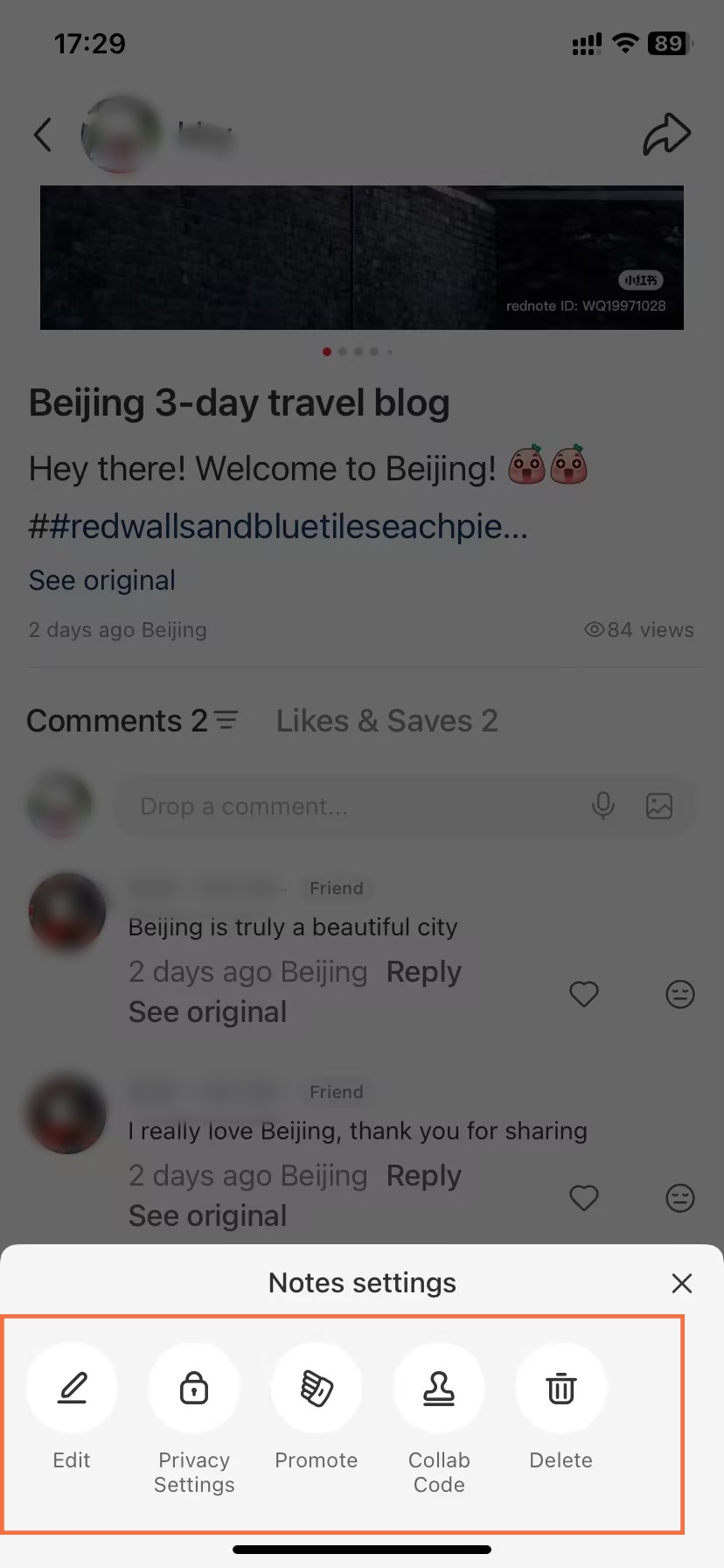
- Managing Published Xiaohongshu Notes
-
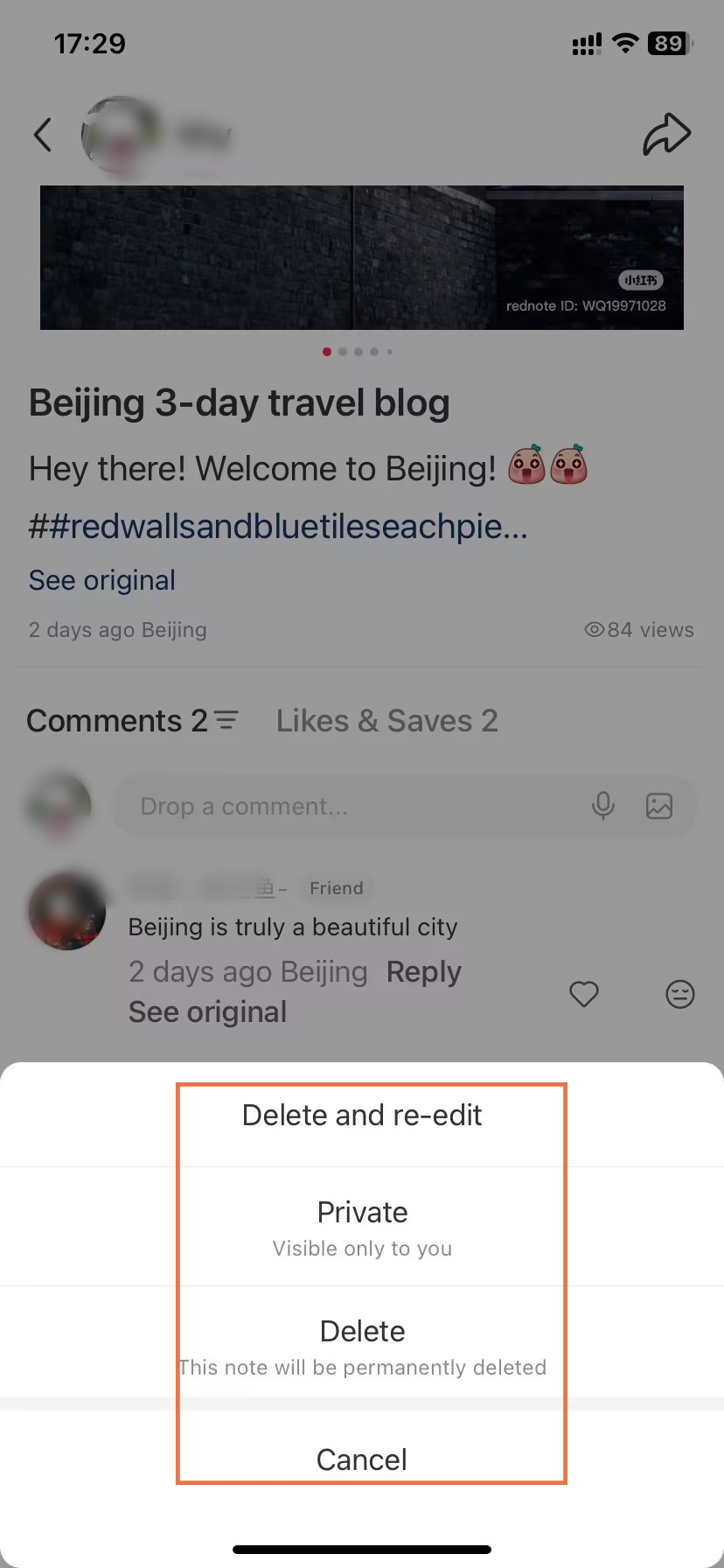
- Delete or Hide Xiaohongshu Note
-
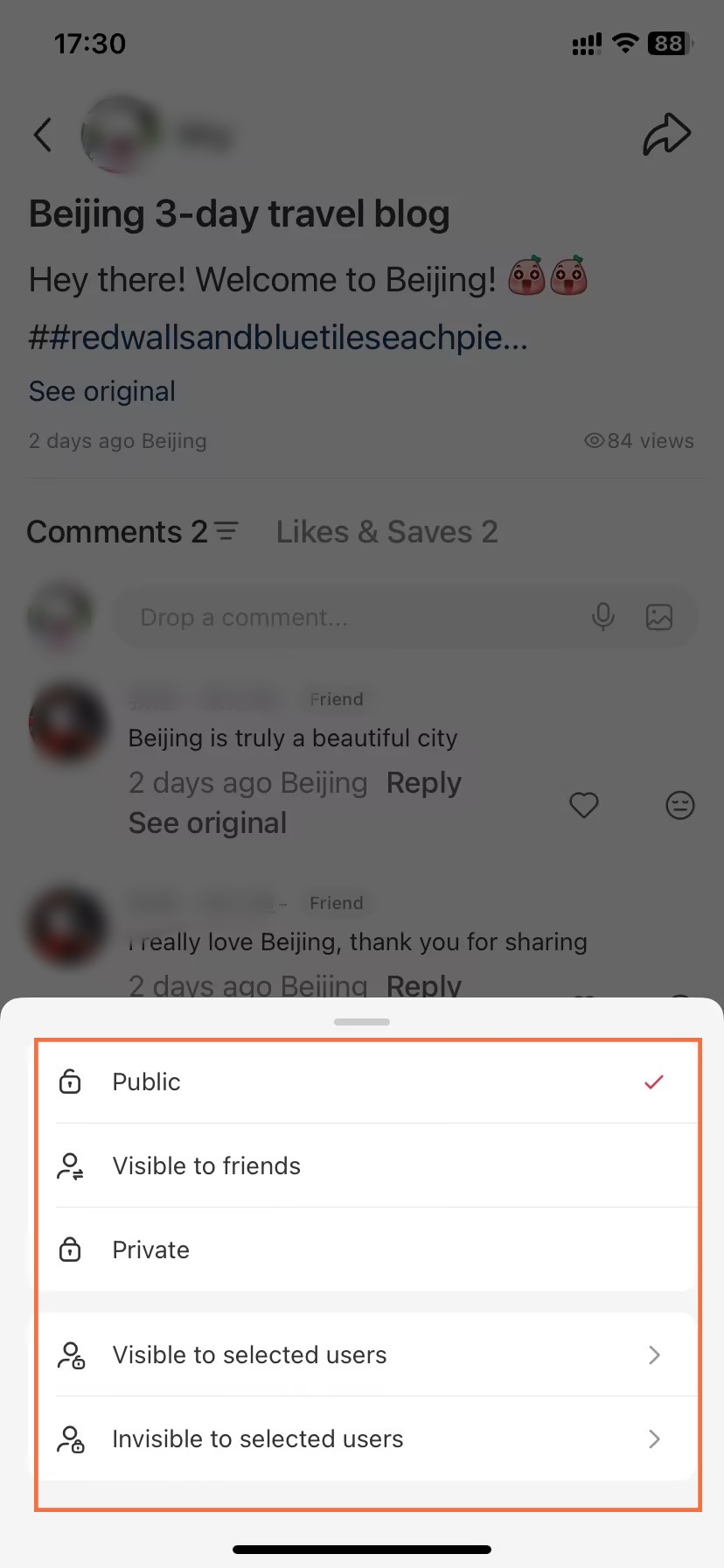
- Adjust Note Privacy
After publishing, you maintain full control over your content. Several management options exist.
- ●Edit Published Notes: Tap "Edit" on any of your notes
- ○Modify caption, title, or hashtags
- ○Cannot change images/videos after posting
- ●Delete or Hide: Remove from public view
- ○Delete permanently removes note and its data
- ○Hide keeps it in drafts but invisible to others
- ●View Analytics: Check performance metrics
- ○See impressions, likes, saves, comments count
- ○Available 24 hours after posting
- ●Adjust Privacy: Change visibility settings
- ○Switch between Public, Followers Only, Private
- ○Useful for testing content before wide release
Analytics reveal what resonates with your audience. Therefore, review your top-performing notes monthly to identify patterns. You'll notice certain topics, formats, or posting times consistently outperform others.
App Search and User Feedback
How to Search and View Posts
-
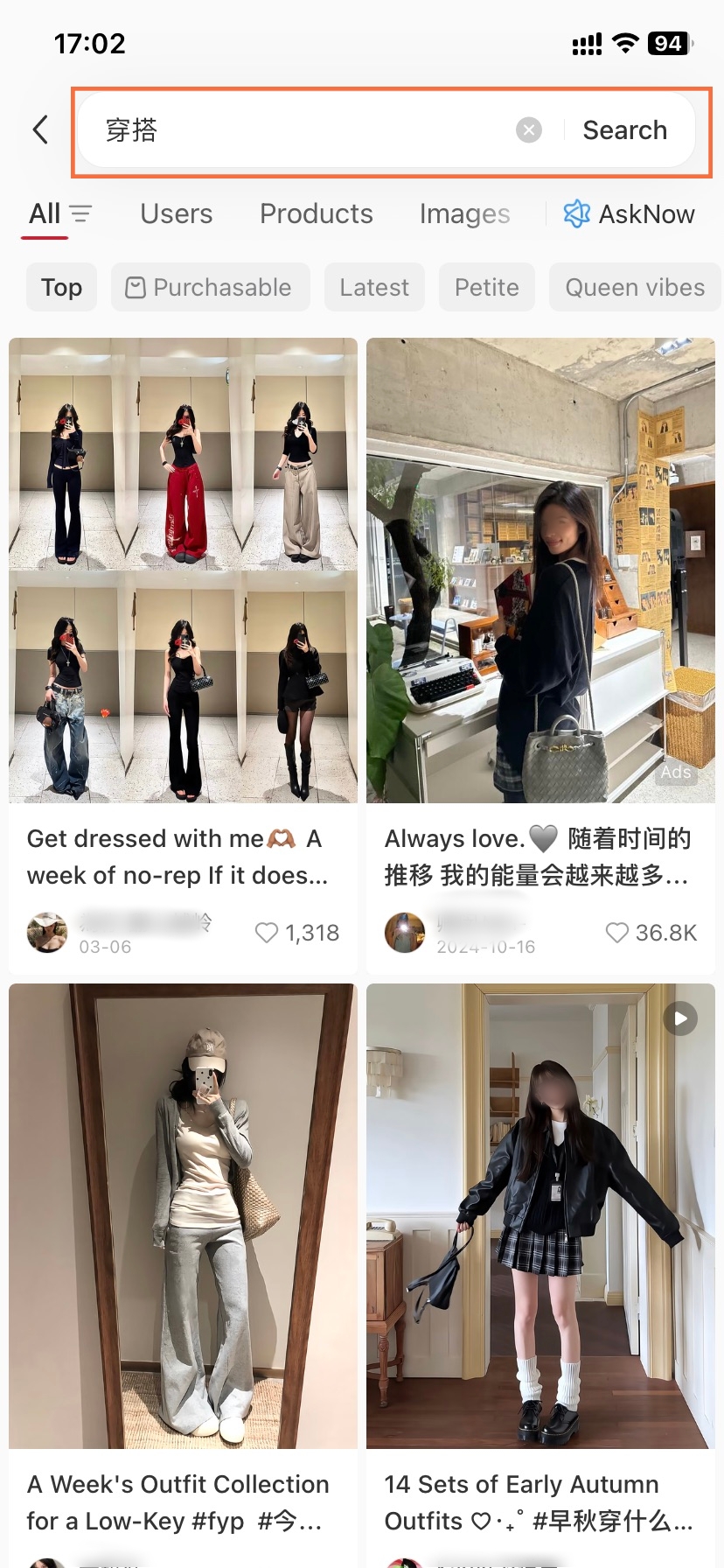
- Xiaohongshu Keyword Search
-
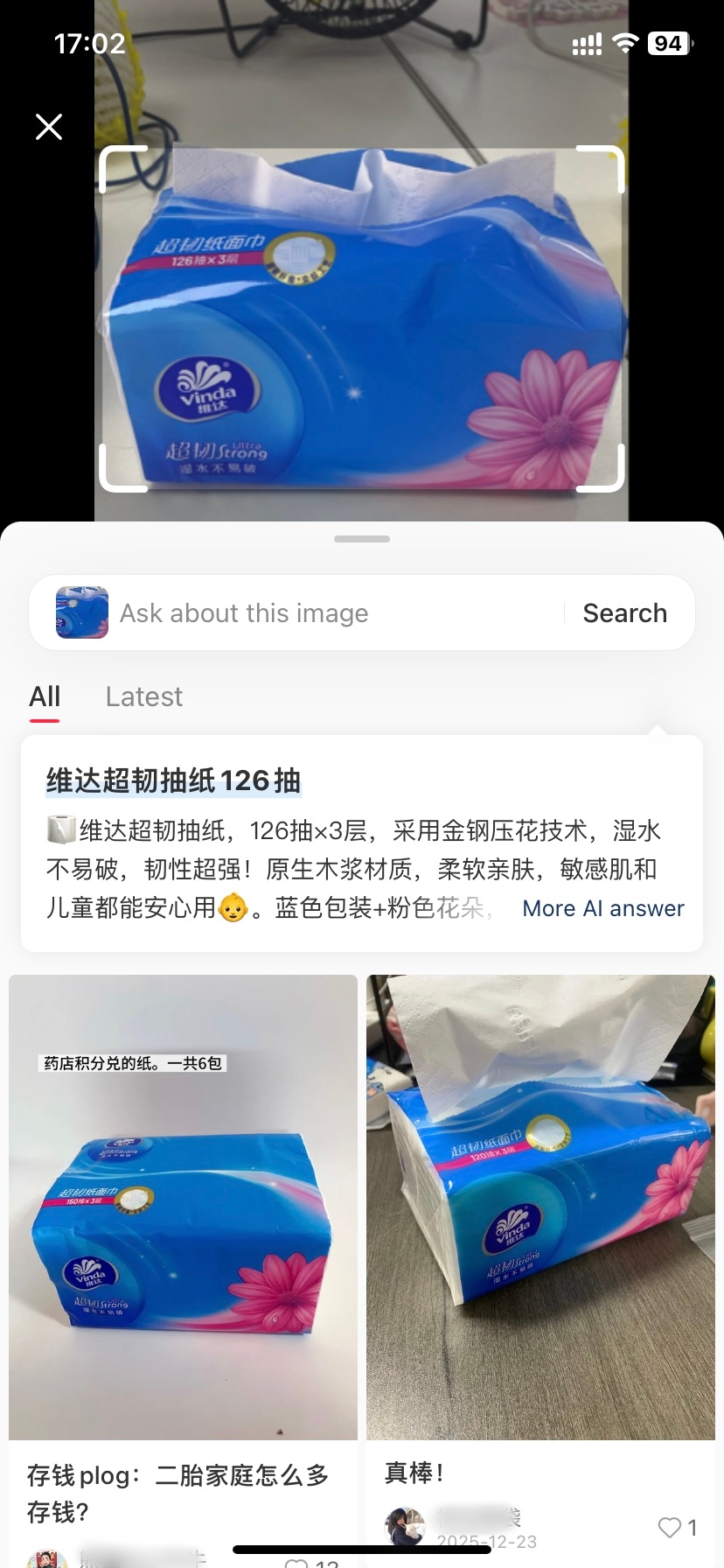
- Xiaohongshu Visual Search
-
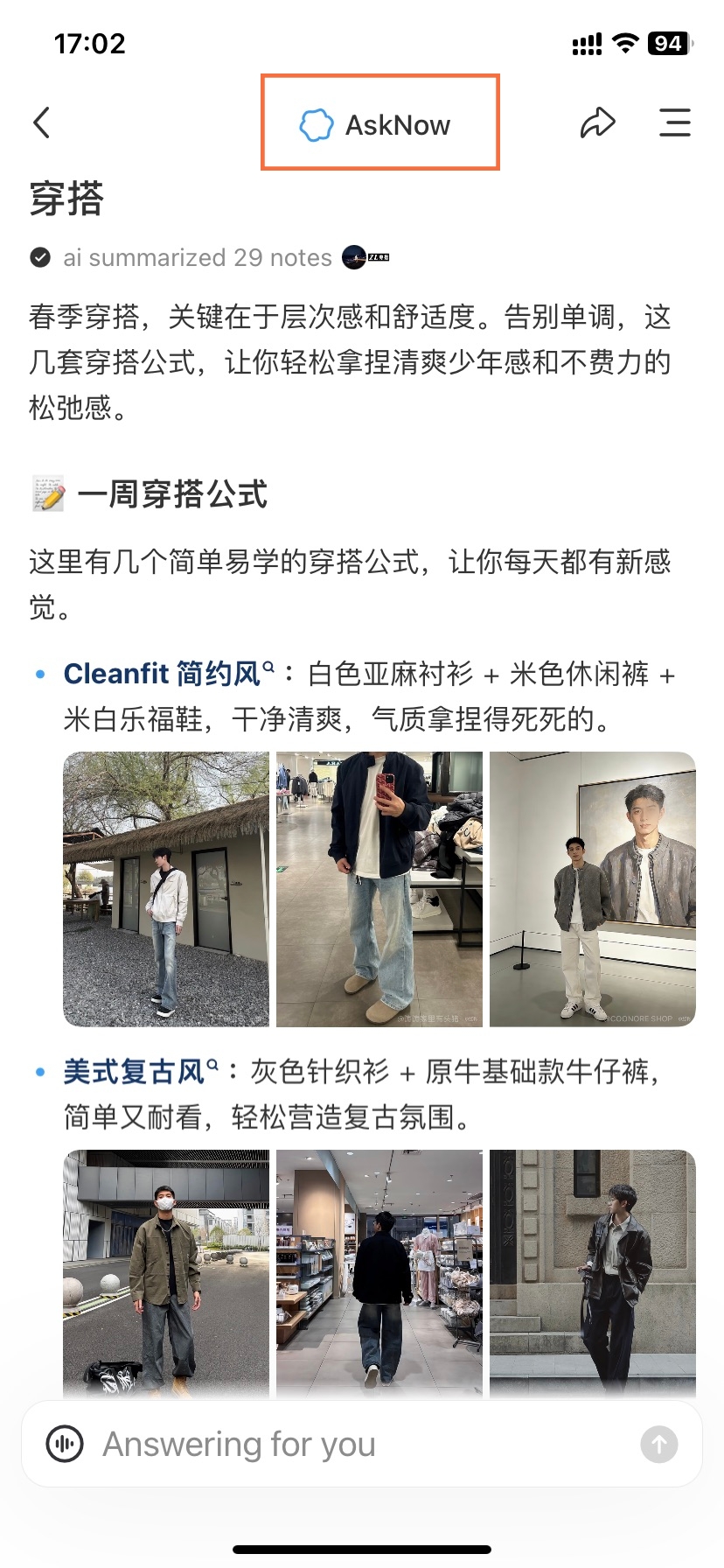
- Xiaohongshu AI Ask Now
-
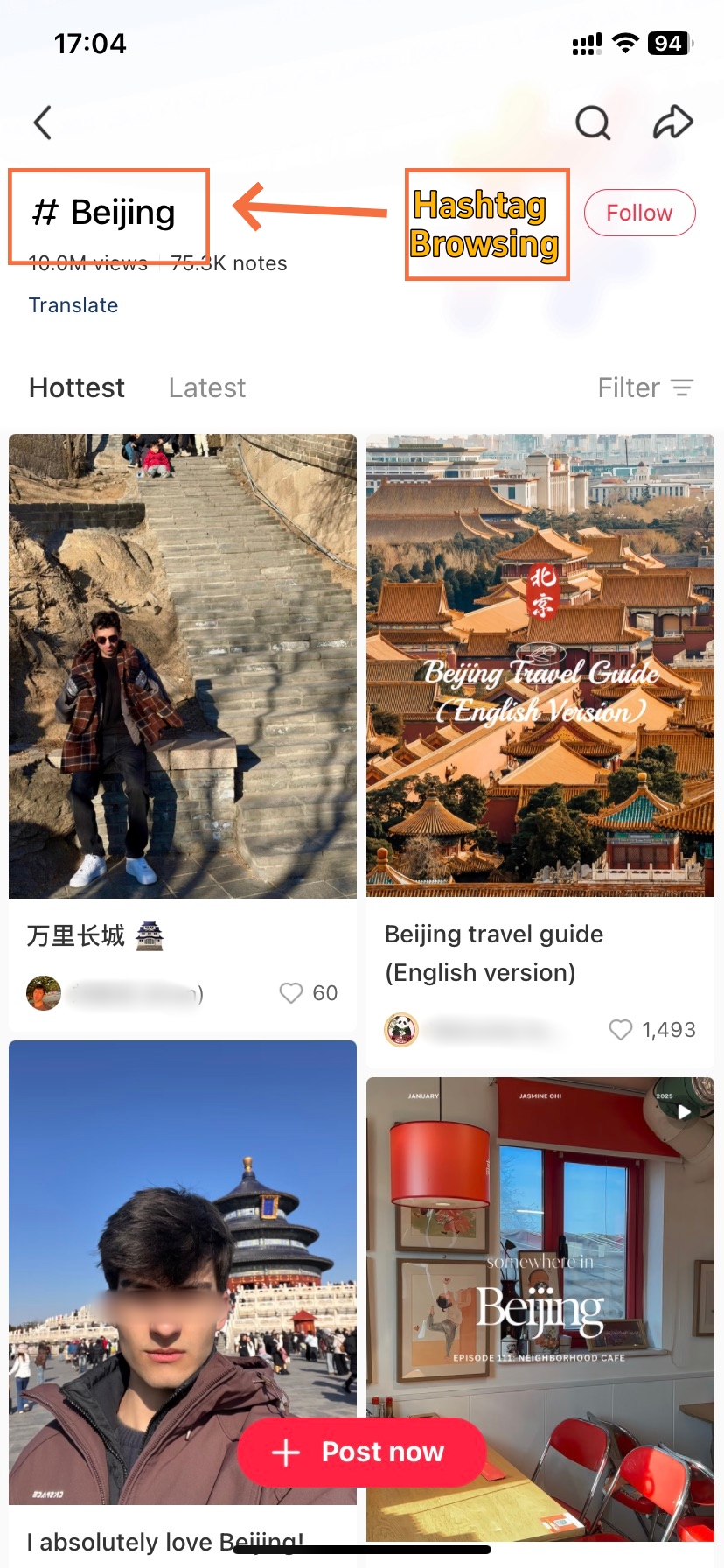
- Xiaohongshu Hashtag Browsing
Discovering content on Xiaohongshu occurs in a few different ways, each providing a different browsing experience.
The Home feed has three tabs (as of 2026) to choose from: 关注 (Following) to see posts from accounts you follow, 发现 (Discover) to see what’s trending according to the algorithm, and 附近 (Nearby) to see posts from the area you find yourself in (magical IRL location-based social media). You can swipe down to refresh the page to see more recent ones. The feed evolves as the user engages with the app.
- ●Search Function: Top search bar accepts multiple search modes
- ○Keyword Search: Type Chinese terms like "好物" (good stuff) or "穿搭" (outfit)
- ○问一问 (Ask Now): Tap search bar → "问一问" tab for AI-summarized answers
- ○Visual Search: Camera icon in search bar to find similar images or locations by photo
- ○Filter results by Latest, Most Popular, or Video
- ●Hashtag Browsing: Tap any hashtag to see related notes
- ○Shows participation count (10K, 1M+ users)
- ○Displays trending posts within that topic
- ●Profile Viewing: Click user avatars to visit their pages
- ○See all published notes in grid layout
- ○Check follower count and bio information
🤖 问一问 AI (Ask AI) — New 2026
Xiaohongshu now integrates AI-powered search assistance:
- ●Tap the search bar at the top of Home
- ●Select the "问一问" (Ask Now) tab
- ●Type your question in Chinese (e.g., "京都樱花最佳时间")
- ●AI compiles answers from thousands of notes into one summary
💡 Example for Travelers: Search "上海咖啡推荐" (Shanghai coffee recommendations) → AI provides top-rated cafés with prices, locations, and signature drinks summarized from multiple user notes.
⚠️ Note: AI responses are in Chinese. Use browser translation tools if needed. Always verify AI recommendations by reading individual note reviews.
For instance, when you type "上海咖啡" (Shanghai coffee) , you'll see a massive list of cafes. If you click on #旅行 (Travel), you'll get a nearly limitless collection of travel photos and/or travelogues. Both discovery methods work well together.
How to Engage with Notes
-
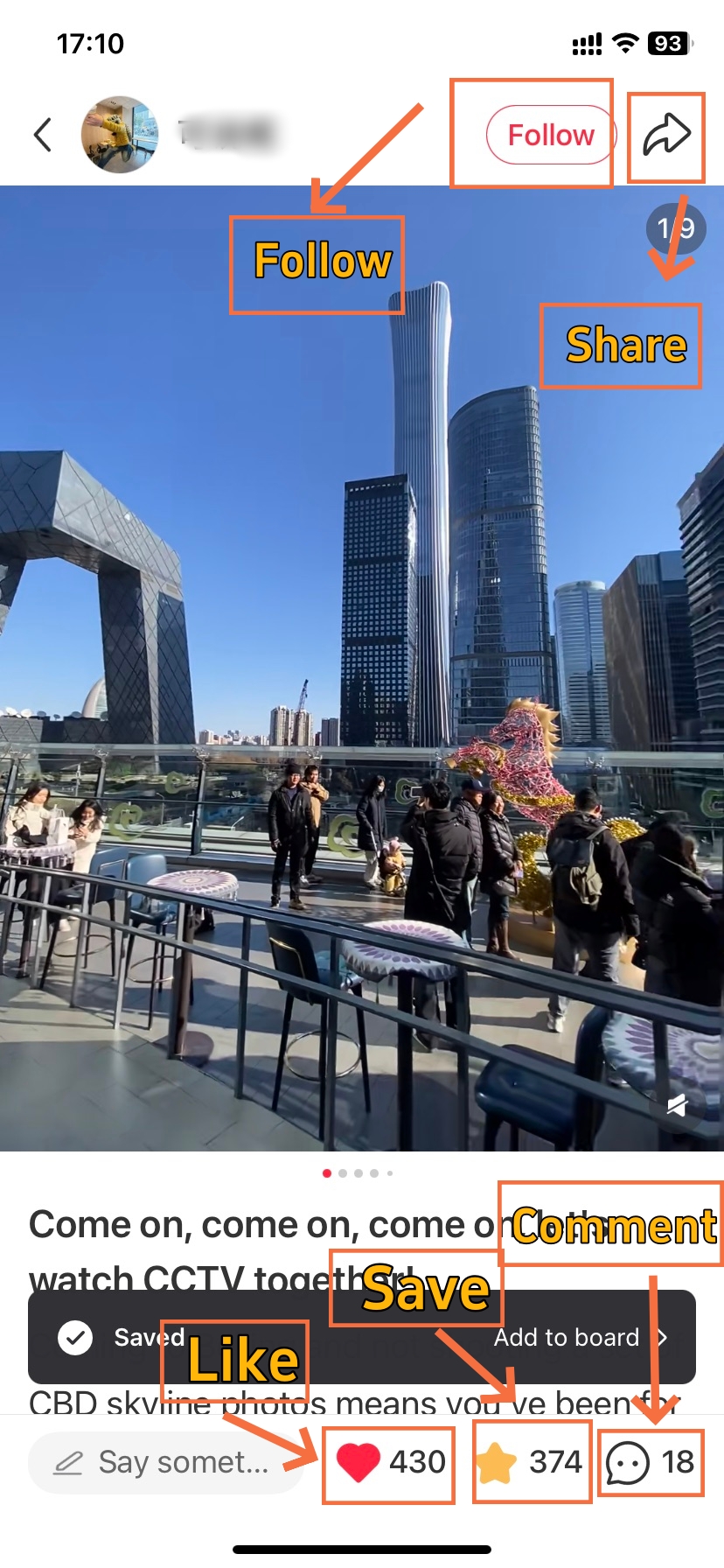
- Engaging with Xiaohongshu Note
-
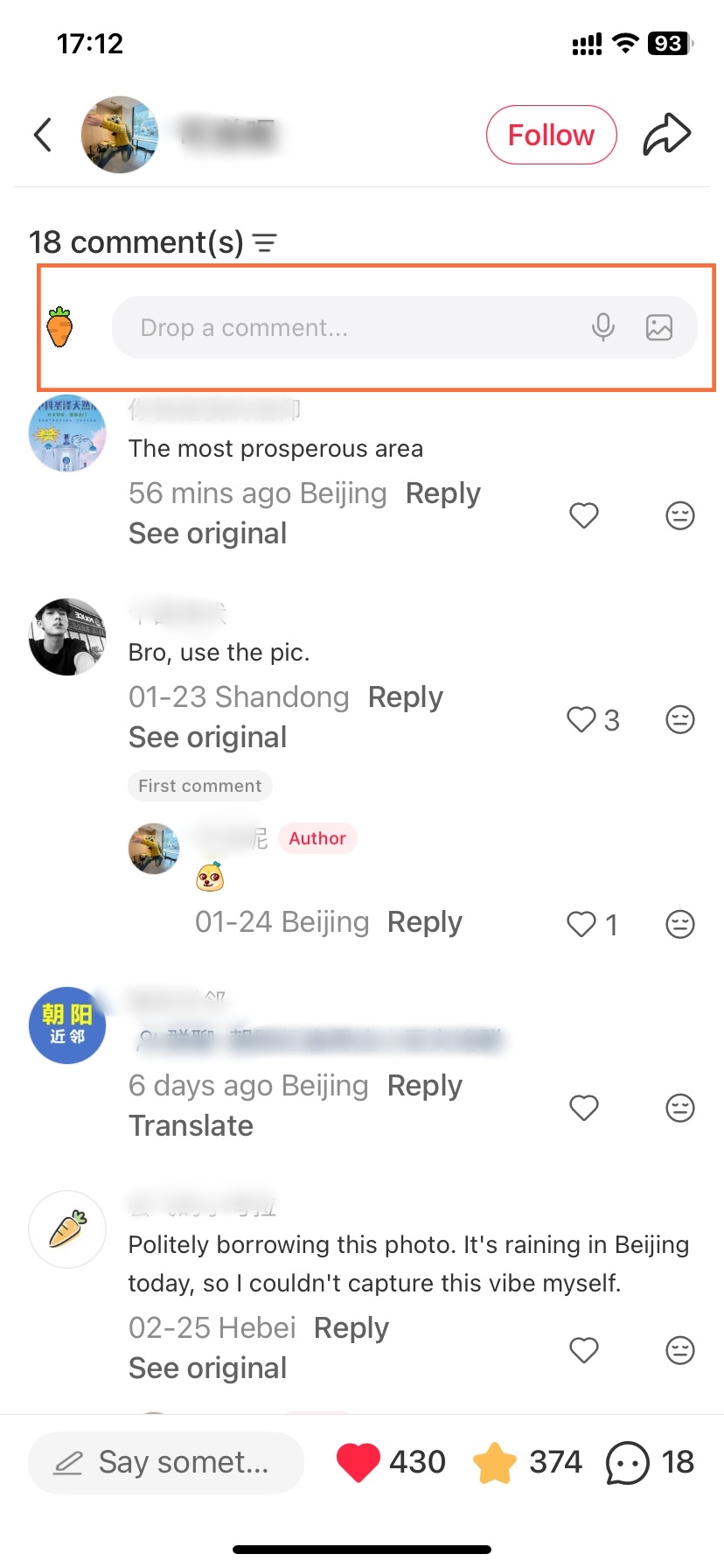
- Post Comments
-
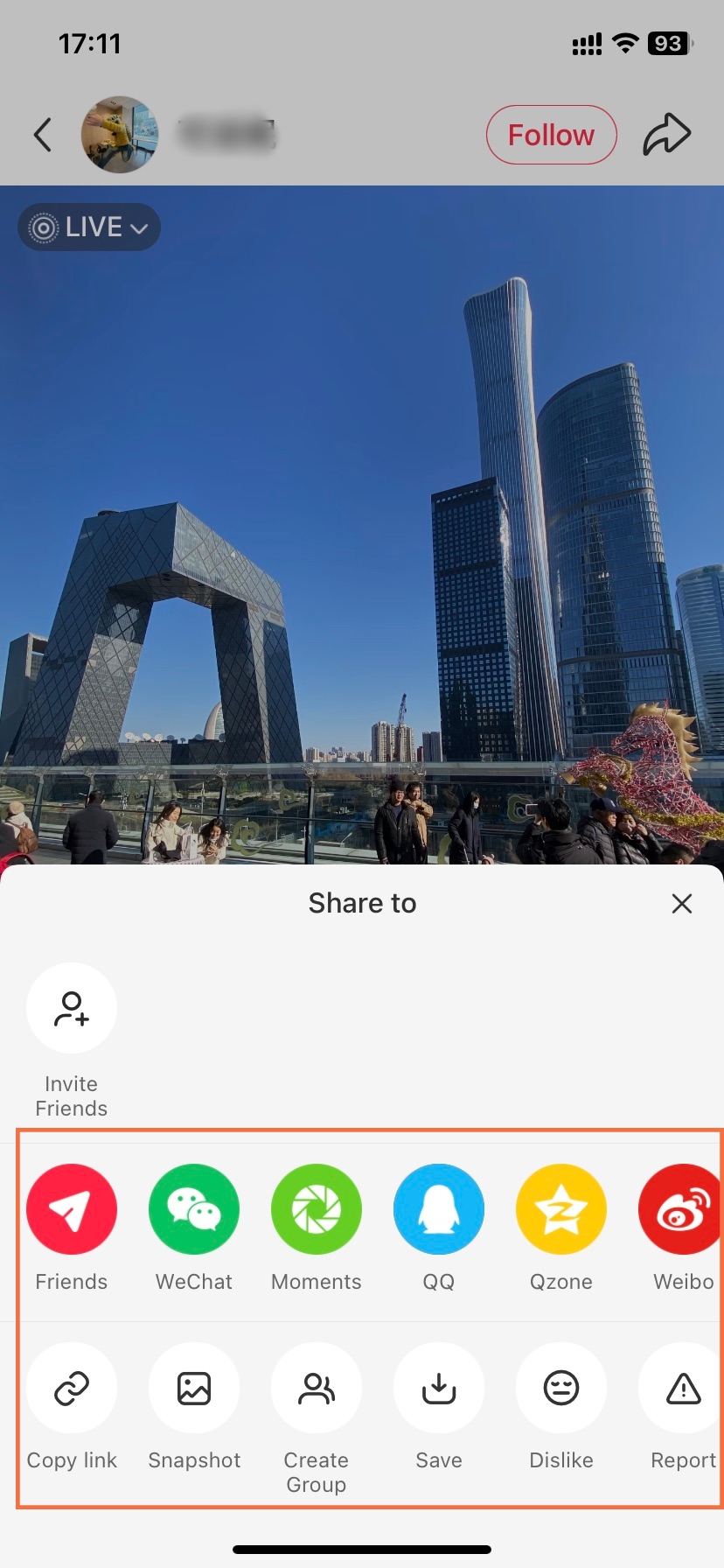
- Share Note to Where You Want
Interaction drives Xiaohongshu's community. Understanding each action helps you connect meaningfully with creators.
Comments deserve special attention. Don’t bullshit your way through with empty platitudes and hype. If someone on your notes wrote about struggling to balance work and study, you might begin your comment with, “Where did you buy that scarf?” Instead of a simple “Nice!” At the very least if you take the time to respond to comments on your own notes, people won’t hesitate to stick around.
Avoid promotional spam in comments. Xiaohongshu's algorithm detects and suppresses obvious advertising. Instead, engage authentically by asking questions or sharing related experiences.
App Mall and Commerce
-
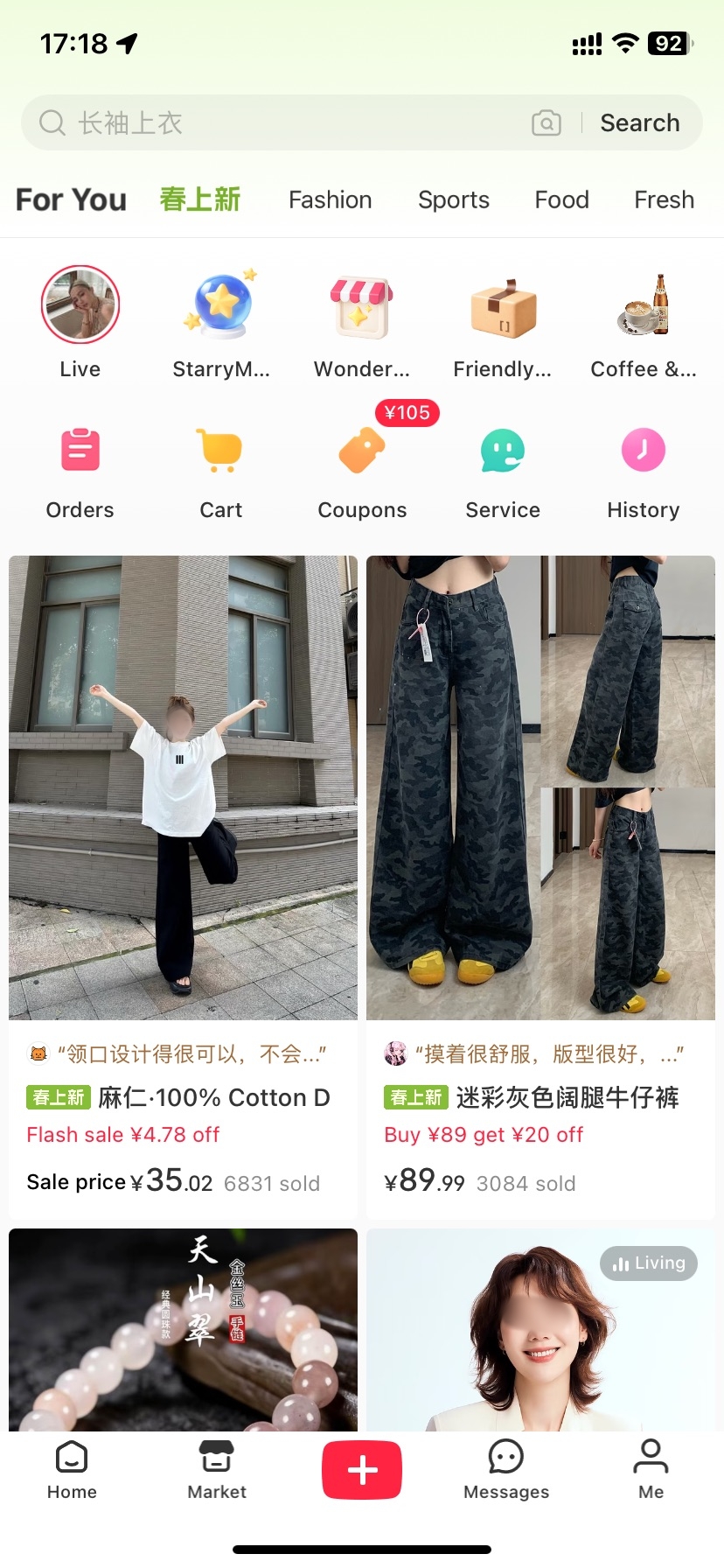
- Xiaohongshu Mall Home
-
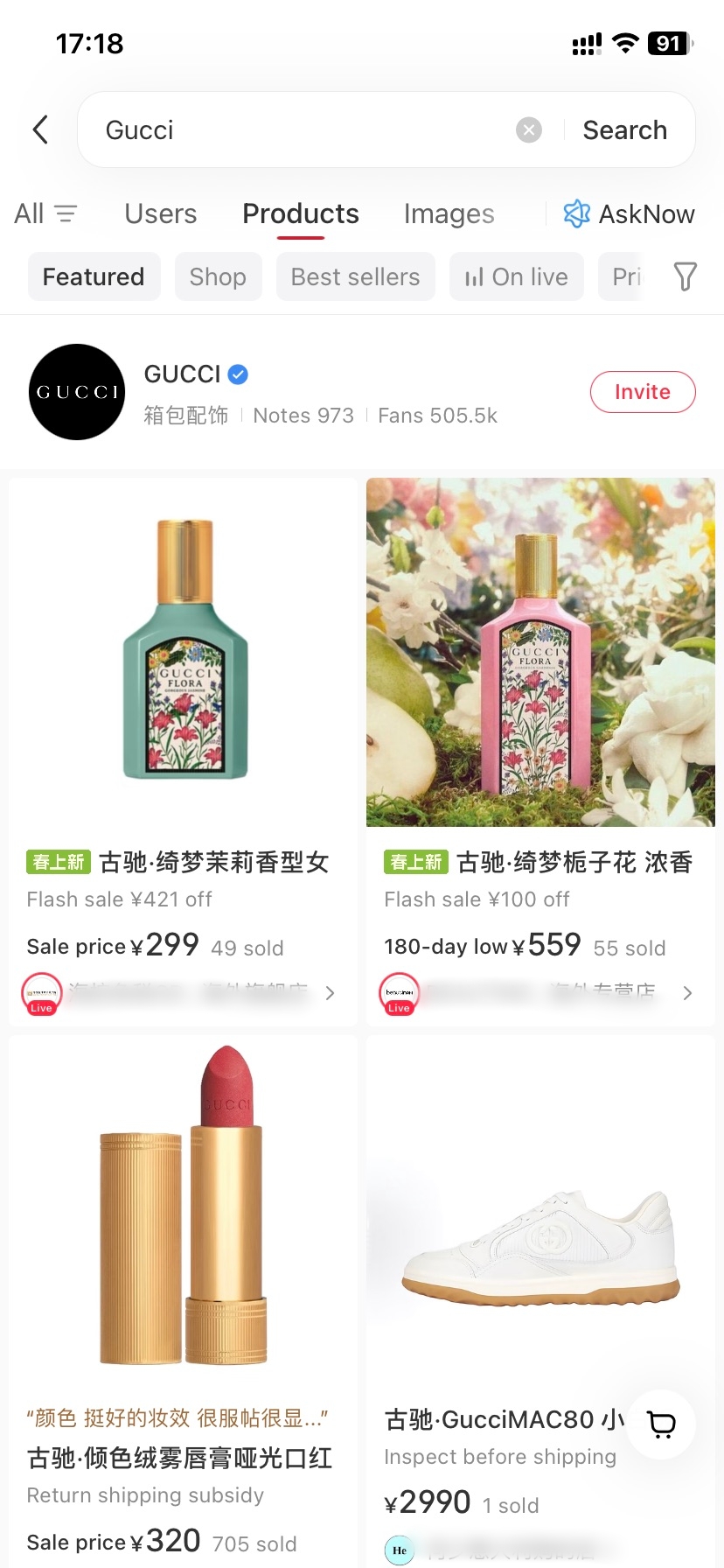
- Product Search in Xiaohongshu
-
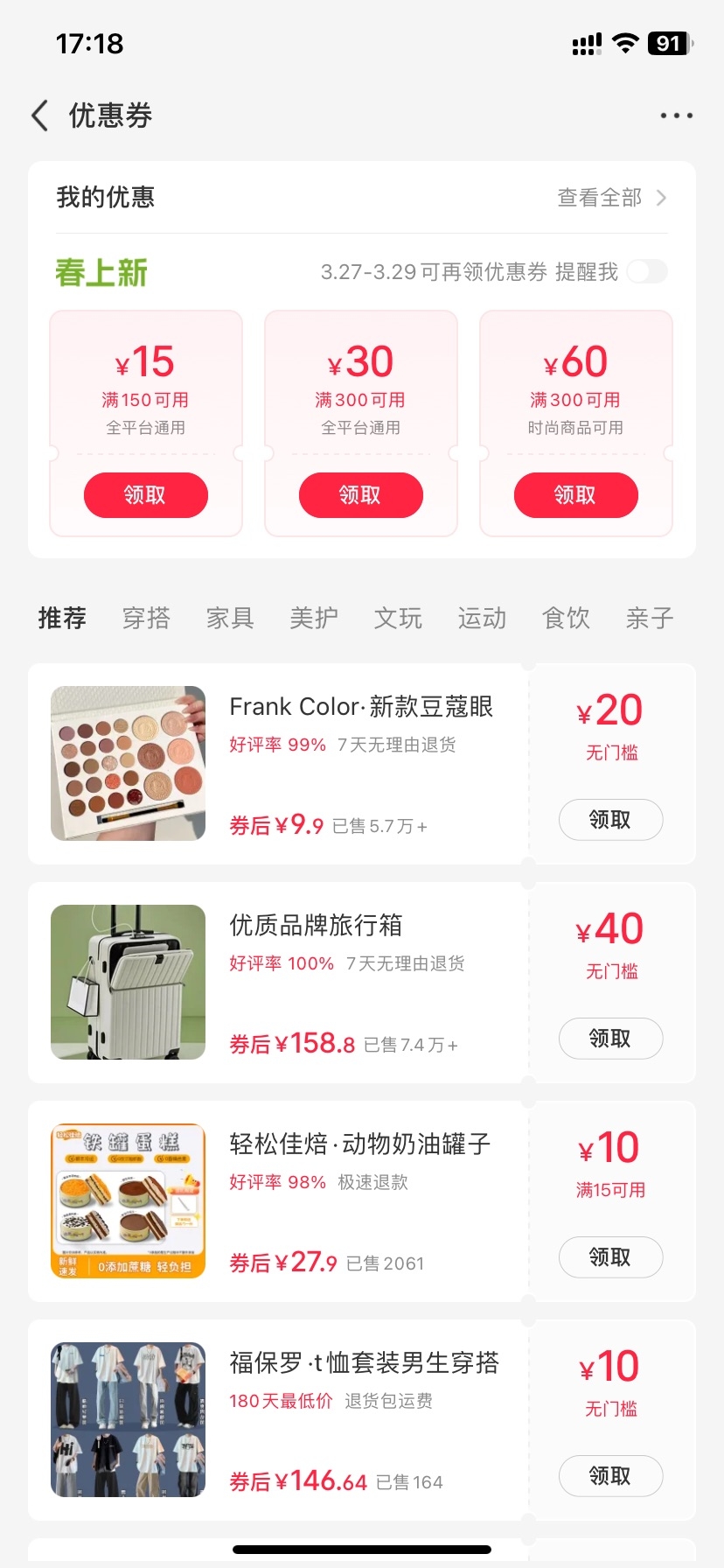
- Coupons & Discounts in Xiaohongshu
Xiaohongshu seamlessly blends social content with shopping. This integration sets it apart from Western platforms.
Product tags appear as small yellow shopping bag icons in notes. Tapping them shows product details, prices, and links for purchase. You can then select items to add to your shopping cart without leaving the app; checkout supports mainly Alipay and WeChat Pay.
The Mall section is accessible via the bottom navigation bar (second from left). For personal users, this is where you can browse and purchase products.
💡 Payment 2026: Chinese users: Alipay, WeChat Pay, Chinese bank cards. International users: Selected categories accept Visa/Mastercard (2026 update). Cross-border shipping available for limited products (beauty, supplements).
- ●Mall Section: Dedicated shopping tab
- ○Browse curated product collections
- ○Flash sales and limited-time offers
- ●Order Management: Track all personal purchases
- ○View order status and logistics tracking
- ○Handle returns and after-sales service
- ●Coupons & Discounts: Personal promotions
- ○Check available coupons before checkout
- ○Apply discount codes at payment
Some products may not ship internationally. Consider using forwarding services for full access. Check product pages for shipping availability before purchasing. Some countries/regions may have limited payment options.
International buyers are out of luck. Items ship to China only. You may be able to use a forwarding service, or enlist the help of friends to receive items for you. Payment also often requires a Chinese bank card or mobile wallet, although some select categories may support international cards.
Account Strategy and App Safety
How to Plan Daily Posts
Successful Xiaohongshu accounts share common patterns. Implementing these strategies accelerates growth.
Consistency beats frequency. Post 3-5 quality notes weekly rather than daily rushed content. Moreover, establish a niche—beauty, travel, food, fashion—and stick with it. The algorithm rewards topical authority over scattered topics.
- ●Content Pillars: Define 3-4 recurring themes
- ○Example: Café reviews, skincare tips, outfit ideas
- ○Rotate between pillars to maintain variety
- ●Engagement Habits: Daily interaction drives growth
- ○Spend 20 minutes commenting on others' posts
- ○Like and save 15-20 notes in your niche
- ○Respond to your own comments promptly
- ●Trend Awareness: Monitor trending topics
- ○Check Discover page daily for hot hashtags
- ○Join challenges early for maximum visibility
Study successful accounts in your category. Notice their title patterns, photo styles, and caption structures. Then adapt (never copy) these elements to your unique voice. Authenticity matters more than perfection on Xiaohongshu.
Safe Content Rules and Ban Risks
What things violate the platform’s rules? (and thus get your account less reach or banned)
Sensitive topics include political discussions, explicit content, and misleading health claims. So does over-promoting yourself (spam filters kicks in). You can also not violate copyright or buy followers/likes.
Avoid posting watermarked content from other platforms. Don't include external links in captions (WeChat/Instagram handles get flagged). Refrain from controversial topics about Chinese policies or culture. These mistakes lead to shadow-banning or account restrictions.
- ●Security Settings: Enable two-factor authentication
- ○Link phone number and email
- ○Change password every 3 months
- ●Privacy Controls: Manage who can contact you
- ○Set message permissions to Followers Only
- ○Hide liked/saved notes from public view
- ●Content Guidelines: Review before posting
- ○Check for prohibited keywords
- ○Ensure product claims are accurate
- ○Credit original creators when sharing ideas
How to Fix App Login Bugs
Technical issues arise occasionally. Knowing quick fixes saves frustration.
Customer support access: Navigate to Me → Settings → Help & Feedback. Submit tickets with screenshots for faster resolution. Response times average 24-48 hours for non-urgent issues.
Clear app cache monthly to prevent slowdowns. Update to the latest version within a week of release. Back up important content by saving to your device. These simple habits prevent most common problems.
FAQs: Answers to Common App Questions
Q: Do I need a Chinese phone number to use Xiaohongshu?
While not strictly mandatory, having a Chinese phone number significantly improves your experience when learning how to use Xiaohongshu. International numbers work for registration, but some features like shopping and customer support require Chinese verification. Note that some countries/regions may face SMS verification delays or restrictions.
Q: Can I use Xiaohongshu if I don't speak Chinese?
Yes, you can definitely learn how to use Xiaohongshu without speaking Chinese. The app offers English interface settings (Me → Settings → Language). However, user-generated content remains in Chinese, so keep Google Translate or similar tools handy for reading posts and writing comments.
Q: Is Xiaohongshu available outside of China?
Absolutely! Understanding how to use Xiaohongshu works globally—the app downloads from international App Stores and Google Play. However, content primarily targets Chinese-speaking audiences, and shopping features often ship to Chinese addresses only. Consider using forwarding services for international purchases.
Q: How do I change the app language to English?
Changing language is essential when learning how to use Xiaohongshu as a non-Chinese speaker. Navigate to Me (我) → Settings (gear icon) → General Settings → Language → English. Note that this only translates the interface menus—posts and comments remain in their original languages.
Q: What's the difference between Xiaohongshu and Instagram/TikTok?
When learning how to use Xiaohongshu, you'll notice it prioritizes authentic reviews over polished aesthetics. Unlike Instagram's filtered perfection or TikTok's entertainment focus, Xiaohongshu centers on trustworthy recommendations and shopping integration. Users seek genuine product insights rather than just pretty pictures or viral videos.
Q: Can I make purchases on Xiaohongshu from outside China?
Shopping presents some challenges when using Xiaohongshu internationally. Most sellers ship to Chinese addresses only. However, as of 2026, selected product categories now accept international Visa/Mastercard payments. Solutions for broader access include using package forwarding services or having Chinese friends receive items.
Q: How do I delete my Xiaohongshu account if I want to?
Account deletion follows this path: Me → Settings → Account & Security → Delete Account → Confirm identity verification → Submit request. Note that a 7-day cooling period applies, during which you can cancel the deletion. All data erases permanently after this window.
Q: Why am I not receiving the verification code during registration?
This common issue usually stems from SMS filtering, network delays, or regional restrictions on international phone numbers. Check your spam folder first. Next, try requesting a voice code instead. Additionally, verify your number format includes the correct country code. If problems persist, consider using Apple ID registration or contact support via the app's Help Center.
Q: Are there any topics I should avoid posting about on Xiaohongshu?
Yes, understanding content restrictions matters when learning how to use Xiaohongshu safely. Avoid political commentary, explicit sexual content, graphic violence, false medical claims, or copyright violations. Additionally, refrain from controversial topics regarding Chinese policies, territorial issues, or sensitive historical events to maintain account standing.
Q: How long does it take to get my first followers on Xiaohongshu?
Most users gain initial followers within 1-2 weeks when actively learning how to use Xiaohongshu. Posting 5-10 quality notes while engaging with others' content typically attracts 20-50 followers. Acceleration comes from participating in trending challenges, using strategic hashtags, and responding to comments promptly. Consistency matters more than speed.