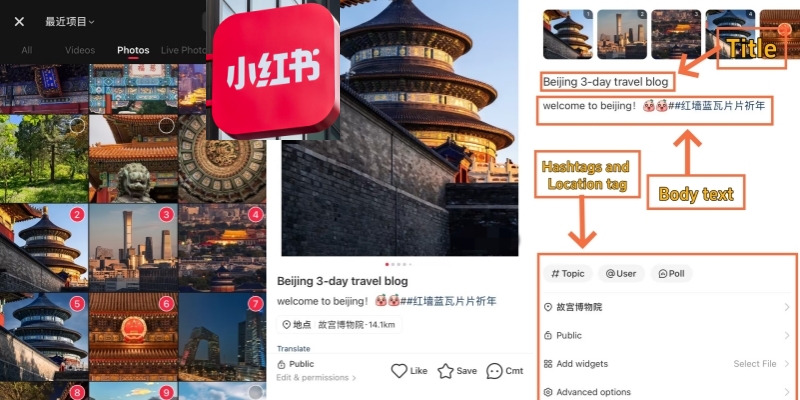
Post on Xiaohongshu
Xiaohongshu demands the daily presence of hundreds of millions of users in China — an app as influential as Instagram or TikTok in the West. So how do you get your content on it? Learning how to post on Xiaohongshu is easier than you think, but the nuances matter: cover ratio, hashtag structure, and comment management all determine whether your note is discovered or dead on arrival. This guide reveals everything you need to know — from tapping the red “+” button for the first time to managing comments in a language you may not speak.
📘 Master the Red App: Before you start creating content, make sure you understand the platform's full ecosystem. Check our How to Use Xiaohongshu: Detailed 2026 Guide & App Tips for a complete walkthrough of navigation, search hacks, and community etiquette.
3 Types to Post on Xiaohongshu
Choose your format, then follow the steps for what type you want to use. Xiaohongshu supports three distinct post types. Each one serves a different kind of content. However, all three share the same entry point — the red "+" button at the bottom center of your screen.
| Post Type | Best For | Max Content | Recommended Size |
|---|---|---|---|
| 📷 Photo Note | Travel tips, reviews, tutorials | Up to 18 photos | 1242 × 1660 px (3:4) |
| 🎬 Video Note | Vlogs, experiences, how-tos | Up to 15 minutes | 1080 × 1920 px (9:16) |
| ✍️ Text Note | Quick thoughts, quotes, updates | Text + background template | N/A — choose a color template |
Type 1: Post a Photo Note on Xiaohongshu
-
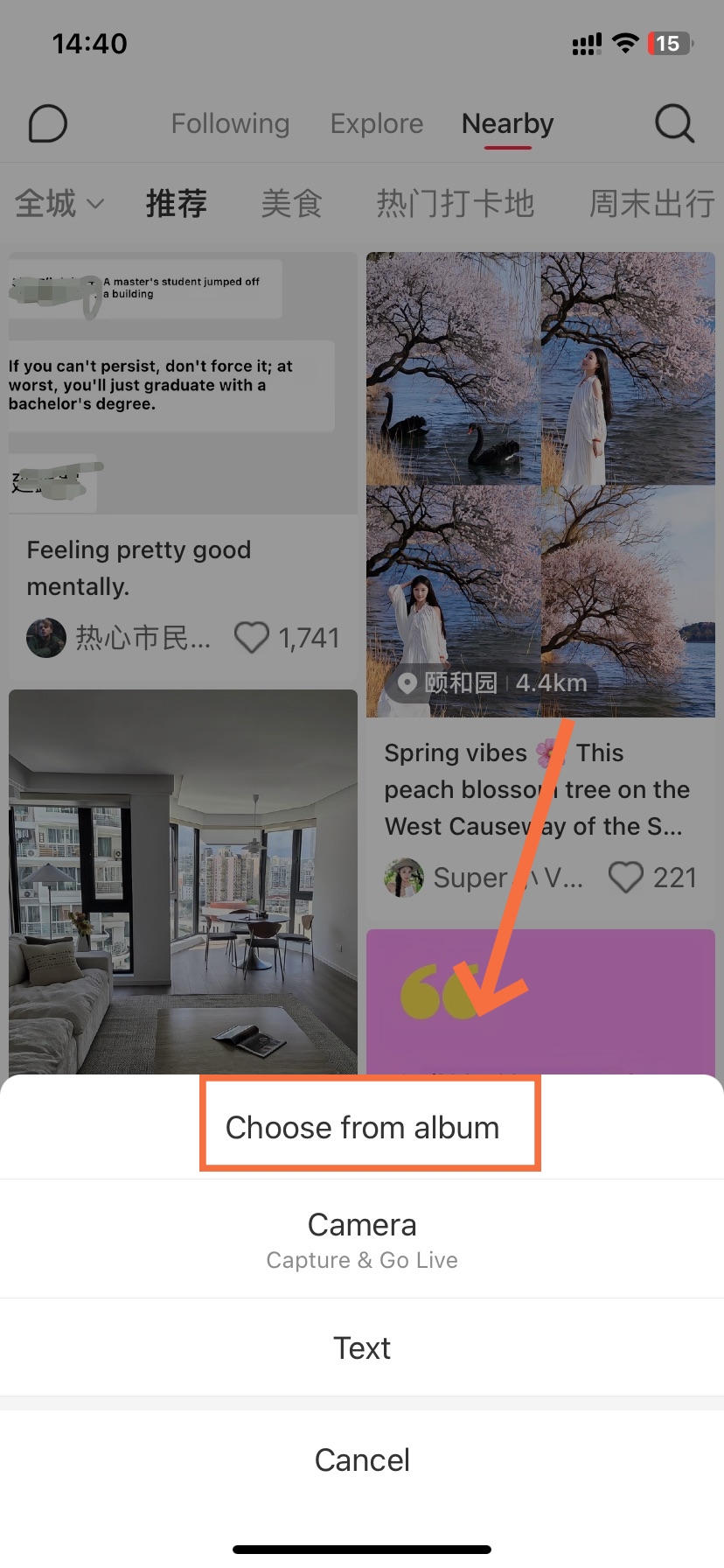

- Select from Album
-
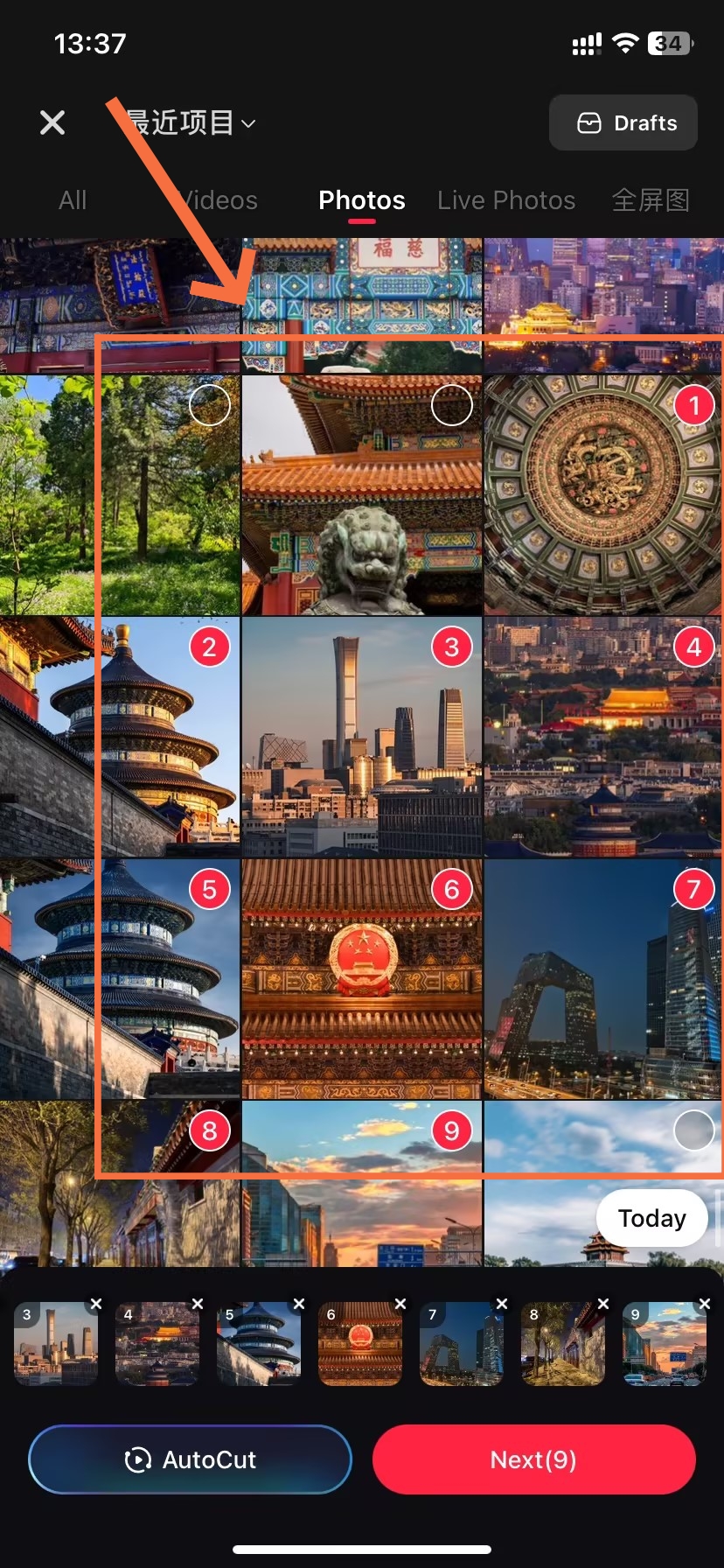
- Select ”Image“
-
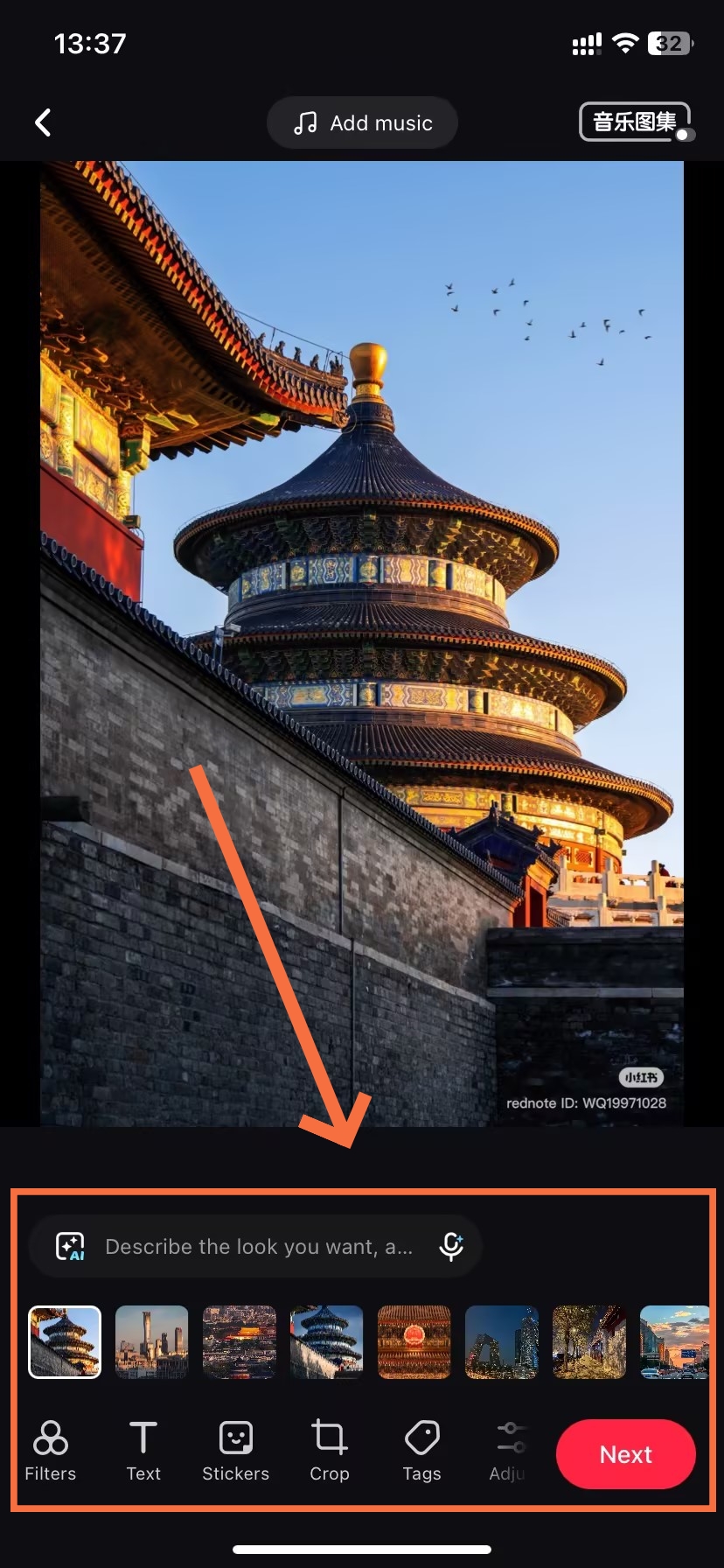
- Edit and Enhance Image
-
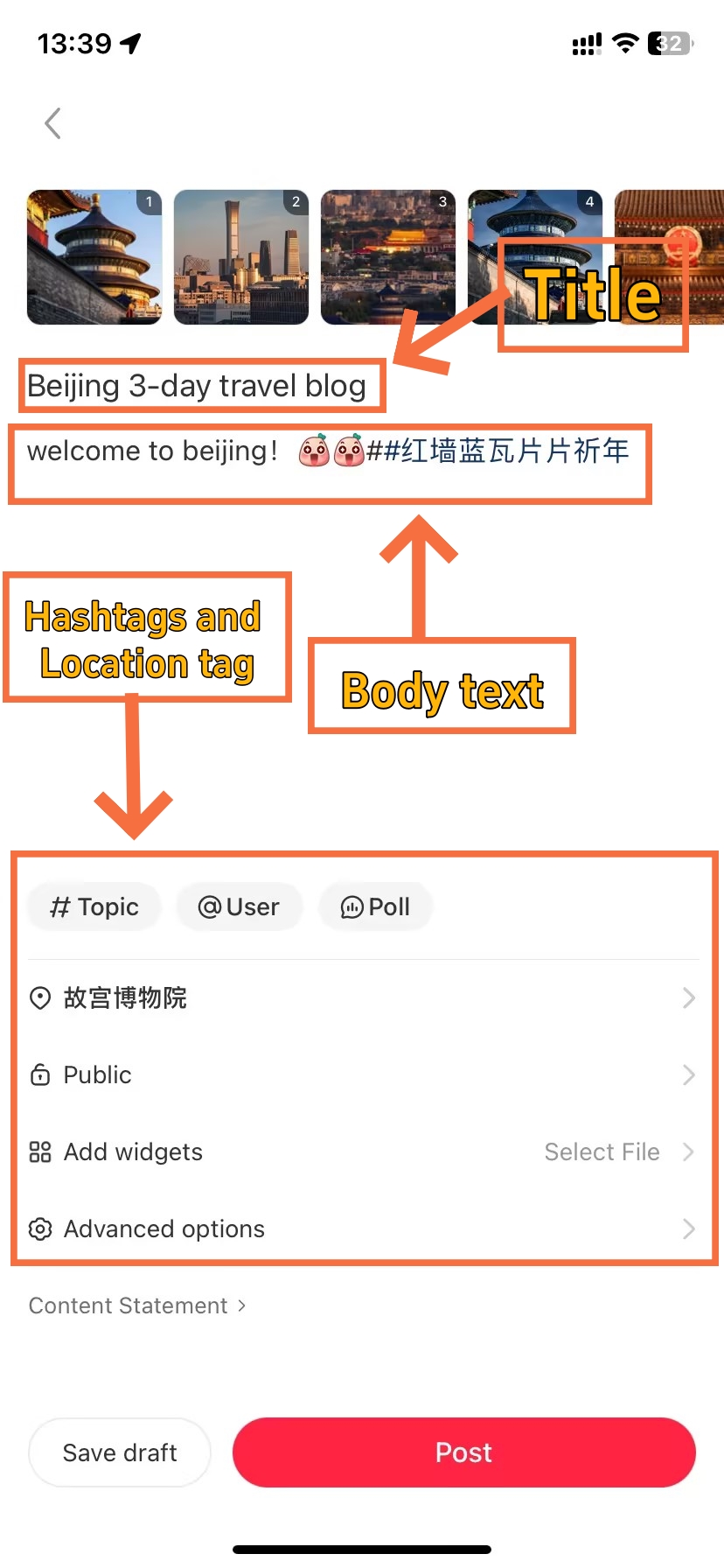
- Filling In the Post Details
-
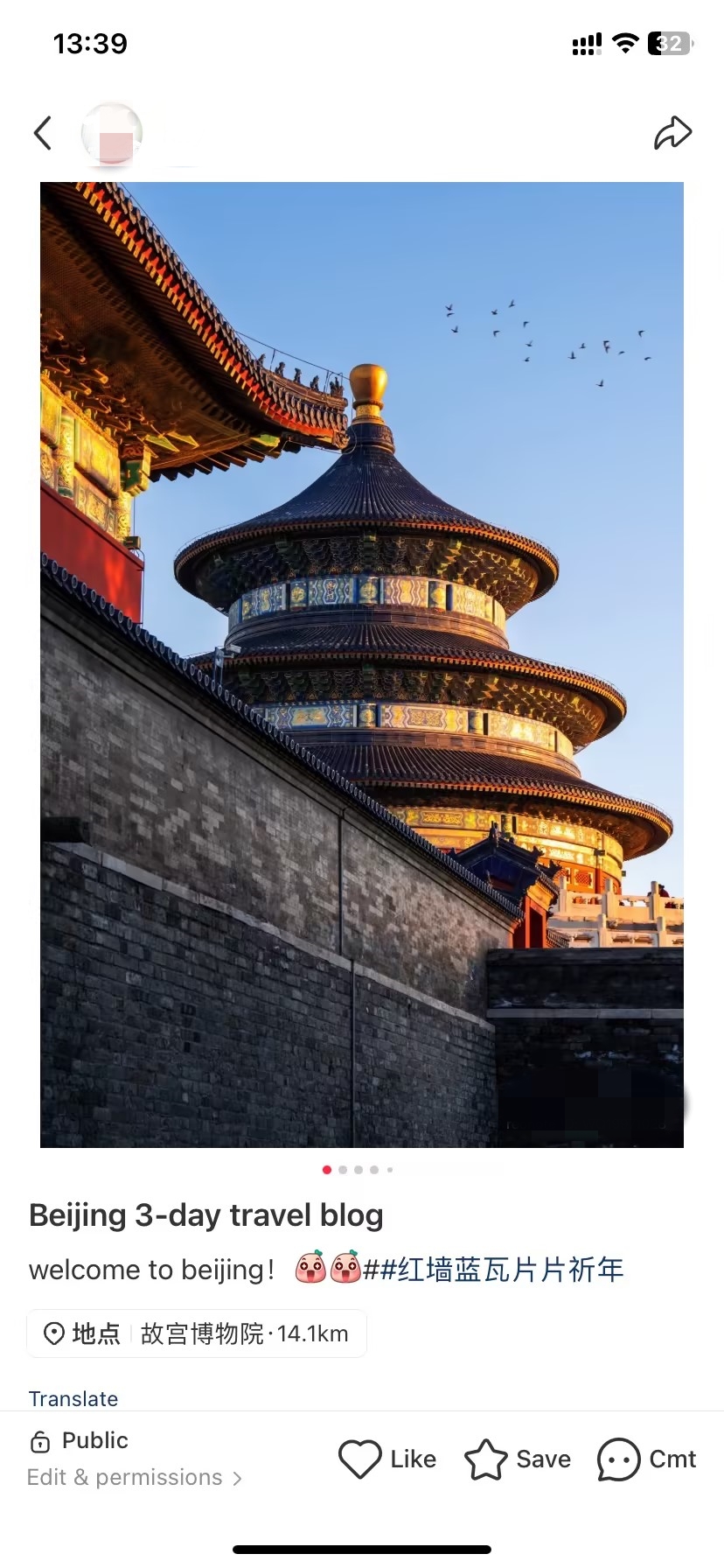
- Finish to Post
Most highly engaging posts are in this format too. If you’re sharing travel photos, reviews of products or trying to create step-by-steps, photo notes are your best option. You can use up to 18 images and the first image you select becomes the cover automatically.
Filling In the Post Details
At Step 5, the post details page asks for several inputs. Here's how to handle each:
"I noticed a stark difference in reach when I added Chinese hashtags alongside English ones — even on an English-language travel post, the Chinese tags pulled in nearly triple the saves within 48 hours. It's worth the extra thirty seconds."
Type 2: Post a Video Note on Xiaohongshu
-
- Select from Album
-
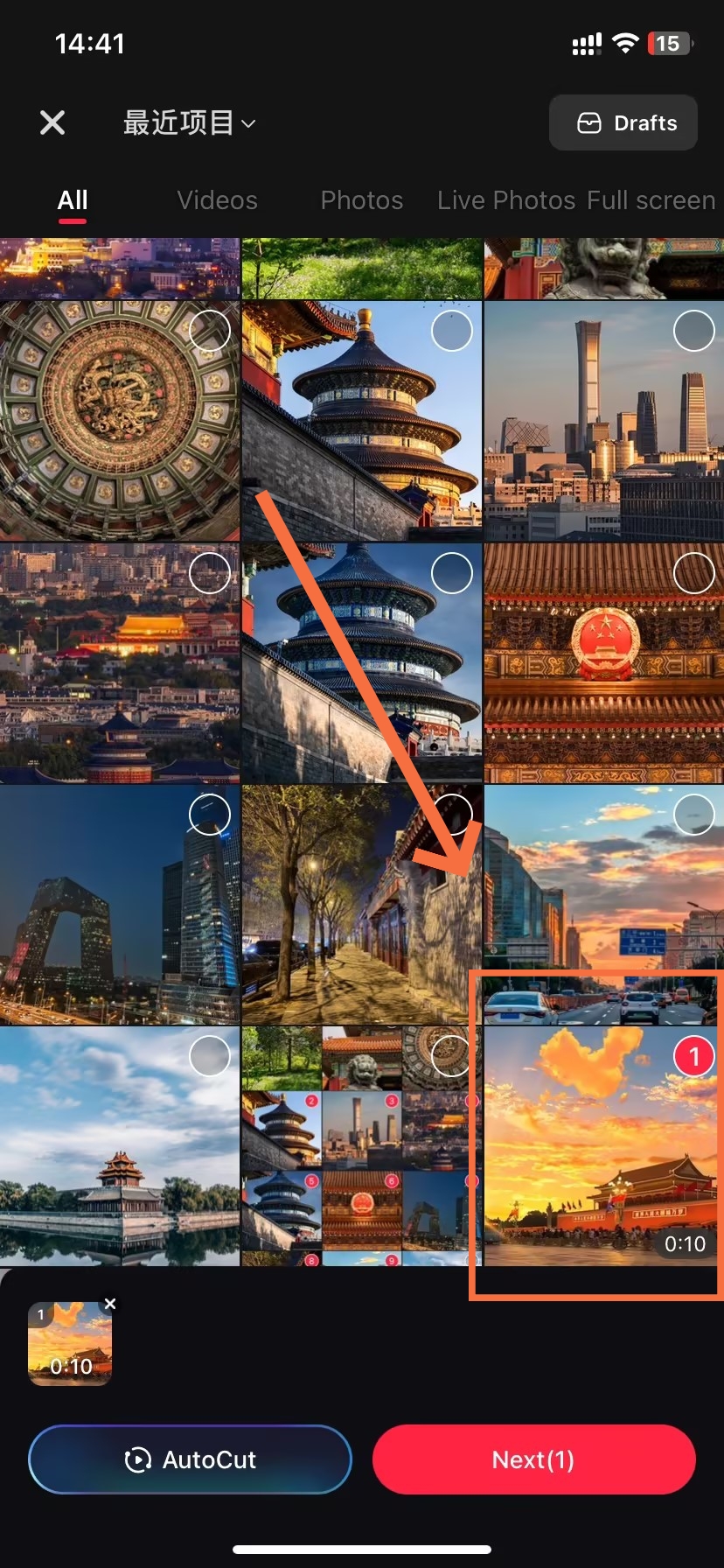
- Select Video
-
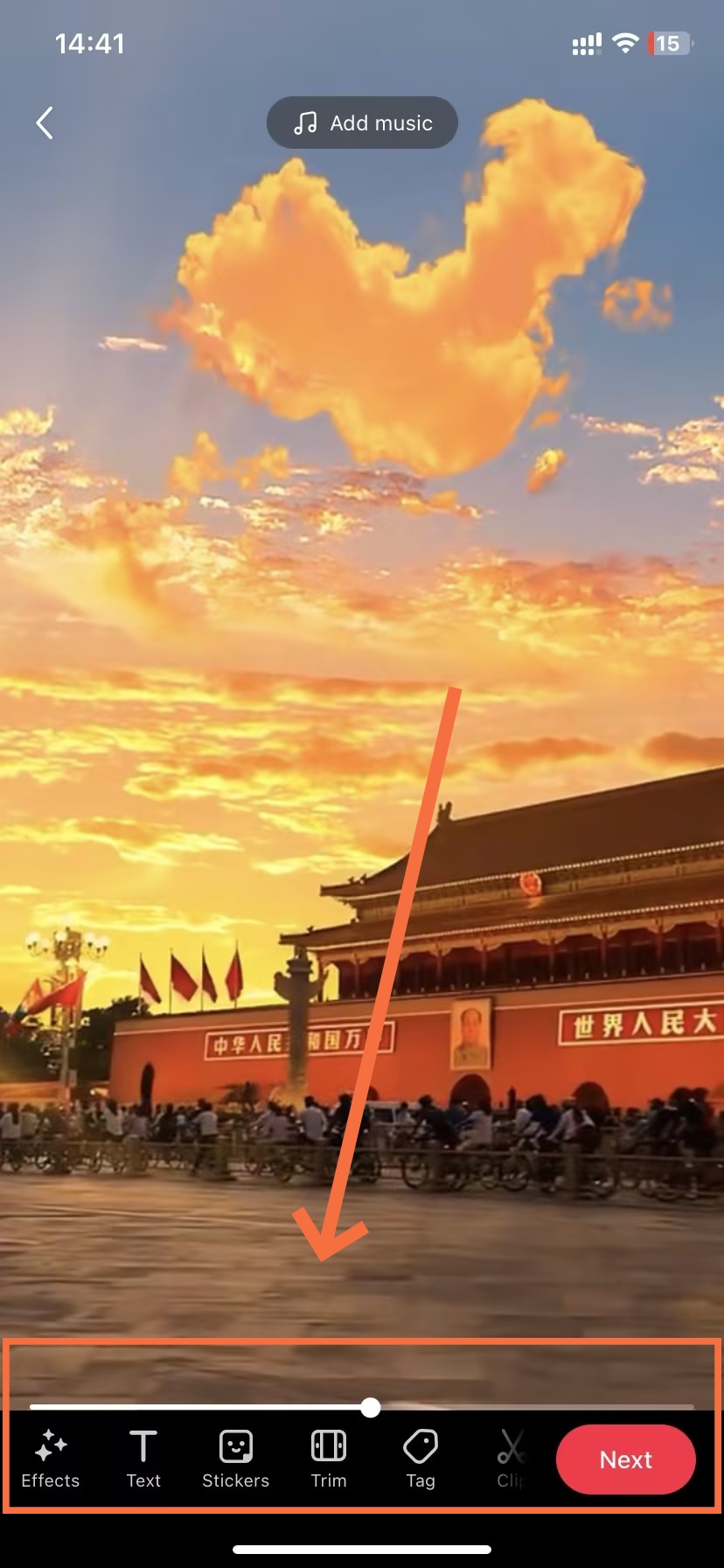
- Edit the Video
-
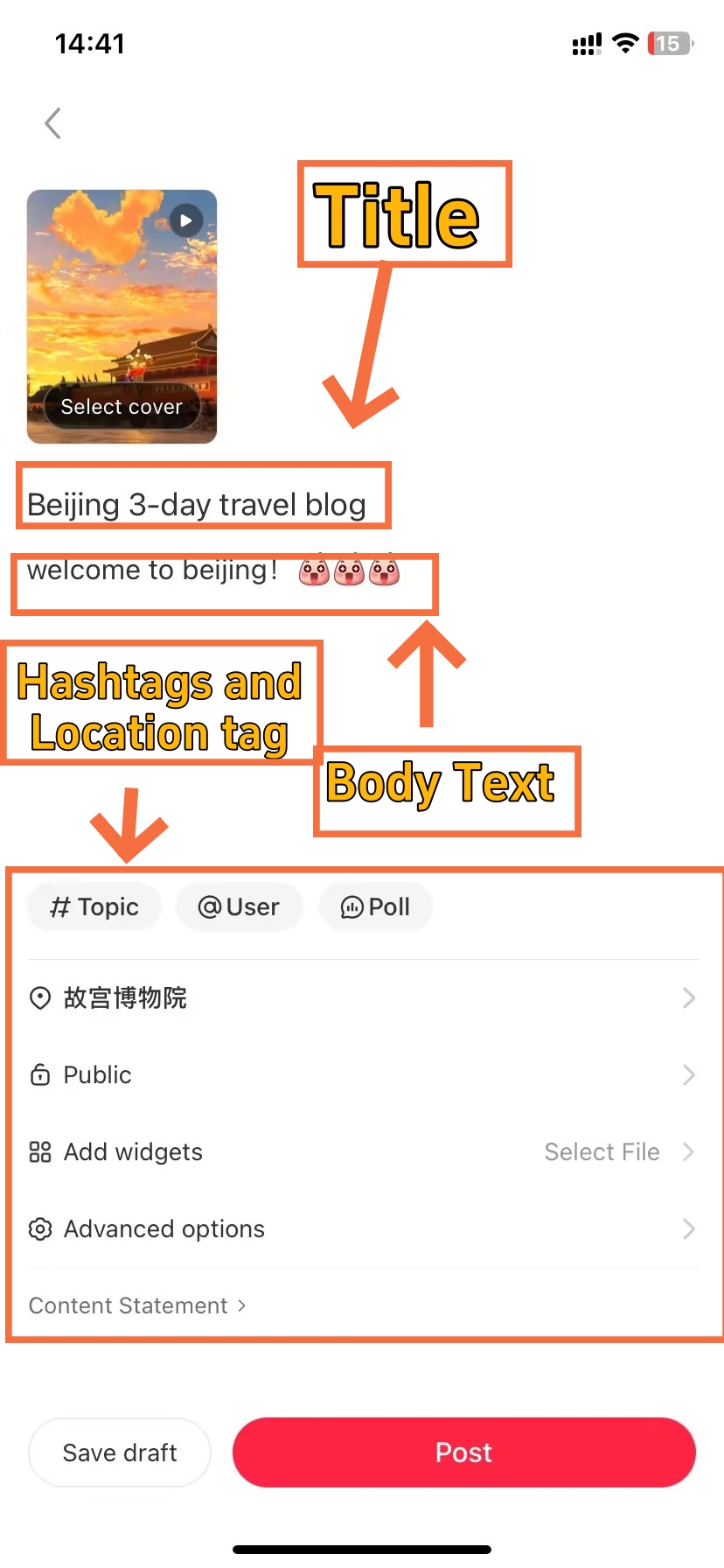
- Add Post Details
-
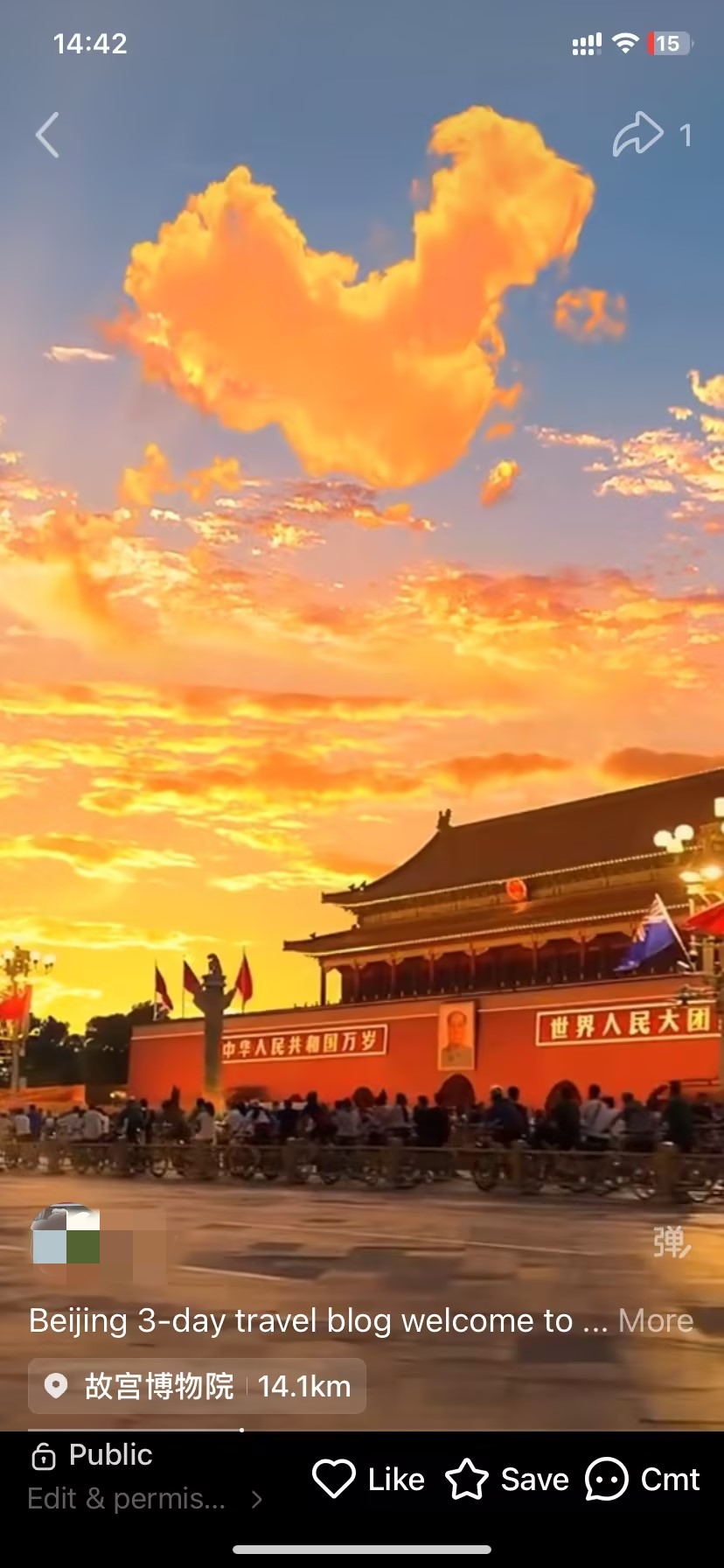
- Video Post is Done
Video notes reach the dedicated "Video" tab on Xiaohongshu — a separate discovery surface from the main feed. Furthermore, the algorithm tends to distribute video content broadly during the first hour after publication.
Shoot or export at 9:16 (for 1080 × 1920 px vertical videos). Horizontal videos show in black letterboxing and look small and not professional in the feed. If your footage is horizontal, crop it or reframe before uploading. Plus, your first 3 seconds determine whether people stick around or scroll on.
Type 3: Post a Text Note on Xiaohongshu
-
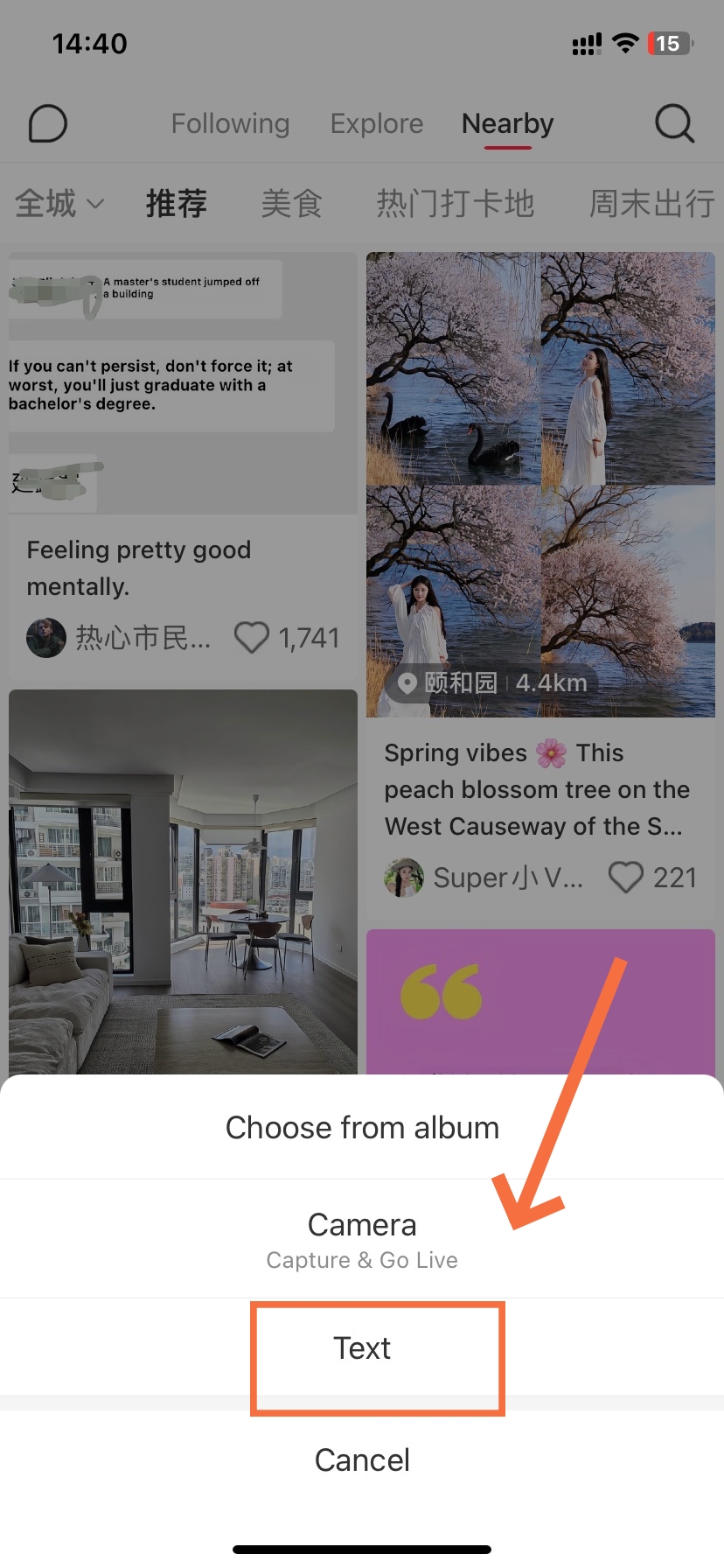
- Select “Text”
-
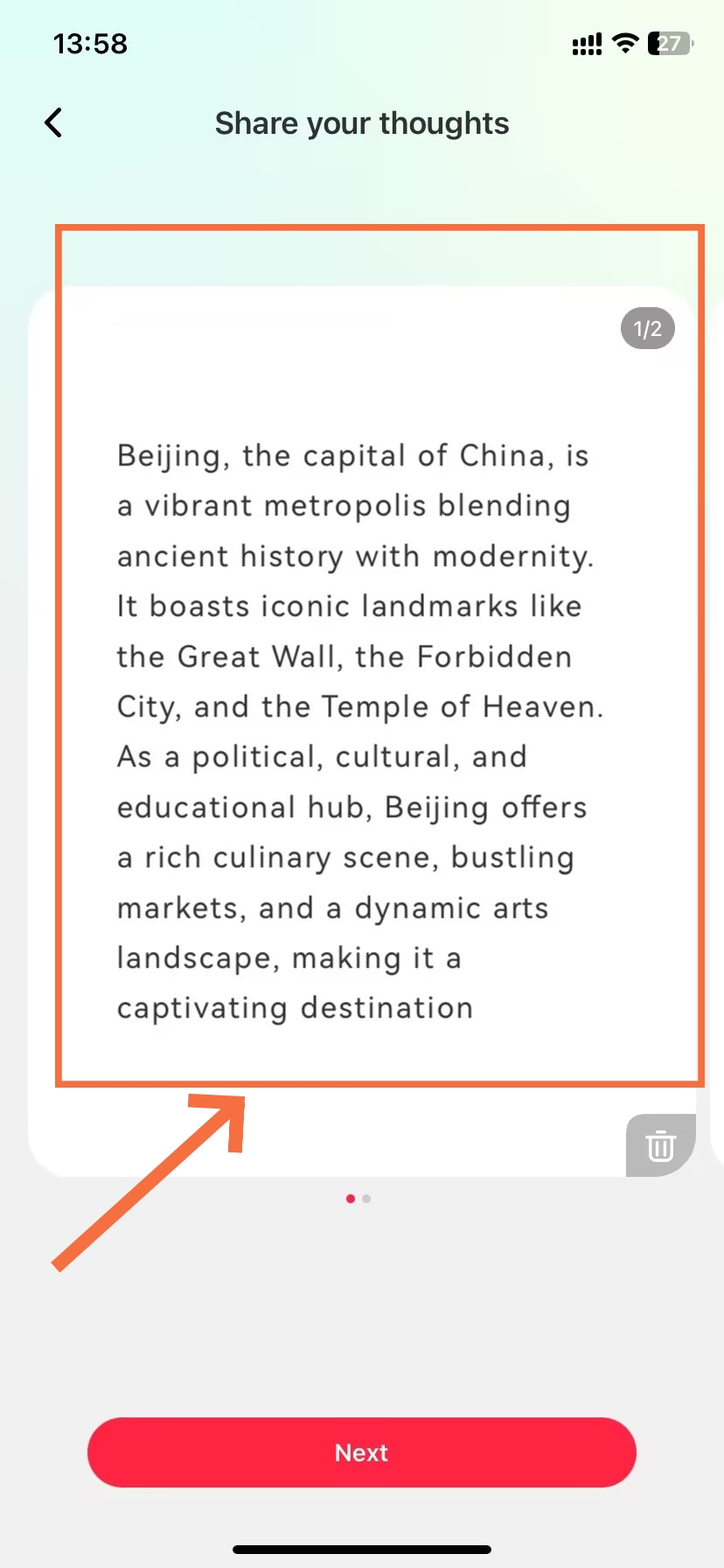
- Type your Content
-
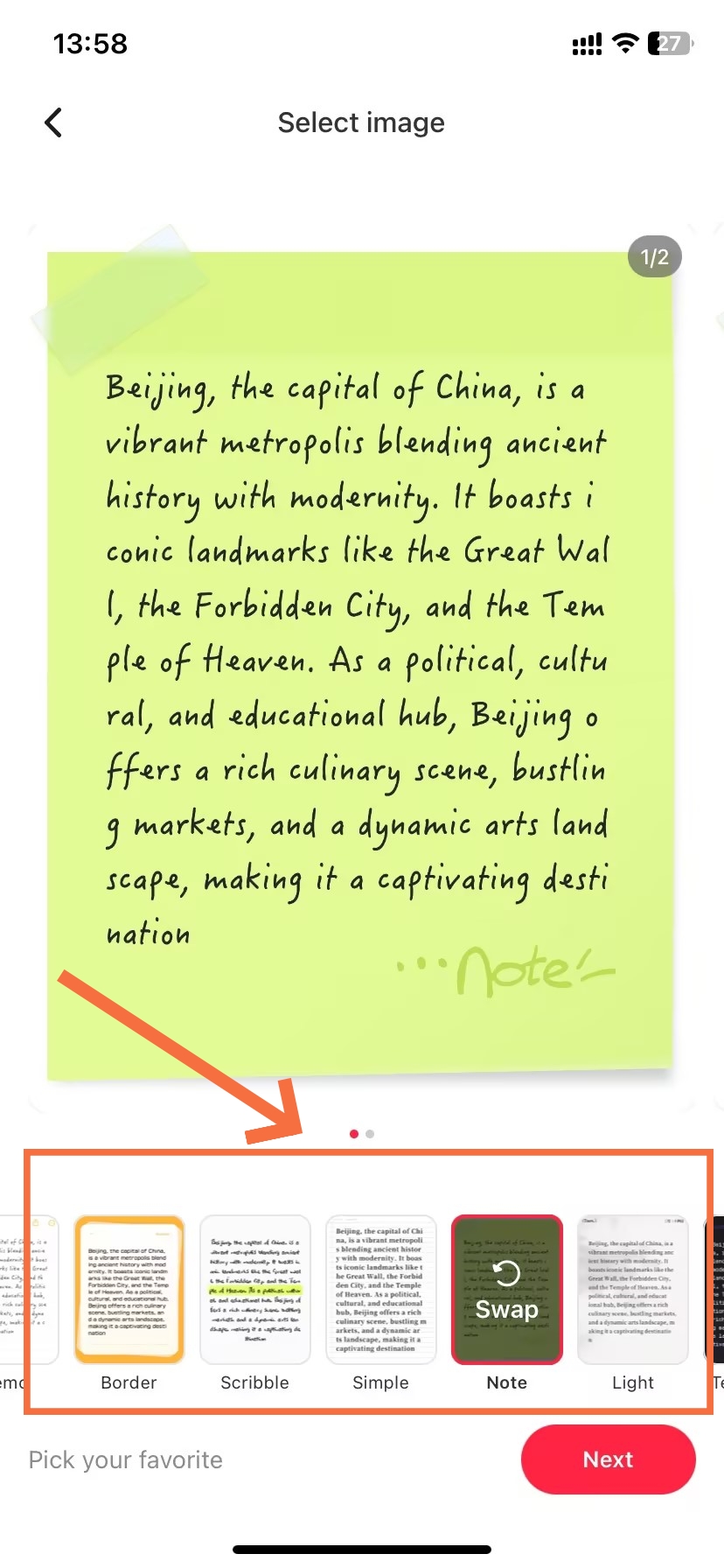
- Choose Background
-
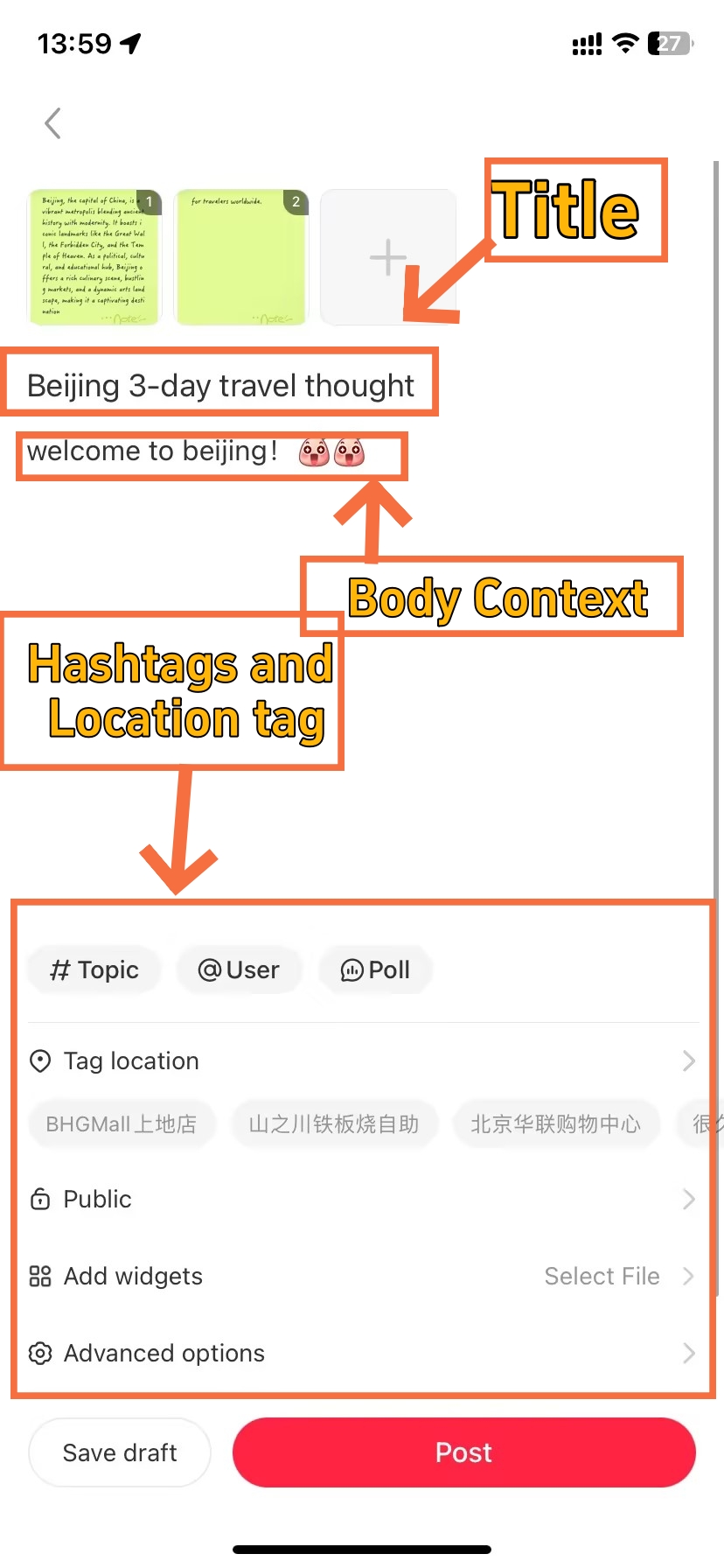
- Edit and Enhance the Post
-
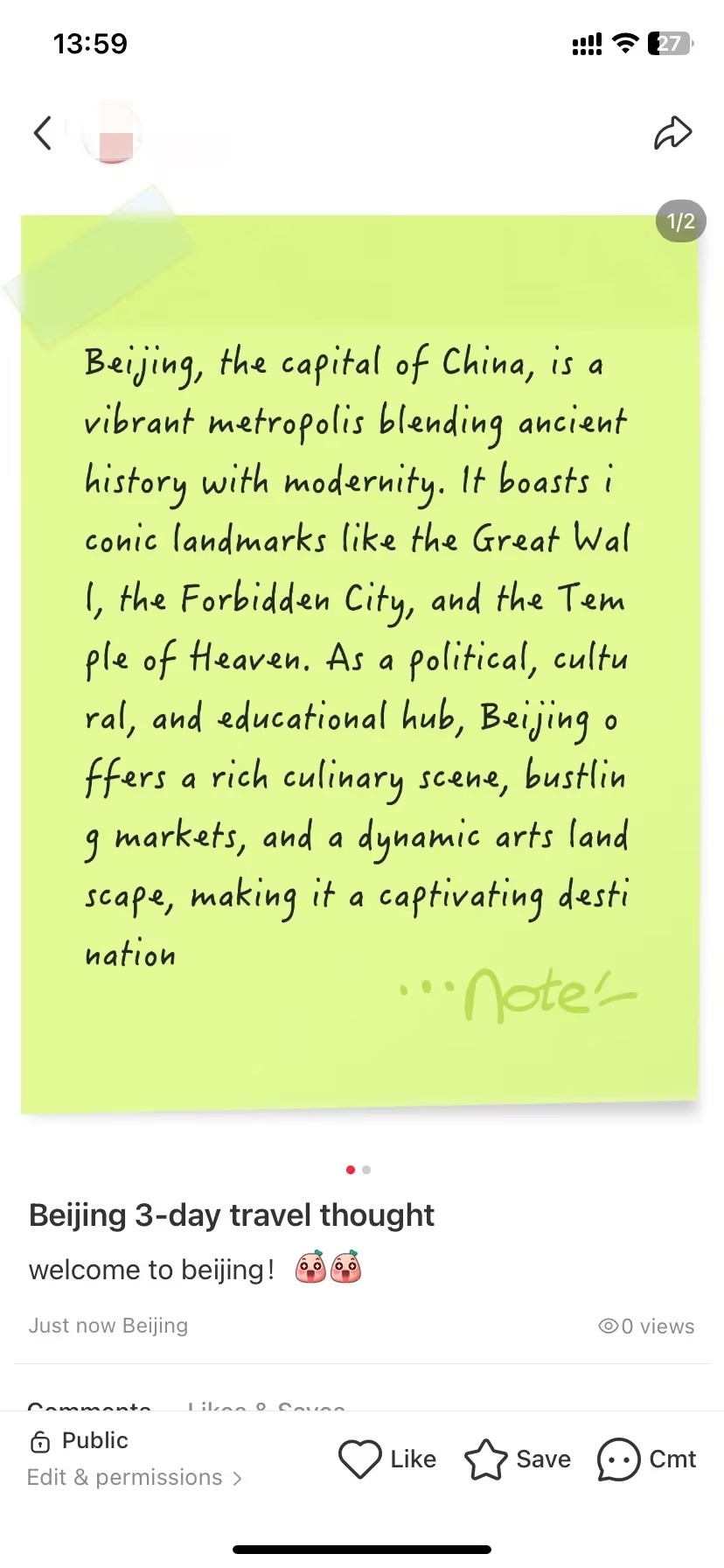
- Post is Done
At any time while you’re editing — in any of the three formats — tap “Save Draft” to store your work. Drafts are saved on your device and can be accessed from your profile’s Draft folder. (Tip: drafts might get lost when you switch devices or uninstall the app!)
Text notes are Xiaohongshu's lightest-light weight format — no photography needed, no video editing. They are suited to a speedy travel tip, packing list, short opinion, or diary-style reflection. Competition in this format is way lower than photo notes making it an easy entry point for a bunch of creators.
How to Delete and Hide Posts on Xiaohongshu
-
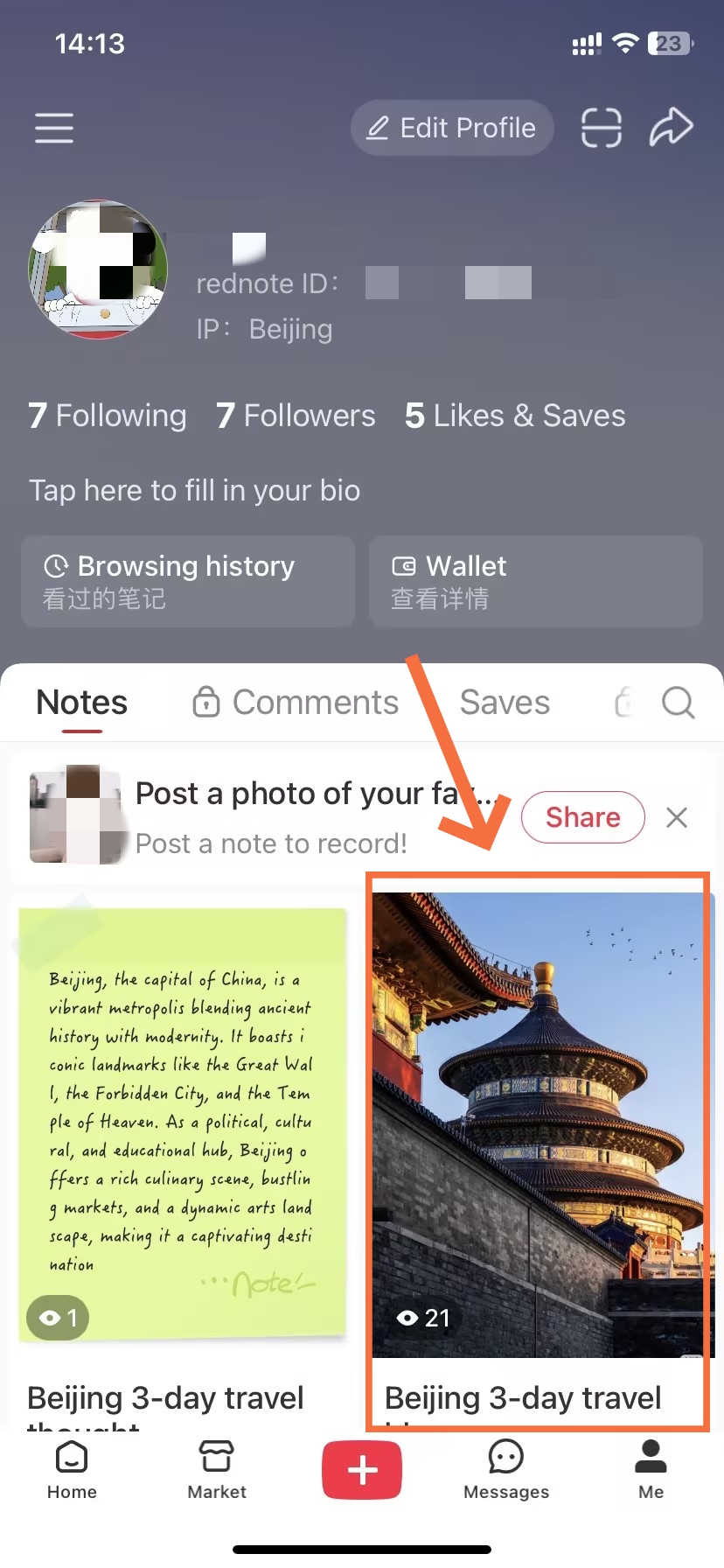
- Open the Post
-
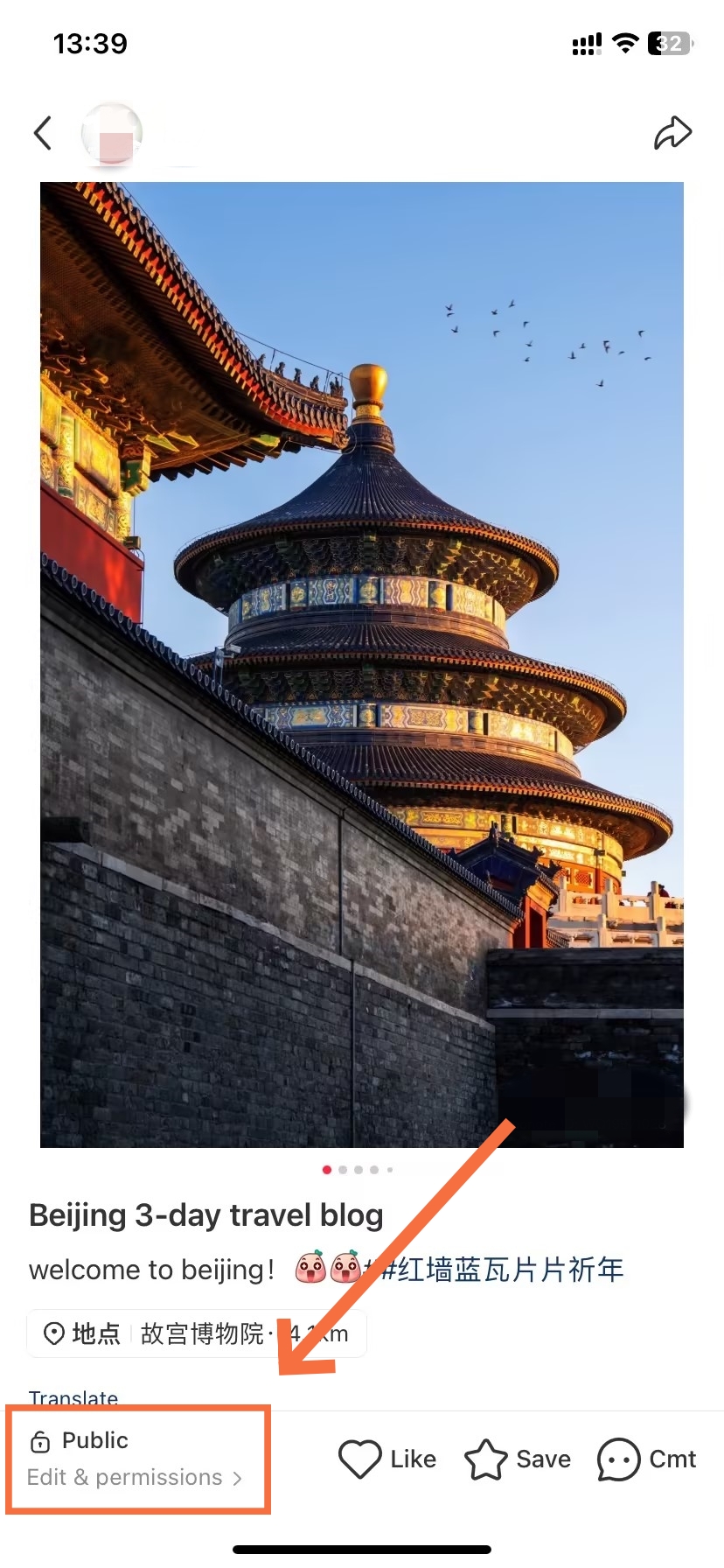
- Tap the Pulic Icon
-
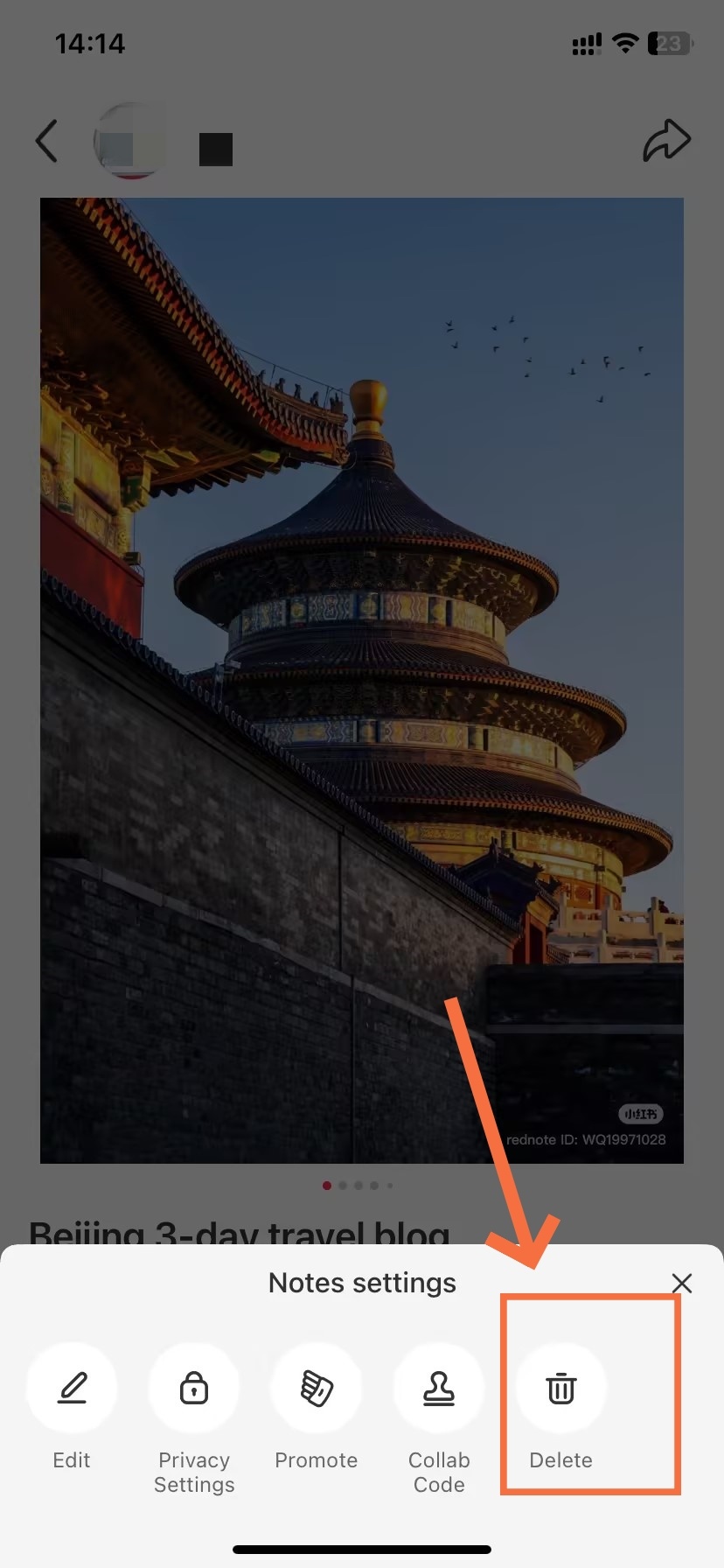
- Tap to Delete
-
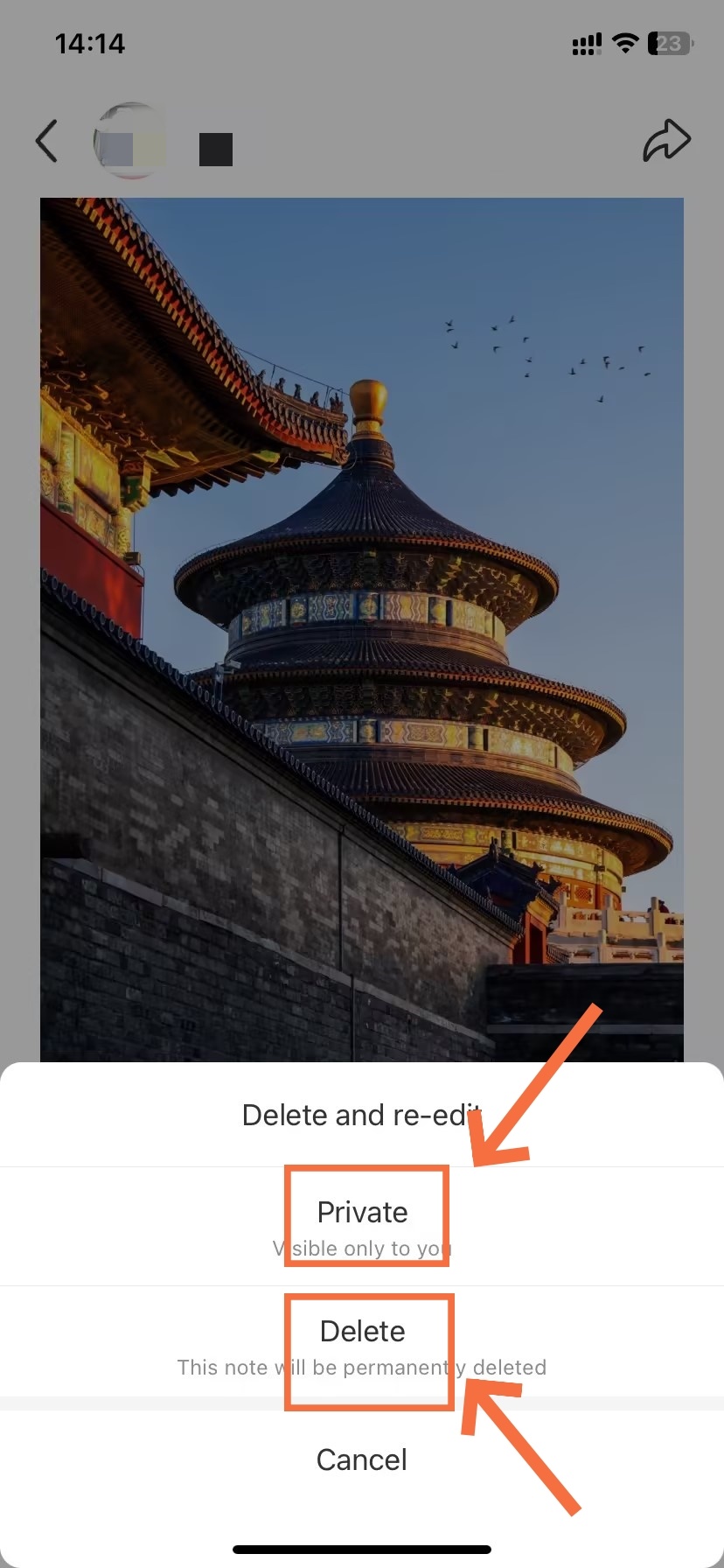
- Choose to Hide or Delete
Two ways to take a post offline — one permanent, one fully reversible.
Once a post is live, you have two options for removing it from public view. Deleting is permanent and erases all engagement data with it. Hiding sets the post to private, preserving everything — likes, saves, comments — while making it invisible to other users. Choose based on whether you ever want the post back.
How to Delete a Post on Xiaohongshu
How to Hide a Post on Xiaohongshu
Hiding a post sets it to "Private" — invisible to all other users, but preserved in full on your account. You can reverse this at any time without losing any engagement data. Use this instead of deleting whenever you're unsure, or want to temporarily pull a post while you revise your strategy.
Private posts are fully reversible; deleted posts are gone forever, along with every like, save, and comment they garnered. Unless you’re absolutely sure you’ll never want the post back, Set as Private is almost always the safer option.
The Best Time to Post on Xiaohongshu
Timing your posts to China's active hours — wherever you're based.
Xiaohongshu's core user base operates on China Standard Time (CST = UTC+8). Therefore, regardless of where you are in the world, the most effective publishing windows align with Beijing time — not your local clock.
High passive discovery
Active engagement spike
Highest saves & comments
Xiaohongshu users do the most commenting and saving during evening leisure hours. For video notes users will be in a passive long viewing experience at this time so whenever possible, post video content at this time as well.
Time Zone Converter for International Creators
If you're posting from outside China, use this reference to match your local time to the 8–10 PM CST prime window:
| Your Location | Time Zone | Post at This Local Time | Aligns With (CST) |
|---|---|---|---|
| US East Coast | EST (UTC–5) | 7:00 AM – 9:00 AM | 8–10 PM CST |
| US West Coast | PST (UTC–8) | 4:00 AM – 6:00 AM | 8–10 PM CST |
| UK / Ireland | GMT (UTC+0) | 12:00 PM – 2:00 PM | 8–10 PM CST |
| Central Europe | CET (UTC+1) | 1:00 PM – 3:00 PM | 8–10 PM CST |
| Singapore | SGT (UTC+8) | 8:00 PM – 10:00 PM | 8–10 PM CST |
| Japan | JST (UTC+9) | 9:00 PM – 11:00 PM | 8–10 PM CST |
| Australia (East) | AEST (UTC+10) | 10:00 PM – 12:00 AM | 8–10 PM CST |
Avoid posting between 2:00 AM and 6:00 AM CST. This is the platform's lowest-activity window. Posts published during this period get minimal initial exposure — and early momentum on Xiaohongshu heavily determines total reach. An exception: content specifically targeting overseas Chinese communities may perform acceptably in this window.
Timing by Content Type
These timings are ballpark figures. They may not be the best times for YOU to post. And bear in mind that social networks change their algorithms all the time, so be sure to check back regularly.
How to Manage Comments on Xiaohongshu
Translate what your audience is saying, respond to them, and moderate your space.
Comments are where audience relationships are built on Xiaohongshu. The platform gives you three key tools: a built-in AI translation feature for Chinese-language responses, a reply function for direct engagement, and moderation controls to delete comments that violate your community standards. Each one is covered below.
How to Comment on a Post on Xiaohongshu
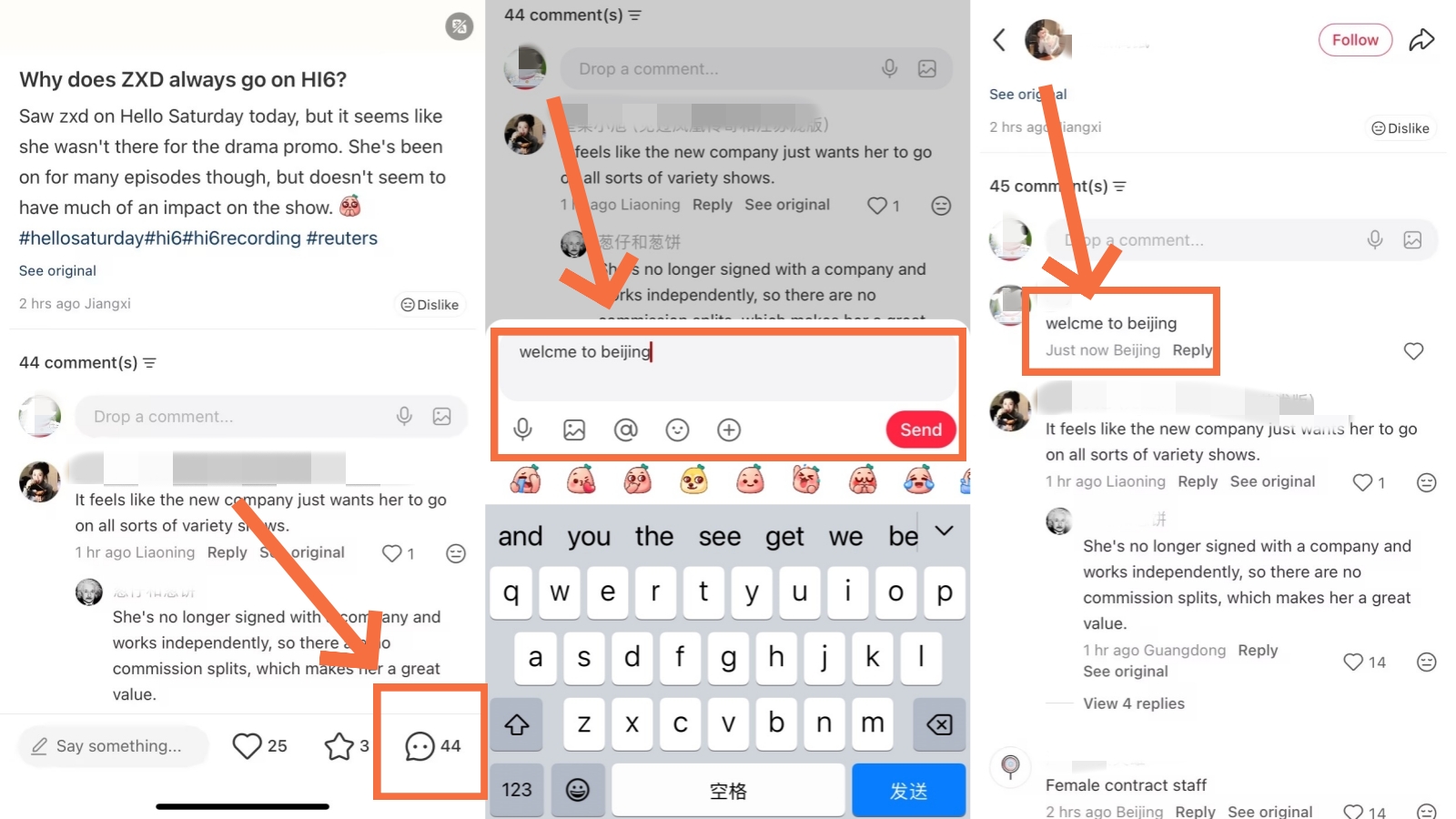
Comment on a Post
Commenting on Xiaohongshu works the same whether you're on your own post or someone else's. Comments go live instantly — there's no approval queue for standard personal accounts.
💡
Leaving comments on others' posts builds visibility: Thoughtful comments on popular notes in your niche expose your username to a wider audience. Many creators gain followers specifically through comment activity, not just their own posts.
How to Translate Comments on Xiaohongshu
-
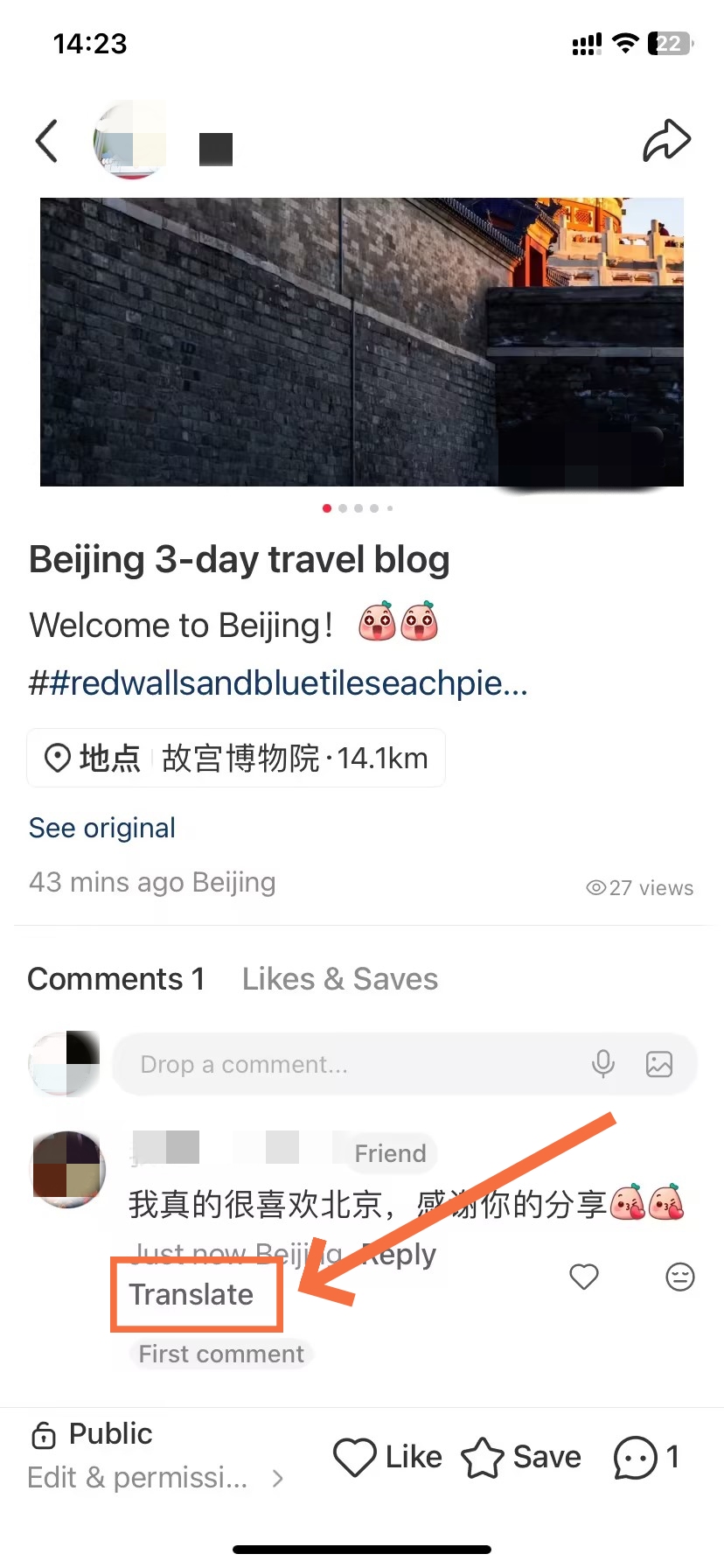
- Tap to Translate
-
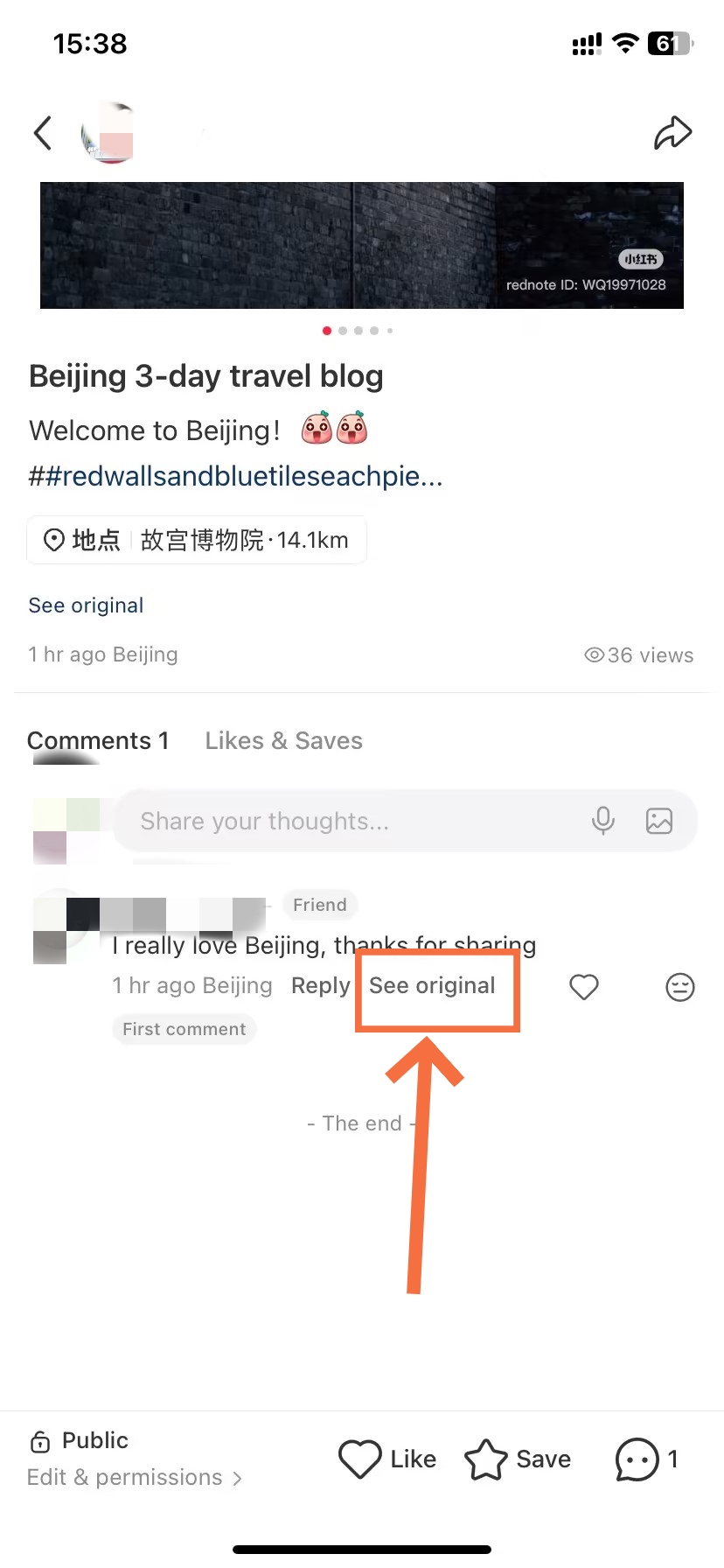
- Tap to see Original Comment
Xiaohongshu added AI comment translation in 2025. This is the fastest way to see what Chinese-speaking users are saying about your posts. Translations appear in the comments section - no need to use extra apps! Features may not be available on all versions or in all regions.
💡
Accuracy note: Quality of translation for standard mandarin is good but with net slang use, regional dialect and platform specific abbreviations can have no accurate equivalent meaning in relation to their intended meaning. Always check your translation through a dedicated translator app, if unsure of its accuracy.
How to Reply to a Comment on Xiaohongshu
-
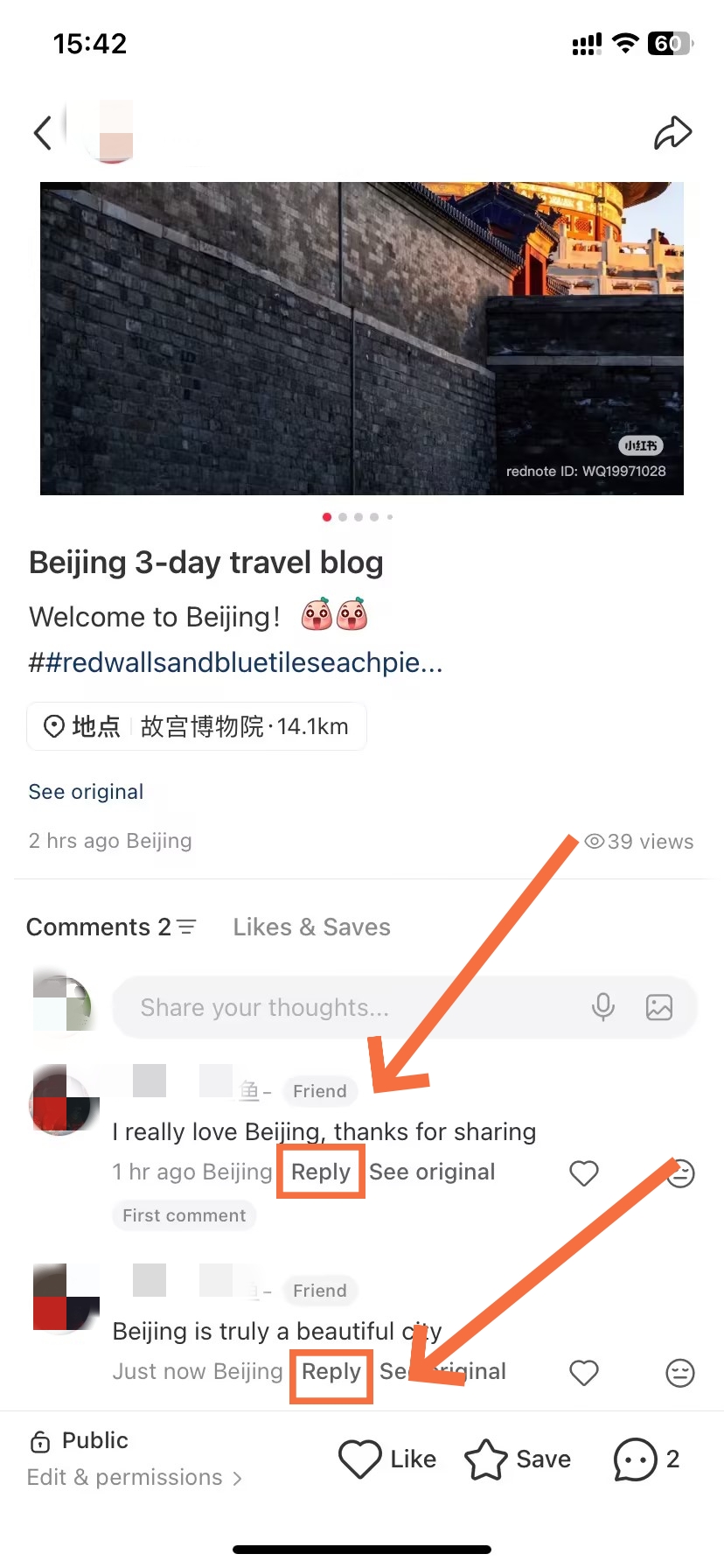
- Reply to Comment Directly
-
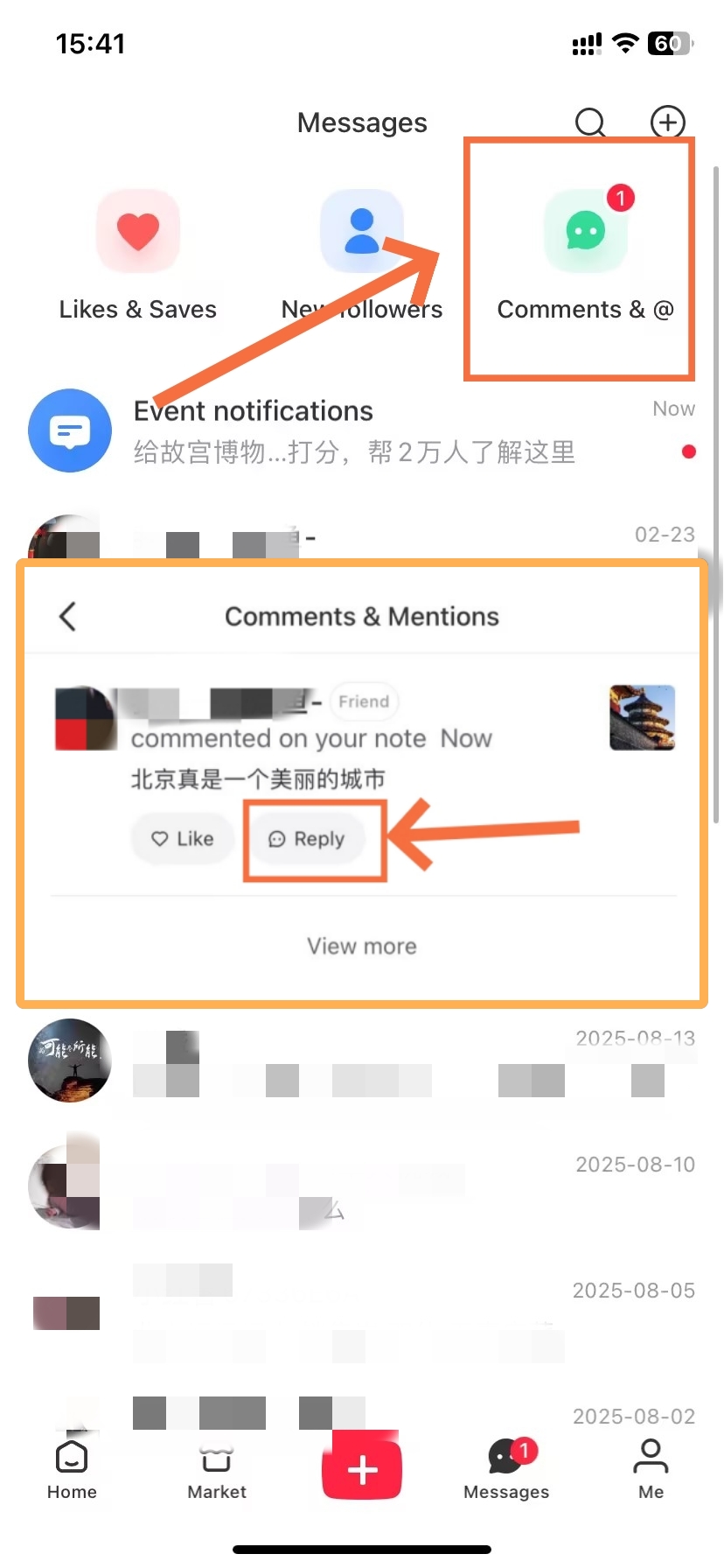
- Tap the Message Icon
Replying to comments signals active engagement to Xiaohongshu's algorithm. Specifically, replying within 24 hours of receiving a comment tends to boost the post's continued distribution. There are two ways to reach a comment and reply — directly from the post, or through your message inbox.
Alternatively, you can reply to comments directly from your message inbox — useful when managing multiple posts without opening each one individually.
💡
Use the inbox for batch replies: With responses to a post flooding in, it can be much more efficient to work through the Comments tab of your inbox rather than returning to the post itself each time, and you can clear all of the new notifications in one go without losing your place.
How to Delete a Comment on Xiaohongshu
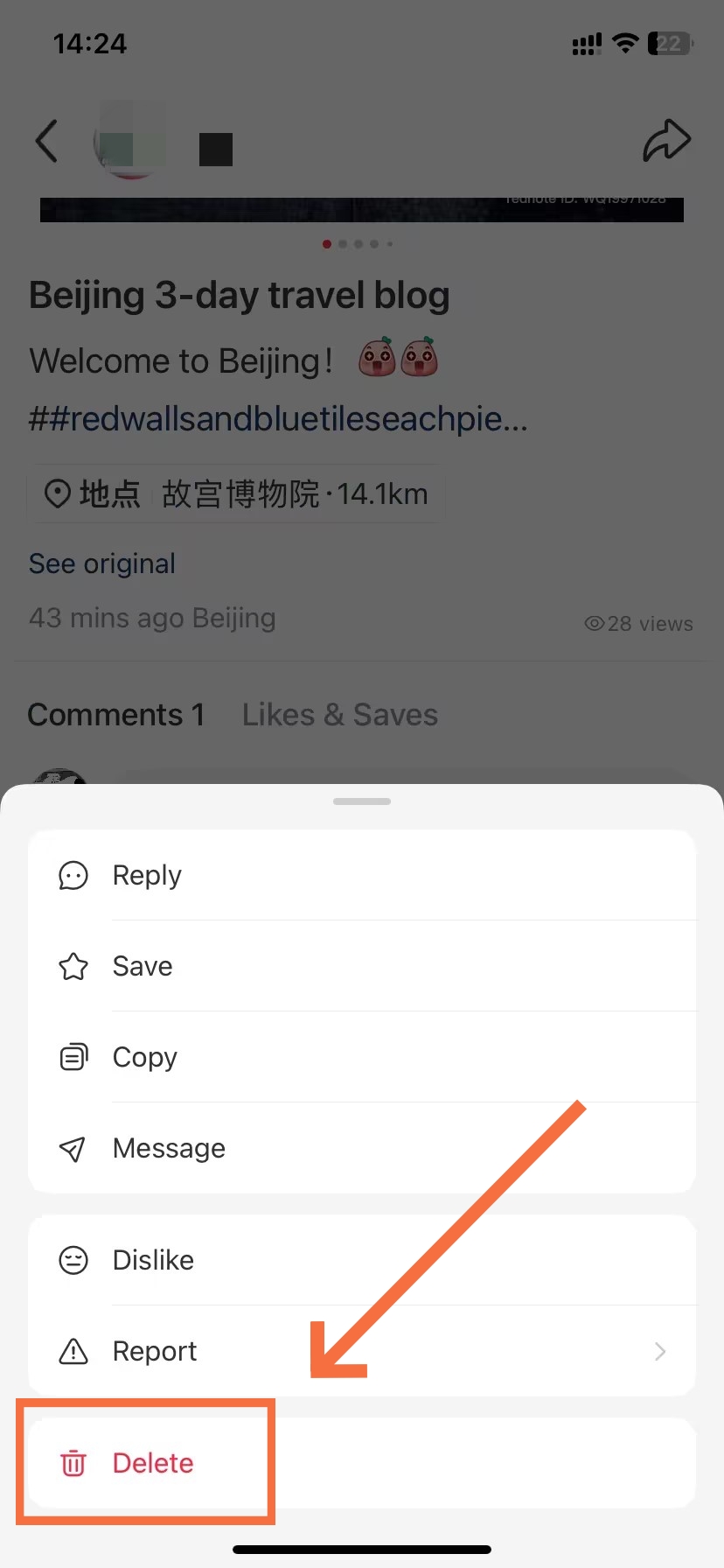
Delete a Comment
You have the ability to delete your own comments throughout all parts of the platform. As well, you are able to delete external comments on your own original post. Long-pressing is the mechanism used on both actions.
Once you hit “Post,” your note finds its way into Xiaohongshu’s content review engine for the 1-10 minutes fun. Notes that violate community guidelines can either appear behind a shadowban or be forced away. To make sure your note skims through review: no links to external sites in the first few posts, don’t use too many promotional buzzwords, stay away from politically sensitive topics and don’t copy-paste the same identical notes across similar subjects all the time.
FAQs: Most Common Posting Questions
Q: How do I post on Xiaohongshu for the first time?
Log in to your account, then tap the red "+" button at the bottom center of the home screen. Select your post type — photo, video, or text — upload or create your content, fill in the title and hashtags, and tap "Post." For a more detailed walkthrough of how to post on Xiaohongshu for the first time, start with Method 1 (Photo Note) in this guide — it's the easiest format to begin with.
Q: Can I post on Xiaohongshu in English?
Yes, you can write your title, description, and hashtags entirely in English when you post on Xiaohongshu. English-language content has grown significantly on the platform since early 2025. However, adding 2–3 relevant Chinese hashtags alongside English ones dramatically expands your discoverability within the platform's predominantly Chinese-speaking user base.
Q: What image size should I use for a Xiaohongshu post?
Use 1242 × 1660 pixels (3:4 portrait ratio) for photo notes. This ratio fills the feed card correctly and looks professional in the grid view. Square images (1:1) display smaller and get cropped at the edges. Horizontal images are strongly discouraged — they appear letterboxed and look small compared to vertical content when you post on Xiaohongshu.
Q: How many photos can I include in one post?
When you post on Xiaohongshu as a photo note, you can include up to 18 photos per post. The first image you select automatically becomes your cover — it displays in the feed grid for all users, so it carries the most weight for click-through rate. Select your most compelling shot for the cover position.
Q: How do I add hashtags when posting on Xiaohongshu?
In the post description field, type "#" and Xiaohongshu will auto-suggest matching hashtags. You can add up to 10 per post. For best results when you post on Xiaohongshu, use the 5-3-2 approach: 5 core-topic hashtags for broad reach, 3 niche hashtags for targeted discovery, and 2 trending or seasonal tags to catch current algorithm momentum.
Q: Can I schedule posts on Xiaohongshu?
Personal accounts on Xiaohongshu do not have a native post scheduling feature. The standard workaround: publish your post immediately, then set it to "Private" right away. When your target time arrives, switch it back to "Public" manually. Business and institutional accounts can access proper scheduling through the Dandelion (蒲公英) creator platform.
Q: How do I delete a post I've already published?
Go to your profile, open the target post, tap the "···" icon in the top-right corner, select "Delete," and confirm. Deletion is irreversible on Xiaohongshu — the post will be permanently removed along with all engagement data. If you only want to temporarily hide the post, use "Set as Private" instead to preserve your data.
Q: How do I hide a post without deleting it?
Tap the "···" icon on your post and select "Set as Private" (设为私密). The post disappears from your public profile and moves to a private tab visible only to you. To restore it, navigate to the private tab, open the post, tap "···" again, and select "Set as Public." No data — likes, saves, comments — is lost when you hide or unhide a post on Xiaohongshu.
Q: How do I translate Chinese comments on my posts?
Xiaohongshu added AI-powered comment translation in 2025. In the comments section, look for a "Translate" button displayed directly beside the comment — tap it for an instant translation. Alternatively, long-press the comment and select "Translate" (翻译). This tool is particularly useful when you post on Xiaohongshu in English and receive Chinese-language responses from local users. Note: feature availability may vary by app version and region.
Q: When is the best time to post on Xiaohongshu?
The best time to post on Xiaohongshu is 8:00–10:30 PM China Standard Time (CST). For US East Coast creators, this translates to 7:00–9:00 AM local time. The lunch window (12:00–1:30 PM CST) is the second-strongest option. Avoid the 2:00–6:00 AM CST window — posts published during this period receive minimal early exposure.