Adding Foreign Credit Card to WeChat Pay
Paying in China used to mean either carrying a fat stack of cash or borrowing a local friend's phone. That's changed. WeChat Pay now lets foreign visitors link their international credit or debit card directly — no Chinese bank account, no local SIM required. The process is straightforward, though there are a few steps that trip people up if they go in blind. If you're new to the app, it’s worth first understanding how WeChat contacts work in China before setting up payments. This guide covers exactly how to add a foreign credit card to WeChat, what the current limits look like, and what to do when something doesn't work.
What Cards Actually Work with WeChat Pay
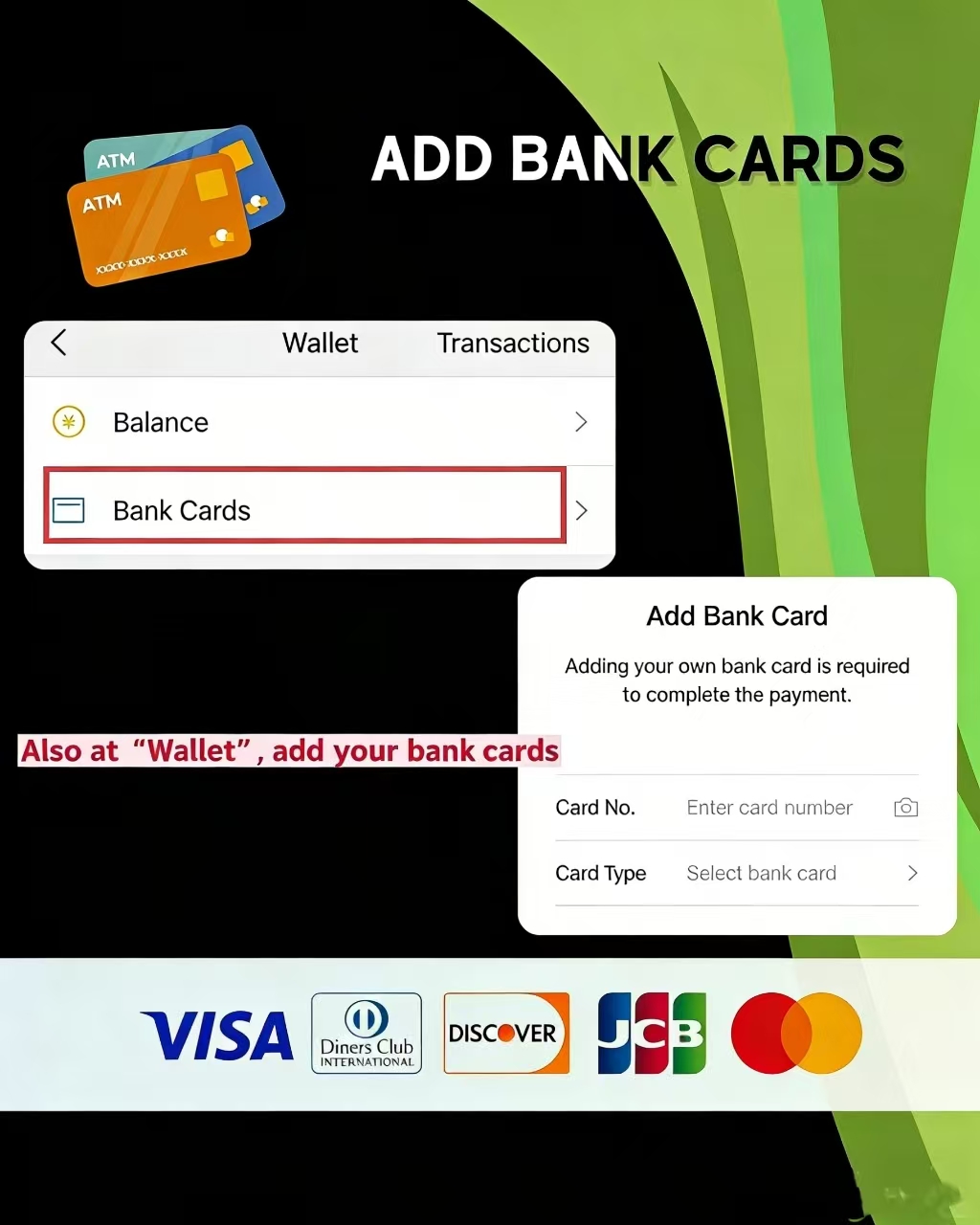
WeChat Pay accepts most major international card networks. Here's the current list as of 2026:
- Visa: widely accepted, most reliable for Western travelers
- Mastercard: works the same as Visa, no issues reported
- American Express: newly added in 2025 — good news for US travelers
- JCB: supported (unlike Alipay, which still doesn't accept JCB)
- Discover Global Network:accepted
- Diners Club International:accepted
- UnionPay: international-issued cards only
Cards that won't work: prepaid cards (like Vanilla or Paysafecard) and most virtual cards. If you've got a Revolut or Wise account, use the physical card — the virtual card version tends to fail at the verification step.
One thing worth double-checking before you start: the name on your card must exactly match the name registered on your WeChat account, middle names included. It sounds minor but it's a common reason the linking fails.
Credit Card or Debit Card — Does It Matter?
Both work fine with WeChat Pay. In practice, a foreign credit card and a debit card go through the same linking process — same steps, same verification, same limits. The difference shows up on your bank statement: credit card payments may trigger a cash advance fee depending on your issuer, while debit cards pull directly from your account. If your credit card charges cash advance fees for overseas transactions, a debit card from a no-fee bank like Charles Schwab or Starling is the smarter call.
How to Add Your Foreign Credit Card to WeChat Pay — Step by Step
Before You Start — 3 Things to Check
Before touching the app, run through these quickly. Skipping this part is why most people end up stuck mid-process. For a smoother experience overall, check out these practical WeChat tips for travelers in China before you begin:
- App version:Make sure WeChat is updated to the latest version from your App Store or Google Play. Older builds sometimes don't show the international card option at all — or worse, they show it but error out during verification. If you haven't opened WeChat in a while, check for updates first. If you’re using the app frequently during travel, enabling features like WeChat night mode can also make late-night usage easier on the eyes.
- VPN: Turn it off. Completely. This is the single most common reason card linking fails, and it's the one people overlook most. WeChat Pay's payment servers need a direct, unproxied connection to process the verification. Switch your VPN off before you open the app, not just before you tap "pay."
- Phone number: You'll receive an SMS verification code during setup, so confirm your number can receive international texts. If your home SIM doesn't support roaming, or you've already swapped to a local Chinese SIM, just make sure the number registered on your WeChat account is the one that can actually receive messages right now.
One more thing — have your physical card in hand before you start. You'll need the card number, expiry date, CVV, and the billing address registered with your bank. Takes maybe three minutes total once you have everything ready.
Adding the Card — Tap by Tap Walkthrough
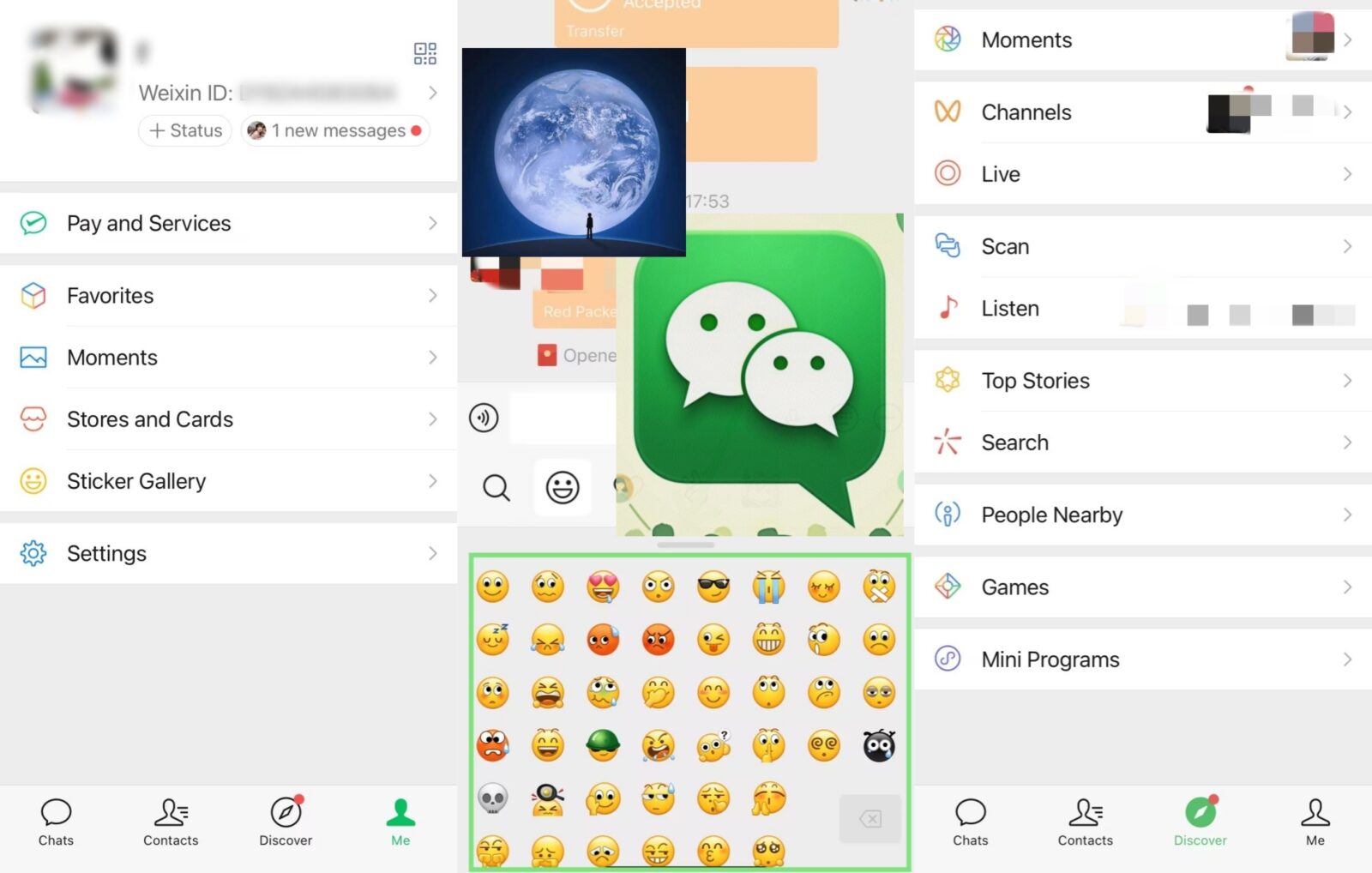
Here's the full path through the English interface. The screenshots below show exactly which button to tap at each step:
- Step 1: Open WeChat → tap "Me" in the bottom-right corner of the screen
- Step 2: Tap "Services" (sometimes labeled "Pay and Services" depending on your app version)
- Step 3: Tap "Wallet" Can't find Wallet? Go to Me → Settings → General → Features → toggle on WeChat Pay. It occasionally gets switched off after app updates.
- Step 4: Tap "Bank Cards" → then "Add a Bank Card"
- Step 5: Enter your 16-digit card number manually — or tap the 📷 camera icon in the top-right corner to scan your card automatically. The scan works reasonably well, though it occasionally misreads digits, so double-check before proceeding.
- Step 6: Select your card network from the dropdown (Visa, Mastercard, Amex, JCB, etc.)
- Step 7: Enter your expiry date, CVV, and billing address. The billing address is whatever address is on file with your card issuer — use that exactly, not your current travel address.
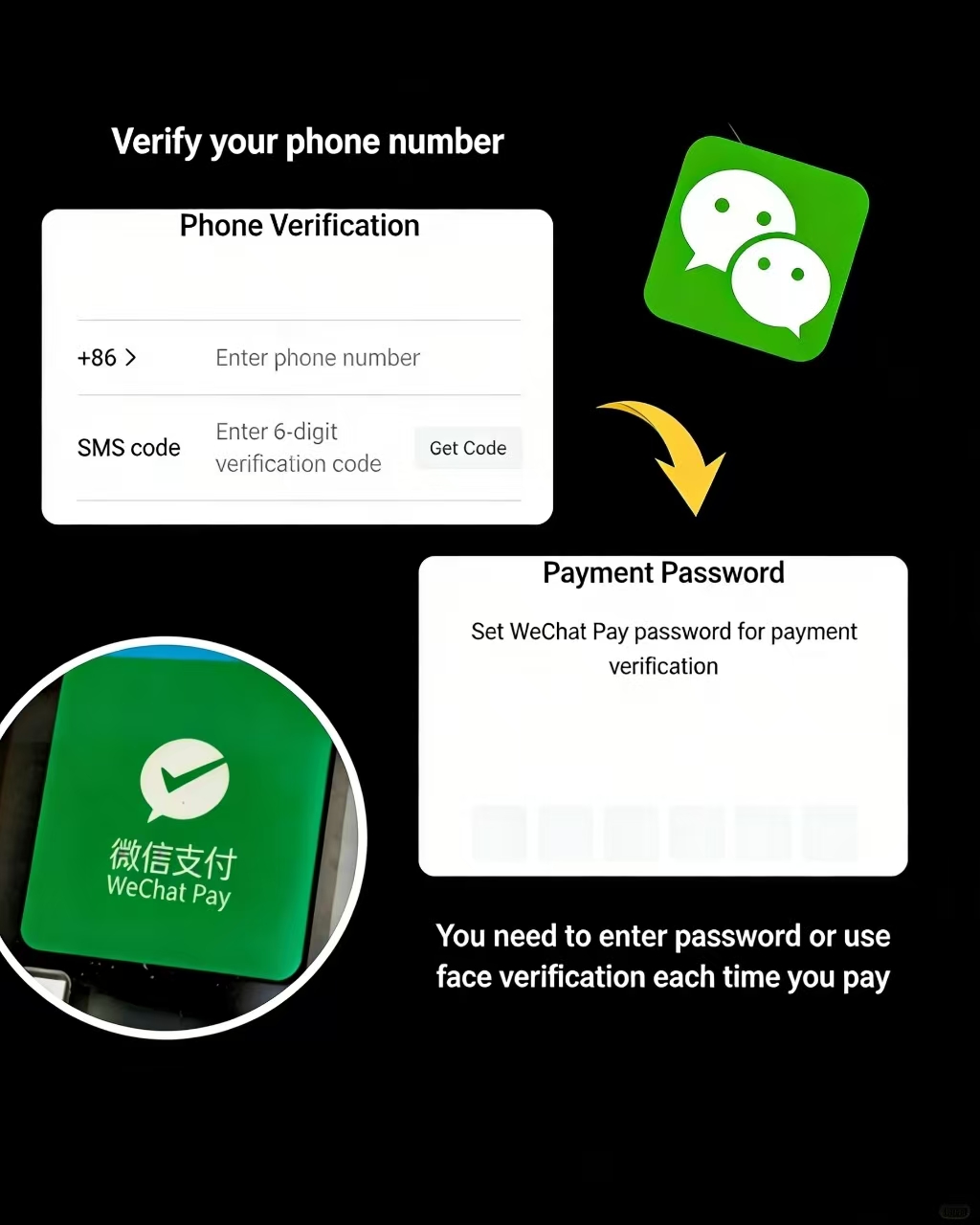
- Step 8: Enter your phone number and input the SMS verification code that gets sent to it
- Step 9: Set a 6-digit payment password. This is separate from your WeChat login password. You'll enter it every single time you make a payment, so pick something you'll actually remember — but not something obvious like 123456.
- Step 10: Done. Your card is now linked to WeChat Pay. Wondering what’s next? learn how to top up your WeChat wallet.
Once the card is linked, go to Me → Services → Money and check that your payment method is set to your bank card — not "Wallet Balance." Foreign cards can't top up the wallet, so if Wallet Balance is set as default, every payment will fail.
Completing Identity Verification for Higher Limits
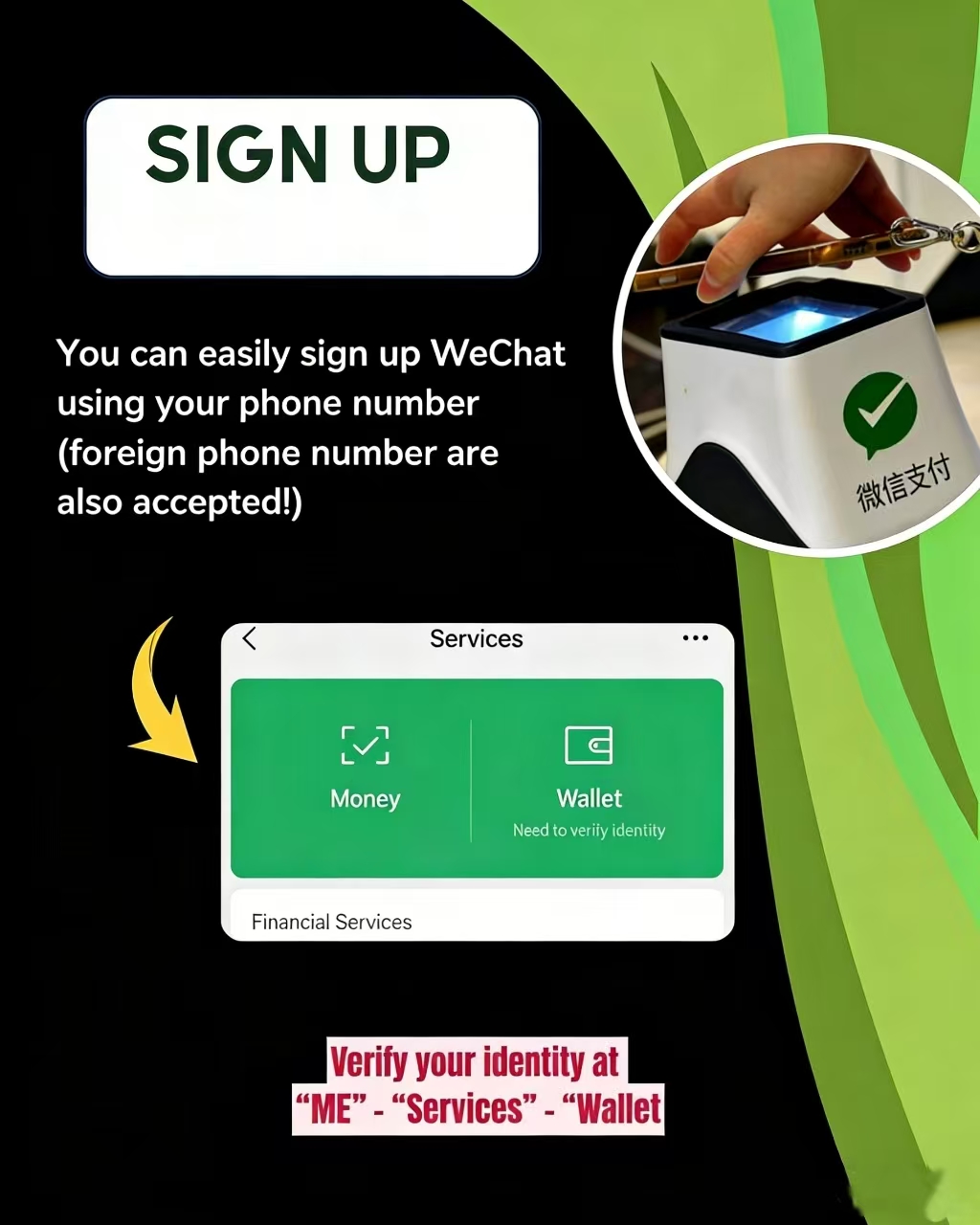
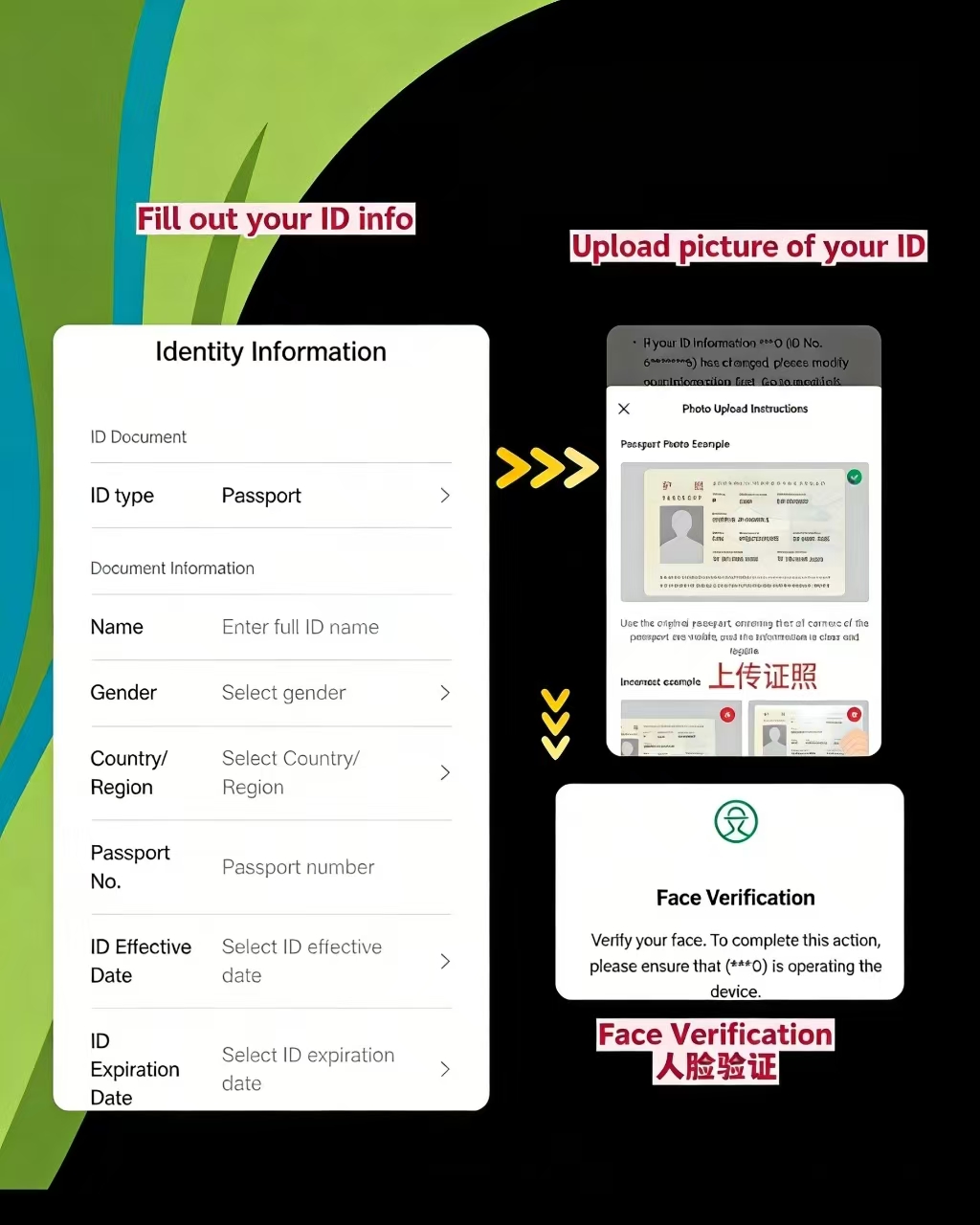
Linking a card works without any ID verification — you can start paying immediately. But your monthly spending is capped at RMB 15,000 until you verify. For a short trip that's probably fine, but if you're staying longer or spending more, it's worth doing.
The path: Me → Services → Money → tap any locked feature (e.g. "Receive Money") → tap "Complete Now"
Accepted ID documents:
- Foreign passport (most common for international visitors)
- Mainland Travel Permit — Hong Kong/Macau residents (回乡证)
- Mainland Travel Permit — Taiwan residents (台湾通行证)
- Foreign Permanent Residence card
Upload a clear, well-lit photo of your document — blurry photos get rejected and you'll have to start over. Most verifications complete within a few minutes. Occasionally it takes up to 24 hours if manual review is triggered.
After verification you unlock:
- Monthly limit raised to RMB 50,000
- Receiving money from WeChat contacts
- Red envelope (hongbao 红包) features
- Higher annual cumulative limit of RMB 65,000
For most tourists, completing verification once is worth the five minutes it takes.
💳 For detailed troubleshooting on linking international cards to WeChat Pay, explore our comprehensive How to Use WeChat in China guide.
Spending Limits and Fees You Need to Know Before You Pay
The WeChat Pay limit for foreigners depends on whether you've completed identity verification. Here's the breakdown:
| Without Verification | With Verification | |
| Single transaction | RMB 6,500 | RMB 6,500 |
| Monthly cumulative | RMB 15,000 | RMB 50,000 |
| Annual cumulative | — | RMB 65,000 |
The single transaction cap stays the same either way — RMB 6,500 is roughly $900 USD, which covers most purchases. The bigger difference is the monthly ceiling. For a two-week trip, RMB 15,000 is usually enough. Staying longer or spending more? Do the verification.
Fees for Using an International Card on WeChat Pay:
- Under RMB 200:completely free — WeChat absorbs the fee
- Over RMB 200: a 3% transaction fee applies
- New user perk (2026):for the first 60 days after linking your card, transactions under RMB 1,000 per day are fully fee-free
That 3% adds up on bigger purchases. A RMB 1,500 hotel payment costs you an extra RMB 45. Not catastrophic, but worth knowing.
On exchange rates — WeChat doesn't set them. The rate is determined by your card network (Visa, Mastercard, etc.) and your issuing bank. If your card charges an additional foreign transaction fee on top of that, you're looking at 4–5% total. Cards like Wise, Revolut, or Charles Schwab don't charge foreign transaction fees, so they're worth considering for China travel.
One quick comparison: using an international card on WeChat Pay allows single transactions up to RMB 6,500, while Alipay caps theirs at RMB 3,000. For larger purchases, WeChat Pay has the clear edge.
💳 This guide focuses on payment setup, but for a broader understanding of WeChat's full capabilities including messaging, Mini Programs, and travel features, explore our How to Use WeChat in China guide.
Things Your Foreign Card Can't Do on WeChat (and Workarounds)
-

- Wallet Top-up
-
- Some Mini-program Purchases
Features That Are Locked for Foreign Cards
Linking a foreign card gets you pretty far, but not all the way. A few things are off-limits:
- Wallet top-up:You can't load money into your WeChat balance using an international card. Only Chinese mainland bank cards can do that. Your foreign card pays directly at checkout — funds never sit in the app.
- Peer-to-peer transfers:Sending money directly to a WeChat contact isn't supported with foreign cards. This one surprises people who want to split a dinner bill or pay back a local friend.
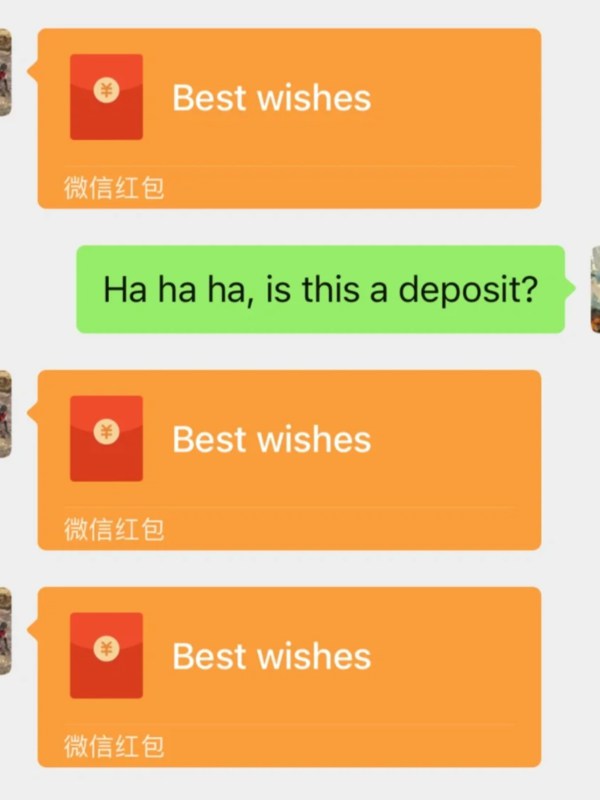
- Red envelopes (hongbao 红包):Sending 红包 requires a Chinese bank card. Receiving them may be possible after identity verification, but don't count on it.
- Some mini-program purchases: Certain WeChat mini-programs haven't enabled international card payments on their end. You'll hit a wall even if your card is correctly linked.
For everyday payments — restaurants, shops, taxis, convenience stores — none of this matters. The limitations mostly show up in social and peer-to-peer scenarios.
When You See "This Transaction Does Not Support International Bank Cards"
This error message means the specific merchant or mini-program hasn't activated the international card payment channel on their side. Your card is fine — it's a merchant configuration issue.
A few ways around it:
- Try Alipay: Alipay's international card setup works similarly to WeChat Pay and is accepted at most of the same places. Worth having as a backup.
- Ask a local friend:They scan, you pay them back in cash. Inelegant but it works — not sure how to add or manage contacts? check how WeChat contacts work.
- Find a different vendor: Large supermarkets, chain restaurants, and tourist-facing businesses almost always support international cards. Smaller independent shops are the more likely culprits.
- Use cash: Chinese ATMs widely accept foreign Visa and Mastercard for withdrawals. Having RMB 500–1,000 as backup is never a bad idea anyway.
WeChat Pay vs Alipay — Which One Is Better for Foreign Visitors

WeChat Pay vs Alipay
| Feature | WeChat Pay | Alipay |
| Supported Cards | Visa, Mastercard, Amex, JCB, Discover, Diners Club, UnionPay (7 networks) | Visa, Mastercard, JCB, Discover (no Amex) |
| Single Transaction Limit | RMB 6,500 | RMB 3,000 |
| Fee-free Threshold | Under RMB 200 | Similar |
| Social Integration | Strong (WeChat ecosystem) | Limited |
| Acceptance | Extremely wide | Extremely wide |
| Best For | Daily spending, transport, social payments | Online shopping, travel bookings |
For most foreign visitors, WeChat Pay pulls ahead on card variety and transaction limits. The Amex support is a genuine differentiator, and the higher single-transaction ceiling matters when you're paying for hotels or larger purchases.
That said, acceptance is roughly equal across both platforms — you'll rarely find a place that takes one but not the other. The real reason to install both is backup. If a merchant throws up that "international card not supported" error on WeChat Pay, Alipay often goes through without a problem, and vice versa.
WeChat Pay for foreigners also has the advantage of being built into an app most visitors already use for messaging. No need to manage a separate app just for payments — it's all in one place. If you're deciding between payment apps, this detailed comparison of Alipay vs WeChat Pay for foreigners breaks down the differences in real-world usage. Here’s a quick side-by-side overview:
FAQ about Adding Foreign Credit Card to WeChat Pay
Q: Can I use WeChat Pay with a foreign credit card without a Chinese bank account?
Yes. Since mid-2023, WeChat Pay allows foreign visitors to link international cards directly — no Chinese bank account needed. You'll need a valid international card (Visa, Mastercard, AmEx, JCB, Discover, Diners Club, or UnionPay international), a foreign phone number for SMS verification, and a supported ID document like a passport. You can start paying immediately after linking, though identity verification unlocks higher limits and extra features.
Q: What is the spending limit for foreign cards on WeChat Pay?
Without identity verification, the monthly cumulative spending limit sits at RMB 15,000. Complete your passport verification and that jumps to RMB 50,000 per month, with an annual ceiling of RMB 65,000. Single transaction limits cap at RMB 6,500 regardless of verification status. For most short-term visitors, the unverified limits are perfectly adequate for a two-to-three-week trip covering food, transport, and shopping.
Q: Are there transaction fees when using a foreign card on WeChat Pay?
WeChat Pay itself waives fees on transactions under RMB 200 — so your morning coffee and metro rides cost you nothing extra. Transactions above RMB 200 incur a 3% fee charged by WeChat. On top of that, your home bank may add its own foreign transaction fee (typically 1–3%). To minimize costs, consider using a no-foreign-fee card like Wise, Revolut, or Charles Schwab for your China trip.
Q: Why does WeChat say "this transaction does not support international bank cards"?
This message appears when a specific merchant or mini-program hasn't enabled the international card payment channel yet. It doesn't mean your card is faulty. Quick fixes: try a different payment method at that specific store, use Alipay as a backup, or simply pay cash. The issue is most common with some WeChat mini-programs, smaller local vendors, and peer-to-peer transfers — mainstream stores and restaurants are generally fine.
Q: Can I top up my WeChat wallet balance using a foreign credit card?
Unfortunately, no. Topping up the wallet balance (the green "Money" balance shown in WeChat Pay) is restricted to Chinese mainland bank cards only. Foreign credit cards are linked for direct payment — they work at checkout, but the funds come straight from your card each time rather than sitting in a pre-loaded wallet. This means you always need a live internet and card connection to pay.
Q: Do I need to turn off my VPN before using WeChat Pay?
Yes — this is one of the most commonly overlooked setup issues. WeChat Pay's payment servers require a direct Chinese network connection to process transactions. If your VPN is active, the payment can fail or the card-linking process may get stuck mid-verification. Turn off your VPN entirely before adding your card or making any payment. You can re-enable it after the transaction completes.
Q: Can I send WeChat red envelopes (hongbao) with a foreign card?
Sending red envelopes and direct peer-to-peer transfers are not available for standard foreign card accounts. These features remain restricted to accounts with Chinese bank cards or fully verified accounts with deeper KYC checks. After completing passport identity verification, some receive-money features may unlock — but red packet sending generally requires a Chinese domestic bank card linked to the account.
Q: What should I do if my foreign card keeps failing to link?
A few common culprits: your VPN is on (turn it off), your card name doesn't exactly match your WeChat registered name (middle names matter), or your card issuer is blocking China transactions. Contact your bank first to whitelist the transaction. Also ensure you're using a physical bank-issued card, not a prepaid or virtual card. If repeated attempts fail, wait 24–48 hours before trying again — too many failures can trigger a temporary security block.
Q: How do I set my foreign card as the default payment method?
After linking your card, go to Me → Services → Money. You'll see your payment QR code screen. Tap the small settings icon or "Payment Method" and make sure it's set to your bank card — not the Wallet Balance (which will show zero for foreign card users). This one step is easy to miss, and skipping it is why some users find their payment still fails at the counter even after a successful card link.