How to Reply Message on WeChat
WeChat is everywhere in China. You use it to text a hotel, confirm a ride, or ask a restaurant if they’re still open. But when a message comes in, especially in Chinese or as a quick voice note, replying isn’t always as straightforward as it looks. The buttons aren’t labeled the way you might expect, and a small tap can send the wrong thing.
Figuring out how to reply message on WeChat takes a bit of getting used to. It’s not complicated, but the details matter—text, voice, emojis, even where you tap. Miss one step, and the conversation can get awkward pretty fast.
How to Reply Message on WeChat Step by Step
-
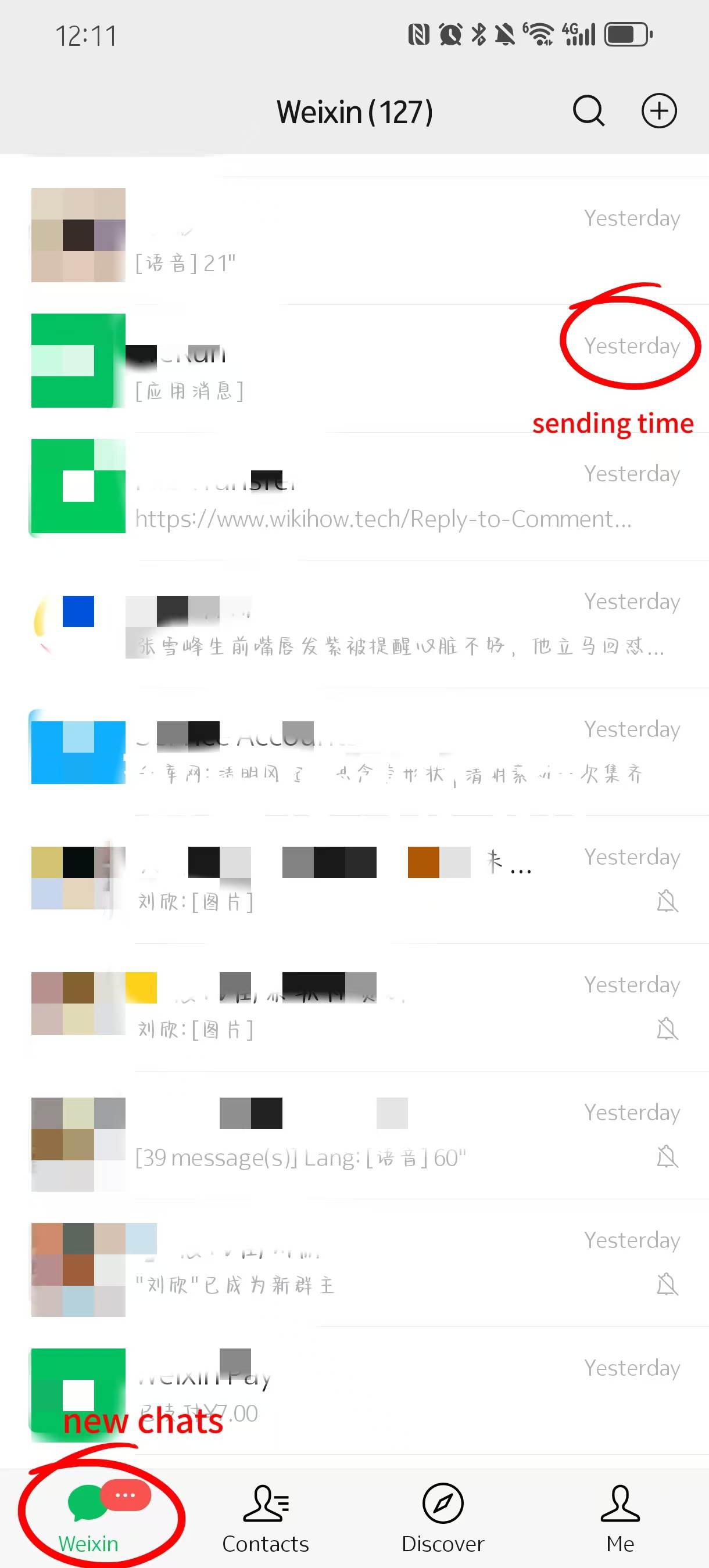

- Sending Time&New Chats
-
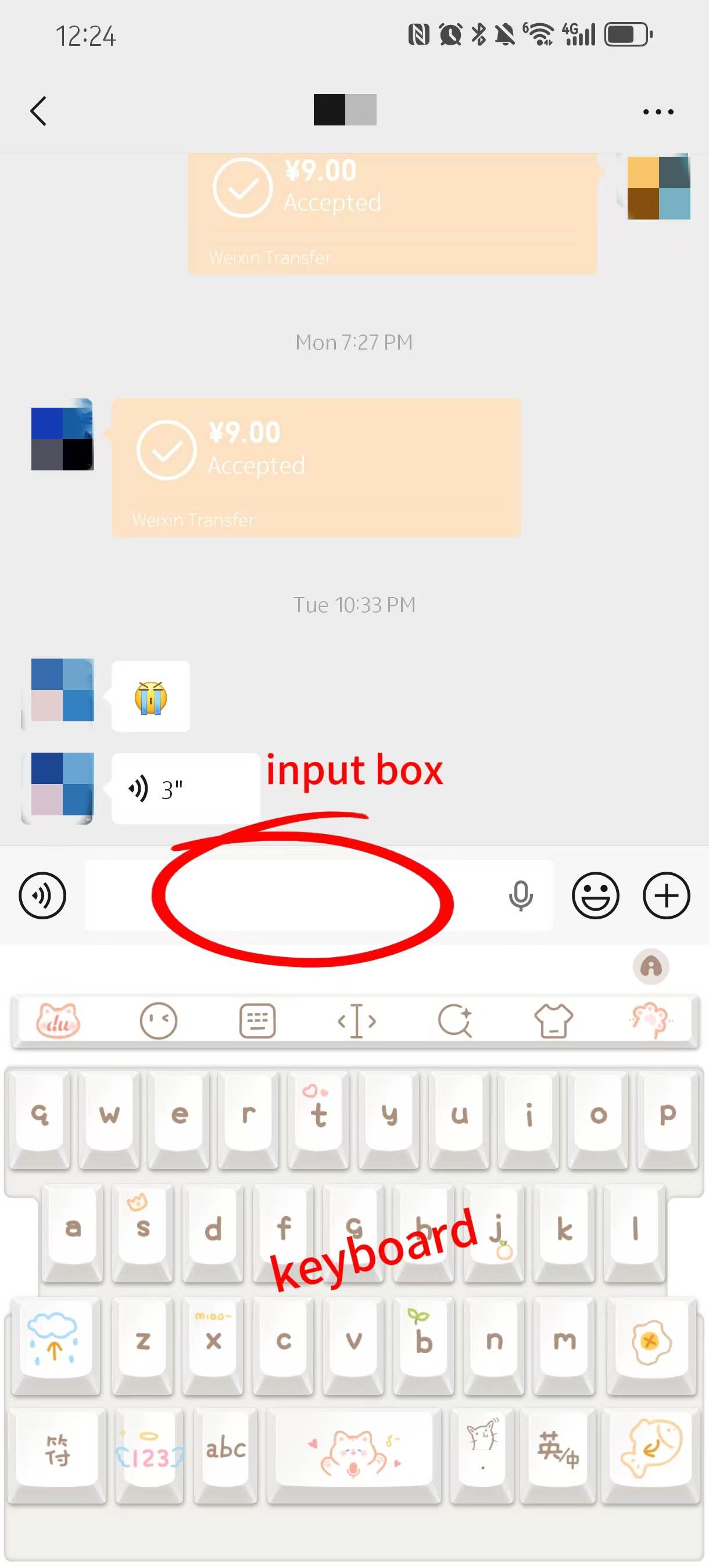
- Type Your Reply
-
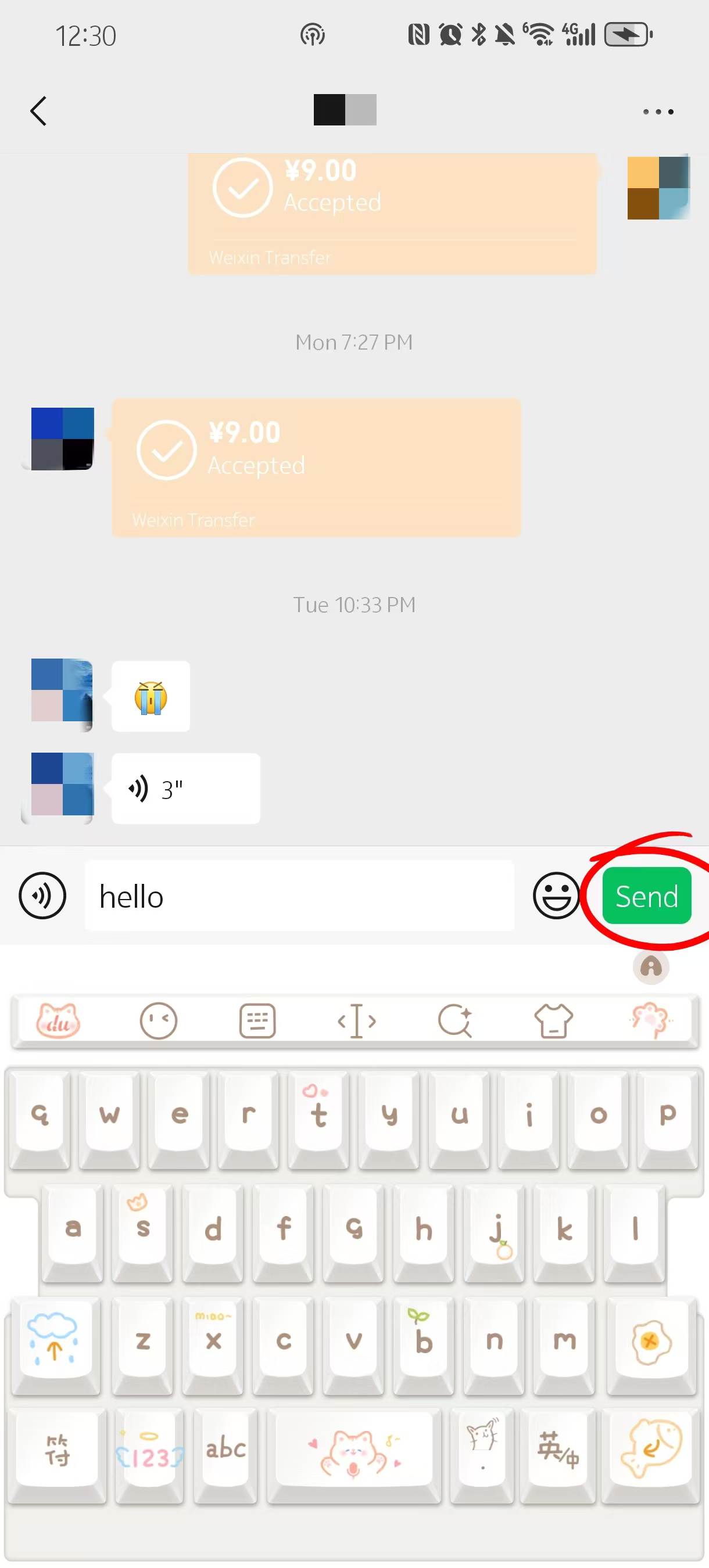
- Hit Send
| Step | Action | What to Do |
|---|---|---|
| Step 1 | Open Chats | Go to “Chats” tab to find your conversation |
| Step 2 | Find Message | Tap the chat and scroll to the latest message |
| Step 3 | Type Reply | Use the input box to write your message |
| Step 4 | Send Message | Tap “Send” and your message goes instantly |
| Extra | Message Status | No read receipts, only timestamps |
Step1: Open WeChat and find the chat you need to reply to
Start by opening WeChat and tapping “Chats” at the bottom of the screen. This is where all your conversations live. It sounds simple, but quite a few people end up in the wrong place at first—usually stuck in the “Contacts” tab wondering why nothing shows up.
Once you’re in Chats, you’ll see a list of conversations, with the most recent ones at the top. There’s also a search bar at the top if you’re trying to find a specific person or business. Messages from hotels, drivers, or food delivery services all appear here, so if you’re trying to figure out how to reply message on WeChat in real situations, this is the only section you really need to get used to. Prefer a darker screen when checking messages at night? learn how to switch on WeChat night mode here.
Step2: Tap into the conversation and locate the message
Tap on the chat you want, and the conversation opens immediately. Messages are arranged in time order, older ones at the top and the latest at the bottom. Most of the time, the message you need to reply to will be sitting just above the typing box.
If you don’t see anything new, scroll down first. That’s a small detail, but it trips people up. I’ve seen someone wait for a restaurant reply that had already arrived—they just hadn’t scrolled to the bottom. If you want to check earlier messages, you can swipe up and go back through the chat history.
Step3: Type your reply using the keyboard
At the bottom of the screen, you’ll see the input field. Tap it, and your keyboard pops up with a placeholder like “Type a message.” This is where you write your reply.
Typing works pretty much like any other app, but it helps to keep things short and clear. You can mix English and Chinese if needed, and most people will understand basic phrases. For example, if you’re messaging a hotel, something like “Hi, I just arrived” or “Is check-in still okay?” is enough. When learning how to reply message on WeChat, simple replies usually get faster responses.
Step4: Hit “Send” and what happens next
Once you finish typing, tap the “Send” button on the right side of the input box. Your message will appear instantly in the chat, along with a small timestamp.
There’s no animation or extra confirmation step. It just shows up, which can feel a bit too quick if you’re used to apps that show delivery progress. But in most cases, if you see it in the chat, it’s already sent and delivered.
What the check marks and timestamps actually mean
WeChat handles message status differently from apps like WhatsApp. There are no blue ticks or clear “read” indicators. You’ll only see the time your message was sent, not whether the other person has opened it.
That means you often won’t know if someone has seen your message or not. In China, that’s completely normal. People don’t rely on read receipts, and replies can come later without explanation. So if you’re working out how to reply message on WeChat and the other side goes quiet, it’s usually not something to worry about.
↩️ Message threading is just one communication feature. To explore WeChat's complete functionality from setup to payments and travel tools, see our How to Use WeChat in China guide.
Replying with Voice Messages
-
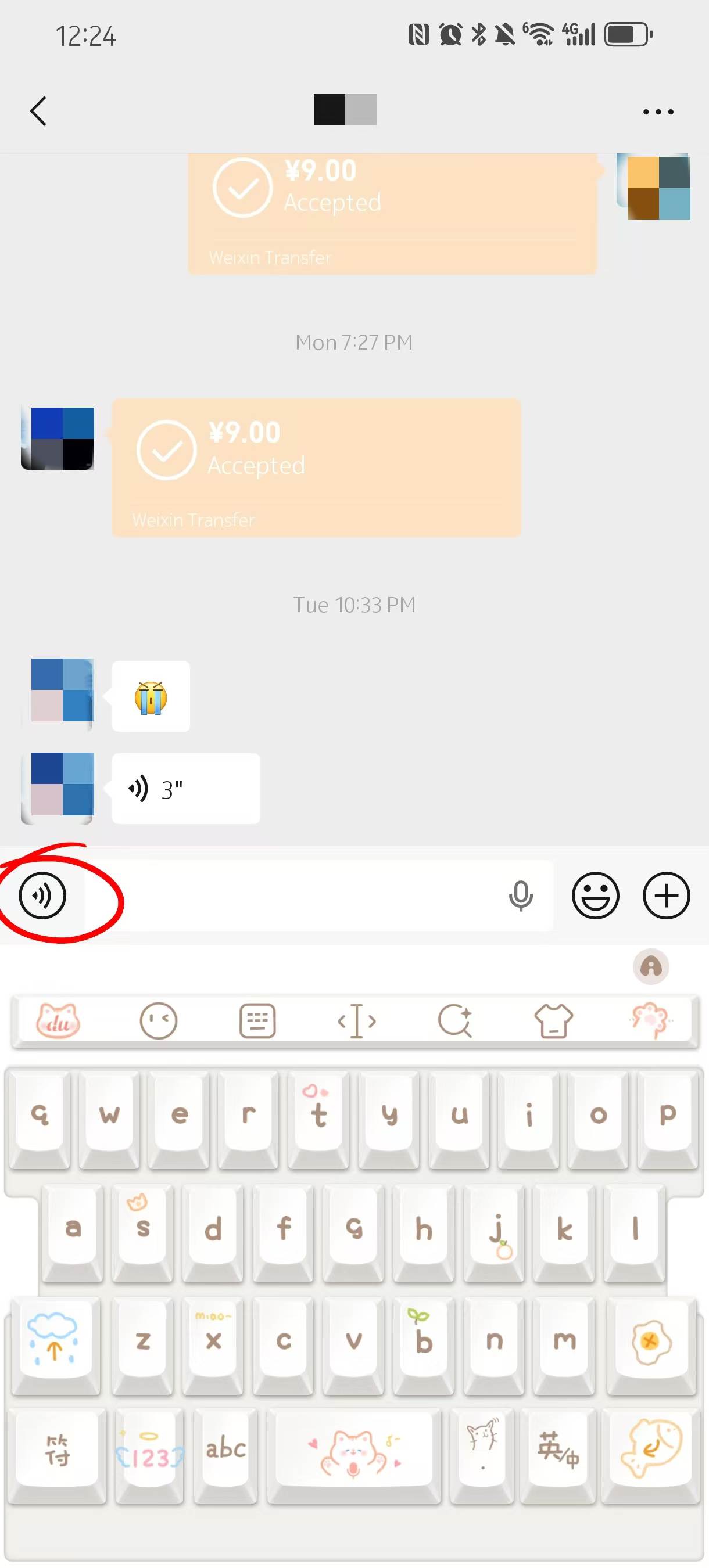
- Voice Button
-
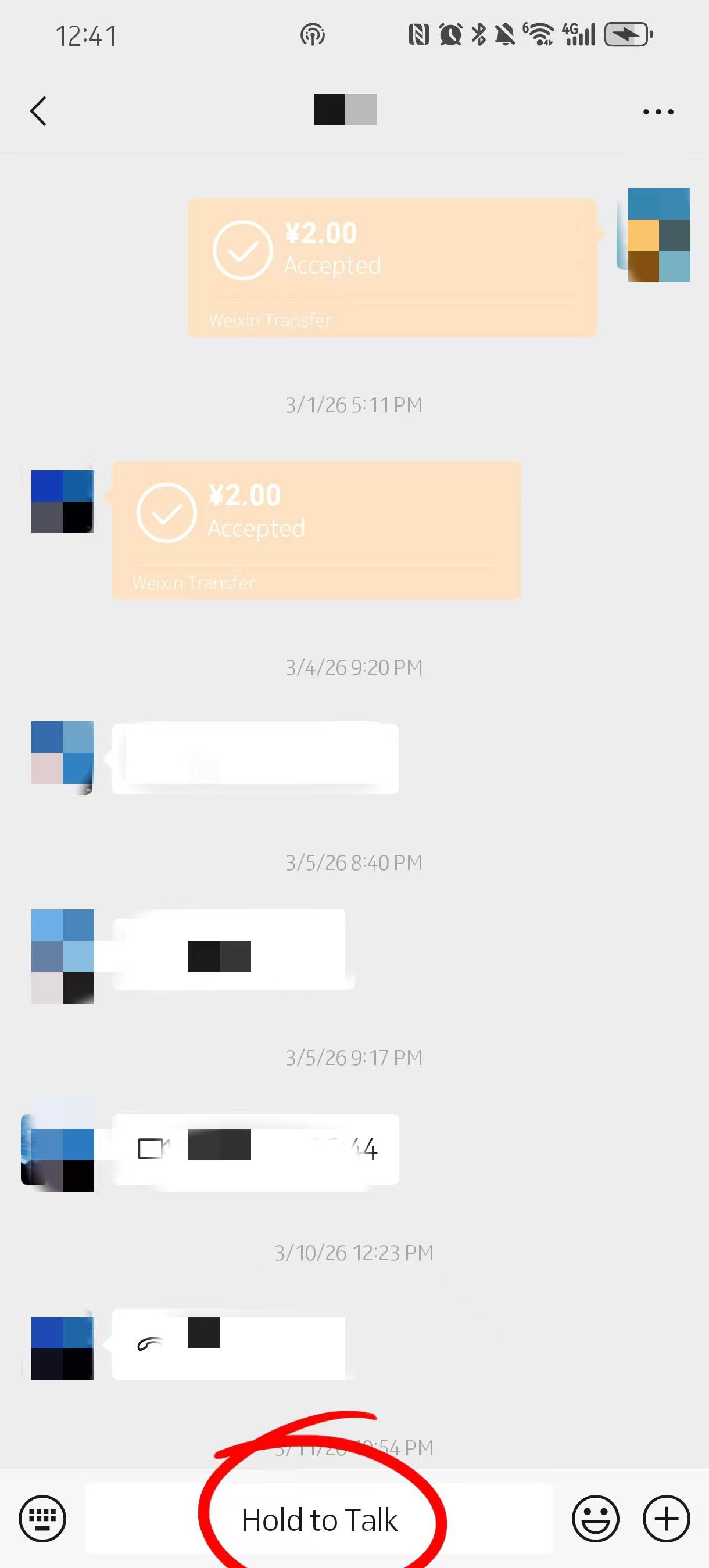
- Hold to Button
-
- Cancle&Convert to Text
| Step | Action | What to Do |
|---|---|---|
| Step 1 | Voice Button | Tap the microphone icon next to the input box |
| Step 2 | Hold to Talk | Press and hold to record your voice message |
| Step 3 | Release or Cancel | Release to send, slide up to cancel |
| Step 4 | Convert to Text | Long press voice message → “Convert to Text” |
Step1: Press and hold the voice button to record
If you don’t feel like typing, WeChat lets you reply with voice messages. To start, tap the small microphone icon next to the input box. The text field will switch to a button labeled something like “Hold to Talk.”
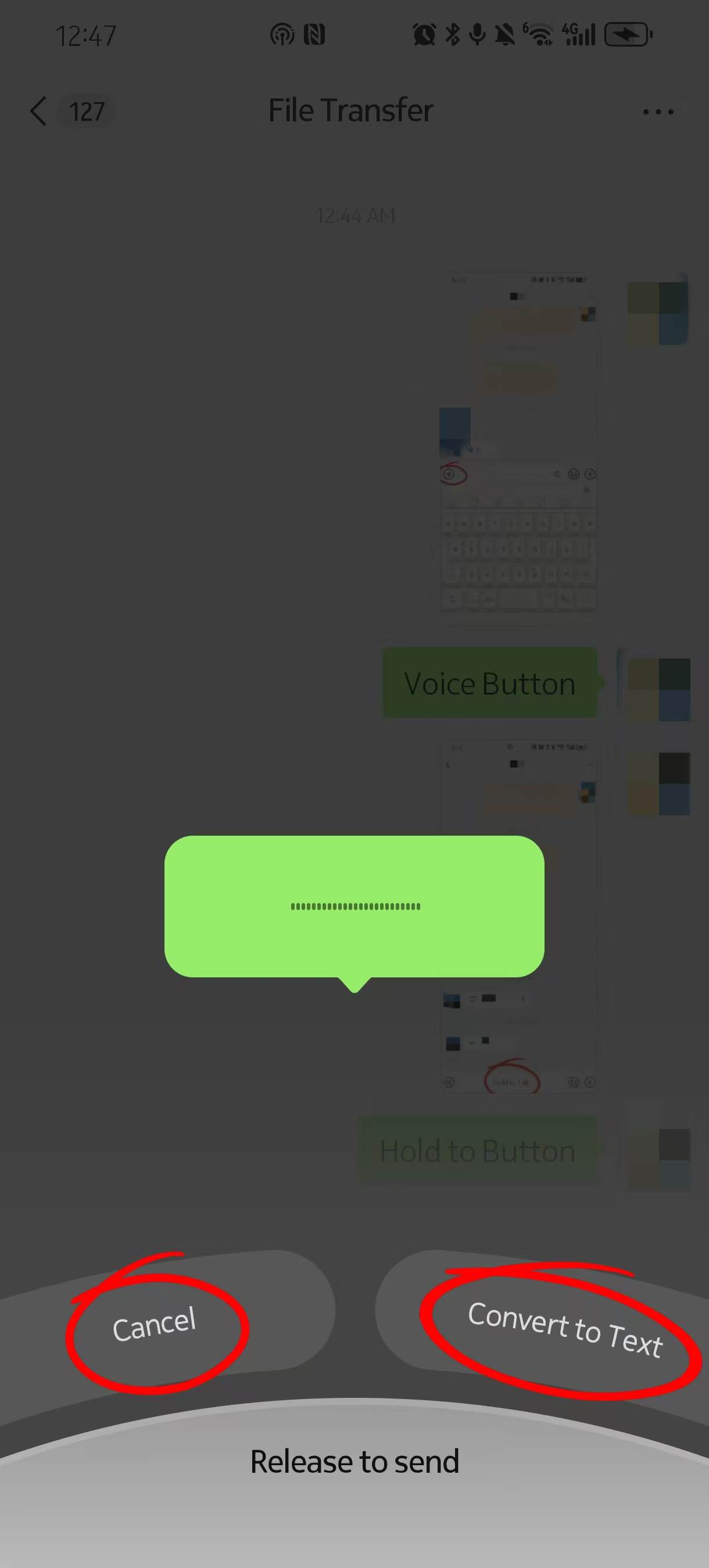
Press and hold that button, and recording starts immediately. You’ll see a subtle visual cue on the screen, usually a waveform or timer. Keep holding while you speak. The moment you release your finger, the message is sent. There’s no extra confirmation step, so it feels a bit direct the first time you try it. If you’re not sure how voice messages or reactions are usually used, check out these WeChat tips for extra practical advice while replying.
For short replies—like confirming a pickup point or answering a quick question—it can be faster than typing, especially when you’re walking or carrying something.
Step2&3: Release to send and how to cancel mid-record
Here’s the part many people don’t realize at first: once you lift your finger, the voice message goes out automatically. That means if you hesitate or say the wrong thing, it’s already sent.
To cancel, you need to slide your finger upward while still holding the button. You’ll see a small “Cancel” indicator appear as you move your finger. Release there, and the recording disappears instead of being sent.
It takes a bit of muscle memory. The first few times feel awkward, especially if you’re not used to press-and-hold gestures. But once you get it, it’s quick. And honestly, don’t panic if you say something wrong—most people just send another message to clarify.
Step4: Convert voice to text before replying
When you receive a voice message, especially in Chinese, you don’t always need to play it out loud. There’s a built-in option that helps a lot.
Press and hold the voice message, then tap “Convert to Text.” WeChat will generate a text version right away. It’s not perfect, but usually clear enough to understand the main point.
This is particularly useful with delivery messages. Riders often send short voice notes like “I’m downstairs” or “Come to the gate.” Instead of replaying it several times, converting it to text gives you a quick way to read and then reply.
When voice messages are okay and when people get annoyed
Voice replies are common in China, but not in every situation. It really depends on who you’re talking to.
With friends or people you know, voice messages feel normal. They’re casual, sometimes even preferred. But with businesses—restaurants, hotel staff, delivery riders—it’s different. Many of them won’t listen to voice messages, especially during busy hours.
I’ve had a delivery rider ignore a voice message completely, then reply the moment I typed the same thing. It wasn’t rude, just practical. Text is faster to scan.
So if you’re figuring out how to respond on WeChat efficiently, stick to text when dealing with services or people you don’t know well.
Using Emojis and Stickers to Reply Faster
-
- Stickers
-
- Emoji Icon
| Step | Action | What to Do |
|---|---|---|
| Step 1 | Emoji Icon | Tap the smiley icon to open emoji keyboard |
| Step 2 | Stickers | Choose stickers for quick and expressive replies |
| Step 3 | React to Message | Long press a message and select a reaction |
| Extra | Emoji Meaning | Some emojis have different meanings in China |
Step1: Tap the emoji icon and choose expressions
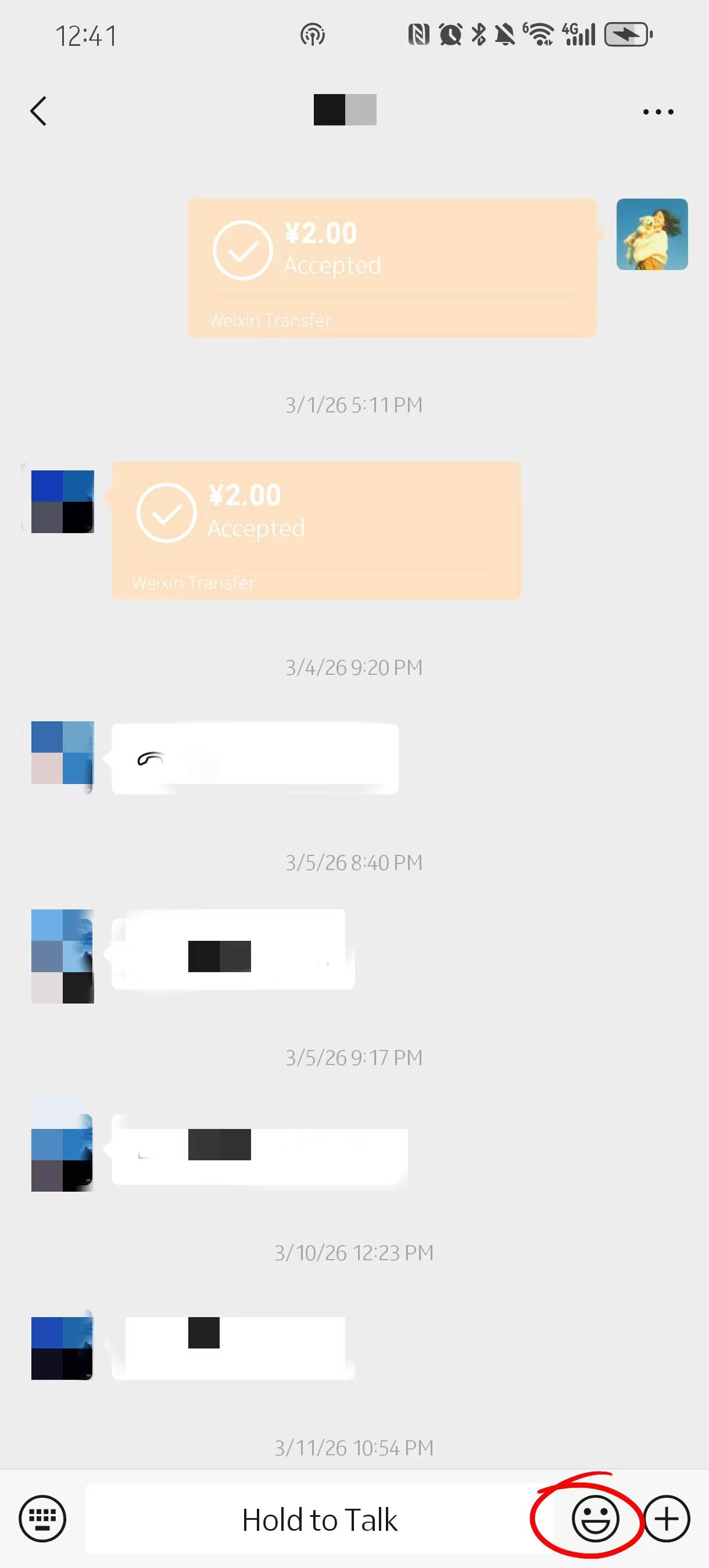
Right next to the typing box, there’s a small smiley face icon. Tap it, and the keyboard switches to emojis. The layout is straightforward, but it may look slightly different depending on your phone system.
Most people stick to a few basics. Smiling faces, thumbs up, simple reactions—these work in almost any situation. If you’re replying quickly to confirm something, a 👍 or 🙂 is often enough. It’s faster than typing, and in many chats, it feels more natural.
One small thing: emojis are used a bit more casually in China. Even in semi-formal chats, you’ll still see them. It’s not overly strict, so you don’t need to worry too much about being perfectly “professional” every time.
Step2: Use stickers to reply quickly in casual chats
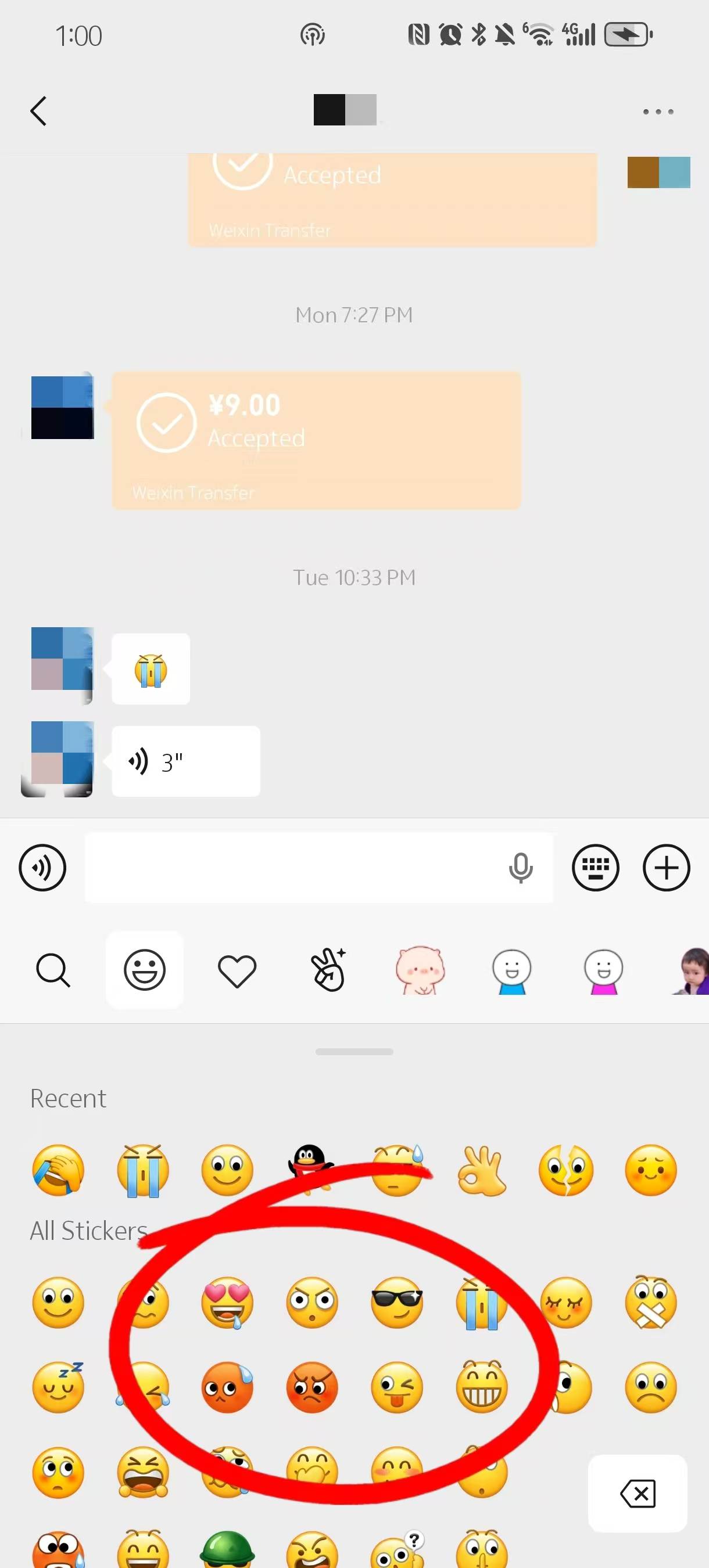
Stickers take things a step further. Tap the sticker icon (usually next to emojis), and you’ll see a whole range of animated or static images. Some are built-in, others are downloaded packs.
In casual conversations, especially with younger users, stickers replace full sentences. Instead of typing “okay,” someone might send a cartoon character nodding. It’s quick, expressive, and saves effort.
You’ll notice a lot of these stickers are very localized—Chinese text, inside jokes, or exaggerated expressions. Even if you don’t fully understand them at first, the tone is usually clear. Still, it’s safer to use simple ones until you get a feel for how people around you use them.
Step3: Long press to react to a message
WeChat also added a lighter way to reply without sending a full message. If you long press on any message, a small menu pops up with reaction emojis like 👍, 😂, or ❤️.
Tap one, and it attaches directly to that message. It’s subtle but useful, especially in group chats where sending another message might clutter the conversation. For quick acknowledgment—like “got it” or “seen”—this works well.
Emoji meanings that may confuse foreign users
Some emojis don’t translate exactly the same way across cultures, and that can lead to small misunderstandings.
😅 meaning: Often used to show awkwardness or mild embarrassment, not just “relief”
🙏 meaning: Commonly used as “thanks” or “appreciate it,” not only for praying
😂 usage: Can mean something is funny, but sometimes used just to soften a message
These differences aren’t a big deal, but they add up. When you’re learning how to reply message on WeChat in a natural way, paying attention to how others use emojis helps avoid those slightly off moments that feel hard to explain.
Replying to comments on WeChat Moments without missing anything
| Step | Action | What to Do |
|---|---|---|
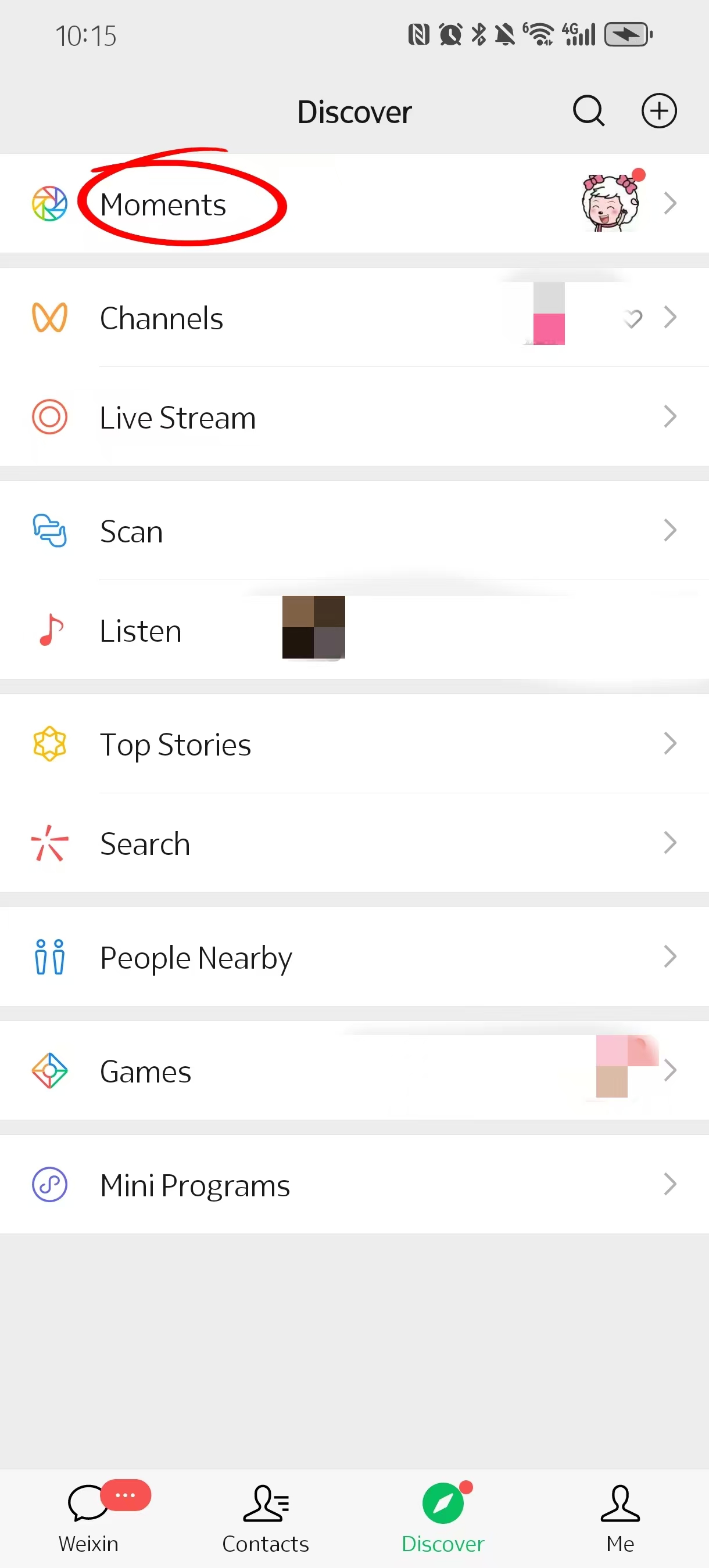
| Step 1 | Open Moments | Go to “Discover” → tap “Moments” |
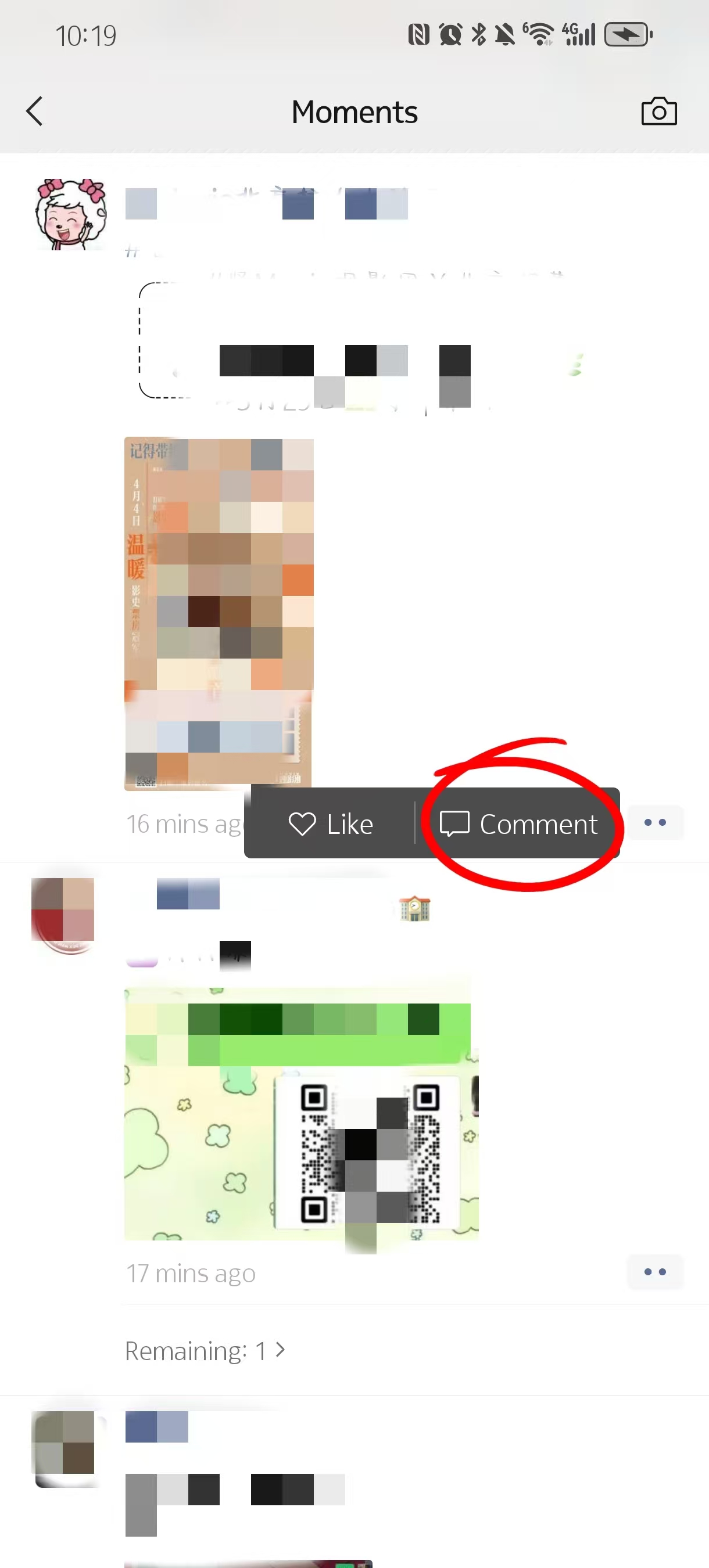
| Step 2 | Find Post | Scroll and locate the post you want |
| Step 3 | Reply to Comment | Tap a comment to reply directly |
| Step 4 | View Replies | Replies appear under the post |
Step1: Open Moments and find the post you want to reply to
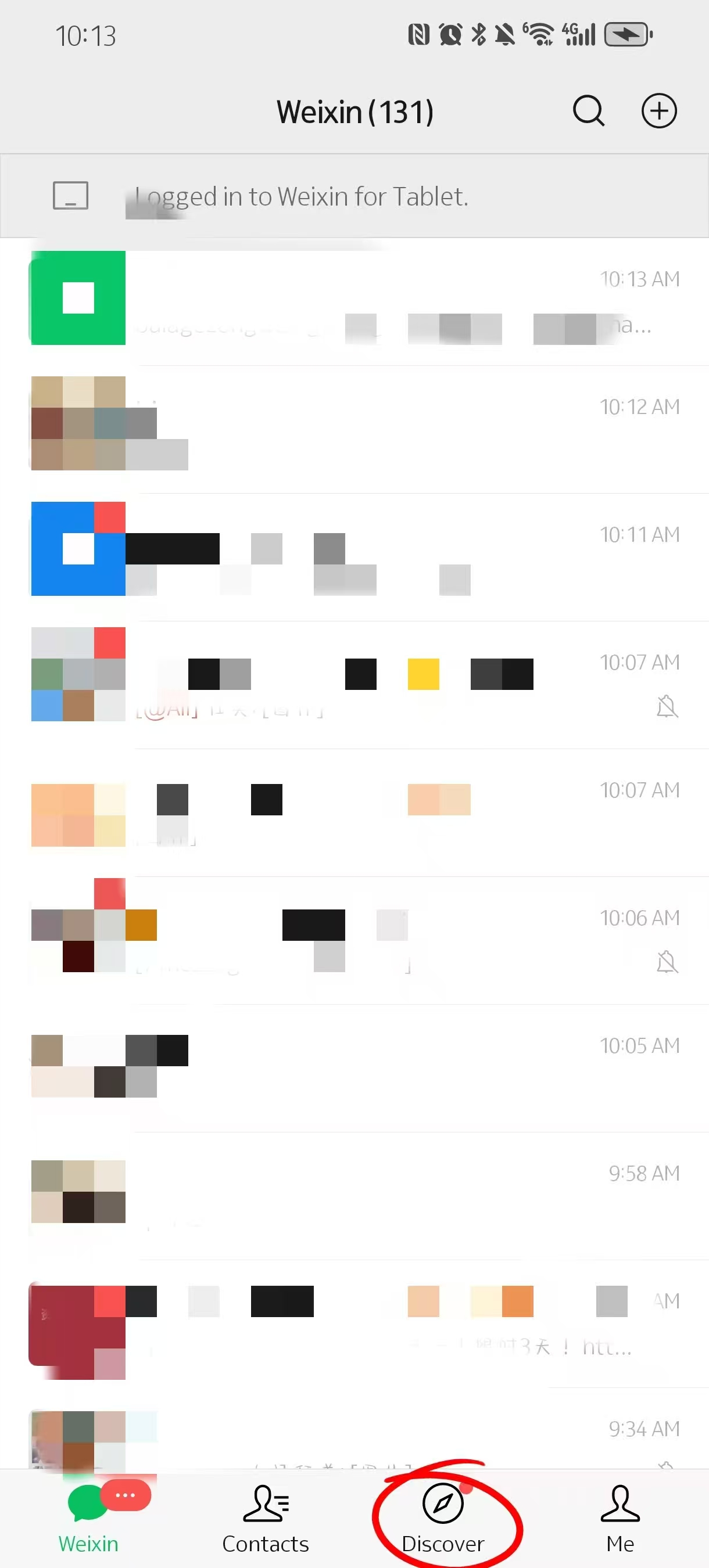
To reply to a comment, you need to go into Moments first. Tap “Discover” at the bottom, then tap “Moments.” This opens the feed where people post photos, updates, or short videos.
Scroll through until you find the post you’re interested in. Unlike chats, Moments works more like a social feed, so replies are tied to each post rather than a conversation thread. If you’ve been tagged or someone replied to you, you might also see a small notification that takes you directly to that post.
Step2: Tap into the comment section
Once you open a post, look just below it for interactions. You’ll usually see a “Like” button and sometimes existing comments.
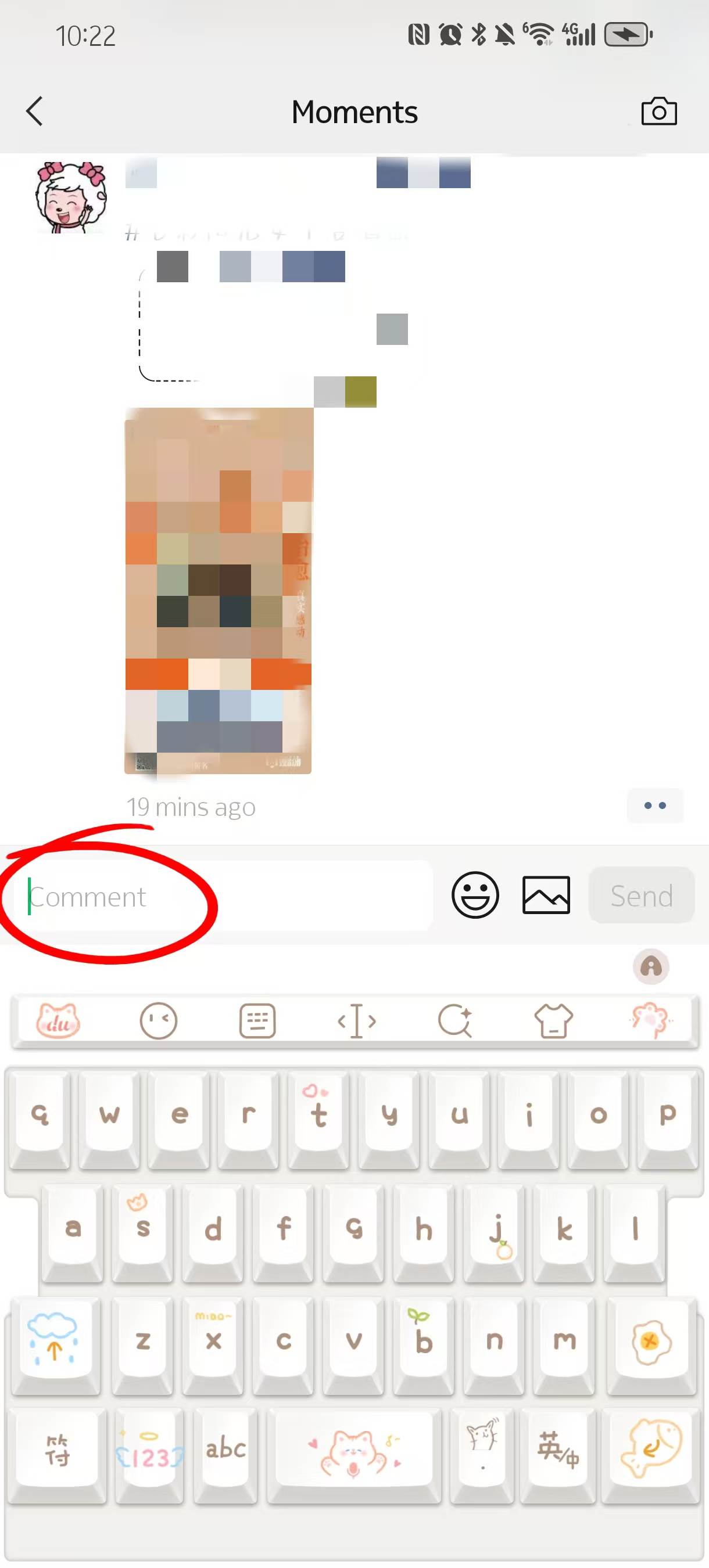
Tap on the comment area, and it expands to show the full discussion. This is where all replies happen. The layout can feel a bit compact at first, especially if multiple people are commenting at the same time.
If there are many replies, you may need to scroll slightly to see everything clearly.
Step3: Reply directly to a specific comment
To reply to someone, tap directly on their comment. This is important—don’t just type randomly, or your reply may not connect to the right person.
After tapping, the input box appears with their name automatically included. Type your message and send it. Your reply will appear nested under that comment, making the conversation easier to follow.
This works well when multiple people are commenting on the same post. Without tapping a specific comment first, replies can look disconnected.
Step4: Understand how replies appear in Moments
Replies in Moments don’t form long threads like Facebook or Instagram. Instead, they appear in a slightly flattened structure under the post.
That means:
- Replies are visible to others in the same comment area
- Conversations can overlap if multiple people reply at once
- There’s less structure compared to chat-based replies
Because of this, it’s common to keep replies short and clear. Long back-and-forth discussions are less common in Moments compared to private chats.
How to Reply Message on WeChat in Busy Group Chats
-
- Work Group
-
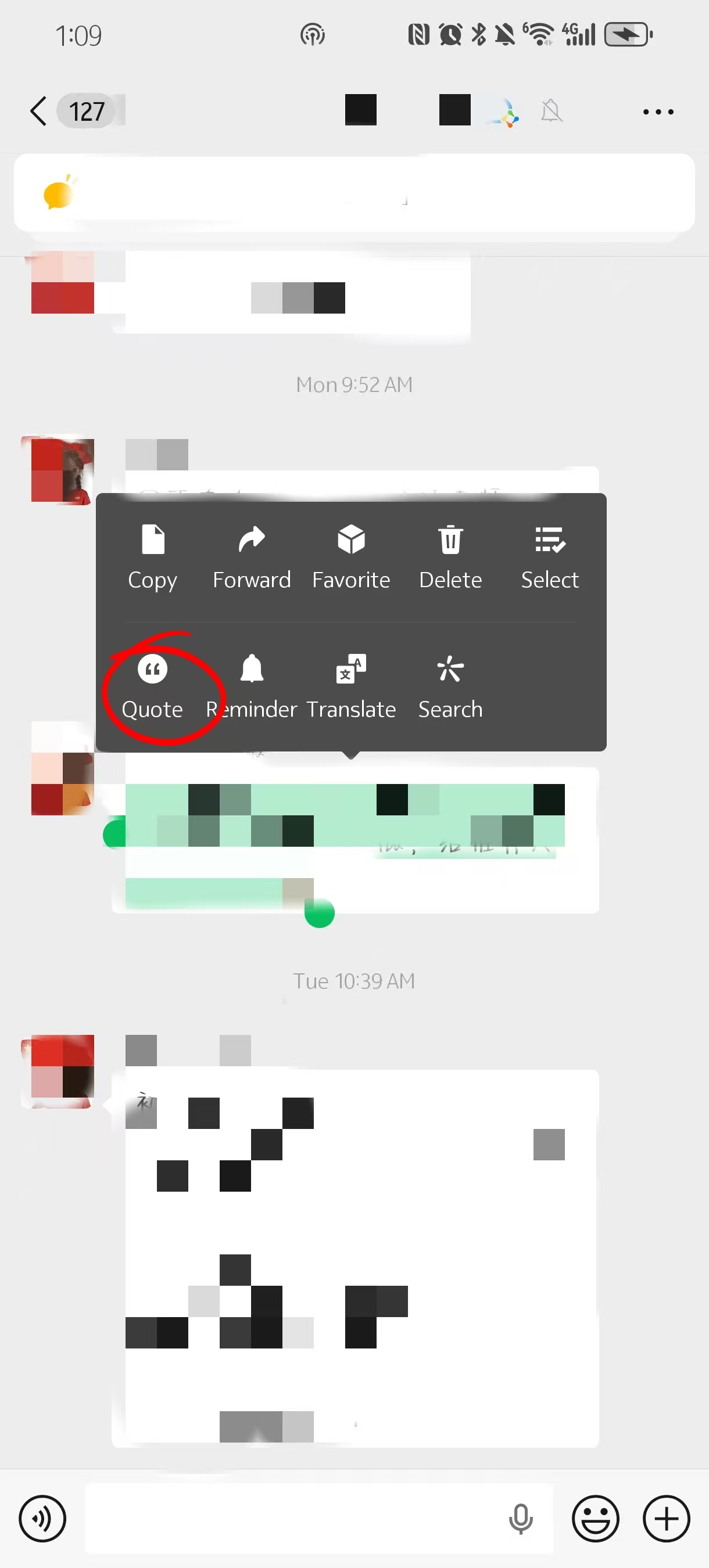
- Quote Reply
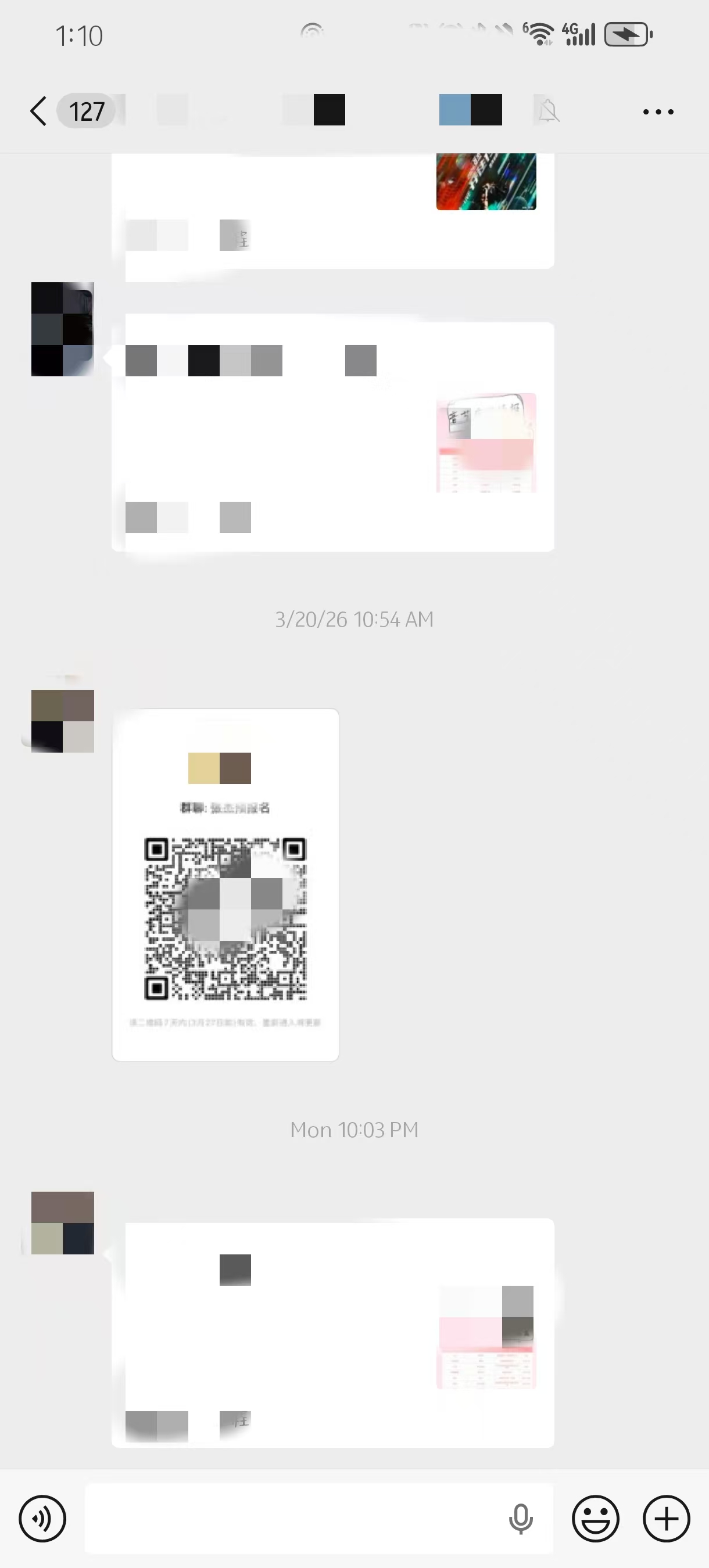
Long press a message and tap “Reply”
Before diving into replying in fast-moving group chats, it’s helpful to know how to create a WeChat group, so you understand how messages are organized. In group chats, replying directly without context can get messy very quickly. The easiest way to stay clear is to use the built-in reply function. Press and hold the specific message you want to respond to, then tap “Reply.”
Once you do that, the original message appears above your input box. This makes it clear what you’re responding to, even if the chat keeps moving. It’s a small feature, but it changes how readable your replies are, especially when multiple people are talking at the same time.
How quote reply works in group chats
Group chats in China can move fast. In something like a travel group, a hotel coordination chat, or even a short-term tour group, messages stack quickly and overlap.
- Message flow: Several people may reply at once, often about different topics
- Quote visibility: Using “Reply” keeps your response tied to one specific message
- Example: In a travel group, someone asks about departure time, another asks about tickets—without quoting, replies get mixed
I’ve seen situations where three different questions were asked within a minute, and people replied without quoting. It turned into guesswork figuring out who was answering what. Once you start using the reply function, that confusion basically disappears.
When to use @mentions instead
Sometimes replying isn’t enough, especially if you want to make sure someone actually notices your message. That’s when @mentions come in.
Type “@” in the input box, and you’ll see a list of group members. Select a name, and they’ll get a notification tied to your message. This works well when you’re asking a direct question or need a response from a specific person.
In practice, @mentions are used sparingly. If you tag someone for every small thing, it feels a bit pushy. But if you’re waiting on an answer—like confirming a pickup time or checking details—it’s completely normal.
Avoid messy replies in fast-moving chats
In active group chats, not using reply tools can make things confusing very quickly. Messages overlap, topics shift, and without context, replies lose meaning.
A common situation: someone answers “Yes, that works” or “Okay,” but doesn’t quote anything. Now you’re left guessing what they agreed to. Was it the time? The location? Something else?
When you’re learning how to reply message on WeChat in group settings, this is where small habits matter. Using quote reply or tagging the right person keeps conversations readable. Skip that, and even a simple chat can start to feel chaotic. While exploring how to reply messages, it’s worth noting you can also manage payments easily—here’s a guide to top up WeChat Wallet
FAQ about How to Reply Message on WeChat
Q: Can I reply to a message on WeChat if I don’t have a Chinese SIM card?
Yes, WeChat works over Wi-Fi, so you don’t need a local SIM to send messages, voice notes, or stickers. I’ve tried this in hotels and cafés across Beijing and Guangzhou—everything works as long as the phone is connected. The only limitation is features tied to payments, like WeChat Pay, which may require verification with a Chinese bank card. For general chatting and replying, it functions just like any messaging app worldwide.
Q: How do I know if my WeChat message was read?
Unlike WhatsApp, WeChat doesn’t provide blue ticks or clear read receipts. You’ll only see the timestamp showing when the message was sent. In China, this is completely normal, and people often don’t reply immediately even if they’ve seen it. I remember sending a message to a delivery rider that wasn’t answered for 20 minutes, but they responded immediately when I followed up—so it’s more about timing than neglect.
Q: When should I use voice messages instead of typing?
Voice messages are most convenient for casual conversations with friends or family. They are faster when you’re walking or carrying luggage. However, avoid sending them to businesses, hotel staff, or delivery riders, as they may not listen immediately, and sometimes your message can be ignored. In those cases, typing a short text is more reliable. Voice notes work best for familiar contacts or when a message is too long to type.
Q: How can I convert a voice message to text?
WeChat has a built-in feature for this. Long press any voice message and tap “Convert to Text.” It’s extremely useful if you can’t understand Chinese audio. For instance, a delivery rider might leave a message saying where they are standing, and converting it saves you from replaying multiple times. While not 100% accurate, it usually provides enough information to respond correctly.
Q: How do I reply in busy group chats without confusing others?
Long press the message you want to reply to and tap “Reply.” This quotes the original message above your input, making it clear what you are responding to. For very active chats, like travel groups or tour coordination chats, quoting prevents mix-ups when multiple people are messaging at once. Additionally, using @mentions helps ensure a specific person sees your reply, which is helpful for questions or instructions. Without these tools, conversations can quickly become hard to follow.
Q: Can emojis or stickers ever cause misunderstandings?
Yes, some emojis have different meanings in China. For example, 😅 usually expresses mild embarrassment or awkwardness rather than relief, and 🙏 is often used to mean “thank you” rather than praying. Stickers are culturally specific, and some include local phrases or jokes that foreigners might misinterpret. Until you’re familiar with how people around you use them, it’s safer to stick to basic, universal expressions.
Q: What if I don’t understand Chinese at all?
If you receive a Chinese message, you can use WeChat’s Translate feature or copy the text into Google Translate. For voice messages, convert them to text first. Once you understand the content, replying with simple phrases like “Got it, thank you” or “I will reply later” keeps communication polite and clear. This approach avoids confusion and ensures you maintain smooth interactions even with language barriers.
Q: Can I send a voice message and cancel it mid-record?
Yes. Press and hold the “Hold to Talk” button to start recording. If you decide you don’t want to send it, slide your finger upward while still holding the button—an on-screen “Cancel” will appear. Releasing there deletes the recording. Otherwise, the message is sent immediately once you lift your finger. This is very useful for avoiding accidental or incorrect messages in active chats.