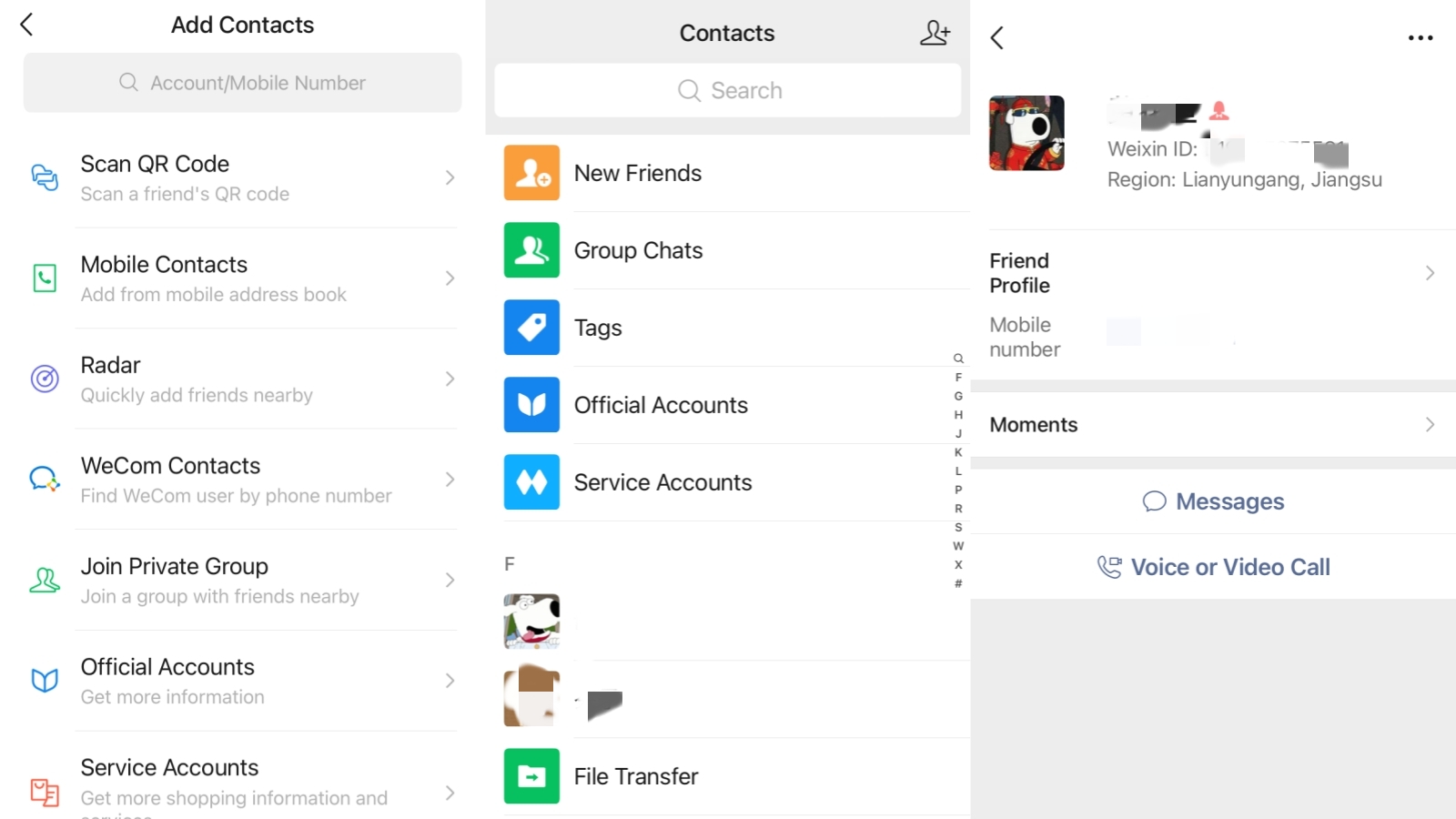
WeChat Contacts
WeChat has a bunch of neat features when it comes to communication and networking — it’s the super-app keeping everyone from locals to expats connected in China. While the West scatters communication across Facebook, LinkedIn, SMS, email, and Slack, China orbits around one platform. So how do you actually build and maintain your WeChat contacts when you get to China? What happens if a contact doesn’t show up — or if you wanna quietly scrub a contact? And how much can they see of yours? In this guide, you’ll learn how to do everything from adding your first contact to making sure your privacy is protected.
6 Proven Methods To Add WeChat Contacts
Adding WeChat contacts is the first thing you will do — and there are six distinct methods. Each one fits a different situation. Before diving into the steps, this table gives you a quick picture of when to use which.
| Method | Best For | What You Need | Speed |
|---|---|---|---|
| 1. Scan QR Code | In-person: meetings, events, check-ins | Other person's phone screen | Instant |
| 2. WeChat ID Search | Remote: already have their ID | Their exact WeChat ID | 30 sec |
| 3. Phone Number Search | Remote: have their mobile number | Number + country code | 30 sec |
| 4. Address Book Sync | Bulk: multiple contacts at once | Phone contacts permission | 1–2 min |
| 5. Add from Group Chat | No ID: share a group already | A shared WeChat group | 1 min |
| 6. Friend Radar | Events, conferences, close range | Location permission + proximity | Situational |
Method 1. Scan Personal QR Codes For Instant Connection
-

- Add Contacts on WeChat
-
- Scan QR Code
-
- WeChat QR Codes
📱 The fastest way to connect in person
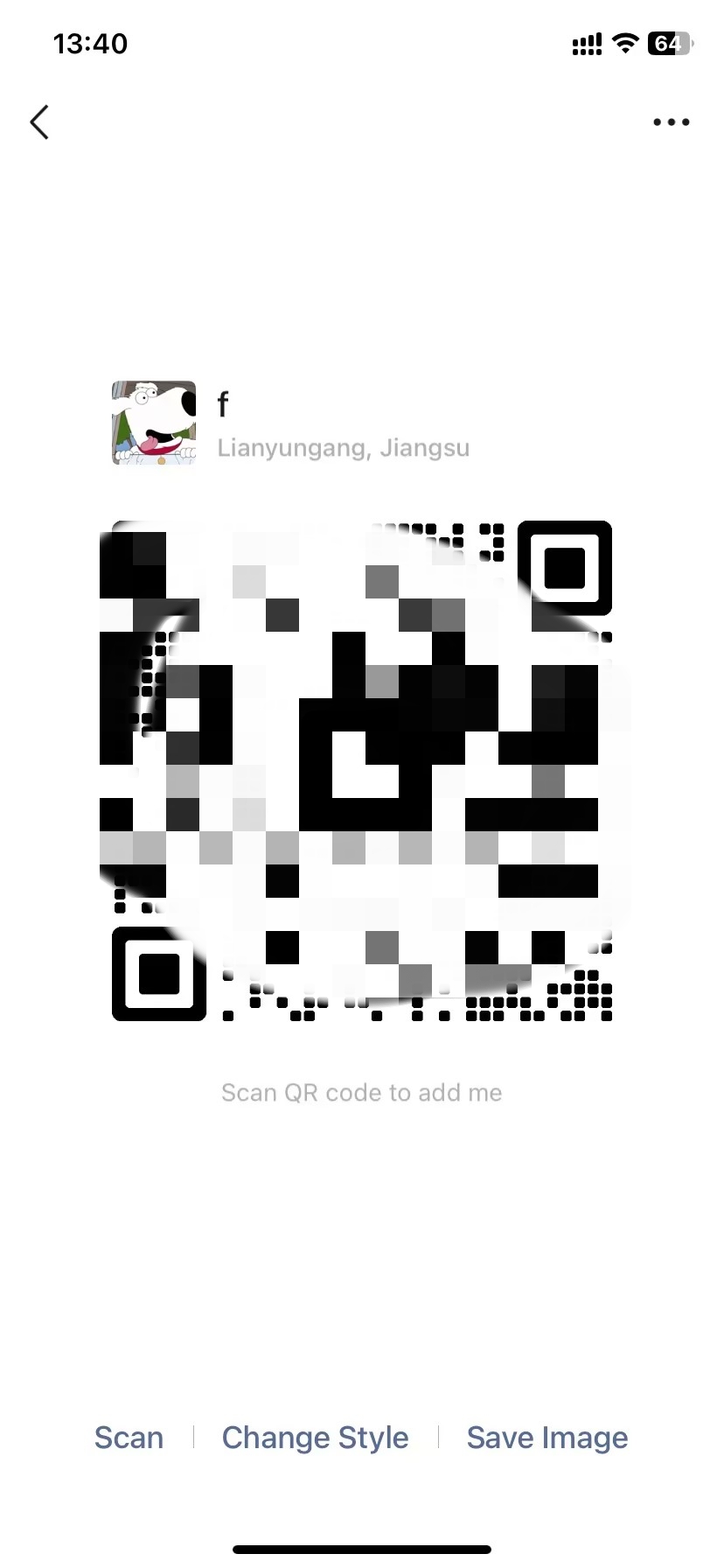
At trade fairs, hotel check-ins, and team meetings across China, scanning a QR code is the default handshake. It takes under ten seconds and requires nothing but two phones.
Here is how to scan someone's code:
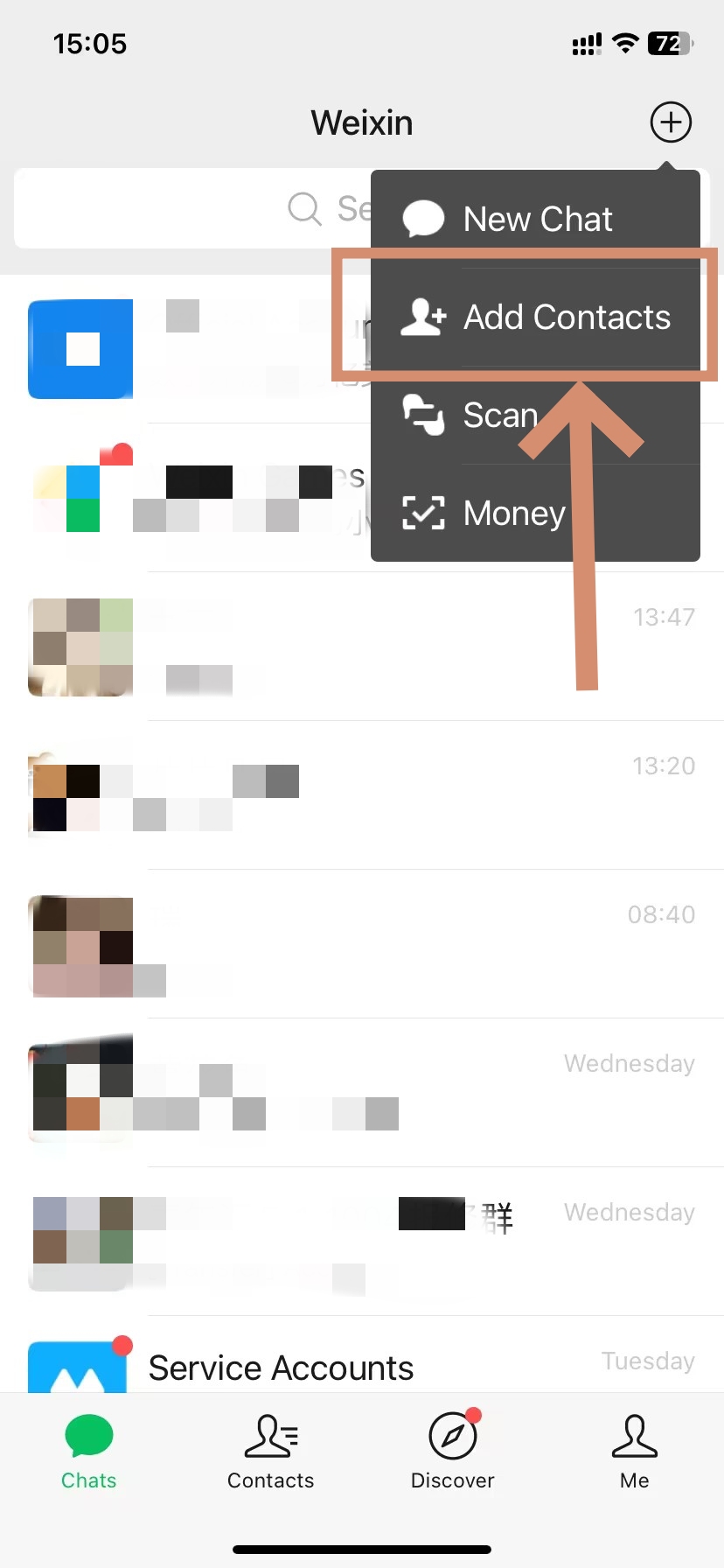
- Step 1. Open WeChat and tap the + icon in the top-right of the Chats screen.
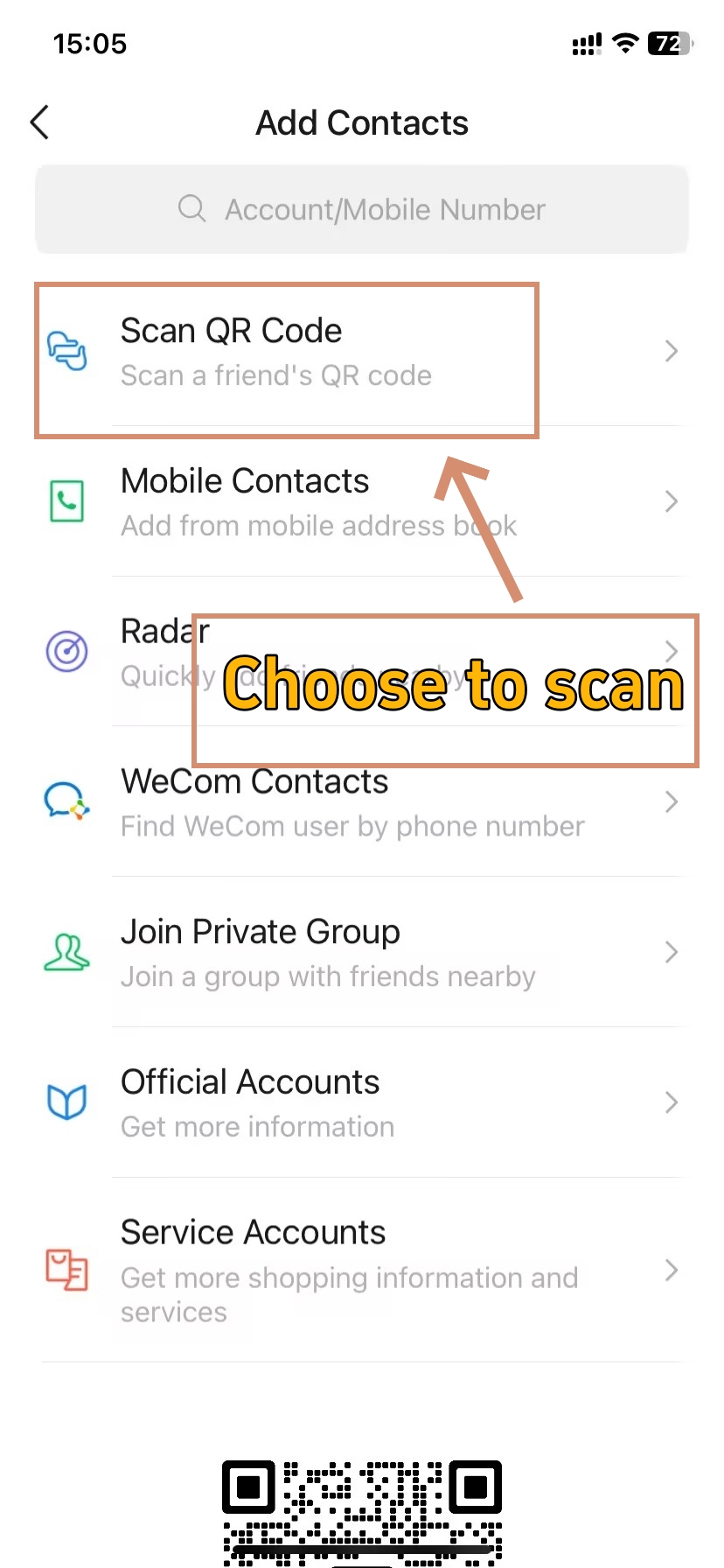
- Step 2. Select Scan QR Code.
- Step 3. Point your camera at the other person's QR code — the profile card appears instantly.
- Step 4. Tap Add to Contacts to send your request.
💡
Tip: Want to share your own QR code remotely? Go to Me → tap your profile photo → QR code icon. Screenshot that image and send it via WhatsApp, email, or SMS. The recipient scans it from their photo library to trigger the add request — no signal needed on your end.
🔗 For a full breakdown of how WeChat QR codes work, see The Complete Guide to WeChat QR Code — including how to save, share, and scan them across devices.
Method 2. Search Unique WeChat IDs For Remote Adding
-
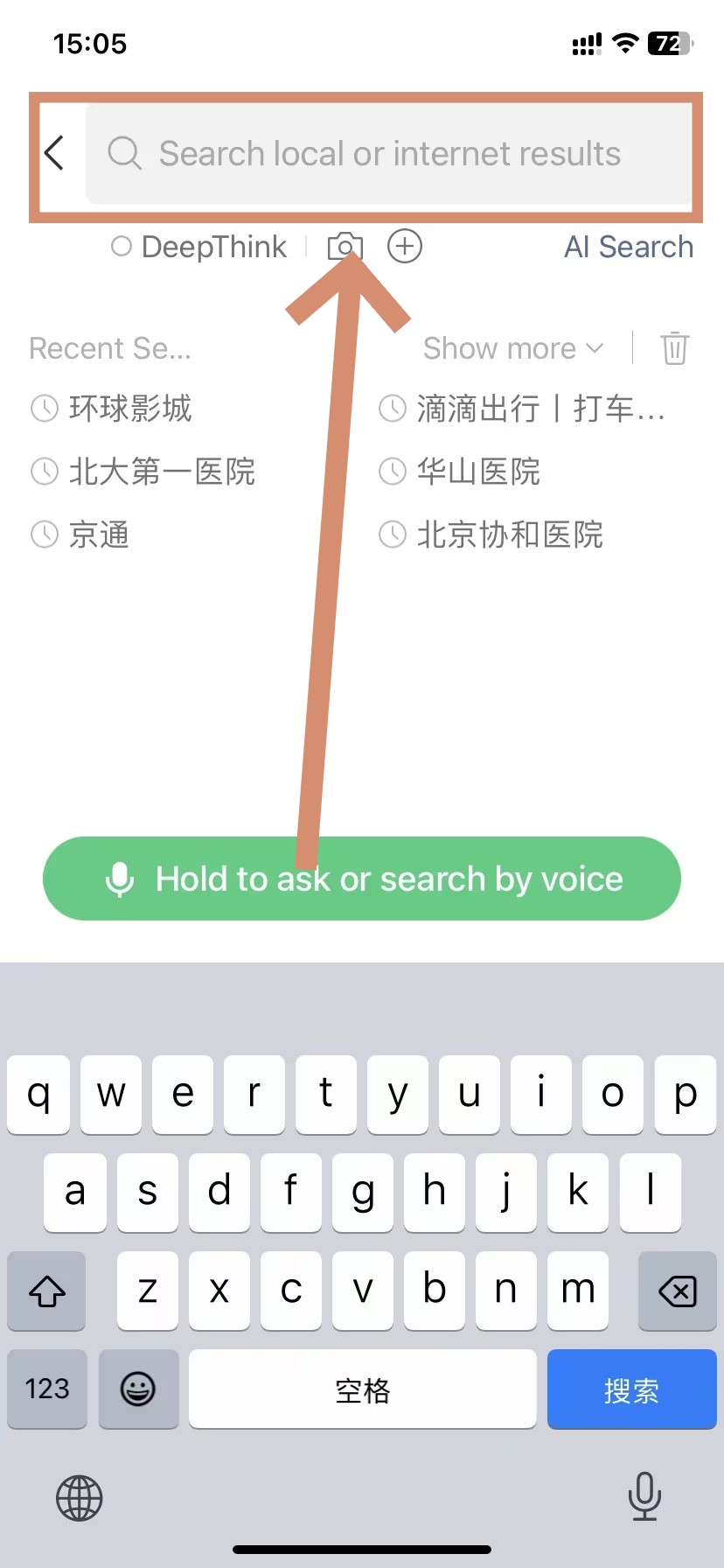
- Use Search Bar to Add Contacts
-
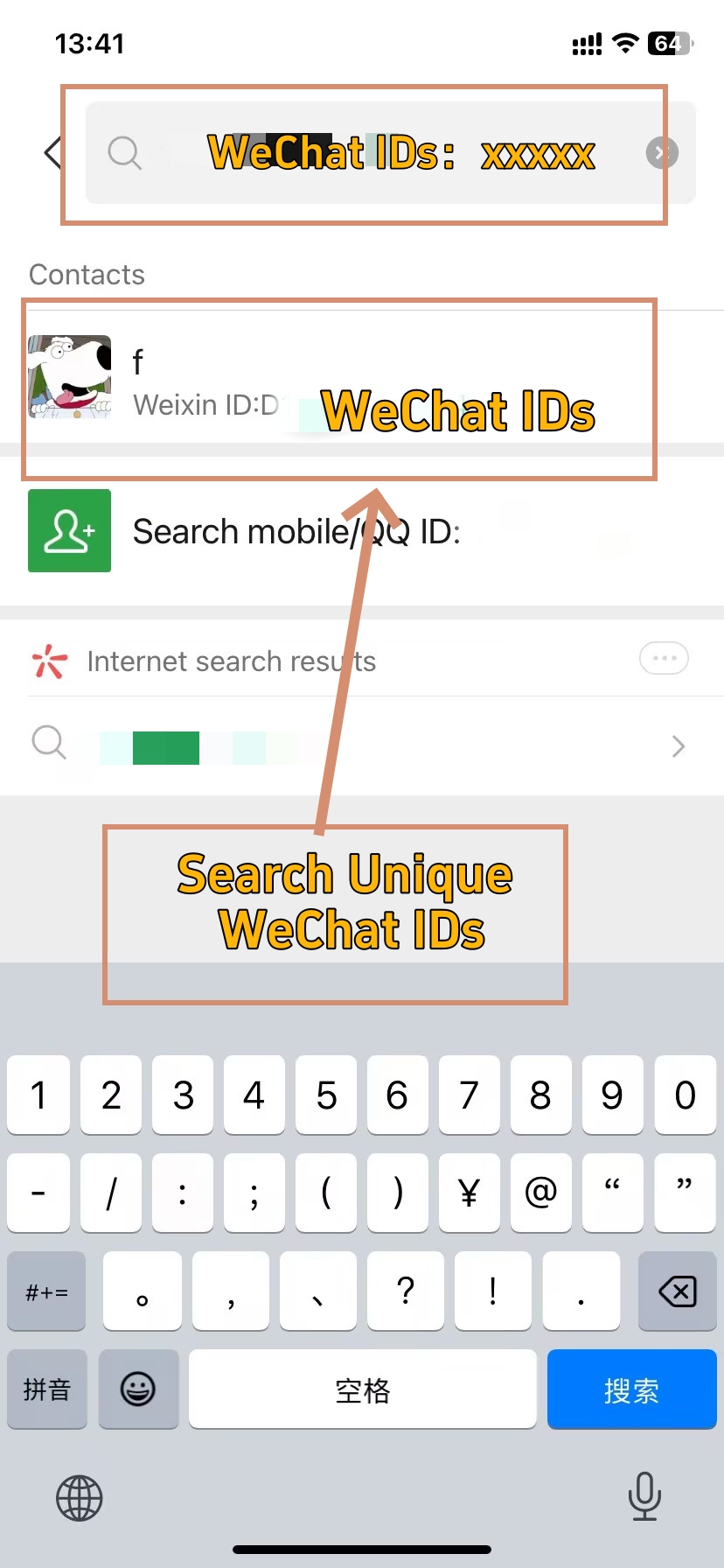
- Search Unique WeChat IDs
Every account has a permanent, unique WeChat ID — separate from the display name. This is the most reliable remote method when you already have someone's ID.
- Step 1. Tap the + button at the top-right of the Chats tab.
- Step 2. Select Add Contact.
- Step 3. Choose Search by ID.
- Step 4. Type their exact WeChat ID and press Search.
- Step 5. Their profile appears; tap Add to Contacts and include a short note about how you know them.
⚠️ WeChat ID is permanent — get it right the first time
WeChat IDs cannot be changed once set. While WeChat historically allowed a one-time change in some regions, this is no longer available. When exchanging IDs in person, ask the other person to show their profile screen directly (Me → Profile → WeChat ID) rather than writing it down.
Method 3. Find People Using Linked Mobile Phone Numbers
-
- Use Search Bar to Add Contacts
-
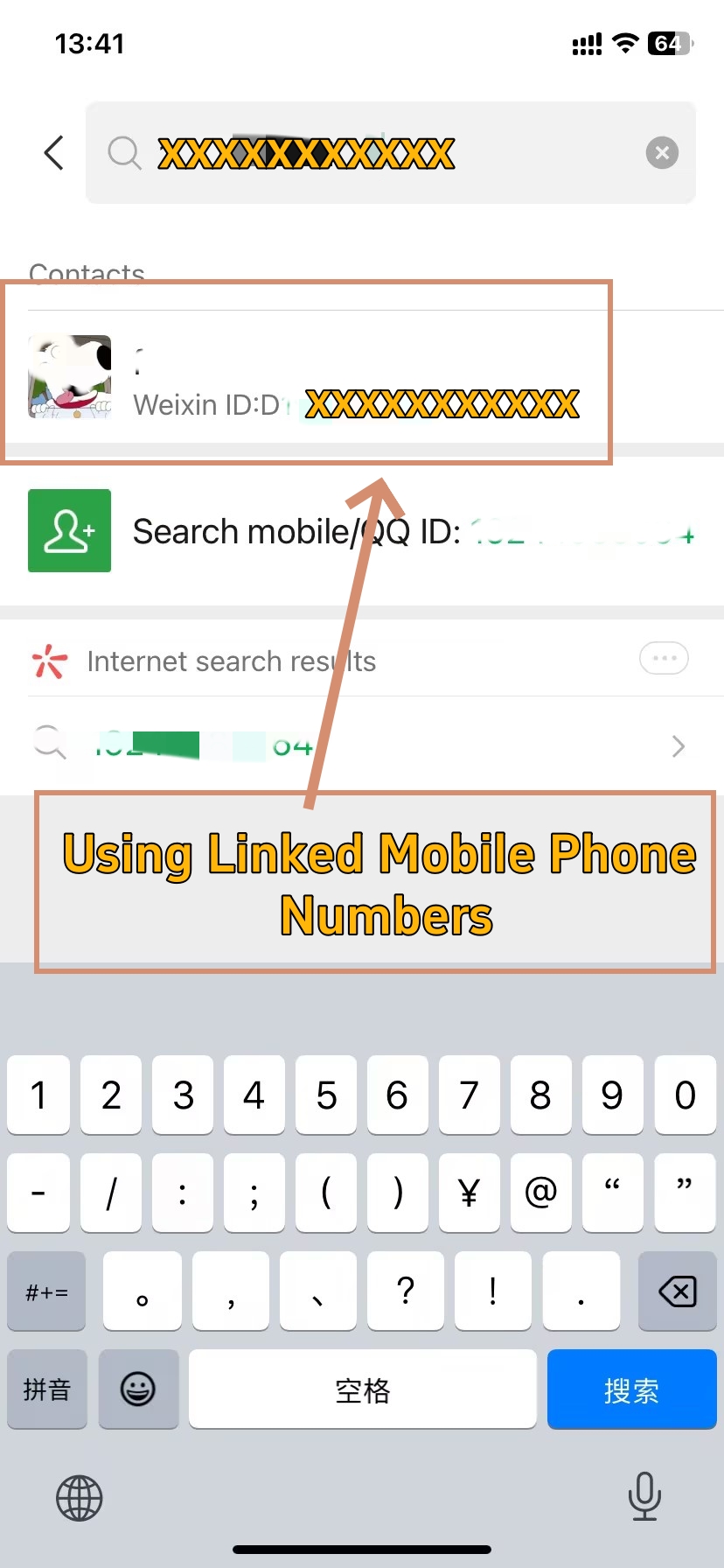
- Find People through Mobile Phone Numbers
📞 Search by phone — but know its limits
Phone number search works when the contact has linked their number to their account and allowed others to find them that way. It is reliable for international contacts but less so for China-registered accounts.
Follow these actions to add by phone:
- Action 1. Tap the + button in the top-right of the Chats tab.
- Action 2. Select Add Contact.
- Action 3. Choose Search by Number.
- Action 4. Enter their phone number with the full country code (e.g., +86 for China, +1 for USA).
- Action 5. Press Search, then Add to Contacts when the profile appears.
⚠️ New account daily limit: 3 to 5 contacts
If your WeChat account is less than two weeks old, do not actively search for and add many people via phone number or WeChat ID. This triggers WeChat's security system immediately.
Strategy: let others add you via QR code first. Use the account normally — chat, browse Moments — for at least a week before proactively searching strangers.
Established accounts face a softer daily cap of around 15 to 25 new contacts. New accounts start at just 3 to 5.
Also: if a phone search returns no result, the person may have disabled "Find Me by Phone Number" in Settings → Privacy → Methods for Adding Me. Ask for their WeChat ID or QR code instead.
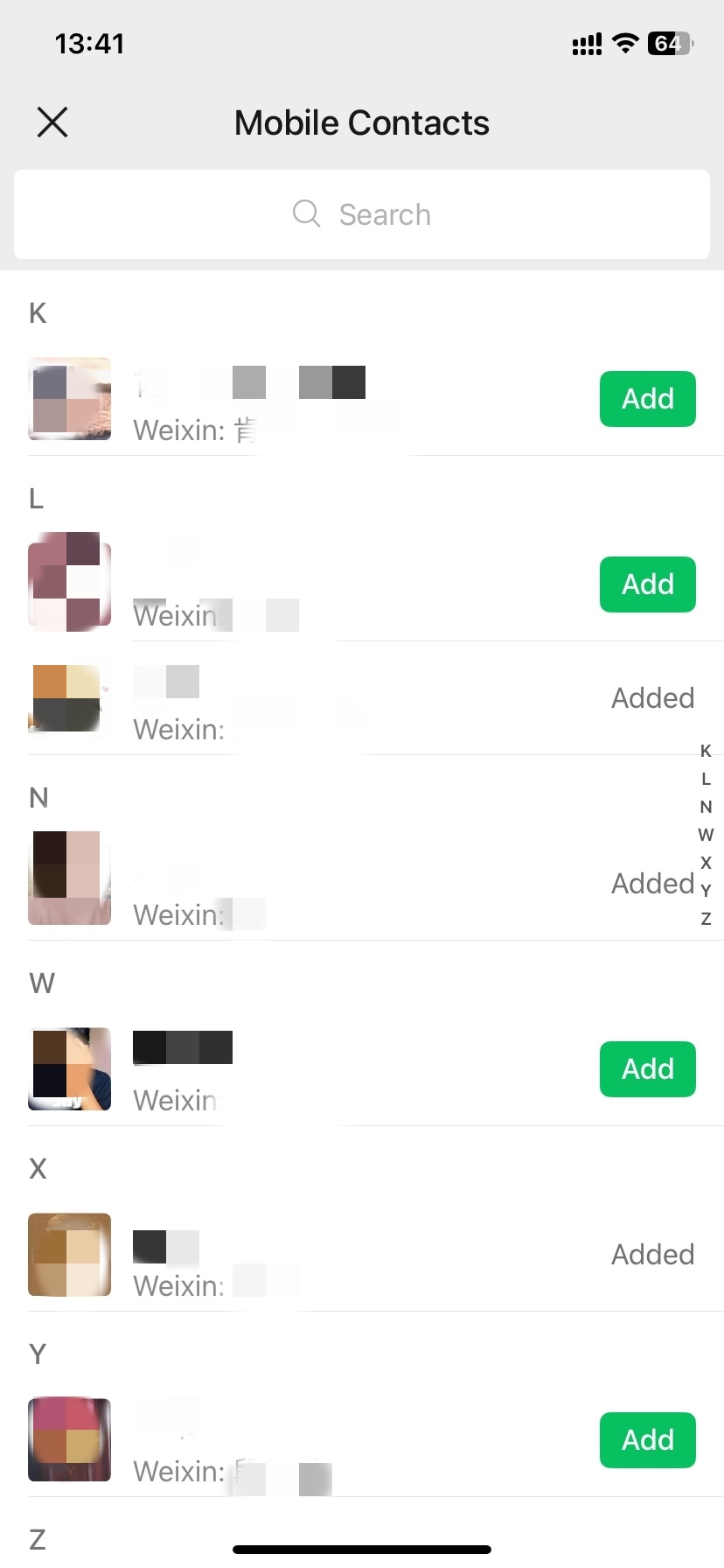
Method 4. Sync Phone Address Books For Bulk Adding
-
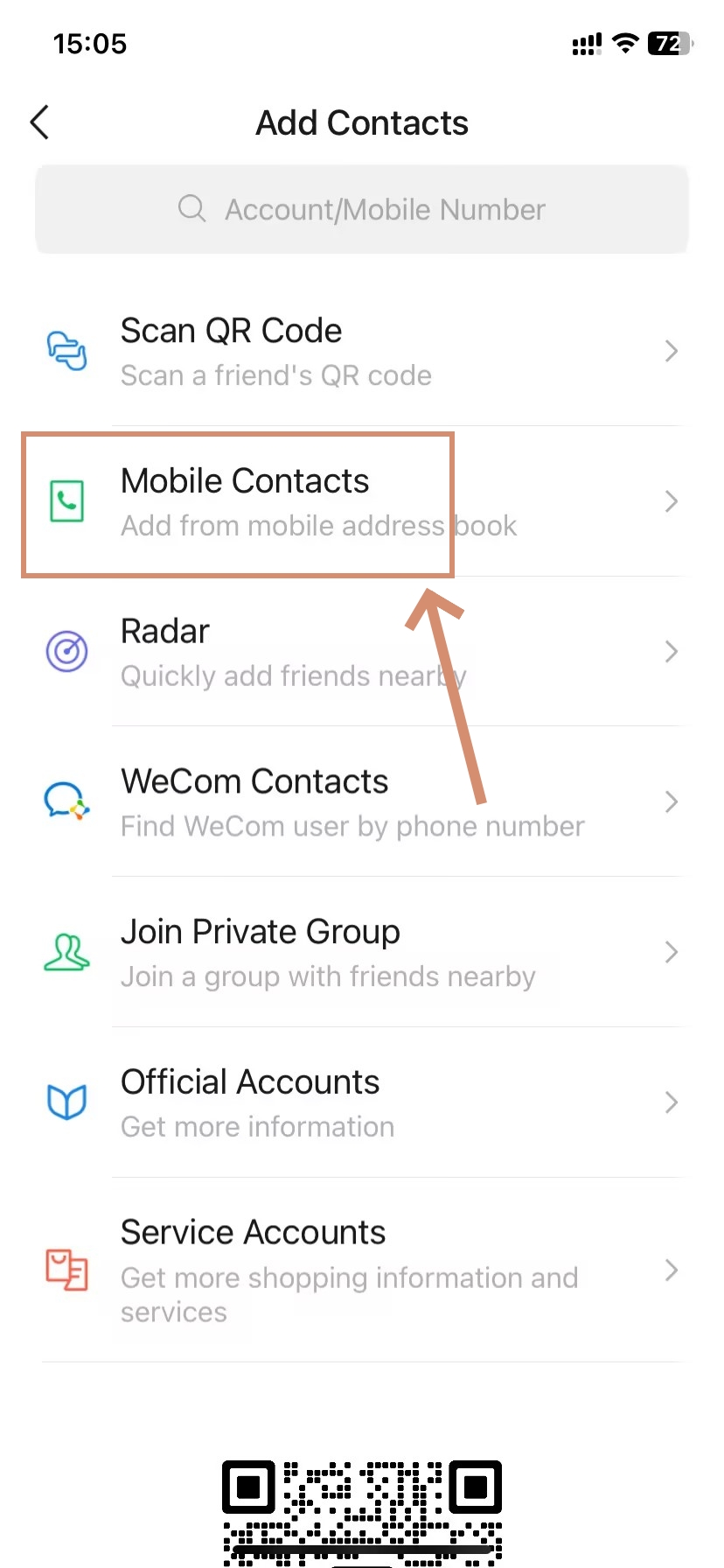
- Open your Phone Address Books
-
- Bulk Adding by Mobile Contacts
Already have someone's number saved in your phone? WeChat can match it automatically — without you needing to type anything.
Here is what to do:
- Do this 1. Open WeChat.
- Do this 2. Go to Me → Settings → Privacy → Contacts → Enable Contacts Sync (you will be asked to grant permissions).
- Do this 3. WeChat will scan your phone contacts and show you a list of matching WeChat accounts.
- Do this 4. Tap each contact you want to add and select Add to Contacts.
A note from an expat in Shanghai —
I synced my address book on my first day in China and found 12 colleagues already on WeChat. It saved me from exchanging QR codes with each one individually at the welcome dinner. Just remember: syncing does not auto-add anyone. Each person still has to accept your request.
Method 5. Add New Friends Directly From Shared Groups
-
- Enter the Group Chat
-
- Add through Shared Groups
👥 The method most foreigners overlook
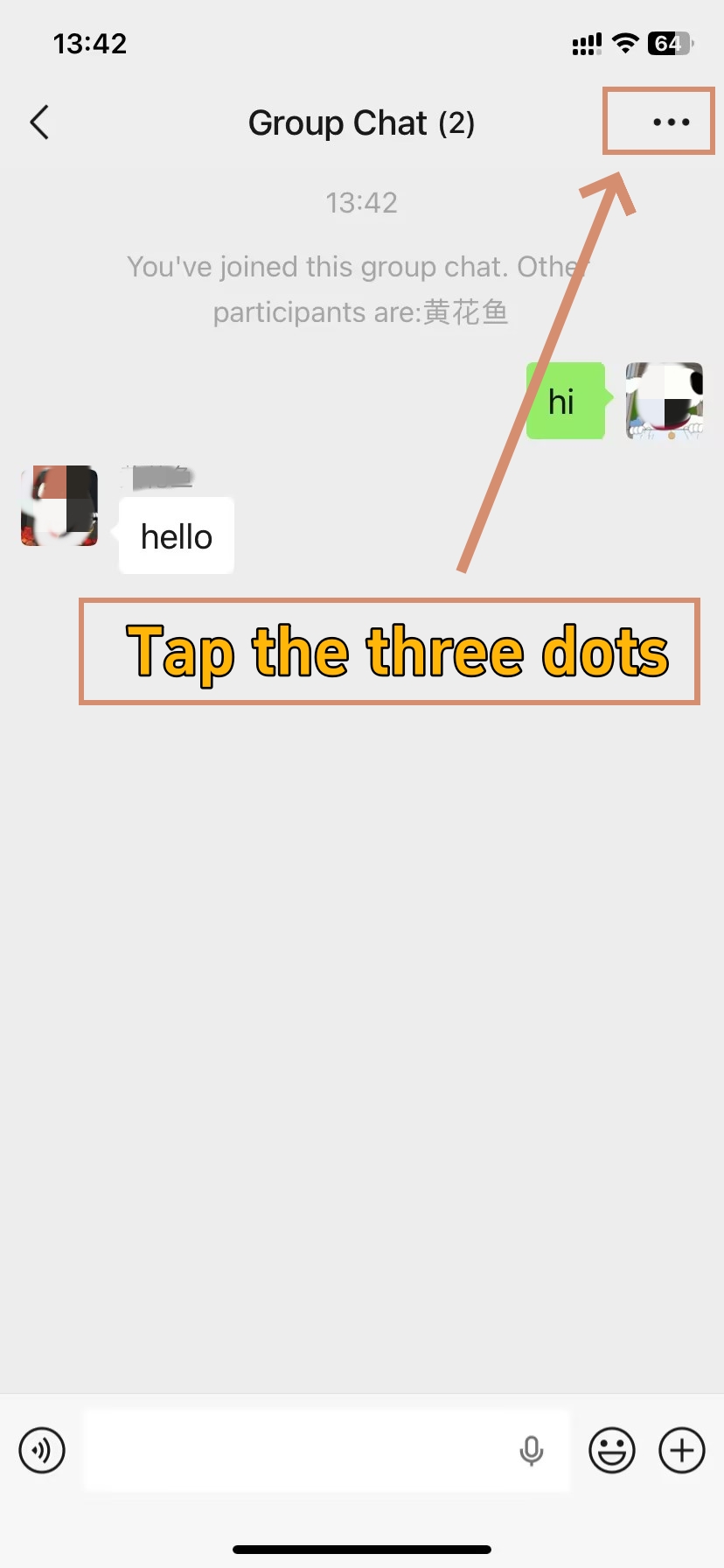
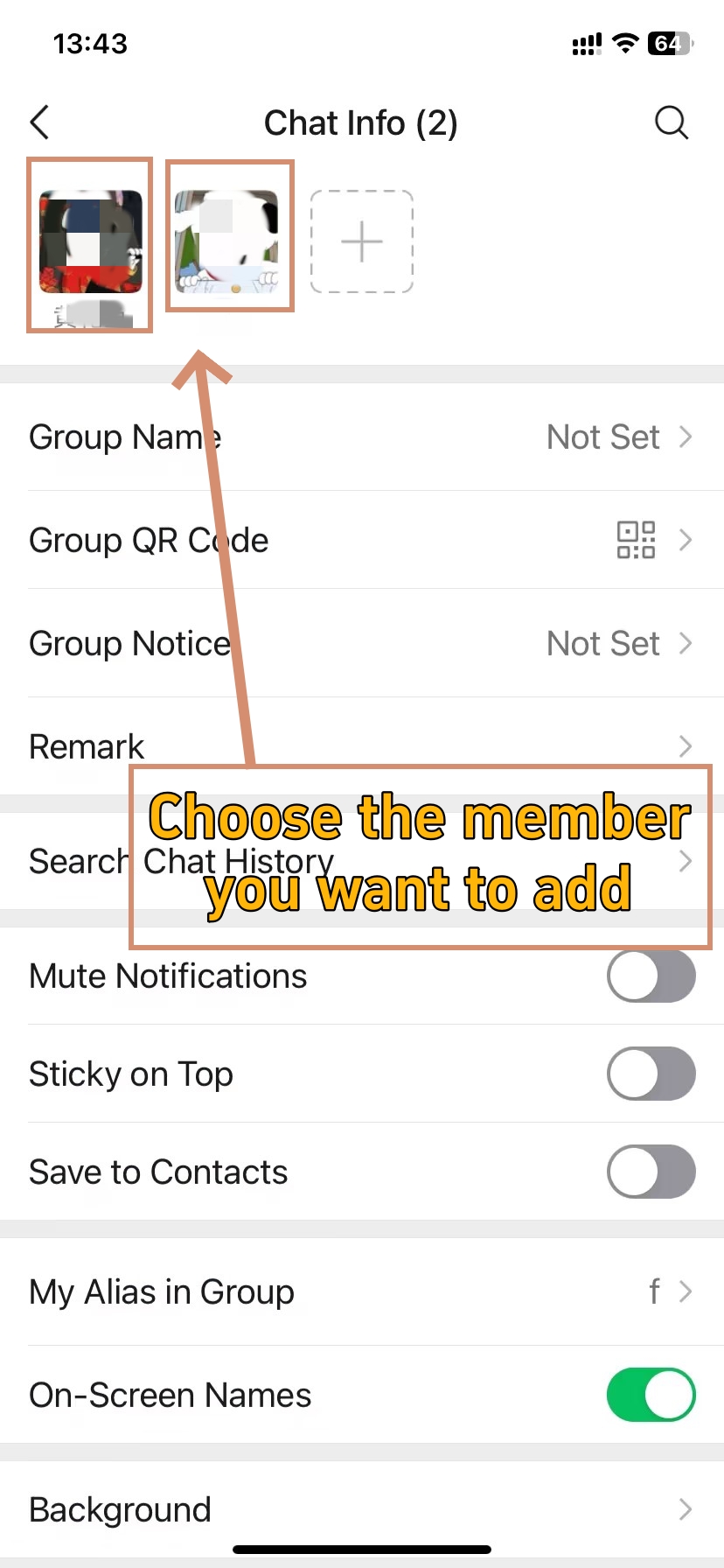
If you share a WeChat group with someone — a hotel guest group, a tour group, a conference group — you can add them directly from the group. No WeChat ID or phone number needed.
Here is the process:
- Process 1. Open the group chat.
- Process 2. Tap the person's avatar or name in the chat.
- Process 3. Their profile card opens; tap Add to Contacts.
- Process 4. Add a note mentioning the group or shared context for clarity : "Hi, we are both in the [group name] group."
💡
Tip: This is especially useful at organised events where a group chat is created on arrival. You can add every person you want to stay in touch with directly from the group — no awkward QR code fumbling required.
📖 New to WeChat groups? Learn how to Create a WeChat Group (Step-by-Step Guide for Mobile and Desktop) before your next trip or event.
Method 6. Use Friend Radar To Find Nearby Users
-
- Tap the Radar
-
- Friend Radar To Find Nearby Users
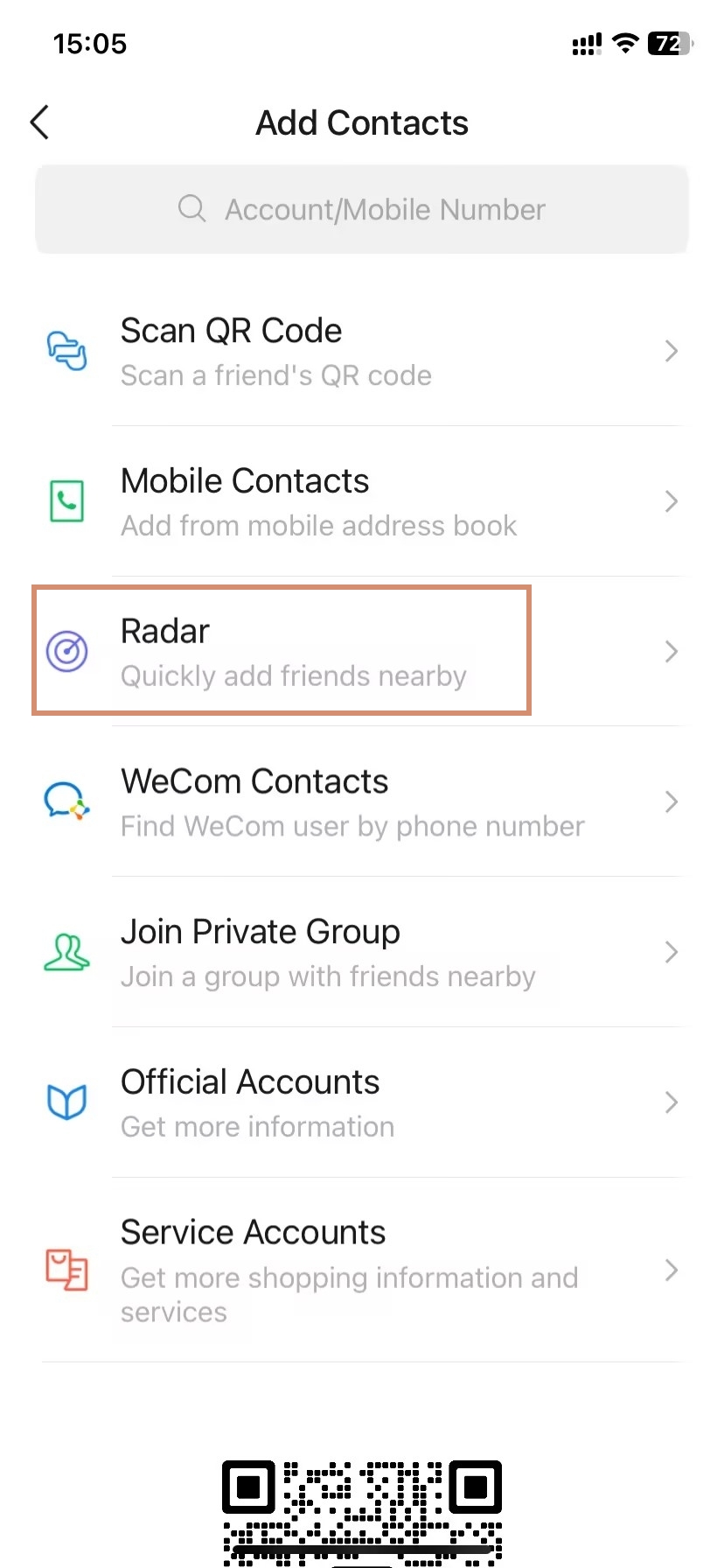
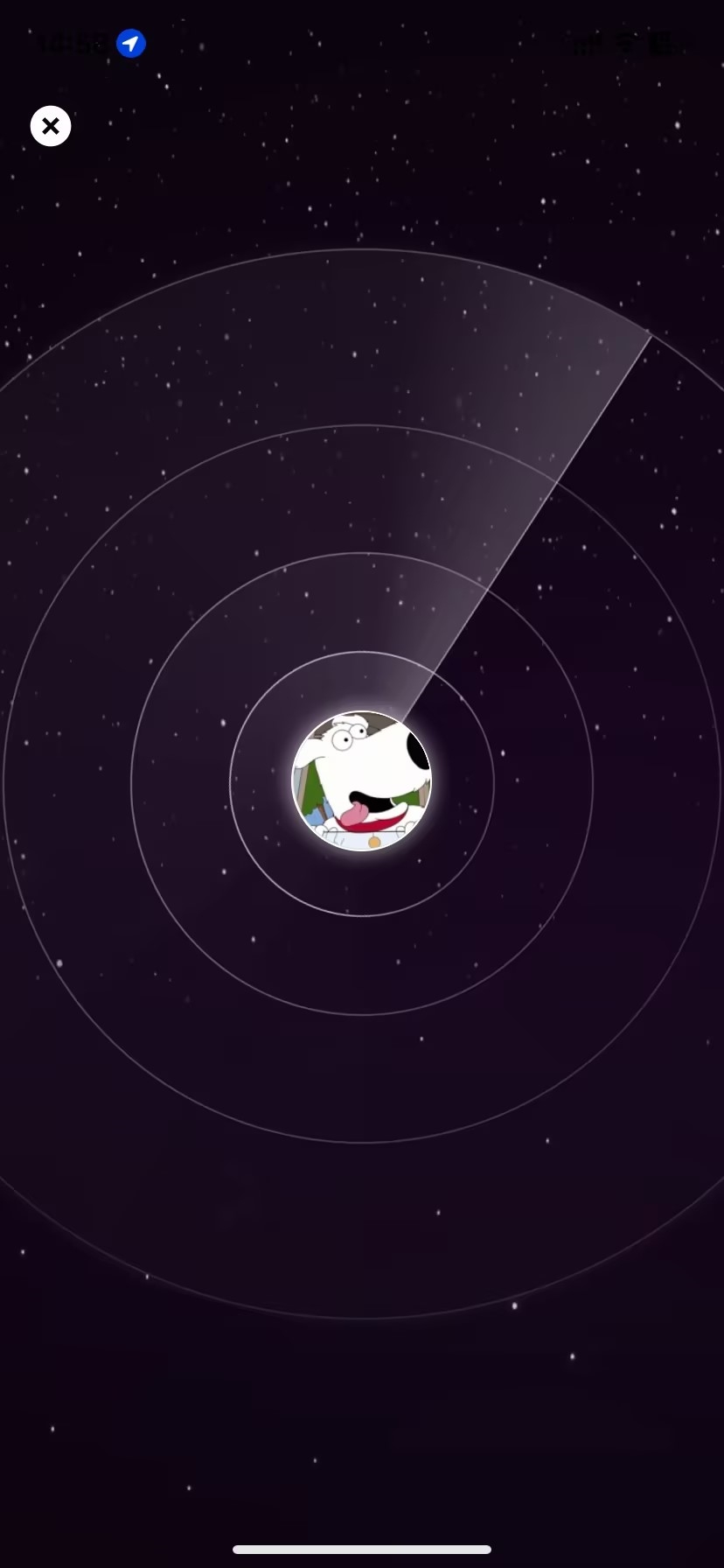
Friend Radar detects nearby WeChat users within a few metres — no ID or QR code exchange needed. It is ideal for conferences, team events, or hostel common rooms.
Important note first: Gone is the old feature of “Shake to add strangers around the world as friends” — said to be removed by WeChat to curb misuse. The current “Shake” in WeChat is strictly for marketing and promotions so don’t reach for the shake to add new friends.
Here is how to use Friend Radar instead:
- Tap 1. Go to Discover → People Nearby.
- Tap 2. Grant location permission when prompted (this feature requires your precise location).
- Tap 3. WeChat displays users within a few hundred meters; tap on any profile to view their card.
- Tap 4. Tap Add to Contacts to send them a request.
⚠️ Disable People Nearby after use
While People Nearby is active, your approximate location is visible to other WeChat users nearby. Switch it off when done: Me → Settings → Privacy → People Nearby → disable. Do not leave it running in the background.
How to Manage WeChat Contact Relationships
-
- Tap the Three Dots
-
- Edit, Block and Delete
-
- Edit the friend profile
Once your contact network is established, the next step is to set the terms of your relationship with those contacts. Every management action, from adding a note to blocking someone, is done from that contact’s profile page, so you have four main choices, depending on your needs, with different consequences for each. We’ll give you the run-down.
| Action | Visible in Your List? | Can They Message You? | Chat History Saved? | Reversible? |
|---|---|---|---|---|
| Set Remark/Tag | Yes (Name updated) | Yes | Yes | Yes (Edit anytime) |
| Mute | Yes | Yes (No notifications) | Yes | Yes (Toggle off) |
| Block | Yes (In Blocked List) | No (Rejected) | Yes | Yes (Unblock) |
| Delete | No (Removed) | No (Must re-add) | No (Deleted Forever) | No (Must re-add) |
⚙️ All actions begin from the same place
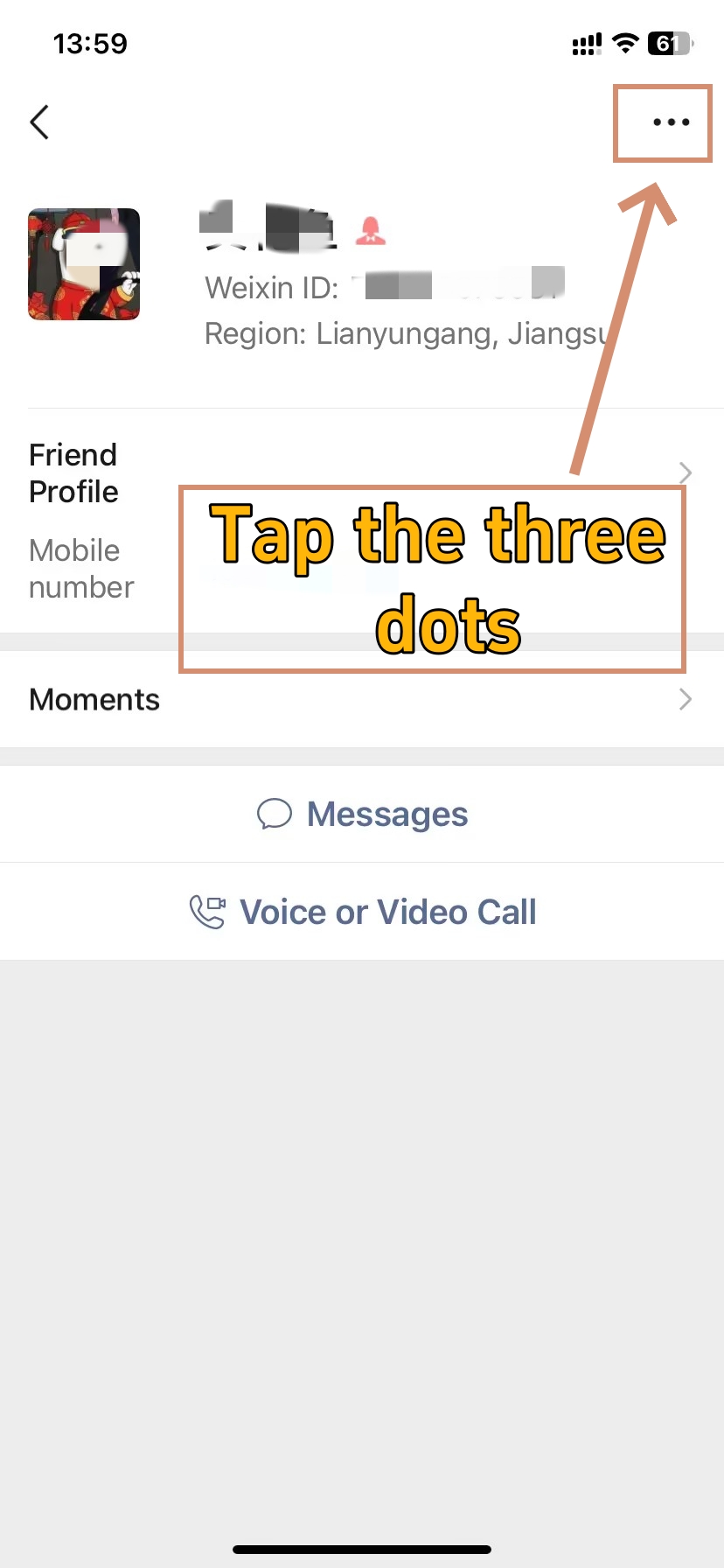
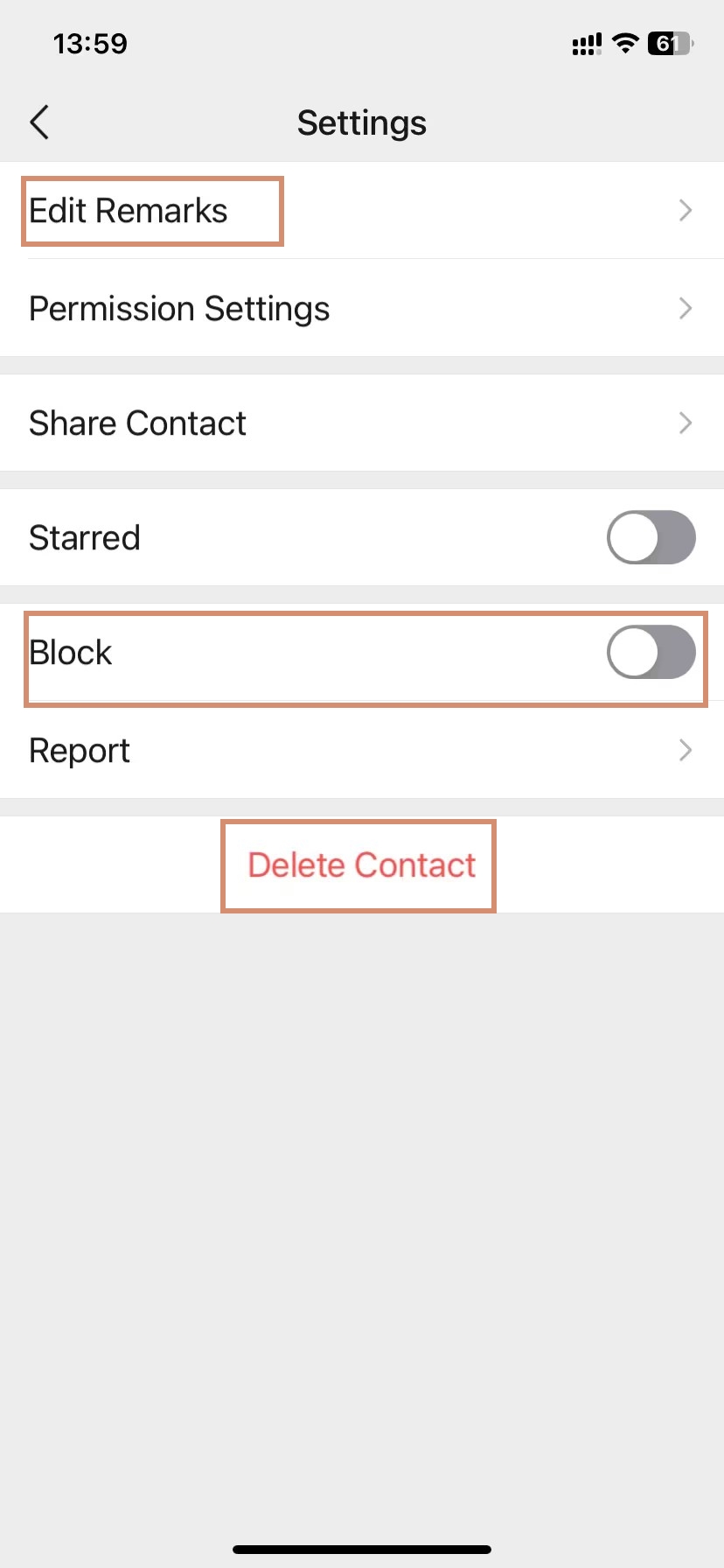
To access these options: Open the contact's profile (from Contacts, search results, or a chat) → Tap the three dots (...) in the top-right corner → Choose your action.
The decision matrix above shows the impact of each choice. Review it before taking action — especially before deleting, which cannot be undone.
How to Set Remark and Tags (Define the Relationship)
Before you delete or block anyone, do this. Naming the contact and tagging it is the key to keeping your address book in order: confused later, you cannot find this person and are forced to remember a phrase you only understand.
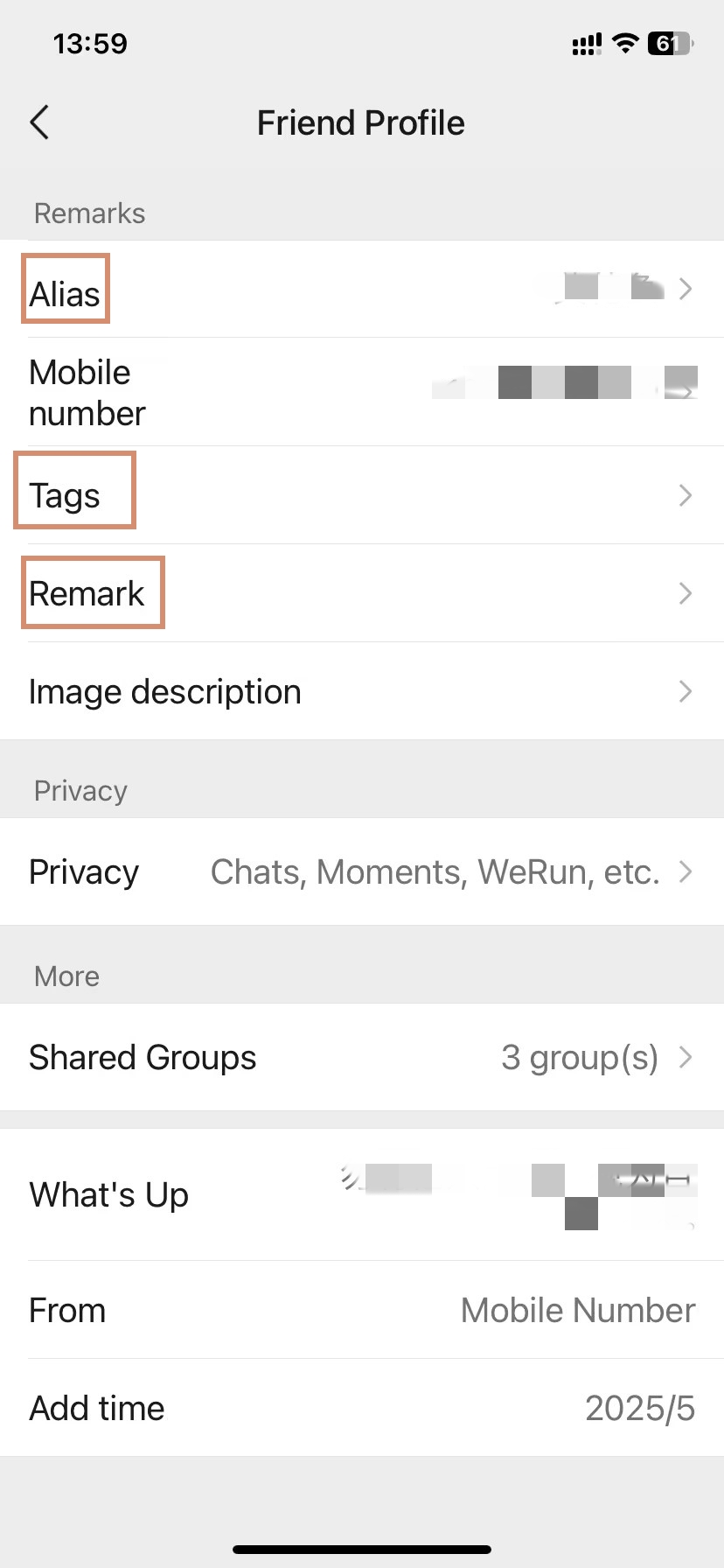
- Step 1. From the contact's profile, tap the three dots (...) → Select Set Remark and Tag.
- Step 2. Remark (备注): Enter their real name, company role, or how you know them — for example, "John — Supplier" or "Marketing Manager, Shanghai Office". This name is visible only to you and overrides their display name across your entire contact list.
- Step 3. Tag (标签): Assign one or more category tags, such as "VIP", "Pending", "Spam Risk", "Q3 Follow-up", or any custom label you create. One contact can carry multiple tags.
- Step 4. Description (描述): Add searchable private notes such as "Met at CIIE 2026, interested in Q3 order" or "Follow up June". This text is fully searchable from your contacts list.
- Step 5. Photo: Optionally attach a business card photo or personal note image.
- Step 6. Tap Save.
✏️ Do this immediately after adding someone
Set a remark and tag the moment you add a new contact. This is your protection against accidentally deleting the wrong person at a later date, and it makes your contact list genuinely usable after a few months of networking in China.
How to Mute Notifications (Temporary Silence)
Mute someone if you want to keep them around, keep the chat history, but no longer want to hear or see sound alerts, badge notifications, etc. The contact is still fully functional — your messages will arrive, you can see their Moments and vice versa, everything else works the same. You won't alert them that you've typed something either.
Best for: high-traffic WeChat groups, pushy sales contacts, contacts you want to phase out without a confrontation, or friends who message at inconvenient times.
Two ways to mute a contact:
- From the profile: Contact profile → three dots (...) → Toggle the Mute switch ON.
- From the chat list: Long-press the chat in your Chats tab → Select Mute Notifications.
💡 Result: You will still receive their messages and can scroll back through the conversation anytime, but your phone will not ring, vibrate, or show a badge notification. The sender never knows they are muted.
How to Block Contact (Complete Privacy Barrier)
Blocking prevents all communication and visibility without deleting the chat history. The contact stays in your system — moved to a restricted "Blocked List" — but you interact with them through a barrier.
Best for: harassment, unwanted contact, protecting your privacy, or temporary rejection without permanently severing the relationship.
- Step 1. Open the contact's profile.
- Step 2. Tap the three dots (...) in the top-right corner.
- Step 3. Toggle the Block switch to ON.
- Step 4. Confirm.
What the blocked person experiences —
They receive no notification. If Friend Confirmation is enabled in your privacy settings, they see: "The message is successfully sent but rejected by the receiver." If it is disabled, their messages appear to send normally — but you never receive them. Either way, they cannot view your Moments or send you WeChat Pay transfers.
To unblock later: Go to Me → Settings → Privacy → Blocked List. Find the contact and select "Unblock". They can immediately message you again.
How to Delete Contact (Permanent Removal)
Deletion is the nuclear option. It’s about muting them like blocking—but it instantly takes them off your contact list. It’s also about muting them like ignoring —but it deletes your entire chat log with that person! You can’t undo this; once you hit delete, you have to wait for that person to send you another friend request before you can start fresh.
Best for: contacts you are certain you will never need again, spam accounts, or a clean break.
- Step 1. Open the contact's profile.
- Step 2. Tap the three dots (...) in the top-right corner.
- Step 3. Scroll to the bottom and tap the red Delete button.
- Step 4. Confirm the deletion.
⚠️ Deletion has permanent consequences
Chat history: All conversation history with this contact is permanently deleted from your device. This cannot be recovered through WeChat's built-in tools.
Mutual deletion: You also remove yourself from their contact list. If they try to message you, their message will show as rejected.
Reconnection: If you need to contact them again, one party must send a new friend request — starting from scratch.
💡 Back up before deleting: If the chat history might be important, back it up first. Go to Me → Settings → Chats → Chat History Backup and follow the prompts. After backup is complete, you can safely delete.
How to Locate and Identify WeChat Contacts
-
- Find an Existing WeChat Contact
-
- Find through Contact Tags
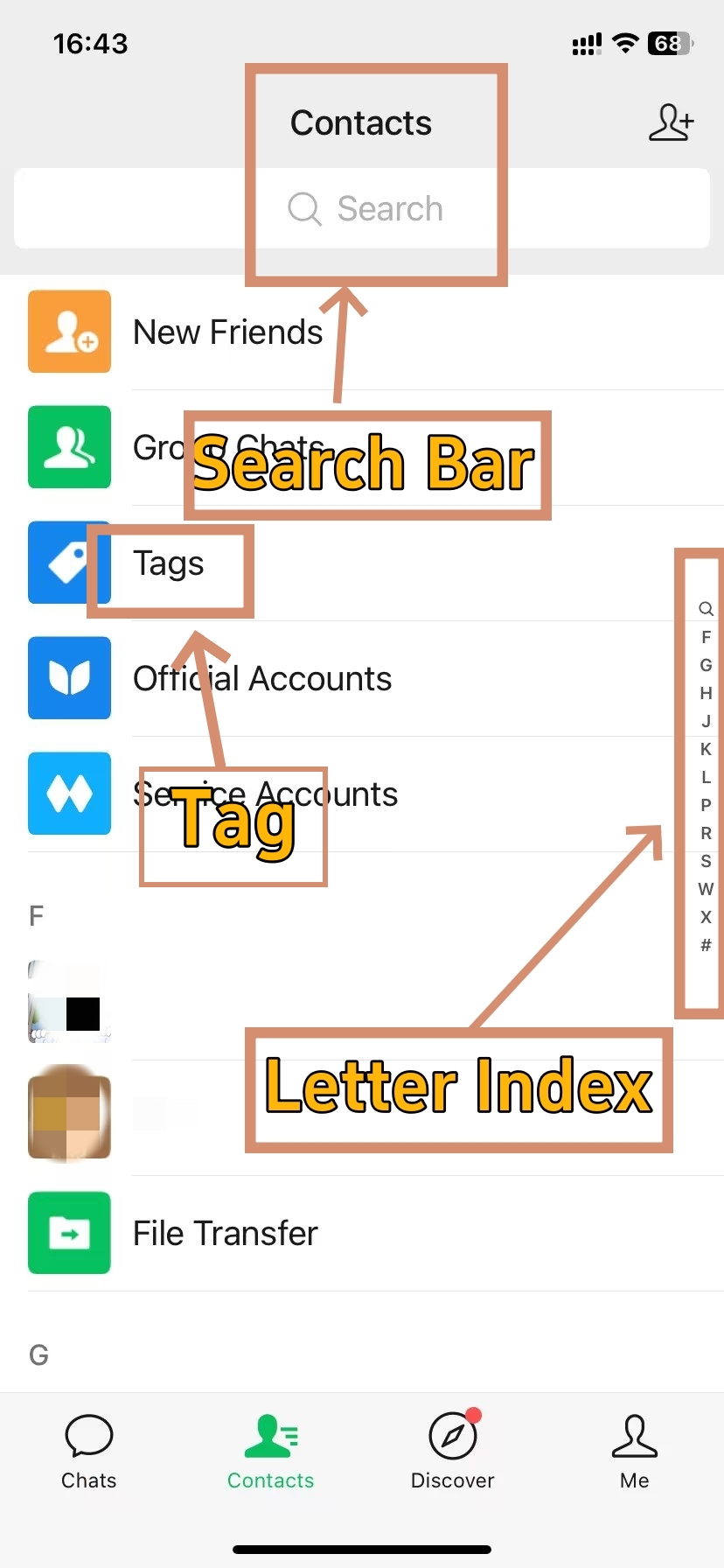
Once you’ve built and maintained your contact list for a while, you’ll need to find specific people within it. In case a contact has changed their display name, or if you haven’t spoken to them in forever, or if your contact list is growing larger than you can scroll through, there are three reliable ways in which you can easily find and identify contacts on WeChat.
🔍 Accurate location is essential for contact management
The ability to find someone quickly is crucial when you need to manage, block, mute, or otherwise adjust your relationship with them. The method you choose depends on what information you remember about them and how organized your contact list has become.
Method 1: The Global Search Bar (The Fastest Way)
The search bar is your primary tool. It accepts multiple types of input and returns results instantly.
- Step 1. Tap the Contacts tab at the bottom of the screen.
- Step 2. Tap the search bar at the top of the contacts list.
- Step 3. Type their Remark Name (Alias), Display Name, WeChat ID, or Phone Number. Results update as you type.
- Step 4. Tap the correct result to open their profile page.
💡 Search by Remark Name first: Remark names are set by you and never change — even when the other person updates their display name. Display names change constantly, making them unreliable for long-term searches. If you cannot find someone by display name, try searching by the remark name you set for them.
Alternative: If the search returns nothing, try these two methods below before giving up.
Method 2: Alphabetical Index Scroll
Your contacts list is sorted alphabetically by display name or remark name (whichever is set). If you remember the first letter of their name but cannot search, use the index on the right edge of the screen.
- Step 1. In the Contacts tab, look at the vertical letter index on the far-right edge of your screen.
- Step 2. Tap or drag your finger up and down the letters to jump directly to that section.
- Step 3. Scroll within that section to find the contact.
A note on foreign contacts —
Contacts without a Roman-letter name often appear grouped at the bottom under the # symbol. If you have many Asian contacts without Latin-character names, this section can get crowded. This is another reason to set a remark name the moment you add someone.
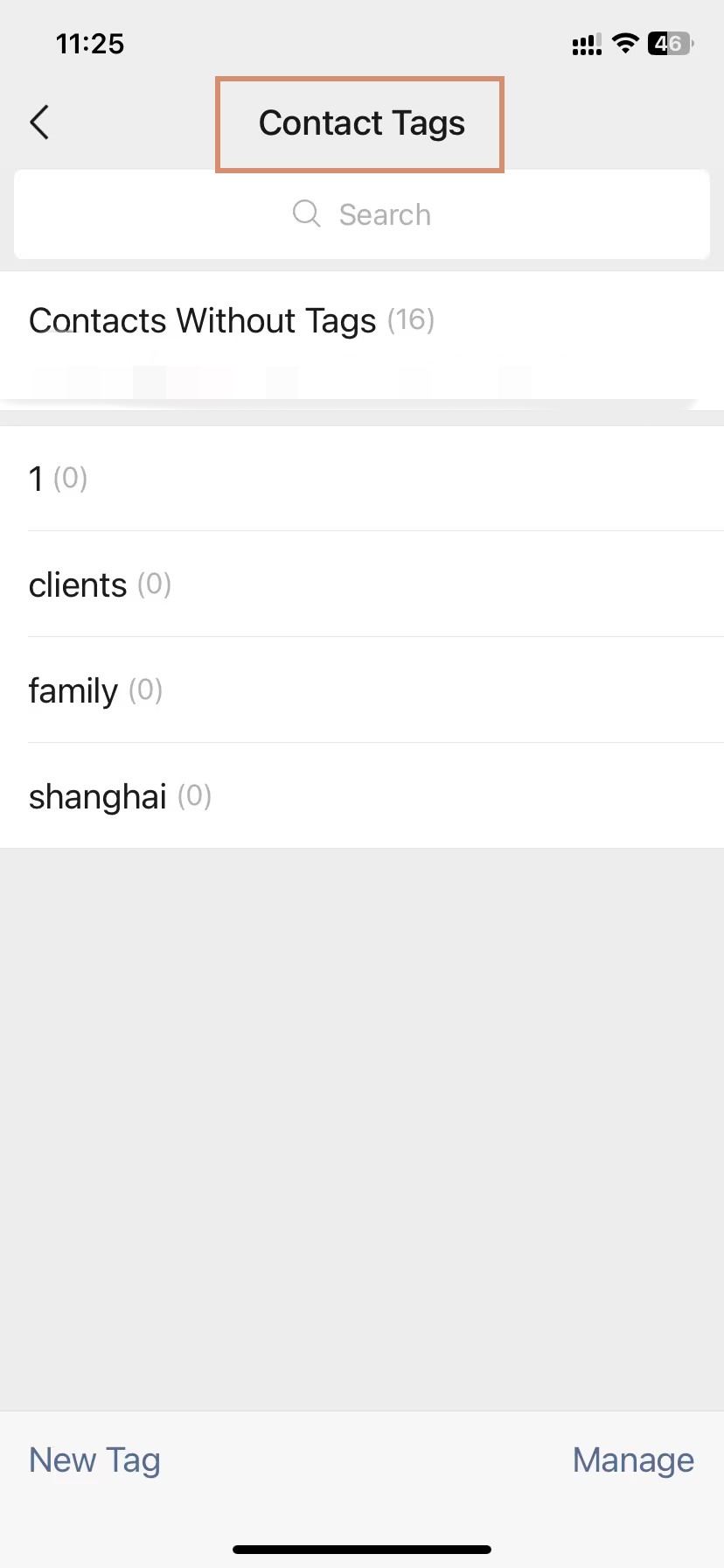
Method 3: Filter by Tags (For Organised Searching)
If you have already organized contacts into groups or tags — such as "Clients," "Family," "Shanghai," or "Q3 Contacts" — this is the fastest way to browse a specific subset.
- Step 1. Go to the Contacts tab.
- Step 2. Tap Tags (usually near the top of the list, or in the menu).
- Step 3. Select the tag you want to filter by.
- Step 4. The list now shows only contacts assigned to that tag. Scroll to find the person you need.
💡 Tags turn chaos into order
If you have invested time in tagging contacts, searching by tag is dramatically faster than scrolling. Most experienced WeChat users in China maintain at least three to five tags: "Clients", "Colleagues", "Personal", "To Follow Up", and "Events". Spend ten minutes setting up tags early — it will save you hours later.
5 Simple Fixes For Missing WeChat Contacts
This is one of the most searched issues for new users. Match your symptom below before working through the fixes — it will save you time.
| Symptom | Most Likely Cause | See Fix |
|---|---|---|
| Phone search returns no result | Number not linked, or privacy blocked | Fix 1 or Fix 4 |
| Address book contacts don't appear | Permission denied on your device | Fix 3 |
| Sent request but they never appear | Request not accepted yet | Fix 2 |
| Cannot send any new friend requests | 5,000 contact limit reached | Fix 5 |
| Contact disappeared from your list | They deleted you, or account issue | Fix 2 then re-add |
Fix 1. Link Your Own Phone Number For Verification
🔧 Mutual phone verification is required
When you search for others by phone number, WeChat applies mutual verification — your own number must also be linked. Check and add it at: Me → Settings → Account Security → Phone Number.
Additionally, the contact may have restricted phone-based discovery. They can disable "Find Me by Phone Number" in their Settings → Privacy → Methods for Adding Me. If phone search returns nothing, ask for their WeChat ID directly.
Fix 2. Wait For The Friend Request Mutual Acceptance
WeChat contacts only appear after mutual acceptance. Your request may have been sitting unread for days. There is no way to resend without first withdrawing the original.
- If urgency matters: reach the person via another channel — email, LinkedIn, or a phone call — and ask them to check their WeChat new friend requests directly.
- To check requests you have received: go to Contacts → New Friends. Pending inbound requests appear here.
Fix 3. Grant Address Book Permissions In Phone Settings
This one is straightforward — and easy to miss after a fresh install or OS update.
On iPhone: Settings → WeChat → Contacts → set to 'On'.
On Android: Settings → Apps → WeChat → Permissions → Contacts → toggle ON.
Restart WeChat after granting the permission. Then return to Mobile Contacts and sync again.
Fix 4. Understand Regional Account Differences To Fix Searches
⚠️ The +86 vs. international split is a real barrier
Accounts registered with +86 Chinese mainland numbers operate on the Weixin platform. When you search from an international WeChat account, phone number searches can fail for these accounts — especially if the user has not enabled cross-region visibility.
Solution: ask for their WeChat ID and search by ID instead of phone number. WeChat ID search works across both platforms reliably.
Fix 5. Remove Inactive Friends To Stay Under Limits
WeChat enforces a hard cap of 5,000 friends per personal account. If either you or the person you are trying to add is at or near this limit, new friend requests will silently fail.
- To resolve: go to Contacts, sort by last interaction, and remove inactive contacts.
- Once you are below the cap, retry the request.
💡
Tip: For new accounts: the daily add limit starts at just 3 to 5 contacts per day. Do not attempt aggressive outreach in the first two weeks. Use the account normally — chat, browse Moments — and the limit increases gradually as WeChat recognises legitimate use.
👥 Contact management is essential, but to understand how it fits into the broader WeChat experience including payments and travel tools, visit our How to Use WeChat in China guide.
How to Control Your WeChat Privacy
-
- Settings of WeChat
-
- Methods for Frending Me
-
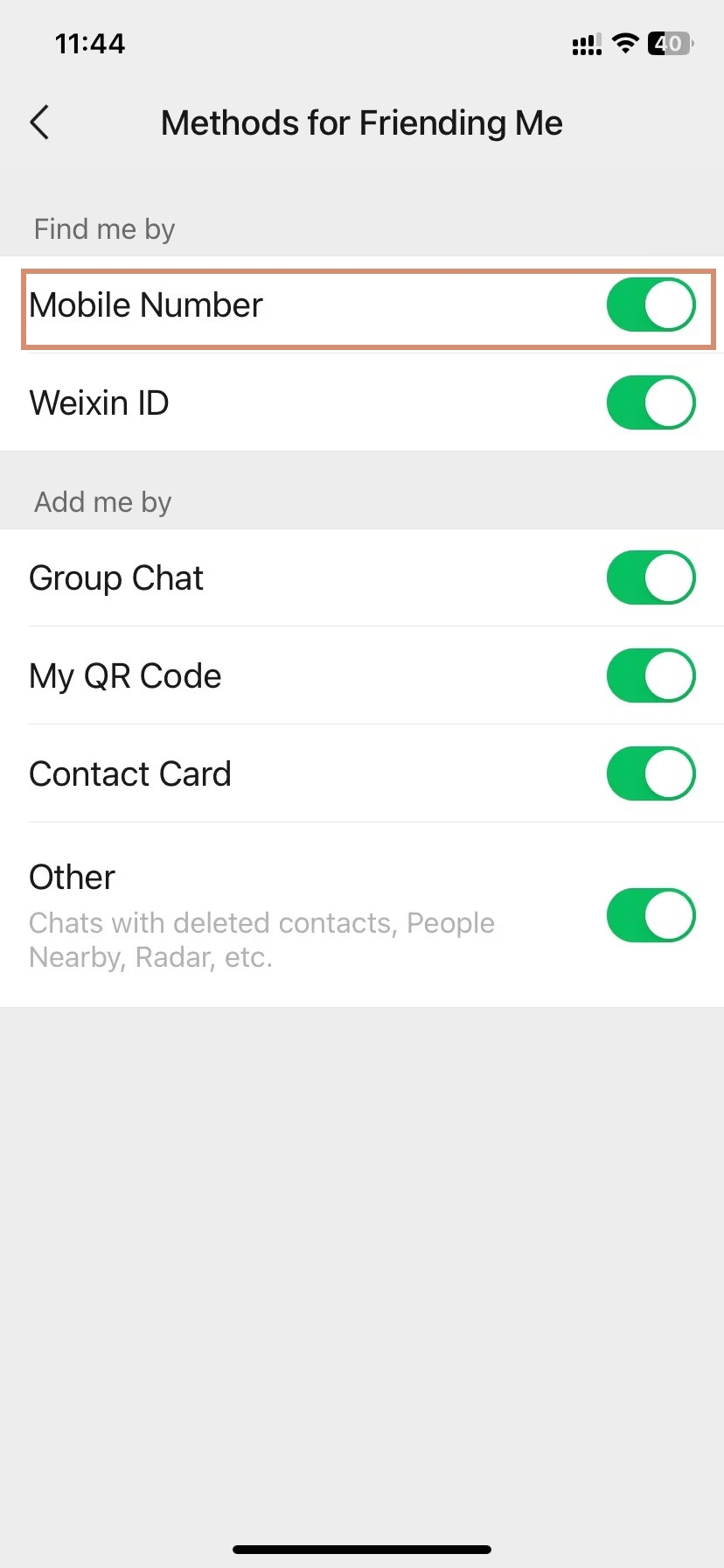
- Methods for Frending Me
Foreign users often worry about what WeChat exposes by default. The good news: the defaults are more private than most expect. Here is the full picture.
| What Contacts CAN See (Default) | What Contacts CANNOT See (Default) |
|---|---|
| Your WeChat display name | Your real phone number |
| Your profile photo | Your phone contacts list |
| Your WeChat ID (if you share it) | Your precise location |
| Your Moments posts set to All Contacts | Your list of other WeChat contacts |
| Your status and signature | Your chat history with anyone |
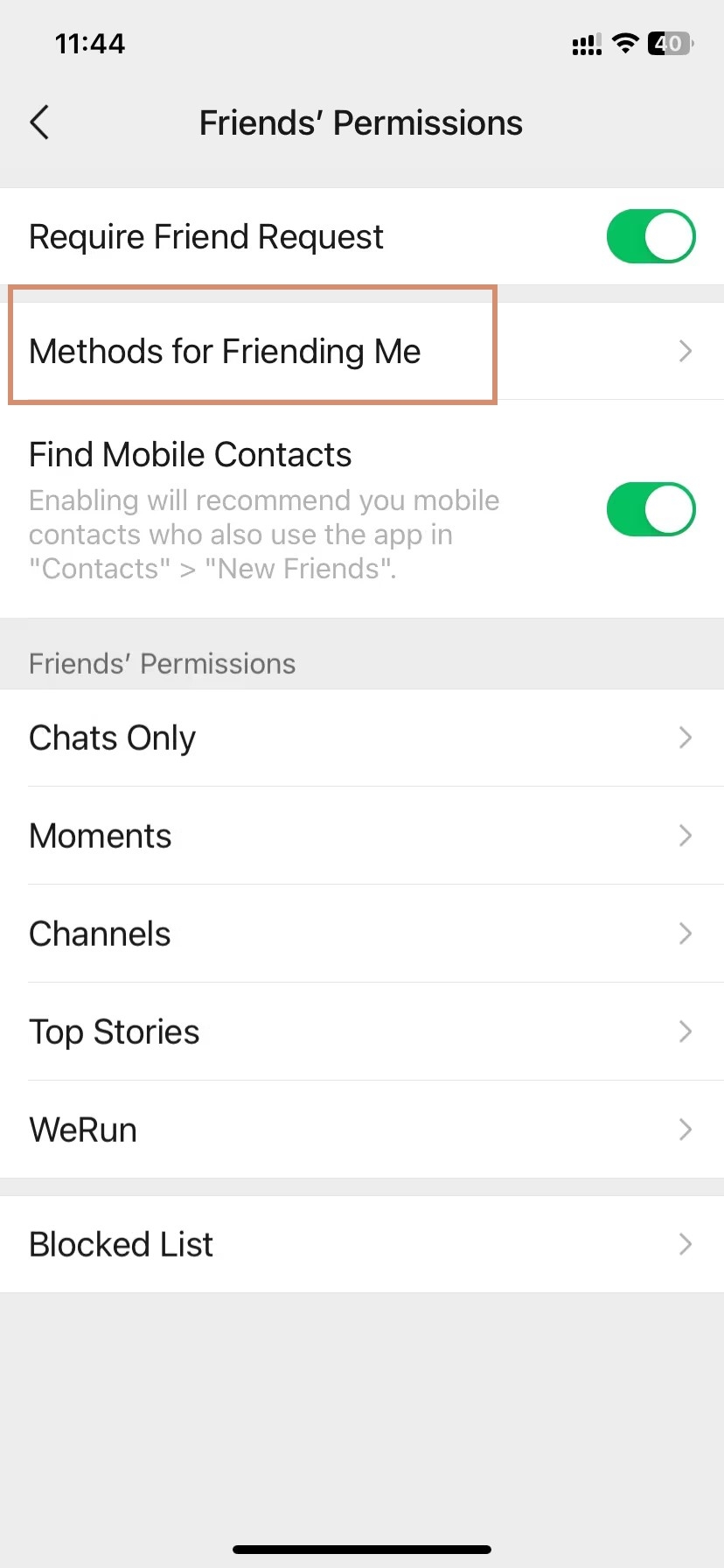
Hide Your Mobile Number From Public Searches
🔒 Your phone number is hidden from all contacts by default
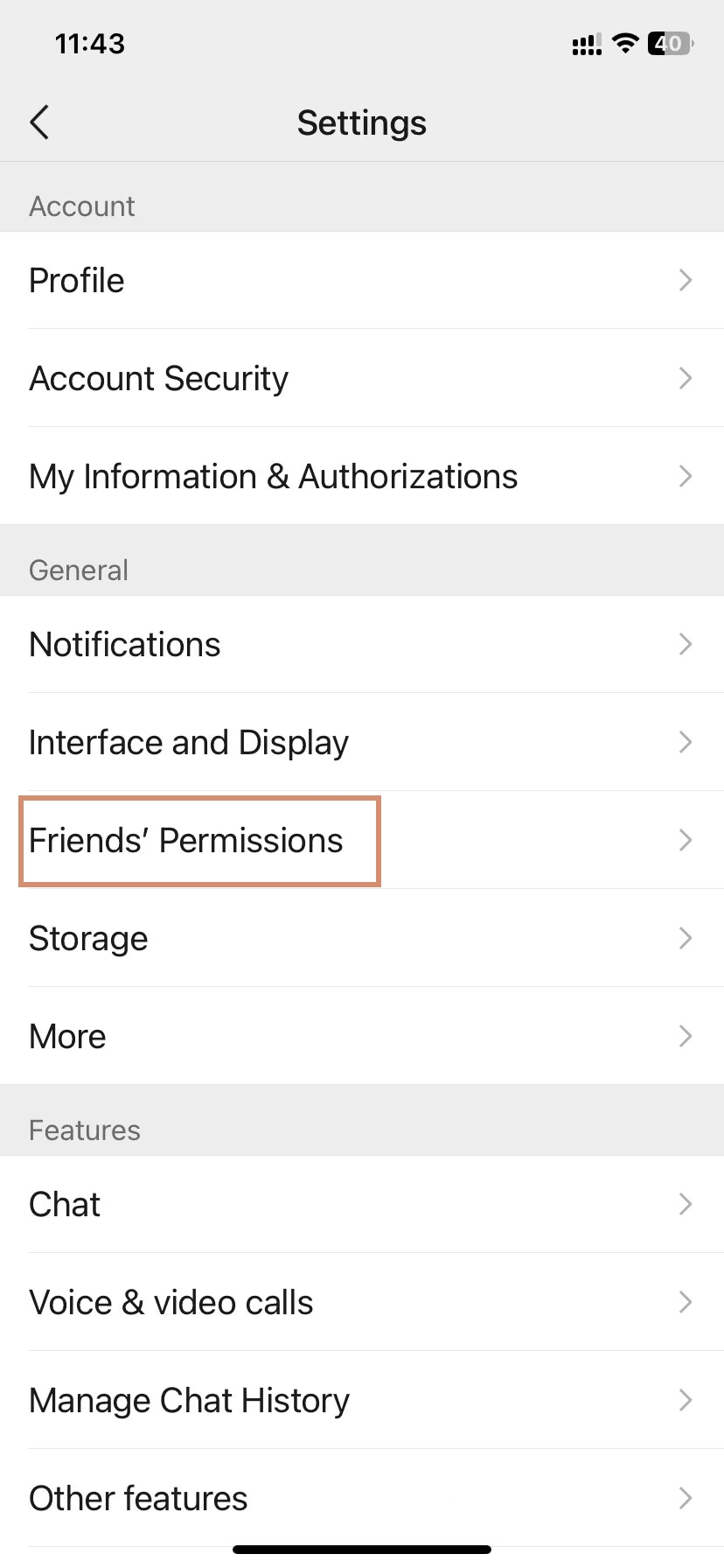
To verify or change who can search for you by phone number: Me → Settings → Friends’Permissions → Methods for Frending Me→ Mobile Number.
This is especially important if you are using a personal number rather than a dedicated China travel SIM. Review this setting before sharing your QR code widely.
🔐 Concerned about WeChat privacy and data safety? Read our in-depth look at Is WeChat Safe? Security Concerns, US Risks, and WeChat Pay Safety before you set up your account.
Restrict Moments Visibility To Protect Personal Privacy
Moments are visible to all contacts by default, covering up to 10 years of posts. To tighten this:
- Go to Me → Settings → Friends’Permissions.
- Set visibility to Contacts Only, or create a custom exclusion list for specific contacts.
- Restrict the visible time window to 3 months or 6 months to limit historical exposure.
A reminder from a long-term expat —
Before I adjusted my Moments settings, new contacts I had just met at an event could scroll back years through my personal posts. Limiting the visible window to six months was an easy fix. I also added a few contacts to my exclusion list — they see my profile but not my Moments at all.
Disable Nearby Features Quickly After Event Networking
📍 People Nearby stays active until you turn it off manually
While active, your approximate location is visible to strangers nearby. This is particularly sensitive in public spaces in China.
To disable: Me → Settings → Privacy → People Nearby → toggle OFF.
Make this part of your standard routine whenever you finish using Friend Radar or People Nearby. Do not leave it running in the background after a conference or event.
Frequently Asked Questions About Managing WeChat Contacts
Q: Can foreigners use WeChat without a Chinese phone number?
Yes — WeChat is available globally via the App Store and Google Play, and registration works with any international phone number. You do not need a Chinese phone number, a Chinese bank account, or a VPN to use basic WeChat contacts and messaging features. Some functions, such as WeChat Pay, require additional identity verification.
Q: Can WeChat contacts see my phone number?
No — your phone number is hidden from all WeChat contacts by default. They can see your display name and profile photo, but nothing else. To verify or adjust who can find you by phone number, go to Me → Settings → Privacy → Phone Number. Keeping WeChat contacts comfortable with your privacy settings is straightforward once you know where to look.
Q: How many contacts can I have on WeChat?
WeChat personal accounts have a hard cap of 5,000 friends. This is an official WeChat limit and applies globally. WeChat Official Accounts — the business pages used by brands and services — have no follower cap. If you are managing a large professional network through WeChat contacts, audit and remove inactive contacts regularly to stay below the limit.
Q: How do I know if someone blocked me on WeChat?
WeChat sends no notification when you are blocked. Common indicators include: messages show as sent but receive no reply over an extended period; the person's profile photo shows as a grey placeholder; their Moments feed appears empty or frozen. The most reliable test for WeChat contacts: try sending them a small amount via WeChat Pay — blocked users cannot receive transfers from you.
Q: What happens to my chats if I delete a WeChat contact?
Deleting a contact removes all chat history with that person from your device at the same time. This applies to all WeChat contacts you delete, and it cannot be recovered through WeChat's built-in tools. If you need to keep the conversation, back it up before deleting: Me → Settings → Chats → Chat History Backup. Deletion is one of the few irreversible actions in WeChat.
Q: Why can I not find someone on WeChat by phone number?
Three common reasons apply to WeChat contacts searches by phone: first, the person has not linked their number to their account; second, their privacy settings prevent phone-based discovery; third, they are on the Weixin (+86) platform and you are on international WeChat, creating a cross-region search barrier. In all three cases, ask for their WeChat ID or QR code and use that instead.
Q: What is the difference between WeChat ID and WeChat phone number?
Your phone number is your account credential — used to register and log in. Your WeChat ID is a separate, permanent public handle you can set once (Me → Profile → WeChat ID). For WeChat contacts purposes: the phone number is your private key, and the WeChat ID is your public username. WeChat IDs cannot be changed after being set, so choose carefully.
Q: How do I add a WeChat contact without being in the same place?
Three methods work remotely for WeChat contacts: search by WeChat ID directly; search by phone number with the correct country code; or screenshot your QR code image and send it via any platform — WhatsApp, email, or SMS. The recipient scans the image from their photo library to trigger the friend request, regardless of which platform you used to share it.
Q: Is it safe to add strangers as WeChat contacts in China?
Adding someone as one of your WeChat contacts exposes only your display name and profile photo by default — no phone number, no location. Exercise the same caution as on any social platform: be selective with unknown add requests, avoid contacts that quickly request money or personal information, and set your Moments to Contacts Only. Disable People Nearby whenever you are not actively using it.
Q: How do I add someone from a group chat without their WeChat ID?
Open the shared group chat, tap the person's avatar or display name, and their profile opens. Tap Add to Contacts and include a note to explain the connection. This works for any of your shared WeChat contacts — no ID or phone number required. It is one of the most practical ways to grow your network at organised events or tours in China.