WeChat Mini Program:Travel Page Translation
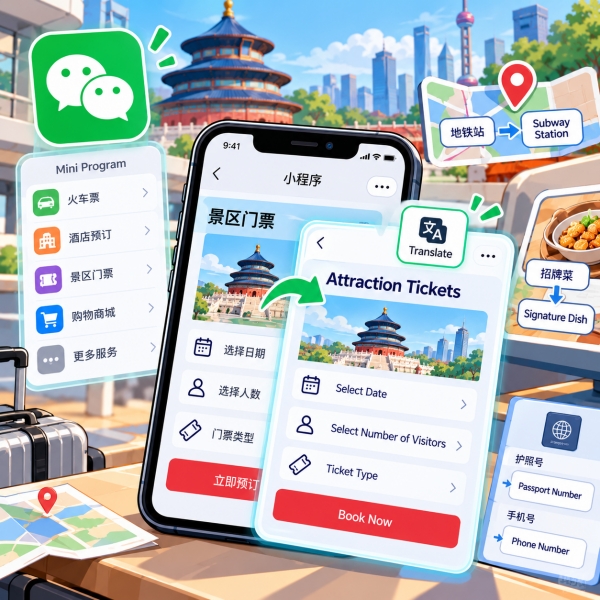
WeChat mini program translation starts with the translation bubble, when it appears, or the Translate option in a mini program’s upper-right menu. It can help you read Chinese page text, but words inside images need a separate translation method. A readable page also does not guarantee that a booking form accepts your overseas phone number or passport. If you are standing at a restaurant table or trying to reserve tomorrow’s ticket, start with the page controls below. Then follow the branch that matches your problem: a missing button, an untranslated image, an unclear order, or a form you cannot complete.
Quick Facts
📱 WeChat Beginner Setup & Navigation: New to the platform and looking for step-by-step guidance on account registration, security settings, and core interface navigation? Read our detailed guide on How To Use Wechat.
Turn On Mini Program Translation
Start inside the mini program you want to use. WeChat’s own menus, a chat message, and a merchant’s ordering page are different places. As a result, a translation action in one place does not necessarily translate the others.
Use the Page Menu
-
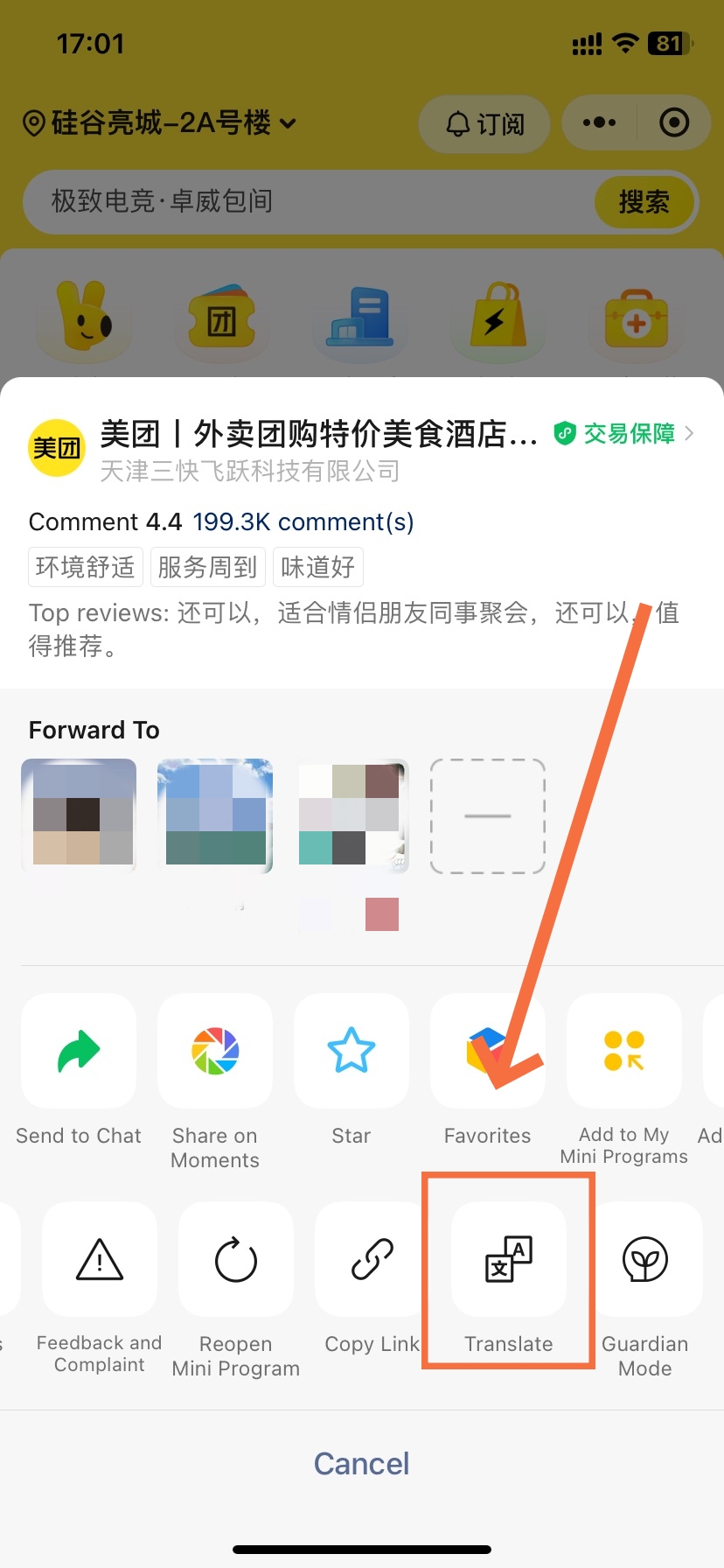

- Meituan Mini Program Translation Settings in WeChat
-
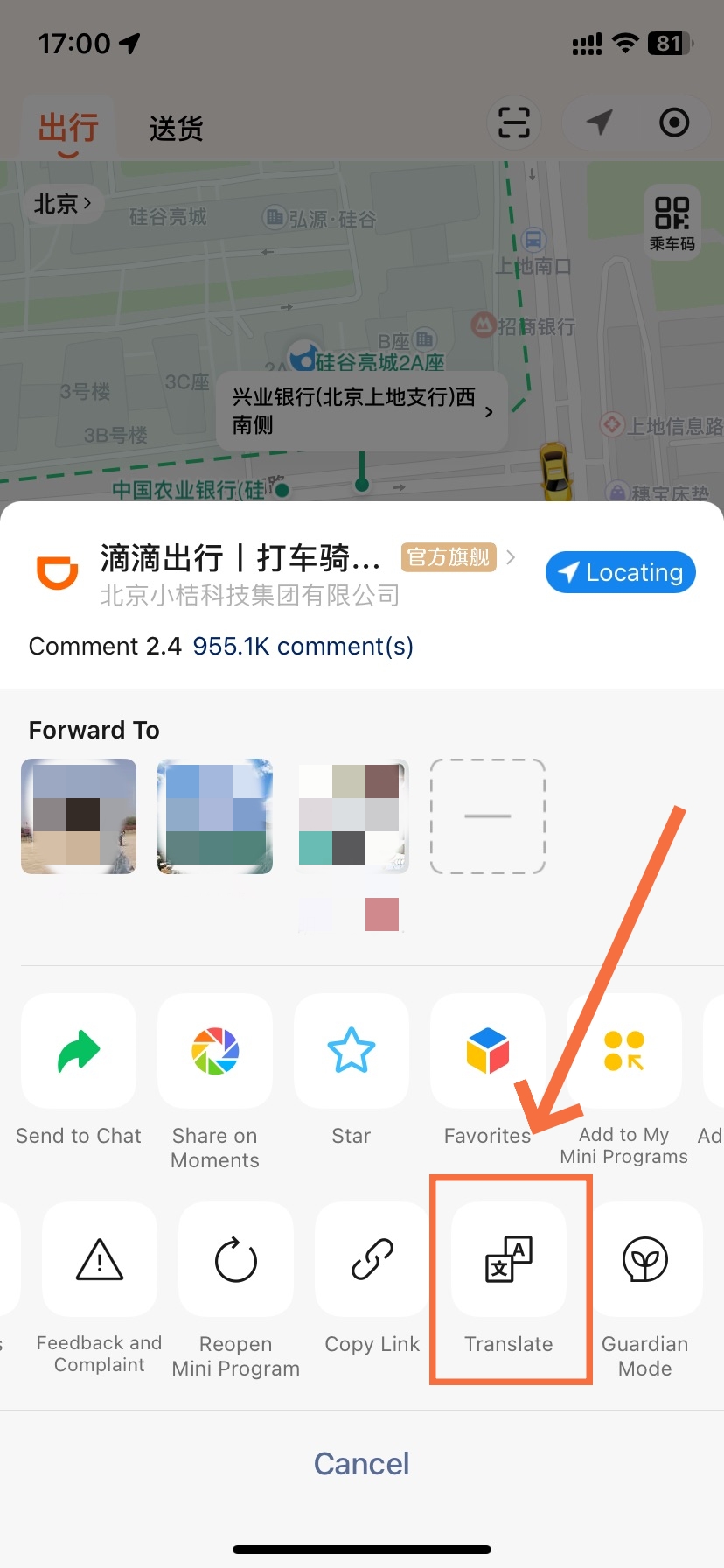
- Didi Mini Program Translation Settings in WeChat
For WeChat mini program translation, look at the upper-right controls around the service page. If a translation bubble appears, tap it. Otherwise, inspect the menu marked with three dots. The Chinese word to recognize is 翻译, meaning “translate.”
- ① Open the relevant page. Bring up the menu, ticket choices, or booking form you actually need to read. A saved promotional picture alone is a different translation task.
- ② Inspect the upper-right menu. Tap the mini program’s … control and look for 翻译. If that option appears, select it; the missing-button section below covers the alternative.
- ③ Check a meaningful label. Look for a readable item name, category, or form instruction. A translated heading is useful evidence of progress, but it does not prove every field changed.
- ④ Read the next screen too. After selecting an item or opening a form, inspect the new content before continuing. Use the appropriate fallback if a new panel remains unclear.
For example, an English category name can help you find drinks. However, check the selected drink’s size and options separately. Translation helps you navigate; the highlighted choice on the live page tells you what you are ordering.
Set Your Translation Language
-
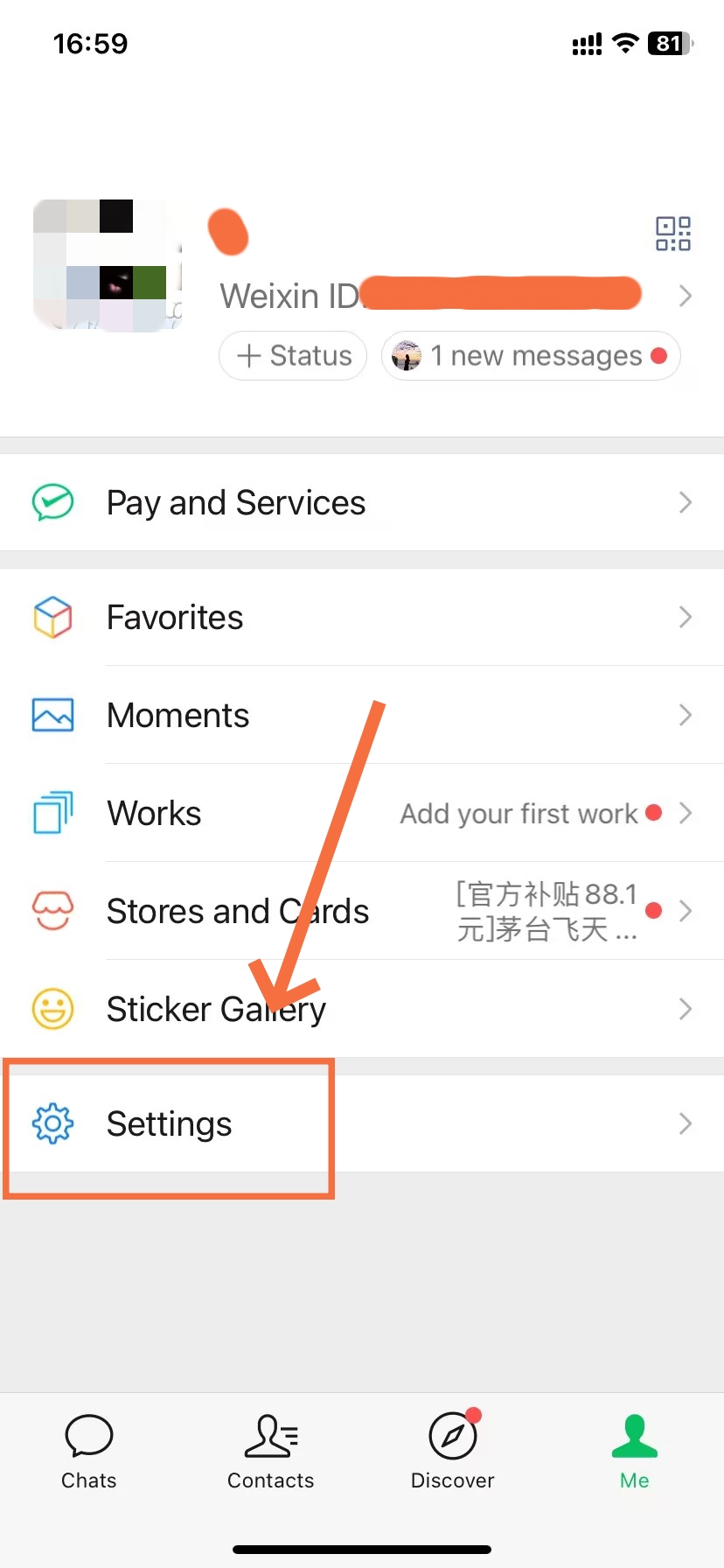
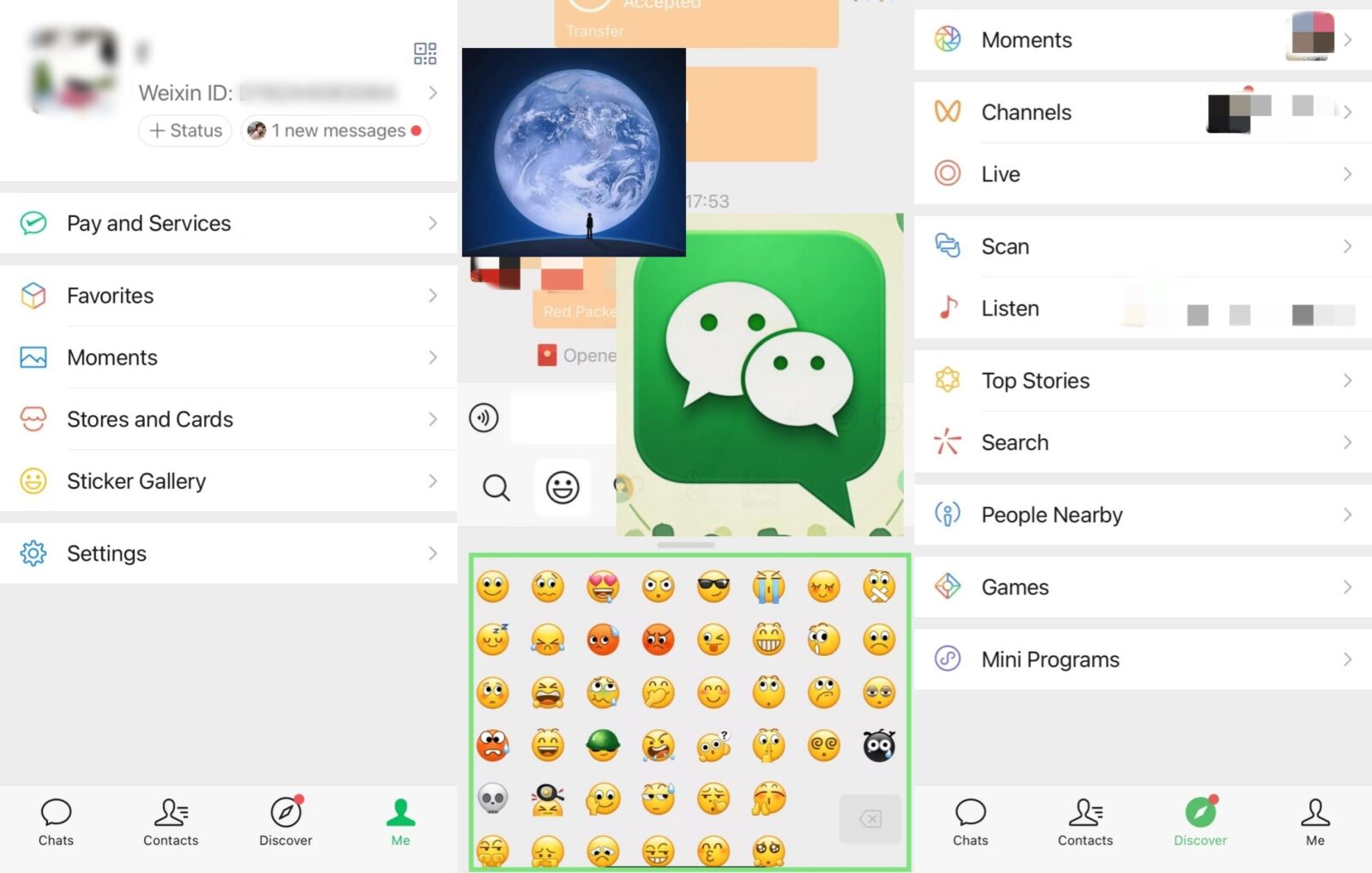
- Me Page in WeChat
-
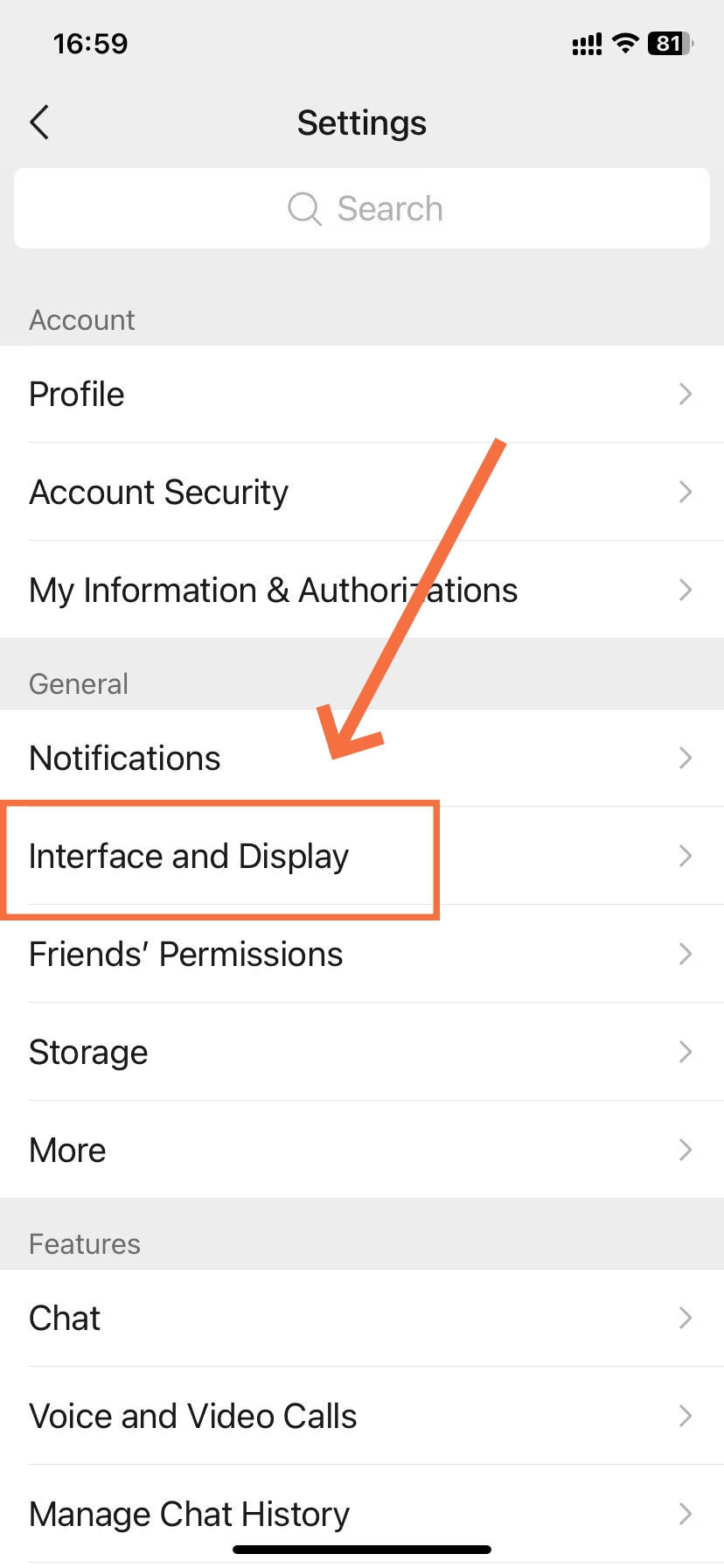
- Settings Page in WeChat
-
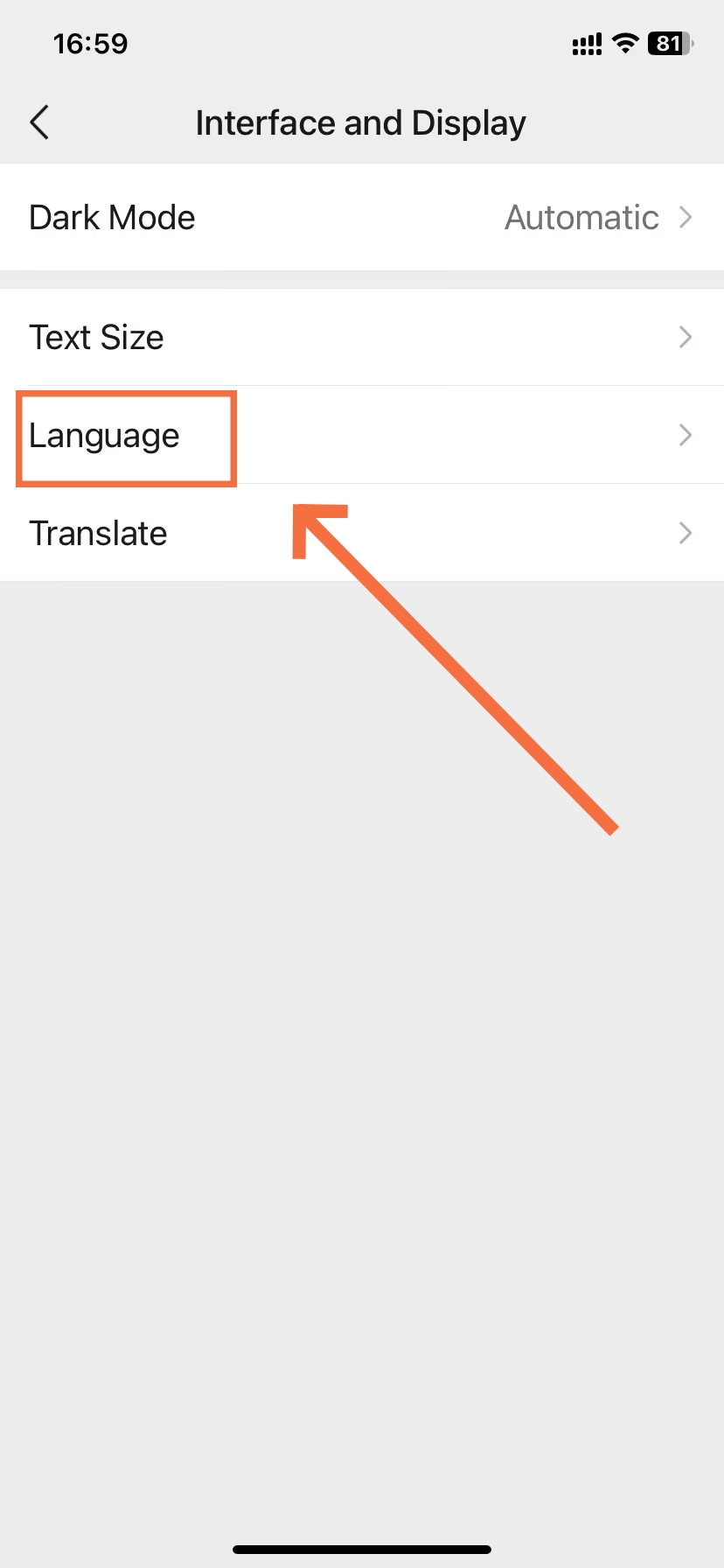
- Interface and Display in WeChat
-
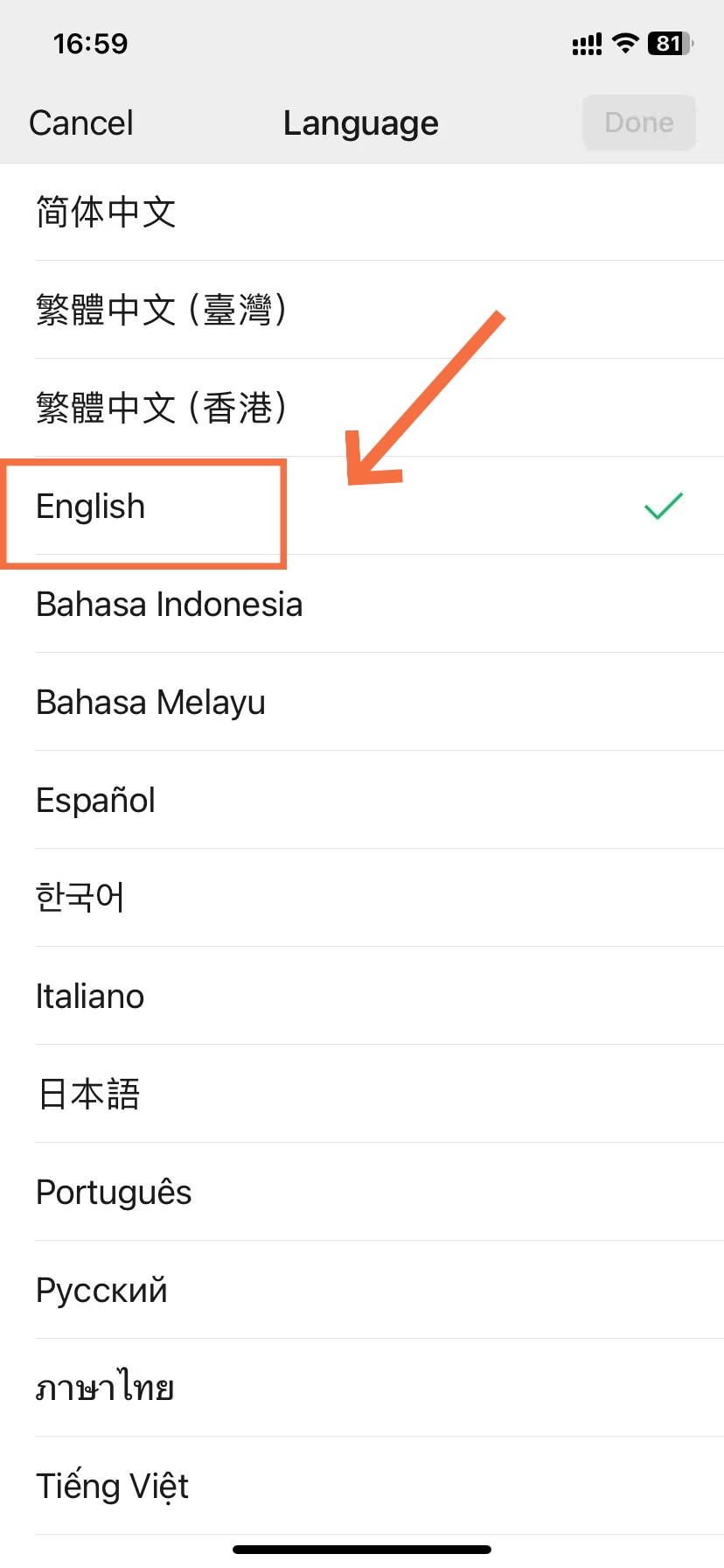
- Language Choice in WeChat
The translation target initially follows your WeChat client language. You can also select it separately. Therefore, check the translation setting if the output is in an unexpected language, rather than repeatedly tapping the same page button.
Exact English wording may differ with the interface you use. The Chinese labels above identify the documented controls. After making your selection, return to the mini program and check whether the text you need now appears in your chosen language.
- Before leaving a form: Keep a note of the service name and any selections you would struggle to reconstruct. Do not assume an unfinished form will preserve them.
- If the merchant offers English: You can try its own language option and compare the resulting page. A service’s built-in language version is another route to readable content.
- If only WeChat menus changed: Return to the merchant page and inspect its translation controls. Changing the app’s display language is not proof that the service content changed.
📲 Navigating WeChat Mini Programs: Looking to unlock ride-hailing, train booking, e-coupons, and retail services without downloading extra apps? Explore our dedicated overview of Wechat Mini Programs.
Find a Missing Translate Button
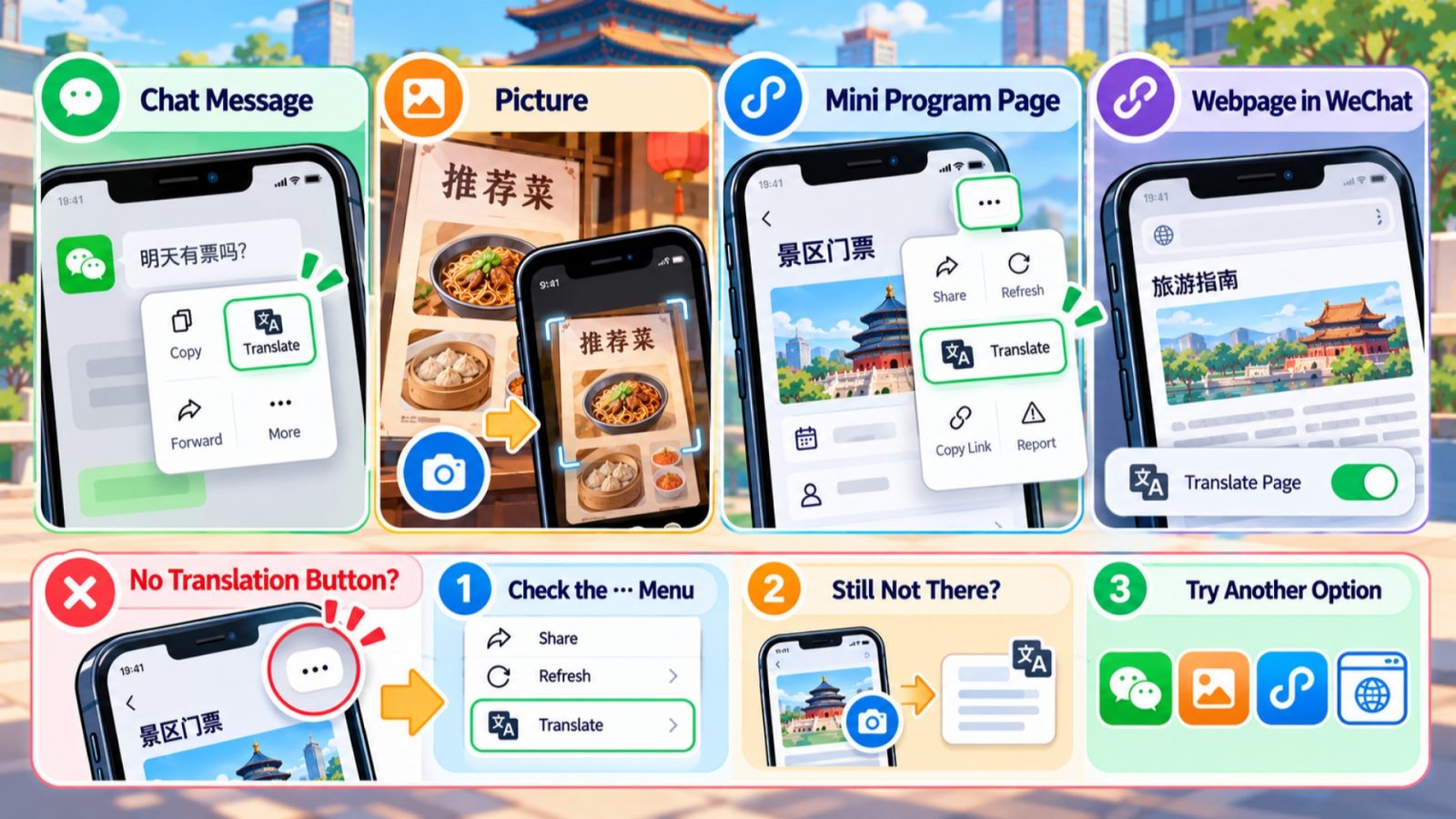
WeChat Translation Button Guide
A missing bubble does not settle whether translation is available. First inspect the separate … menu. If no useful control appears there either, choose a fallback for the content in front of you instead of guessing at hidden settings.
Check the Screen You Opened
Start by identifying what is actually on your screen. A restaurant might send you a picture, a message, or a mini program entry. Each can contain Chinese text, but that does not make them the same kind of page.
- A chat message: Long-pressing the message can reveal its translation action. This translates the message; it does not operate the mini program mentioned inside it.
- A picture: Treat it as image text. Use the screenshot or photo method in the next section rather than hunting for a page-wide mini program control.
- A mini program page: Inspect the surrounding WeChat controls, not only the merchant’s navigation bar or shopping-cart icons. The documented entry is the upper-right … menu.
- An embedded webpage: Its translation may follow a separate browser path. Use a relevant visible translation option if present, or capture the text for a screenshot translation.
For a traveler, the useful distinction is the available action, not the page’s technical construction. You do not need a developer account or a translation API to read a menu. If you cannot identify the page type, a clear screenshot is a practical next step.
Choose a Practical Fallback
Use the symptom to narrow your next move. WeChat mini program translation is a documented feature, but the documentation does not promise that its button appears in every screen or situation.
Before your trip, checking for a normal WeChat update is reasonable app maintenance. However, an update is not a guaranteed repair for a particular missing control. Avoid spending your meal or ticket-booking window repeatedly reinstalling the app.
💡 Essential WeChat Travel Tips: Traveling in China and want to learn practical shortcuts, account recovery hacks, and daily usage tricks? Check out our feature on Wechat Tips.
Translate Images and Unchanged Text
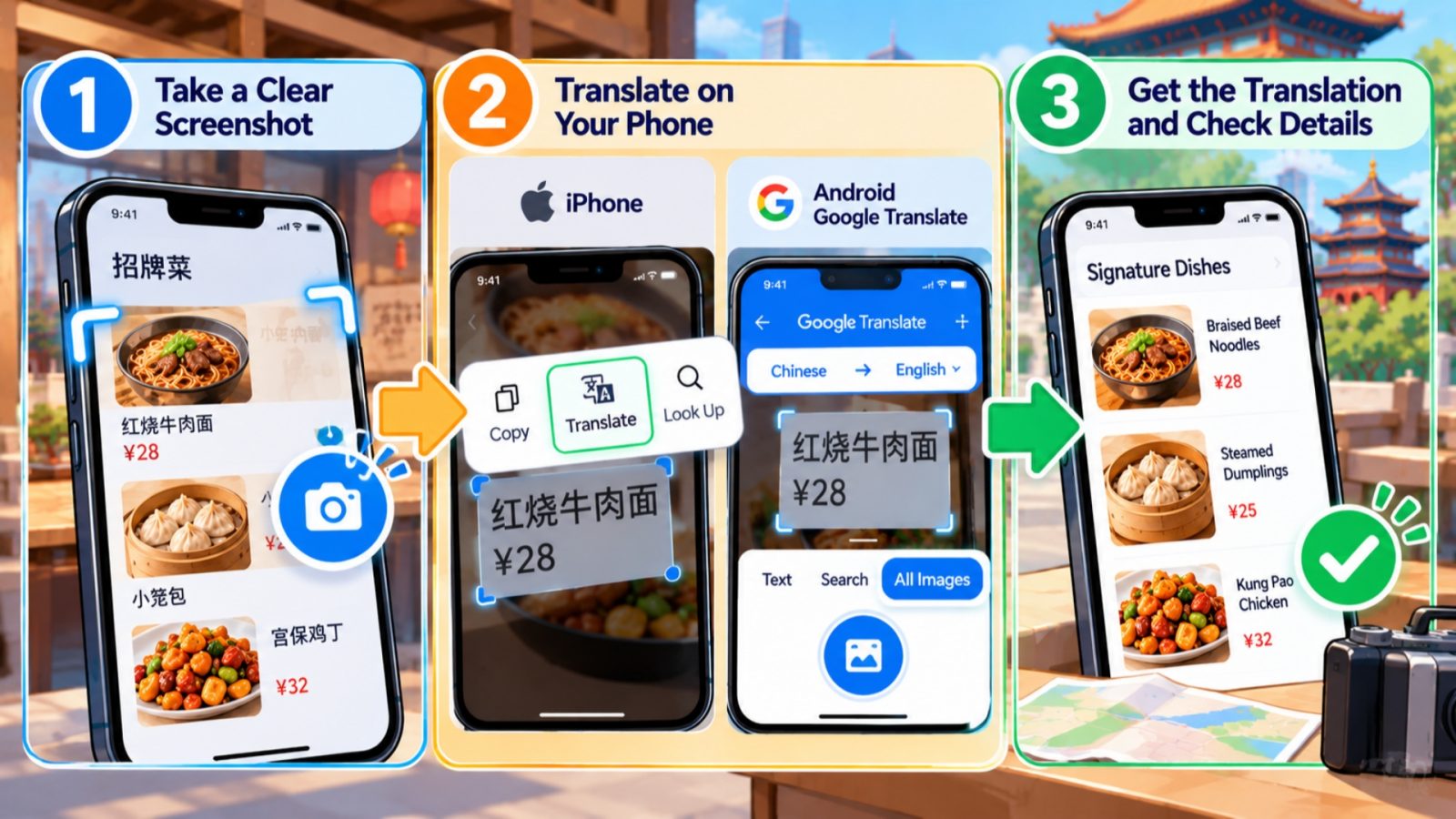
Screenshot Image Translation Steps
When a menu picture stays Chinese, repeating the page translation will not read the words inside it. Instead, use text recognition on a screenshot. This also helps when you need to inspect a small, specific part of an otherwise readable page.
Capture a Useful Screenshot
A useful screenshot keeps the words and their context together. For example, a price without the selected size or ticket category can be misleading. Include the item heading and the relevant choices before translating the image.
- Keep the deciding detail: Capture the date, quantity, option, or condition you need to understand. If a paragraph continues below the screen, capture that portion separately.
- Use readable text: Tiny or unclear lettering can produce poor recognition. Open a larger view when the service offers one, rather than relying on an unreadable thumbnail.
- Keep the original: Save the Chinese version alongside your interpretation. It helps you match the translated instruction to the correct live button or item.
- Limit what you share: For assistance, show the relevant wording rather than an unnecessary view of payment credentials or personal document details.
Read Screenshots on Your Phone
These two phone-specific routes can help with image content that WeChat mini program translation leaves unchanged. Choose the one available on your device, then compare the result with the original image.
- iPhone: Open the screenshot in Photos. On a supported device, use Live Text to select the words, then choose Translate. If needed, check Settings → General → Language & Region → Live Text. Availability varies by language, region, and device.
- Android with Google Translate (谷歌翻译): Open the app, select Chinese as the source language and English as the target, then open Camera → All Images. Choose your screenshot and inspect the recognized text.
- Before traveling: Google documents offline camera translation with downloaded languages. Download the languages you need and test a sample image while offline before departure; do not depend on untested online access during your trip.
Next, return to the live mini program. A translated screenshot is a reading aid, so tapping its pictured button will not submit your order. Match the original characters and surrounding layout to the actual control.
Handle Physical Menus and Clipped Text
For a printed menu or sign, WeChat offers a camera route: open the home-screen + menu, choose Scan, switch to Translate, and photograph the text. This is useful when you have a physical menu in front of you.
Clipped wording is a different problem. Translated text can become longer than the original layout allows. If part of a condition disappears, neither a cropped screenshot nor a guessed ending supplies the missing information.
- For a complete image: Translate it and compare the result with the original.
- For an incomplete condition: Find an available full detail view or ask staff to read the complete wording before you act.
👥 Managing WeChat Contacts & Social Features: Want to learn how to add friends via QR code, organize contact groups, and use translation tools in private chats? Discover our visitor guide on Wechat Contacts.
Read Orders Before You Confirm
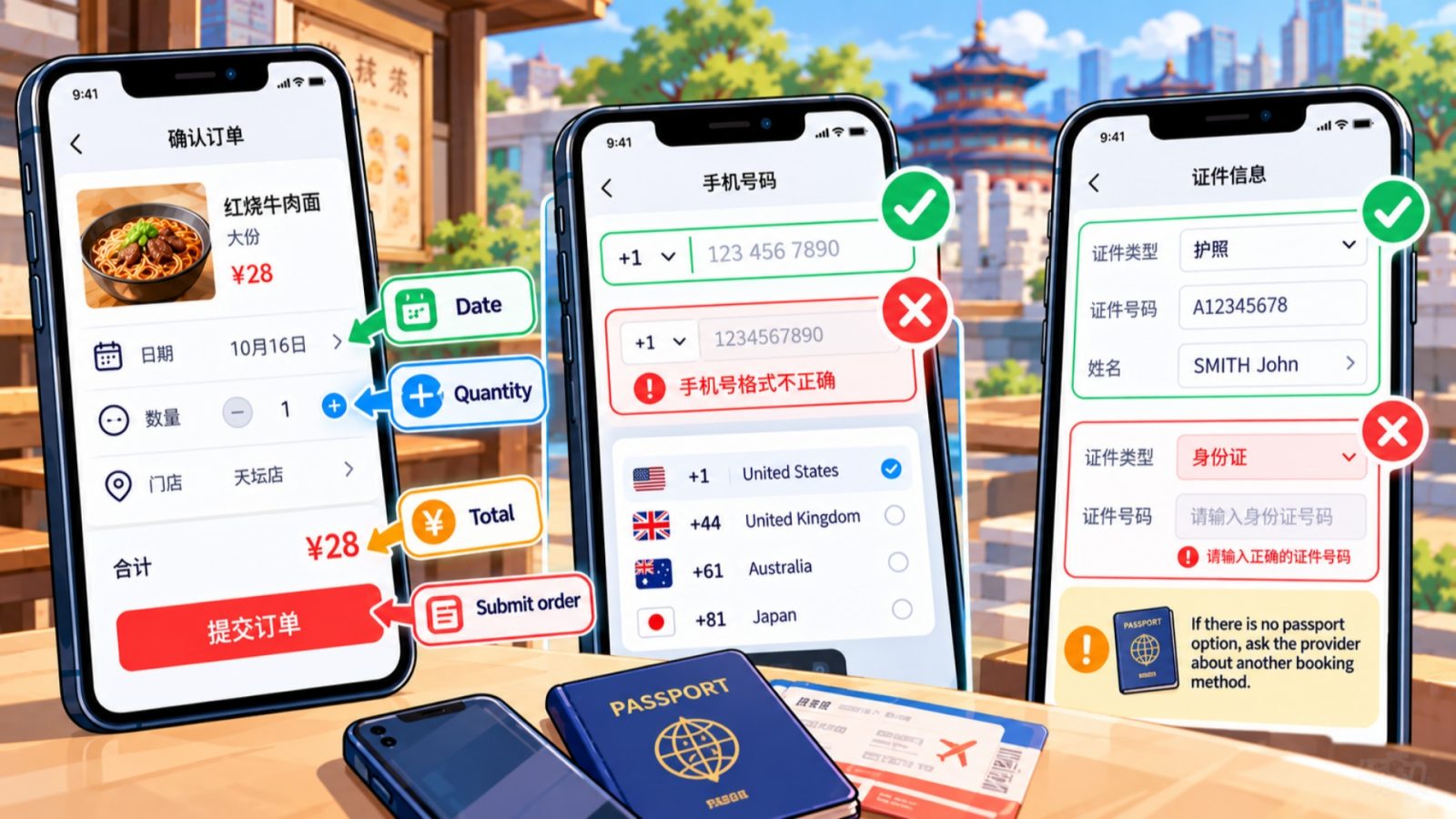
WeChat Mini Program Order Check
Once the page is readable, check what the service will actually do. WeChat mini program translation can clarify a label, but it cannot change a merchant’s accepted phone formats, document types, or booking conditions.
Match Labels to Your Order
Use the following words as orientation aids, then read the surrounding instruction. A familiar button label alone does not tell you the complete order status or whether a particular selection suits your plans.
Before confirming, match the branch or venue, selected item, date, and quantity to your intended purchase. For example, recognizing “date” helps you locate the field; you still need to check the actual day shown.
- Item and options: Check the selected variant, not just the product heading. The readable category may contain several different choices.
- Amount and conditions: Read the total and any relevant collection, cancellation, or use instructions displayed for that order.
- After submission: Read the resulting status. An instruction to pay, an order reference, and a completed purchase are not interchangeable pieces of information.
Handle Phone Number Fields
If an English form rejects your number, stop treating it as a translation problem. International phone support depends on the service’s form and login design. The translated instruction cannot add a country-code selector or change the accepted number format.
- ① Look for the country code. If a selector is available, choose the code for your own reachable number. Follow that form’s instructions for entering the rest.
- ② Read the actual error. A format error and a missing verification message require different questions. Capture the wording so staff can see which stage failed.
- ③ Use an offered alternative. If the service explicitly provides email or another supported login route, consider that option. Do not assume every mini program has one.
- ④ Ask about unsupported numbers. If the form only accepts a format you cannot supply, ask the service about another way to place this order.
Do not enter made-up digits just to reach the next screen. You may need that contact route for a verification message or order communication. A readable error and a clear request for help are more useful than a false number.
Check Passport and Name Fields
For a booking that requests identification, inspect the document-type list first. If it offers a passport option, follow the corresponding fields using your real document details. Selecting an unrelated document type changes the task rather than solving it.
- Passport option present: Check that the number and name fields match the instructions for that option. Keep your spelling tied to your document.
- Chinese ID field only: Ask the provider how a foreign passport holder can book. Do not invent a Chinese identity number or borrow another person’s details.
- Name rejected: Show the error and ask about supported characters, spacing, or another booking route. Avoid changing your identity details simply to make the form accept them.
Get Help Without Losing Your Order
When the remaining obstacle belongs to the service, ask a focused question. Showing the exact screen is more useful than saying the whole app does not work. Keep control of what is ordered and what result you need.
Show the Exact Problem
Start with reading help. If staff need to place the order for you, first establish whether your earlier attempt created one. This distinction matters when you have already reached an order summary or payment instruction.
“Could you help me read this page? Which option should I choose?”For a phone field: 我的手机号是国外号码,可以使用吗?
“My phone number is from overseas. Can I use it?”For identification: 我可以用护照预订吗?
“Can I book with a passport?”
You can also show a translated message describing your intended item, date, or problem. However, give the helper one decision at a time. Asking about the rejected phone field is clearer than handing over several unrelated screenshots.
- At a restaurant: Ask whether staff can take this order another way. An English menu, paper menu, or assisted order may be an option; none is guaranteed.
- For a ticket or reservation: Ask the provider which booking route accepts your actual document. Confirm the route before repeating the same incompatible form.
- If nobody shares your language: Use a short written translation and point to the relevant field. Keep the original Chinese wording available for comparison.
Keep the Result You Need
The goal of WeChat mini program translation is a useful travel action: understanding a menu, choosing the right booking, or identifying who can resolve a blocked form. Before leaving the counter or closing the page, check the result with your helper.
- Confirm the selected purchase: Match the item, branch, quantity, and any applicable date or time. Ask about the displayed amount before approving payment.
- Identify the accepted order: Keep the actual reference or confirmation provided by the service. If two attempts appear, ask which one is active rather than assuming they merged.
- Keep the collection instructions: For food, establish how you will know it is ready. For a reservation, retain the entry or check-in instructions the provider gives you.
- Choose another route when necessary: If the service cannot accept your document or contact details, ask about an appropriate alternative before committing further time.
This handoff does not need a long explanation of your phone settings. A clear screen, a specific question, and the details of your intended order give the helper a concrete problem to solve.
Frequently Asked Questions
Q: Does changing WeChat to English translate every mini program?
No. Changing WeChat’s display language affects its own interface, while a merchant’s service may handle language separately. Check the translation target and use the mini program’s translation control when available. If words remain inside a picture, use screenshot text recognition instead. Also inspect each new form before entering details or confirming an order.
Q: Can I translate a mini program without the translation bubble?
Yes, there is another documented route: inspect the mini program’s upper-right … menu for 翻译, meaning Translate. The missing bubble alone does not rule that out. However, the menu item is not guaranteed on every screen. If you cannot find it, use a screenshot reading method or ask someone to help with the page.
Q: Why does a menu image stay in Chinese?
WeChat mini program translation does not recognize words embedded in images. Capture a readable screenshot and use a supported image translation tool instead. Keep the item name, options, and amount together so the translation has context. Then return to the live page and match the original wording before selecting your meal or other purchase.
Q: Will translation let me use an overseas phone number?
No. Translation changes how you read the page; international phone support depends on the service’s form. Look for a country-code selector and follow its instructions with your own number. If the form cannot accept it, use an explicitly offered alternative or ask the provider about another ordering route. Do not invent a local number.
Q: Can I rely on screenshot translation without internet?
Google Translate documents offline camera translation with downloaded languages. Prepare the needed languages and test a saved image while offline before traveling. That gives you a checked fallback on your own phone. It does not establish that WeChat mini programs, account verification, or ordering will work offline, so keep those tasks separate from reading screenshots.
Q: Should I submit an order if the translated button looks unclear?
Pause and establish what the button will do, especially if text is clipped or the amount is unclear. Translate the complete instruction or ask staff to read it. If you already tried submitting, check whether an order exists before repeating the action. A translated label alone is not evidence that a purchase has completed.