Changi Pay Overseas Qr Payment Notice
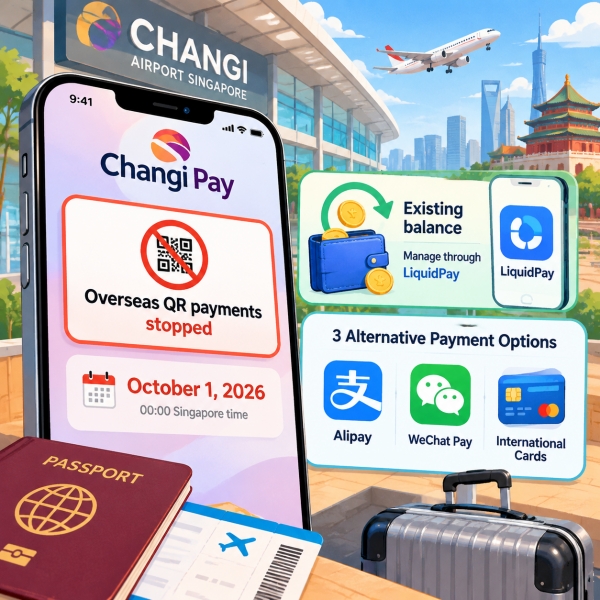
Changi Pay stopped overseas QR payments on October 1, 2026, so you can no longer use it to pay merchants in mainland China. The Changi Pay China payments 2026 change also removes access to Liquid Account inside the Changi App, but your existing account and money remain with Liquid Group. You can manage them through the separate LiquidPay app. Meanwhile, participating shops at Changi Airport and Jewel still accept supported Changi Pay card and voucher payments. Here is how to separate those services, recover access to old funds, follow a pending refund, and prepare a payment method for your next China trip.
Quick Facts
📈 Transaction Ceiling Updates: Traveling on higher budgets or making large purchases? Read about updated spending rules in Alipay WeChat New 5000 Limit for Foreigners 2026.
October 1 Ends Overseas Changi Pay
Changi Pay Overseas Payment Cutoff Timeline
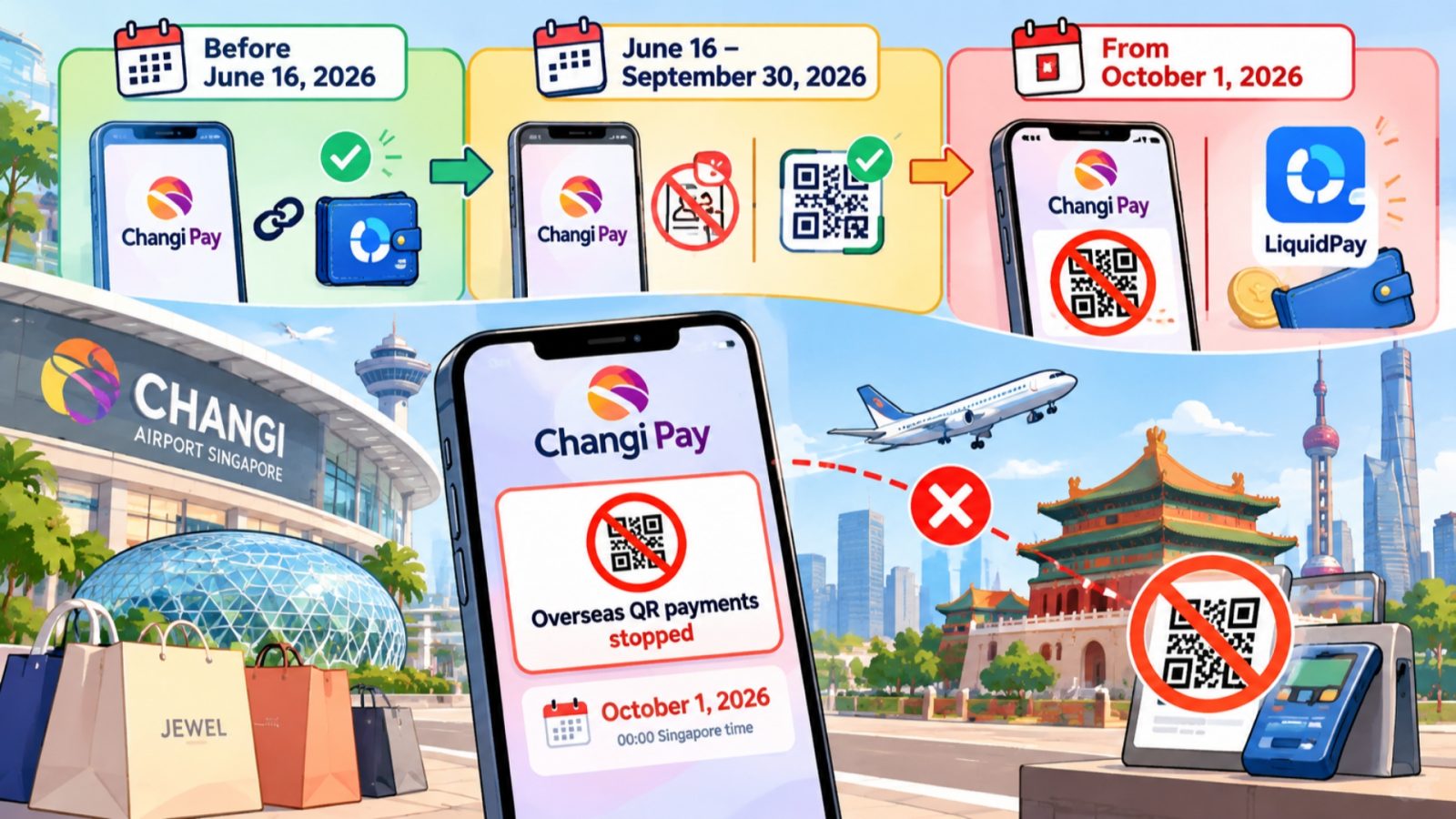
The Changi Pay China payments 2026 cutoff is an operator service change affecting the payment route inside the Changi App. Liquid Group's terms and Changi Airport's service notice identify the change. You should therefore replace that route before relying on it at a Chinese checkout.
Change note: From October 1, 2026, Changi Pay no longer supports overseas Alipay (支付宝)/Alipay+ QR payments or access to Liquid Account. Older instructions describing that combination no longer provide a working China payment setup.
June Registration Cutoff
The transition began before October. From June 16, new Liquid Account registration or linking through Changi Pay ceased. Previously linked users had a temporary continuation period, which explains why a summer tutorial could still describe a working service.
September Spending Versus October Payments
The final cutoff was midnight Singapore time. Singapore and mainland China use the same UTC+8 offset, so there is no time difference to add when interpreting the date for a mainland purchase. A previously linked account does not extend the overseas service beyond that cutoff.
Treat the purchase date and refund date separately. A purchase made before the change can still have a refund afterward. That refund follows the old transaction's account route; it does not mean the discontinued checkout route has reopened for new purchases.
Two-country trip: Plan your Singapore and China payments separately. Buying something at Jewel confirms acceptance for that participating Singapore merchant and payment method. It does not confirm acceptance at your next mainland restaurant, hotel, or shop.
💳 China Mobile Wallet Setup: Preparing an alternative mobile payment option before departure? Follow our step-by-step tutorial on Alipay Setup Guide.
Identify Your App and Account
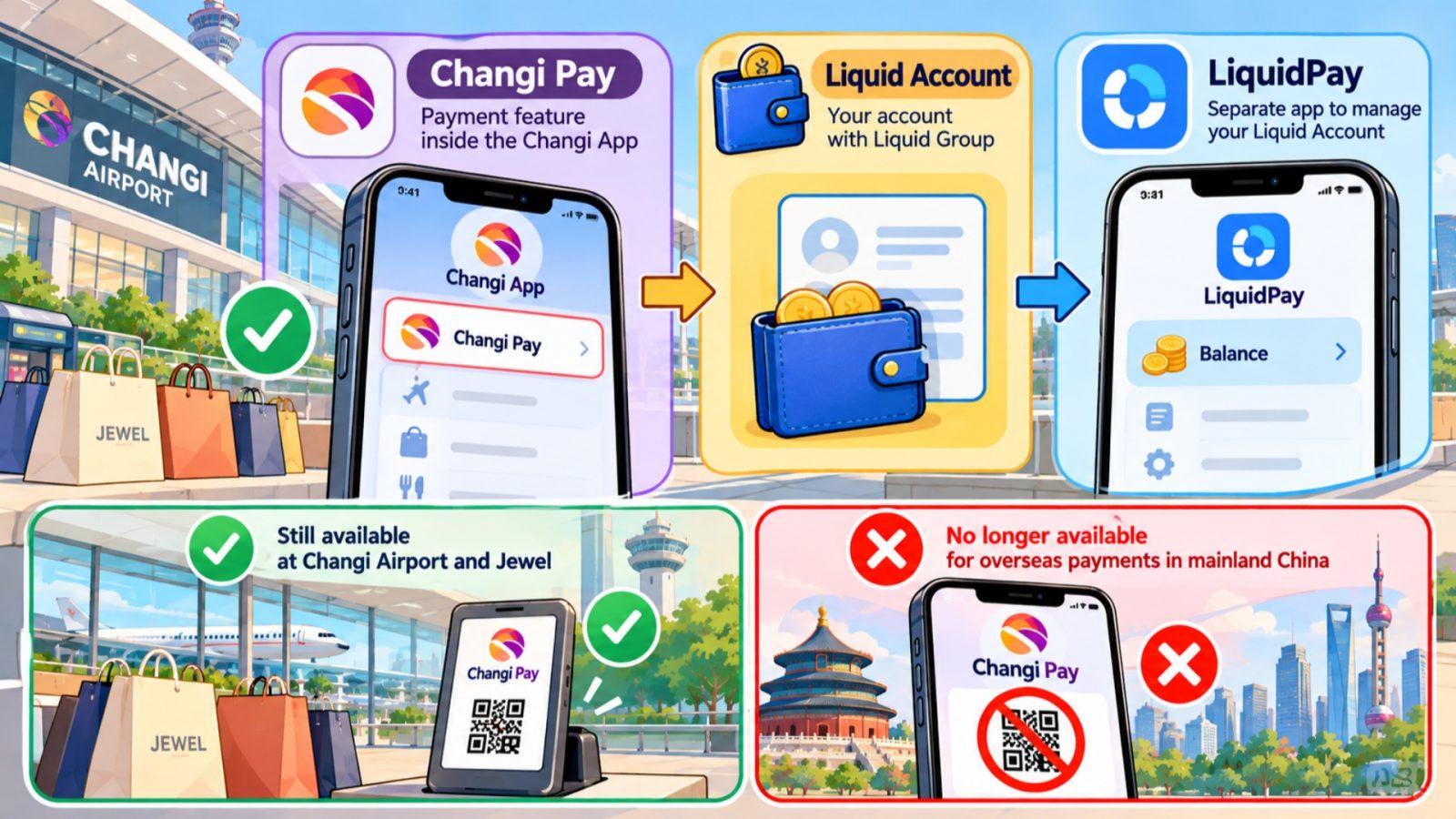
Changi Pay Liquid Account Liquidpay Overview
Start by checking which product you are opening. Similar names make this change harder to follow than it needs to be. The useful distinction is between a payment feature, the account holding funds, and the separate app now used to access that account.
Changi Pay, Liquid Account, LiquidPay
- Changi Pay: The payment feature inside the Changi App. Its remaining airport and Jewel services are separate from the discontinued overseas QR function.
- Liquid Account: Your account with Liquid Group. An existing balance belongs to this account, even though the Changi Pay screen no longer provides access to it.
- LiquidPay: Liquid Group's separate app. Existing account holders can use it to manage their Liquid Account and access the services available to their account.
This distinction also helps you describe a problem clearly. “I cannot see my Liquid balance in Changi Pay” points to the changed access route. “I can open LiquidPay, but this merchant payment is unavailable” points to a different question about the particular account, code, or transaction.
Existing Users and First-Time Visitors
Existing Liquid Account holders should begin with account recovery, rather than immediately creating another account. Liquid Group specifically says that an existing account can continue in LiquidPay using its registered email address. Keeping the original account also makes it easier to follow an older purchase.
First-time visitors have a different decision. LiquidPay advertises passport verification for international users, but that does not guarantee approval for every applicant or every feature. Choose a method you can actually activate with your own details, rather than assuming an old Singapore resident's setup applies to you.
Old Guides and Airport Purchases
When following Changi Pay China payments 2026 advice, look for the service's effective date, not just the page's headline year. An older official visitor guide may list Changi Pay among accepted wallets. The later, product-specific service change supersedes that historical description.
Likewise, a valid airport voucher tells you nothing about China merchant acceptance. Keep airport offers in your Singapore shopping plan, and prepare a separate method for mainland spending. You do not need to abandon useful airport benefits simply because the overseas feature ended.
📲 Direct WeChat Pay Setup: Prefer paying directly without foreign transaction barriers? Discover how to use WeChat without a local bank account in our guide on How to Use WeChat Pay in China No Chinese Bank Card Needed.
Changi Pay China Payments 2026: Old Funds
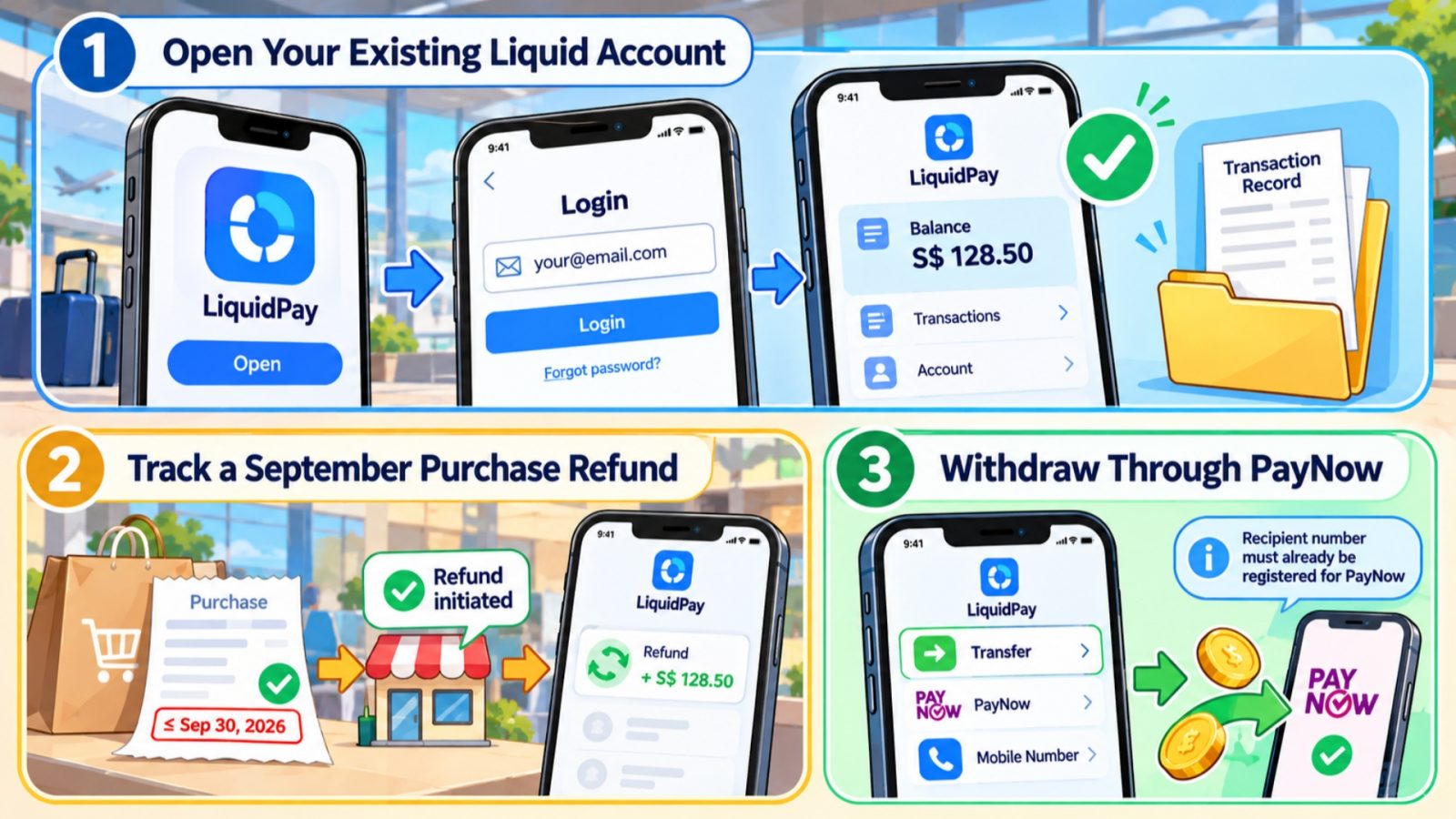
Liquid Account Balance And Refund Steps
Your first task is to regain visibility of the existing account. There is no need to rush into spending a balance simply because its old screen disappeared. Separate account access, the status of an old refund, and any decision to withdraw money.
Open Your Existing Liquid Account
Use the official LiquidPay app listing provided by Liquid Group or Changi Airport. Then follow this sequence with the account details you originally registered:
- Open LiquidPay and use your existing Liquid Account email address. Changi's instructions note that the email address is case-sensitive.
- Use the password recovery option if necessary, and complete the verification requested for access to your account.
- Check that you can see the expected account balance and relevant transaction history before making plans to use those funds.
If the account looks unfamiliar or the balance differs from your records, pause before adding money. Compare your original registration information and saved transaction references. Then ask Liquid Group to investigate the specific account issue, rather than creating more accounts in an attempt to find the missing balance.
For older purchases, save a copy of the transaction details somewhere you can find without opening the payment app. Keep your Changi Pay China payments 2026 records separate from new LiquidPay purchases, with each original amount and currency together. That makes a specific refund easier to identify.
Track a September Purchase Refund
For an overseas purchase made on or before September 30 using your Liquid Account, a merchant-initiated refund returns to that account. Liquid Group says processing follows the merchant's refund timeline. The service change does not create a universal number of days for the money to arrive.
Begin with the merchant if you do not yet have confirmation that a refund was initiated. A cancelled booking, a conversation about returning an item, and a processed payment refund are different stages. Ask for confirmation tied to your original transaction.
- Original purchase: Merchant name, transaction reference, purchase date, amount, and currency.
- Refund evidence: The merchant's confirmation, refund reference where supplied, and the date it says processing began.
- Account record: The relevant LiquidPay transaction entry and a clear description of what has or has not appeared.
If the merchant confirms initiation but you need help tracing the credit, contact Liquid Group at [email protected]. Explain the purchase and refund separately. For this old payment route, check Liquid Account rather than assuming the credit will appear on a card linked to the Changi App.
Withdraw Through an Eligible Route
Changi Airport's withdrawal instructions direct existing account holders into LiquidPay, then Transfer, PayNow under Instant Transfers, and Mobile Number. The receiving number must already be registered for PayNow. Review the recipient details and amount before completing any transfer.
Withdrawal eligibility: The receiving number must already be registered for PayNow. Liquid Group's PayNow activation guidance describes Singpass and PayNow verification. Passport-based wallet registration does not automatically establish access to that particular withdrawal method.
If you do not have the required receiving arrangement, ask Liquid Group which withdrawal option is available for your account. Describe your actual registration and destination account. Do not assume that entering a foreign number or a Chinese bank card will turn it into an eligible PayNow recipient.
You can also leave the funds in the active account while deciding what to do. Before choosing between spending and withdrawing, consider whether you have a supported use for the balance and whether the transfer route is available to you. Account access alone does not settle either question.
Choose a China Payment Replacement
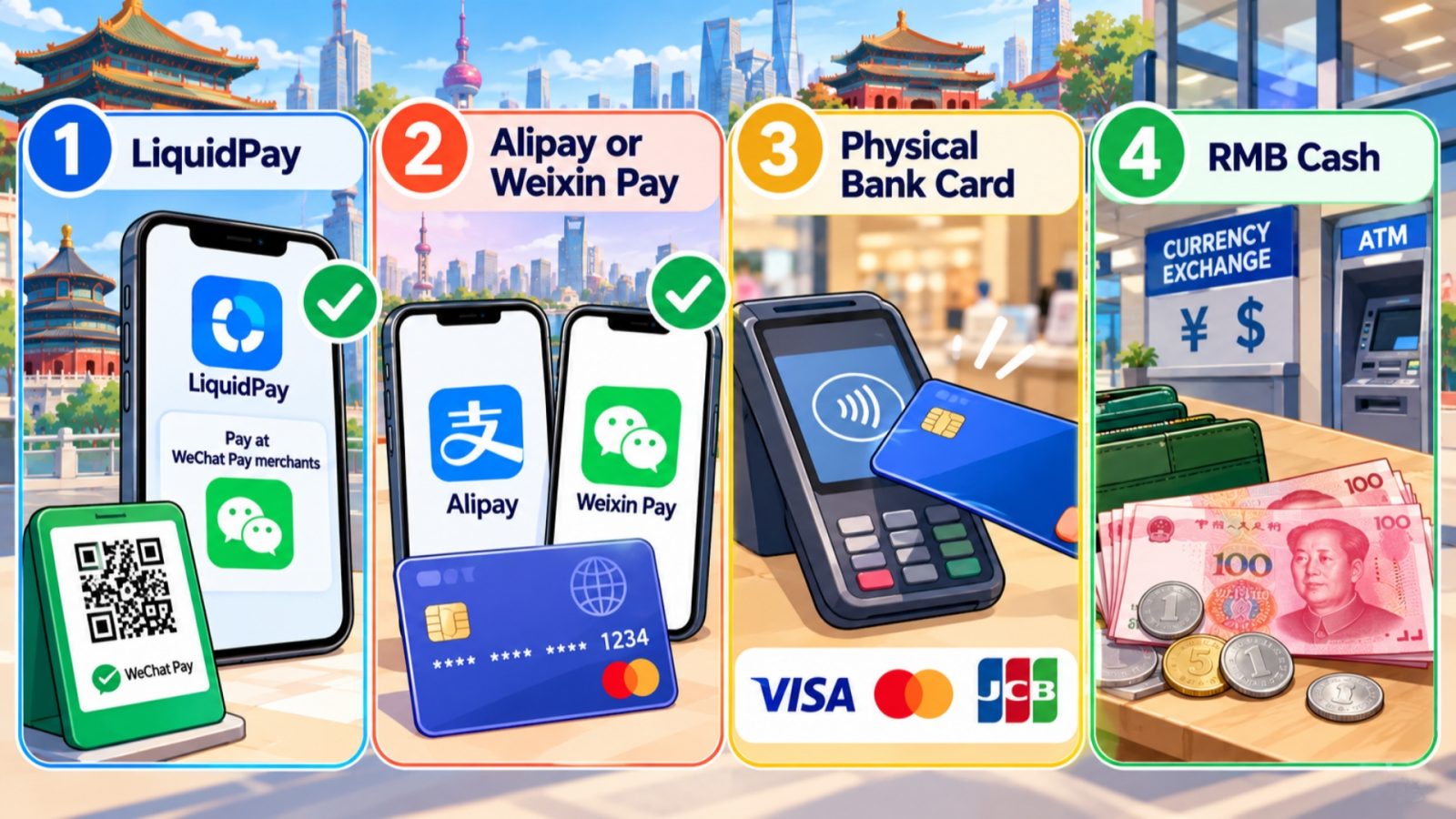
Four Payment Options In China
Choose your replacement by acceptance and account eligibility first, then compare its cost. A familiar app is useful only when it can handle your actual purchase. For the Changi Pay China payments 2026 transition, moving your account and preparing a mainland checkout method are related but separate tasks.
LiquidPay and Participating WeChat Merchants
Liquid Group lists China payments through participating merchants accepting WeChat Pay, using its RoamQR network. Its product page also calls the China network Weixin Pay. This differs from the old Changi Pay instructions centered on Alipay/Alipay+ QR.
Accordingly, do not assume that every code bearing a familiar payment logo will work. Account eligibility, the merchant, network, location, and transaction type can affect availability. Use LiquidPay's supported scanning flow and review the merchant and payment details it actually returns.
Using an existing balance: LiquidPay is worth considering when you already hold usable funds. Keep another route ready for a merchant the app cannot serve, so your day's spending does not depend on one untested purchase.
Alipay and Weixin Foreign Card Payments
International visitors can link eligible overseas cards to Alipay or Weixin Pay without opening a mainland bank account. Register with your own details and complete the app's requested checks. Card binding may also require approval or verification from your issuing bank.
For a visitor starting fresh, this provides a route separate from the discontinued Changi Pay setup. Nevertheless, adding a card is preparation, not proof that every merchant or transaction will accept it. Keep access to your bank's verification messages and check the available payment method for the purchase itself.
Compare the Complete Payment Cost
For international-card wallet payments, a transaction of ¥200 or less is generally exempt from the platform service fee. Above that threshold, a 3% fee on the full transaction amount may apply. Check the payment page for the applicable charge and any promotional exemption.
Illustrative calculation: If a ¥500 purchase attracts the full 3% platform fee, that fee is ¥15, making the platform-level total ¥515. This example excludes your card issuer's conversion and other applicable charges.
LiquidPay's overseas payment conversion uses its available balance and real-time exchange rate. Do not carry an old Changi Pay “zero fee” claim into this different route. Instead, compare the amount and currency shown for the transaction with the competing payment method's actual total.
For a larger purchase, ask which supported methods the merchant offers before committing. Then compare like with like: the same bill, the same currency, and all displayed charges. A smaller headline fee does not necessarily produce the smallest final debit after conversion.
Keep Cash and a Physical Card
A physical card and some RMB cash give you options when phone-based payments fail. For card payments, look for the relevant network logo or ask the cashier about acceptance. Do not assume that having the card linked in an app means the shop also has a compatible terminal.
Arrange cash through a legitimate exchange service or an ATM displaying your card network. Confirm your issuer's withdrawal conditions and choose an amount suited to your immediate needs. Small denominations can make an ordinary purchase easier when the exact change available matters.
Prepare Before Your Next China Payment
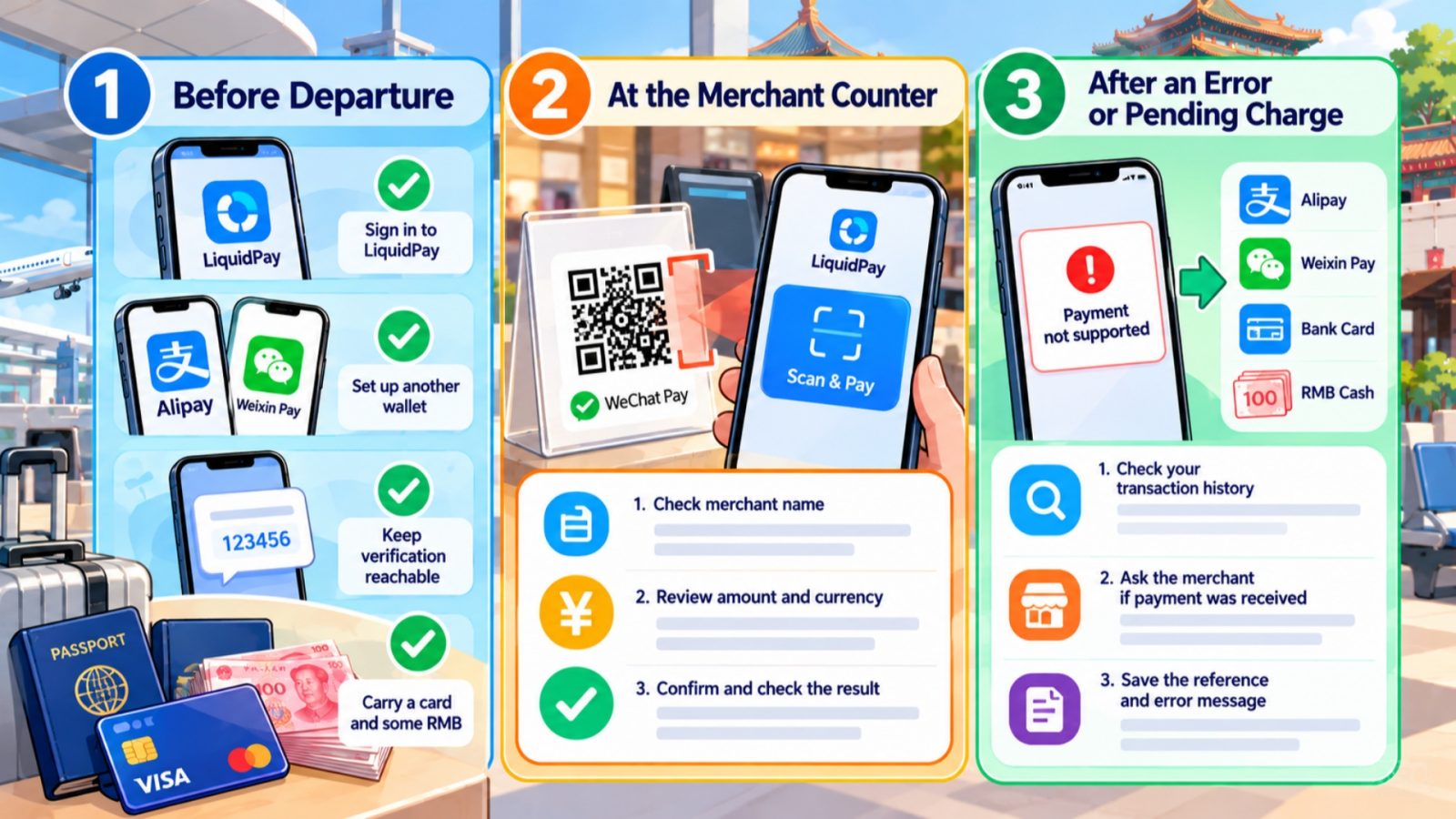
China Payment Workflow For Travellers
Turn the service change into a short preparation task before departure. Once you have identified the right account and chosen a replacement, concentrate on access, the first purchase, and a fallback that you can use without troubleshooting at the counter.
Before Departure
- Open the right account: Sign into LiquidPay if you have existing funds, and resolve access problems while you have time to follow up.
- Prepare another wallet: Complete the requested registration, card binding, and identity checks for your chosen China payment app.
- Keep verification reachable: Check how you will receive messages on the number registered with your bank and payment provider during the trip.
- Arrange an independent backup: Carry your physical card and plan where you can obtain RMB, rather than leaving both tasks until a payment fails.
Do not judge LiquidPay's China acceptance by scanning a saved Chinese code while you are abroad. Its Scan & Pay service checks the country where you are located. A location-based rejection outside China cannot by itself establish what that merchant transaction will do when you are there.
At the Merchant Counter
Ask which payment methods the merchant can accept for your bill. If using LiquidPay, open Scan & Pay and scan the supported merchant code. Then inspect the returned payment information before authorizing anything.
- Check the merchant name and confirm that it matches the purchase you are making.
- Review the amount, payment currency, exchange rate, and any other transaction details the app displays.
- Confirm only when the details are correct, then check the resulting transaction status with the merchant.
A successful small purchase is a useful starting point, but it does not guarantee acceptance for a different merchant or larger amount. Keep the backup accessible throughout the trip. This gives you room to handle a specific refusal without having to rebuild your entire payment setup.
After an Error or Pending Charge
If a code is unsupported, use an available alternative rather than repeatedly scanning the same code. Liquid Group lists merchant participation, code validity, account limits, verification, and network availability among the factors that can affect a payment.
- If the outcome is unclear, inspect your transaction history before trying again.
- Ask whether the merchant received payment, so that you do not pay the same bill twice.
- Save the reference and error message if you need the provider to investigate.
When the app shows a location, security, or verification requirement, follow its stated process. Do not try to disguise your location or bypass a restriction to force the purchase through. Use your prepared alternative for the immediate bill, then resolve the account issue through official support.
Frequently Asked Questions
Q: Do older accounts keep Changi Pay China payments 2026 access?
No. Existing linked accounts had a transition period ending September 30, 2026. From October 1, the overseas Changi Pay payment route stopped for them too. Keeping an older account does not extend that service. Recover any existing Liquid Account through LiquidPay, and prepare a supported method for new purchases in China.
Q: Has my Liquid Account balance disappeared?
The account continues even though Changi Pay no longer provides access to it. Sign into LiquidPay using your registered Liquid Account email address, complete any requested verification, and check the balance there. If the details do not match your records, contact Liquid Group before adding money or creating another account to investigate.
Q: Can LiquidPay scan every Chinese QR code?
No universal acceptance is promised. Liquid Group lists participating WeChat Pay merchants in China, with availability depending on your account, location, merchant, network, and transaction type. Scan the supported merchant code and review the details returned in LiquidPay. Keep another method available, because a familiar payment logo alone does not confirm acceptance.
Q: Where will a refund for a September purchase go?
For an overseas purchase made using your Liquid Account on or before September 30, a merchant-initiated refund returns to that account. Processing follows the merchant's refund timeline. Check LiquidPay and keep the original transaction and refund confirmation together. Contact Liquid Group if you need help tracing the credit after the merchant initiates it.
Q: Does passport registration guarantee PayNow withdrawal?
No. LiquidPay's passport registration offering and the requirements for PayNow are separate matters. Its PayNow activation guidance describes Singpass and PayNow verification, while Changi's withdrawal instructions require a PayNow-registered receiving number. If that route is unavailable to you, ask Liquid Group which withdrawal method your account can use before attempting a transfer.
Q: Can I still use Changi Pay at Jewel?
Yes, at participating Jewel and Changi Airport merchants using supported linked debit or credit cards and eligible vouchers. The overseas service change does not mean all Changi Pay functions have ended. Follow the conditions for that particular purchase or voucher, and keep your China payment arrangements separate from your Singapore airport shopping plans.