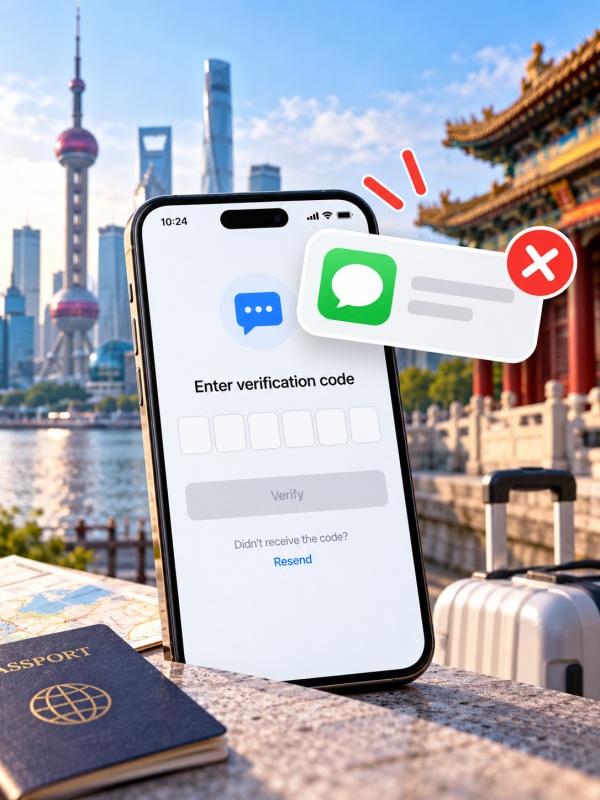
Ways to Address Missing Verification Codes in China
If you are not receiving verification codes in China, first match the number on the verification screen to an enabled phone line, then test whether that line receives ordinary SMS. Your Airalo or Nomad data eSIM can load Alipay perfectly while the home number waiting for its code is switched off. Keep the receiving line active and use the travel plan for data.
The same distinction matters when a food order stops at login: browsing a Meituan menu does not mean your account is ready to order. Start with the phone instructions below, then follow the app-specific checks. If you need a Chinese number, check your phone's SIM compatibility before heading to a counter—especially with an overseas eSIM-only iPhone.
Quick Facts
3 Checks for Missing Verification Codes
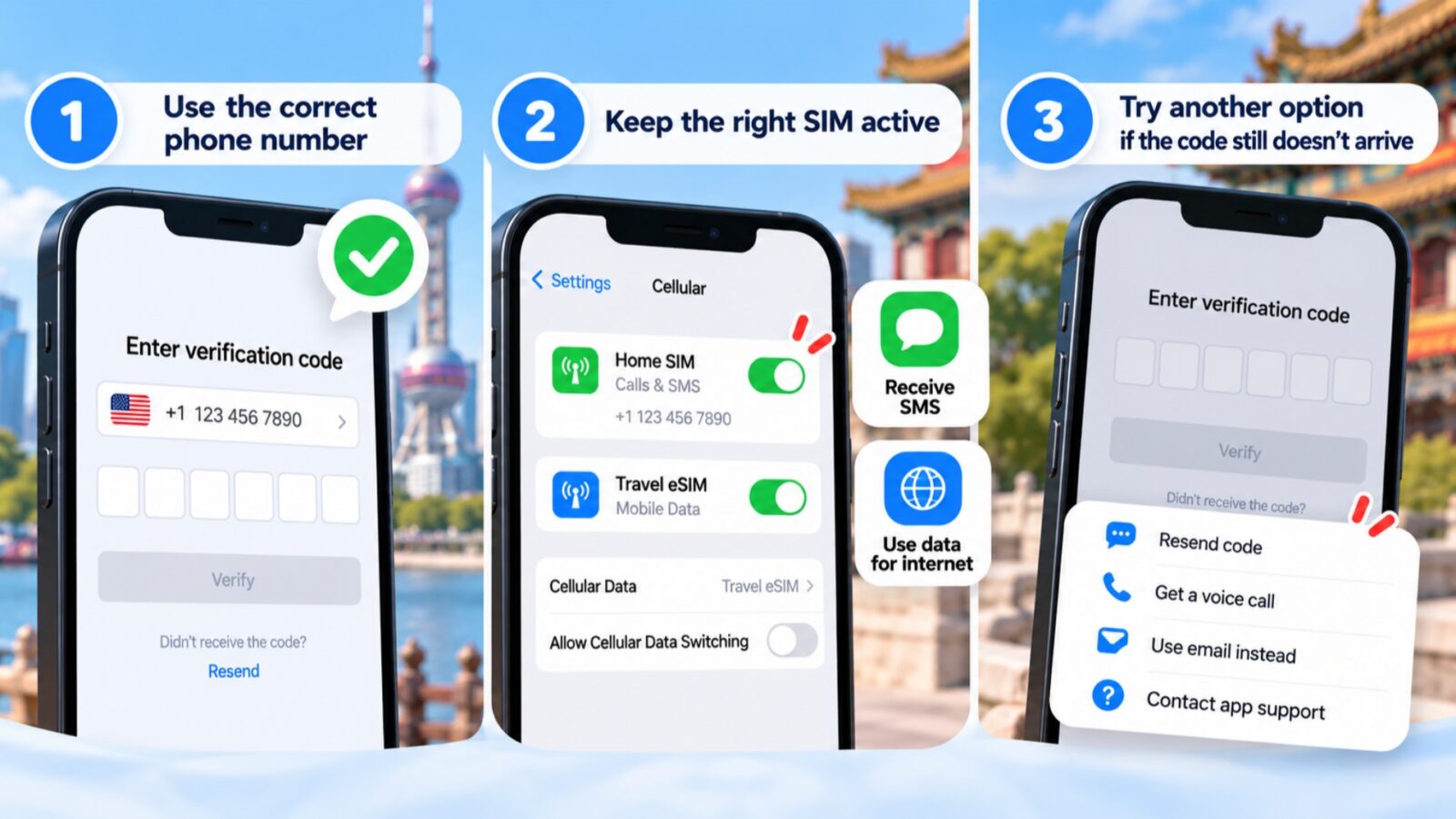
Check for Missing Verification Codes
Before another resend, look at the screen asking for the code. Are you registering an account, binding a phone number after another login, or verifying a bank card? Those requests can involve different receiving numbers. The useful first move is finding the one this request actually uses.
Check 1: Your Receiving Number
Read the country code and final digits on the verification screen. Choose the country your number belongs to—even while you are in China. If the page explicitly rejects that region, changing roaming settings will not make the number eligible.
Which card are you using? Open the purchased package details and match it below.
Airalo
Look for Data versus Data/Calls/Texts on the package page. Data-only supplies internet; keep your regular number available for SMS. A calls-and-texts package does not automatically provide +86.
Nomad data-only
“No Number” or “Unknown Number” need not mean installation failed. An identification number displayed by a profile may not receive texts. More data will not add SMS to it.
Mainland carrier SIM
With China Mobile, China Unicom or China Telecom, ask for a personally registered +86 number with incoming SMS, then test it.
Hong Kong or cross-border plan
China coverage can mean roaming data only. Check the number's country code and incoming-SMS entitlement separately.
For travelers not receiving verification codes in China, this package check can save a needless eSIM reinstall. Use the number that actually receives texts, rather than an identification number from a data profile.
Check 2: Roaming and SMS
Keep two jobs separate on your phone: the travel plan supplies data; the number shown by the app receives the text. Follow the instructions for your device below. Menu names vary with software, country and carrier, so use the line's actual number to identify it rather than assuming “Primary” means your home SIM.
iPhone
enable the receiving line and keep data on the travel eSIM.
- Find the number
Open Settings → Cellular or Mobile Data, then select the line matching the verification screen. Enable Turn On This Line. - Select your data plan
Return to Cellular or Mobile Data → Cellular Data or Mobile Data, then choose the travel eSIM. To prevent automatic data use on the other line, turn off Allow Cellular Data Switching. - Control roaming data separately
Keep the home line enabled even if you disable its Data Roaming. Set roaming on the travel line according to that provider's installation instructions. - Look for a filtered text
On iOS 26, open Messages → Filters → Unknown Senders. If you find a legitimate verification conversation, use Mark as Known to move it into your main conversation list.
Google Pixel
turn on Use SIM for the receiving number.
- Enable the line
Open Settings → Network & internet → SIMs, select your home carrier, and enable Use SIM. Some instructions require Android 11 or later. - Choose data separately
Under SIMs, use Mobile data or the primary-SIM controls to select your travel plan. Calls, Texts and Mobile data have different assignments. - Check message filtering
In Google Messages, open your profile photo or icon → More options → Spam & blocked. Review the conversations; unblock a sender only when you recognize it as legitimate.
Samsung Galaxy
start in SIM manager.
- Enable your number
Open Settings → Connections → SIM manager or SIM card manager. Turn on the switch beside the receiving SIM or activated eSIM. - Assign mobile data
Where Calls, Text Messages and Mobile data appear separately, choose the travel card under Mobile data. Some US versions instead show Primary SIM; follow that model's data controls rather than looking for identical menus. - Read the roaming control correctly
Settings → Connections → Mobile networks → Data Roaming controls data. It is not a separate SMS-roaming switch. Keep the receiving SIM enabled. - Use the right messages app
If your Galaxy uses Google Messages, follow the filtering path above. Samsung Messages has a different interface; it does not use the Google profile menu.
Now send one real SMS test. Ask someone to text the exact receiving number. The sender must use carrier SMS, not iMessage, RCS, WhatsApp or WeChat. Check international sending charges first.
SMS does not arrive
Restart and retest. If the line has no service or still receives nothing, contact its issuing carrier about roaming registration, account restrictions and incoming SMS. For a foreign number, that means your home carrier.
SMS arrives, app code does not
Move to Check 3. Personal SMS working does not prove every business-message route works.
The carrier suggests manual selection
Choose a supported partner available locally. On Pixel, look under the receiving SIM's network settings.
Keep advanced changes for a diagnosed fault. Do not edit the message-centre number or APNs, or reset the phone, without device-specific guidance. On an older phone with full message storage, clear space before testing again.
Check 3: App Verification Options
The next move depends on the screen where you stopped. Match your situation below before requesting another code.
Alipay
registering an account or adding a bank card?
- Registration
Overseas numbers can register before arrival. Check the country code and keep that receiving line enabled; a Chinese SIM is not a prerequisite. - Card setup
Open Me → Bank Cards. If verification appears, read the requester and masked destination. For a card-issuer check, follow the bank's method and contact the issuer if it fails. - Before buying +86
A new Chinese number does not automatically change the number your overseas bank holds.
Meituan
menu browsing works, but login stops you?
The main app allows browsing and searching without registration. Account creation needs a phone number. Use these cues at the login screen:
- Country selector appears
Choose your number's country. If that region is explicitly rejected, stop repeating roaming checks. - One-tap carrier login appears
Read the masked number before authorizing. If it is wrong, use another-number or alternative-login options where offered. - WeChat authorization leads to phone binding
Complete the requested number check. Third-party login can still require it; another entry point is not a guaranteed shortcut. - Delivery contact is requested
This helps the rider reach the recipient. With permission, reception may assist or place an order, but its number should not become your personal login. - WeChat Pay — already logged in? Card setup is at Me → Services → Wallet → Bank Cards. If you are stuck on WeChat's login screen, use its displayed recovery options instead. Voice, email and third-party verification are available only where that screen offers them.
Still not receiving verification codes in China? Save the error, failed stage and last request time for app support. If several platforms fail while ordinary SMS works, also ask your carrier about business or international-message filtering.
🍜 Back to Your Order
Once account access works, follow our food delivery apps in China guide for ordering and receiving your meal.
Prepare Your Number Before Traveling to China
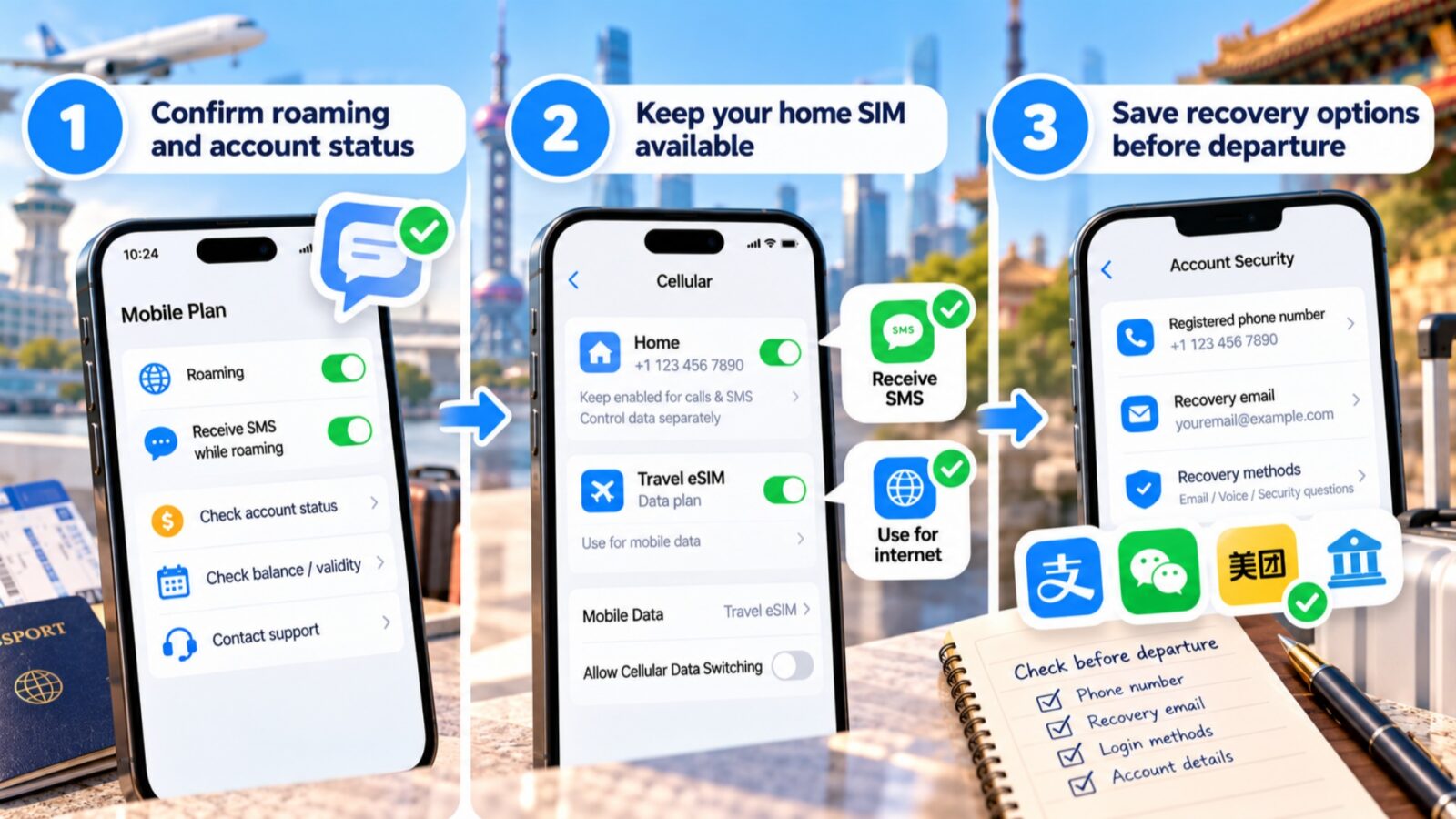
How to Prepare Your Number Before Traveling to China
The easiest setup to prepare is the one your accounts already recognize. Get the original number ready for travel, then add data alongside it. This also leaves you able to handle a bank check that arrives after your Chinese apps are working.
Confirm Roaming and Account Status
Ask your home carrier: “Can this exact plan receive SMS while roaming in mainland China? Does anything need activating, and what will it cost?”
Account — Check prepaid validity, unpaid charges and restrictions. Service — Confirm incoming SMS separately from a data pass. Support — Save a contact route you can use over Wi-Fi without another SMS login.
If you later report not receiving verification codes in China, give the phone model, receiving number and ordinary-SMS test result. “My eSIM doesn't work” leaves out the useful clues.
Keep Your Home SIM Available
Label compatible lines “Home” and “Travel” before departure. Then give each a job:
Home — Keep the line enabled for texts while controlling its data use separately. Calls and incoming SMS follow your carrier's charges. Travel — Select this plan for mobile data, with roaming configured according to its installation instructions. iOS 26 setup — If offered Travel eSIM Only or Travel eSIM and Current eSIM, choose the latter when you need the original line available.
Check the phone supports your intended active-SIM combination. Storing several eSIM profiles does not mean they can all operate at once.
Save Recovery Options Before Departure
While you can still sign in, save the details that are hardest to recover later:
Important apps — Check their registered number, recovery email and available recovery methods. Carrier account — Keep account and plan details accessible without relying on an SMS login. Long-term accounts — Avoid making an expiring tourist number your only recovery route for banking or other important services.
📱 Travel eSIM Setup
For installation and data-plan planning, read our China eSIM guide.
Step-by-Step Chinese SIM Setup for Foreign Visitors
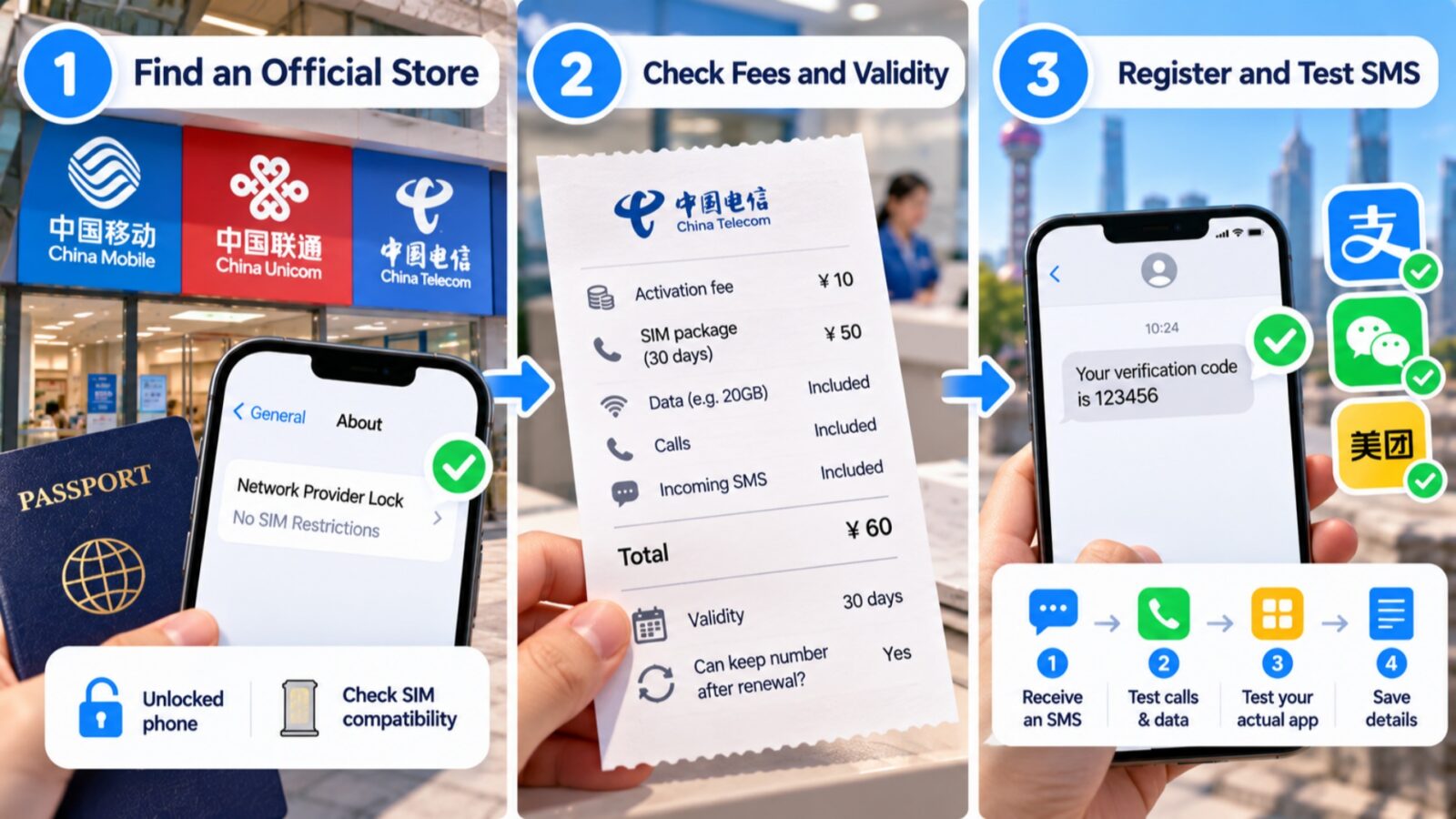
Step-by-Step Chinese SIM Setup for Foreign Visitors
A Chinese number is worth considering when a service you need requires +86, or your existing arrangement cannot provide dependable access. If you are not receiving verification codes in China, identify whether a new number would solve that specific request before buying one.
Step 1: Find an Official Store
Before the shop: can your phone use the card?
Check the lock — On iPhone, open Settings → General → About → Network Provider Lock. An unlocked phone shows No SIM Restrictions.
Check the tray and eligibility — An overseas eSIM-only iPhone cannot simply take a physical card. Apple also does not support a mainland Chinese carrier eSIM on an iPhone purchased outside mainland China.
Consider a spare phone — A compatible spare can hold your own passport-registered physical SIM. Receive the code there and enter it on the main device where permitted. Check carrier compatibility first; do not buy someone else's registered card.
Where to go: Choose a carrier-operated China Mobile, China Unicom or China Telecom branch that confirms passport registration. Attend yourself with your valid passport and phone. Extra visa, residence or accommodation documents depend on the product and channel.
Landing in Shanghai? Pudong International Airport has communication services in the international-arrivals baggage-claim service area. The International Services Shanghai centre in public arrivals also handles short-term China Telecom cards with 7-, 15- and 30-day options. Ask whether the number can continue after that period.
Step 2: Check Fees and Validity
Ask staff to write down today's total and split it into these four checks. Preloaded credit is account balance; an activation fee is a charge.
- Pay now — Separate activation, the first package charge and prepaid credit. Is the first billing period included?
- Pay later — Record recurring charges, incoming-SMS availability, included calls and data, and out-of-package costs.
- Expiry — Does validity start at purchase or activation? Get the date and ask whether renewal keeps the same number.
- Management — Have staff show recharge, plan-change and cancellation routes, including what works remotely.
Only for this trip? A fixed expiry may suit you. Need the account from home? Check overseas SMS and number retention before paying. A top-up does not necessarily turn a visitor card into an ongoing account.
Step 3: Register and Test SMS
Stay at the counter until the line can do the job you bought it for. Complete identity verification, then follow this order:
- Identify the line
Record your new number and insert the SIM into the compatible phone. Keep the receipt and package details. - Test basic service
Receive a real SMS. Test any calls and data you need, after checking applicable charges. - Test your actual app
Open the service that prompted the purchase and request one code when its countdown allows. Receiving a text is a stronger check than seeing a 4G or 5G symbol. - Save the next steps
Record the expiry date, recharge route and support contact before leaving.
If ordinary SMS works but the app still refuses registration, keep the error and ask about the remaining account or number issue. Another new SIM is not automatically the answer. For visitors not receiving verification codes in China, this final app test is the difference between buying connectivity and completing the original task.
Useful Chinese Phrases for SMS Support
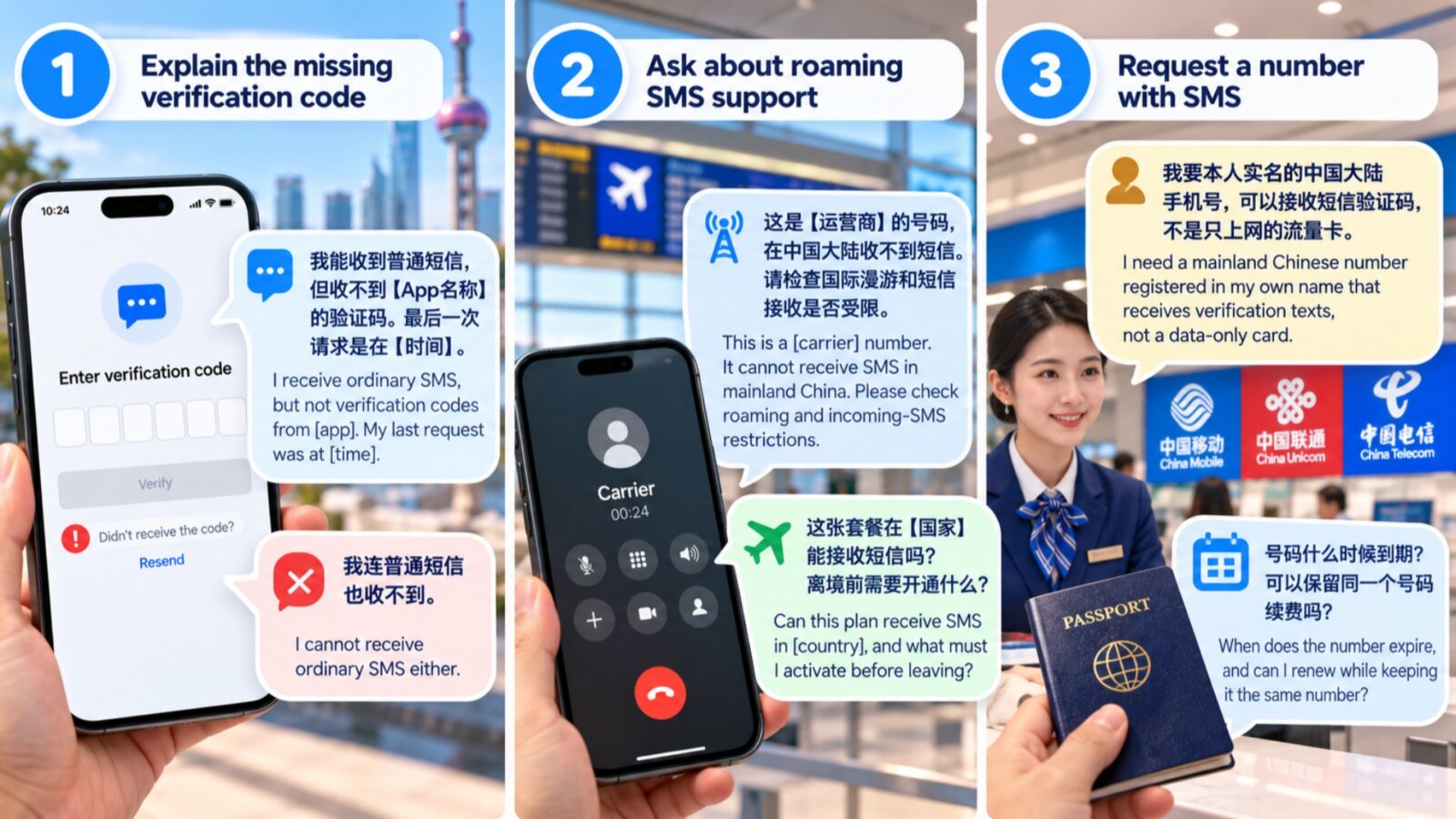
Useful Chinese Phrases for SMS Support
Show the relevant sentence alongside the error screen. Fill in the app name, carrier and destination country so the person helping you knows which service to investigate.
Explain the Missing Verification Code
If ordinary SMS arrives, show this
“我能收到普通短信,但收不到【App名称】的验证码。最后一次请求是在【时间】。”
“I receive ordinary SMS, but not verification codes from [app]. My last request was at [time].”
If all SMS fails “我连普通短信也收不到。” — “I cannot receive ordinary SMS either.”
Ask About Roaming SMS Support
Foreign SIM in China — contact its issuing carrier
“这是【运营商】的号码,在中国大陆收不到短信。请检查国际漫游和短信接收是否受限。”
“This is a [carrier] number. It cannot receive SMS in mainland China. Please check roaming and incoming-SMS restrictions.”
Chinese SIM going home with you — ask before departure
“这张套餐在【国家】能接收短信吗?离境前需要开通什么?”
“Can this plan receive SMS in [country], and what must I activate before leaving?”
Request a Number With SMS
Show the counter assistant
“我要本人实名的中国大陆手机号,可以接收短信验证码,不是只上网的流量卡。”
“I need a mainland Chinese number registered in my own name that receives verification texts, not a data-only card.”
Then ask about keeping it “号码什么时候到期?可以保留同一个号码续费吗?” — “When does the number expire, and can I renew while keeping it?”
Keep Your Chinese SIM Working Abroad
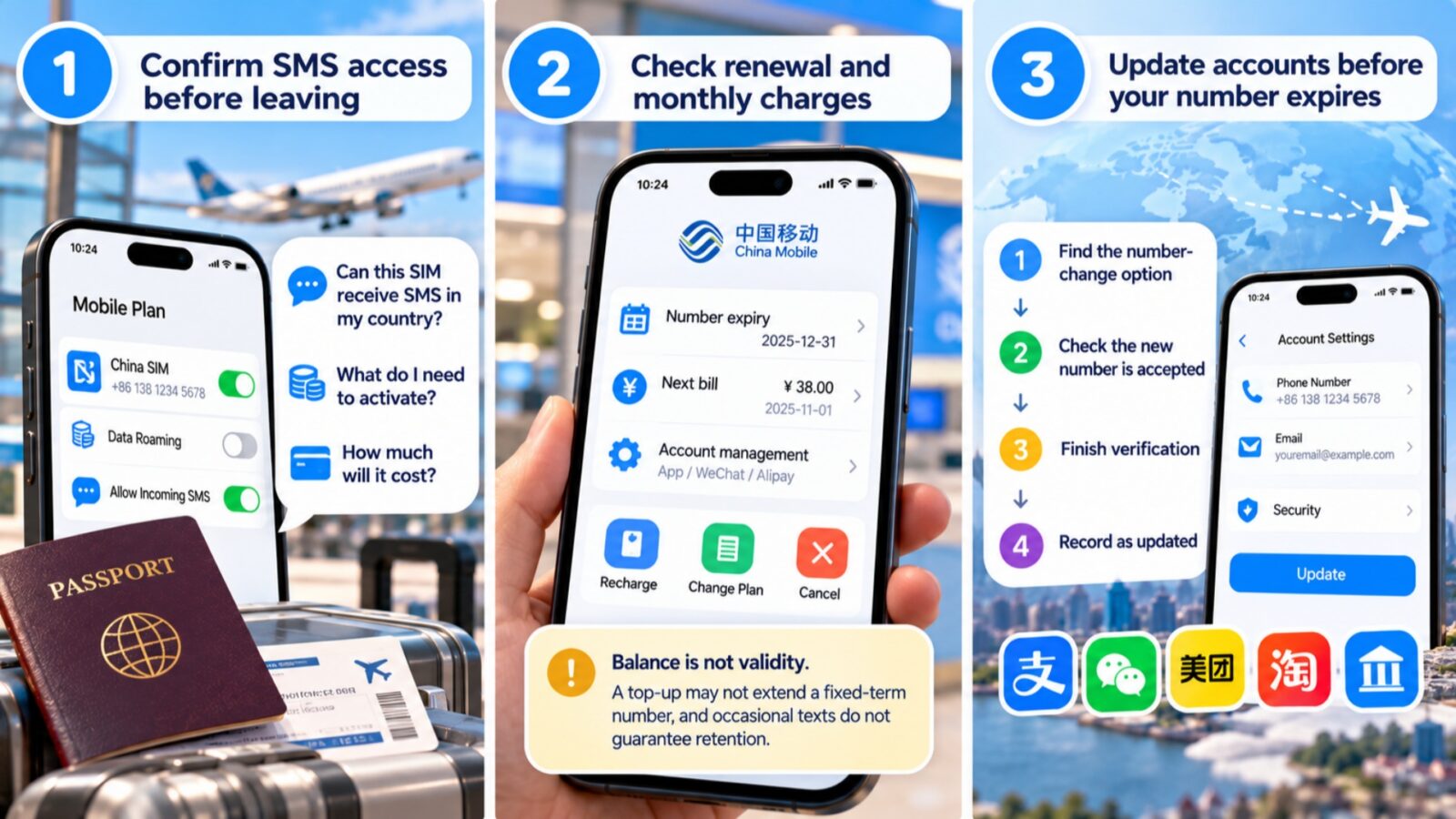
How to Keep Your Chinese SIM Working Abroad
The number you use successfully today may still expire after the trip. If you were not receiving verification codes in China and bought a local card to finish registration, decide whether that account needs to remain accessible once you leave.
Confirm SMS Access Before Leaving
Give the carrier your destination country and exact package name. Ask whether incoming SMS works there, what must be activated and what it costs. A test inside China does not establish overseas reception.
Abroad, keep the receiving line enabled and manage its data-roaming charges separately.
Check Renewal and Monthly Charges
Save these details while staff can still show you the account controls:
Balance is not validity. A top-up may not extend a fixed-term number, and occasional texts do not guarantee retention. Follow the actual renewal conditions.
Update Accounts Before Your Number Expires
If you will not keep the SIM, handle each linked account while it still receives codes:
Find the number-change option → check the replacement number is accepted → finish verification → record the account as updated.
Repeat for every service. Updating one app does not change the others or your bank's contact details.
Frequently Asked Questions
Q: How long should I wait before requesting another code?
Follow the countdown and any restriction on the current screen; there is no single waiting period for every app. Record the last request time and avoid repeated taps. If you are not receiving verification codes in China, use the pause to test ordinary SMS and check the destination number, rather than generating more requests.
Q: Does changing my default SMS SIM fix incoming codes?
Changing the default sending SIM does not redirect texts addressed to another number. Incoming codes belong to the destination shown by the app. Find that number under your phone's SIM settings, keep its line enabled, and test reception. Your travel eSIM can remain the data line while your home number receives the message.
Q: Should I turn off iMessage or RCS?
Not as a general fix for a missing verification code. First check the receiving line and filtered messages. For your test, have the sender use genuine SMS rather than internet messaging. That establishes what you are testing without requiring you to permanently disable the messaging services you normally use.
Q: Can I use my hotel's number to log in?
A hotel number is unsuitable as your personal long-term verification number because you will not control future codes. With permission, reception may help with a delivery contact or place an order for you. Check what the field requests: a recipient's contact number and an account-binding number have different purposes.
Q: Can Wi-Fi Calling replace a local SIM?
Only if your carrier, device and location support the services you need. Ask specifically whether SMS works through that arrangement, rather than assuming support for calls includes verification texts. Wi-Fi Calling does not supply a Chinese +86 number or change which country codes an app accepts, so it cannot resolve every registration restriction.
Q: What should I tell support if codes still fail?
Use: “I am not receiving verification codes in China in [app/version], during [registration, login or payment]. The destination ends [digits]. Ordinary SMS [arrives/fails]. My phone is [model/OS], using [home SIM] with [data plan]. My last request was [China time]. The error reads [text].” Never share a password or verification code.