Touch 'n Go eWallet in China
You can use Touch 'n Go eWallet in China for supported merchant payments through Alipay+, provided your account meets the overseas payment requirements. Start by checking that your TNG eWallet identity verification is complete; having the app installed is not enough. At checkout, you either scan the merchant's payment code or let the cashier scan your overseas payment code. The important limits are merchant acceptance, account eligibility, available funds, and the exchange rate you approve. This guide walks through preparation, both payment methods, the conversion fee, and what to do when a payment fails or a purchase needs a refund.
Quick Facts
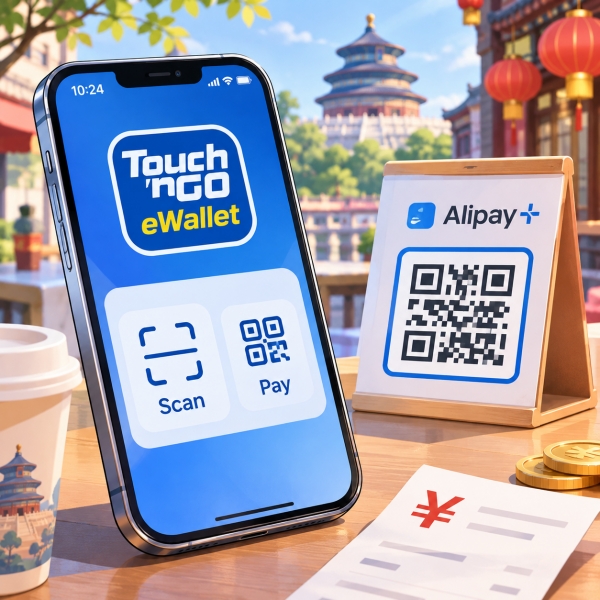
For existing eligible users, paying with Touch 'n Go eWallet in China starts with the wallet already on your phone. You do not need to begin by searching for another app called Alipay+. However, recognizing that logo does not establish that every payment code beside it will work.
Choose the method at the counter: If the cashier presents a merchant code, use Scan. If the cashier asks to scan your phone, use the overseas code under Pay. Establishing who scans whom avoids opening the wrong screen while someone waits.
💳 Visitor Payment Options in China: Planning how to link international cards to Alipay or WeChat Pay, handle cash backups, and settle daily bills across mainland merchants? Read our complete guide on How Do Tourists Pay In China.
Check Your Eligibility
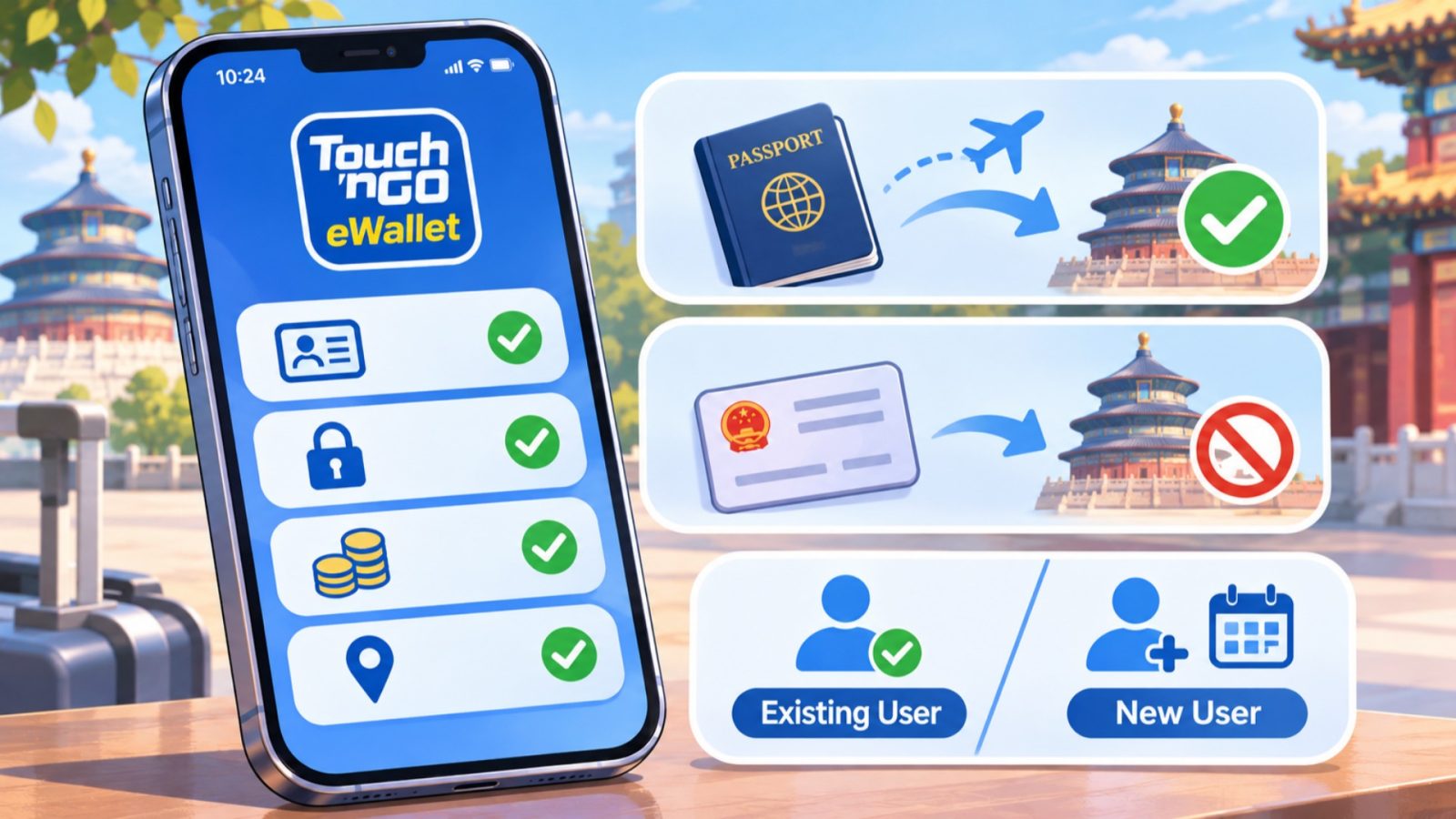
Touch N Go Ewallet Eligibility For China Payments
Confirm Verification First
Before using Touch 'n Go eWallet in China, complete identity verification, often called KYC. This is required by the Overseas QR eligibility guidance. Check your account's verification status before relying on it for China spending. A registered account, a linked funding card, and an approved identity check are different things.
If verification is still pending, treat the wallet as unready for this trip. Follow the identity instructions shown in your own account, and resolve mismatched details with TNG support. Do not assume that adding money will remove an identity restriction.
Before you rely on it, confirm:
- Verification: Your account has completed the required identity check.
- Access: You can sign in on the phone you will take.
- Limits: You understand the account type and allowances shown for you.
- Residence: The destination restriction does not apply to you.
Traveling with someone who already uses the wallet can make the process feel straightforward. Still, check your own account before copying their setup. A successful payment on a companion's phone cannot confirm that your verification has cleared or that your remaining allowance covers the bill.
Check the Residence Restriction
The official eligibility page says China residents cannot make Overseas QR payments within their own country. That condition matters even if you hold a working TNG account. Do not treat foreign citizenship, overseas registration, and residence as interchangeable qualifications.
If you are a China resident, this guide's payment path should not be your assumed solution for domestic purchases. Ask TNG about your account's permitted use before making plans around the feature. Switching the displayed destination does not change a residence restriction.
Account question to resolve: “My account is verified, and my residence is [country]. Is Overseas QR enabled for merchant payments in mainland China on this account?” That is more precise than asking whether the app works in China generally.
Separate Existing Users From New Applicants
An existing verified user has a different preparation task from someone downloading TNG eWallet for the first time. Existing users should focus on overseas eligibility, funding, and merchant acceptance. New applicants must first establish that registration and verification are available for their circumstances.
TNG offers account categories with different limits. A product aimed at tourists visiting Malaysia should not automatically be read as permission for every overseas payment feature. Confirm the relevant China capability within your account before loading money specifically for this trip.
Existing users: If you already use TNG eWallet routinely, preparation may be fairly focused. For a new user, leave time for registration questions and keep another payment method ready. This guide does not promise account approval or a fixed verification turnaround.
🇸🇬 Using Changi Pay in Mainland China: Traveling from Singapore and want to pay via Alipay+ QR codes at Chinese shops and restaurants without a local bank account? Check out our breakdown on Changi Pay China Payments 2026.
Prepare Before You Travel
Check Your Phone and Connection
To prepare for using Touch 'n Go eWallet in China, update the app before departure and check that it opens normally. TNG eWallet specifically lists app updates and internet connectivity among its overseas payment troubleshooting checks. Discovering a login problem at home gives you more time to resolve it.
You need a working connection when attempting payment. Arrange mobile data or another usable connection for your arrival, rather than assuming every counter offers Wi-Fi. This is a practical preparation choice, not a claim that one particular roaming package is required.
Phone preparation checklist:
- Account: Open the wallet and confirm you can access your account.
- App: Update it using your usual official app store.
- Internet: Check that your planned data connection works on the phone.
- Camera: Allow access if you intend to scan merchant codes.
- Backup: Keep the phone charged and another payment method accessible.
Camera permission is relevant to Scan because the app must read the merchant's code. If the camera view will not open, inspect that permission before assuming the merchant is unsupported. Conversely, allowing the camera cannot fix an account eligibility problem.
Check Funding Costs Separately
Know how you will add money before you need a larger purchase. TNG eWallet's product disclosure sheet distinguishes money added through Malaysian credit cards from money added through non-Malaysian credit or debit cards. Those funding charges are separate from overseas conversion.
The disclosed charge is 1% for adding money with a Malaysian credit card, and up to 2.6% for a non-Malaysian credit or debit card. Check the amount shown for your actual funding method before approving a reload.
Cost checkpoint: Compare the amount you add, any funding charge, and the resulting usable balance. Later, review the China payment conversion separately. Combining these into a single “TNG fee” can hide where your spending cost actually comes from.
For example, adding RM100 with a Malaysian credit card carries a disclosed RM1 reload charge. At the maximum 2.6% rate, adding RM100 with a non-Malaysian card would carry RM2.60. These are illustrative funding calculations, not exchange-rate quotes or a promise that every foreign card incurs the maximum.
Keep a Separate Way to Pay
Using Touch 'n Go eWallet in China does not guarantee support at every merchant. Take some usable backup money and prepare another payment route appropriate to your circumstances. The backup should be ready before a failed checkout, especially when you need to leave for a train or appointment.
That does not mean keeping a large unused wallet balance for every possibility. Start with an amount that fits your planned purchases and confirmed limits. Increase it deliberately when you understand both the funding cost and how you will use it.
Before a substantial purchase: ask the merchant whether it accepts your Alipay+ wallet. A simple acceptance check is useful even after smaller purchases have worked elsewhere. Support at one shop is not proof about a different shop's account or terminal.
💸 Funding Alipay With PayPal: Looking into options, limits, and practical workarounds for moving funds between your PayPal balance and your Chinese mobile wallet? Read our guide on How To Transfer Paypal To Alipay.
Make Your First Payment
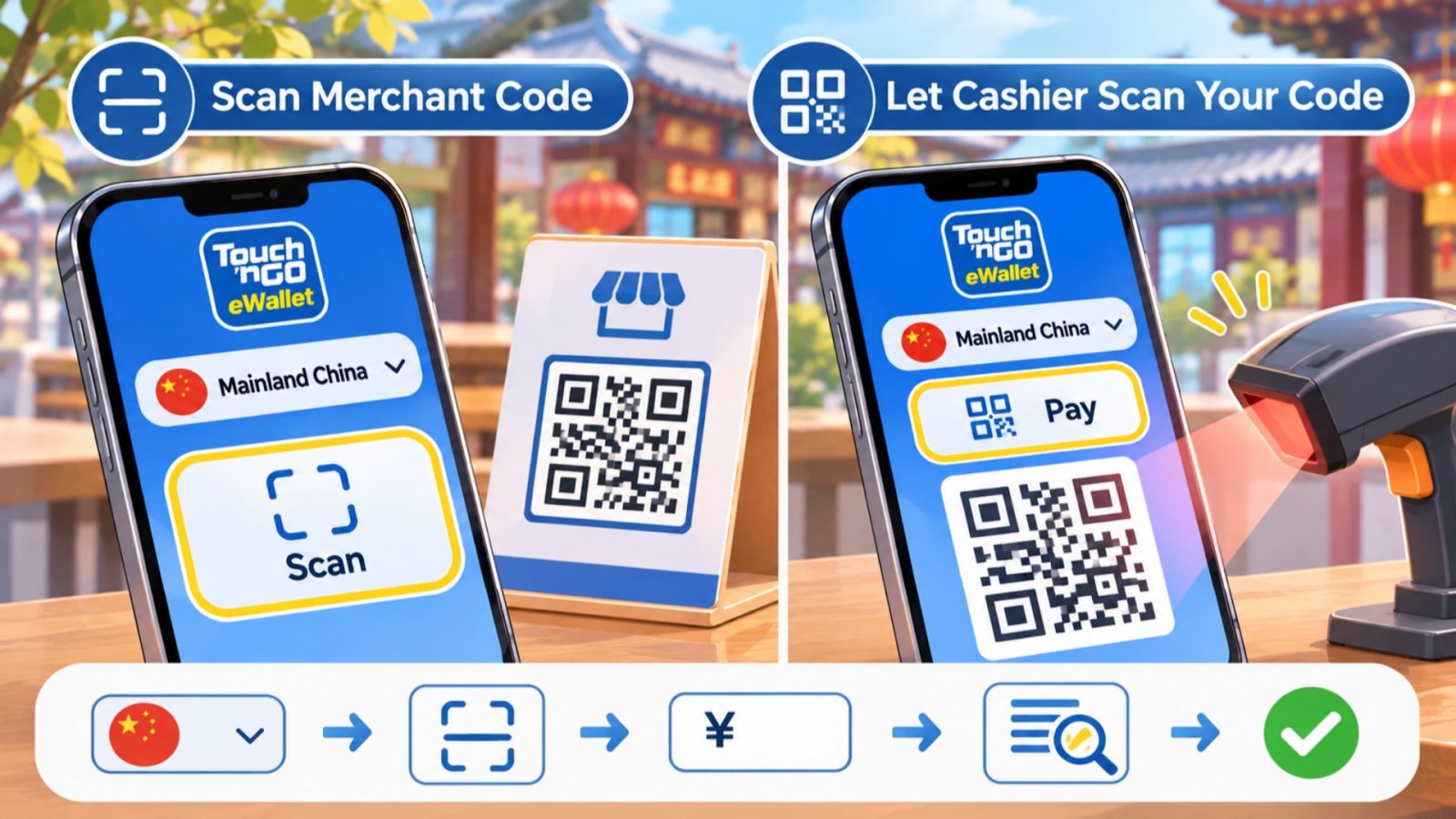
Touch N Go Ewallet Two Payment Ways In China
Scan the Merchant's Code
To pay with Touch 'n Go eWallet in China, use Scan when the merchant provides a supported business payment code. TNG's country-homepage tutorial starts with selecting your destination. For a mainland purchase, choose Mainland China, then use Scan. Your app may show Confirm or the help center's Pay now wording.
- ① Choose the destination: Open TNG eWallet and select Mainland China from the country homepage selector.
- ② Read the code: Tap Scan and scan the merchant's business payment code.
- ③ Enter the bill: Type the purchase amount in the local currency requested on screen.
- ④ Review the payment: Check the currency, amount, recipient, and displayed conversion information.
- ⑤ Approve: Use Confirm or Pay now, then complete any authentication the app requests.
- ⑥ Check completion: Read the transaction result and ask the merchant to confirm receipt.
The amount you enter must match the bill's currency and total. If the merchant quotes CNY 68, first confirm that the screen is asking for the Chinese yuan purchase amount. Do not enter a ringgit estimate in a field intended for the local bill.
Illustrative checkout: For a CNY 68 purchase, compare the merchant's bill with the local amount on the payment screen. Then check the corresponding ringgit cost shown by the wallet. This example does not supply a live exchange rate.
Check the recipient: If the recipient looks unfamiliar or the screen appears to request a personal transfer, stop before approving. Ask the merchant for its supported business payment option. Overseas merchant payments and sending money to a person's account are different tasks.
The merchant's printed code can be clear enough for the camera to read and still be unsuitable for this payment route. Successful scanning only identifies a code. It does not establish cross-border acceptance or confirm that money has reached the seller.
Let the Cashier Scan Your Code
Use this method when the cashier asks to scan your phone. The country-homepage tutorial directs you to select the destination, tap Pay, and present your QR code. The help center also describes a Pay screen with an upward swipe for Alipay+ overseas payments.
- ① Choose Mainland China: Open the country homepage selector and select your destination.
- ② Open your code: Tap Pay.
- ③ Check the overseas option: If your Pay screen offers an upward swipe for Alipay+, use that option.
- ④ Present the code: Show the payment QR to the cashier.
- ⑤ Complete the payment: Let the merchant scan it and follow any approval prompt.
- ⑥ Confirm the result: Check the wallet record and confirm that the merchant received payment.
If your screen looks different: Both official instructions describe overseas merchant payments, but their entry screens differ. Follow the destination or Alipay+ option available in your app. The important check is that you are presenting the overseas payment code, not finding a swipe gesture that your screen may not offer.
At the counter: Tell the cashier you are using an overseas wallet through Alipay+. That helps explain why you are showing this particular code. It does not guarantee that the cashier's terminal or merchant account supports it.
Check the receipt: For merchant-scanned payments, the merchant supplies the purchase amount. Compare the receipt and the completed wallet transaction afterward. If the amount is wrong, raise it immediately with the merchant while you still have the purchase and payment details together.
Confirm the Payment Result
After paying with Touch 'n Go eWallet in China, look for the completed transaction record. A sound or scanned code alone does not confirm payment. Check the amount and merchant details. Ask the cashier to confirm receipt before treating the purchase as settled.
If the result is unclear, pause. Opening a code or starting authentication is not the same as completing payment. Check the wallet record and the merchant's side before authorizing another attempt, particularly when the connection drops during the first one.
Understand Fees and Limits
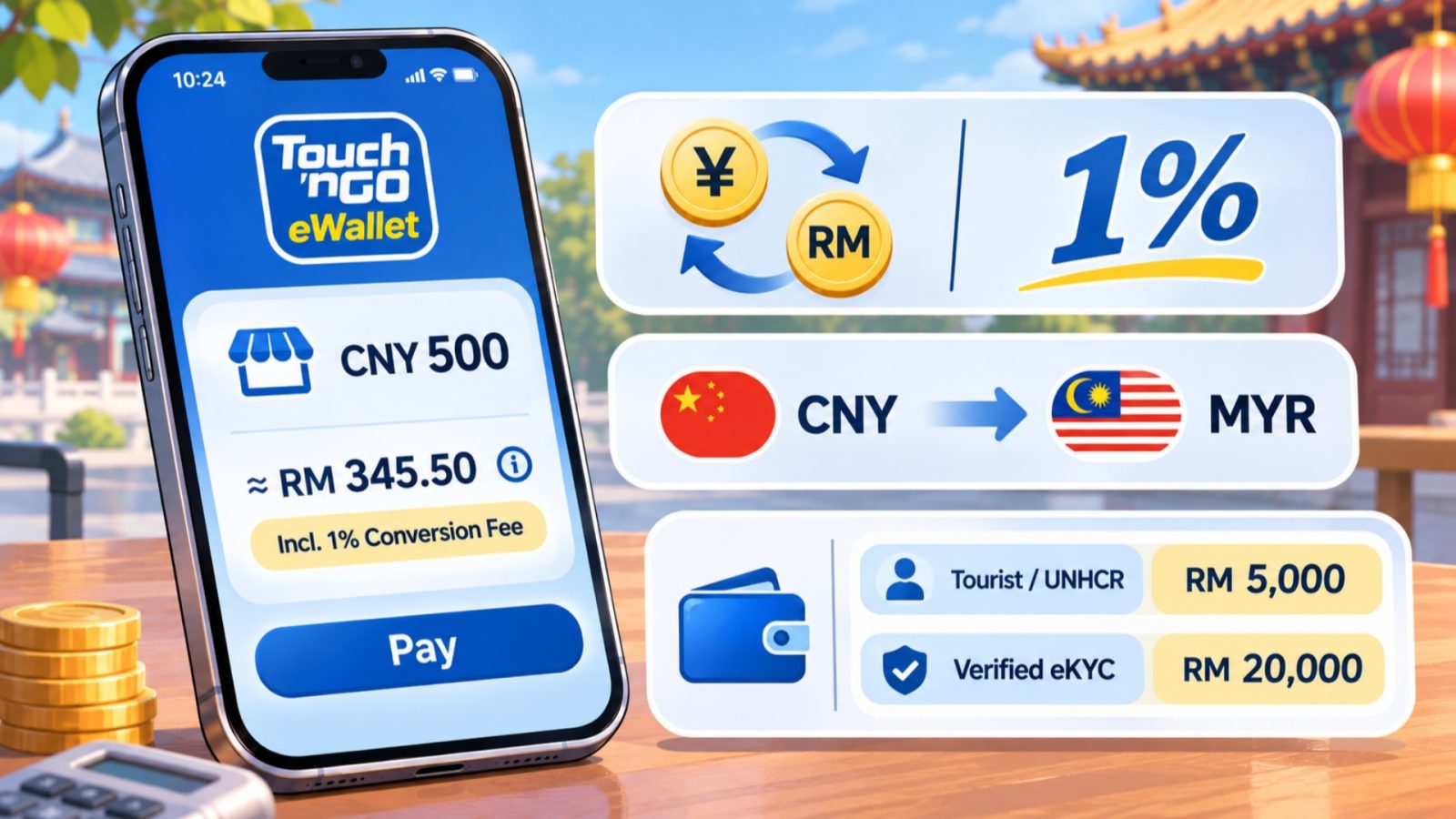
Touch N Go Ewallet Currency Conversion Charges
Read the Included Conversion Fee
For payments with Touch 'n Go eWallet in China, current user terms specify a 1% overseas conversion fee within the displayed exchange rate. The terms effective October 1, 2026 retain this provision in section 1.30. Budget using the rate and amount the app actually shows.
You may also encounter help wording saying there is no foreign transaction fee. Do not interpret that phrase as a promise of zero conversion cost. The conversion provision is explicit, and the product disclosure sheet also lists a 1% overseas conversion fee.
Avoid double counting: If you use the app's displayed payment amount, do not automatically add another 1% to that total. The stated conversion fee is already incorporated into the displayed exchange rate. Funding charges, where applicable, are a separate calculation.
This also explains why comparing a wallet quote with a currency converter can be misleading. The converter's reference rate is not necessarily the rate offered for your transaction. Compare what each payment route would actually charge for the same bill.
Keep Currencies and Charges Distinct
The merchant's China price is in Chinese yuan, usually written CNY or RMB. Your wallet funding and account limits use Malaysian ringgit, written MYR or RM. Keep both labels visible when estimating how much of your balance a purchase will use.
There is no single fixed CNY-to-MYR figure suitable for every travel day. TNG eWallet says overseas rates come from its payment service operators. Check through Pay or Scan when planning, and review the information for the actual payment.
For a larger bill, the useful question is the final ringgit cost and whether it fits your available balance and limits. A rough conversion done days earlier is a planning estimate. It cannot establish the amount that will be charged later.
Use Your Current Account Limits
The product disclosure sheet effective May 1, 2026 lists a RM5,000 wallet limit and RM5,000 monthly limit for its UNHCR/Tourist category. Its Verified eKYC category lists a RM20,000 wallet limit and RM120,000 monthly limit.
The separate overseas FAQ uses Pro and Premium tier names and lists RM5,000 daily and per-payment limits for both. Its labels differ from the PDS. Do not treat a RM20,000 wallet capacity or RM120,000 monthly allowance as permission to make a purchase of that size in one payment.
Before a large bill: Check the per-payment and daily settings shown in your account, as well as your remaining monthly allowance. Ask TNG support to reconcile any mismatch with the published tables before committing to the purchase. There is no reason to load the full amount while that question remains unresolved.
Three different checks: A sufficient wallet balance, remaining monthly allowance, and any daily or per-payment restriction are separate conditions. Adding money can address an insufficient balance; it does not automatically expand a transaction limit or change your account category.
Fix Failed Payments and Refunds
Match the Problem to the Check
If a payment with Touch 'n Go eWallet in China fails, start with the symptom you can actually observe. TNG eWallet's official troubleshooting advice covers app updates, internet connectivity, merchant support, business accounts, and camera permissions. Check those items in relation to the payment method you were using.
- Camera will not open: Check the app's camera permission, then return to Scan.
- Connection fails: Restore usable internet and inspect the earlier transaction result before retrying.
- Code is rejected: Ask whether it is a supported merchant payment code.
- Payment cannot proceed: Check verification, available funds, and the limits for your account.
- Merchant cannot scan your phone: Confirm you opened the overseas Alipay+ payment code under Pay.
Changing an unrelated setting is unlikely to help. A readable personal code remains a personal code after you improve the connection. Similarly, a supported merchant cannot make an unverified or otherwise ineligible account satisfy the overseas service requirements.
If the merchant cannot support this route, switch to your prepared alternative. Do not ask the seller to disguise a personal transfer as a business purchase. The overseas feature is intended for supported merchant accounts.
Pause When the Result Is Unclear
A connection interruption is an uncertain result until you inspect the payment record. Keep the merchant involved while you compare the wallet transaction with its receipt or terminal record. Avoid paying again just because one side has not yet seen a confirmation.
Save the useful details: Keep the transaction reference, amount, currency, merchant, time, receipt, and exact error message where available. These details let support distinguish a rejected attempt from a completed payment or a possible duplicate.
Support request: If the listed checks do not resolve the problem, use TNG eWallet's in-app help or chat function. Explain which route you used, where it failed, and what the transaction record shows. Do not share your PIN or authentication codes with a merchant.
Request a Merchant Refund
For a purchase refund, TNG eWallet directs you to contact or visit the merchant. The merchant's refund policy and conditions apply. Begin with the receipt and the original wallet transaction so the seller can identify the purchase correctly.
Ask which purchase is being refunded, what amount is approved, and how the merchant will confirm its action. Keep that confirmation with the original transaction record. An agreed return and a completed refund are different stages.
Refund conversion: TNG eWallet's exchange-rate guidance says refunds use the rate applicable on the original transaction date. Do not recalculate the expected amount using today's tourist exchange rate. Ask for the refund amount and status rather than assuming a separate conversion-fee refund or deduction.
Before leaving the shop, keep a way to follow up and save its refund confirmation. If the refund remains unresolved, give TNG support the original transaction and merchant confirmation together. A friend's two-day refund experience is not a deadline for your case, so request a case-specific next step and follow-up time.
Frequently Asked Questions
Q: Do I need an Alipay account?
For the supported TNG overseas merchant payment route, you use your wallet and its Alipay+ payment option. You do not follow these steps inside a separate Alipay account. Your TNG eWallet eligibility still matters, and the merchant must support the route. Having the app installed alone does not establish that you can pay.
Q: Can TNG scan every Chinese QR code?
No. The overseas service is intended for supported merchant accounts, so a code that opens on your camera is not automatically payable. Ask for the merchant's supported business payment option if a scan fails. Personal transfers are a different function, and this guide does not promise that TNG can complete them in China.
Q: Can China residents use this overseas feature?
TNG's eligibility guidance says China residents cannot perform Overseas QR payments within their own country. A working account or completed verification does not remove that restriction. If your residence makes the rule relevant, ask TNG about permitted account use before relying on this feature for purchases during your stay in mainland China.
Q: Is using TNG in China completely free?
Do not budget on that assumption. Current user terms specify a 1% conversion fee incorporated into the displayed exchange rate for cross-border QR payments. Adding money can also carry a separate charge, depending on the funding method. Compare the final quoted cost for your purchase and avoid adding the included conversion fee twice.
Q: Should I request a refund from TNG?
Start with the merchant for a purchase refund, because its refund policy and conditions apply. Keep the receipt and original wallet transaction details. If you need help with the payment record or an unresolved payment issue, contact TNG through its in-app support. Do not assume merchant approval means the refund has already arrived.
Q: Should I still carry backup cash?
Keeping some usable backup money is sensible because merchant acceptance, connectivity, and account conditions can interrupt a wallet payment. Choose an amount appropriate to your own itinerary rather than relying on a universal figure. Prepare another payment route before travel, and check acceptance before a substantial purchase that you cannot easily settle another way.