China Train E-Invoice Changes December 2026
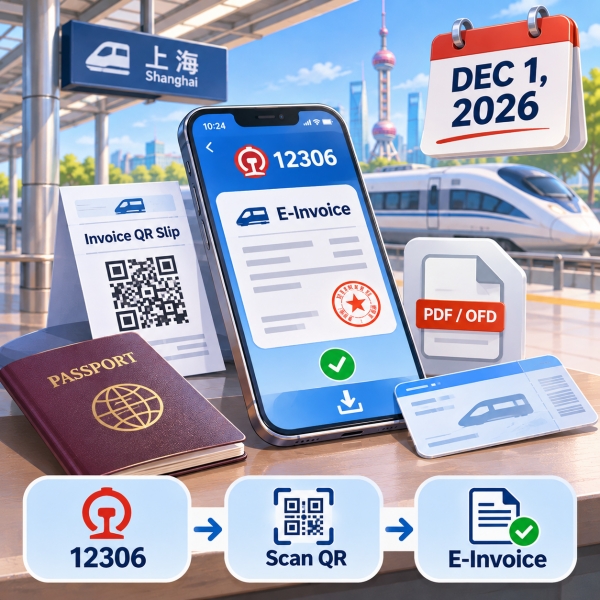
Starting December 1, 2026, China's railway invoice rules expand the arrangements for purchasers to obtain electronic invoices for passengers. For the China train e-invoice changes December 2026 brings, first identify who bought your ticket and which document you used. Foreign passports already qualify for railway electronic invoicing; the adjustment does not promise to remove identity checks. If you need expenses reimbursed, prepare the correct buyer details before requesting an invoice. You can then choose the documented 12306 or station route, complete any required QR scan, and save the issued file; a station QR slip alone does not finish the job.
Quick Facts
🚆 Official China Train Ticket Booking: Need a complete walkthrough on setting up a 12306 account, verifying your passport, and reserving seats on high-speed rail? Follow our step-by-step tutorial on How To Book Train Tickets In China.
China train e-invoice changes December 2026
The State Taxation Administration (国家税务总局) and China State Railway Group Co., Ltd. (中国国家铁路集团有限公司) set out the adjustment in Announcement 2026 No. 22, dated November 4, 2026. Its effective date is December 1. Until then, treat its expanded arrangements as forthcoming.
The actual adjustment
The announcement expressly allows a purchaser who handles a transaction through China Railway 12306 (中国铁路12306) to obtain the passenger's invoice through 12306 afterward. For a completed journey, or after paying refund or change charges, this gives the paying purchaser an official route alongside the passenger's own application.
That matters when a traveling companion buys both tickets. The person riding and the person completing the purchase may differ. However, a helper does not automatically acquire every purchaser permission simply by knowing the passenger or having a booking screenshot.
The tax authority also describes an additional white-background invoice layout. Other invoice elements stay unchanged. Therefore, choosing that layout does not change the fare, the passenger, or the supporting information your employer needs. It is a presentation option rather than another travel product.
Third-party invoice services
The China train e-invoice changes December 2026 brings also draw a clear boundary around third-party invoice services. Ticket-selling internet platforms and individuals may not provide issuance, delivery, or download services for this railway e-invoice. The announcement assigns issuance and delivery to the relevant railway transport enterprises.
This restriction concerns the railway invoice. It does not say that third-party ticket sales are prohibited. If you booked elsewhere, retain the reservation details, but arrange the official railway invoice through the railway channels rather than assuming a reseller's confirmation completes your expense paperwork.
🔄 Modifying Existing 12306 Train Orders: Need to reschedule your departure time, switch trains, or understand railway change fees before issuing your final e-invoice? Read our instructions on How To Change Train Tickets On 12306.
Match the invoice to your booking
-
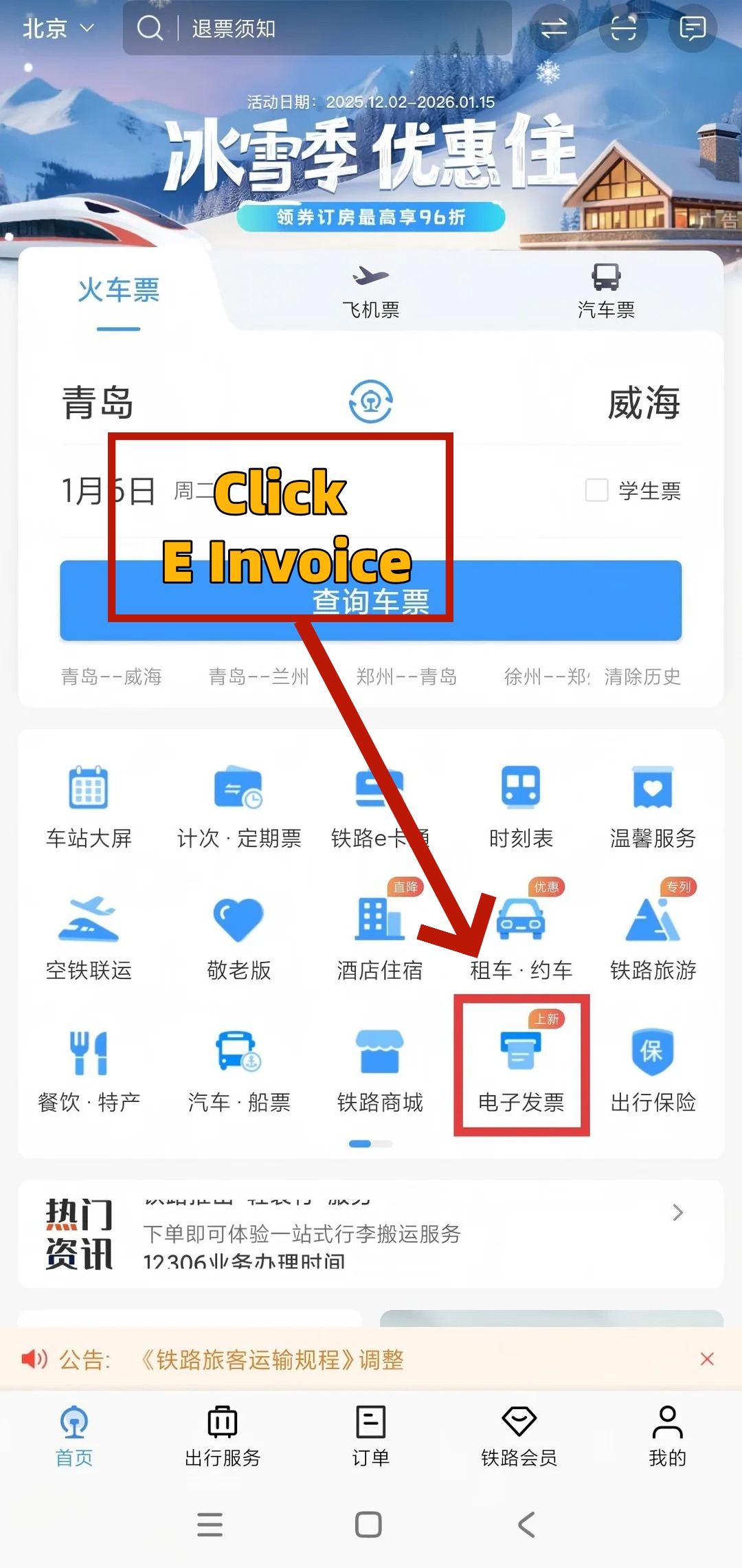

- How to Get 12306 E Invoice(Step 1)
-
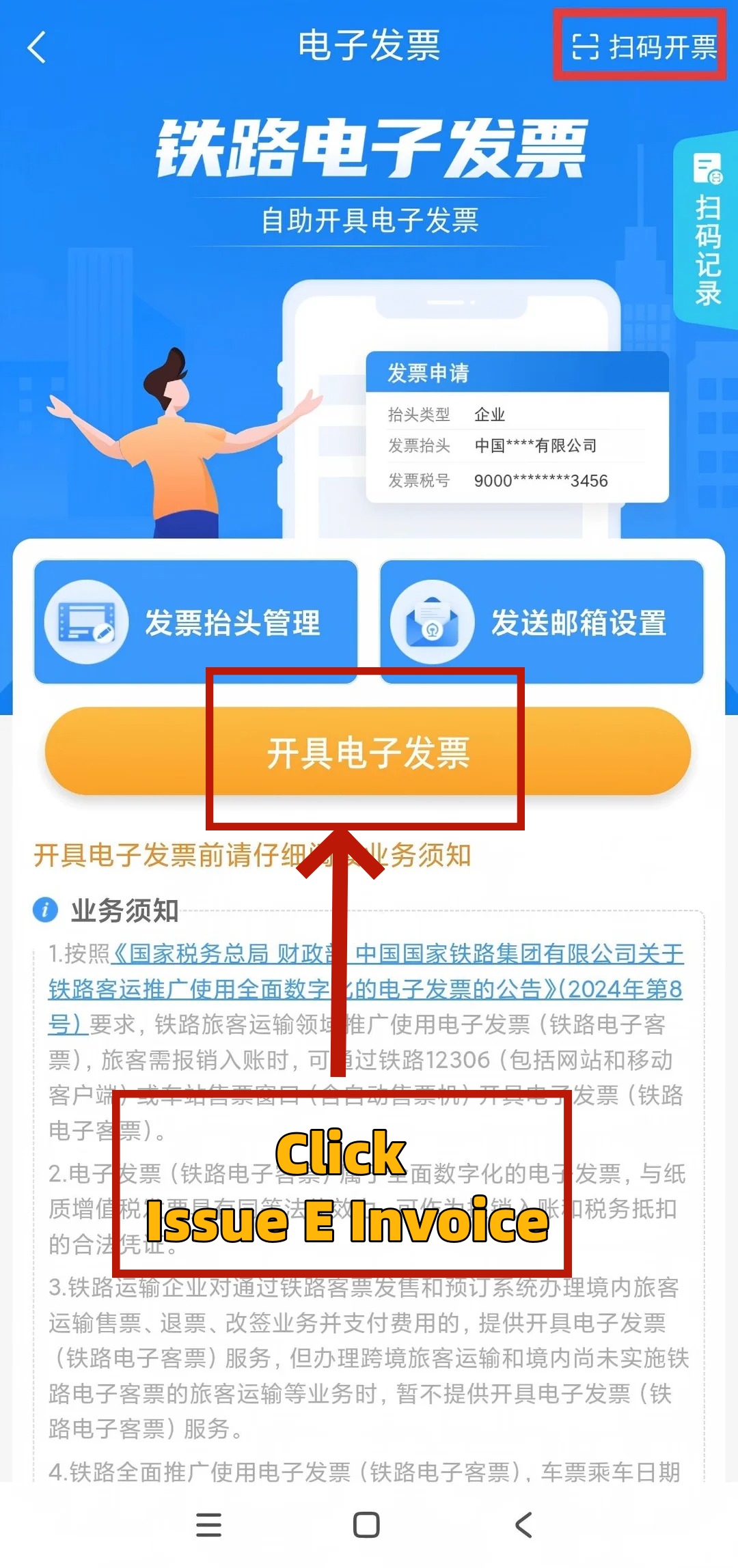

- How to Get 12306 E Invoice(Step 2)
-
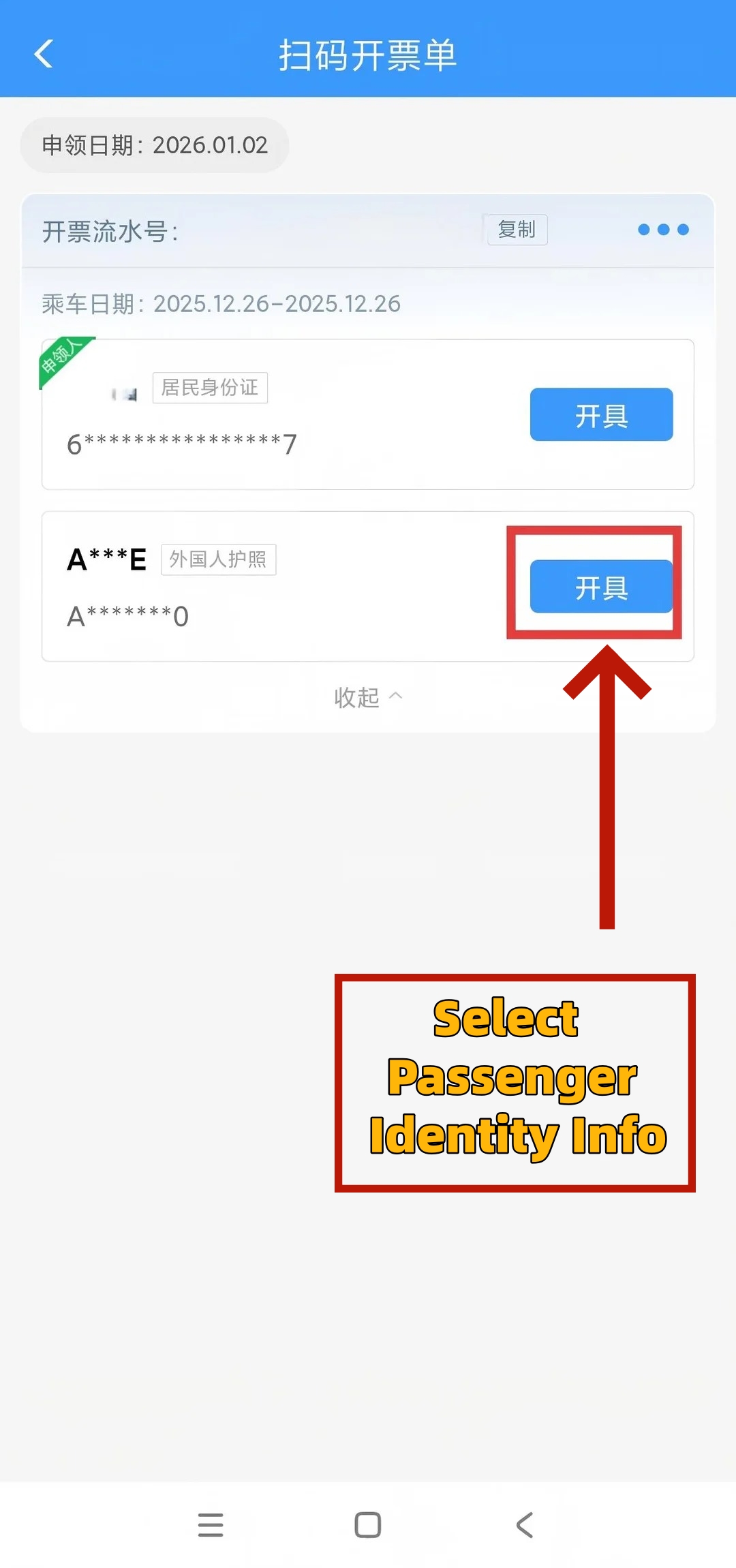

- How to Get 12306 E Invoice(Step 3)
-
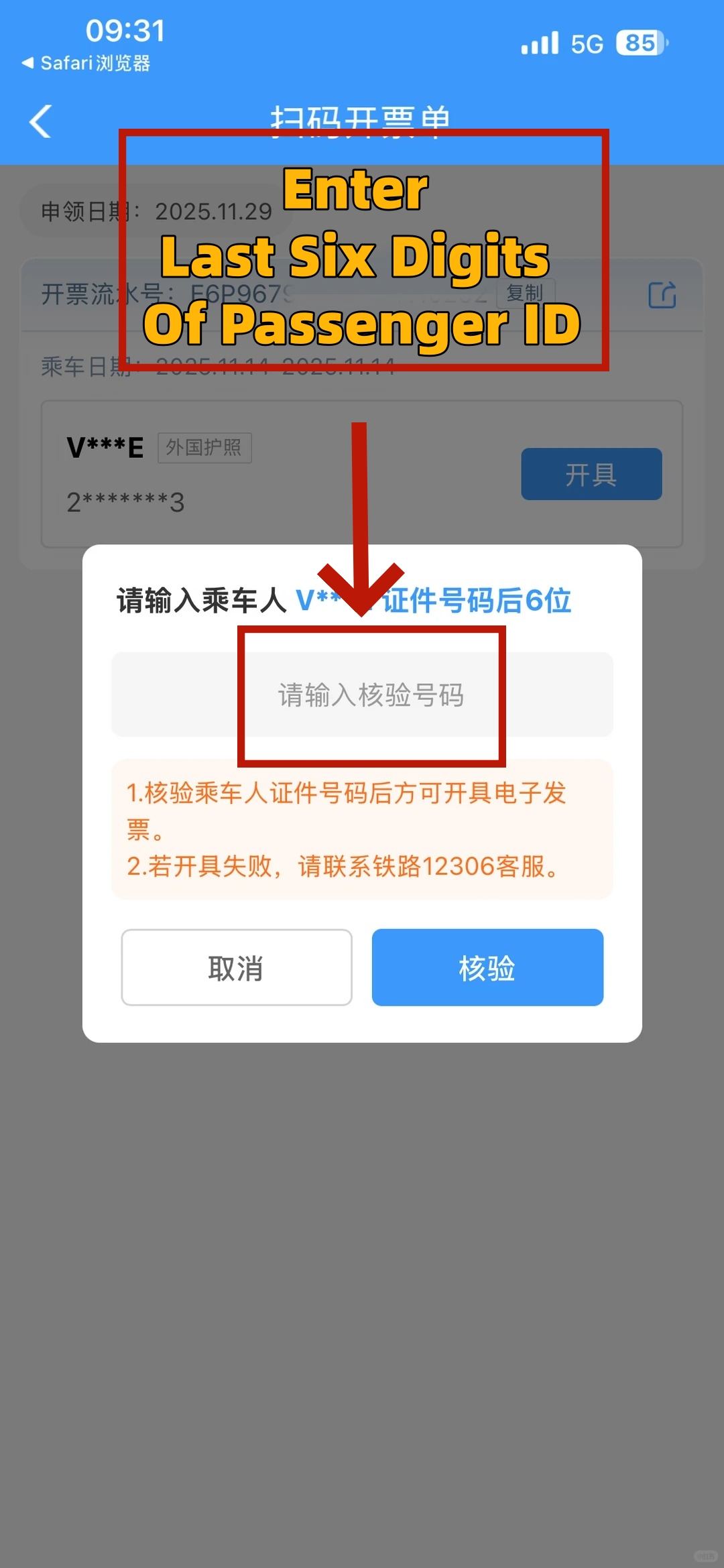

- How to Get 12306 E Invoice(Step 4)
-
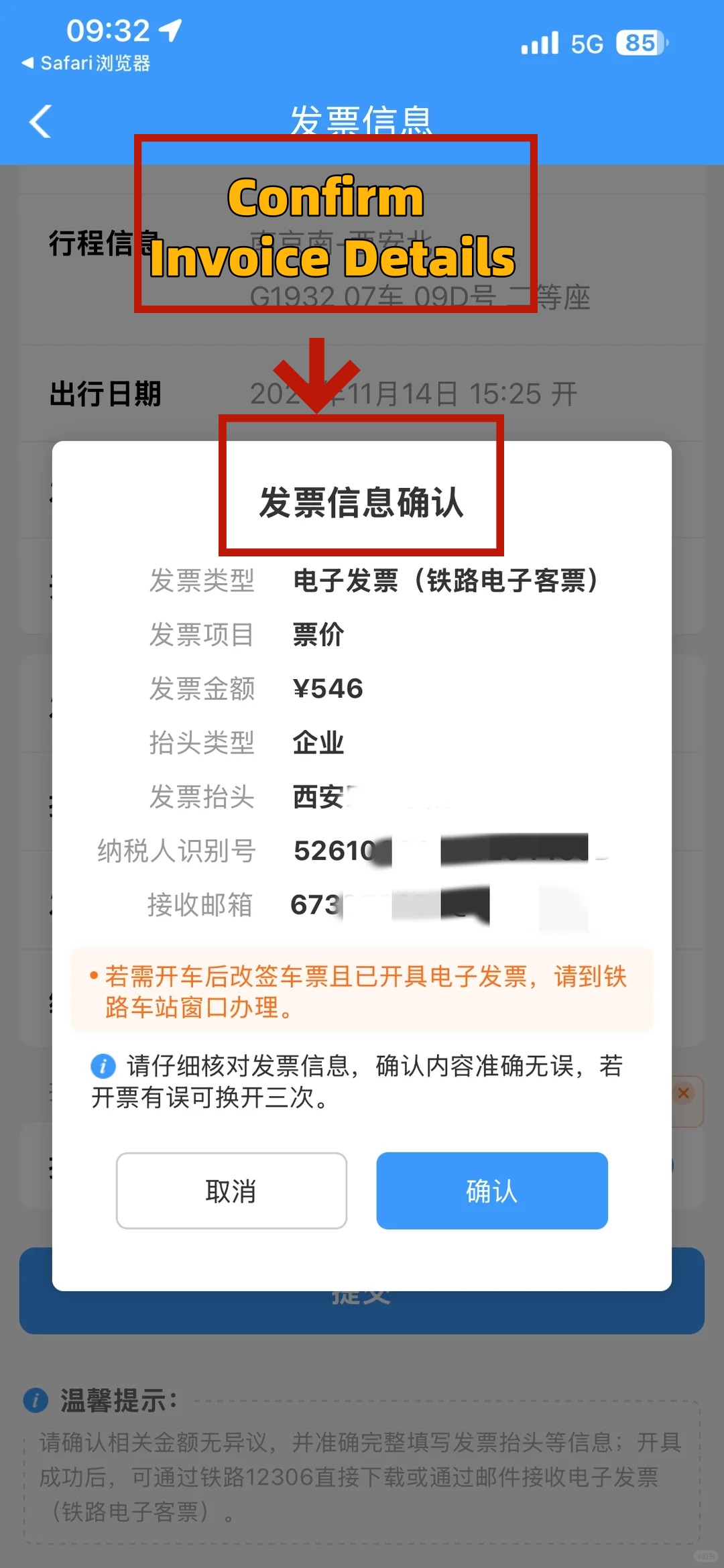
- How to Get 12306 E Invoice(Step 5)
-
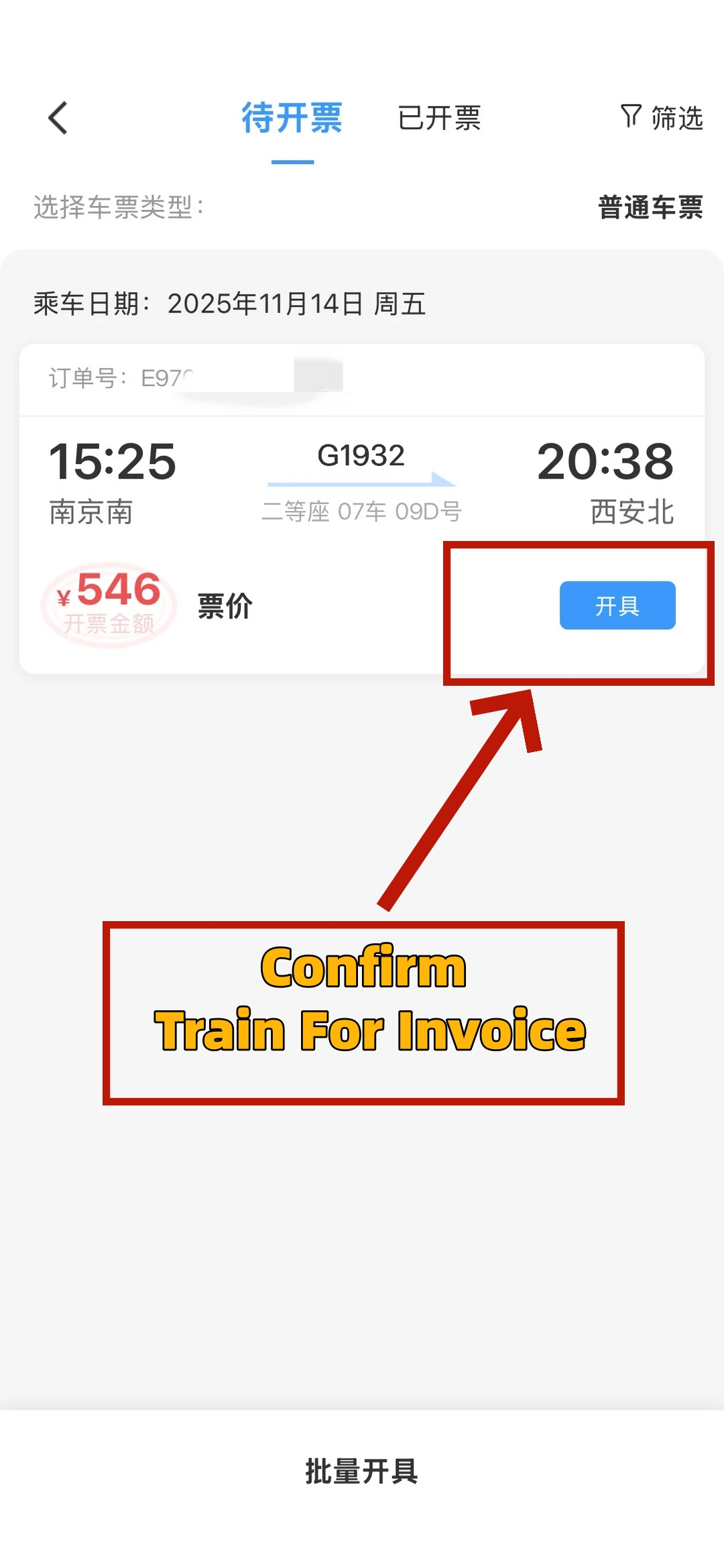
- How to Get 12306 E Invoice(Step 6)
-
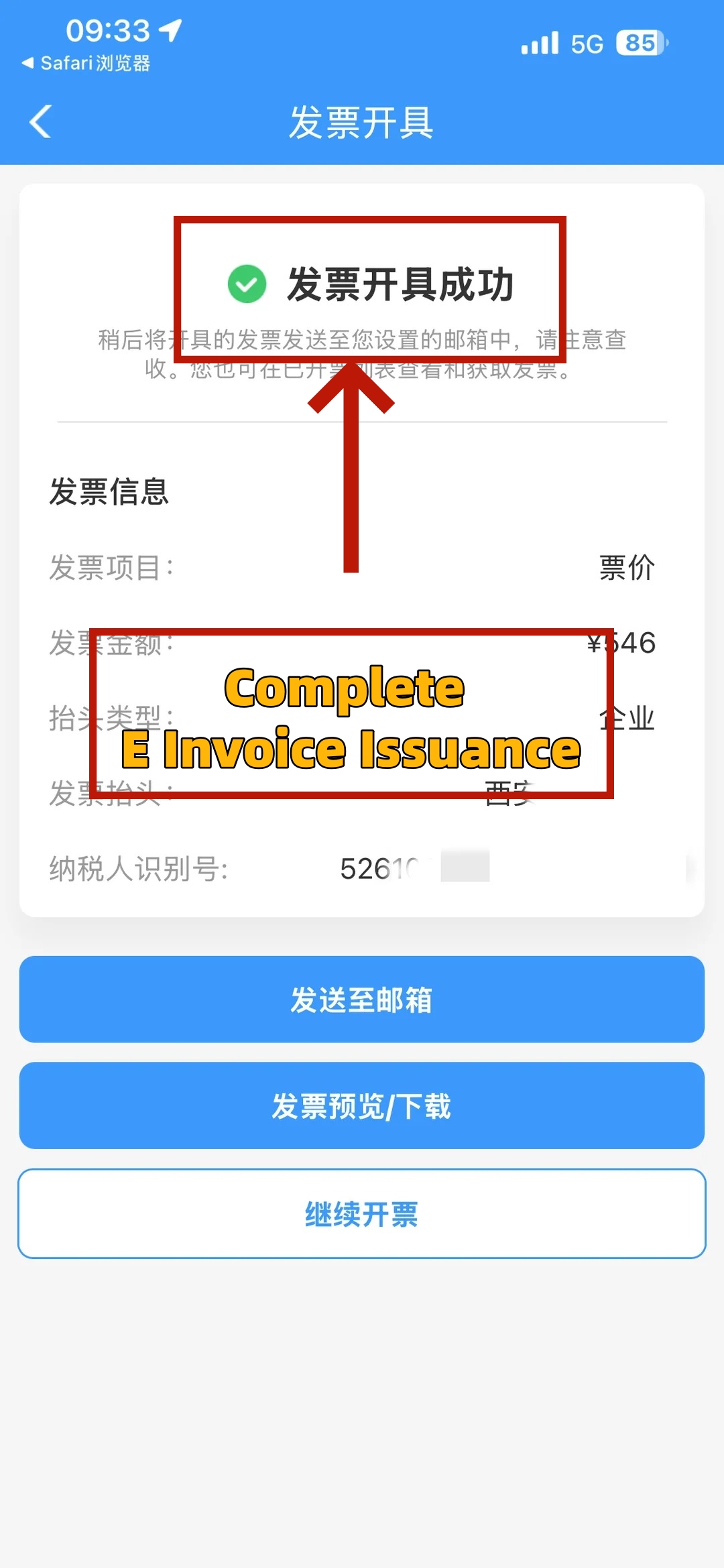
- How to Get 12306 E Invoice(Step 7)
Before visiting a window or opening the invoice section, separate the person traveling, the person purchasing, and the name required for reimbursement. These can be three different entries. Matching them correctly prevents you from bringing the wrong document or issuing an invoice with an unsuitable buyer name.
Passenger, purchaser, and expense buyer
The passenger is the person traveling with the valid railway travel credential. If that is you, the passenger route uses the valid identity document used for your booking. The 12306 reimbursement FAQ specifically includes foreign passports among eligible documents for passenger online invoicing.
The purchaser is the individual who buys the ticket and completes fare payment. Under the December announcement, the purchaser's 12306 transaction can support the documented purchaser route. This role is more specific than a colleague who later volunteers to handle your paperwork.
- You bought your own ticket: You are both passenger and purchaser. Keep your booking passport and order together.
- A companion completed the purchase: Identify that purchaser and retain the railway 12306 order number for any purchaser-based window application.
- Someone handles a station refund or change: The announcement's representative role applies specifically to that counter or machine business, with its own document requirements.
The invoice buyer is the name entered for the expense document. For business travel, obtain the exact name and relevant identification details from your finance team. Paying with your own card does not tell you which buyer name your company requires on the invoice.
Pack the correct information
Keep the original booking passport accessible for your own window application. Also save the train number, journey date, departure and arrival stations, and railway order reference. These details help distinguish similar journeys when your itinerary includes several train legs.
- Identity: Use the passenger document associated with the booking, rather than substituting another document because it is easier to find.
- Buyer details: Copy the required buyer name accurately, together with the unified social credit code where applicable.
- Delivery: Prepare an email address you can access and check for typing errors before submission.
- Trip record: Keep booking and payment information available so the invoice can later be matched to the right expense.
If your overseas employer has no Chinese unified social credit code, resolve the required invoice details with finance and railway 12306 before submitting uncertain information. The announcement requires truthful details; it does not explain a universal foreign-company form workaround. Do not invent a code or silently substitute a personal buyer name.
Finally, separate domestic legs from cross-border travel. The published 12306 business notice excludes cross-border passenger transport from this railway e-invoice service. A domestic connection and a cross-border leg therefore should not be treated as one interchangeable invoice case.
🛏️ Sleeper & Lie-Flat First Class Trains: Planning an overnight rail journey across China and comparing comfort levels, cabin layouts, and ticket options? Explore our guide to Lie Flat First Class China Trains.
Collect a station QR invoice slip
A staffed station ticket window gives you a documented place to request the QR invoice slip. The 12306 FAQ excludes ticket agencies from this window channel. Although official rules also mention ticket machines, they do not establish that every machine supports every foreign passport.
Choose your window materials
Use the China train e-invoice changes December 2026 brings to choose the correct applicant route before joining a queue. The crucial distinction is between requesting an invoice slip for a 12306 purchase and handling a refund or change at the station.
The purchaser's own-ID-and-order-number option can help when the passenger is elsewhere. However, it belongs to the documented 12306 purchaser application. It is not permission for an unrelated person holding an order screenshot to collect paperwork for anyone.
For example, a companion who bought your 12306 ticket should retain that railway order number alongside their own valid ID. If they instead go to the station to change your ticket, the refund/change branch below requires your passenger document. Decide which transaction they will actually perform before separating your documents.
Collect the slip during counter business
When purchasing at a station window or machine, a purchaser who needs the invoice slip should request it during that transaction. The December announcement provides an on-the-spot route using passenger ID, or the purchaser's own ID at a staffed window. Obtain the slip before leaving the counter.
For a station refund or change handled by a purchaser or representative, request the slip on the spot using the passenger's valid booking document. The tax authority explains this document requirement in connection with preventing unauthorized refunds and changes. Your helper must also meet the underlying refund/change requirements.
Getting a slip during ticket purchase and issuing the completed fare invoice are separate stages. The on-the-spot slip provision does not mean that a future journey's fare invoice is already ready for reimbursement. For the fare, use the journey-completion condition; for relevant fees, use the completed refund/change business.
Scan and finish the invoice
Once you have the slip, use the 12306 mobile client to scan its QR code. The official FAQ says you must then complete the relevant verification information. Follow the fields actually displayed for your transaction; do not substitute a generic passport-number format from an unrelated guide.
- ① Keep the slip available: Retain it until you have obtained and checked the issued invoice file.
- ② Scan in the official mobile client: Use the QR code on the invoice slip, rather than a general camera result as your final proof of completion.
- ③ Complete the requested information: Supply the relevant verification and accurate buyer details. Review the amount and delivery email before issuing.
- ④ Check the result: Retrieve the issued invoice and verify its passenger, journey, and buyer details. Then save the electronic files or receive them by email.
Success means you have the issued invoice, not just the printed slip or a filled form. If verification stops the process, keep the slip and transaction details for railway assistance. Neither the slip nor the December announcement promises to bypass identity verification.
🎫 12306 vs. Third-Party Booking Platforms: Comparing official China Railway direct bookings against international travel apps for ticket fees, modifications, and expense documentation? Check out our detailed breakdown on 12306 Vs Trip Com.
Save the invoice for reimbursement
Save the issued electronic invoice while you still have the trip details together. A booking confirmation, a payment record, and a railway invoice serve different purposes in your expense file. Keeping them associated helps your finance team understand which journey and charge the invoice covers.
Check the issued document
The railway invoice includes its number, issue date, buyer information, passenger identification, journey information, fare, and QR code. Compare the journey and amount with the transaction you intended to document. Do this before forwarding the file, especially if several passengers or train legs appear in your booking records.
- Buyer: Match the name and applicable identification details to the instructions from the organization reimbursing you.
- Passenger and journey: Confirm the document relates to the correct traveler, date, and route.
- Amount: Distinguish the journey fare from a refund or change charge, rather than treating every document as the original ticket price.
- Delivery: Open the received file and check it is the invoice you requested, not merely an order confirmation.
This review is particularly useful when someone else bought the ticket. The traveler and invoice buyer can differ, but the document still needs to describe the actual transaction truthfully. Correcting the buyer name before finance records the expense is easier to coordinate than discovering the mismatch afterward.
Keep electronic files and expense records
The 12306 business notice provides PDF and OFD files and says the PDF is for previewing and printing. It separately refers formal reimbursement, accounting, and archiving to the applicable accounting rules. Therefore, keep the electronic files supplied by 12306 rather than retaining only a screenshot or paper printout.
Your employer may ask for additional expense evidence. Send the original files it requires, together with a readable copy if requested. A file opening successfully on your phone does not establish that a particular overseas employer or accounting system accepts it for every purpose.
Apply within 180 days of the journey ending. For refund or change charges, the 12306 FAQ starts the window from completion of the relevant business. The clock does not restart when you collect the QR slip, receive an email, or decide to submit your expenses.
The China train e-invoice changes December 2026 brings should not become a reason to postpone a time-sensitive claim. If an existing journey is approaching its deadline, use the available documented railway route and consult 12306 about the specific case instead of assuming December will reopen its eligibility.
Fix missing or incorrect invoices
First identify which part failed: obtaining the slip, completing verification, retrieving the issued file, or correcting its details. Each has a different next step. Repeating the entire process without identifying that point can leave you with more screenshots and the same unresolved expense.
Missing invoice or failed verification
If you have only the QR invoice slip, return to the scanning step in the 12306 mobile client. The paper slip is an application route, so its existence does not mean the invoice was issued. Complete the displayed verification and retrieve the actual file before treating the task as finished.
If the invoice was issued but the email is missing, use 12306 to retrieve it. The railway FAQ allows repeated downloads. This is a retrieval task, rather than a reason to request a replacement invoice or create another expense claim for the same journey.
- Verification stops: Compare the booking document and transaction details. Keep the exact displayed message for railway 12306 or station staff.
- Order unclear: Have the railway reference, passenger document, journey date, train, and stations available when asking staff to identify the case.
- Only an agency receipt available: Explain that you need the official railway e-invoice, and use the railway's documented passenger route and matching document.
Ask for help with the specific stage: obtaining the QR slip, completing its verification, or retrieving an issued invoice. The 12306 business notice directs other questions and needs to railway 12306. It does not publish a guaranteed recovery time for these situations.
Wrong buyer name or company details
The published 12306 notice allows up to three reissues for buyer-name errors or company-information changes within the original invoice issuance window. After successful replacement, the original receives a red-letter invoice, and you should use the newly issued invoice for reimbursement.
This is not three additional 180-day periods. Nor is downloading the same file again a correction. Identify the field that is wrong, obtain the exact replacement information, and check the new invoice before sending it onward. Keep the replacement clearly associated with the original expense.
Cross-border trips and older orders
For cross-border rail journeys, ask the railway for the applicable reimbursement document rather than forcing the domestic e-invoice workflow onto the trip. The current 12306 notice also excludes domestic transport that has not implemented railway electronic tickets. Its service scope is narrower than “every train journey.”
For older orders or missed on-the-spot slip requests, give 12306 the exact transaction and date. Do not count on a new download, a later QR scan, or the December adjustment to reset the original window. Keep the available records while the railway clarifies the applicable route.
Frequently Asked Questions
Q: Do China train e-invoice changes December 2026 brings affect boarding?
The invoice process concerns expense documentation, and the December announcement does not introduce a new boarding requirement. Keep the travel credential and identity document associated with your booking available for railway checks. A QR invoice slip serves the invoicing process; do not treat it as a replacement for the documents required for your journey.
Q: Can a friend obtain my invoice?
A friend may have a documented route if they are the purchaser who completed your ticket payment. The December rules also define a separate representative role for station refunds and changes. Match the person to the actual role and required documents. Knowing your booking number alone does not establish every permission in the announcement.
Q: Can I get an invoice for change fees?
Yes. The railway's published invoicing arrangements cover relevant refund and change charges as well as purchased tickets. For these fees, the 12306 FAQ sets a 180-day application window from completion of the corresponding business. If someone handles the transaction at a station, collect the QR slip on the spot using the required passenger document.
Q: Is a downloaded PDF enough for reimbursement?
12306 provides PDF and OFD files, but its business notice describes the PDF as a preview and printing format. Formal accounting and archiving follow the applicable rules. Keep the electronic files and ask your finance team which originals and supporting records it requires. Do not assume a screenshot or printed PDF satisfies every expense policy.
Q: Can I download the same invoice again?
Yes. The 12306 reimbursement FAQ expressly allows repeated downloads of a railway electronic invoice. Use that option when a file is lost or an email was missed. Downloading again retrieves the existing invoice; it does not correct buyer details, create another reimbursable journey, or start a new application period for the original transaction.
Q: Does the new rule guarantee English invoicing?
No. The announcement specifies 12306 and its mobile scanning route, but does not promise identical invoicing features in every language version. It also does not waive identity verification for foreign passports. Follow the available official interface and seek railway help with the specific invoice stage if language or verification prevents you from completing it.