BCIA Free Wifi Connection Guide
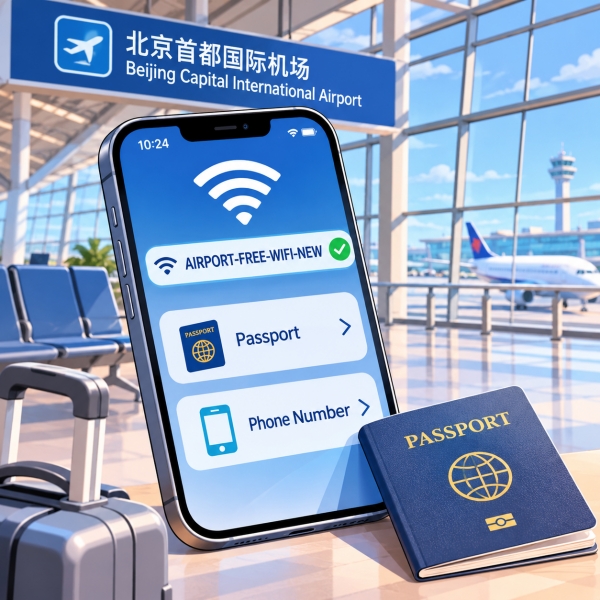
For Beijing Capital Airport WiFi login, join AIRPORT-FREE-WIFI-NEW and use passport authentication if you cannot receive a text message. At Beijing Capital International Airport (北京首都国际机场), you can photograph your passport through the airport's sign-in page instead of waiting for a roaming verification code. A passport-scanning kiosk offers another route when the phone method fails, giving you practical options before buying a local SIM just to get online. This guide covers choosing a method, opening the login page, entering kiosk credentials, and asking for help when something stops working. These instructions apply to Capital Airport, PEK; Beijing Daxing is a different airport.
Quick Facts
Choose a Beijing Capital Airport WiFi Login
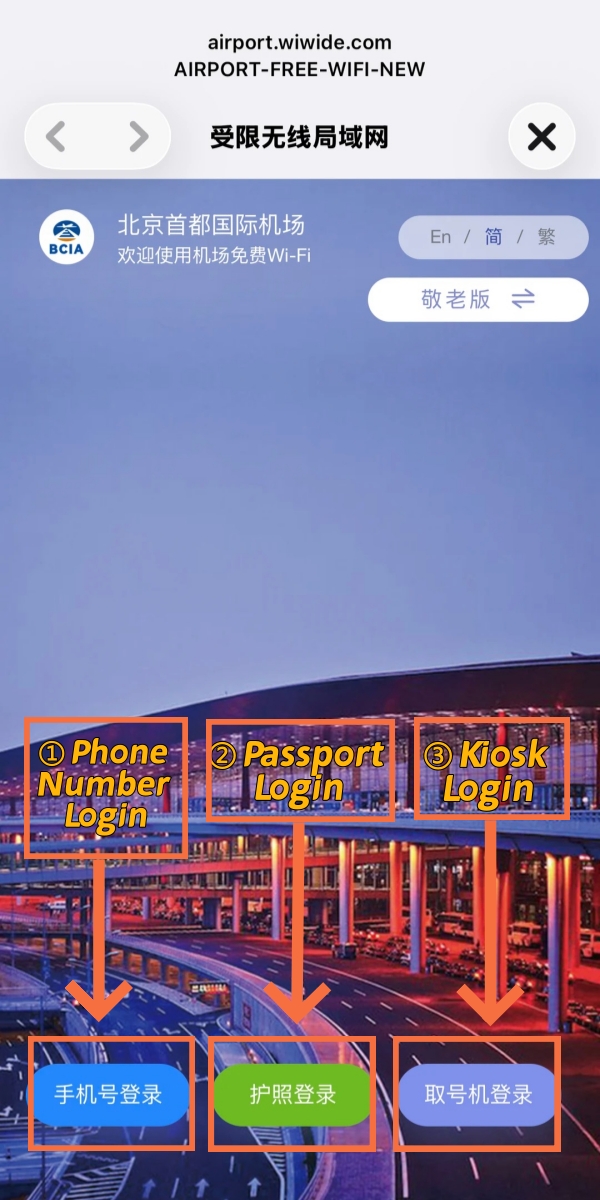
BCIA Airport Wifi Login Options
Choose a method based on what you have available now. When your home number cannot receive messages, the passport route avoids that dependency. Conversely, a working number can make SMS straightforward. You do not need to try every method in a particular order.
Passport Login Without SMS
The airport's passport option works through its WiFi authentication page. After joining the network, select 护照登录, meaning passport login. Follow the photo instructions, submit the requested passport image, and allow the system to process it. The airport describes this as an alternative to receiving a roaming SMS.
Keep the document nearby until you finish. This is a good moment to stand somewhere out of the passenger flow. The airport recommends staying in place during authentication rather than moving quickly between areas or floors.
- ① Reach the airport page: Join the network shown in Quick Facts. If the login page does not appear, use the device instructions in the next section before trying to upload anything.
- ② Choose the passport route: Select the passport-login option on that page. A phone-number field alone means you may still be viewing the SMS method.
- ③ Follow the camera request: Use your phone to photograph the passport as instructed. Check the image before submitting it; a cropped or reflective photo is worth correcting first.
- ④ Complete the request: Follow any remaining instructions on the actual screen. Wait for the authentication result rather than treating the photo upload itself as proof of internet access.
- ⑤ Test the connection: Open a new webpage. If it loads, move on to the travel task you needed. If it does not, note whether the airport page still requests authentication.
Useful distinction: A successful photo upload and a working internet connection are different checkpoints. Finish the authentication process, then test a fresh page before putting your passport away.
For this method, Beijing Capital Airport WiFi login does not require a text to your home number. However, the phone still needs to reach the airport portal. A blank page is therefore a different problem from a rejected passport image; changing your SIM will not necessarily solve either one.
Prepare the Right Items
Keep preparation small and specific. You are completing a local network login, so there is no reason to organize a full Chinese mobile plan first. The items below help you choose a route without getting trapped halfway through it.
- Physical passport: Keep the information page accessible for the phone-photo method or kiosk scan. Do not rely on a photocopy being accepted by either process.
- Usable phone camera: Choose the photo route when the camera works and the portal can use it. If that step repeatedly fails, a kiosk provides a different way to present the document.
- Your own receiving number: Use SMS when you can receive messages on that number. Having internet on a travel data plan does not, by itself, prove that a particular phone number can receive the code.
Before borrowing someone else's phone, consider the actual task. Getting your companion online may help you retrieve a booking together, but it does not establish a connection on your device. If you need your own phone for the next step, complete and test its connection separately.
📱 International Phone & SIM Usage in China: Checking frequency band compatibility, roaming packages, eSIM availability, and local SIM registration before your trip? Read our practical guide on Will My Phone Work In China.
Open the Airport WiFi Login Page
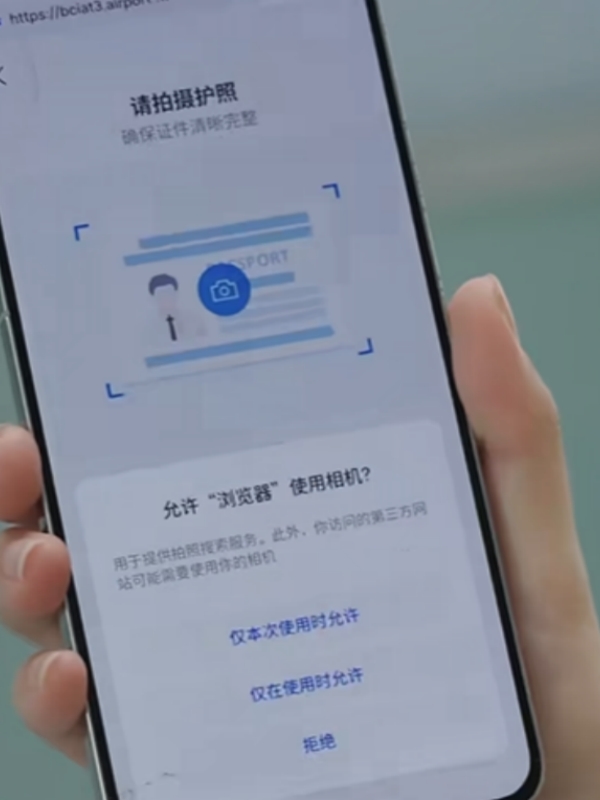
BCIA Wifi Passport Scan Page
Start in your device's WiFi settings and select AIRPORT-FREE-WIFI-NEW. Joining the wireless network comes before identity authentication. For Beijing Capital Airport WiFi login, a WiFi symbol alone is therefore not the finish line: you still need the airport's sign-in page or an already valid connection.
iPhone and iPad WiFi
On an iPhone or iPad, open Settings → Wi-Fi, select the network, and wait for its login screen. Apple also provides a route through the information button beside the network name, followed by Join Network when that option appears.
Avoid dismissing the screen just because it opens in a small window. Apple's captive-network guidance distinguishes between canceling the login and staying connected without internet. The latter does not complete the airport's authentication for you.
Settings check: If you chose Without Internet, return to the network's login process. That choice can keep the device associated with WiFi while leaving you unable to browse.
Once the page appears, select the authentication method that fits your situation. There is no need to install a new browser simply because the login screen looks different from a normal Safari tab. If the device still cannot display it, show the current screen to airport staff.
Android WiFi Sign-In
On Google's Android interface, the usual starting point is Settings → Network & internet → Internet. Select the airport network. Menu names differ across manufacturers, so search your settings for WiFi if your phone uses another layout.
Google's public-network troubleshooting guidance gives a short sequence for a missing authorization page:
- ① Check notifications: Look for a request to sign in to the WiFi network and open it.
- ② Try a fresh browser page: Open a new page in a new window rather than repeatedly reloading an old app screen.
- ③ Reconnect if necessary: Forget the airport network, turn WiFi off and on, then select the network again. Open the new sign-in notification if it appears.
Use these as device troubleshooting steps, not a promise that every Android model displays identical controls. Avoid resetting all your network settings as the first move; that is a much broader change than reconnecting to this one hotspot.
Confirm Internet Access
Test a page that needs to load new content. An old boarding-pass image or previously opened message can remain visible without proving that the connection works. Also check whether the phone has switched to mobile data; a loading page may otherwise be using your paid plan.
Keep the test focused. If the airport page appears, you have reached authentication. If authentication succeeds but one app fails, try another page before starting the whole login again. Those observations help you explain the fault without changing several settings at once.
🚖 Beijing Airport Transfer Options: Planning your journey into central Beijing from PEK or PKX via express rail, official taxi queues, or private transfers? Read our complete breakdown on Beijing Airport Transfer.
Use SMS or the WeChat Option
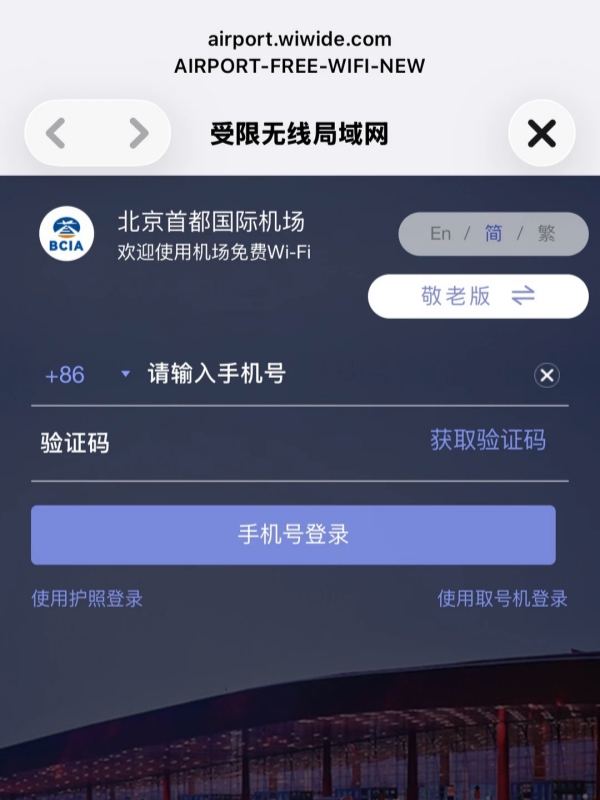
BCIA Wifi Phone Login Screen
SMS is a reasonable choice when your own number can receive the verification text. The airport states that it supports numbers from all countries and regions. That establishes eligibility for the method, but it does not guarantee delivery to every phone on every attempt.
SMS With Your Own Number
Read the phone-number section before requesting a code. If a country or region selector appears, match it to the number you are entering. Being physically in China does not turn an overseas number into a Chinese number.
Use the fields on the current page rather than copying an old screenshot's layout. The basic sequence is to enter the number, request the SMS, enter the received code, and complete the login. The page may show a countdown or further instructions; follow those instead of repeatedly pressing resend.
- Before requesting: Check the destination number carefully, including its country selection. A mistyped digit sends the request somewhere else.
- After requesting: Open the messages inbox for that number. Keep the airport login page available so you can return to it without starting over.
- After entering the code: Complete the page's login action, then load new content to confirm access. Receiving a text alone does not finish the connection.
Treat the verification code as part of your own session. You can ask a staff member to explain a screen while keeping control of the phone. There is no need to post the code, passport image, or kiosk credentials in a public travel group to ask for help.
A Missing Verification Code
When the code does not arrive, first confirm that the request went to the number you can actually receive messages on. If that number has no service or cannot receive texts, switch methods instead of generating more requests.
The passport option gives Beijing Capital Airport WiFi login a practical fallback here. It is usually more useful to try that independent route than to spend your airport connection time diagnosing your carrier. You can deal with the wider phone problem once you have working access.
The Airport WeChat Option
WeChat (微信) is another listed authentication route through the airport's official mini program. Consider it if you already use WeChat and can open the airport's service. Follow the WiFi function and authorization prompts that it actually displays.
Do not assume that every overseas WeChat account will receive the same choices. If the mini program asks for an unavailable number or another step you cannot complete, return to passport authentication. Installing or recovering WeChat solely to obtain this first connection can add another login problem to the one you already have.
✈️ PEK vs PKX Airport Comparison: Comparing terminal amenities, customs processing speeds, airline hub assignments, and transit connections between Capital and Daxing? Explore our guide to Pek Vs Pkx.
Get a Passport Kiosk Login
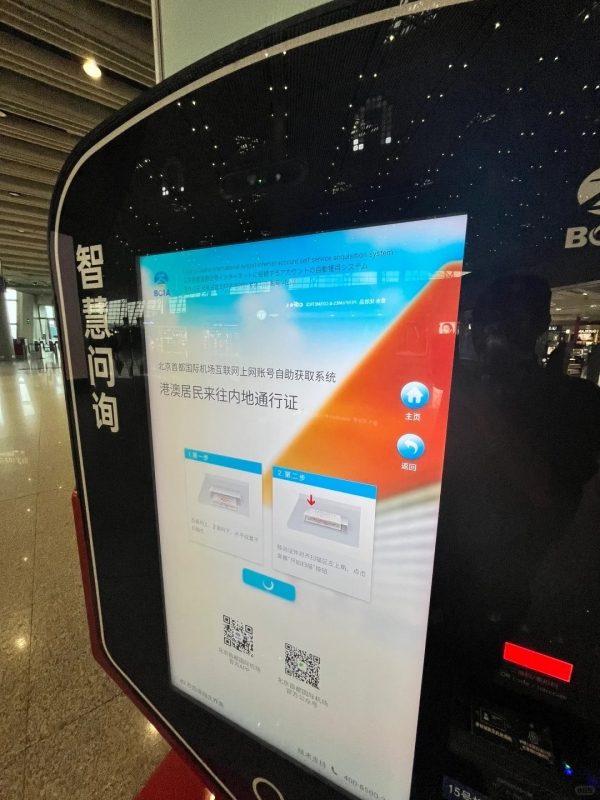
BCIA Wifi Kiosk For Travelers
A WiFi authentication kiosk lets you obtain login credentials by scanning your physical passport. This is useful when the phone-photo route is unavailable or will not finish. The kiosk supplies an account and password; you then use them on the device you want to connect.
Find Help Near Your Gate
Ask a nearby airport employee for the closest WiFi authentication machine in your current area. This is more useful than following an old claim about a particular gate, especially when you are transferring or cannot freely move between arrival and departure zones.
Show this question: 请问最近的无线上网身份验证自助终端在哪里? — Where is the nearest WiFi identity-authentication kiosk?
Add your practical constraint when asking: you need a machine accessible from this side of security, or you need help before boarding. A kiosk elsewhere in the terminal may not be a useful answer for your particular journey.
If staff can help with the phone method where you are, consider that first. The aim is to get your device online, not to find a machine for its own sake. Keep your departure and transfer instructions ahead of any search for WiFi.
Enter the Printed Account
The Beijing city government's illustrated instructions describe scanning the passport's main information page, then collecting a printed username and password. Place the document as the machine directs. Do not force it into an opening or leave it behind while checking the printout.
For a kiosk-based Beijing Capital Airport WiFi login, match the printed account and password to the corresponding fields. They are different from a phone number and SMS code. If you can only see the SMS form, look for the account or kiosk method on the authentication page.
Read characters carefully when copying the credentials. Keep the slip until the intended device has successfully loaded a fresh page. If the account fails, show the slip and the error to staff rather than assuming that another person's credentials will solve it.
Kiosk Time Limits and Return Visits
The city's August 2024 English guide describes five hours of access per kiosk account and a maximum of three printouts per valid ID. Treat that as the dated kiosk guidance, and check the current machine or slip for the terms attached to the account you receive.
Separately, the airport advertises three months without repeating identity authentication. That describes a return-visit convenience, not a promise of one uninterrupted session. It also does not establish that a kiosk account works on unlimited devices or remains usable after you leave the airport.
Fix Failed Airport WiFi Connections
Identify the stage that failed before changing methods. A network that does not appear, an unopened login page, and rejected credentials need different responses. Keeping those separate saves you from redoing a successful step while leaving the actual problem untouched.
Match the Failure Stage
A specific error is useful information. Preserve its wording before closing the page, and note which method produced it. Avoid changing several unrelated settings at once: otherwise, neither you nor the person helping can tell which change made a difference.
Ask for Airport WiFi Help
The airport directs travelers with connection problems to its service ambassadors or other staff. Explain what already worked: you found the network, opened the page, or received credentials. Then show the exact point where progress stopped.
A useful help request: 我已经连上机场Wi-Fi,但是认证页面打不开。 — I have connected to the airport WiFi, but the authentication page will not open.
For an SMS problem, say 我收不到短信验证码: I cannot receive the SMS verification code. For the next alternative, ask 可以用护照认证吗?: Can I authenticate with my passport?
Terminal 3 also has a Beijing Service counter offering communication assistance, including airport WiFi help. Use it when it is accessible along your arrival route. If you are waiting airside or transferring, ask nearby staff instead of leaving your permitted area to reach a named counter.
Save Essentials Before Leaving
Once access works, save what will help with the next part of your journey. Keep your accommodation's name and address, the agreed meeting point, and relevant booking details available offline. Check that the saved information actually opens before you leave the connection behind.
- Meeting someone: Save their message and the meeting location, including the terminal if relevant.
- Going to a hotel: Keep its Chinese address available to show a driver or staff member.
- Continuing by air: Save the booking reference, but keep checking airport displays for changes.
These small preparations make a dropped connection less disruptive without turning WiFi troubleshooting into a separate travel project.
Frequently Asked Questions
Q: Do I need a Chinese phone number?
No. Beijing Capital Airport WiFi login includes a passport-photo method that avoids SMS, plus a passport-scanning kiosk route. The airport also supports overseas numbers for SMS authentication. Choose that option when your number can actually receive the code; buying a Chinese SIM is not a prerequisite for using the airport's free network.
Q: Can I use a passport copy?
Do not plan around a copy being accepted. The airport describes photographing your passport for the phone method, while the kiosk instructions require scanning its information page. Keep the physical document accessible. If you only have a copy available, ask staff about your immediate options rather than assuming the machine will recognize it.
Q: Does the login last three months?
The airport describes three months without repeat identity authentication, which helps on a return visit. That is different from guaranteeing a continuous session. The older English guide's five-hour figure refers to kiosk access. Follow the current account instructions if a session expires, and ask for help if the page rejects otherwise correct credentials.
Q: Can I connect a laptop too?
Open the airport network's authentication page on the laptop and use an available method. Kiosk credentials offer an account-and-password route, but do not assume one set can serve multiple devices simultaneously. If your phone already works, keep that connection while asking staff how to authenticate the laptop under the current network rules.
Q: Will airport WiFi work after I leave?
Do not treat airport authentication as a citywide data plan. Before leaving, save your hotel address, booking details, and meeting instructions for offline use. If you need continuous access afterward, arrange a separate mobile connection suited to your phone and trip. The airport's three-month recognition period does not extend its WiFi coverage across Beijing.